Contact Data Check
Contact data check: count and list contacts with an invalid phone number, ALL CAPS or lowercase name, stray spaces or a bad email address
Request a live demo · Odoo.sh or On-Premise only, not Odoo Online (SaaS).
Free
App Store price, per Odoo version
19 · 20
Odoo versions, each sold on its own page
Odoo.sh
or On-Premise; not Odoo Online (SaaS)
1.0.1
version of mh_contact_data_check
Contacts pile up phone numbers nobody can dial, names typed in capitals, a stray space after a surname and half-typed email addresses. Odoo has no screen that counts them in one place, so nobody knows how big the problem is until a report groups "Acme" and "Acme " separately.
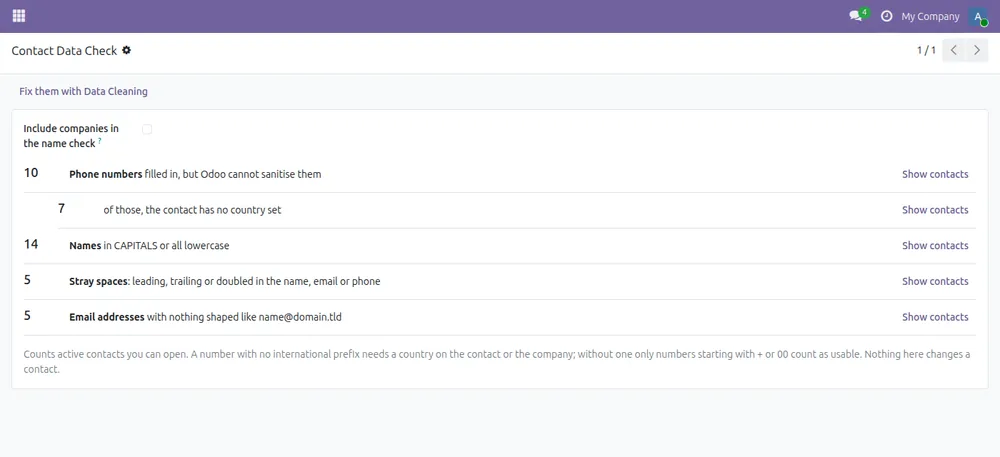
Open Contacts > Reporting > Contact Data Check. You get four counters, each with a Show contacts button that opens an ordinary contact list you can sort, filter, export and open.
How it works
Phone numbers Odoo cannot sanitise
A phone is filled in but Odoo's own Sanitized Number for it is empty, so the number cannot be searched or dialled in international form. The screen also shows how many of those contacts have no country set, because that is often the whole fix.
A number without a + or 00 prefix needs a country to be read: Odoo uses the contact's country, then the company's. With neither, only numbers that start with + or 00 are usable, so a perfectly good local number is counted too. The count is Odoo's stored result, which is worked out when the number or the contact's country is saved. A number saved before you set the company's country stays counted until it is saved again.
Names in CAPITALS or all lowercase
A name counts when every letter in it is upper case or every letter is lower case. A name with no letters, like 12345, is ignored. Companies are left out unless you tick the box on the screen, because SAP and IBM are correctly written in capitals. On Odoo 20, Odoo itself only treats a contact as a company when it has a VAT number, so a company without one is checked like a person.
Stray spaces
A space at the start or end, or two spaces in a row, in the name, email or phone.
Email addresses that look wrong
The email field has nothing shaped like name@domain.tld in it: no @, no dot after it, or two @ in a row. A field holding several addresses is fine as long as one looks right. A blank field is not counted, and an address whose only fault is a trailing space is counted under spaces, not twice.
Screenshots
What it does not do
- It never changes a contact. It does not fix a number, a name or a space, and it does not check that a phone number or an email address exists. It does not stop bad data being typed in later.
- It counts active contacts that you are allowed to open, so archived contacts and other companies' contacts you cannot see are not included. A name in mixed case is never flagged, even if it is wrong, and a correctly capitalised acronym such as a person's initials is flagged: the check only compares each name with its own upper- and lower-case form. Only the phone field is read, not any extra number field another app adds.
Requirements
- Odoo 19.0 or 20.0. The App Store sells each version separately, so buy the one that matches your database.
- Odoo.sh or On-Premise only. Third-party apps cannot be installed on Odoo Online (SaaS) databases. Check your hosting before buying.
- Odoo 19 and 20, Community or Enterprise, with the Contacts app. Third-party apps install on Odoo.sh or On-Premise only - they cannot be installed on Odoo Online.
- Module
mh_contact_data_check, version 19.0.1.0.1, licensed OPL-1.