Survey Close Date
Survey end date and response limit: close a survey on a date or after a maximum number of responses, and the public link shows a closed page
Request a live demo · Odoo.sh or On-Premise only, not Odoo Online (SaaS).
Free
App Store price, per Odoo version
19 · 20
Odoo versions, each sold on its own page
Odoo.sh
or On-Premise; not Odoo Online (SaaS)
1.0.1
version of mh_survey_close_date
How it works
What it does
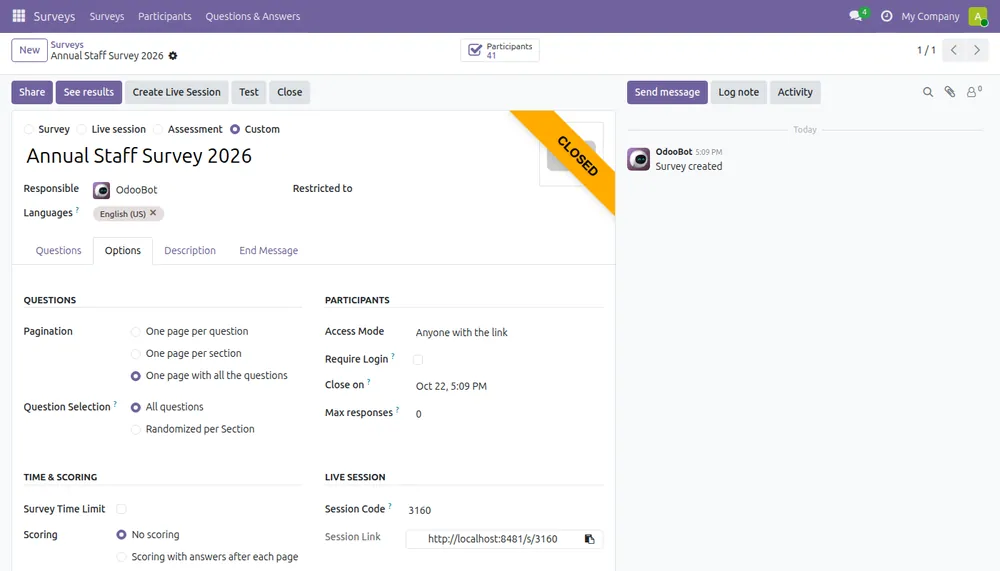
An Odoo survey has a Close button, but it only works by hand: there is no end date and no cap on responses, so a survey stays open until somebody remembers to press it. This adds two optional settings to the survey form, under Options, Participants: Close on (a date and time) and Max responses (a number).
When either one is reached, the public link shows Odoo's own "This survey is now closed" page. Nobody can start a new answer, and an answer that someone was still filling in can no longer be submitted.
The same rule on every public step
The check sits in the one place every public survey step already goes through - opening the link, starting, moving to the next page and submitting - so a respondent who opened the form before the deadline cannot finish it after.
Only real responses count toward the cap
Max responses counts submitted responses. Test entries from the backend and answers that were started but not finished do not use up a place. The form shows the current count next to the cap.
What your team sees
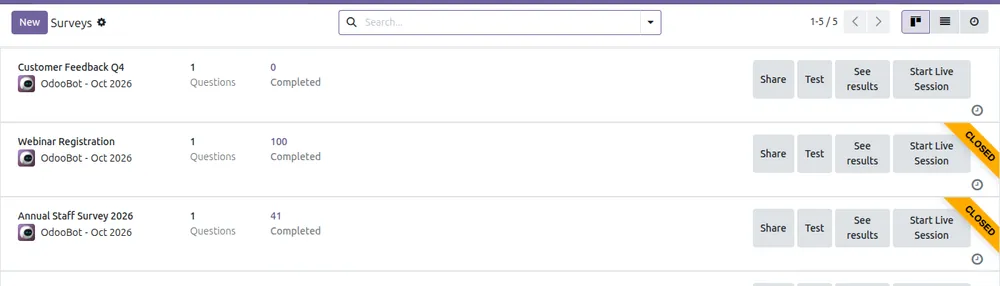
A Closed ribbon on the survey form and kanban card, a Closed column in the list (closed surveys are greyed out) and Closed / Open filters in the survey search. Survey users still open the survey and see every result. Backend test entries still work, so you can preview a closed survey. A respondent who already submitted still sees their thank-you page.
Reopening
Clear the date or move it forward, or raise the cap, and the link works again at once. Nothing is archived or deleted (Odoo's own Close button, which archives the survey, still works as before).
Who it is for
Anyone running a registration form, a feedback form with a deadline, a poll that should stop at 100 answers, or an application form that closes on a given day, without a developer or a scheduled action.
Screenshots

What it does not do
- It does not send reminders to people who have not answered, and it has no per-question deadlines.
- It cannot open a survey later. There is a close date, not a start date.
- It is not a hard lock on the cap. If two people submit in the same instant, a survey can end a response or two over its cap.
- The closed page is Odoo's own "survey expired" page. Its wording is not customisable here.
- It does not archive or delete anything - the survey stays active, only the public link stops - and sends no data to any third party. Odoo's attempts-per-person setting for scored surveys is unchanged.
Requirements
- Odoo 19.0 or 20.0. The App Store sells each version separately, so buy the one that matches your database.
- Odoo.sh or On-Premise only. Third-party apps cannot be installed on Odoo Online (SaaS) databases. Check your hosting before buying.
- Odoo 19 and 20 Community or Enterprise, with the Survey app. Third-party apps install on Odoo.sh or On-Premise only - they cannot be installed on Odoo Online (SaaS).
- Module
mh_survey_close_date, version 19.0.1.0.1, licensed OPL-1.