Survey File Upload
A survey that can ask for the document, not only describe it
Request a live demo · Odoo.sh or On-Premise only, not Odoo Online (SaaS).
1 type
new question type, File Upload, for Odoo Surveys: the respondent attaches a PDF, image or document to the answer
44
automated tests in the app, none failing, including browser tests on the real survey page; 15 were added in this version
15 of 15
deliberate breaks of the code were caught by the tests (the unchanged copy: 0 failed)
1
defect found and fixed in this version (a missing file was reported a round later than other missing answers), disclosed below
0
data sent anywhere: files stay in your Odoo attachment store and nothing goes to a third party
Name
the file type is read from the file name, not the content, and no virus scan runs (see the known limits)
Odoo Surveys cannot ask for a file. A job application, an insurance claim or a school form has to send the CV, the photo or the scan by email on the side, and nobody can tell afterwards which file belongs to which answer. Survey File Upload adds one question type, File Upload. The respondent picks one or more files on the survey page; the server checks each against the size, type and number you set on the question and stores it as an attachment on that participation. This page walks through it with screenshots of an Odoo 19 database holding a made-up recruiter's application form, and with tables rendered from real readings of the same run; each picture says which it is.
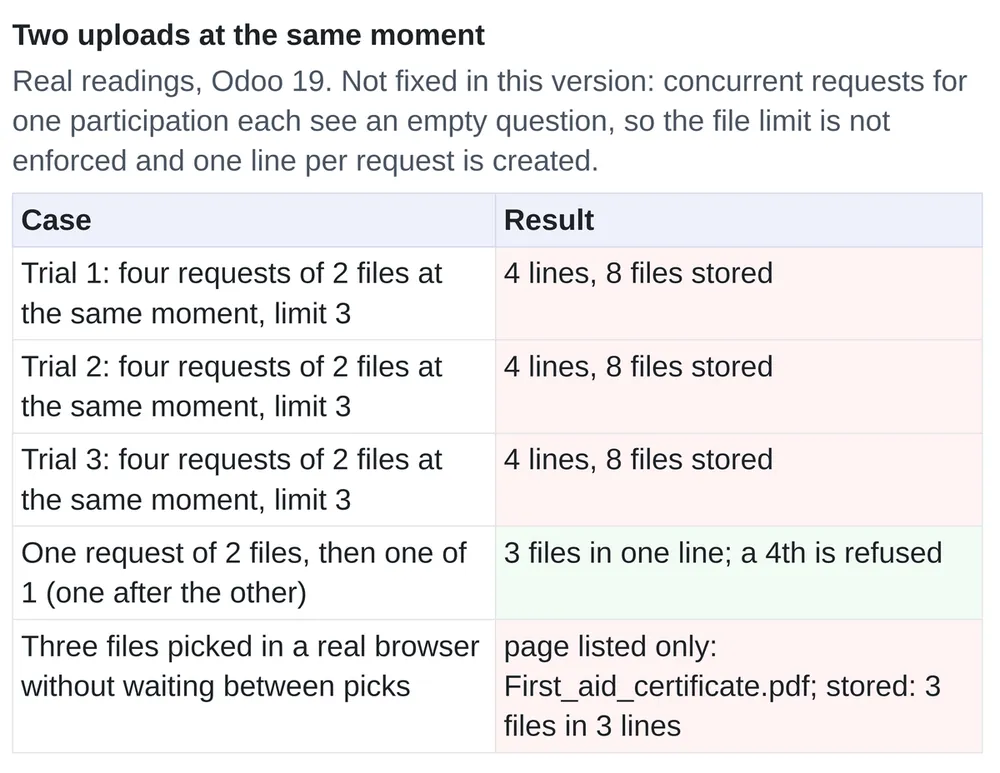
The page also says where the app stops: the type is read from the file name only, nothing scans a file, two uploads at the same moment for one question can pass the file limit, and live sessions are not what it was built for.
Install it and File Upload is one more choice in the question type list. It needs only the Surveys app (survey) and adds three settings to a question and nothing else to configure.
How it works
What it keeps, what it changes, what it does not
Each line was tested or read in the code or on the running survey.
1 A file question on the survey page
Use it when your survey needs a document back with the answers.Read-only for visitors
A survey has no way to ask for a CV, a photo or a signed scan, so it goes by email and nobody can tell which file belongs to which answer.
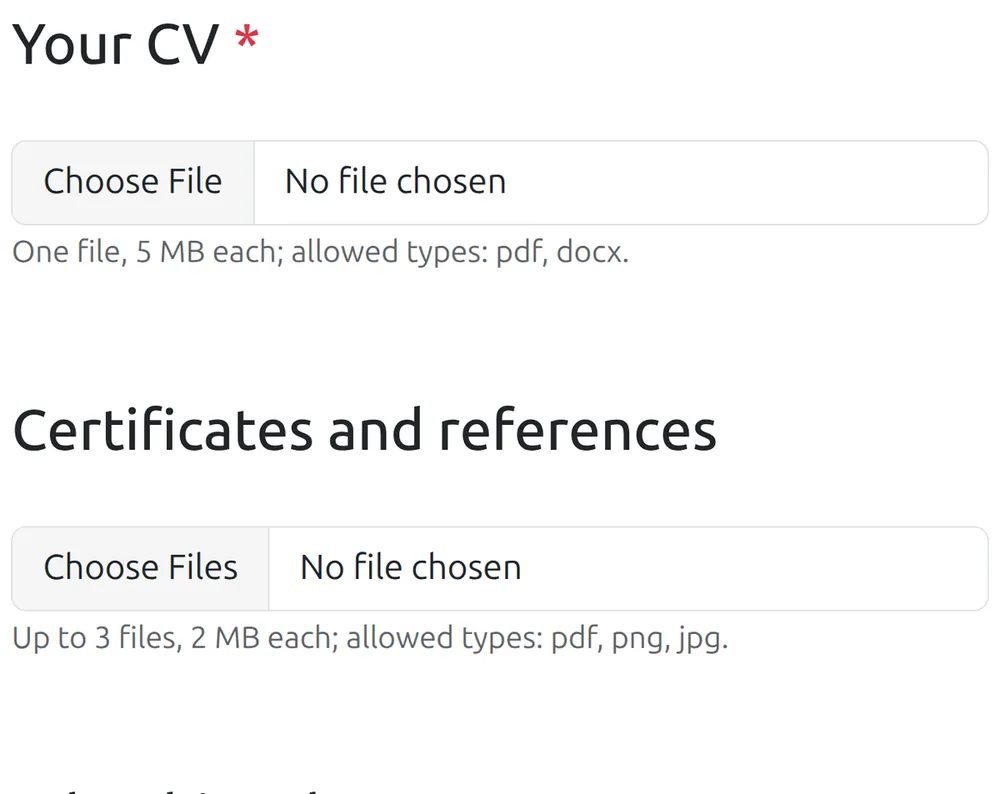
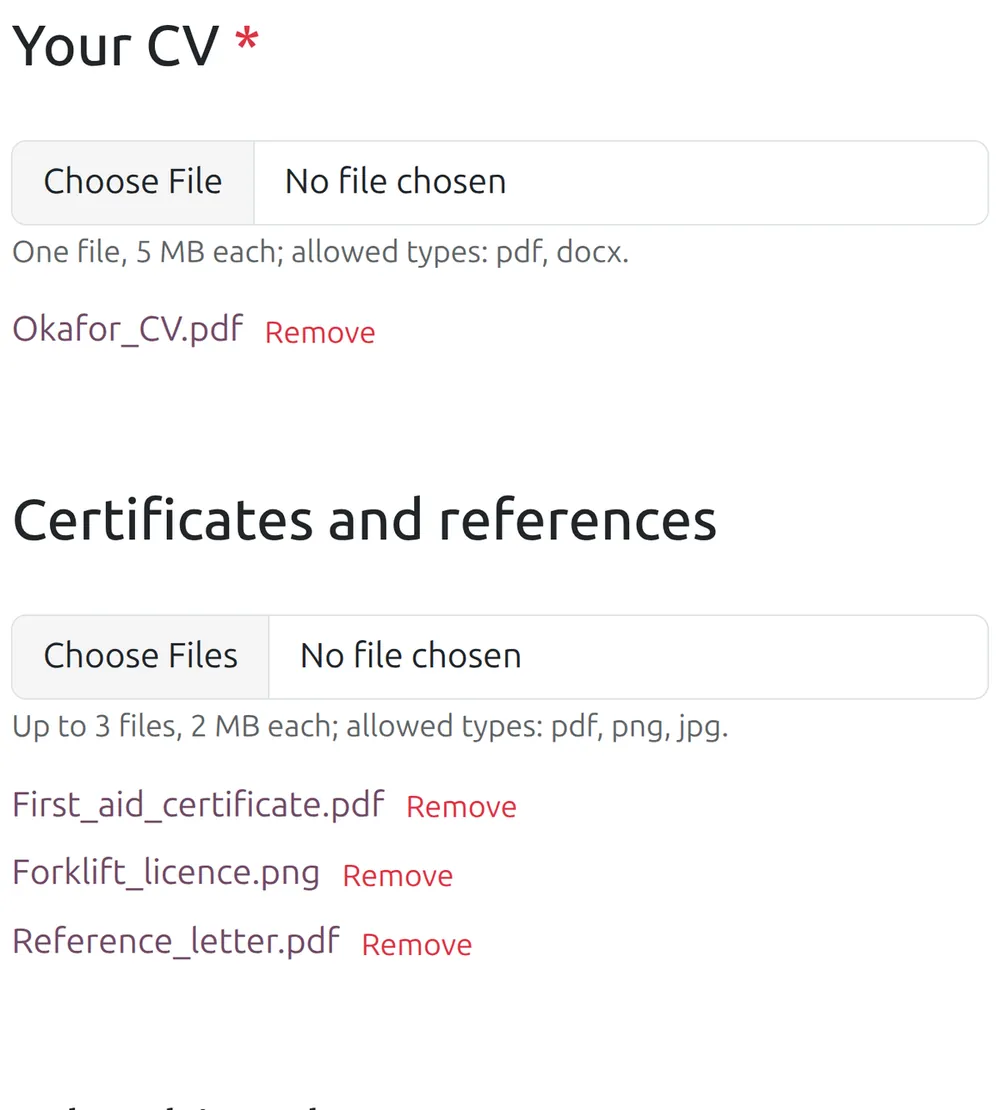
The first picture is the application form of a made-up recruiter, Brightwater Staffing: name, email, a required CV (one file, pdf or docx, 5 MB) and an optional question for certificates and references (up to three files, pdf, png or jpg, 2 MB each). The second has files attached: they are listed under the picker with a Remove link, and the CV question shows its file. Pictures are real Odoo 19 screens as an anonymous visitor, cropped to the two file questions; the files were attached through the page's own file picker.
It does not preview or convert files, and it does not save a draft of the other answers: only the files are saved when they are picked.
The two file questions before anything is attached. Real Odoo screen.
Files attached: listed, each with Remove. Real Odoo screen.
2 Limits you set on the question
Use it when you need to keep uploads to the sizes and types you can handle.Read-only
An upload box with no limits fills the database with whatever people send.
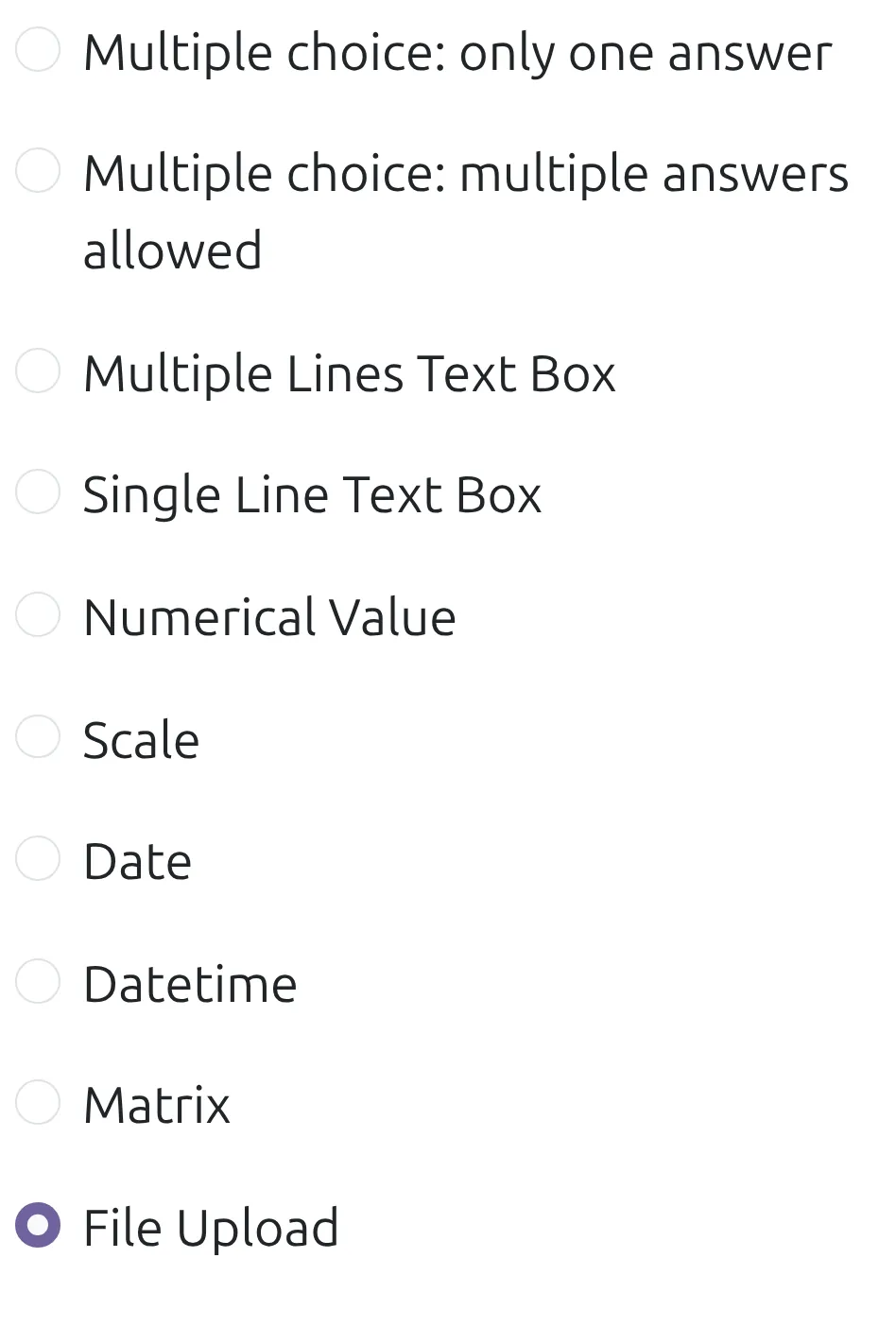
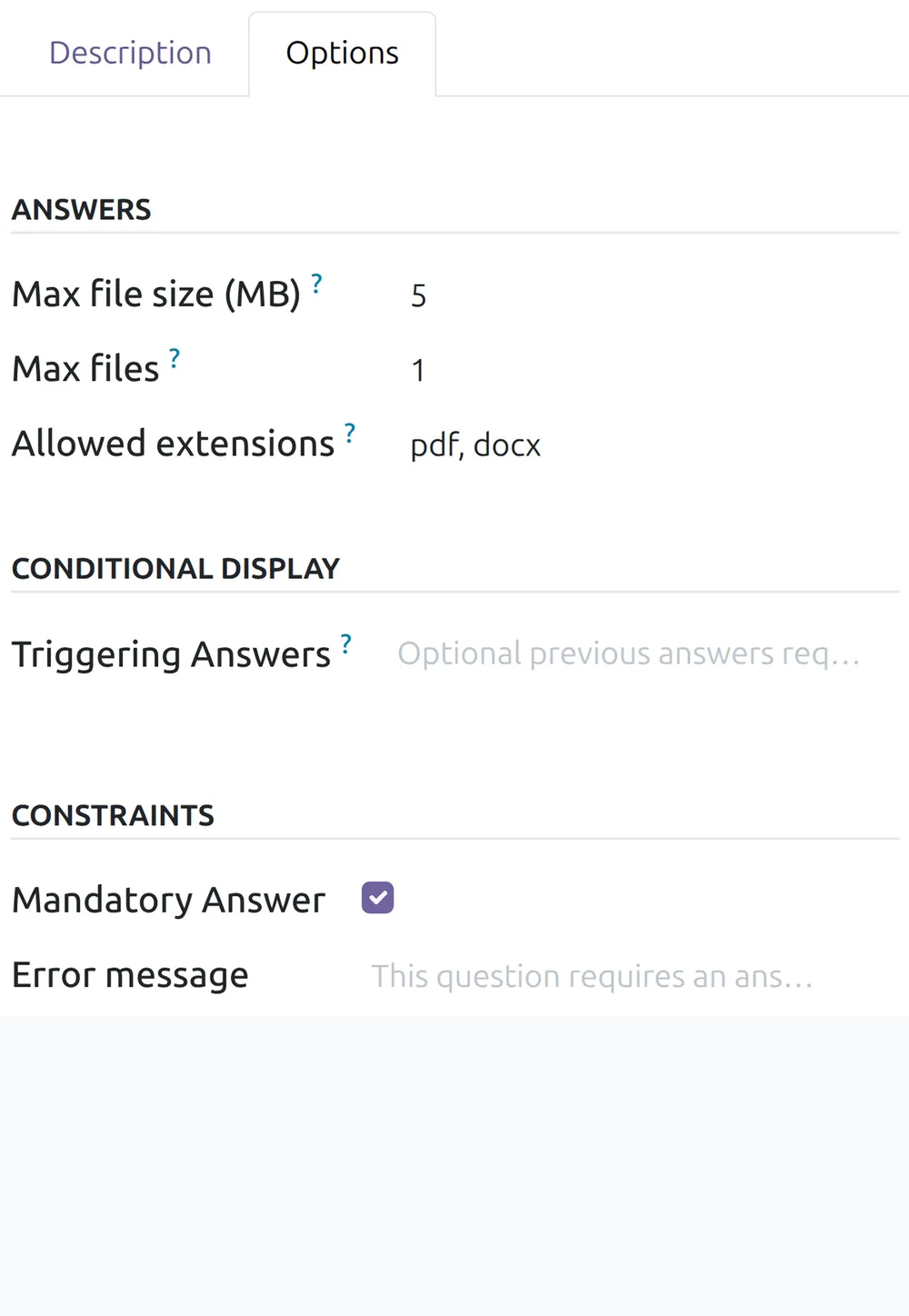
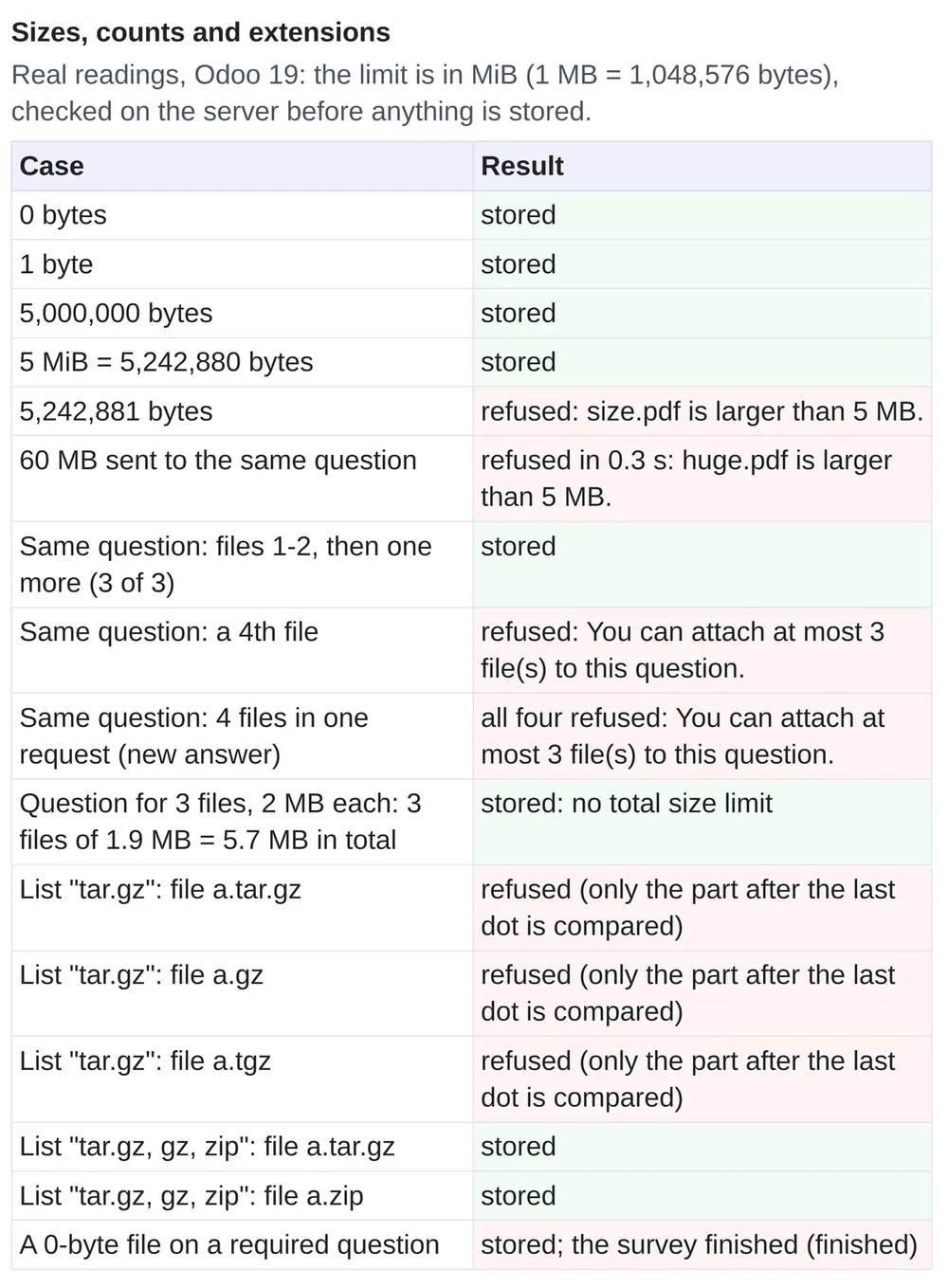
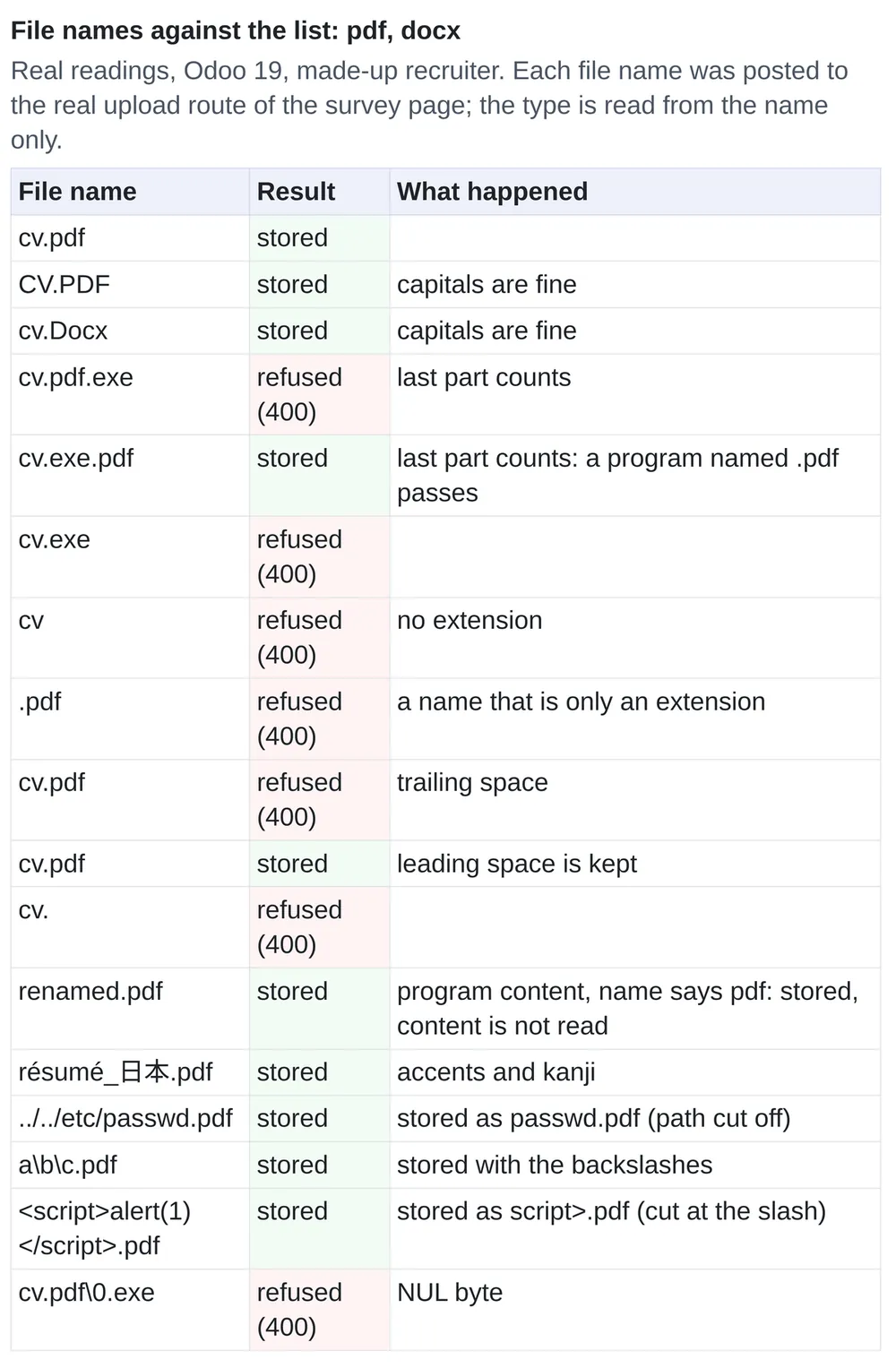
Choose File Upload as the question type and open the Options tab: Max file size (MB) (default 10), Max files (default 1) and Allowed extensions (for example pdf, docx, png; empty means any type). With 1 file a new upload replaces the old one. All three are enforced by the server. The table shows the real answers to 17 file names and to sizes, counts and extensions.
It does not read the content: a program renamed .pdf passes. There is no total size limit, only one per file.
File Upload is one more question type. Real Odoo screen (cropped to the type list).
The three settings. Real Odoo screen (cropped to the Options tab).
Sizes, counts and extensions. Evidence table.
File names against the list. Evidence table.
3 What the respondent sees when something is wrong
Use it when you want people to learn at once why a file was not taken.Read-only
A silent refusal makes people send the file by email after all.
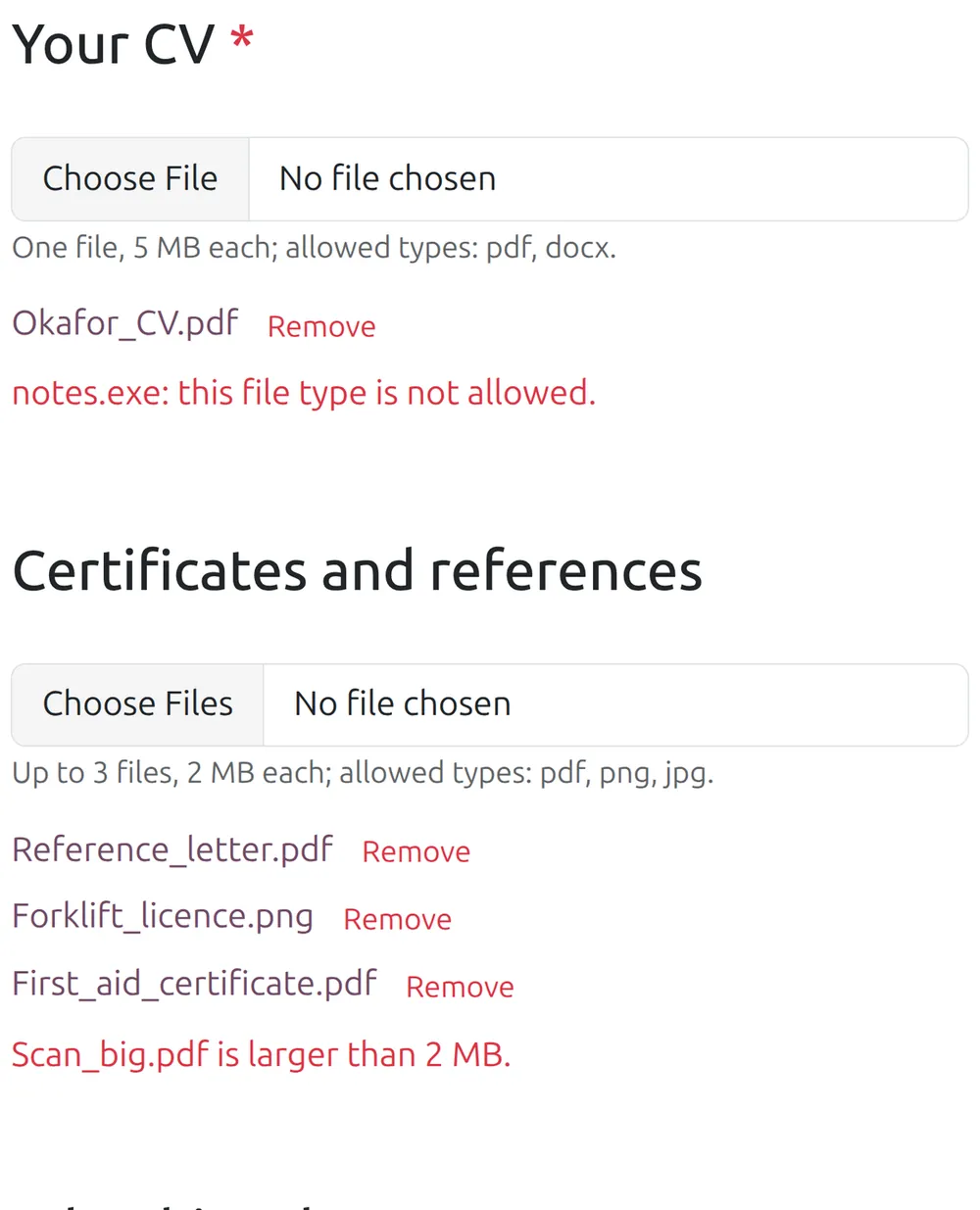
The page checks size and type before sending, and the server checks again. The picture shows a program (notes.exe) refused on the CV question and a 3 MB scan refused on the certificates question, each with the message under its picker; nothing was stored for either, and the CV that was attached before stays. A required file question refuses to submit without a file, in the browser and again on the server; a client cannot fake it by sending a number.
It does not say how to fix the file: it names the file and the limit.
Two refused files, each with its message. Real Odoo screen.
4 Where the files end up
Use it when you want to open the files without asking anyone.Read-only
Files that live only in an email thread are lost to the survey.
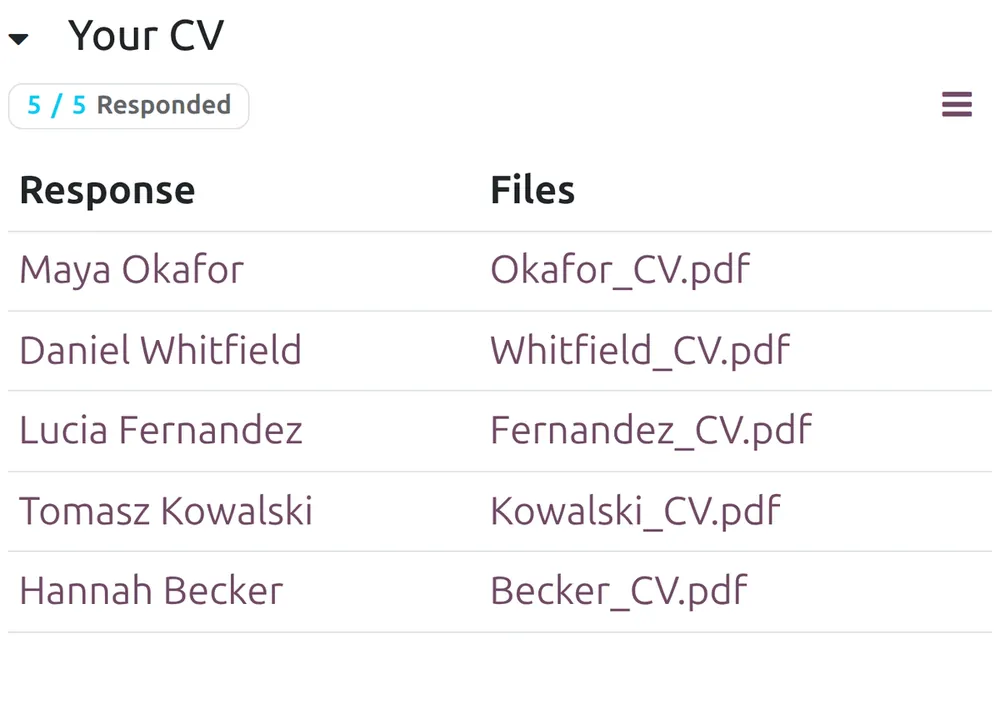
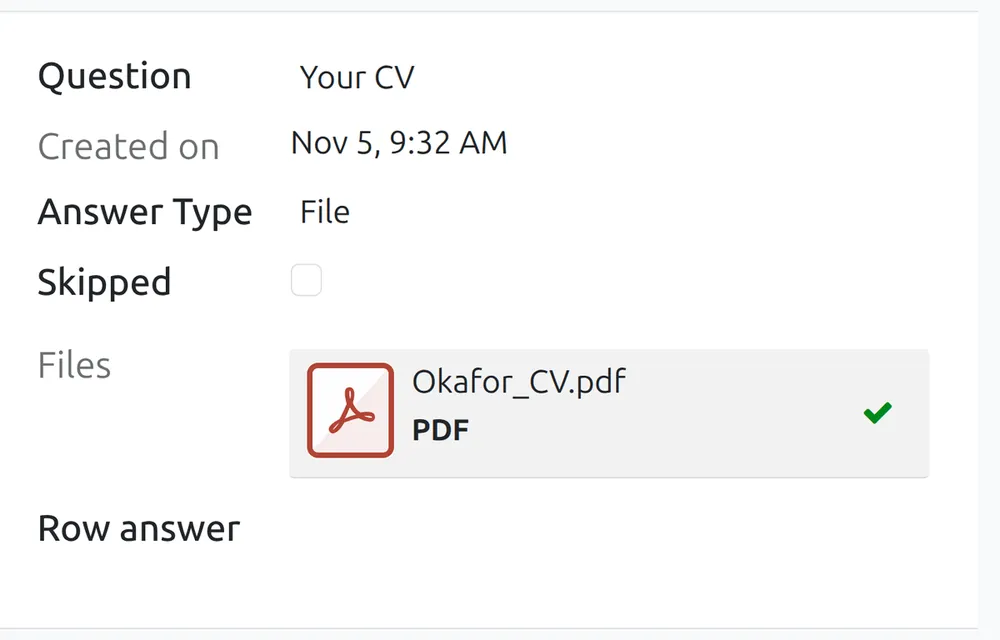
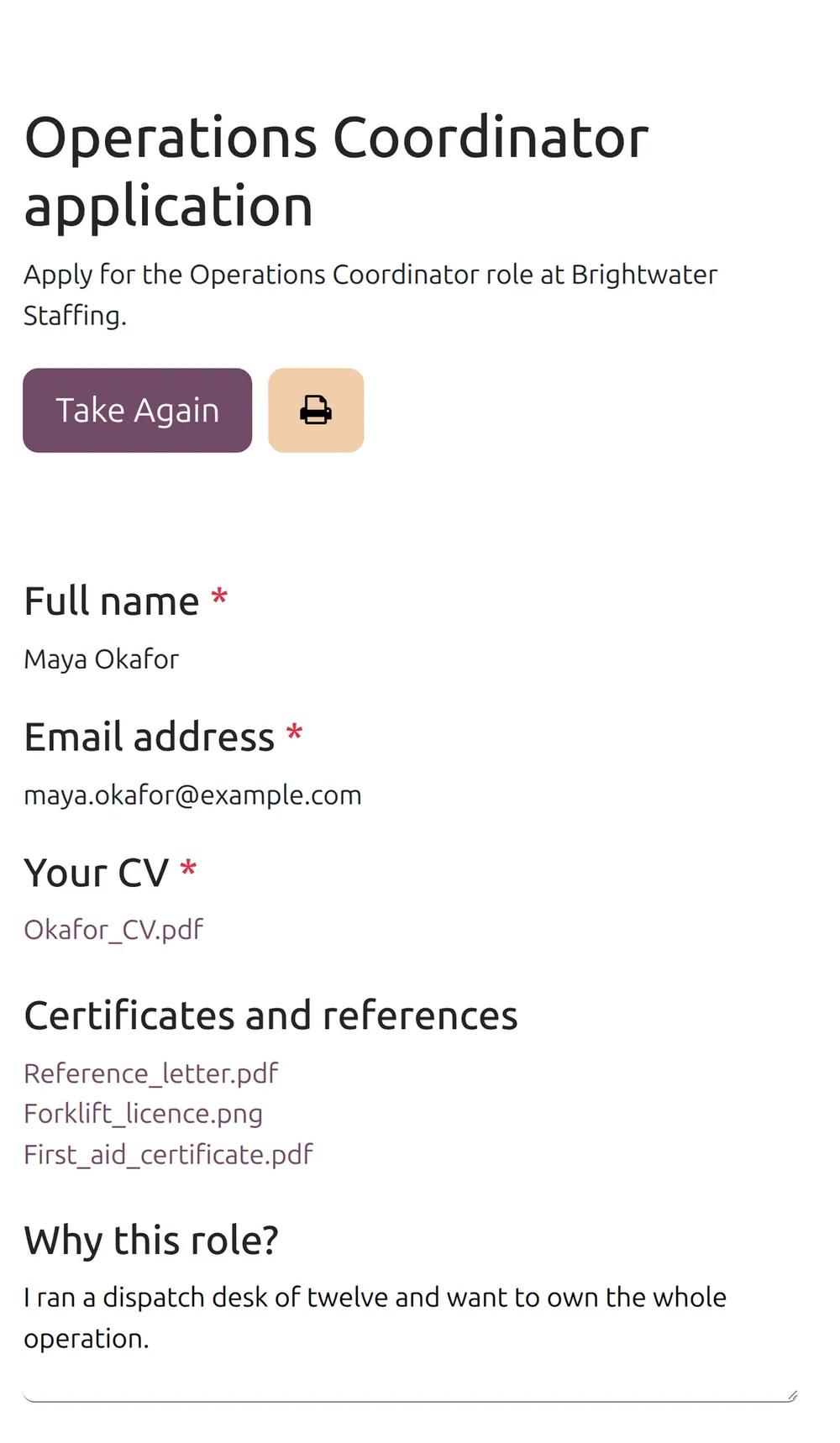
On the survey's Results page the File Upload question lists each response with its files as download links. The participation's answer line in the back office lists them too, and the review page the respondent gets after submitting shows them read-only with no picker and no Remove. A participation left unfinished keeps its files until you delete it, and an in-progress participation appears in Results. The pictures are real Odoo 19 screens; names and files are made up.
It does not download all files of a survey as one archive and does not email you when a file arrives.
Results: each response with its file. Real Odoo screen (cropped to the question).
The answer line in the back office. Real Odoo screen.
The review page: read-only. Real Odoo screen.
5 Who can open the files
Use it when the documents are personal and must not leak.Read-only
CVs, claim photos and scans are personal data and must stay with the right people.
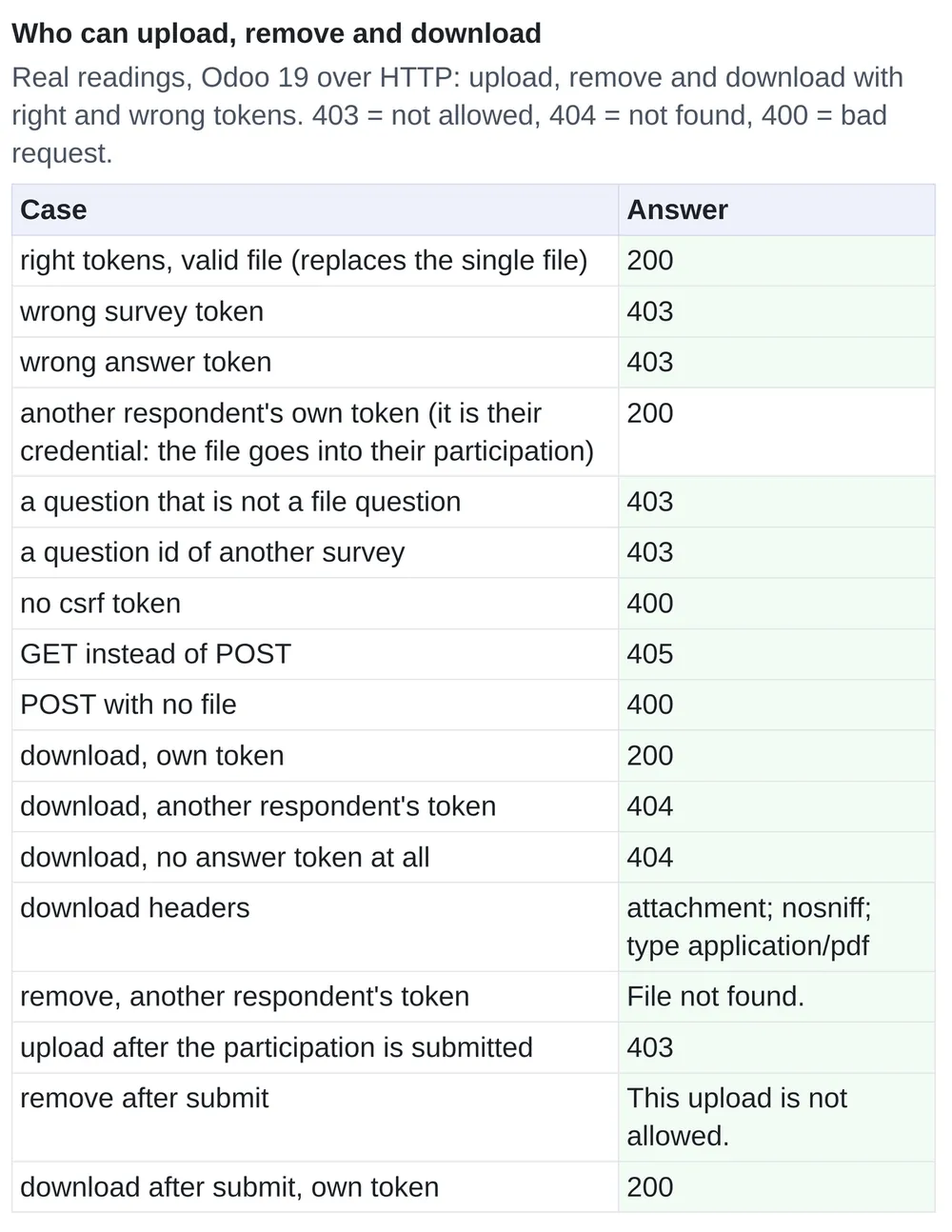
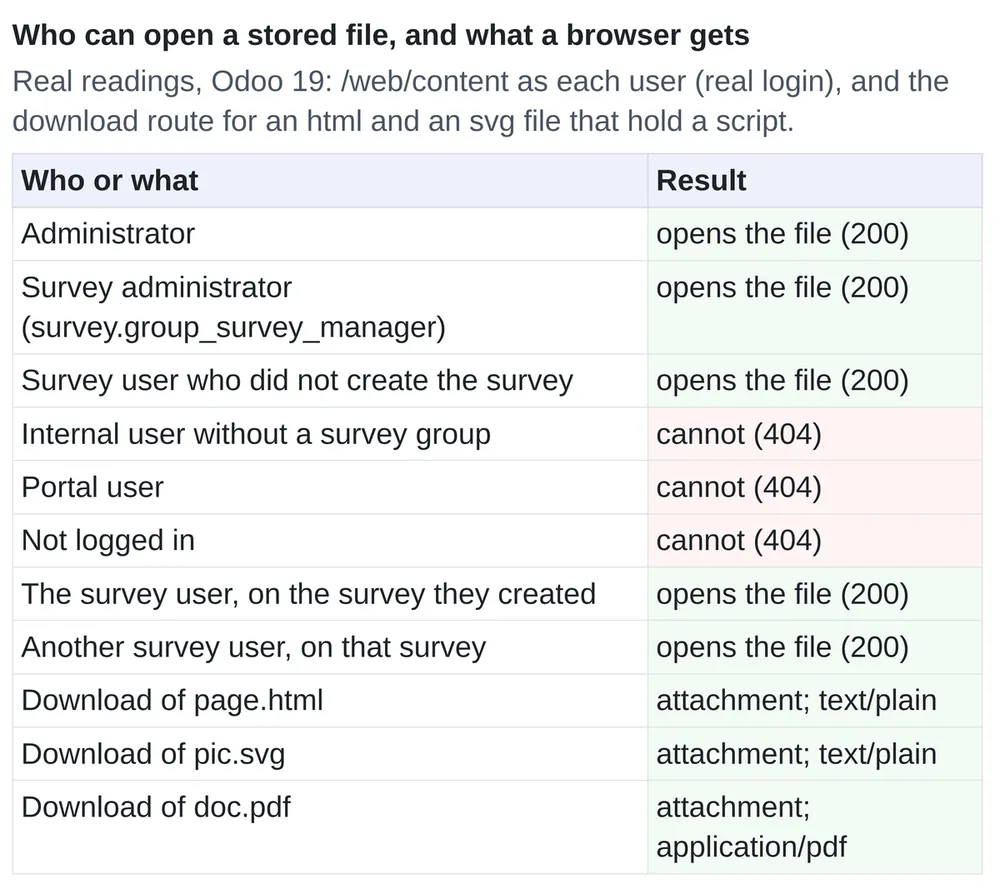
The token in a respondent's link is their credential: whoever holds it can act as that respondent until they submit, and nobody else can. Upload, remove and download refuse a wrong survey token, a wrong answer token, another survey's question and a question that is not a file question, and the download or removal of another respondent's file; after submit, upload and remove are refused but the respondent can still download their own file. In the back office any survey user (not only the creator) and administrators can open a file; an internal user without a survey group, a portal user and a visitor cannot. The download route always sends the file as an attachment, as plain text for html and svg, with nosniff, so an uploaded page with a script is never run on your site. The tables hold the readings.
It adds no groups or access rules of its own: access follows Odoo's attachment and survey rules.
Upload, remove and download with right and wrong tokens. Evidence table.
Who can open a stored file. Evidence table.
6 Surveys that behave differently
Use it when your survey uses conditions, pages or scoring.Read-only
A new question type is only useful if it works inside the survey features people already use.
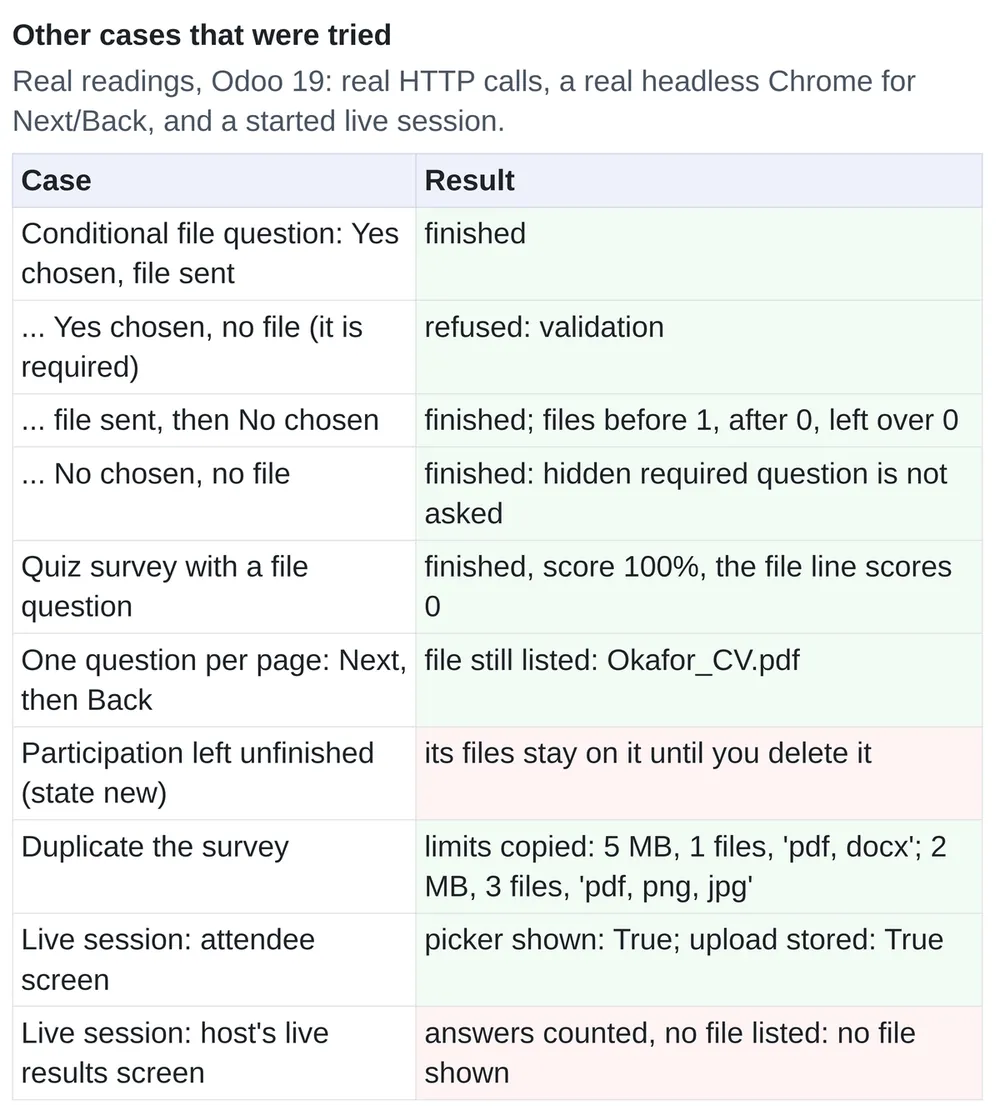
Tried on real surveys: a required file question that only shows after an answer (hidden: not asked; a file sent before the answer changed is deleted), one question per page with Back (the file is still listed), a quiz (finishes, the file question scores 0), a duplicated survey (limits are copied), and a started live session (the attendee sees the picker and an upload is stored, but the host's live results screen lists no file; the files are in Results afterwards). The last row is a limit.
It was not built for live sessions: no file is listed on the host's live screen.
Other cases. Evidence table.
7 One defect fixed in this version
Use it when you want to know what changed in behaviour.Read-only
One small defect was found while checking this page against a running survey, and fixed.
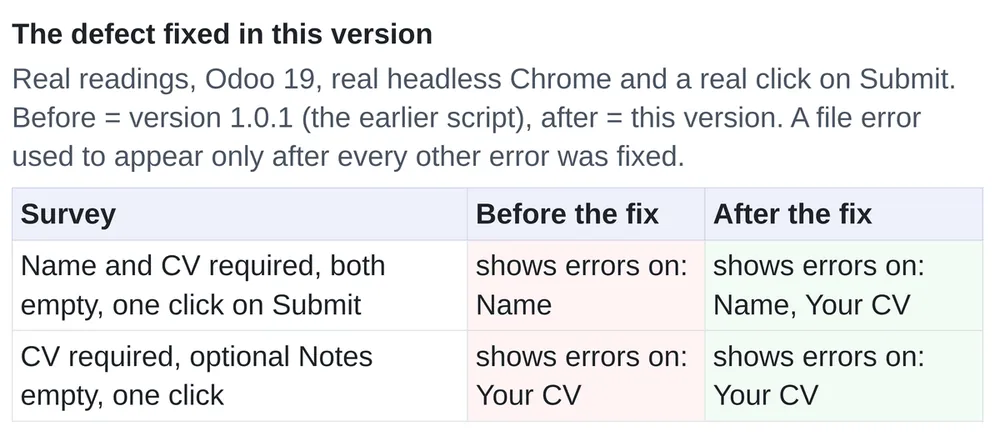
When a survey had a required file question and another required question both empty, a click on Submit showed only the other question's error; the file question's error appeared on the next click. The file check ran only when Odoo's own check had passed. Both errors now show together. It is script only; no data or server behaviour changed. One test fails on the old code and passes now.
Before and after the fix. Evidence table.
What changed in this version
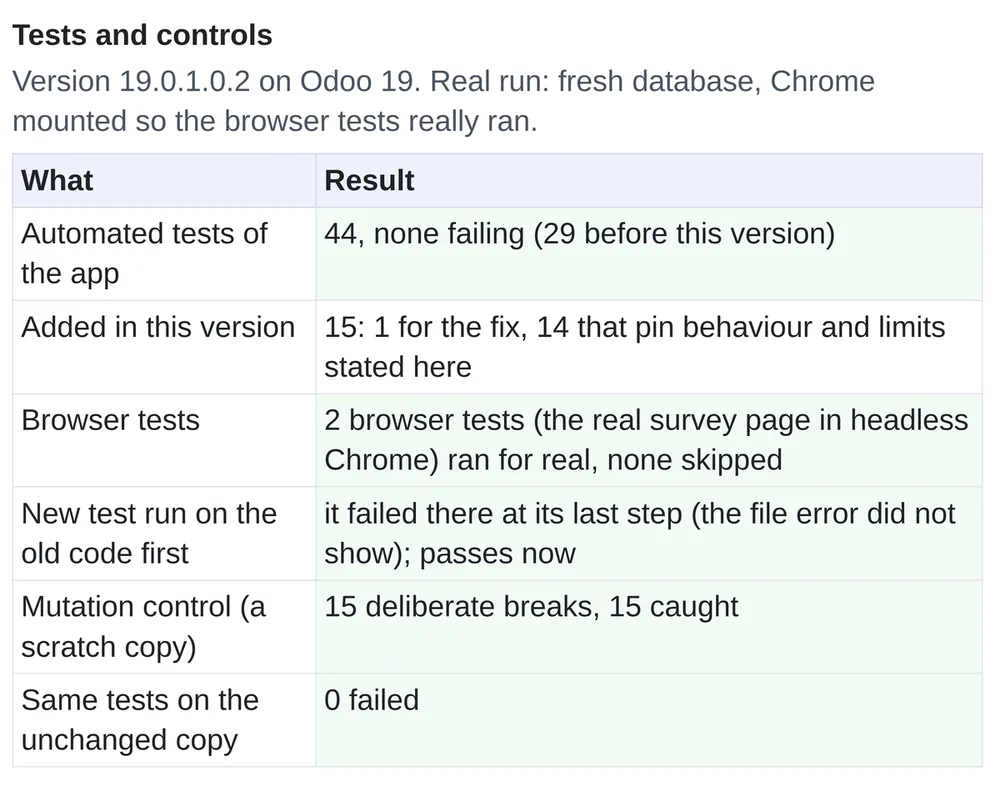
Version 19.1.0.2 fixes one small defect (a missing file was reported a round later than other missing answers) and adds 15 automated tests (29 before, 44 now): 1 for the fix and 14 that pin the limits above. It replaces the screenshots and the page text with checked ones, corrects the manifest text about live sessions (it said not available; an attendee can upload, the host's live screen lists no file), makes the browser tour wait for Odoo 19's submit dialog only when there is one, and takes no feature out. All 44 ran on Odoo 19. The demo video of an earlier version is kept as it was and was not re-recorded.
Screenshots
What it does not do
- Each of these was reproduced on a running Odoo 19 survey or read in the code; none is changed in this version except the one above. The tables hold the tests and controls.
- Two uploads at the same moment. Evidence table.
- Tests and controls. Evidence table.
Requirements
- Odoo 19.0 or 20.0. The App Store sells each version separately, so buy the one that matches your database.
- Odoo.sh or On-Premise only. Third-party apps cannot be installed on Odoo Online (SaaS) databases. Check your hosting before buying.
- Module
mh_survey_file_upload, version 19.0.1.0.1, licensed OPL-1.