Barcode Check
Barcode check: count and list products and packagings with a missing, invalid or wrong length barcode or a wrong EAN-13 check digit
Request a live demo · Odoo.sh or On-Premise only, not Odoo Online (SaaS).
Free
App Store price, per Odoo version
19 · 20
Odoo versions, each sold on its own page
Odoo.sh
or On-Premise; not Odoo Online (SaaS)
1.0.1
version of mh_barcode_check
Before you print labels or hand out scanners, you want to know which products have a barcode that cannot be right: none at all, a typo, a code of the wrong length or a last digit that does not match the rest. Odoo only finds out when a scan fails or a label comes out wrong, and it has no screen that counts them.
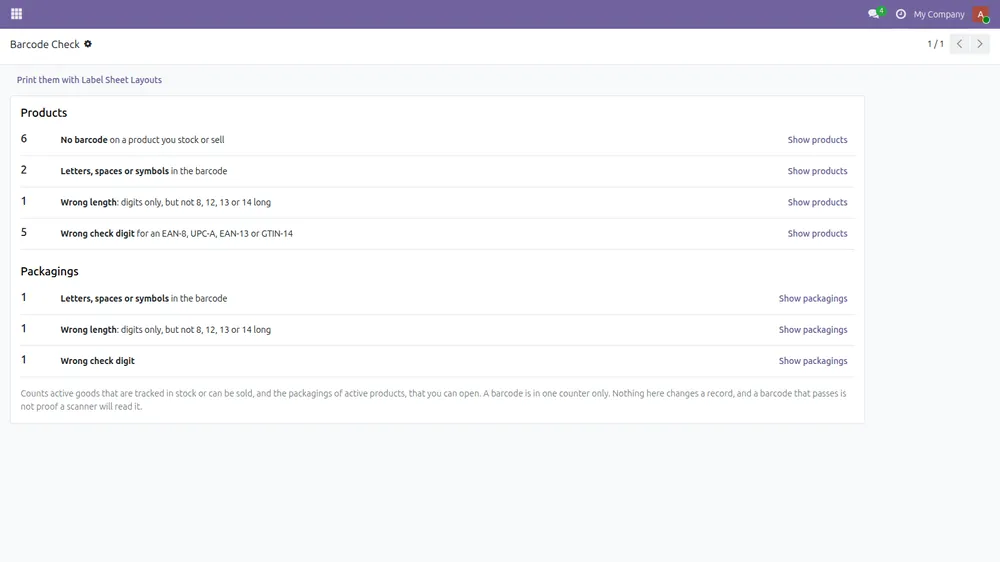
Open Inventory > Reporting > Barcode Check. You get seven counters, each with a Show button that opens an ordinary list you can sort, filter, export and open.
How it works
Products with no barcode
Active goods that are tracked in stock or can be sold and have an empty barcode. Services are not counted, and neither are goods that are neither stocked nor sold.
Letters, spaces or symbols
The barcode holds anything that is not a digit 0-9, including a space left at the end by a paste. Counted for products and for packagings.
Wrong length
Digits only, but not 8 (EAN-8), 12 (UPC-A), 13 (EAN-13) or 14 (GTIN-14) long. Counted for products and for packagings.
Wrong check digit
The length fits, but the last digit does not match the others under the GS1 check digit rule used by EAN-8, UPC-A, EAN-13 and GTIN-14. Counted for products and for packagings.
A barcode is counted once, under the first problem it has: empty, then non-digits, then length, then check digit. The screen only reads; it never changes a record.
Who it is for
Warehouse and inventory managers who are about to print barcode labels, roll out scanners or import a product list, and want to clean the barcodes first.
Screenshots
What it does not do
- It does not fix, generate or fill in barcodes. It does not look for duplicates: Odoo already refuses a barcode used twice. It does not check GS1-128 or SSCC strings, or barcodes that are deliberately internal codes, so an internal code such as ABC-1 is counted under letters. A code that passes is not proof that a scanner will read it or that the number is registered to you; only the length and the check digit are tested.
- It counts active products and packagings that you are allowed to open, so archived records and other companies' records you cannot see are not included. A product with several variants is checked variant by variant. A packaging always has a barcode, so there is no missing counter for packagings. On a barcode with leading zeros, the check uses the whole string at its own length, so a 13-digit code starting with 0 is checked as an EAN-13.
Requirements
- Odoo 19.0 or 20.0. The App Store sells each version separately, so buy the one that matches your database.
- Odoo.sh or On-Premise only. Third-party apps cannot be installed on Odoo Online (SaaS) databases. Check your hosting before buying.
- Odoo 19 and 20, Community or Enterprise. Also requires stock (Inventory). Third-party apps install on Odoo.sh or On-Premise only - they cannot be installed on Odoo Online (SaaS).
- Module
mh_barcode_check, version 19.0.1.0.1, licensed OPL-1.