Vendor Evaluation
Which vendors deliver on time, at the agreed price and in good condition - one score per vendor, from your own data
Request a live demo · Odoo.sh or On-Premise only, not Odoo Online (SaaS).
6 of 6
vendors matched an independent recompute from the raw purchase, stock and rating tables (every measured number, criterion score, total and star)
4 + 3
four numbers measured from your own orders and receipts plus three rated criteria (Quality, Packaging, Communication) that you can rename and reweight
30
automated tests in the app, none failing; 8 were added for the limits stated on this page
1.3 s
to recompute 126 vendor scores from 720 order lines and 1,228 stock moves in the test run; larger data not tested
0
products, prices, orders or receipts changed: it writes only its own records and sends nothing over the network
Not
refreshed by a receipt or a weight change: daily, by ratings and on demand (see the known limits)
Choosing between vendors usually rests on memory: who was late last quarter, who raised the price, who sent damaged goods. Vendor Evaluation measures on-time delivery, days late, price drift and returns from your confirmed purchase orders, receipts, backorders and returns, adds the star ratings your storekeepers give each receipt, and combines them with weights you set into one score from 0 to 100 per vendor. This page walks through it with screenshots of an Odoo 19 database holding a made-up joinery and six made-up vendors, and with tables rendered from real readings of the same run; each picture says which it is.
It reads orders, receipts and vendor price lines and writes only its own records. This page also says where its definitions bite: cancelled backorders, price lists that change, new vendors with little data, who may rate and when the score refreshes.
Install it and a Vendor Scores menu appears under Purchase, Orders, a Vendor Evaluation settings page under Purchase, Configuration, and a Vendor rating tab on done receipts. It needs only Purchase with Inventory (the purchase_stock module).
How it works
What it keeps, what it changes, what it does not
Each line was tested or read in the code.
1 Set the weights, the zero points and the rated criteria
Use it when you want the score to reflect what matters to your purchasing, not a fixed formula.Writes when saved
A fixed formula treats a one-day delay and a bad batch alike, and nobody agrees on how much each should cost a vendor.
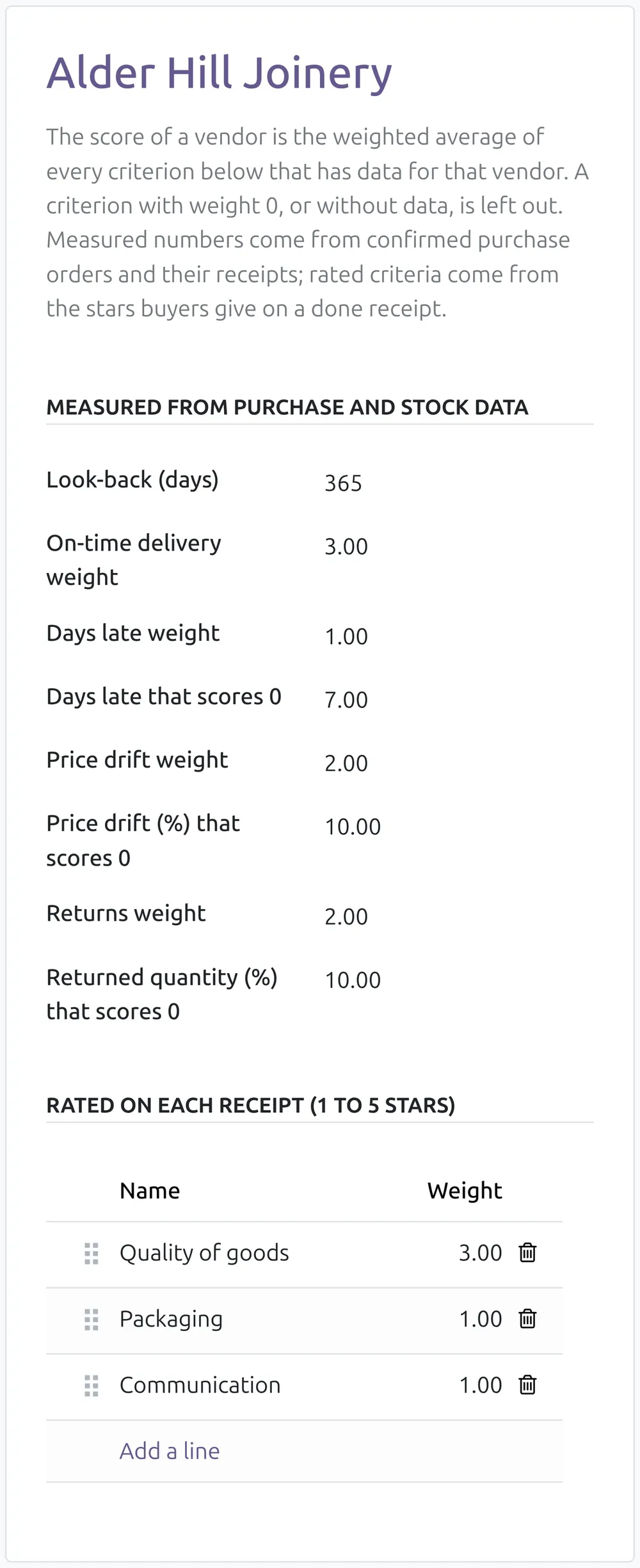
Open Purchase, Configuration, Vendor Evaluation (one page per company). Set the look-back in days, the weight of each measured number (on-time delivery 3, days late 1, price drift 2, returns 2 by default) and the point at which each scores 0 (7 days late, 10% over the vendor price, 10% of the quantity returned). Below are the rated criteria: Quality of goods (weight 3), Packaging and Communication (weight 1 each); rename, add, reorder, reweight or archive them. A weight of 0 leaves a number out; weights cannot be negative. This is a screenshot from Odoo 19.
Changing a weight does not change the stored scores until the next recompute (see the known limits).
The settings page for the made-up company. Real Odoo screen.
2 Rate each receipt with stars
Use it when a storekeeper has just received goods and can judge quality, packaging and communication.Writes the ratings
The people who open the boxes know whether the goods were as ordered, and that rarely reaches the person who chooses the vendor.
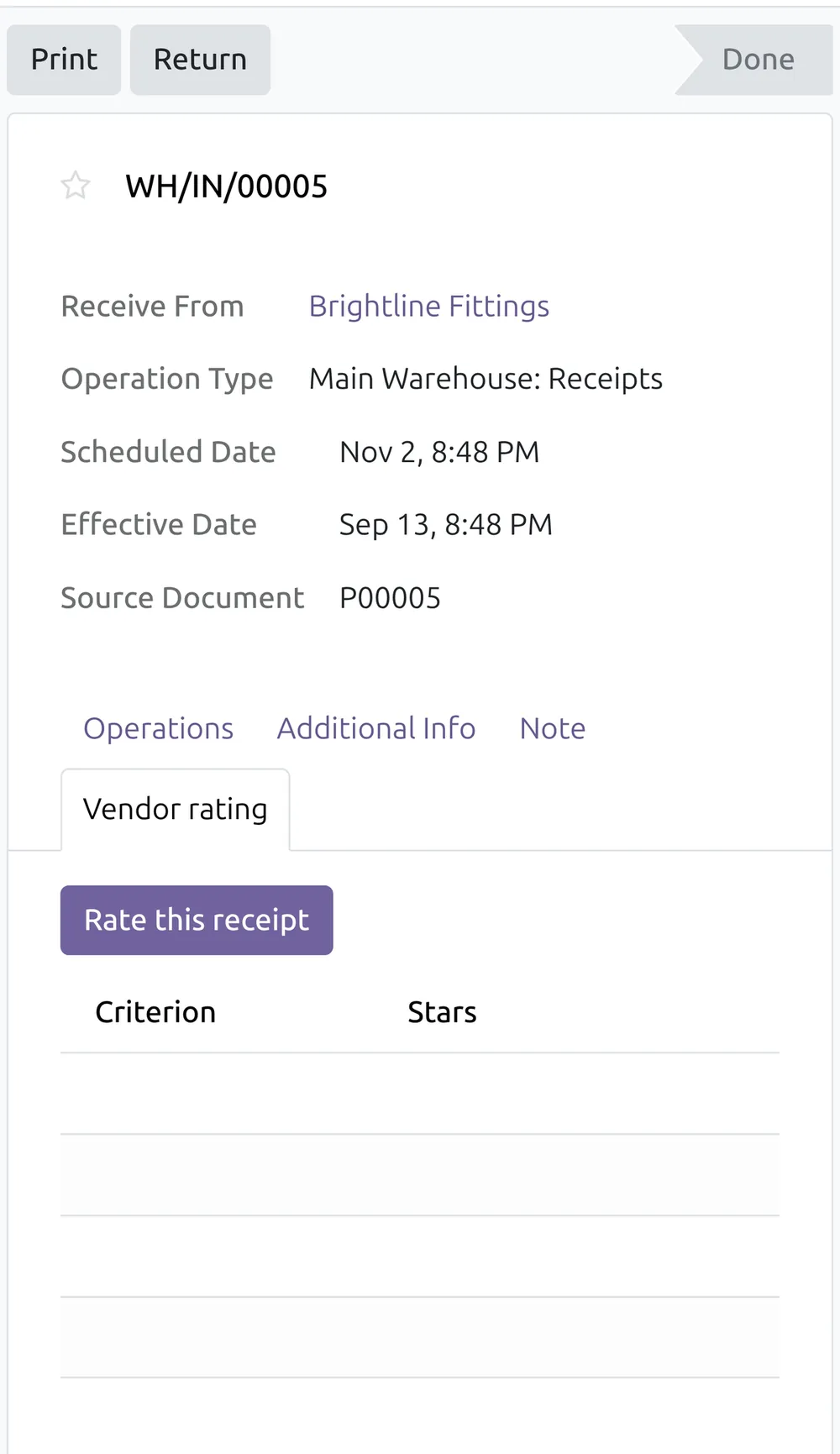
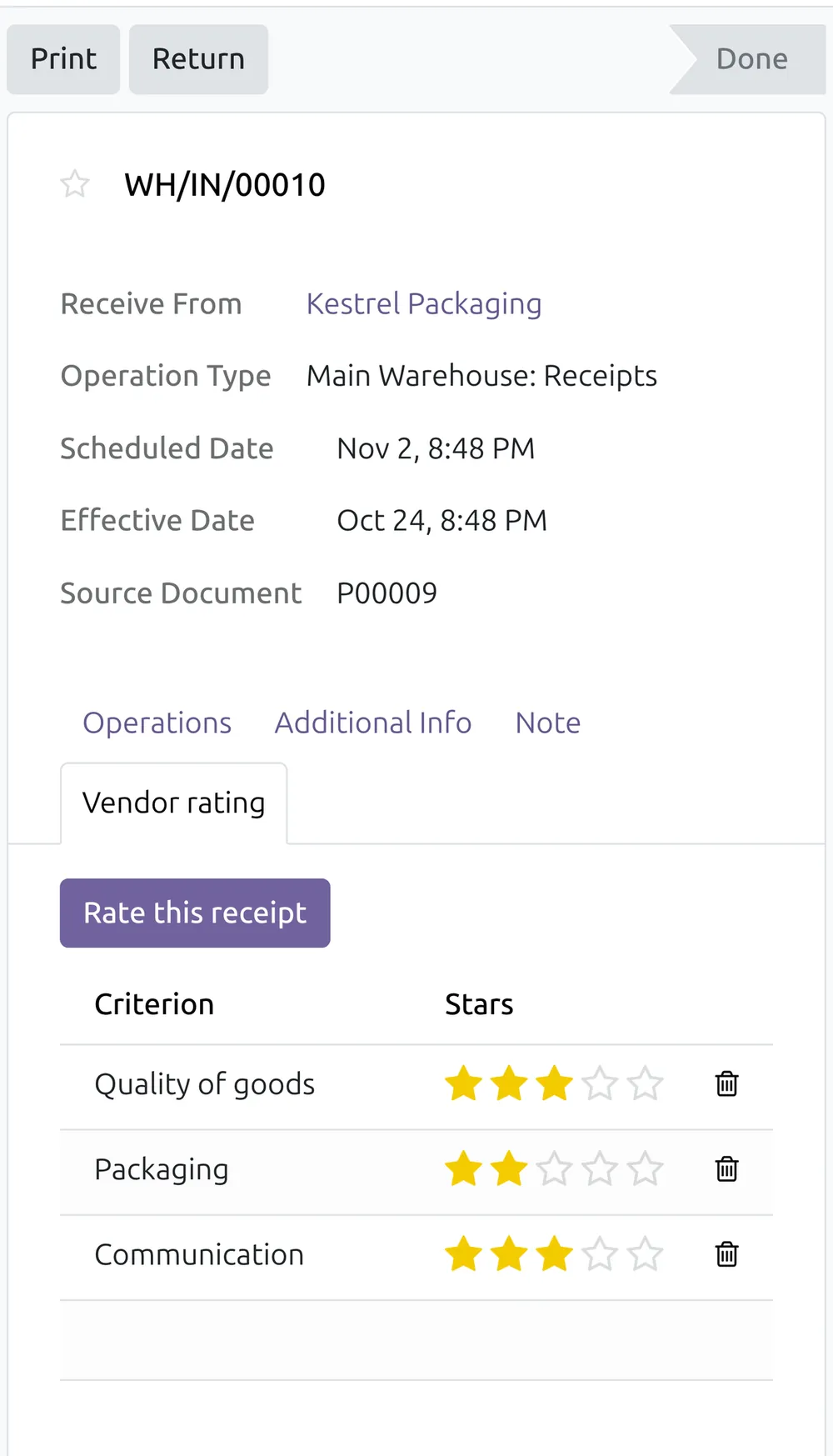
On a done receipt from a vendor, the Vendor rating tab shows a Rate this receipt button. It adds one line per criterion, all Not scored; you click the stars (1 to 5) you want to give and leave the others. A line left at Not scored does not count. The first picture is a receipt before rating, the second a rated receipt. Ratings are entered by users of the Inventory (Stock) group; a user with Purchase rights only gets an access error. Saving a rating refreshes that vendor's score at once.
Only a done receipt from a vendor can be rated, once per criterion. Nothing records who rated except the record's creator and last writer, and another Inventory user can change the stars.
A done receipt before rating. Real Odoo screen (Odoo 19).
The same tab on a rated receipt. Real Odoo screen.
3 Four numbers measured from your own data
Use it when you want delivery, price and returns judged from what happened, not from what people remember.Read-only
Ratings alone are opinions; the orders, backorders and returns already hold the facts.
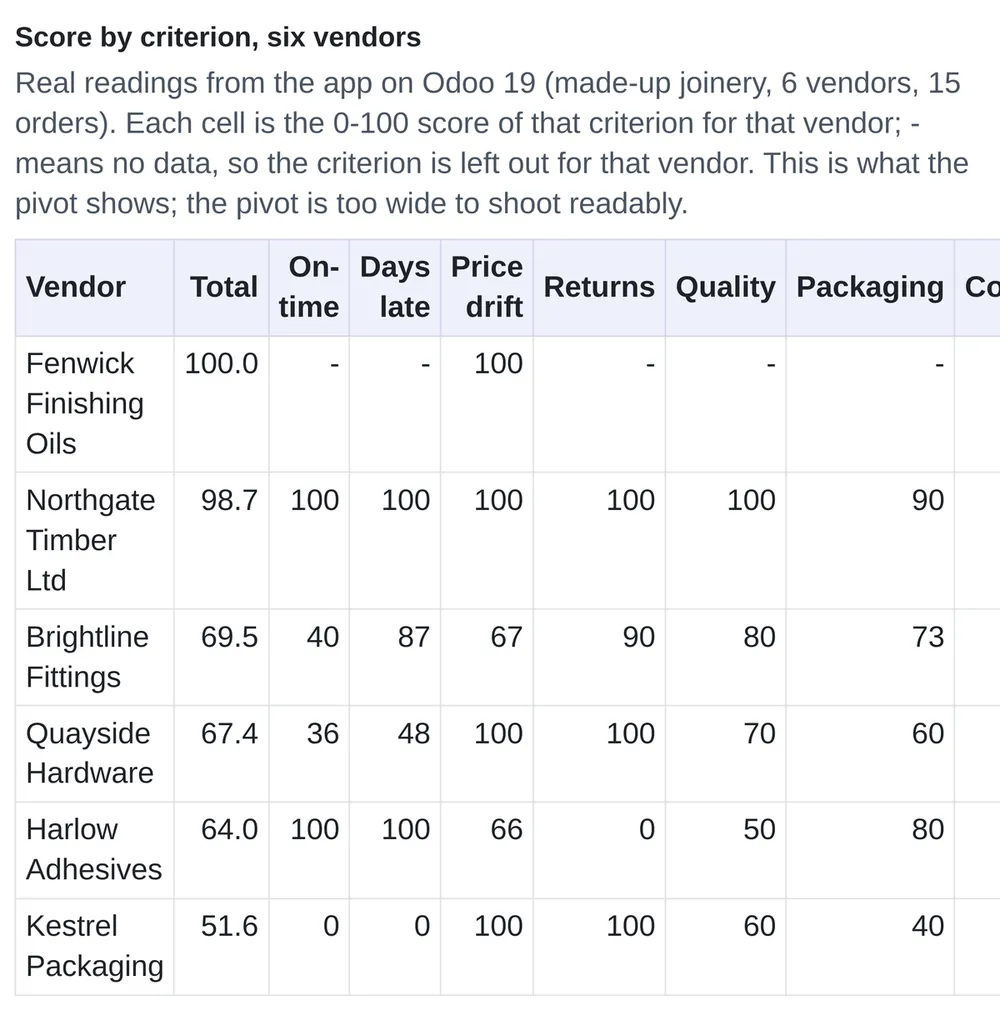
On-time delivery is the share of the quantity due that arrived on or before its date (the line's Expected Arrival on Odoo 19, the Promised Date on Odoo 20); quantity still owed past its date counts as late, quantity not yet due is not counted. Days late is the average per unit received. Price drift compares the order line price with the vendor price line of the product, by value in company currency, and skips lines with no vendor price, a price of 0 or a price-included tax. Returns is the share of the received quantity sent back through the Return button. Each becomes a 0 to 100 score, and a criterion with no data is left out for that vendor. The table is real readings of the six demo vendors; it stands in for the pivot, which is too wide to show readably.
It does not read vendor bills, only stock products with receipts are measured, and dates are compared by calendar day in UTC.
Score by criterion for six vendors. Evidence table.
4 One score per vendor, and how it is made
Use it when you want a ranking you can open up and argue with.Read-only
A single number is only useful if someone can see what is behind it.
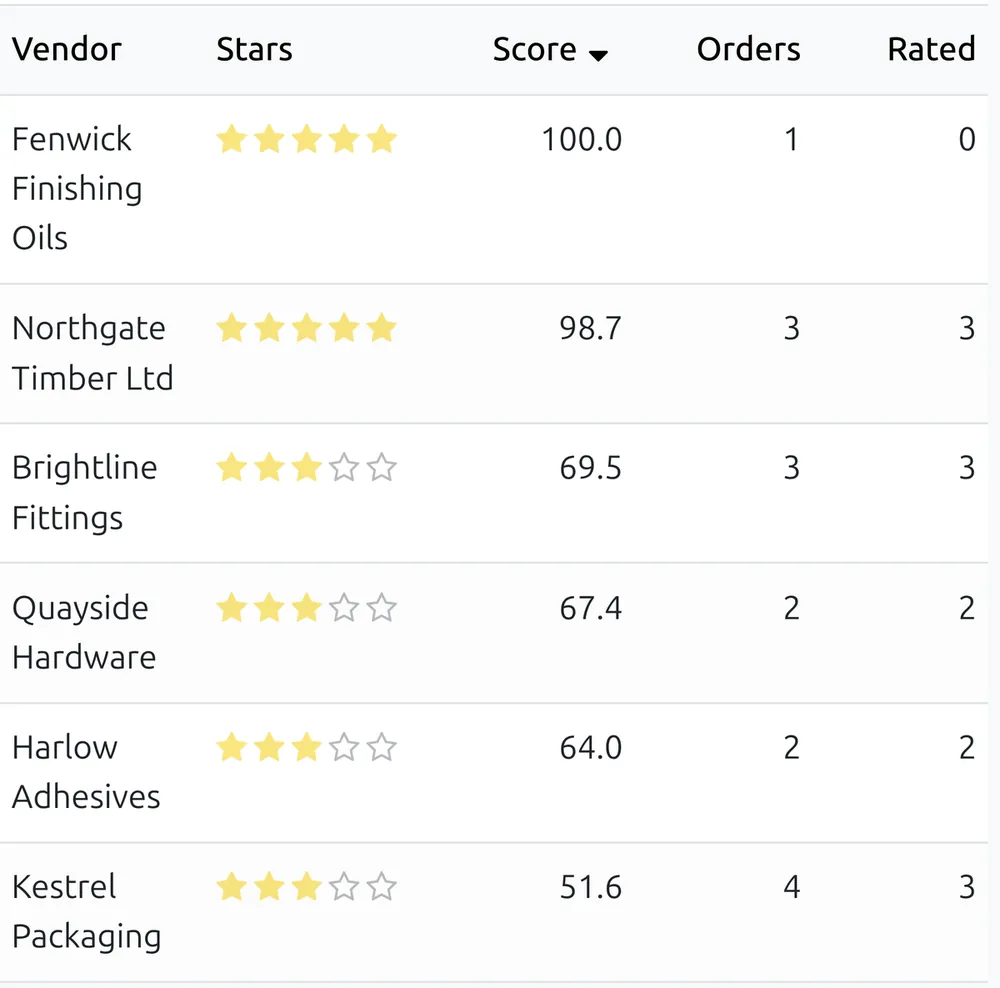
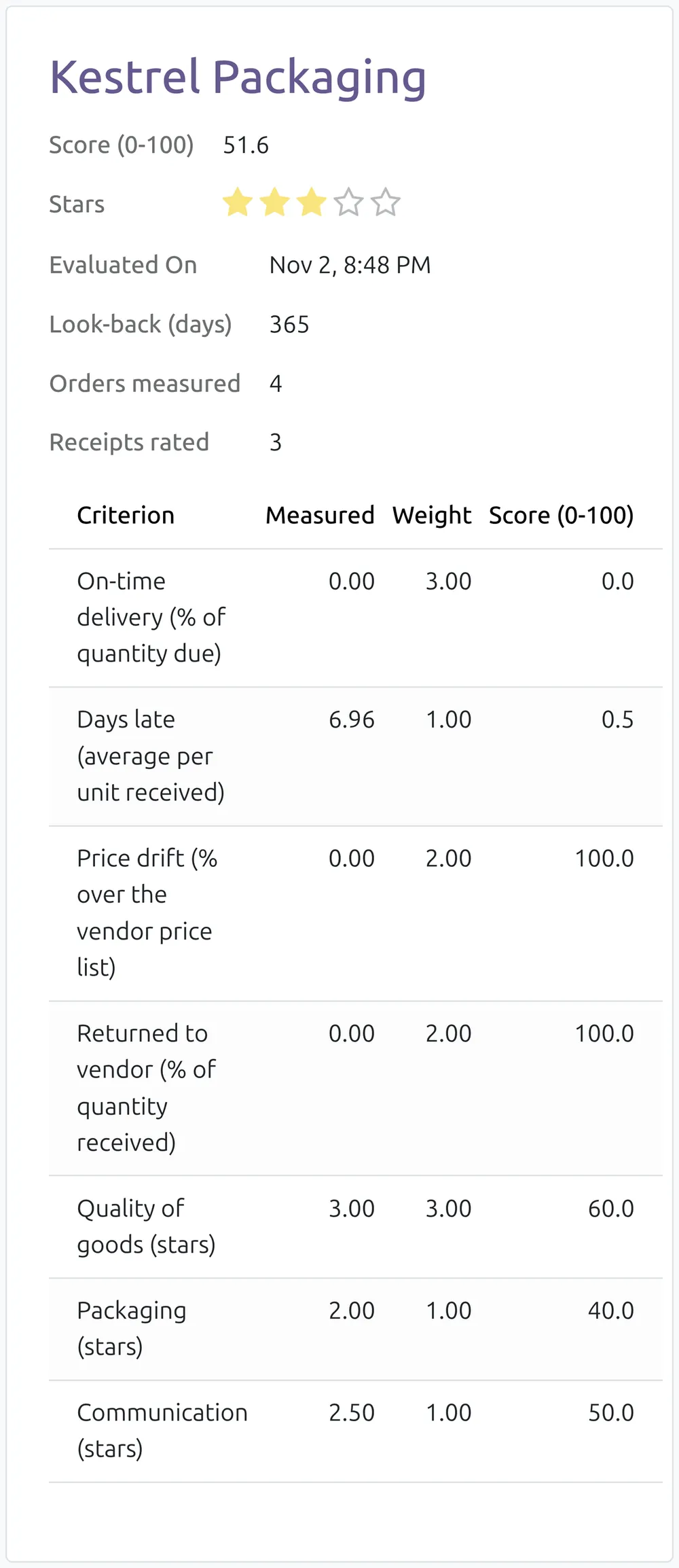
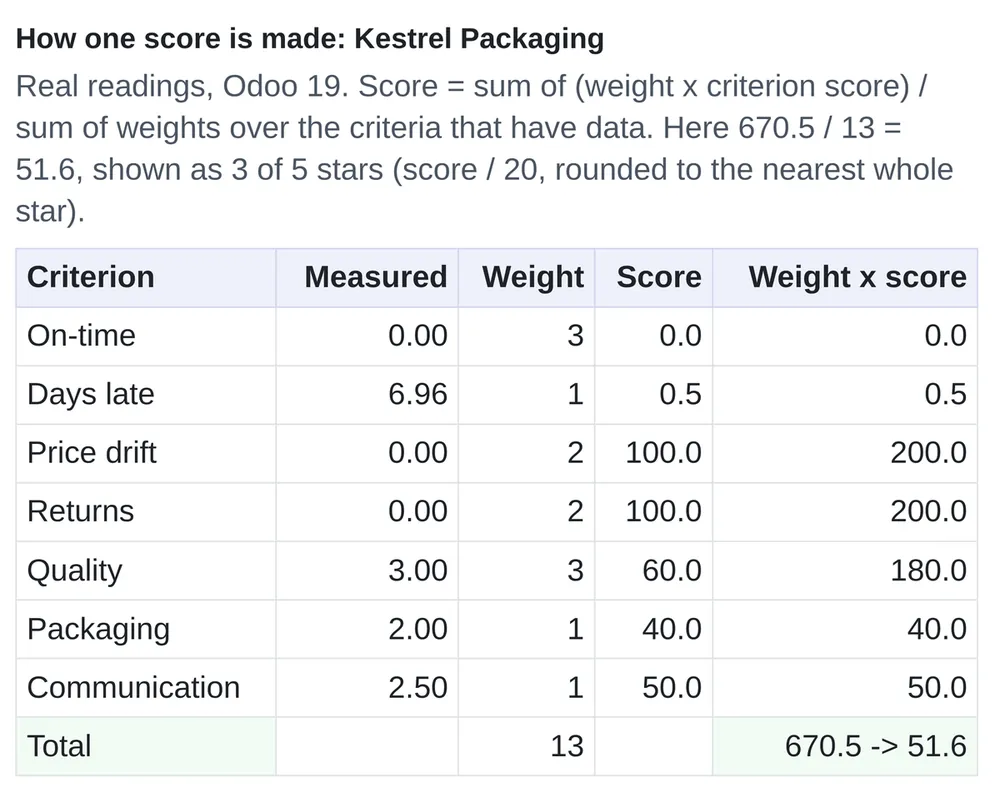
Purchase, Orders, Vendor Scores lists every scored vendor by score with stars, the number of orders measured and the receipts rated; opening one shows each criterion with its measured value, its weight and its 0 to 100 score. The score is the weighted average of the criteria that have data, and the stars are the score divided by 20, rounded to the nearest star. The made-up Kestrel Packaging is always about a week late: 0%% on time, 6.96 days late on average, 51.6 and three stars. Fenwick Finishing Oils is new, has one open order at the list price and nothing else to measure, and scores 100: one of the limits below.
A weight of 0 still shows the line in the breakdown, with its weight, but it does not count.
The ranking of the six demo vendors. Real Odoo screen (Odoo 19).
One vendor opened: every criterion with its measured value, weight and score. Real Odoo screen.
The arithmetic for the same vendor. Evidence table.
5 Where you see it
Use it when a buyer is choosing a vendor or confirming an order.Read-only
A score on a report nobody opens changes nothing; it has to be on the screens where the vendor is chosen.
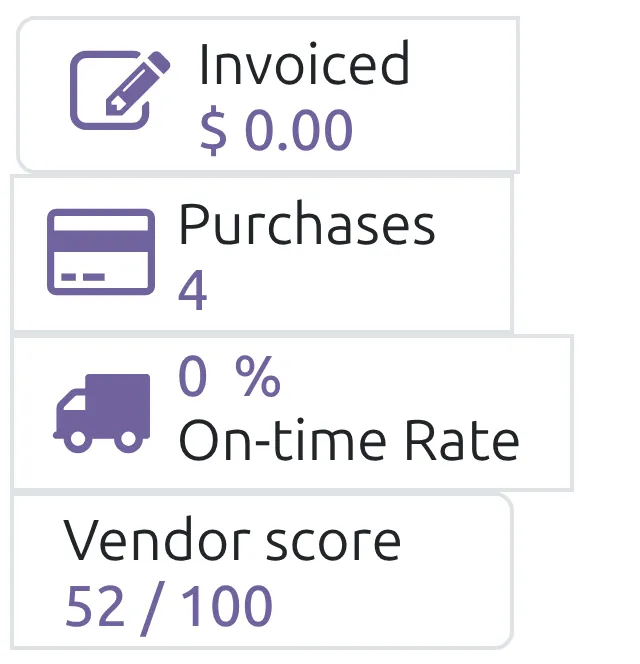
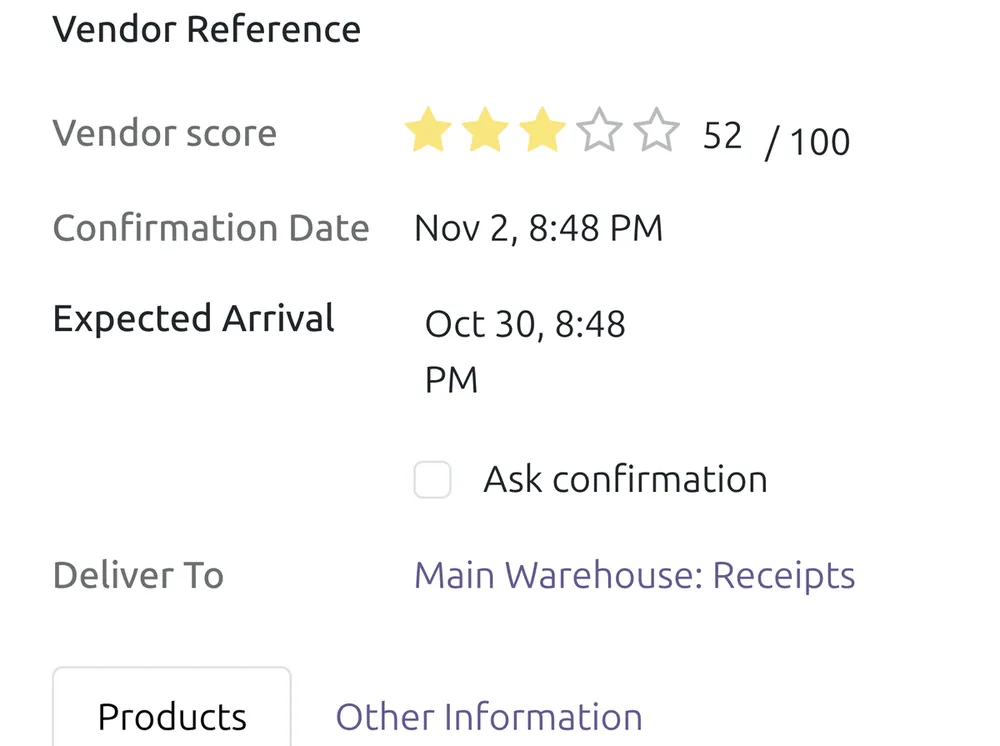
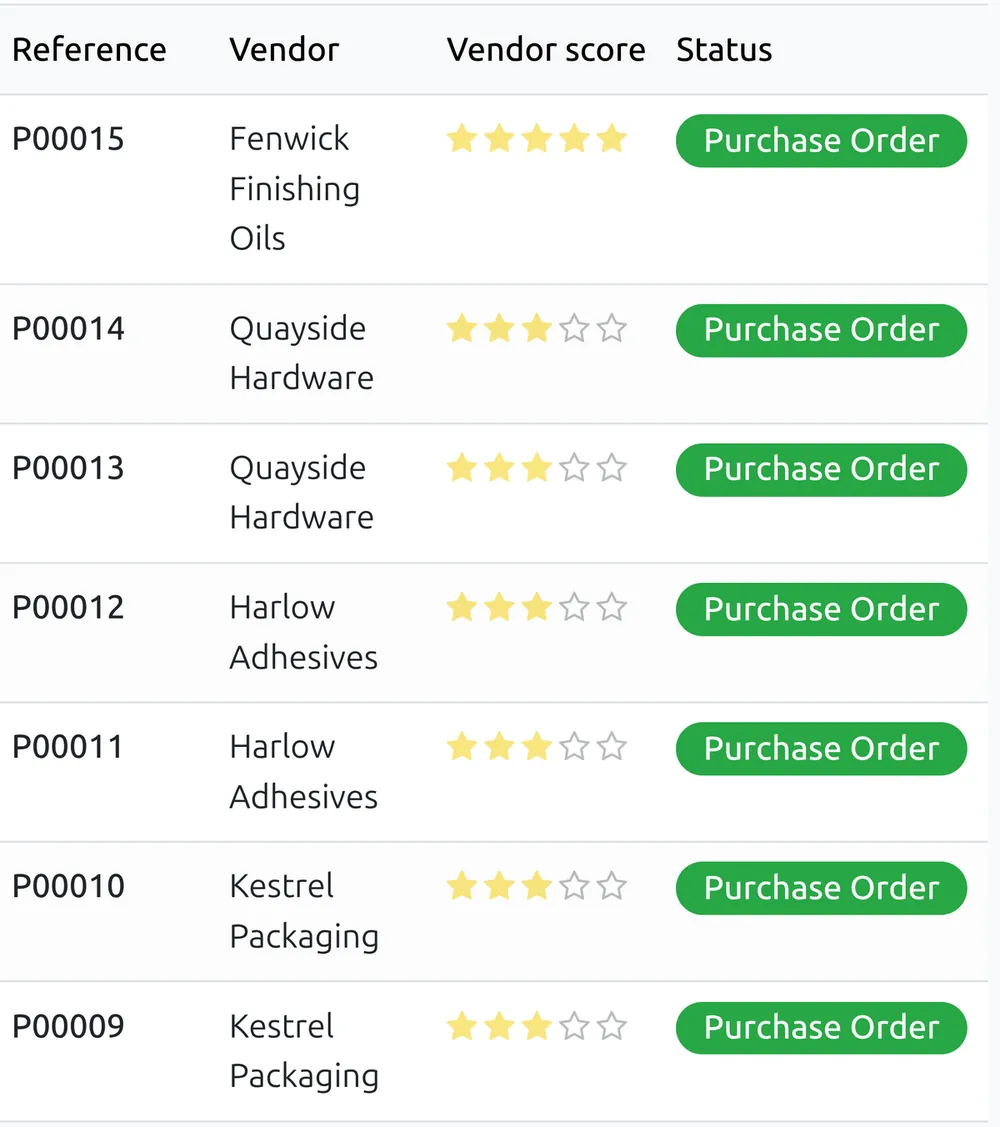
The vendor form gets a Vendor score button (score out of 100) beside Odoo's own On-time Rate, which is a different figure. RFQ and purchase order forms show the vendor's stars and score under the vendor, and the order lists have a Vendor score column of stars. Purchase users see these; users outside Purchase do not even get the fields.
The score is not shown on product vendor lines or in replenishment and blocks nothing.
The vendor form's button box. Real Odoo screen.
The vendor's score on a purchase order. Real Odoo screen.
The order list with the stars column (first rows). Real Odoo screen.
6 Checked against the raw tables
Use it when you want to know the arithmetic is right before you rely on it.Read-only
A score is only as good as the counts behind it.
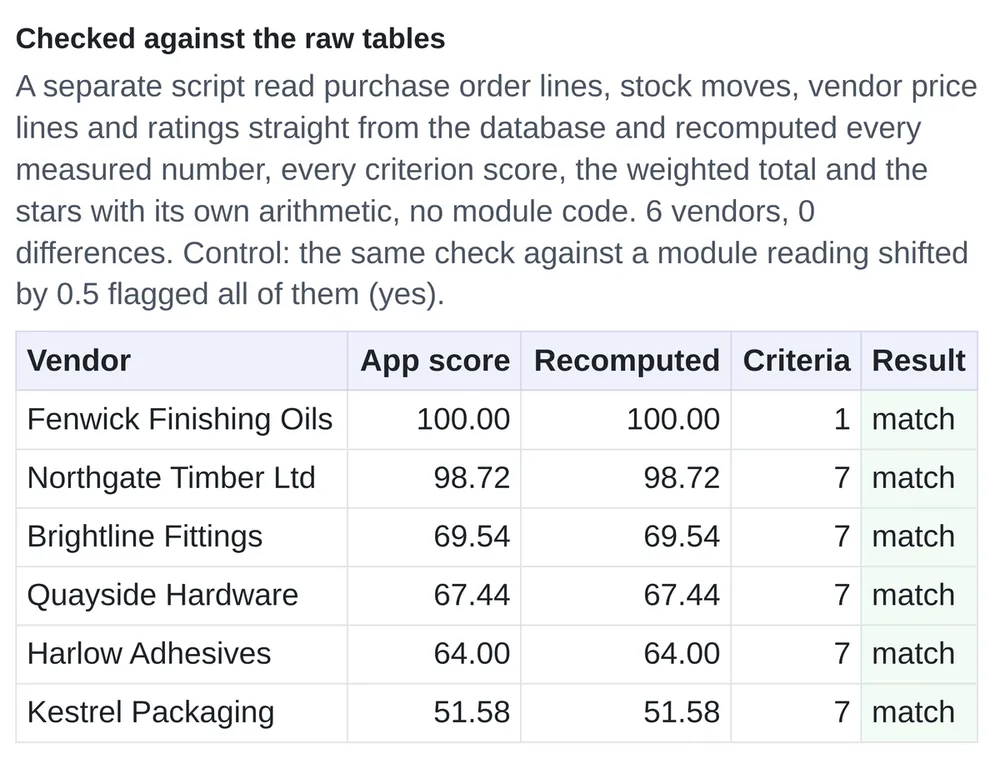
A separate script read the purchase order lines, stock moves, vendor price lines and ratings straight from the database and recomputed every measured number, every criterion score, the weighted total and the stars with its own arithmetic and no module code. All six vendors matched, with no difference, on Odoo 19 and Odoo 20. As a control the same check run against a module reading shifted by 0.5 flagged all six.
Six of six vendors, each matched. Evidence table.
What changed in this version
Version 1.0.2 changes no behaviour of the app. It adds eight automated tests that pin the limits above, replaces the screenshots and the demo-free page text with checked ones, and takes nothing out. The demo video of an earlier version is kept as it was and was not re-recorded.
Screenshots
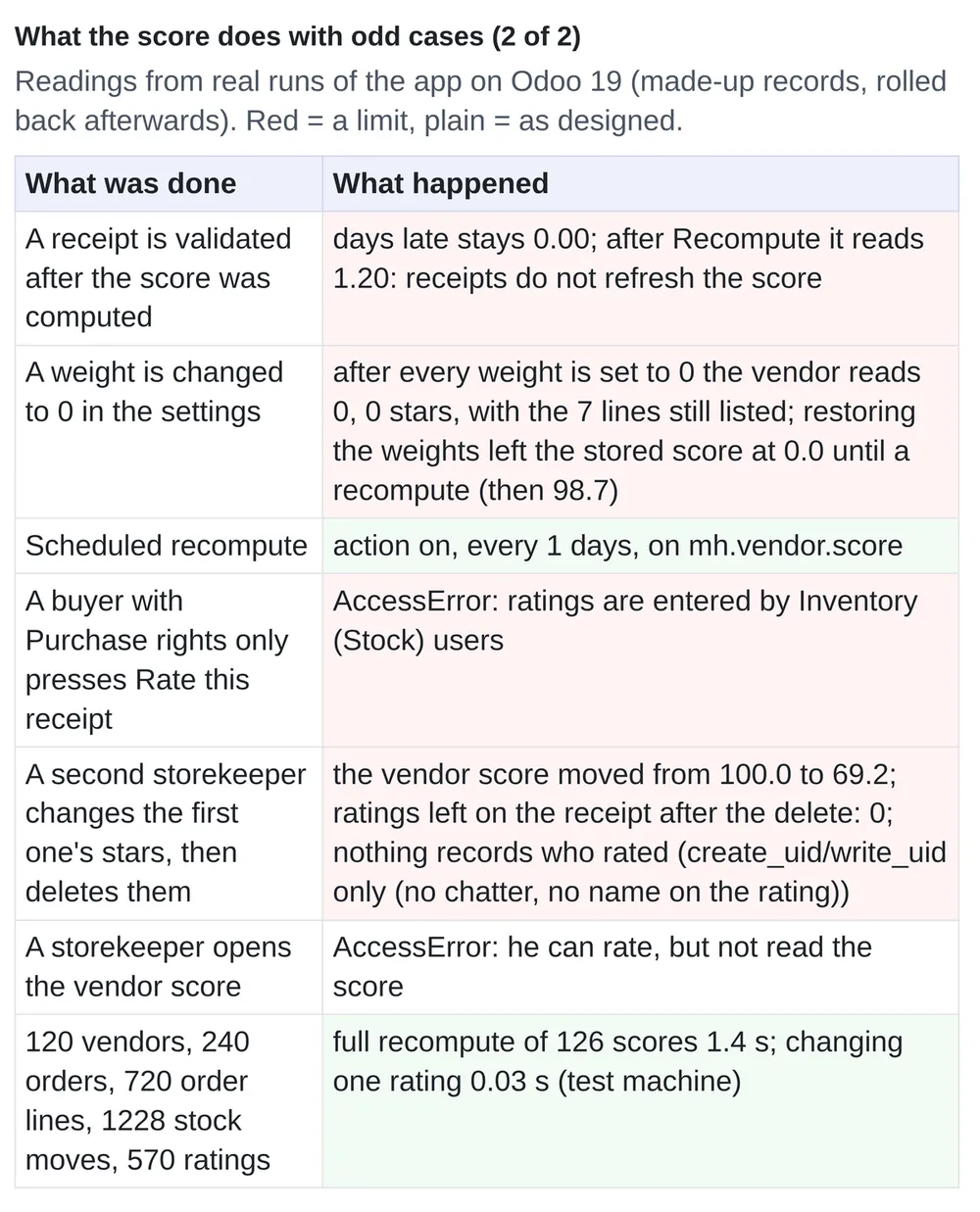
What it does not do
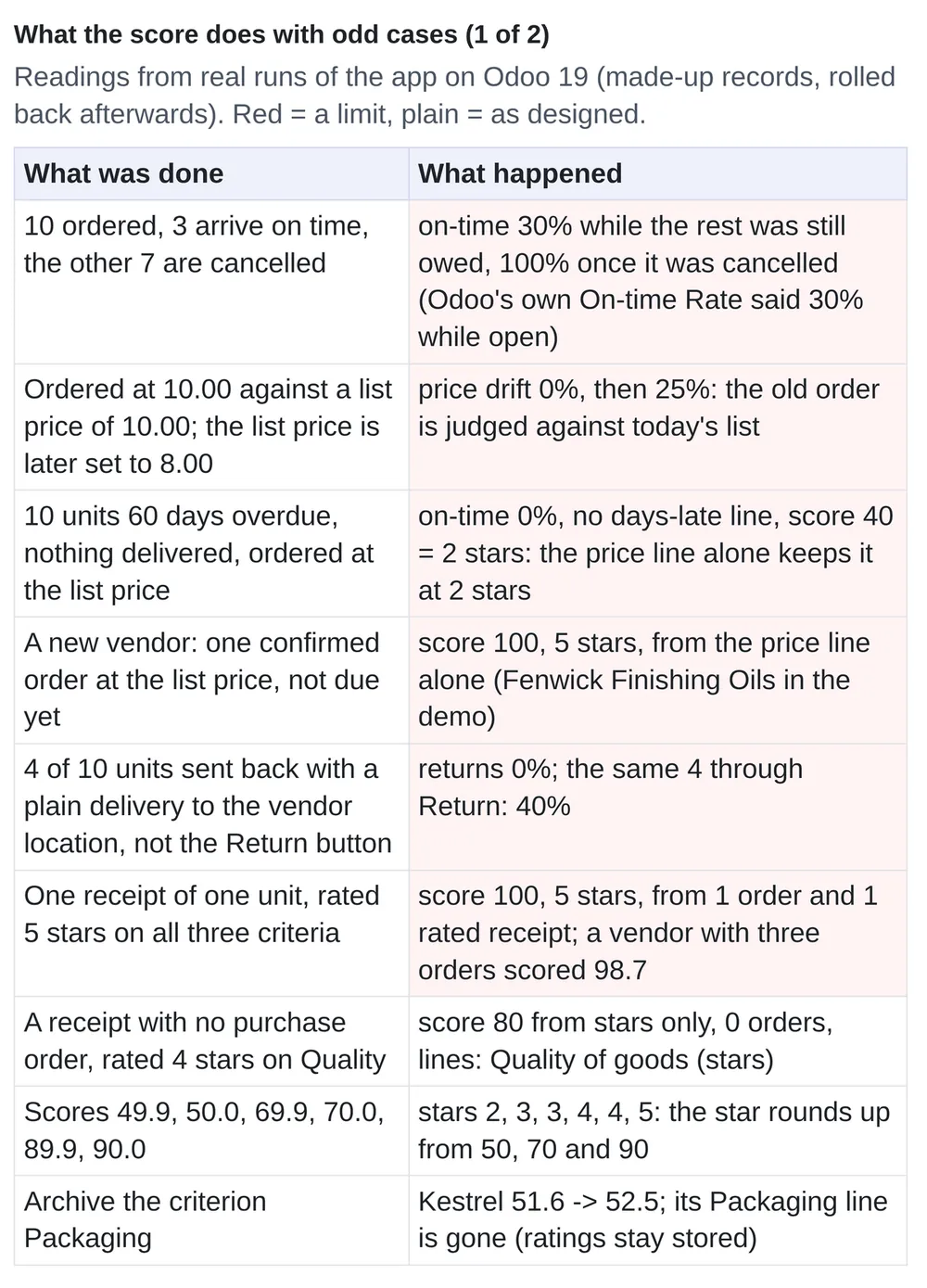
- Each of these was reproduced in a run of the app on Odoo 19 and is pinned by a test that passes; none is changed in this version.
- Nine readings from real runs. Evidence table.
- Seven more readings from real runs. Evidence table.
Requirements
- Odoo 19.0 or 20.0. The App Store sells each version separately, so buy the one that matches your database.
- Odoo.sh or On-Premise only. Third-party apps cannot be installed on Odoo Online (SaaS) databases. Check your hosting before buying.
- Module
mh_vendor_evaluation, version 19.0.1.0.3, licensed OPL-1.