HR Employee Compliance
Expiry dates with a reminder before they lapse, plus a log of complaints and disciplinary penalties, on the employee record
Request a live demo · Odoo.sh or On-Premise only, not Odoo Online (SaaS).
0 of 496
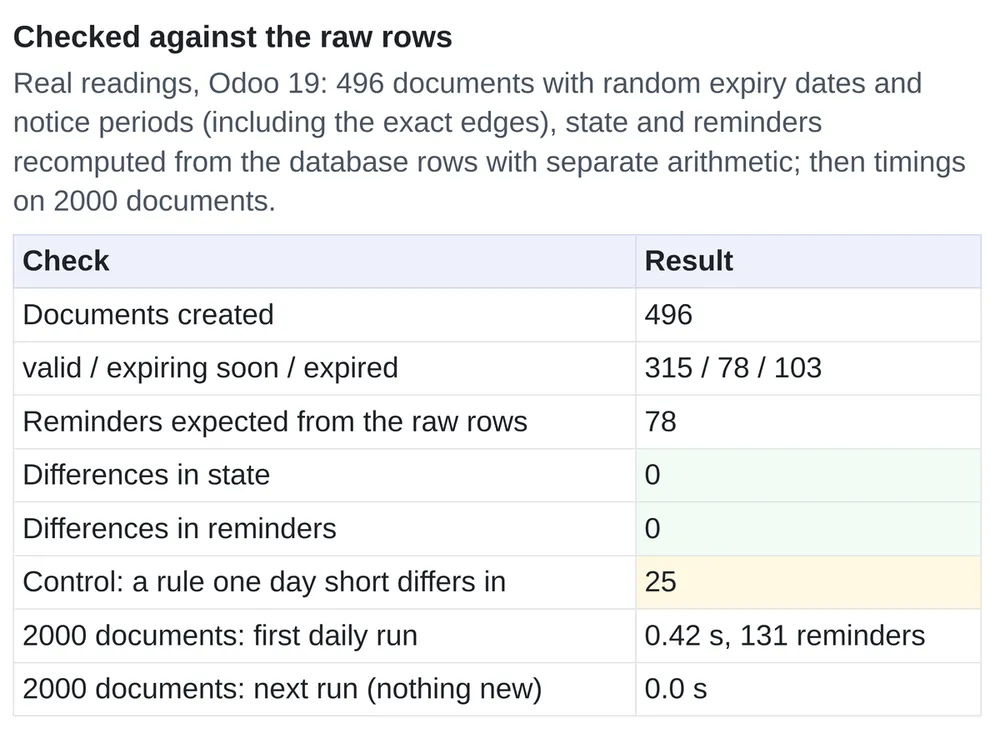
made-up documents had a state or a reminder different from what a separate script computed from the raw database rows (96 of them exactly on the edge of their notice period; control: a rule one day short differs in 25)
3 kinds
of record on the employee file: documents that expire, complaints and disciplinary penalties, each with its own chatter
23
automated tests counted on this version, none failing; 16 were added (7 before)
4 fixed
in this version: reminders to OdooBot, reminders that came back after Mark Done, reminders for archived employees, and records of other companies visible to an HR Officer
0.3 s
for the daily action over 2000 documents (131 of them inside their notice); larger data not tested
Not
a legal or compliance control: no file field, no e-mail, no history of edits to a penalty's reason, and any HR Officer can delete a record (see the known limits)
Odoo tracks passport, visa and work-permit expiry and nothing else. HR Employee Compliance adds a document with an expiry date and a notice period for anything else (a driving licence, a first aid certificate, a background check), a daily to-do for the HR Responsible before it lapses, and two logs: complaints that move from New to Closed, and disciplinary penalties (verbal or written warning, suspension, termination notice). This page walks through it with screenshots of an Odoo 19 database holding a made-up freight company, one HR Officer and eight employees, and with tables rendered from real readings of the same run; each picture says which it is.
It is a record keeper for HR officers. This page also says where that bites: nobody but HR sees a record, there is no file field and no e-mail, a record can be deleted without a trace, and the state cannot be filtered on.
Install it and three menus appear under Employees: Employee Documents, Complaints and Disciplinary Penalties. It needs only the Employees app (hr).
How it works
What it keeps, what it changes, what it does not
Each line was tested or read in the code.
1 Documents that expire
Use it when you track licences and certificates that lapse and want to see at a glance which are close.Changes records
A spreadsheet of licence dates does not tell anyone a date is close; Odoo's own fields cover only a passport, a visa and a work permit.
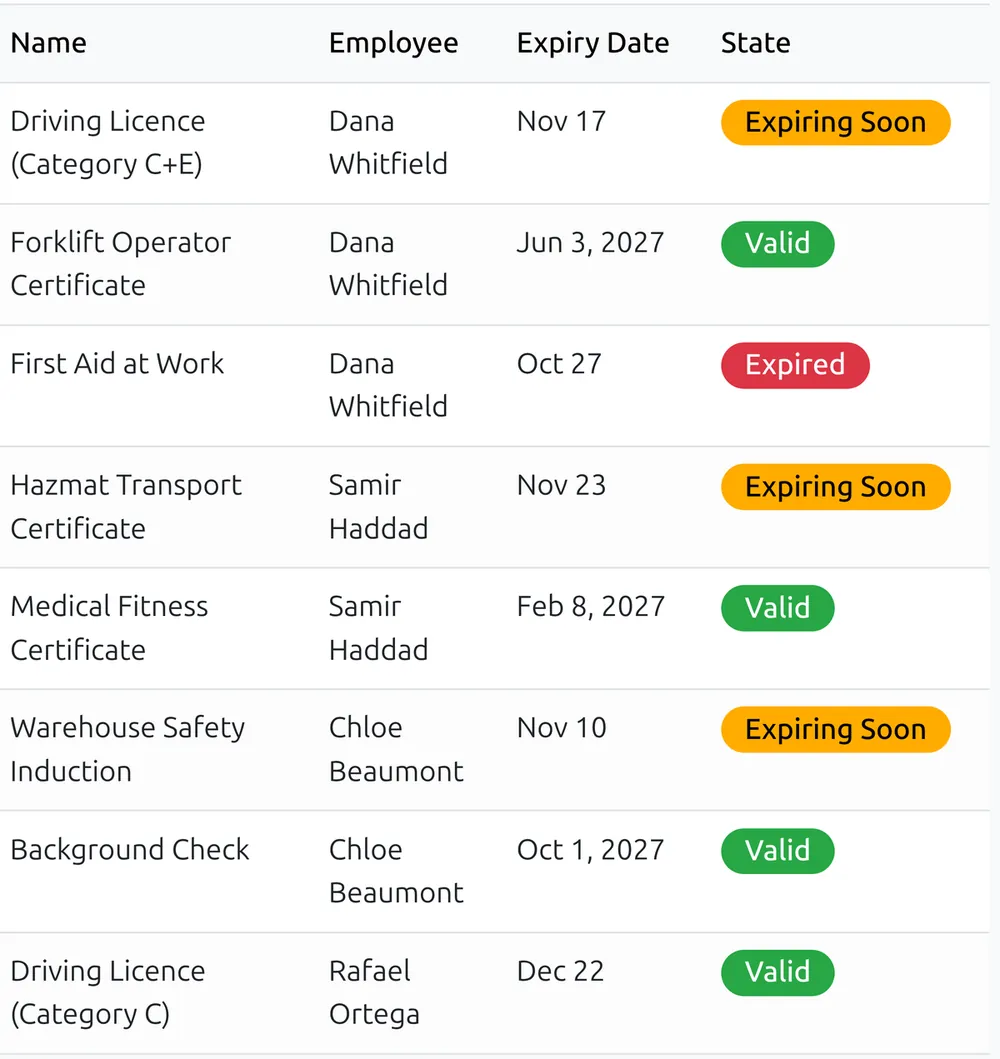
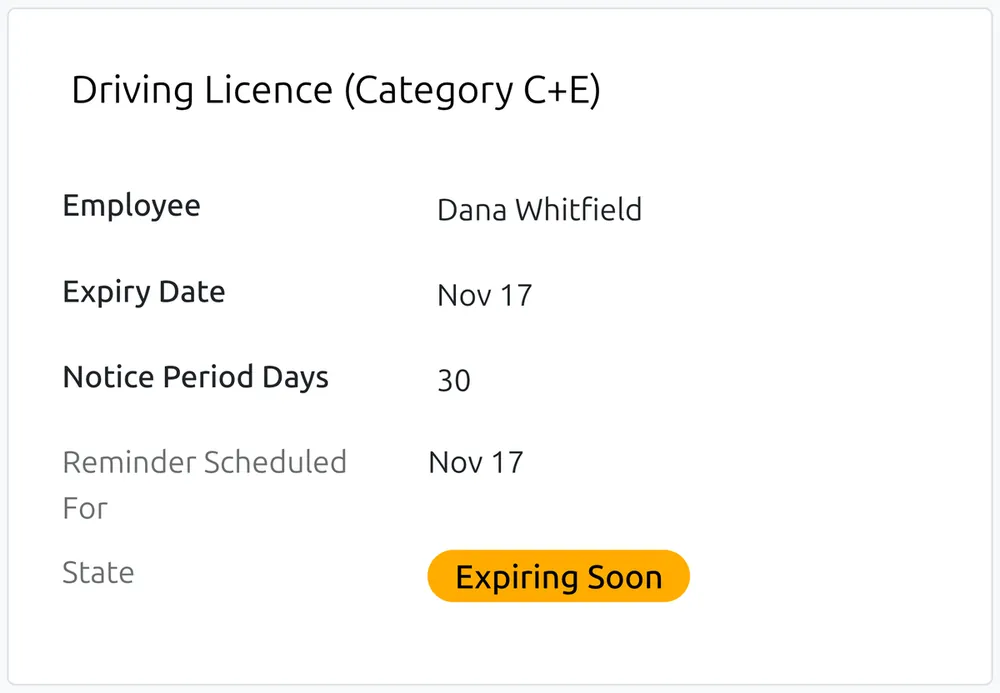
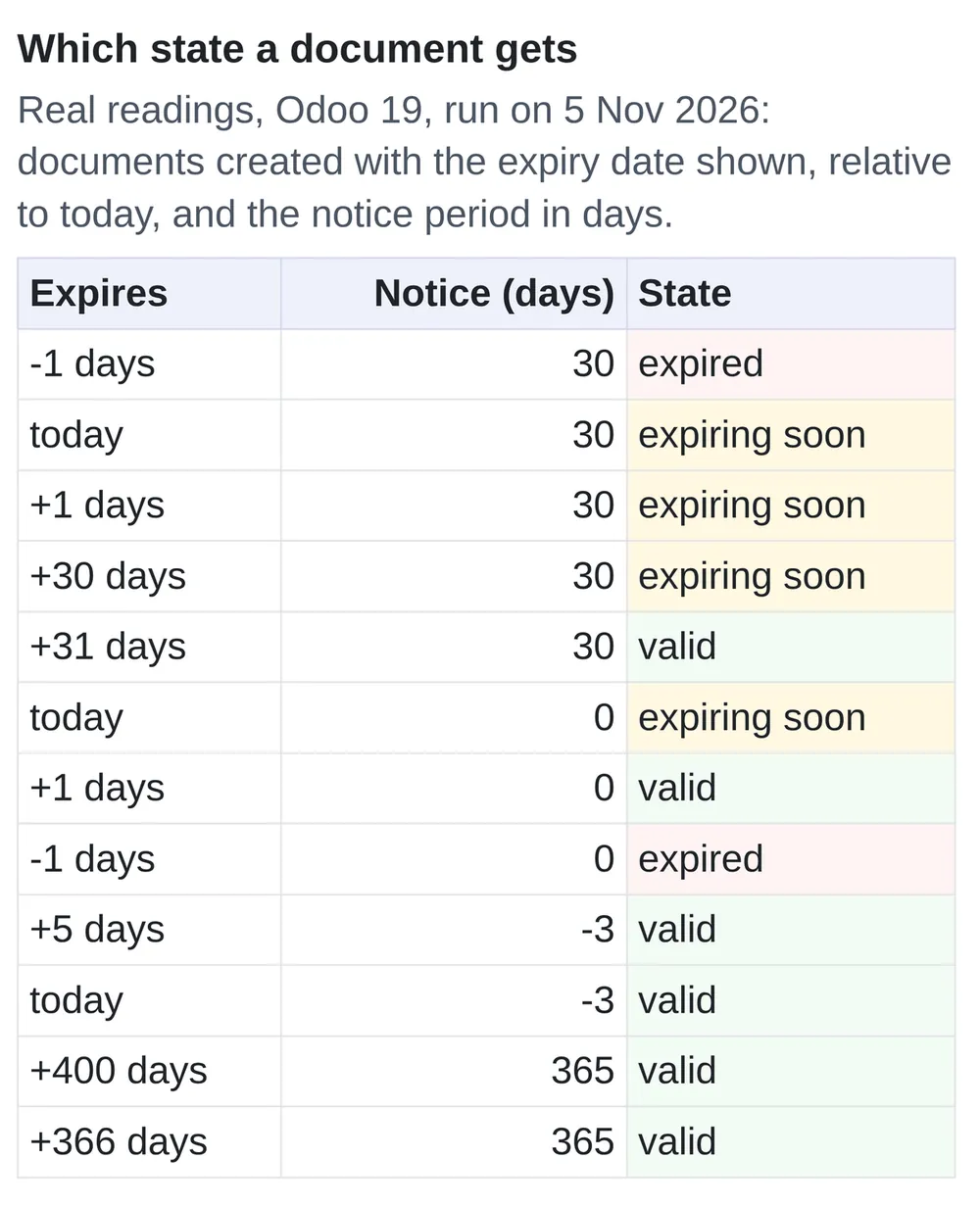
Open Employees, Employee Documents and add a document: a name, the employee, the expiry date and the notice period in days (30 unless you change it). The list shows each document with a coloured state: Valid, Expiring Soon from the notice period until the expiry date (the expiry day itself counts as Expiring Soon), and Expired the day after. The first picture is the list of a made-up freight company on 5 November 2026; the second is a document form. The first table shows the state for twelve combinations of expiry date and notice period, including a notice period of 0 and a negative one.
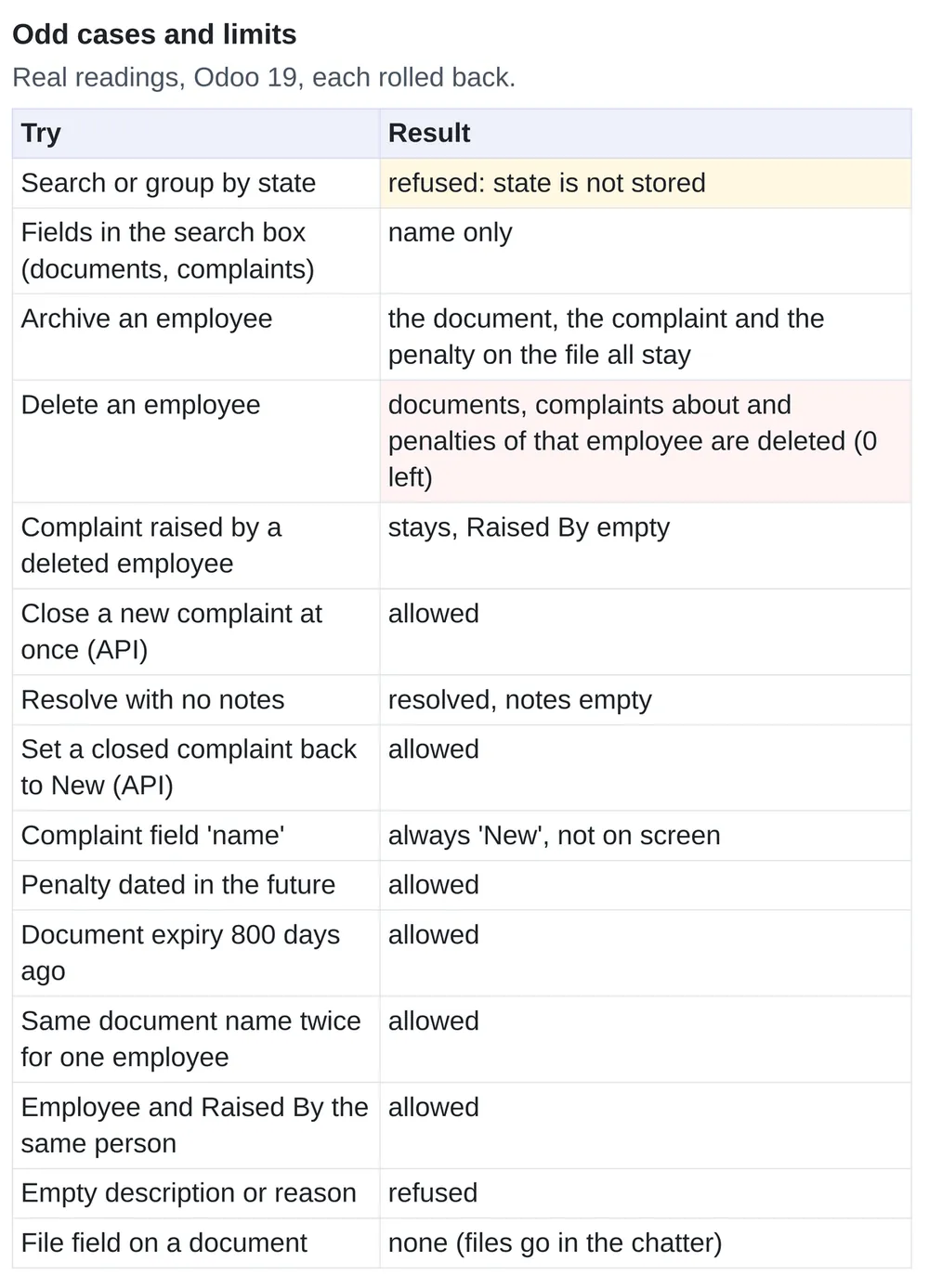
The state is worked out when the screen is read, so it can be seen but not searched, filtered or grouped on; the search box finds a document by name only. There is no field for the scan of the document: files go in the chatter.
The documents list. Real Odoo screen.
A document. Real Odoo screen.
Which state a document gets. Evidence table.
2 The reminder
Use it when you want the person responsible told before a date, not after.Changes records
A date nobody is reminded of lapses unnoticed.
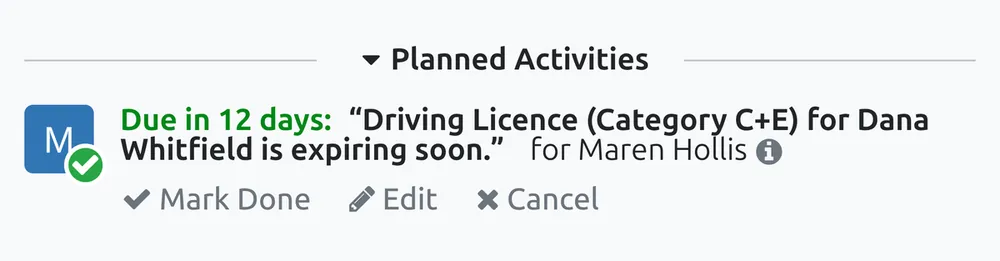
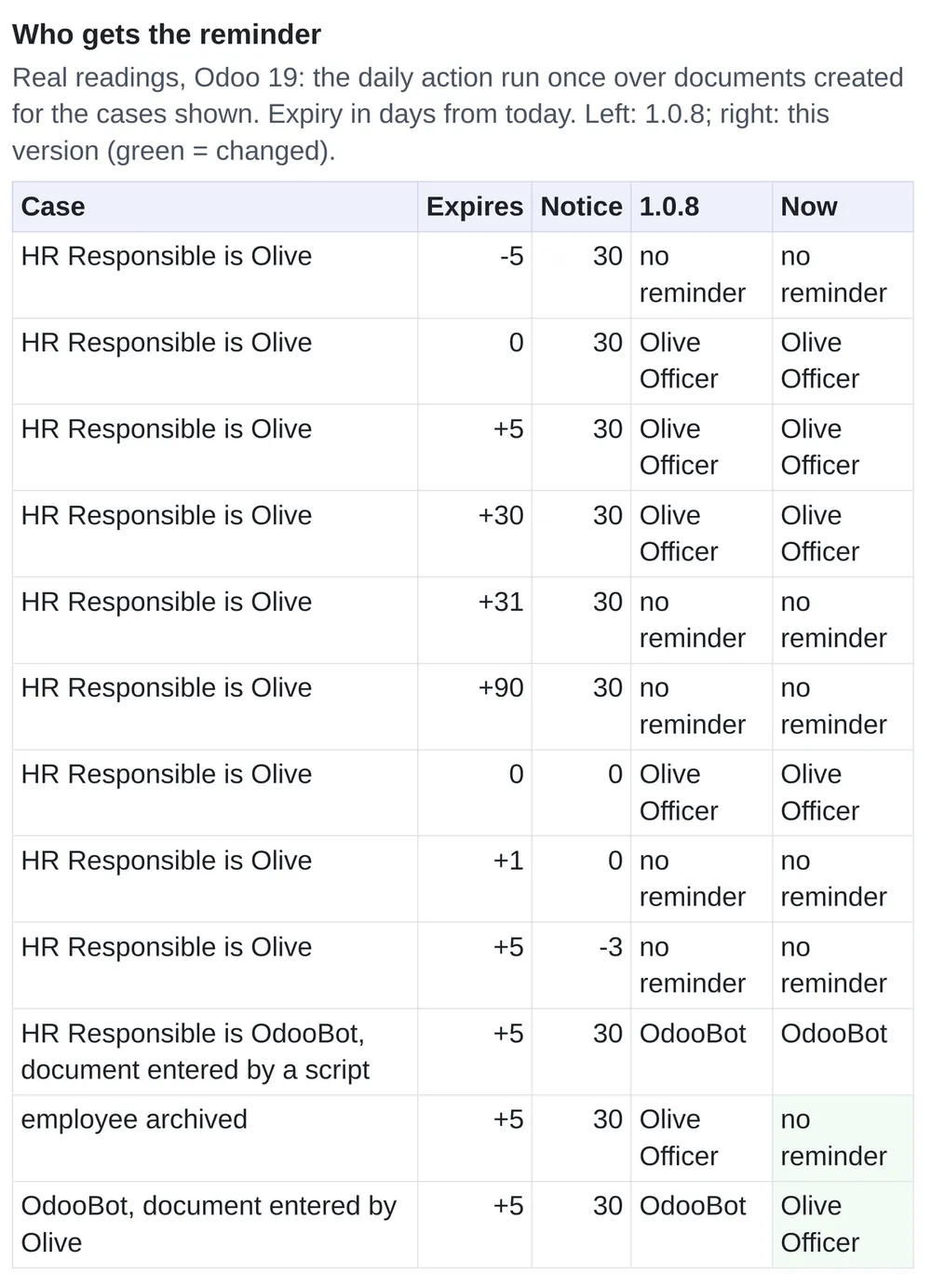
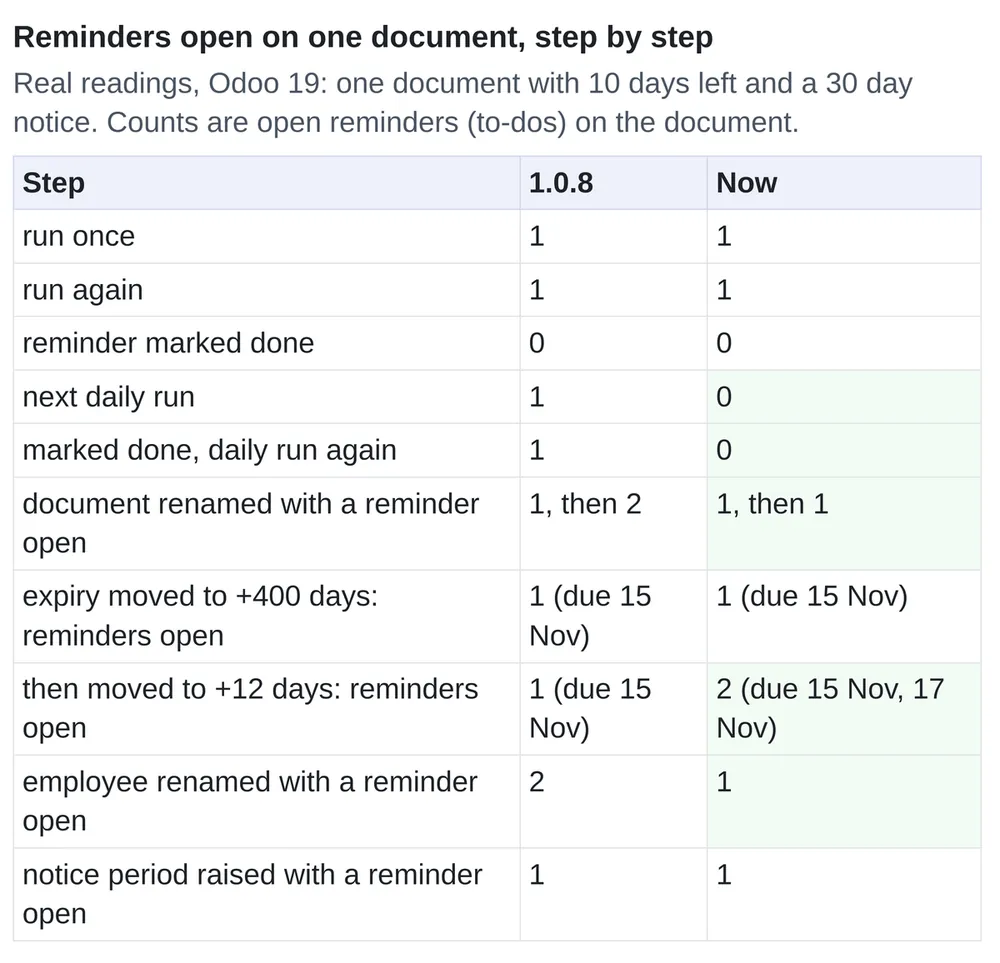
A scheduled action runs once a day. For each document that has not expired and is inside its notice period it adds one to-do, '<document> for <employee> is expiring soon.', due on the expiry date, for the employee's HR Responsible (the first picture, the to-do on the document). If that user is OdooBot, which happens for employees created by a script or import, or is archived, the to-do goes to the user who entered the document. A document is reminded once for each expiry date: running the action again adds nothing, marking the to-do done does not bring it back, and moving the expiry date to a new one gives a new reminder. The first table says who was given the to-do in each case and what 1.0.8 did, the second follows one document through nine steps.
It sends no e-mail or inbox message, reminds nothing that has already expired (also a document entered after its date), and a to-do left open when a document is renewed stays open with the old date.
The to-do on the document. Real Odoo screen.
Who gets the reminder. Evidence table.
One document, step by step. Evidence table.
3 Complaints
Use it when you need a dated record of a complaint from the first report to the outcome.Changes records
A complaint kept in e-mail threads has no state and no date anyone can list.
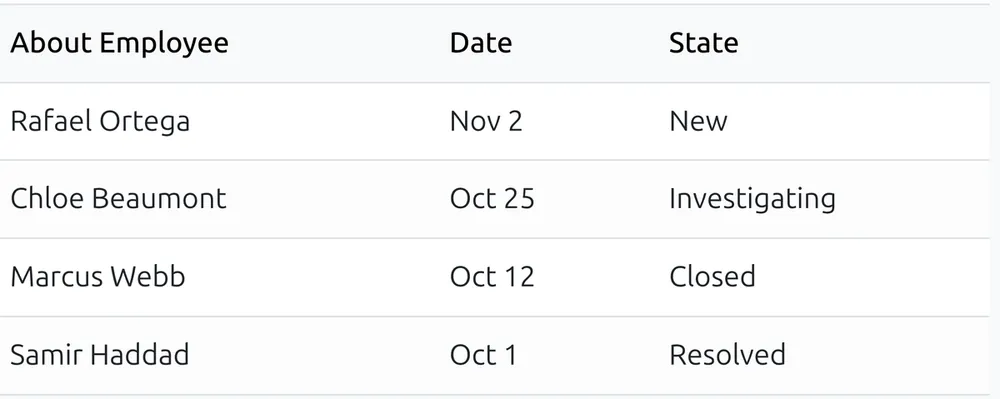
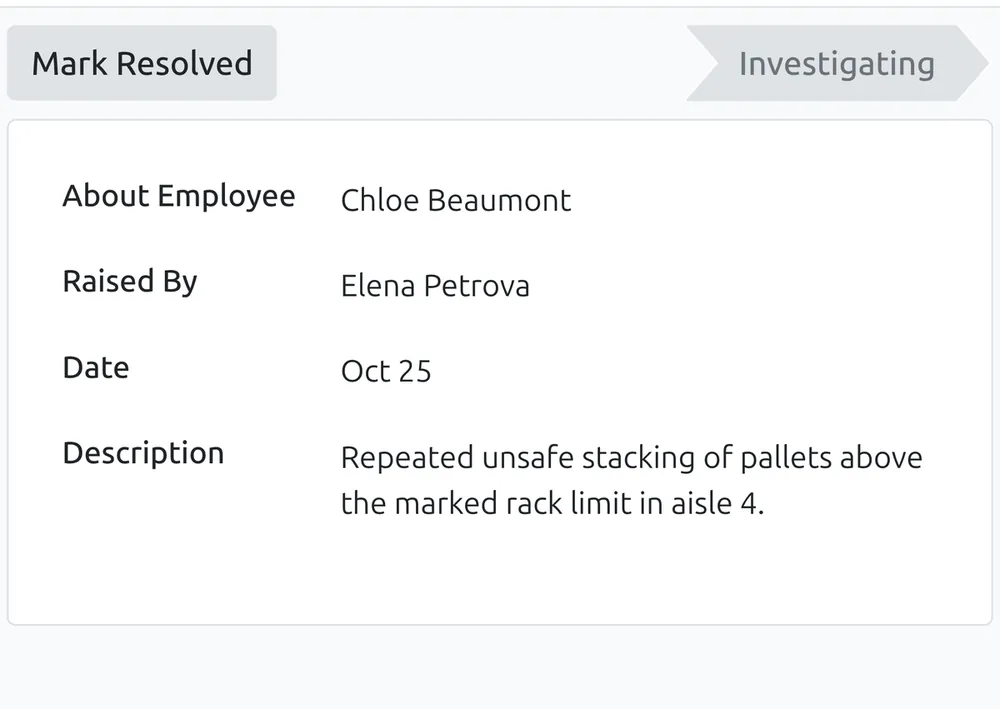
Employees, Complaints, New: who it is about, who raised it (optional), the date and the description. The buttons Start Investigating, Mark Resolved and Close move it from New through Investigating and Resolved to Closed (the second picture shows a complaint under investigation); the resolution notes appear from Resolved on. The state, the employee and the person who raised it are tracked in the chatter. The list shows the employee, the date and the state.
The buttons are on screen only: through the API a new complaint can be closed at once or set back to New, and a complaint can be resolved without notes. The description and the notes are not tracked in the chatter.
The complaints list. Real Odoo screen.
A complaint under investigation. Real Odoo screen.
4 Disciplinary penalties
Use it when you need to show what was issued, to whom, when and by whom.Changes records
A warning that is not written down on the file is a warning that did not happen.
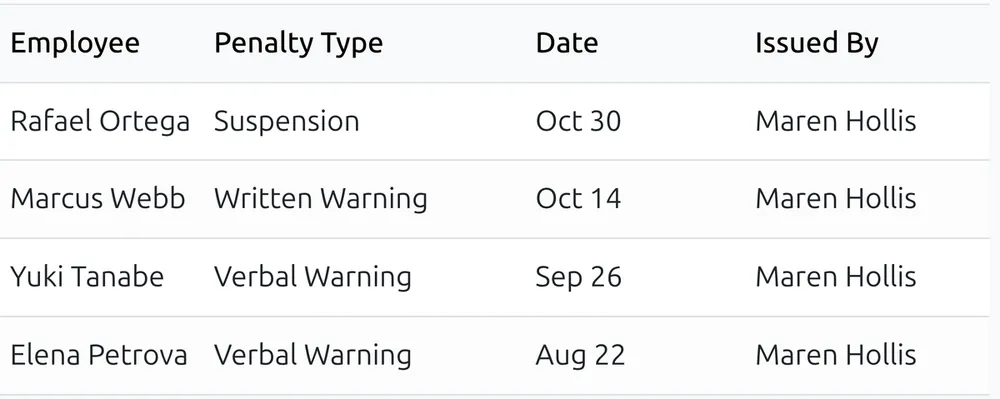
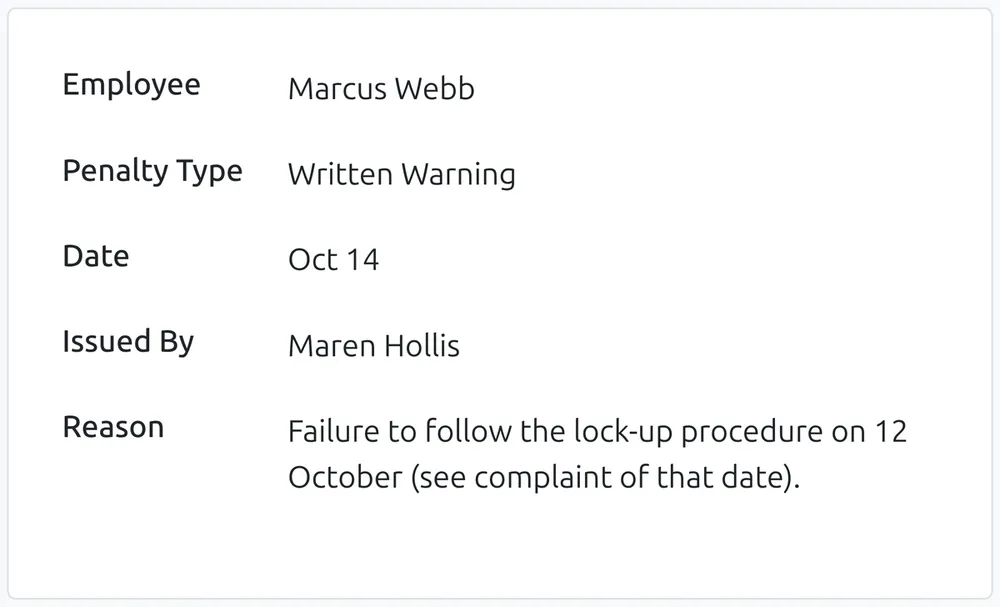
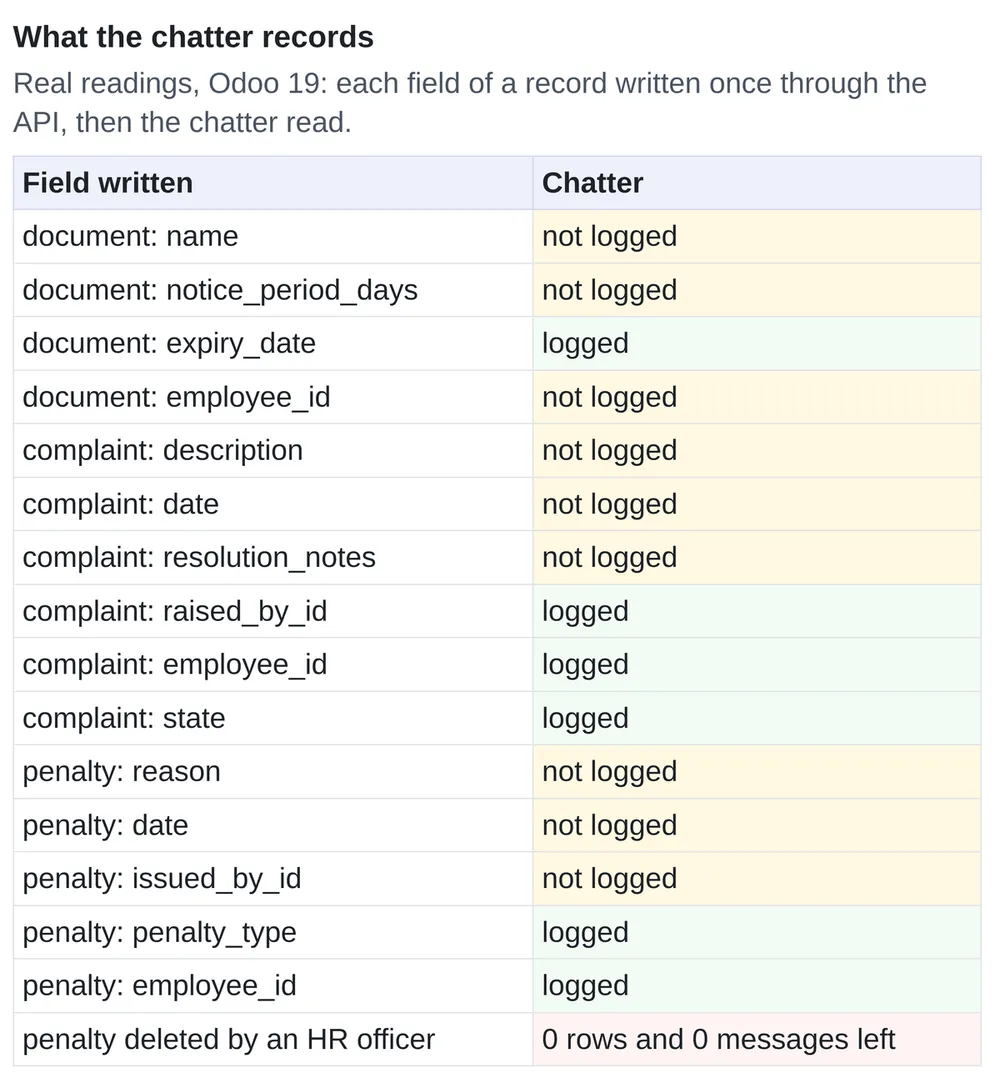
Employees, Disciplinary Penalties, New: the employee, the type (Verbal Warning, Written Warning, Suspension, Termination Notice), the date, the reason and who issued it (the current user unless changed). The list shows the employee, type, date and issuer (first picture); the form carries the reason (second picture). The type and the employee are tracked in the chatter; the reason, the date and the issuer are not, so a changed reason leaves no history.
It does not issue a letter, notify the employee or lock a penalty: any HR Officer can change or delete it, and a penalty may be dated in the future.
The penalties list. Real Odoo screen.
A penalty. Real Odoo screen.
5 Who can see it, and which company
Use it when the records are about people and only HR should see them.Read-only
A complaint or a warning is among the most private things on a file.
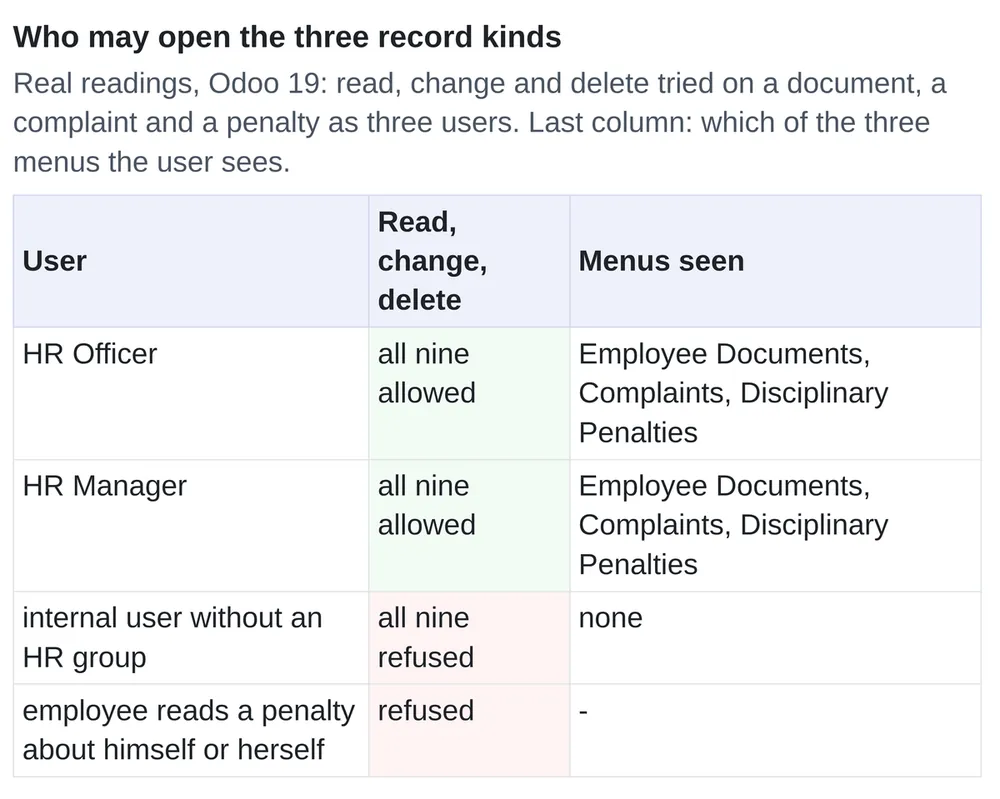
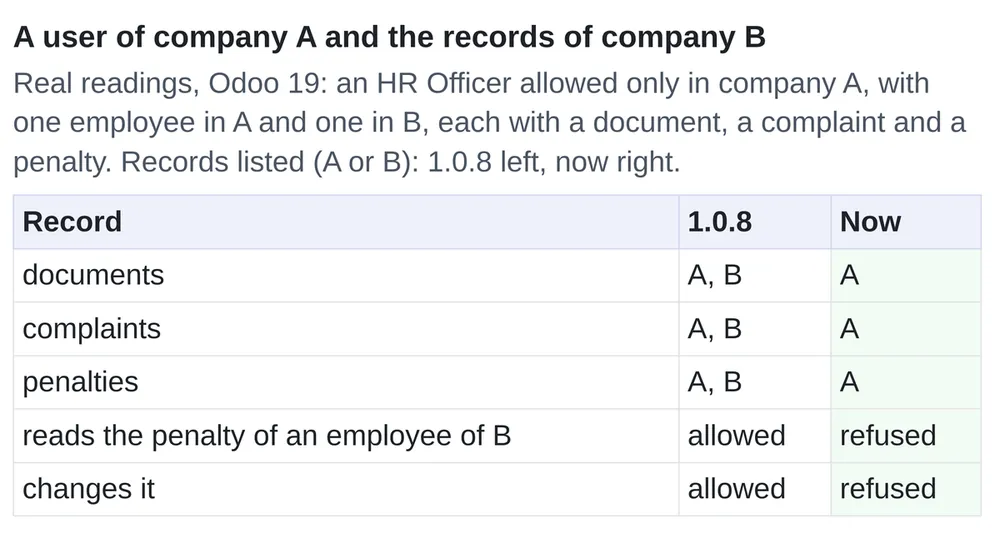
HR Officers and HR Managers (Odoo's Employees group Officer: Manage all employees, and Administrator) can read, create, change and delete all three kinds, and see the three menus. An internal user without an HR group sees no menu and is refused when asking for a record, including one about himself or herself (first table). In a database with several companies the records now follow the employee's company: in 1.0.8 an HR Officer allowed only in company A listed, read and changed the records of employees of company B (second table, 1.0.8 on the left).
A person cannot see what the file says about him or her, and the rule looks at the employee's company only, not at the company of the person who raised a complaint.
Who may open the three kinds of record. Evidence table.
An officer of company A and the records of company B. Evidence table.
6 What the file does and does not remember
Use it when you need to know what leaves a trace before you rely on it.Read-only
A file that can be edited or emptied without a trace is a weak record.
Each record has a chatter. The first table lists each field written once through the API and whether the chatter logged it: the expiry date of a document, the state, employee and Raised By of a complaint and the type and employee of a penalty are logged; names, notice periods, reasons, dates, descriptions and notes are not. Deleting a penalty removes the record and its chatter. The second table lists what was tried at the edges: the state cannot be searched, archiving an employee keeps the records and deleting one deletes them, and the odd cases the screens would not allow but the API does.
What the chatter records. Evidence table.
Odd cases and limits. Evidence table.
7 Checked against the raw rows
Use it when you want to know the dates are counted right before you rely on a reminder.Read-only
A reminder one day late is a reminder after the licence lapsed.
A separate script read the database rows and worked out, with its own arithmetic and no module code, the state of each of 496 made-up documents (random dates and notice periods, 96 of them exactly on the edge of their notice period or on the day) and whether each should have a reminder after the daily action: 0 differences, on Odoo 19 and Odoo 20. As a control, a rule one day short differs in 25 of them. The table also lists the timings on 2000 documents.
The independent check and timings. Evidence table.
What changed in this version
Version 1.0.9 fixes four defects that were reproduced on 1.0.8: (1) the daily to-do went to OdooBot for an employee whose HR Responsible is OdooBot, where nobody reads it, and now goes to the user who entered the document; (2) a to-do marked done came back on the next daily run until the expiry date, and a document renamed while its to-do was open got a second one; a new read-only field Reminder Scheduled For records the expiry date already reminded, so a reminder is sent once per expiry date; (3) archived employees were still reminded; (4) the three kinds of record had no company rule, so an HR Officer allowed only in one company could list, read and change the records of another company's employees. The last is a security change: in a database with one company nothing changes. It also adds 16 automated tests for what this page states, rewrites the screenshots and the text, and removes the claim that the reminder works 'the same way' as Odoo's own work-permit reminder (the assignee fallback was the same; the rest was not checked). The demo video of an earlier version is kept as it was and was not re-recorded.
What it does not do
- Each of these was reproduced in a run of the app on Odoo 19 and is pinned by a test that passes; the four before the list were changed in this version.
Requirements
- Odoo 19.0 or 20.0. The App Store sells each version separately, so buy the one that matches your database.
- Odoo.sh or On-Premise only. Third-party apps cannot be installed on Odoo Online (SaaS) databases. Check your hosting before buying.
- Module
mh_hr_employee_compliance, version 19.0.1.0.8, licensed OPL-1.