Archive Stock Guard
Block archiving products that still have stock on hand or open transfers, and list the archived products still holding stock
Request a live demo · Odoo.sh or On-Premise only, not Odoo Online (SaaS).
Free
App Store price, per Odoo version
19 · 20
Odoo versions, each sold on its own page
Odoo.sh
or On-Premise; not Odoo Online (SaaS)
1.0.2
version of mh_archive_stock_guard
Odoo stops you archiving a stock location that still holds products. It does not stop you archiving a product that does. Archive a product while it still has stock and it disappears from the default product and stock screens, while the units are still on the shelf and still in your valuation. This puts the same guard on products.
How it works
What it blocks
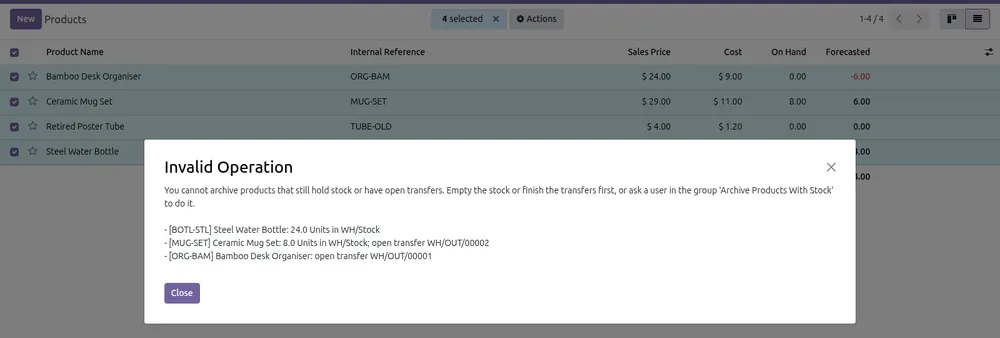
Archiving a product is refused, with a message naming the product and why, when it has either of these:
Stock on hand. A quantity that is not zero (a negative one counts too) in an internal or transit location, in any company.
An open transfer. Any stock move that is not done and not cancelled: a draft, waiting, ready or partly done receipt, delivery or internal transfer.
Every way of archiving
The check sits on the product variant, which is where Odoo's archiving ends up. Archive from the list or the form, on a template or on one variant, or for a whole selection at once: all of them go through it. Archiving a template archives its variants, so one variant with stock blocks the template. A selection is refused as a whole: nothing is archived halfway. Removing an attribute value from a product, which makes Odoo archive the variants that used it, is refused the same way.
A message that tells you what to do
The error lists each product with its location and quantity, or the transfer that is still open (for example WH/OUT/00012). It lists up to 8 products, and up to 3 reasons for each.
Who can still archive
Users in the group Archive Products With Stock (Settings > Users, under Inventory). Inventory Administrators do not get it automatically, on purpose: the guard would mean nothing if every stock manager were exempt. OdooBot is never blocked, so data files and module upgrades that archive products still run.
Archived With Stock
Inventory > Reporting > Archived With Stock lists the stock that archived products still hold, by product and location, with the quantity and its value. It also finds products that were archived before you installed the app. It is shown to Inventory Administrators.
Screenshots

What it does not do
- It does not look at reserved quantities, reordering rules, or orders that have not created a transfer yet. A confirmed order whose delivery does not exist, or a quotation, does not block archiving.
- It does not stop code that runs as the superuser , and it does not touch products that are already archived. It does not un-archive anything.
- It does not move or write off the stock. It only refuses, and shows you what is in the way.
Requirements
- Odoo 19.0 or 20.0. The App Store sells each version separately, so buy the one that matches your database.
- Odoo.sh or On-Premise only. Third-party apps cannot be installed on Odoo Online (SaaS) databases. Check your hosting before buying.
- Odoo 19 and 20, Community or Enterprise. Also requires Inventory with valuation (stock_account). Third-party apps install on Odoo.sh or On-Premise only - they cannot be installed on Odoo Online (SaaS).
- Module
mh_archive_stock_guard, version 19.0.1.0.2, licensed OPL-1.