Stock Valuation Report
Inventory valuation for any period: opening stock, received, issued and closing value, per product.
The video below shows Stock Valuation Report running on a real Odoo 19 database. Want it driven against your own data, or a question answered first? Ask and we will set up a session.
Odoo 19 removed the stock valuation layer and, with it, the Valuation view under Inventory > Reporting. In Community, what is left is a single-date reconciliation by accounting account that no menu opens.
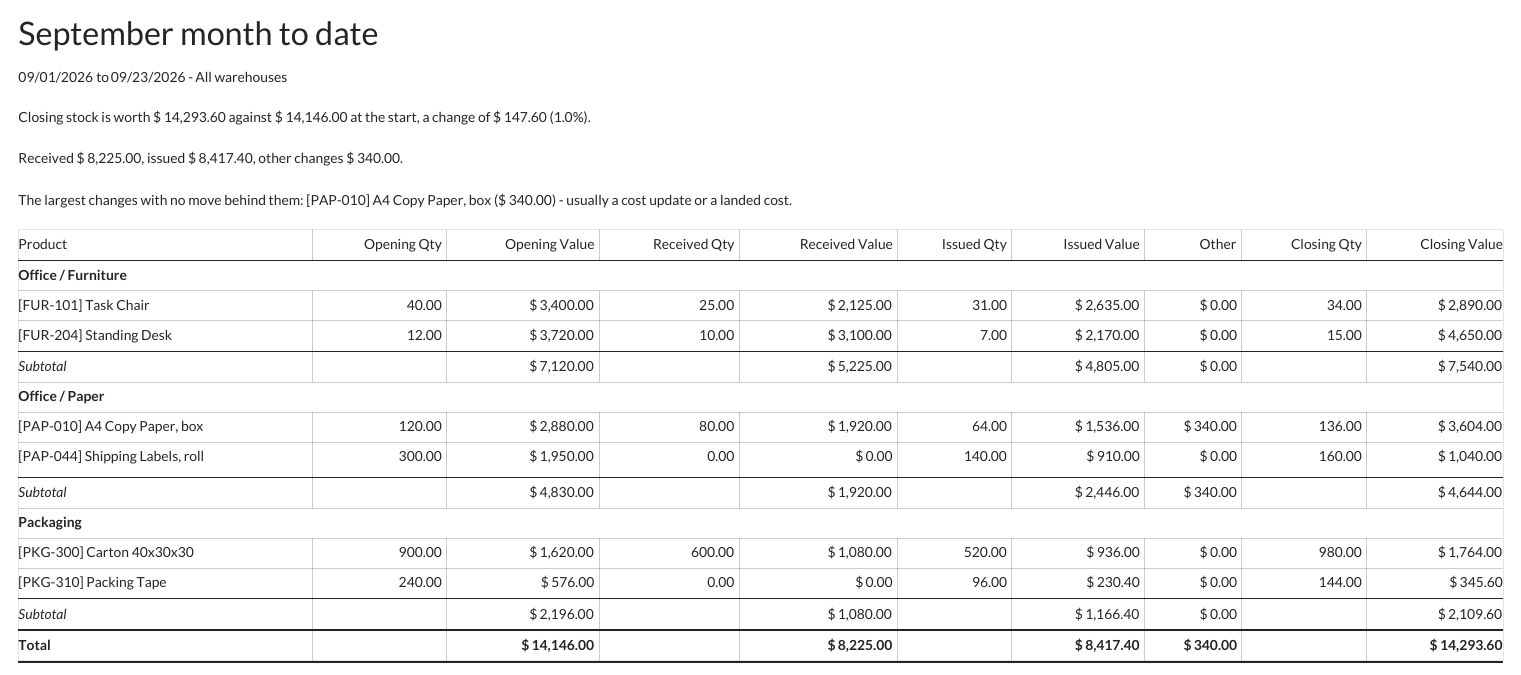
This report puts back the question every month end asks: what was the stock worth on the first, what came in, what went out, and what is it worth now — per product.
What it does
Opening and closing are Odoo’s own figures
The report reads Odoo’s own valuation at the first and the last second of the period — the same computation Odoo itself uses — so standard, average and FIFO costing and lot valuation come out exactly as Odoo books them. Nothing is recalculated.
Every row reconciles
Received and issued carry the value Odoo recorded on each stock move. Whatever changed the value without a move — a cost update, a landed cost — sits in its own Other column, so opening + received − issued + other = closing on every line.
By warehouse, location and category
Filter to one or more warehouses or internal locations, sub-locations included, and to product categories, sub-categories included. A filtered value is pro-rated by quantity, which is how Odoo itself values a warehouse. Archived products that still hold stock are included — they are still on your balance sheet.
PDF and Excel, grouped by category
Print a PDF with category subtotals and a grand total, or export the same rows to Excel for the month-end file.
Your month ends at your midnight
Period boundaries follow your time zone. Odoo’s own valuation treats a bare date as the end of that day in UTC, which moves a month end by hours anywhere east or west of Greenwich.
It says what it found
A short summary states the change over the period, the largest value changes with no stock move behind them, and any product whose quantity does not reconcile — rather than leaving you to spot it in the rows.
Screenshots
Requirements
- Odoo 19.0, Community or Enterprise.
- Odoo.sh or On-Premise only. Third-party apps cannot be installed on Odoo Online (SaaS) databases — check your hosting before buying.
- Odoo 19 Community or Enterprise with Inventory; installs Odoo’s own Inventory valuation module (stock_account). Third-party apps install on Odoo.sh or On-Premise only — they cannot be installed on Odoo Online (SaaS).
- It only reads: it posts no journal entries and changes no valuation. Stock moved between your own warehouses is not valued by Odoo, so in a report filtered to one warehouse that transfer shows as quantity with no value, and its value effect lands under Other. Stock you hold on consignment for someone else is left out, as Odoo leaves it out of your valuation. Only Inventory Administrators can run it, matching Odoo’s own rule for who sees stock value.
- Module
mh_stock_valuation_report, version 19.0.1.0.4, licensed OPL-1.
The Odoo App Store lists this app at $69.01 because it requires a paid dependency; the module's own price is $69. $69.01 is the total you pay to install it.
Related apps
Record the plots of land behind every lot of coffee, cocoa, soya, rubber, palm, cattle or wood, and check a shipment has the geolocation data an EU deforestation due diligence statement needs before it leaves
Age your inventory into buckets by how long it has sat unsold, with the capital tied up in each, per warehouse and category
Check every reordering rule against what the product has actually consumed: which minimums will stock out over the lead time, and which maximums are hoarding cash