Bulk Scrap
Bulk scrap: scrap multiple products at once, or a whole transfer with its lots in one step, instead of one product at a time
Request a live demo · Odoo.sh or On-Premise only, not Odoo Online (SaaS).
Free
App Store price, per Odoo version
19 · 20
Odoo versions, each sold on its own page
Odoo.sh
or On-Premise; not Odoo Online (SaaS)
1.0.2
version of mh_bulk_scrap
Odoo scraps one product at a time: open Scrap, pick a product, a quantity and a lot, validate, and start again. Writing off a damaged pallet of forty lines, or everything on a transfer that arrived broken, means forty trips through the same form. This adds a Bulk Scrap screen where you list every product, lot and quantity once and scrap them together, and a Scrap All button on any transfer that fills the list in for you.
How it works
Many products on one screen
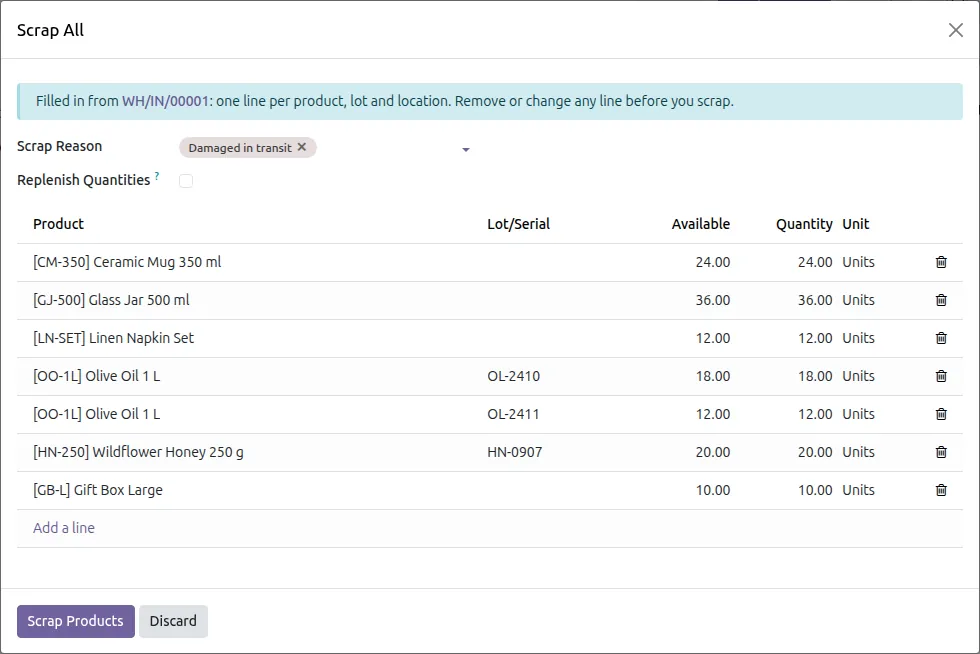
Open Inventory > Operations > Adjustments > Bulk Scrap. Add a line for each product with its lot or serial number and quantity, and the screen shows how much of it is available at that location. If you use multiple locations, each line has its own source location. The scrap reason, the scrap location and the Replenish Quantities option are set once for the whole batch.
Scrap a whole transfer
Open any transfer and choose Scrap All in the Actions menu. The screen opens with one line per product, lot and location already filled in. A done transfer is scrapped from where it put the goods, a transfer still open from what it reserved. Change or remove any line, then scrap.
Odoo's own scrap underneath
Every line is scrapped by Odoo's own scrap code, so stock, valuation, the scrap reason and replenishment behave as when you scrap one product at a time, and the results show in Inventory > Operations > Adjustments > Scrap as usual. On Odoo 19 each line becomes a scrap order. Odoo 20 no longer has scrap orders, so each line becomes a scrap stock move, which is how Odoo 20 records a scrap.
All or nothing
Lines are checked against the stock available at their location one after another, so two lines of the same product add up. If any line is short, has no lot or has a zero quantity, nothing is scrapped at all and the message lists every line to fix.
Screenshots
What it does not do
- It does not offer Odoo's "scrap anyway" override. A line that is short of stock stops the whole batch.
- One reason and one scrap location apply to the whole batch. Scrap different reasons in separate batches.
- It works in each product's own unit of measure , and it does not carry packages or owners: a line scraps from a location and lot, and is refused if the stock sits in a package. Scrap All skips anything that is not in an internal location, so a delivered order has nothing to scrap.
Requirements
- Odoo 19.0 or 20.0. The App Store sells each version separately, so buy the one that matches your database.
- Odoo.sh or On-Premise only. Third-party apps cannot be installed on Odoo Online (SaaS) databases. Check your hosting before buying.
- Odoo 19 and 20, Community or Enterprise. Requires Inventory (stock). Third-party apps install on Odoo.sh or On-Premise only - they cannot be installed on Odoo Online (SaaS).
- Module
mh_bulk_scrap, version 19.0.1.0.2, licensed OPL-1.