Count Coverage
Request a live demo · Odoo.sh or On-Premise only, not Odoo Online (SaaS).
Free
App Store price, per Odoo version
19 · 20
Odoo versions, each sold on its own page
Odoo.sh
or On-Premise; not Odoo Online (SaaS)
1.0.1
version of mh_count_coverage
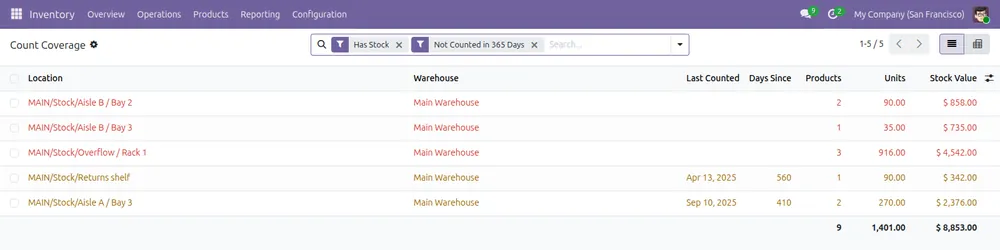
Locations never counted - when each warehouse location was last counted, days since, and the stock value sitting in locations nobody has counted
Odoo writes the date on a location every time a count is applied, and then shows it in exactly one place: the location's own form. There is no list, no filter, no way to ask which locations nobody has counted. This is that list.
How it works
Every internal location, oldest count first
The date it was last counted, the days since, how many products are in it, the units, and the stock value at product cost. Locations never counted sit at the top, in red. Locations not counted for over a year are in amber.
Filters that answer the question
Never counted, or not counted in 90, 180 or 365 days. Hide locations with no stock. Group by warehouse. Group by Counted or Never and the totals say how much stock value sits in locations nobody has counted.
A count that found nothing still counts
Odoo writes the date on the location even when every quantity matched, so a location that was counted and was right is not reported as uncounted. If your database has counts from before Odoo kept that date, the last inventory adjustment move is used instead, and the later of the two wins.
Reads only
No count, adjustment or location is created or changed, and nothing new is stored: the list is a view over what Odoo already holds. Each company sees only its own locations.
Screenshots
What it does not do
- It does not schedule or generate counts: Odoo already has the Count Sheet, a cycle count frequency on each location and Request a Count. It does not compare counted with system quantity or measure how accurate a count was. It does not look inside child locations: each location is judged on its own date. Units are a plain sum of on-hand quantities in each product's own unit of measure, so kilograms and pieces are added as they are. Value is quantity times the product cost price of the location's company, positive quantities only. Days are counted by the database clock, so a user far from UTC can see a day's difference.
Requirements
- Odoo 19.0 or 20.0. The App Store sells each version separately, so buy the one that matches your database.
- Odoo.sh or On-Premise only. Third-party apps cannot be installed on Odoo Online (SaaS) databases. Check your hosting before buying.
- Odoo 19 or 20, Community or Enterprise, with Inventory. Reading it needs the Inventory User right. Third-party apps install on Odoo.sh or On-Premise only - they cannot be installed on Odoo Online.
- Module
mh_count_coverage, version 19.0.1.0.1, licensed OPL-1.