Duplicate Product Check
Find duplicate products: the same name, internal reference or vendor product code created twice, and the stock split between the copies
Request a live demo · Odoo.sh or On-Premise only, not Odoo Online (SaaS).
Free
App Store price, per Odoo version
19 · 20
Odoo versions, each sold on its own page
Odoo.sh
or On-Premise; not Odoo Online (SaaS)
1.0.3
version of mh_duplicate_product_check
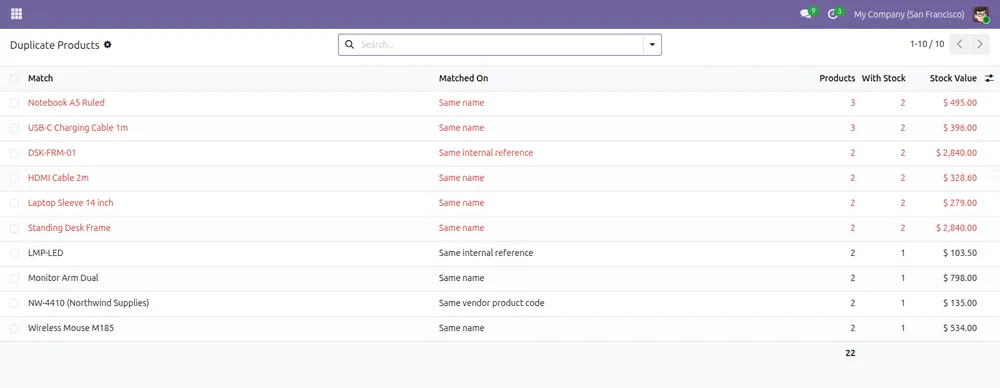
Odoo warns you when you type an internal reference that already exists. It never looks back. Nothing in Odoo lists the duplicates that are already in your catalogue, so the same product entered twice sits there, each copy holding some of the stock. Open Inventory > Reporting > Duplicate Products and this scans the catalogue and shows the groups of products that look like the same thing entered twice.
How it works
Three ways to match
By name: case, spaces and punctuation are ignored, so "Blue Widget", "blue widget" and "Blue-Widget." are one group. By internal reference: the same rule, across products. A product with several variants matches through any of its variants' references. By vendor product code: the same code from the same vendor on two or more products. Archived products are included, and a product can appear in more than one group.
The stock split
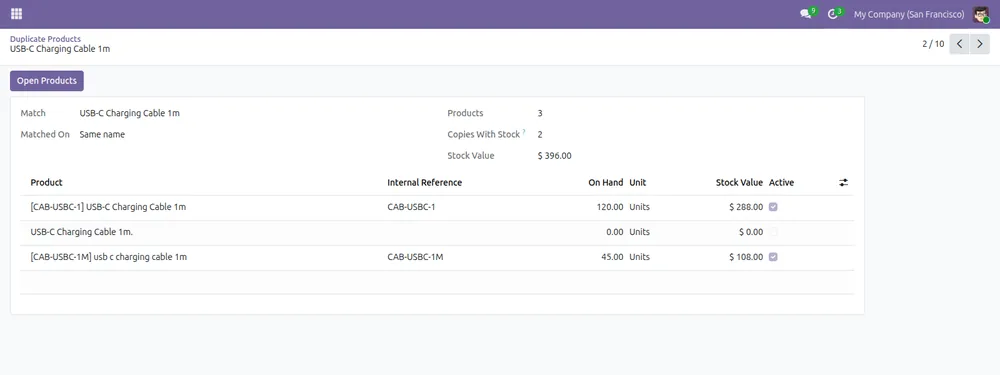
Open a group to see each copy with its quantity on hand and its stock value in internal locations. Groups where two or more copies hold stock are shown in red in the list, so you can see where the stock is split before you decide which copy to keep. The list shows how many groups there are and how many products sit in them.
It rescans every time you open it
Opening the menu rebuilds the list from the current catalogue, so it is never stale. The Open Products button on a group lists its products, archived ones included, so you can review them or hand them to Merge Duplicate Products.
Screenshots
What it does not do
- It does not change anything. It never merges, archives or edits a product.
- It matches text, not meaning. "Blue Widget" and "Widget (blue)" are not found. Names that differ by a word are different names.
- It does not compare across companies. Products of different companies are never grouped together, and a product shared by all companies is only compared with other shared products.
- Stock and value cover the companies selected in the company switcher when you open the list, and only internal locations. It needs the Inventory Manager right, which is Odoo's setting.
Requirements
- Odoo 19.0 or 20.0. The App Store sells each version separately, so buy the one that matches your database.
- Odoo.sh or On-Premise only. Third-party apps cannot be installed on Odoo Online (SaaS) databases. Check your hosting before buying.
- Odoo 19 and 20, Community or Enterprise. Also requires Inventory with valuation (stock_account). Third-party apps install on Odoo.sh or On-Premise only - they cannot be installed on Odoo Online (SaaS).
- Module
mh_duplicate_product_check, version 19.0.1.0.3, licensed OPL-1.