FSN Analysis
Which products are issued all the time, which only now and then and which not at all - and how much money sits in each group
Request a live demo · Odoo.sh or On-Premise only, not Odoo Online (SaaS).
28 of 28
products matched an independent recompute from the raw stock moves (issues, rate, class, on hand, value, last issue date)
17 / 6 / 5
fast, slow and non-moving products in the made-up demo warehouse, with $3,622.00 of the $32,817.70 on hand in non-moving stock
34
automated tests in the app, none failing; 8 were added for the limits stated on this page and for one fix
0.2 s
to run an analysis of 1,500 products and 9,000 issues in the test run; larger catalogues not tested
0
products, costs or reordering rules changed: it writes only its own records and the Excel file you ask for
Not
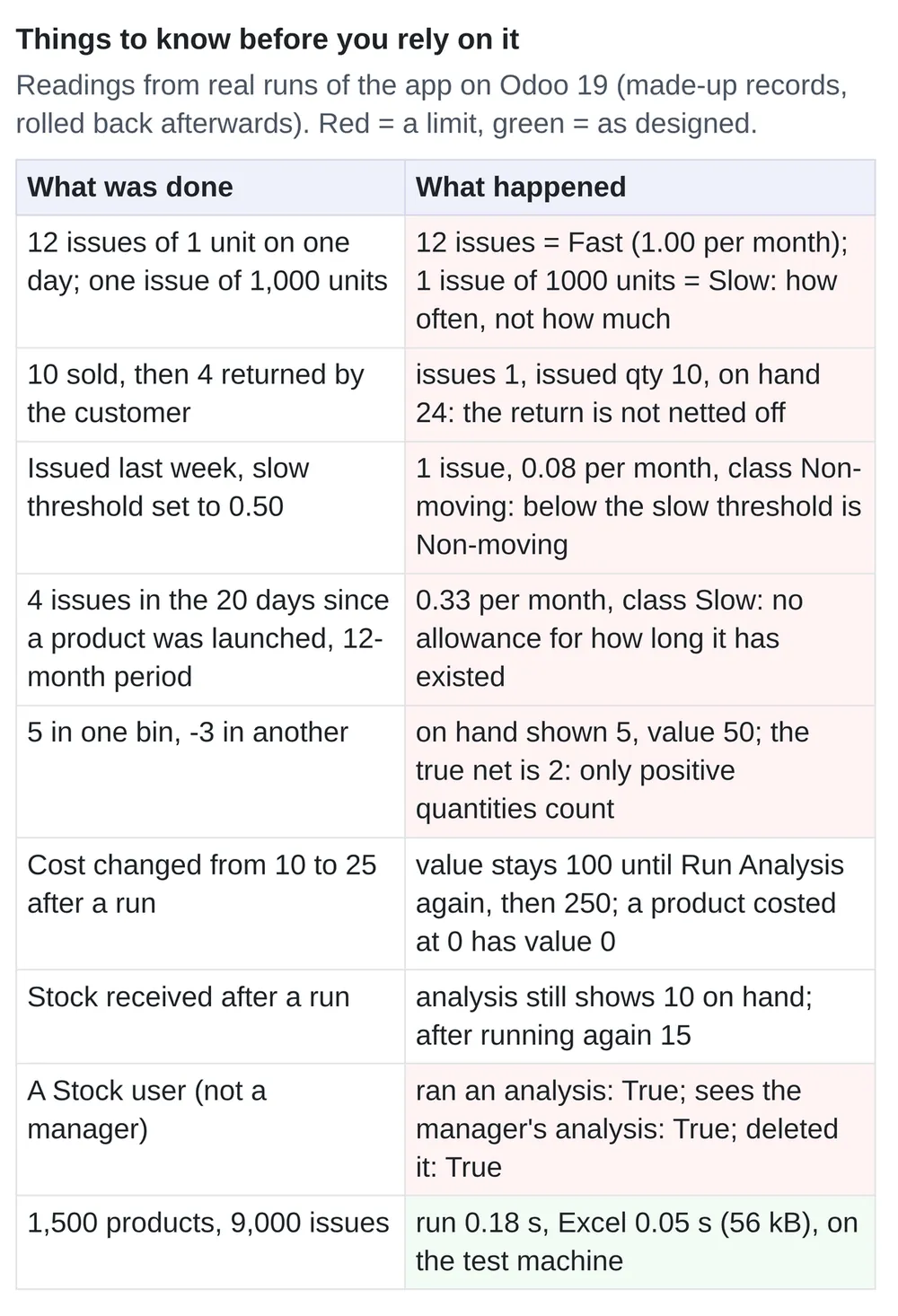
netted: a customer return does not reduce the issues (see the known limits)
Some products leave the warehouse every week, some twice a year and some not at all, and a stock report lists them all alike. FSN Analysis classes every storable product as Fast moving, Slow moving or Non-moving by how often it was issued over a period you choose, and shows the stock value in each class. This page walks through it with screenshots of an Odoo 19 database holding a made-up hardware distributor, and with tables rendered from real readings of the same run; each picture says which it is.
It reads stock moves and quants and writes only its own analysis records. This page also says where its definitions bite: returns, how often versus how much, new products, negative bins and who can see it.
Install it and a menu appears under Inventory, Reporting: FSN Analysis. It needs only Inventory. Users of the Stock group can use it.
How it works
What it keeps, what it changes, what it does not
Each line was tested or read in the code.
1 Set the period, thresholds and scope
Use it when you want to judge one warehouse, one category range or one season.Writes when saved
A classification over every product and the whole company mixes shops and ranges that nobody reviews together, and one threshold does not suit every business.
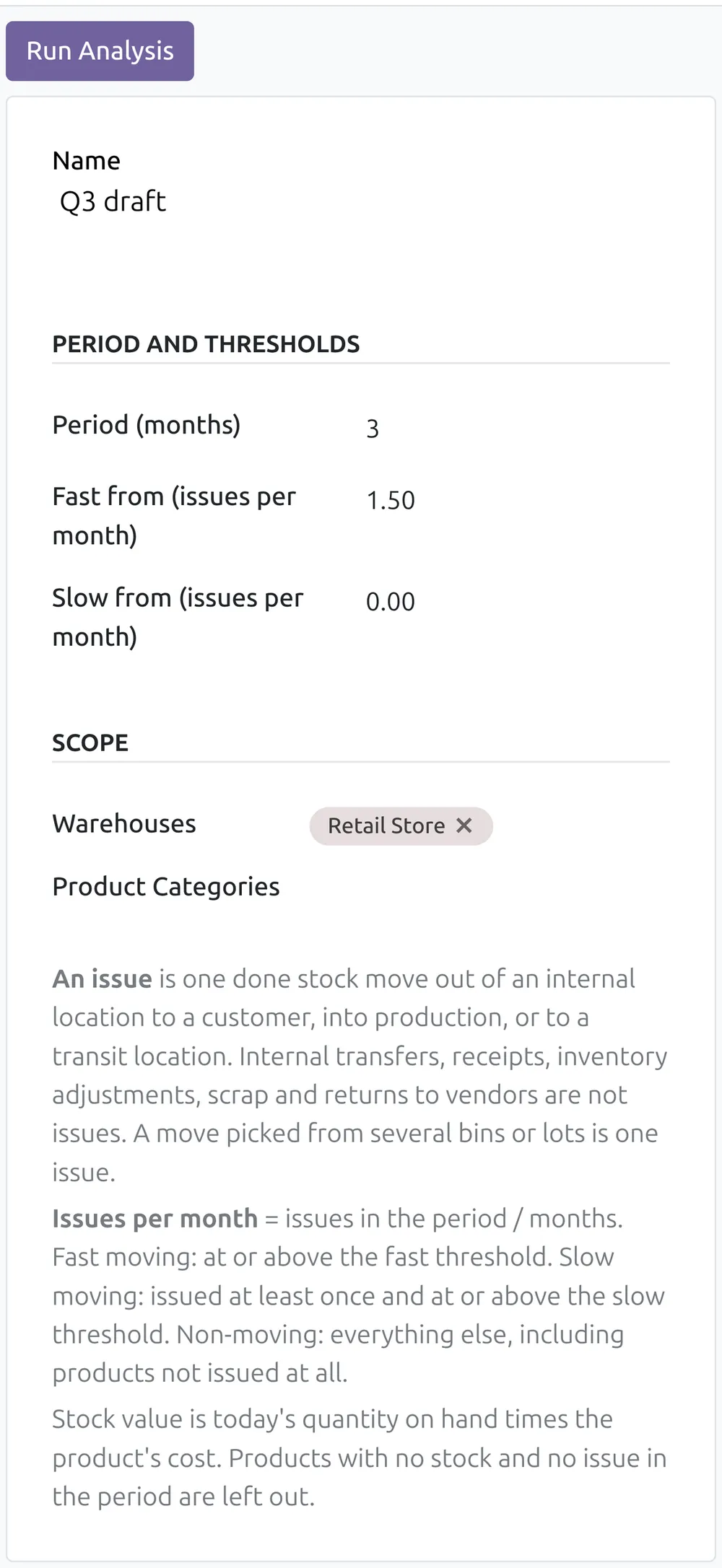
Create an analysis and choose the period in months (the default is 12), the fast threshold (issues per month, default 1.00), the slow threshold (default 0.00, so any issue in the period makes a product slow rather than non-moving), one or more warehouses and one or more product categories (sub-categories are included). Leave warehouses and categories empty for the whole company. The slow threshold must be zero or more and below the fast one, and the period at least one month. This is a screenshot from Odoo 19 of a draft for the Retail Store, before it is run: only Run Analysis is offered.
The period always ends the moment you press Run Analysis; you cannot run it as of a past date, and a month is a calendar month whatever its length.
A draft analysis before it is run. Real Odoo screen.
2 Run it and read what stood out
Use it when you want the answer in a few sentences before the table.Writes the lines
A list of 28 products tells you nothing until you have worked out how many are idle and what they cost.
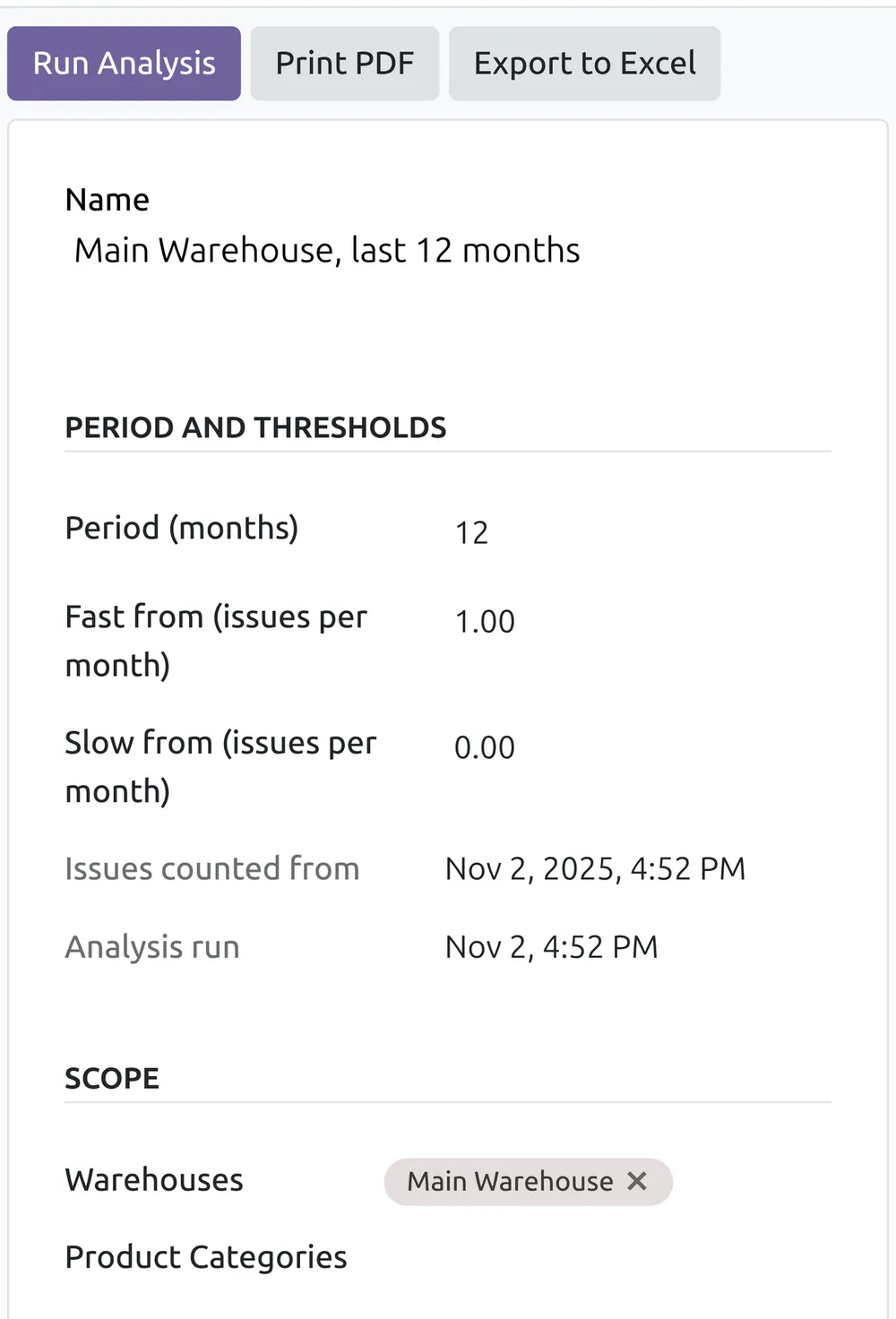
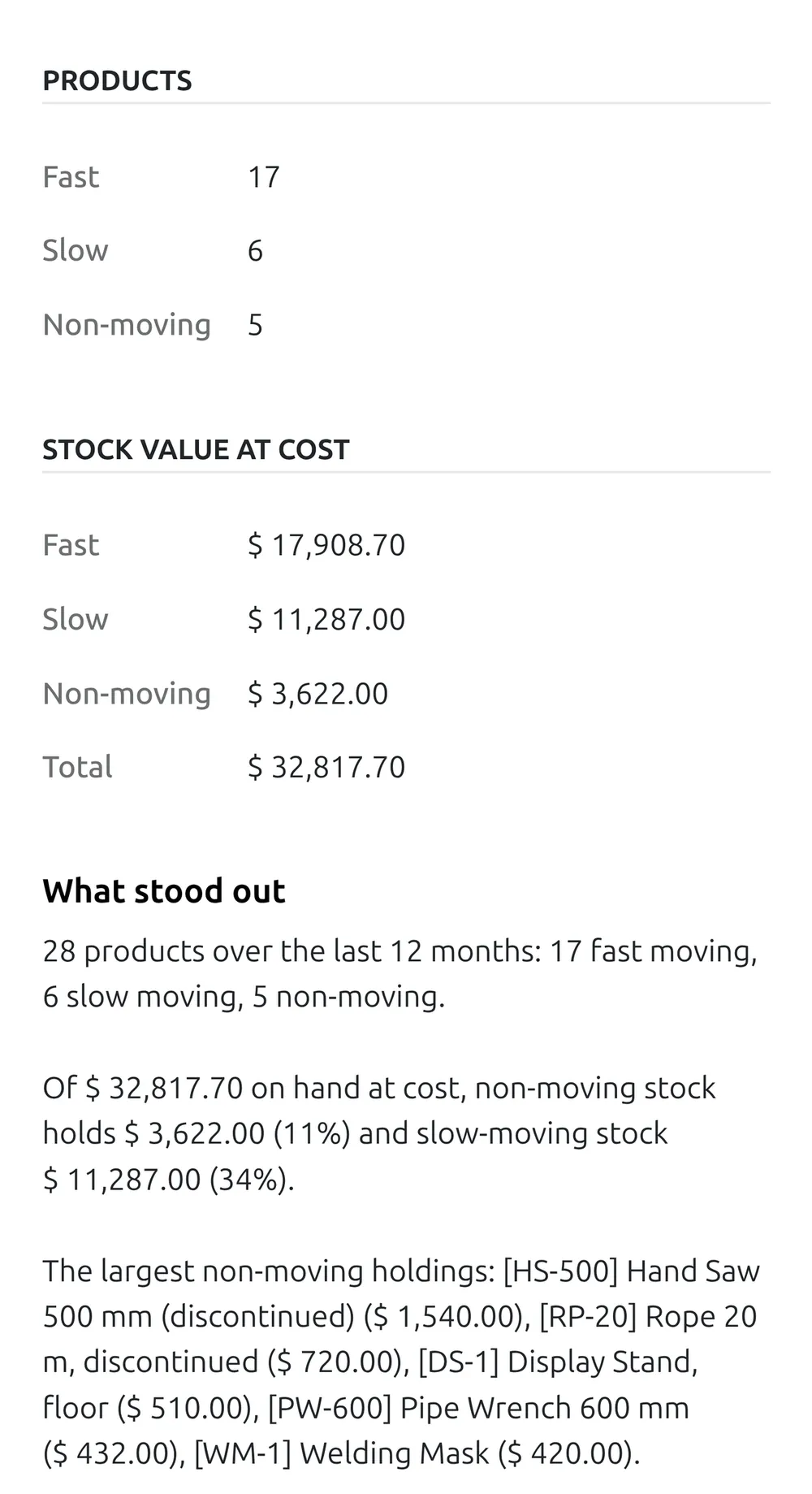
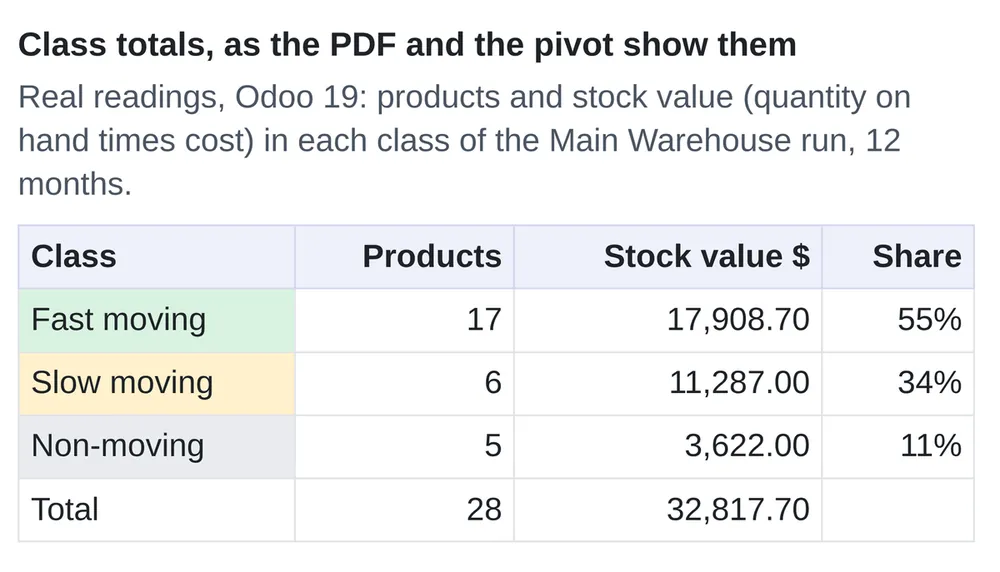
Press Run Analysis . The form shows how many products are fast, slow and non-moving, the stock value in each class and a short What stood out text. In the demo run of the Main Warehouse over 12 months, 17 of the 28 products were fast, 6 slow and 5 non-moving; of $32,817.70 on hand at cost, non-moving stock held $3,622.00 (11%%) and slow-moving stock $11,287.00 (34%%), and the largest non-moving holding was a discontinued hand saw at $1,540.00. Run again and the lines are replaced with a fresh result.
It does not forecast. Stock value is the quantity on hand times the product's cost today.
The analysis after the run. Real Odoo screen (Odoo 19).
The counts, the values and the findings text from the same run. Real Odoo screen.
3 What counts as an issue
Use it when you want to know exactly which moves make a product fast.Read-only
A frequency is only as honest as the definition of the thing being counted.
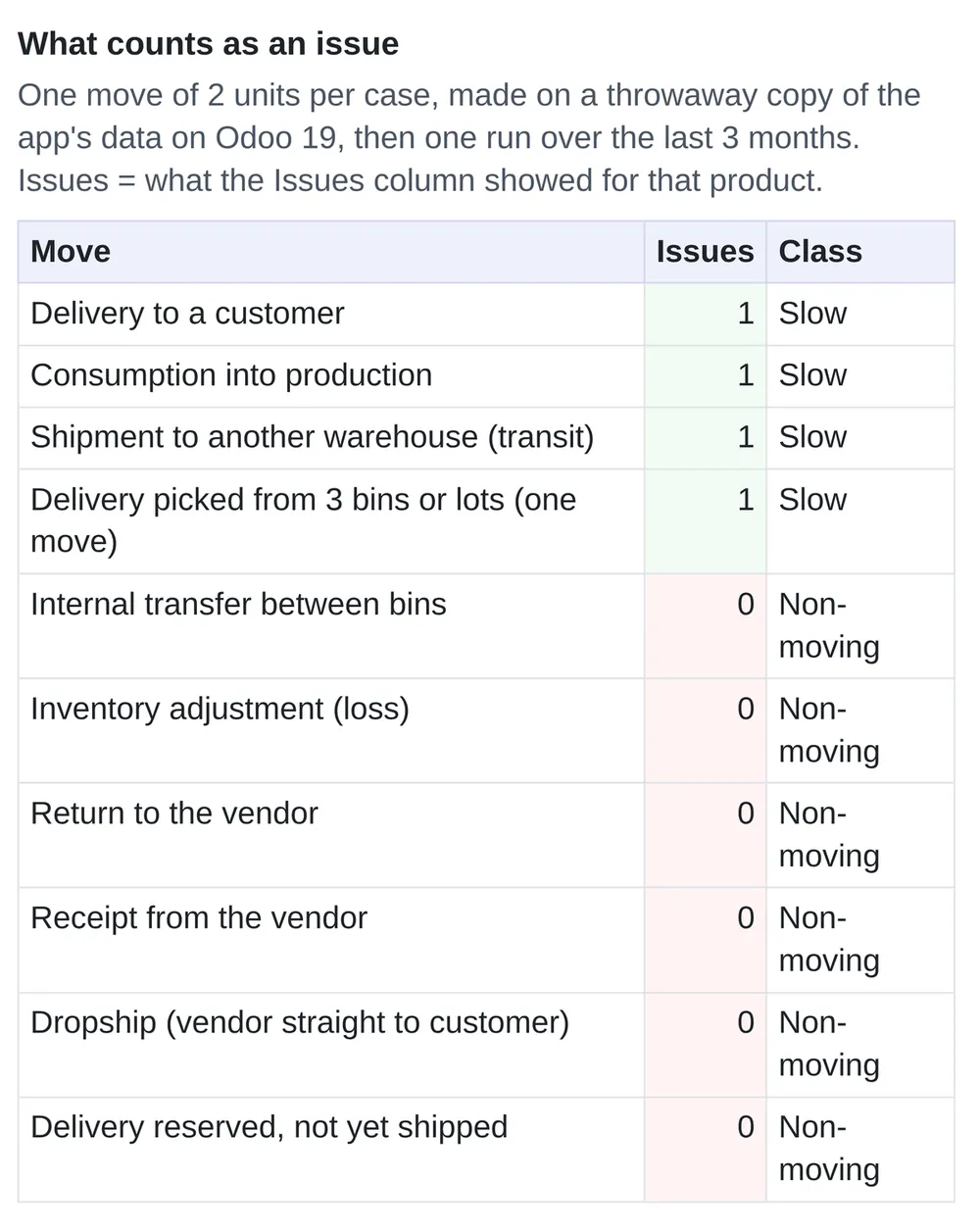
An issue is one done stock move out of an internal location to a customer, into production or to a transit location. It is counted once per stock move, however many bins or lots it was picked from. The table is a real run on Odoo 19: one 2-unit move of each kind on a throwaway copy of the data. Internal transfers, inventory adjustments, returns to the vendor, receipts, dropship and a delivery that is reserved but not shipped did not count. A shipment to another warehouse through a transit location counts as an issue for the warehouse it leaves.
It does not net a customer return against the delivery it reverses, and it counts moves, not units.
Ten kinds of move and what the Issues column showed. Evidence table.
4 Fast, slow and non-moving lists
Use it when you want to see which product is in which class and when it last left.Read-only
A class with no figures behind it cannot be argued with or acted on.
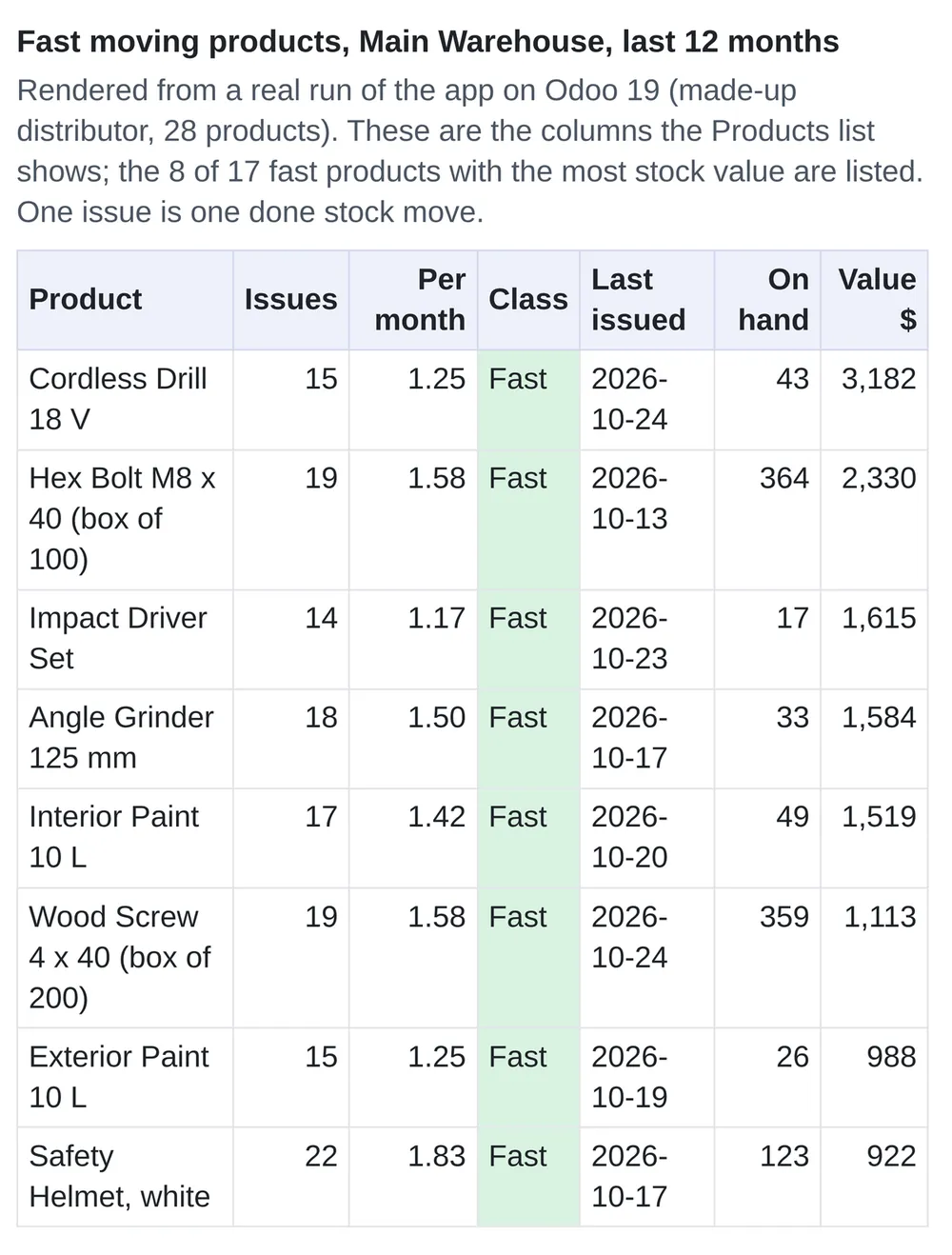
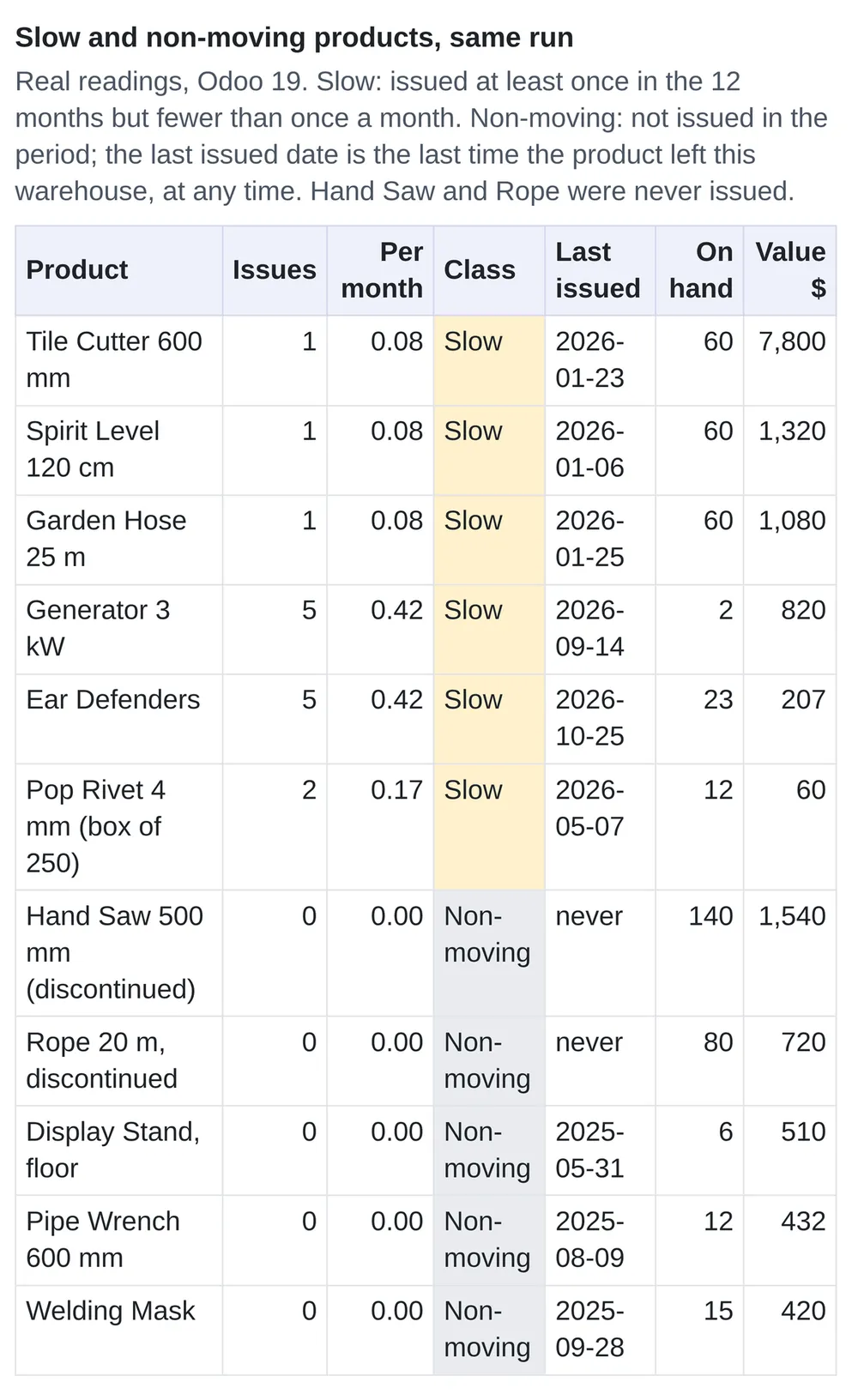
The Products button opens a line per product: class, issues, issues per month, issued quantity, last issued date, quantity on hand and stock value; the Non-moving button opens the non-moving ones. You can filter by class and by stock on hand, group by class or category, and switch to a pivot or a graph. The two sheets below are rendered from the real lines of the demo run on Odoo 19; they are tables, not screenshots of the Odoo list, because that list is too wide to show at a readable size. The last issued date also looks back beyond the period, so a product last issued in May 2025 reads Non-moving with that date beside it.
A product with no stock and no issue in the period is left out of the list; a product sold out but issued in the period is listed with nothing on hand.
Eight of the 17 fast products. Evidence table.
All 6 slow and all 5 non-moving products. Evidence table.
5 Stock value by class
Use it when you want to see where the money sits.Read-only
The question behind the classes is how much capital is tied up in stock that does not move.
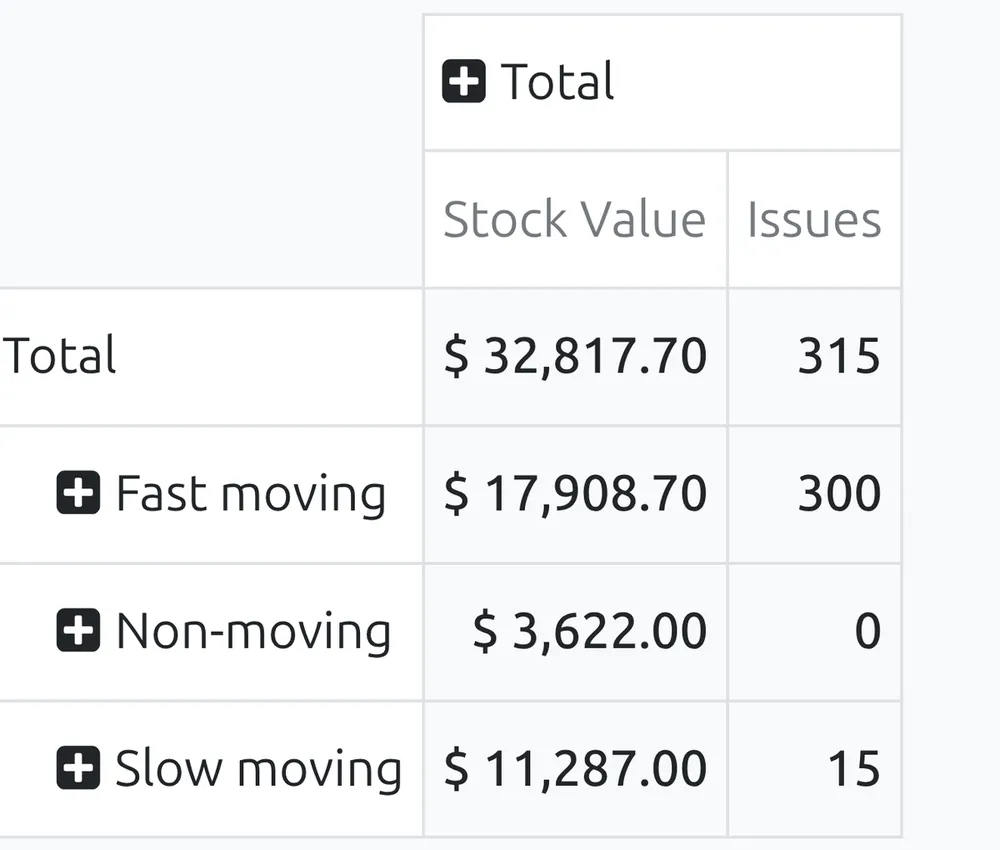
The pivot adds up stock value and issues per class, and the PDF carries the same class table. In the demo run the 17 fast products hold $17,908.70 and 300 of the 315 issues, the 6 slow ones $11,287.00 and 15 issues, the 5 non-moving ones $3,622.00 and none. The first picture is the real Odoo pivot (Odoo 19); the second is the same totals read from the app with the share of value.
Value is the product's cost times the positive quantity on hand, not what it was bought for.
The pivot view of the run. Real Odoo screen.
Class totals with the share of value. Evidence table.
6 Compare other settings
Use it when you want to see how the answer moves when you change the period or the thresholds.Writes the lines
Whether a product is slow depends on what you call fast, so one set of thresholds is rarely the last word.
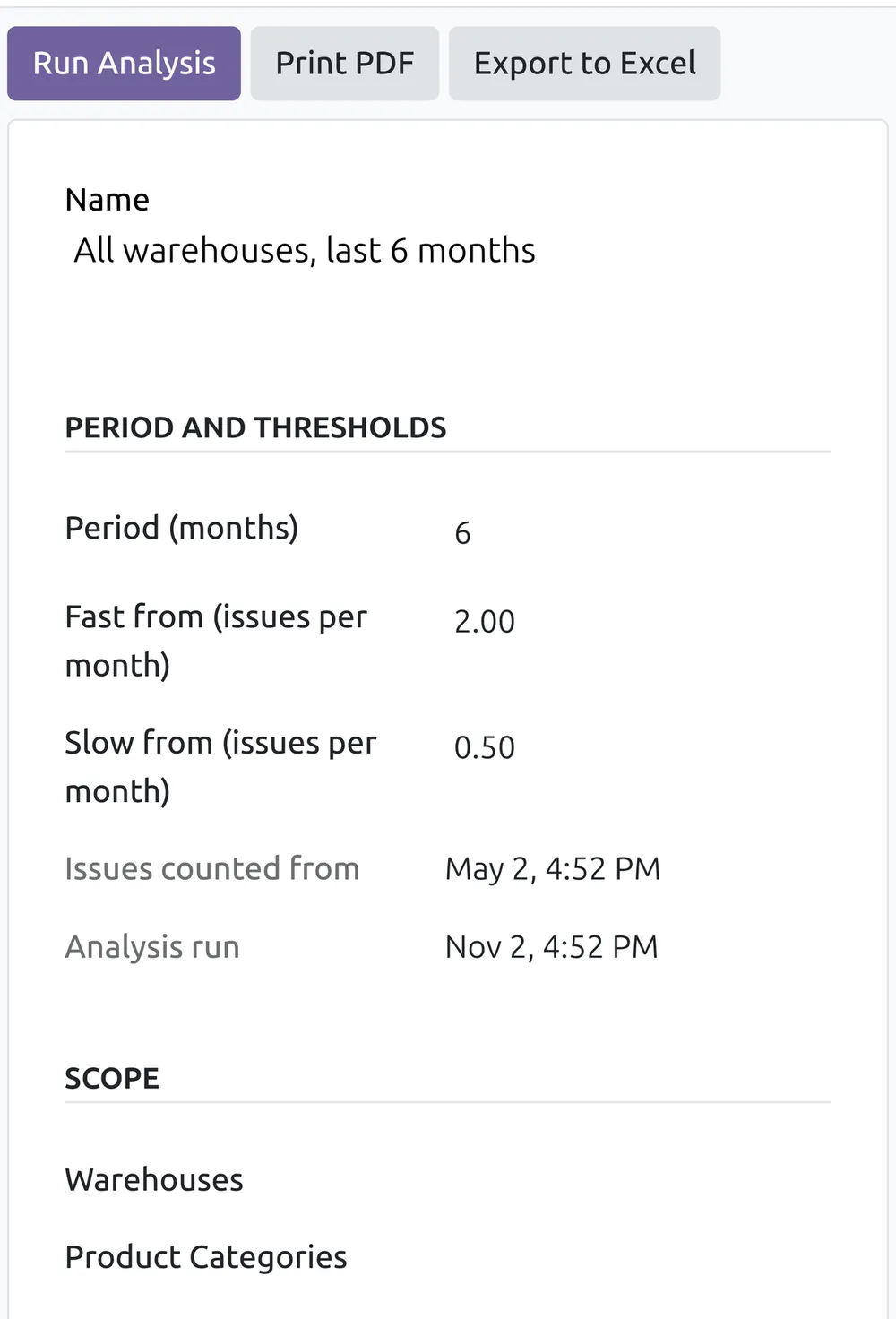
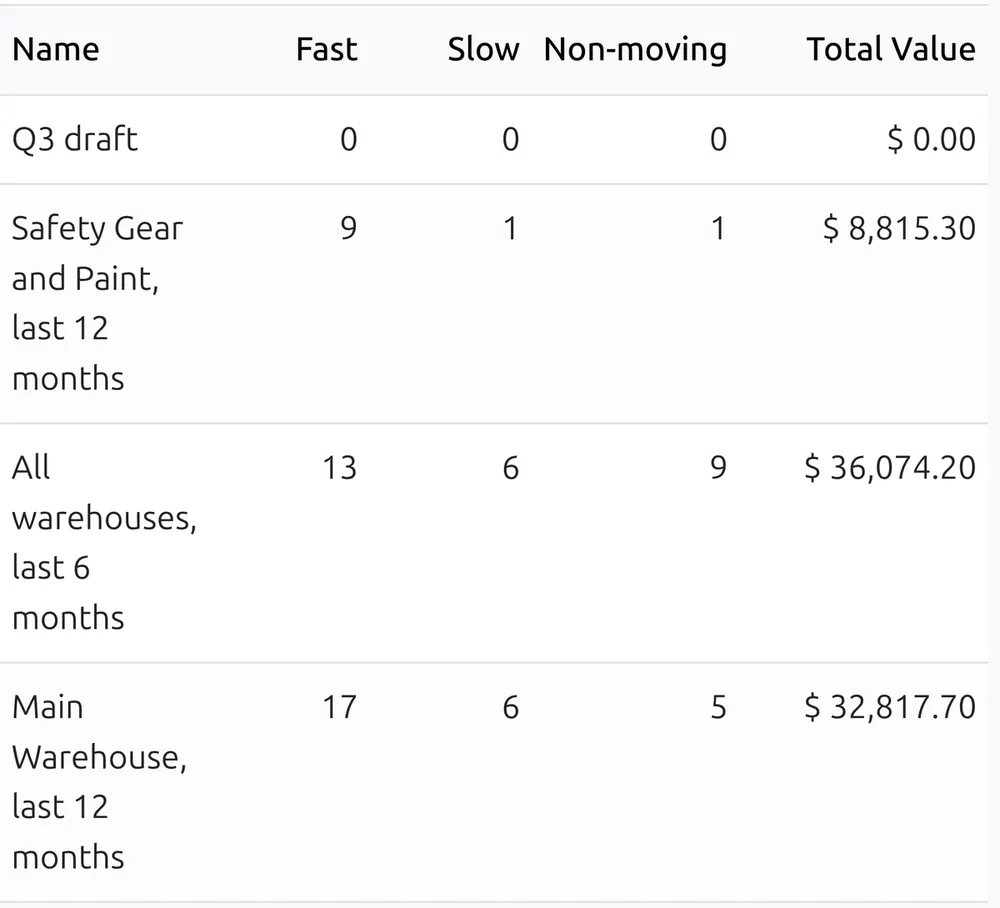
Each analysis keeps its own settings and result. The second analysis below covers all warehouses over 6 months with fast from 2.00 and slow from 0.50 issues per month: 13 products fast, 6 slow and 9 non-moving. With a slow threshold above zero a product that was issued can still read non-moving: one issued last week reads non-moving when its rate is under the threshold, and its last issued date shows it. The list shows the three analyses of the demo with their counts and values.
Running an analysis again replaces its lines; to keep an old result, export it first.
The 6 month analysis with higher thresholds. Real Odoo screen (Odoo 19).
The analyses side by side. Real Odoo screen.
7 PDF and Excel
Use it when you want to hand the result to a buyer or keep it outside Odoo.Excel writes an attachment
A result that stays in the database does not reach the person who decides what to clear.
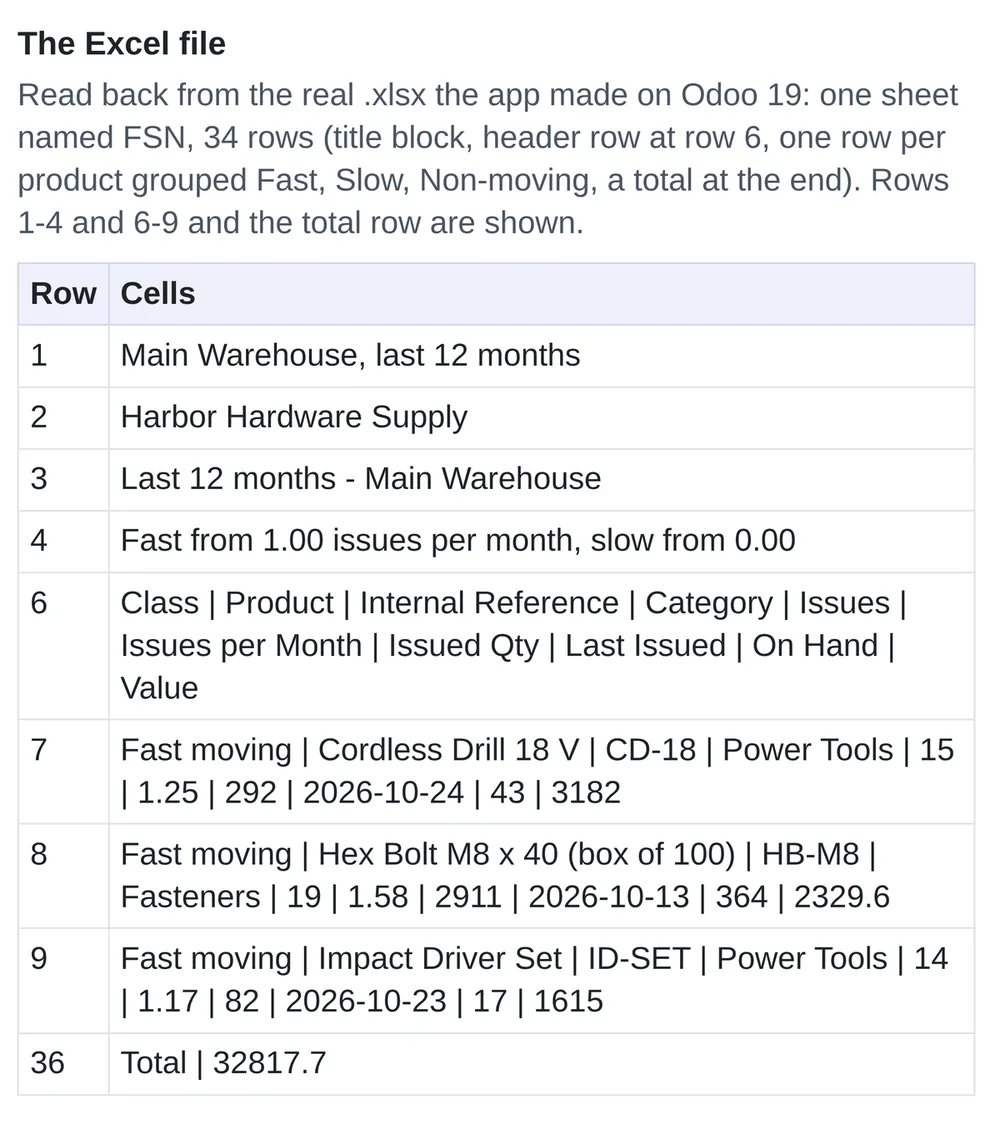
Print PDF gives a summary with the findings, the class table and a list of the non-moving products with their last issued date or Never. Export to Excel gives one sheet named FSN: a title block, a header row, one row per product grouped Fast, Slow and Non-moving, and a total. The table is the real file read back. The PDF layout itself is not shown on this page.
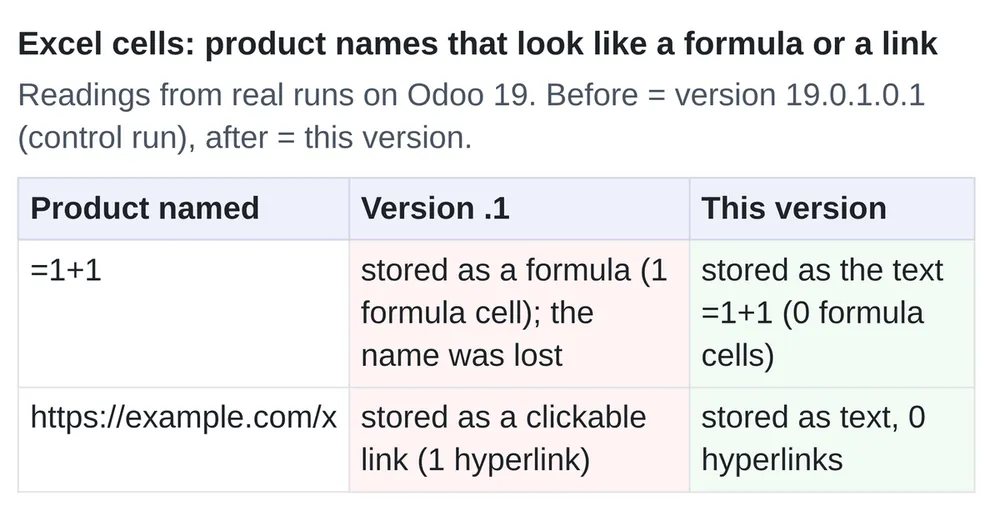
A product named like a formula or a link is now written to Excel as text (a fix in this version).
Title block, header, first rows and total of the real .xlsx. Evidence table.
8 Checked against the raw moves
Use it when you want to know the arithmetic is right before you rely on it.Read-only
A class is only as good as the count behind it.
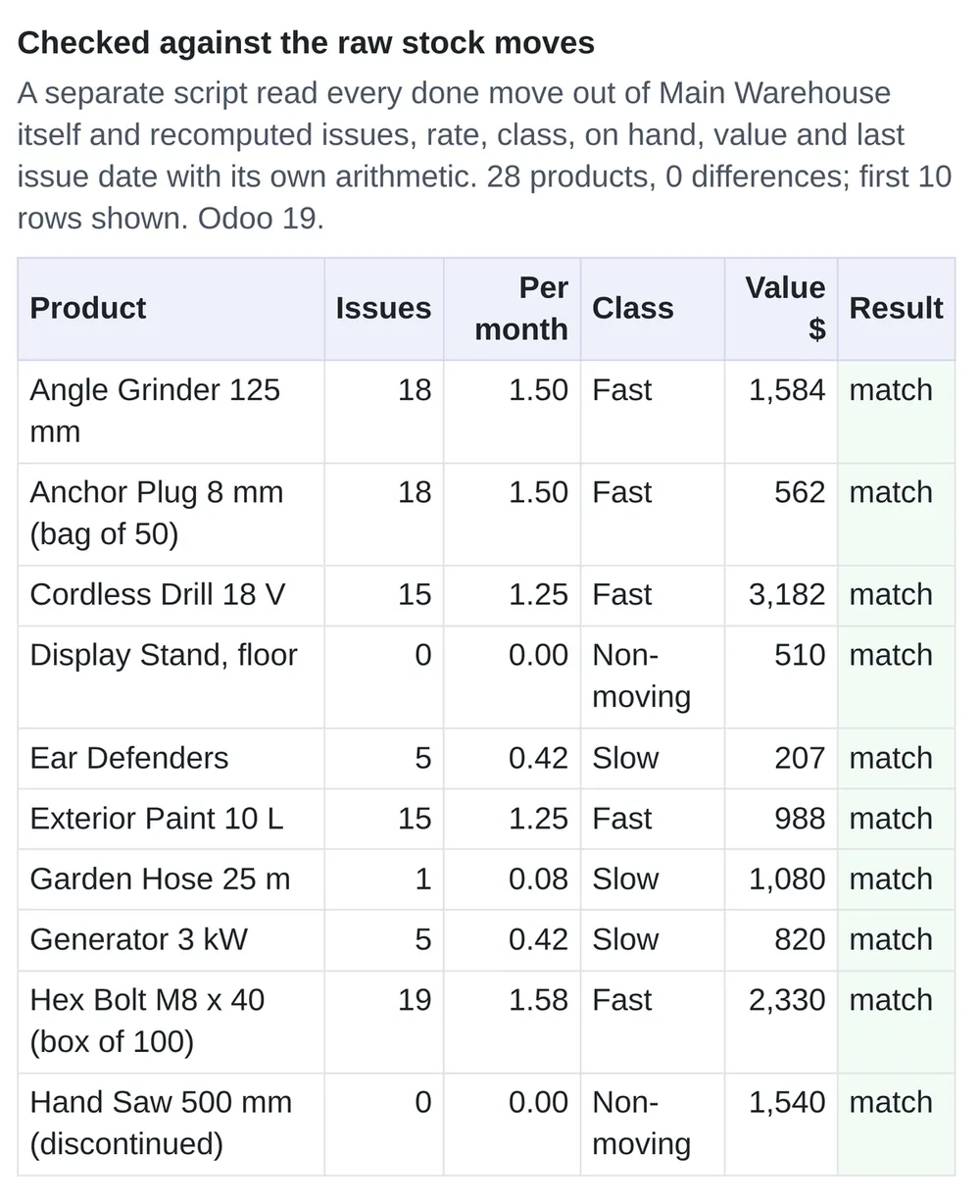
A separate script read every done move out of the Main Warehouse and the quants, and recomputed issues, rate, class, on hand, value, issued quantity and last issue date with its own arithmetic, with no module code. All 28 products matched, with no difference, on both Odoo 19 and Odoo 20. The first 10 rows are below.
First 10 of 28 products, each matched. Evidence table.
The Excel fix in this version
Version 1.0.2 writes every text cell of the Excel file as text. Before, a product whose name began with = was written as a formula (the name was lost) and one whose name began with http became a clickable link. The table shows the old and the new reading.
Old and new reading of the same two names. Evidence table.
Screenshots
What it does not do
- Each of these was reproduced in a run of the app on Odoo 19. Eight are covered by tests that pass; none is changed in this version except the Excel fix below.
- Nine readings from real runs. Evidence table.
Requirements
- Odoo 19.0 or 20.0. The App Store sells each version separately, so buy the one that matches your database.
- Odoo.sh or On-Premise only. Third-party apps cannot be installed on Odoo Online (SaaS) databases. Check your hosting before buying.
- Module
mh_fsn_analysis, version 19.0.1.0.3, licensed OPL-1.