Merge Duplicate Products
Merge duplicate products into one: sale orders, purchase orders, transfers, stock and vendor prices all move to the product you keep
Request a live demo · Odoo.sh or On-Premise only, not Odoo Online (SaaS).
Free
App Store price, per Odoo version
19 · 20
Odoo versions, each sold on its own page
Odoo.sh
or On-Premise; not Odoo Online (SaaS)
1.0.2
version of mh_merge_products
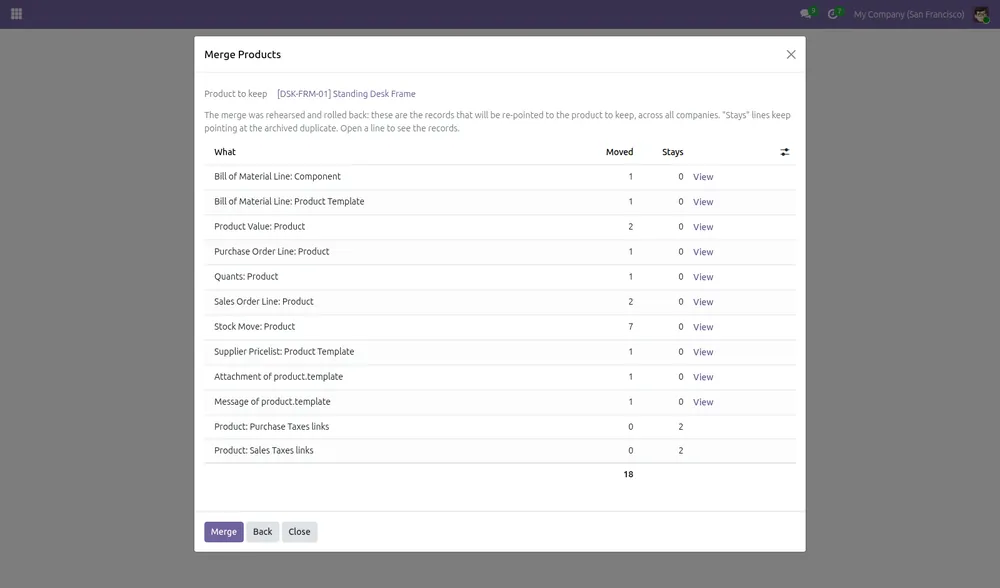
Odoo has no way to merge two products. When the same product has been created twice, you either live with both or archive one and lose the link to its history and its stock. Select the duplicates in Inventory > Products, choose Action > Merge Products, pick the one to keep and press Preview. You get a list of every table and field that will be re-pointed, with a record count for each and a View button to open the records. Nothing changes until you press Merge.
How it works
Every record that points at a duplicate moves
The merge re-points every many2one that refers to the product or its variant, in every installed app. The list is read from your database when you press Preview, so it includes apps installed after this one. With Inventory, Sales, Purchase, Manufacturing and Accounting that covers sale and purchase order lines, stock moves and move lines, stock quants, lots, vendor pricelists, pricelist rules, bills of materials and their components, manufacturing orders, invoice lines and reordering rules. It also moves the links other records hold to the product (many2many), chatter messages, attachments, activities and followers.
The preview is a rehearsal
Preview runs the whole merge and rolls it back, so a problem is reported before you press Merge, not halfway through it. The merge itself is one transaction: if anything fails, nothing is changed. After it, the app checks that none of the columns it re-pointed still holds a duplicate, and undoes the merge if one does.
The duplicates are archived, not deleted
A note on the kept product lists what moved, and each duplicate gets a note saying where it went. The duplicate keeps its own settings (price, cost, taxes, category, barcode, description, images) and the kept product keeps its own. The duplicate's own many2many settings (tax links, routes) and its field images stay with it, and the preview lists them under "Stays".
What it refuses
It will not merge, and tells you why, when the products have a different unit of measure, product type, storable setting or tracking, or a different cost method on their category. It will not merge products of different companies, or a product with attribute variants (archived variants count). It will not merge into an archived product. It will not merge when a bill of materials would end up containing its own finished product, or when two lots of the same tracked product would share a name.
It also refuses when the move would break a database rule, for example two reordering rules for the same product and location, or when a table that Odoo does not manage still points at the product.
Need to find the duplicates first?
Duplicate Product Check lists the groups of products with the same name, internal reference or vendor product code, and shows the stock split between the copies.
Get Duplicate Product Check
Screenshots
What it does not do
- It cannot be undone. The duplicates stay archived, but the records that moved do not move back.
- It does not merge variants or different units of measure, and it does not copy the duplicate's own settings onto the kept product.
- It does not rewrite references stored as plain text or numbers inside saved filters, domains or custom fields. It does not move the barcode of a duplicate: it stays on the archived product.
- It rewrites posted and done documents. Invoice lines and done stock moves point at the kept product afterwards. Needs the Inventory Manager right, which is Odoo's setting. It counts records of all companies, including ones you cannot see.
Requirements
- Odoo 19.0 or 20.0. The App Store sells each version separately, so buy the one that matches your database.
- Odoo.sh or On-Premise only. Third-party apps cannot be installed on Odoo Online (SaaS) databases. Check your hosting before buying.
- Odoo 19 and 20, Community or Enterprise. Also requires Inventory with valuation (stock_account). Third-party apps install on Odoo.sh or On-Premise only - they cannot be installed on Odoo Online (SaaS).
- Module
mh_merge_products, version 19.0.1.0.2, licensed OPL-1.