Reordering Rule Audit
Check every reordering rule against the demand it has actually seen: which minimums reorder too late over the vendor lead time, and which maximums tie up cash
Request a live demo · Odoo.sh or On-Premise only, not Odoo Online (SaaS).
17 of 17
rules in the made-up demo database matched an independent recompute from the raw stock moves (shipped, needed, verdict and value held)
4 of 17
rules had a minimum below what the product consumed while a replenishment was on its way: they reorder too late
$2,722.50
held by 3 maximums above a quarter of a year's demand in the demo run, valued at cost
28
automated tests in the app, none failing; 9 were added in this version, 2 of them for fixes
0
rules changed and no order created: it writes only its own audit records
Not
split by warehouse: a product with rules in two warehouses gives each the whole demand (see the known limits)
A reordering rule is a guess made once and rarely revisited. Demand moves; the minimum does not, and the stock-out that follows gets blamed on the supplier. Reordering Rule Audit takes each rule, measures what the product shipped in the last 90 days (or the window you choose), and gives it one verdict: minimum too low, maximum too high, no lead time set, no demand, or looks right. This page walks through it with screenshots of an Odoo 19 database holding a made-up bike-parts wholesaler, and with tables rendered from real readings of the same run; each picture says which it is.
It reads stock moves, locations and your rules and writes only its own audit records. It changes no rule and orders nothing. This page also says where it is blunt: demand is per product rather than per warehouse rule, returns are not netted, and a missing lead time is reported, not guessed.
Install it and a menu appears under Inventory, Configuration: Reordering Rule Audit. It needs only Inventory. Only Inventory Administrators can use it.
How it works
What it keeps, what it changes, what it does not
Each line was tested or read in the code.
1 Choose the window and the scope
Use it when you want to audit one warehouse or a shorter window.Writes when run
A rule set for the whole company says nothing about how one warehouse or one season behaves.
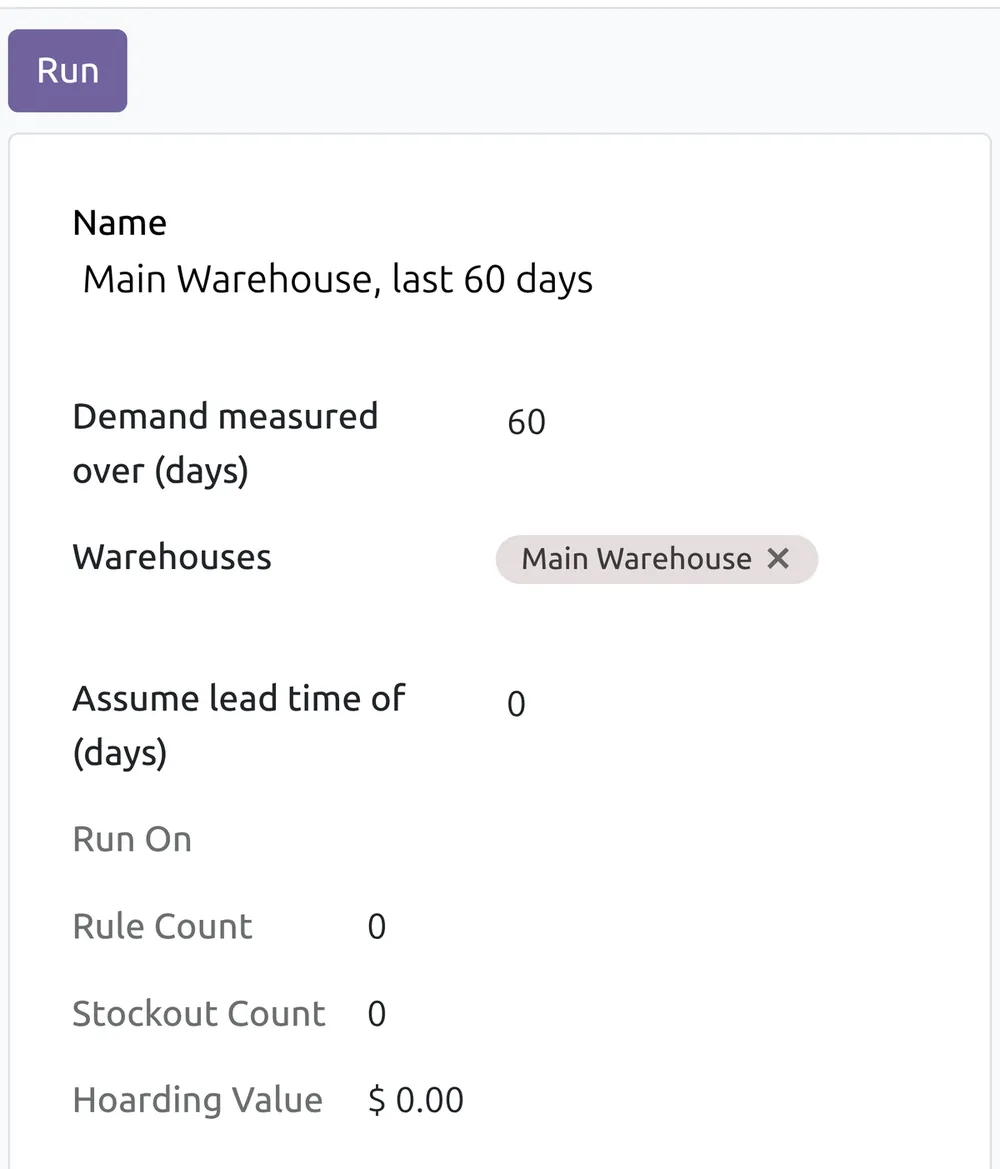
Create an audit and set how many days of shipments to measure (the default is 90), pick one or more warehouses (empty means all), and, if you want, a lead time to assume where Odoo reports none. Only Run is offered before it is run. This is a screenshot from Odoo 19 of a draft for the Main Warehouse over 60 days.
A window of 0 days or less is accepted and reads every rule as No demand. Archived rules and rules of other companies are not audited; manual-trigger rules are.
A draft audit before it is run. Real Odoo screen.
2 Run it and read what stood out
Use it when you want the answer in a few sentences before the table.Writes the lines
A table of 17 rules tells you nothing until you have worked out which ones matter.
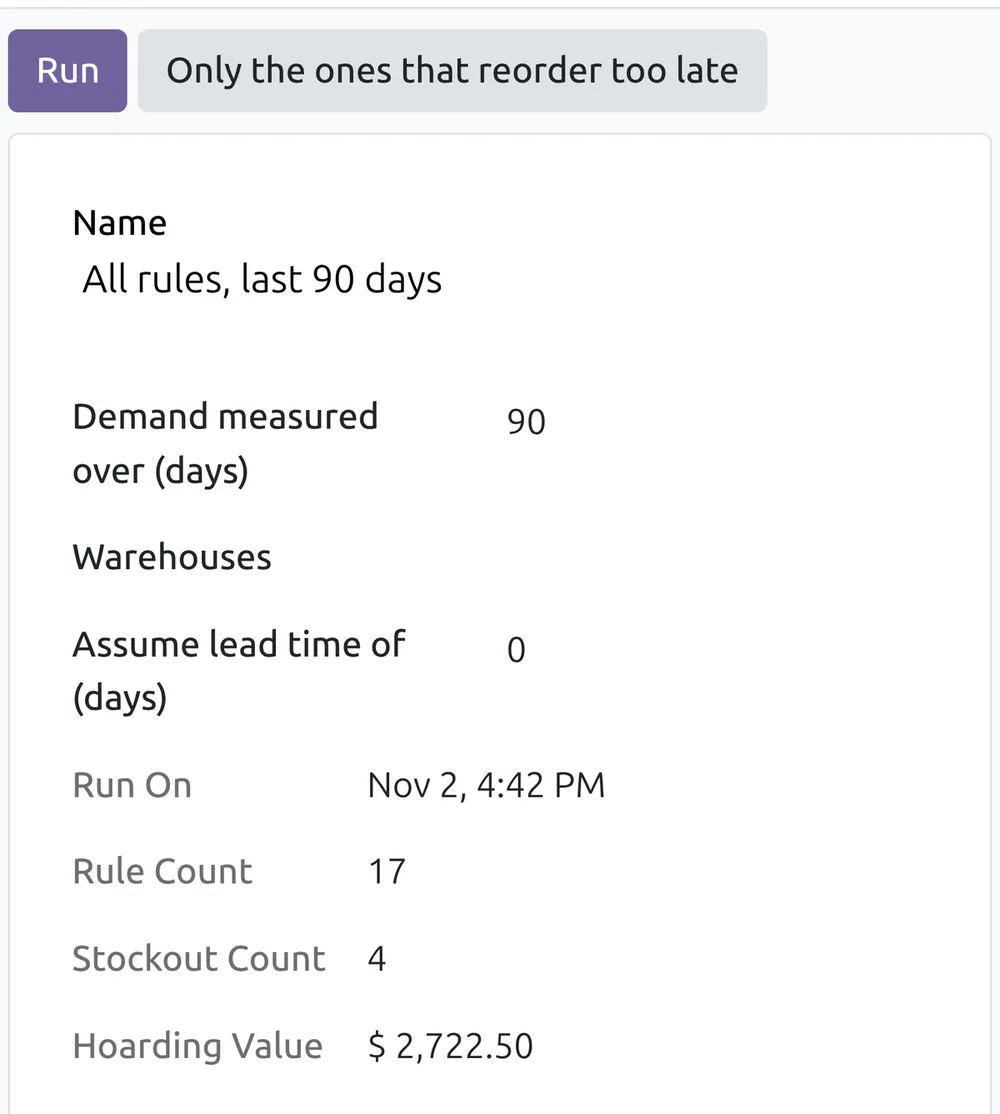
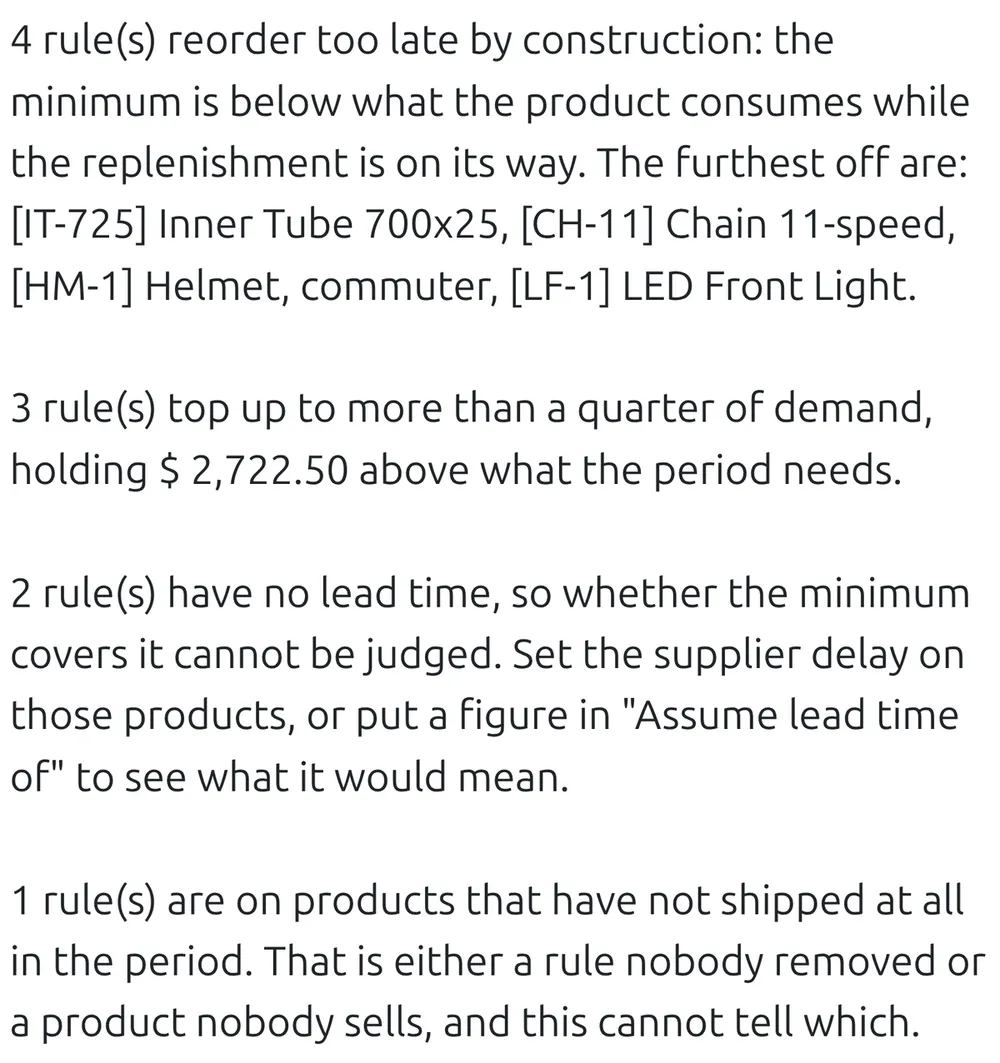
Press Run . The form shows when it ran, how many rules were checked, how many reorder too late, the value held by maximums that are too high, and a short What stood out text. In the demo run 4 of 17 rules reorder too late, 3 hold $2,722.50 above what a quarter of demand needs, 2 have no lead time and 1 is on a product that did not ship. Run again and the lines are replaced with a fresh result.
It does not forecast: it compares each rule with shipments that already happened. The text names only the five minimums furthest off.
The audit after the run. Real Odoo screen (Odoo 19).
The findings text from the same run. Real Odoo screen.
3 Rule by rule
Use it when you want to see the figures behind each verdict.Read-only
A verdict with no figures behind it cannot be argued with or checked.
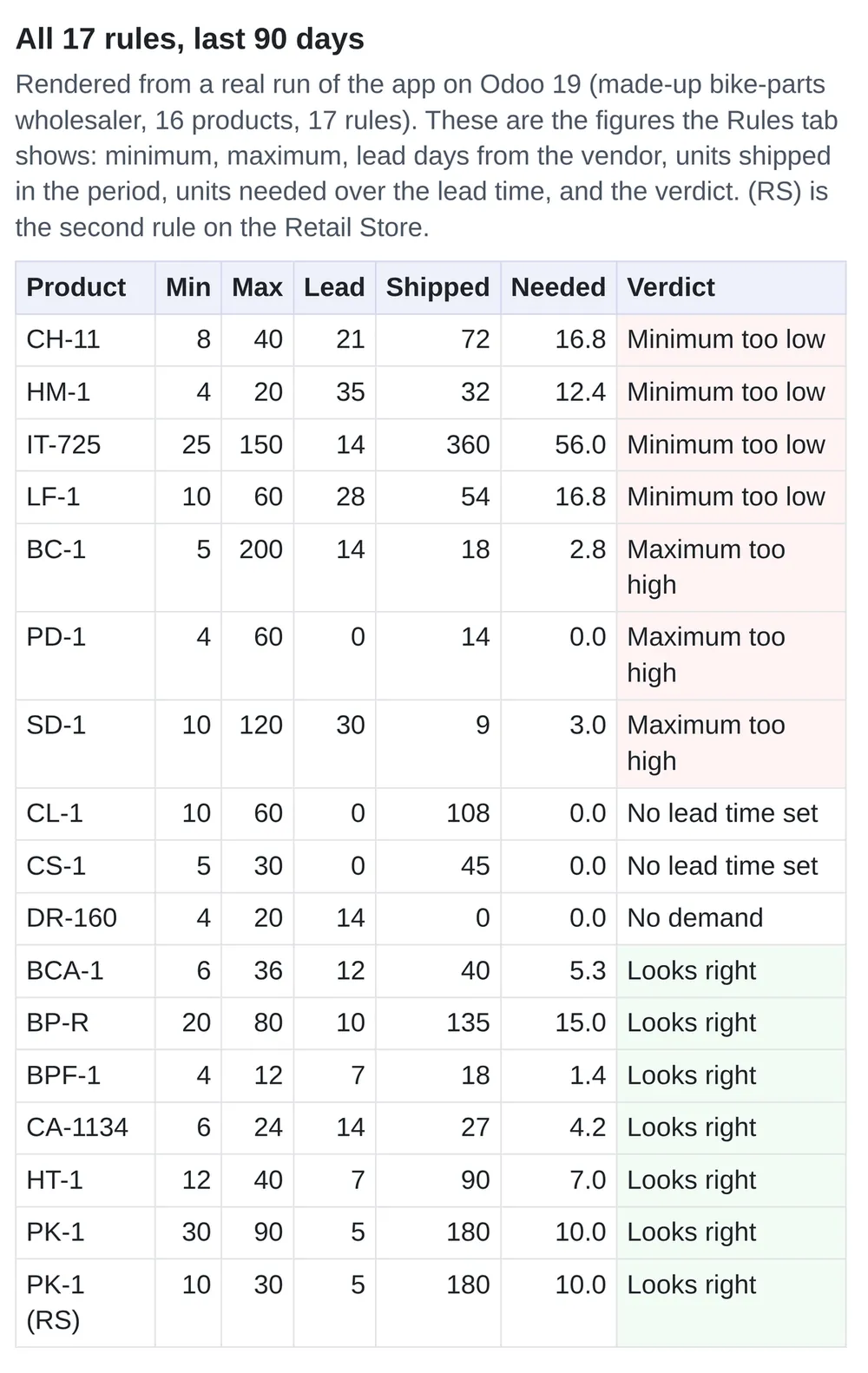
Open the Rules tab: each rule has its minimum and maximum, the lead days Odoo reports, what the product shipped in the period, what it needs over the lead time (shipped per day x lead days), the value held and the verdict. The verdicts are exclusive and are tested in this order: no demand, minimum too low, maximum too high, no lead time, looks right. The sheet is rendered from the real lines of the demo run on Odoo 19; it is a table, not a screenshot of the Odoo list, because that list is too wide to show at a readable size.
A rule that is both too low and too high is reported as too low only: its line still shows the value above a quarter, and the audit's hoarded total leaves it out.
All 17 lines of the demo run, read from the app. Evidence table.
4 Minimums that reorder too late
Use it when you want the rules that will stock out however well they are followed.Read-only
Inner tubes ship four a day and take 14 days to arrive; a minimum of 25 fires at a point where 56 are needed.
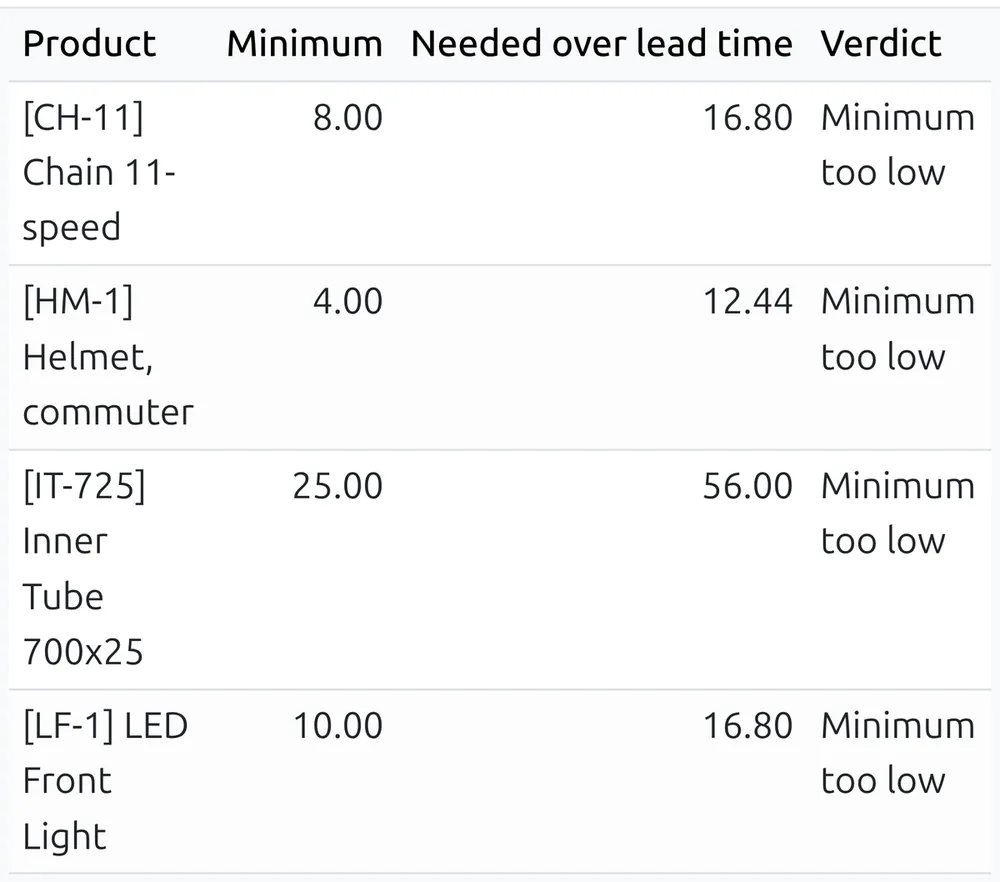
The button Only the ones that reorder too late opens the lines whose minimum is below shipped-per-day times lead days. In the demo run those are the chain (needs 16.8, minimum 8), the helmet (12.4 against 4), the inner tube (56 against 25) and the front light (16.8 against 10).
It does not raise the minimum or order anything. A rule with no lead time is never called too low unless you enter an assumed lead time.
The four rules the button lists. Real Odoo screen (Odoo 19).
5 Maximums that tie up cash
Use it when you want to know which top-ups are far above what is needed.Read-only
A maximum of 120 saddles when the shop sells nine a quarter is cash sitting in a rack.
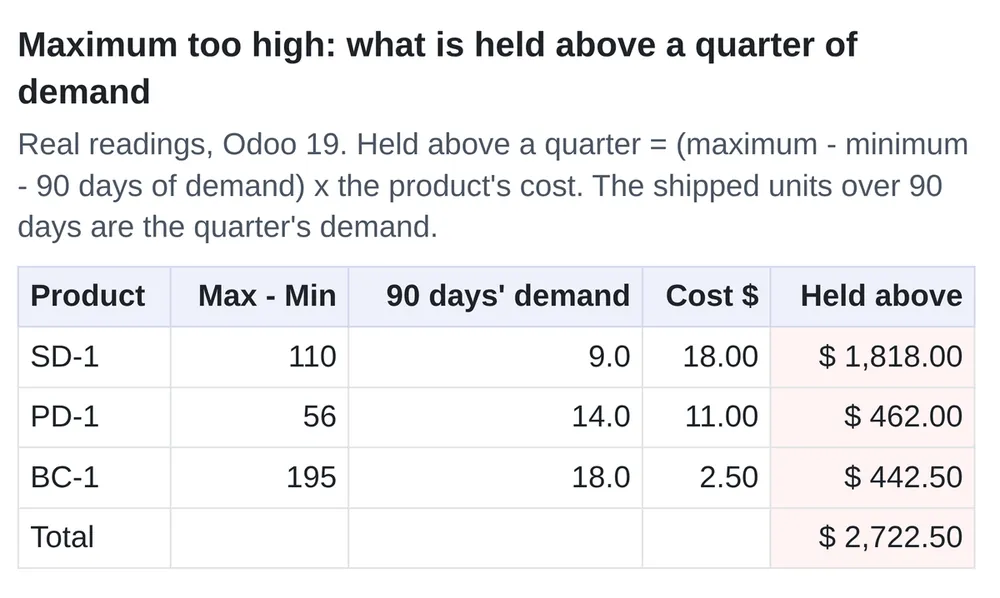
A maximum is too high when it is more than 90 days of demand above the minimum. The value is (maximum - minimum - 90 days of demand) x the product's standard cost. This is judged even when no lead time is set. In the demo run: the sport saddle holds $1,818.00 above a quarter, the flat pedals $462.00 and the bottle cage $442.50, $2,722.50 in all.
The cost is the product's current standard cost, not the cost of what is in the rack. A quarter is always 90 days of demand, whatever window you chose.
The three lines and their total, read from the app. Evidence table.
6 When Odoo has no lead time
Use it when your rules report no supplier delay.Writes the lines
A default Odoo has no supplier delays, so a report that assumed one would agree with everything.
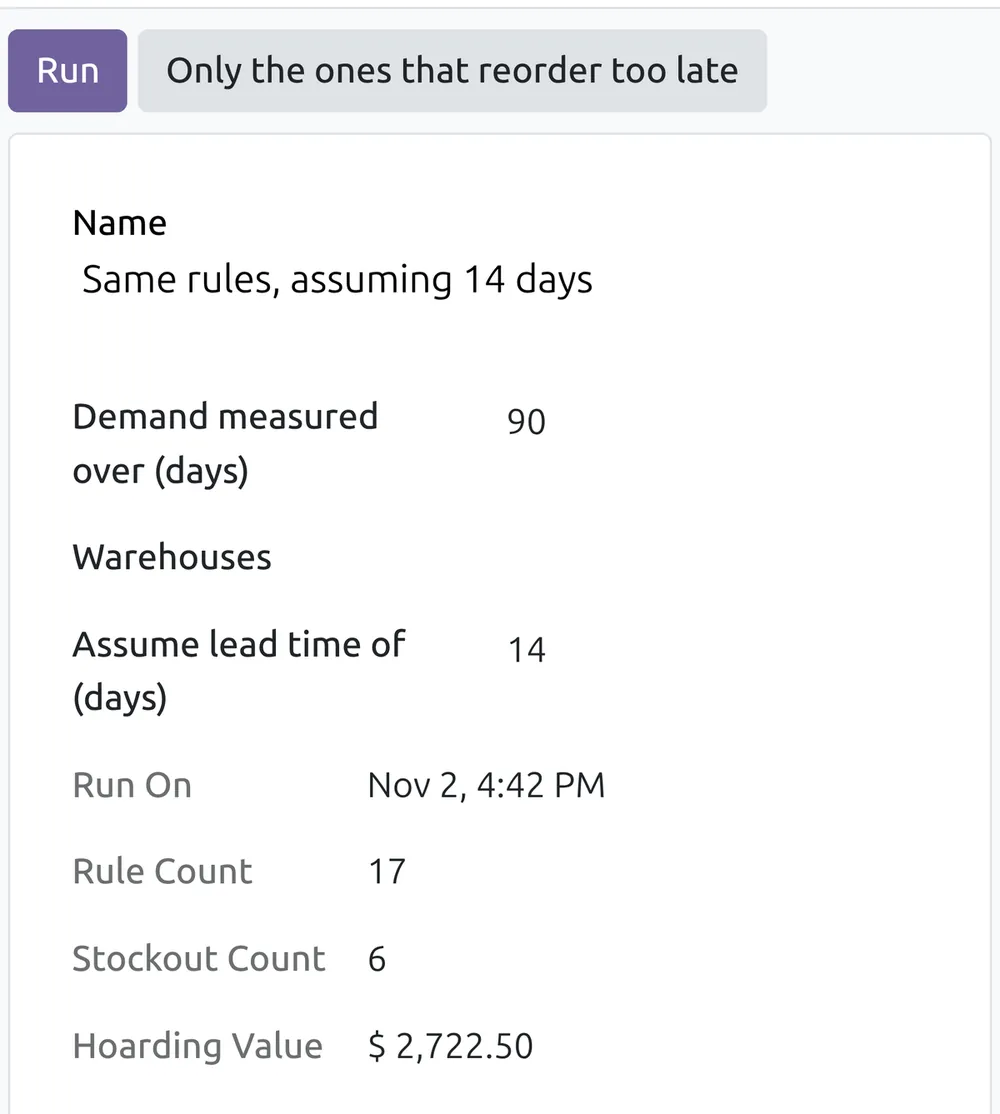
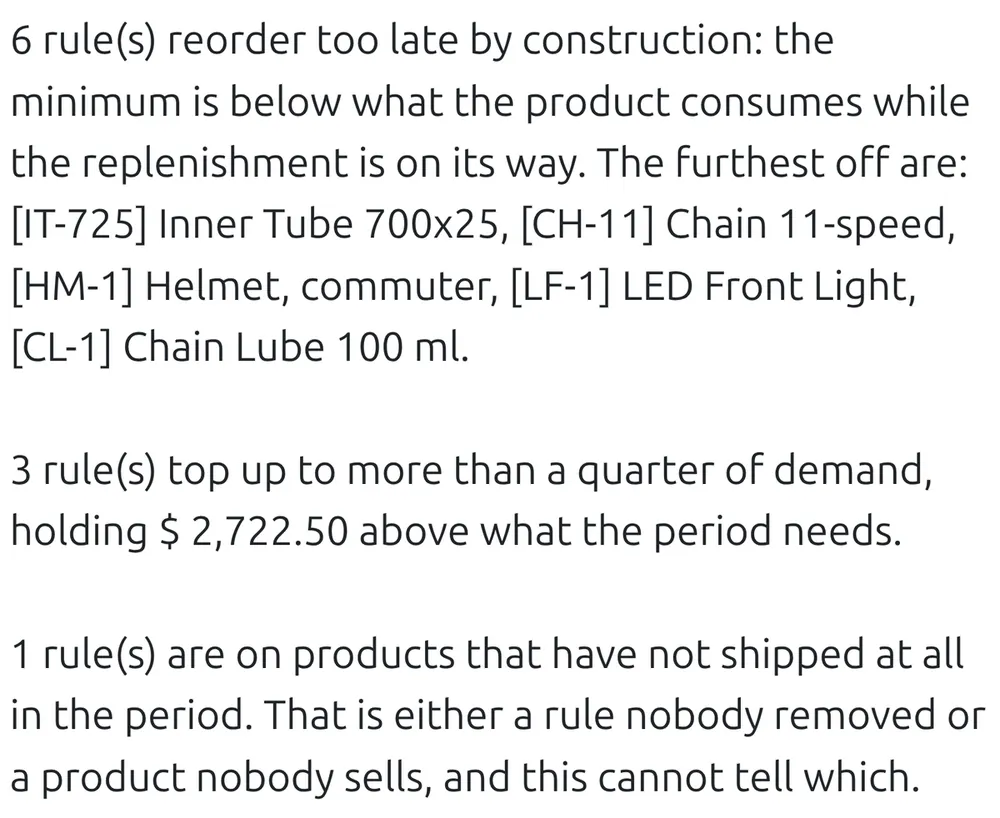
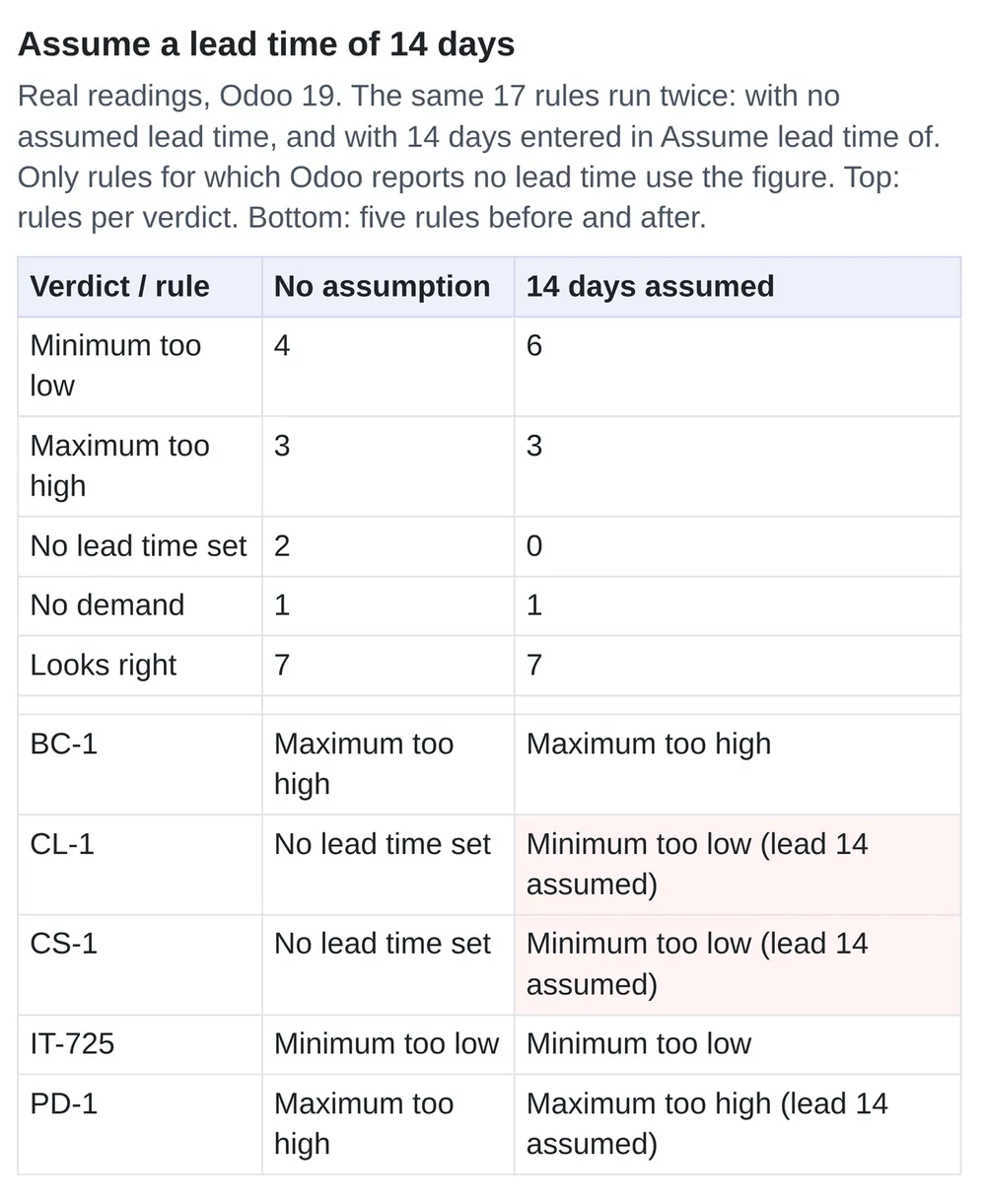
A rule with no lead time is reported as No lead time set , not as sound. To see what a lead time would mean, enter one in Assume lead time of and run again: it is used only where Odoo reports none, and those lines are marked as assumed. With 14 days entered in the demo, the chain lube and the cable set (no vendor delay) became Minimum too low , and the rules that already had a lead time kept their own.
An assumed figure is a what-if, not a measurement of your suppliers.
The second audit of the same rules, with 14 days assumed. Real Odoo screen.
Its findings text: 6 instead of 4. Real Odoo screen.
Verdict counts and five rules before and after. Evidence table.
7 Checked against the raw moves
Use it when you want to know the arithmetic is right before you act on it.Read-only
A verdict on a rule is only as good as the sum behind it.
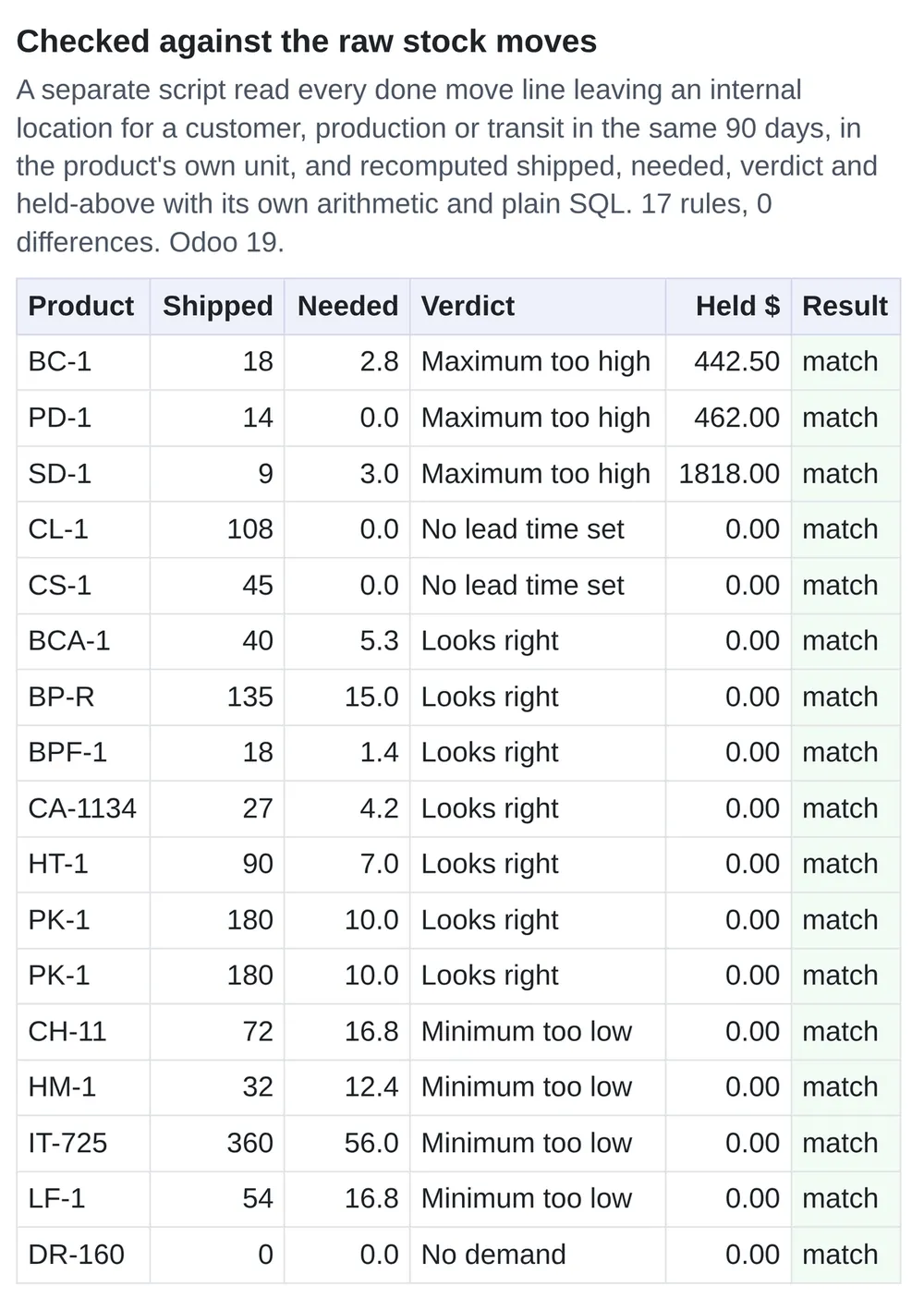
A separate script read every done move line leaving an internal location for a customer, production or transit in the same 90 days, in the product's own unit, and recomputed shipped, needed, verdict and value held with plain SQL and its own arithmetic. All 17 rules matched with no difference, on both Odoo 19 and Odoo 20.
All 17 rules, each matched. Evidence table.
8 Past audits
Use it when you want to compare runs.Read-only
A single run is a photograph; you may want to see how the picture changed.
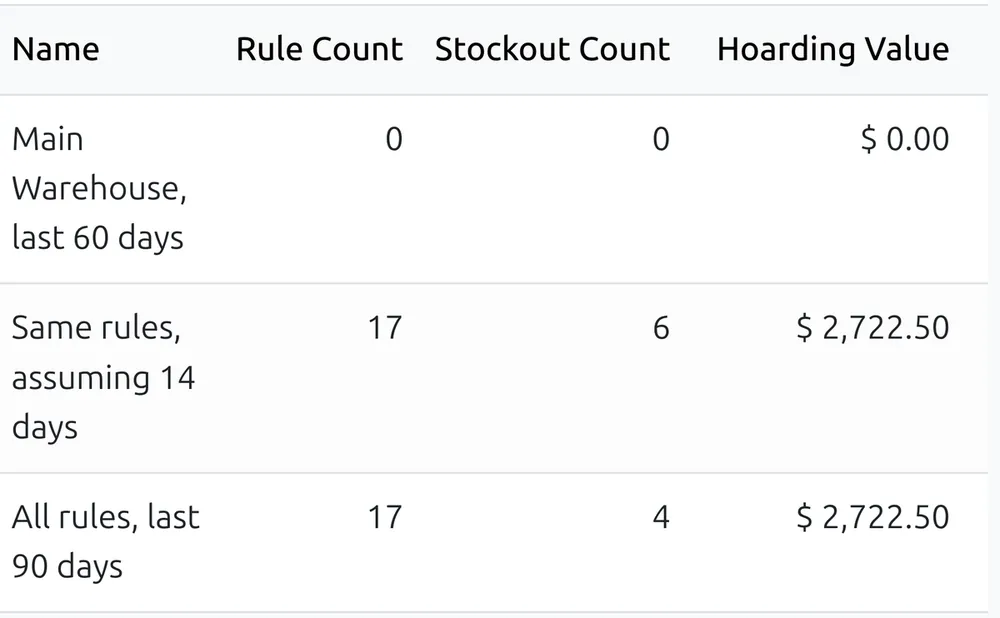
Each audit stays as a record with its counts. The list shows the rules checked, how many reorder too late and the value held. Run an audit again and its lines are replaced; keep the old result by making a new audit. This is a screenshot from Odoo 19.
The audit list. Real Odoo screen.
What changed in this version
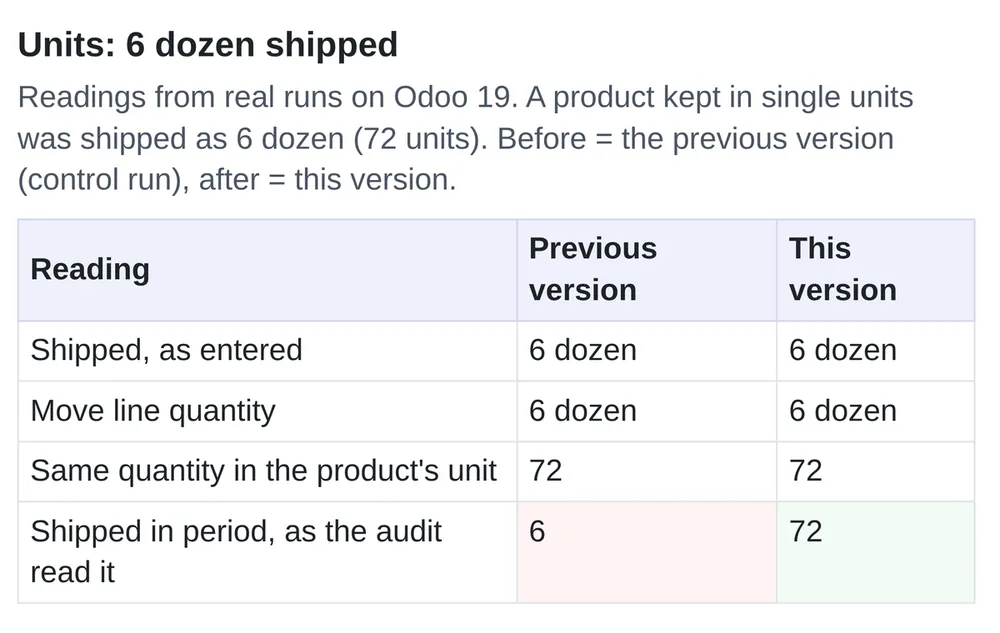
Two small fixes. Shipments entered in another unit of measure were summed as written, so 6 dozen read as 6 shipped; they are now summed in the product's own unit (72). And Assume lead time of is now on the form; before, the findings told you to fill it in and the screen did not show it. Each fix has a test that fails on the old code.
Old and new reading of the same shipment. Evidence table.
Screenshots
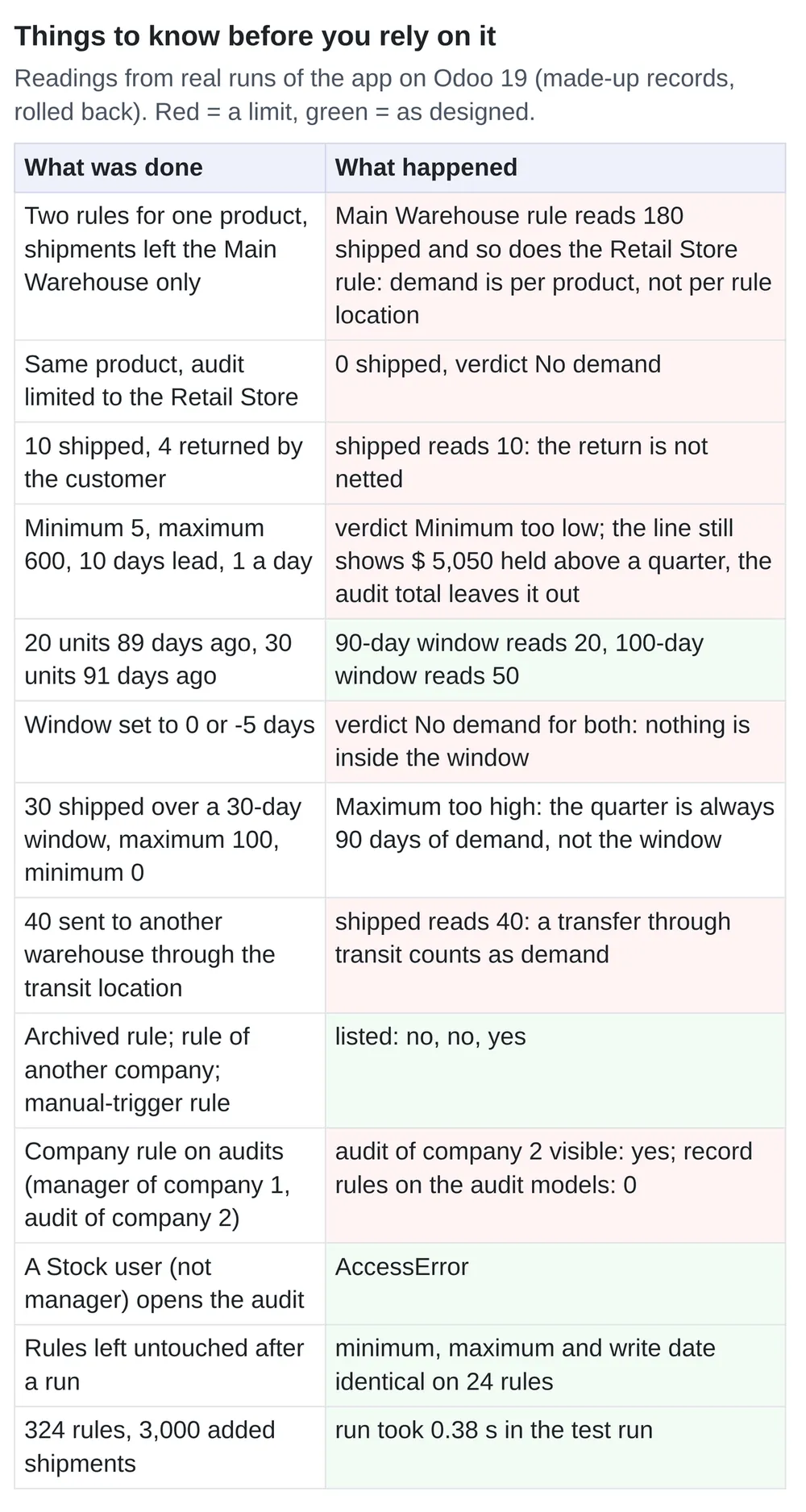
What it does not do
- Each of these was reproduced in a run of the app on Odoo 19. Seven are covered by tests that pass; none is changed in this version.
- Thirteen readings from real runs. Evidence table.
Requirements
- Odoo 19.0 or 20.0. The App Store sells each version separately, so buy the one that matches your database.
- Odoo.sh or On-Premise only. Third-party apps cannot be installed on Odoo Online (SaaS) databases. Check your hosting before buying.
- Module
mh_reorder_rule_audit, version 19.0.1.0.17, licensed OPL-1.