Stock Count Accuracy
How wrong the records were at each inventory count, per location and product, so cycle counts go where the stock drifts
Request a live demo · Odoo.sh or On-Premise only, not Odoo Online (SaaS).
$200 vs $0
error and net kept apart: in the test one product 20 units down and another 20 up, both at cost 5 and 100 on hand, gave Error $200 and Net $0
4 fixed
in this version: a count in a bay archived later vanished, a location with no error was named as holding it, the cost came from the wrong company, and other companies' reports were visible; each has a test that failed on the old code
28
automated tests counted on this version, none failing; 15 were added (13 before)
0.57 s
to report 3000 counted lines (300 products in 10 bays) on the test machine; larger data not tested
Reads
only: it creates its own report records and no stock movement, adjustment or quantity
Not
a count planner: it cannot tell an opening balance from a count, values at today's cost, and counts per lot as one adjustment each (see the known limits)
Every applied inventory count in Odoo is a measurement: the gap between what the system believed was on the shelf and what somebody found. Odoo posts the correction as a stock movement and moves on. Stock Count Accuracy adds those gaps up for a window of days, per counted location and product: how much was found, how much was missing, what it is worth at cost, how many adjustments each place has had and when the last one was, and a short text that names the locations with the most error. Error (gains plus losses) and net (gains less losses) are kept apart, because a bay that loses 100 and a bay that finds 100 has a net of nothing and a real problem. This page walks through it with screenshots of an Odoo 19 database holding a made-up hardware wholesaler, and with tables rendered from real readings of the same run; each picture says which it is.
Install it and a Count Accuracy menu appears under Inventory, Configuration, for Inventory administrators. It needs only the Inventory app (stock).
How it works
What it keeps, what it changes, what it does not
Each line was tested or read in the code.
1 Run a report
Use it when you want to know where the stock records drift without counting everything again.Changes records
Odoo posts each count's correction and moves on, so the size of the gaps, the only evidence of where the process leaks, is never added up.
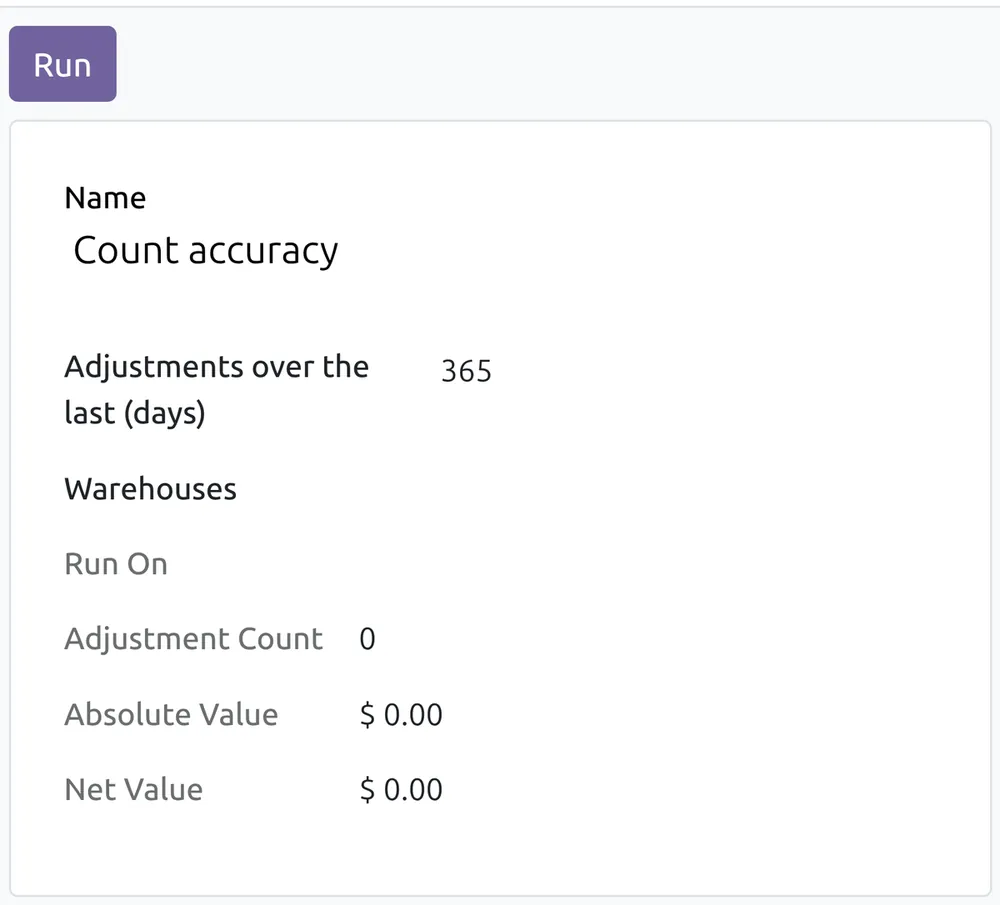
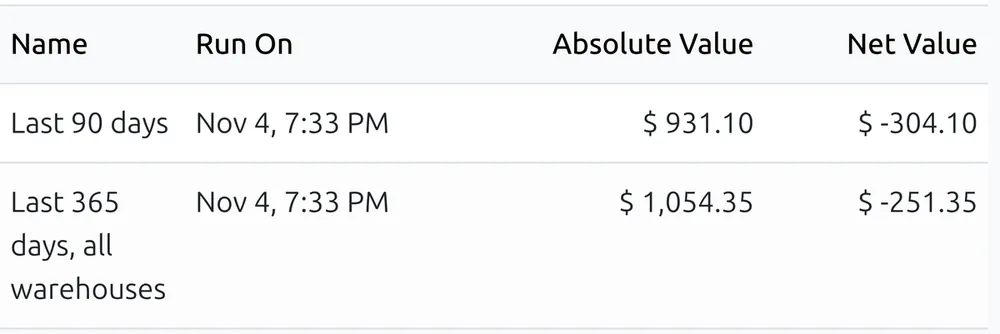
Open Inventory, Configuration, Count Accuracy and press New. Pick how many days back to look (it opens on 365; a quarter usually holds too few counts to say anything) and, if you want, one or more warehouses; leave Warehouses empty to cover every internal location of the company. Press Run. The second picture is the list of reports already run, with the error and the net of each. A report is a saved snapshot: counts posted later do not change it until Run is pressed again, and pressing Run again replaces the lines.
It will not run counts or create adjustments, and it has no scheduled run, chart, PDF or Excel export.
A new report before Run. Real Odoo screen.
Reports already run. Real Odoo screen.
2 Read the result
Use it when you need to decide which locations to count more often.Reads only
Counting everything every quarter is expensive and mostly wasted, because the drift is not spread evenly.
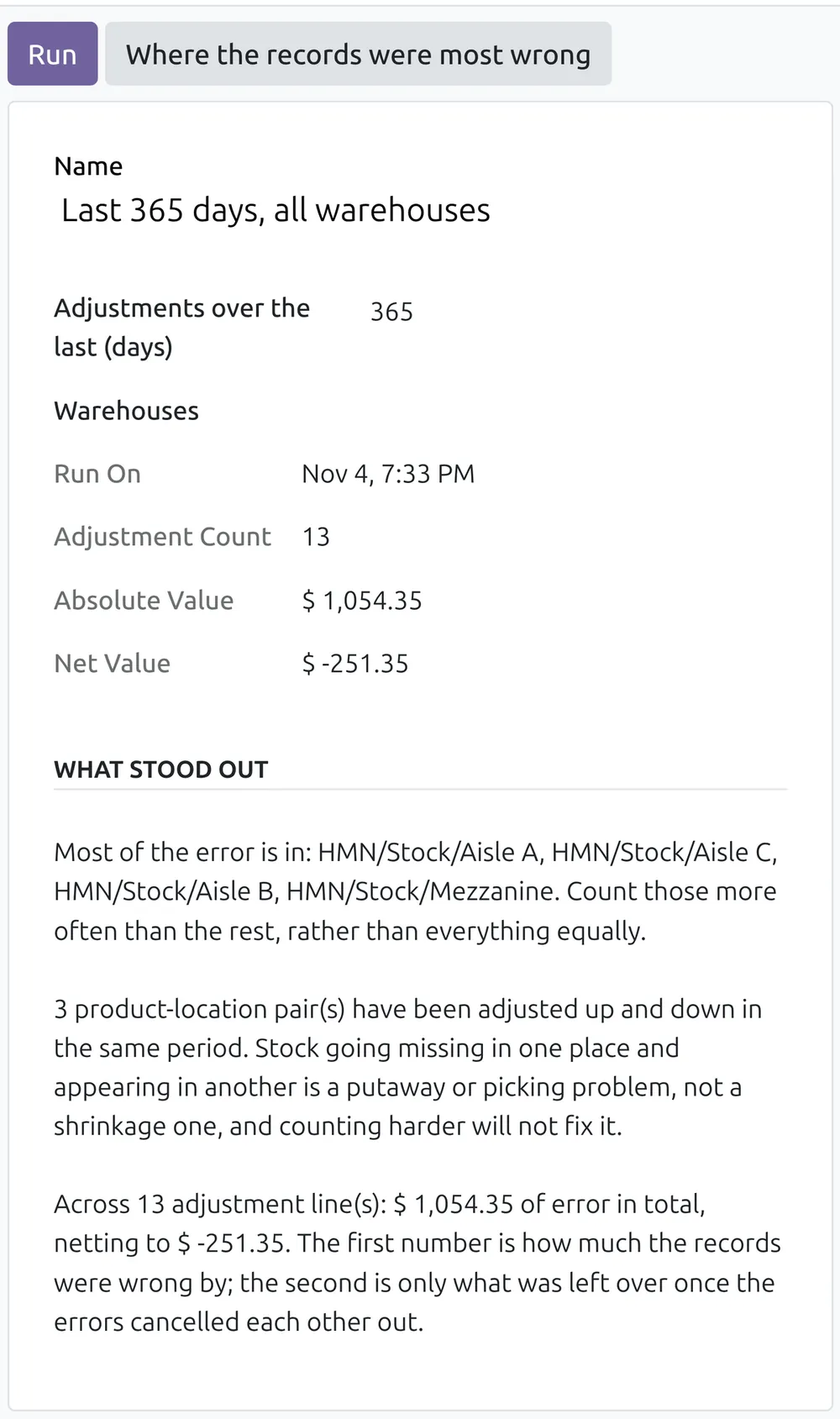
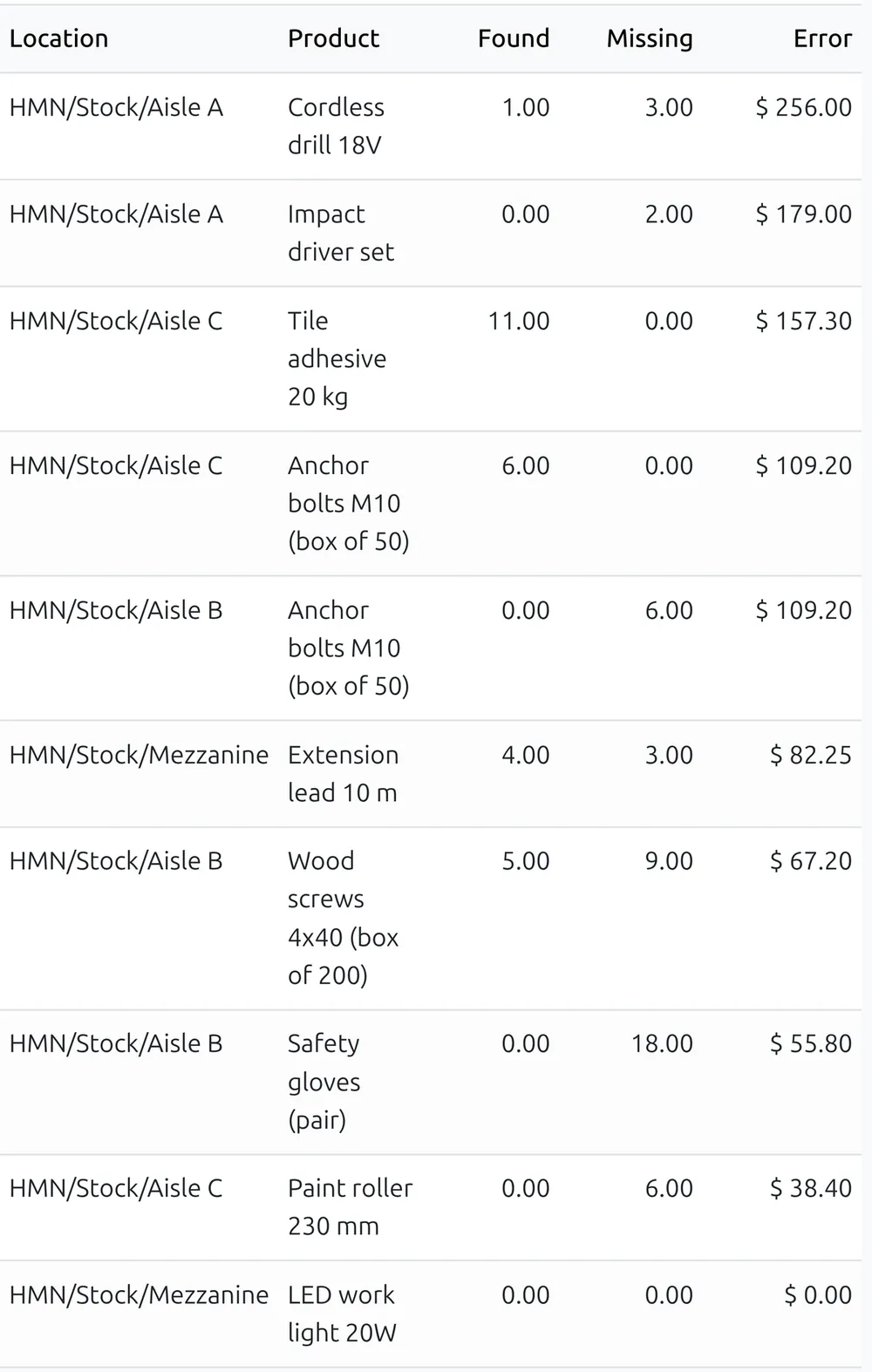
The form shows the run time, the number of adjustment lines, the Absolute Value (error: gains plus losses, ignoring direction) and the Net Value (gains less losses), then a short text under What stood out. In the made-up data of the first picture, 13 adjustment lines carry $1,054.35 of error and net to minus $251.35; the text names the four locations that hold the error, says that three product-location pairs were adjusted both up and down in the year, and explains the two totals. The button Where the records were most wrong opens the second picture: one line per counted product in a counted location, largest error first, with Found, Missing and the error at cost. The last line, a count that agreed, is a line with no error: Odoo posts an agreeing count as a movement of zero units.
The text names at most five locations, and only locations with an error above zero. It does not say who counted or why stock was wrong.
A report after Run. Real Odoo screen.
Where the records were most wrong. Real Odoo screen.
3 What counts, and for which window
Use it when you want to know what the numbers are made of before you trust them.Reads only
Counting a delivery or a transfer as drift would make the busiest location look like the leakiest one.
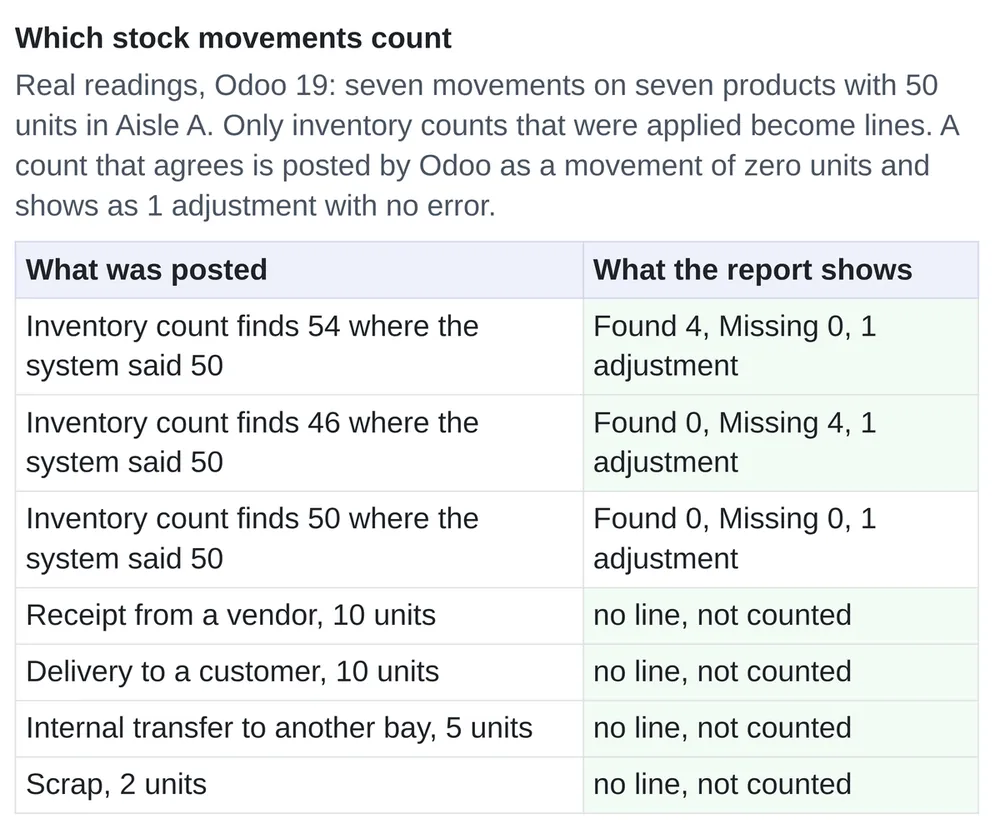
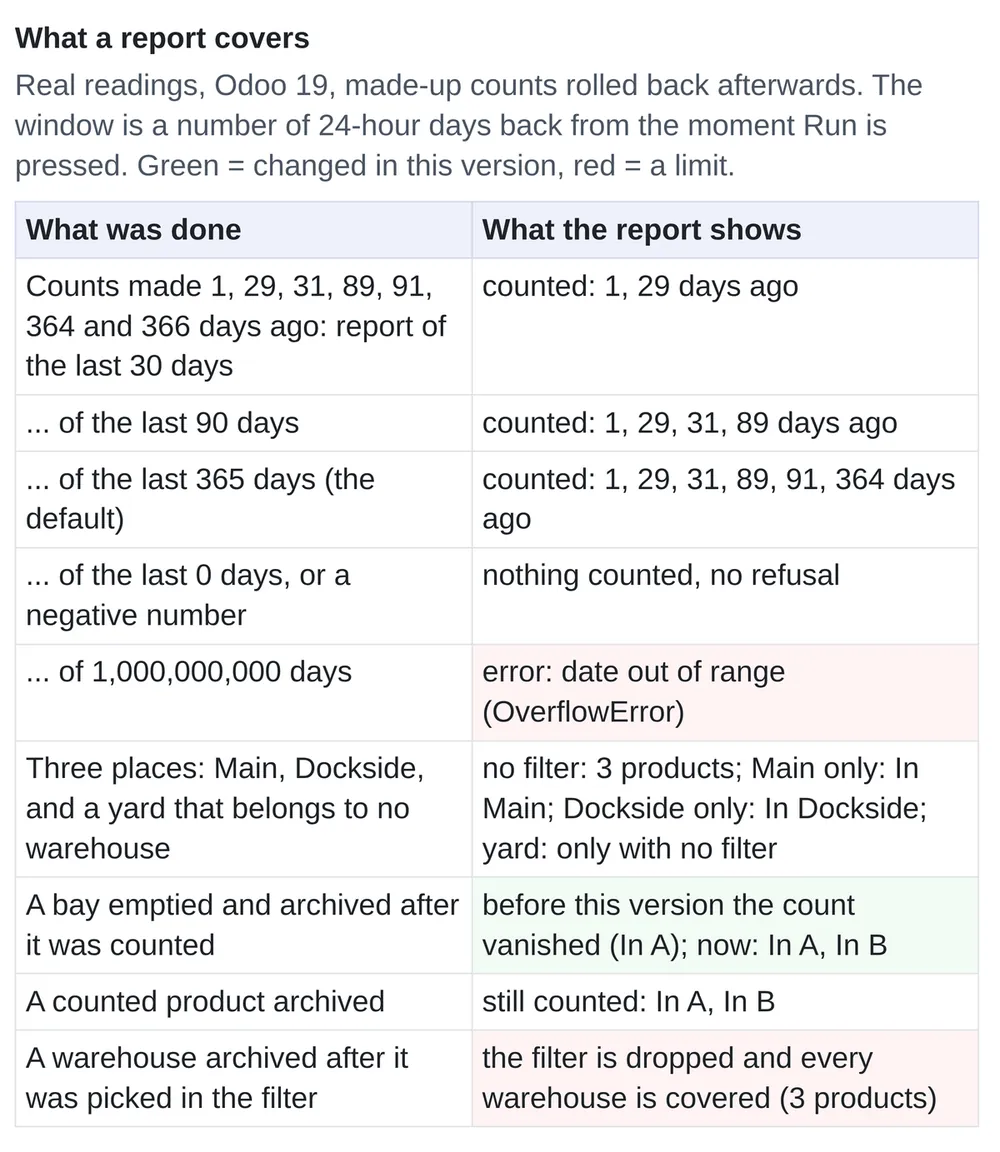
Only the movements Odoo posts when a count is applied are measured. The first table is a real reading of seven movements on seven products: a count that finds more, one that finds less, one that agrees, a receipt, a delivery, an internal transfer and scrap. Only the three counts become lines. A movement into an internal location is Found and out of one is Missing, and it is booked to the location that was counted, never to the virtual adjustment location. The second table reads the window (a number of 24-hour days back from the moment Run is pressed: a count 89 days old is in a 90-day report and one 91 days old is out), the warehouse filter, and what happens to archived locations, products and warehouses.
A window of one billion days stops with a date error; zero and negative windows count nothing and are not refused.
Which movements count. Evidence table.
What a report covers. Evidence table.
4 Error, net and value
Use it when you need to know how far to trust the records and what the gaps cost.Reads only
A net near zero can hide large gains and losses, and only the net is a loss.
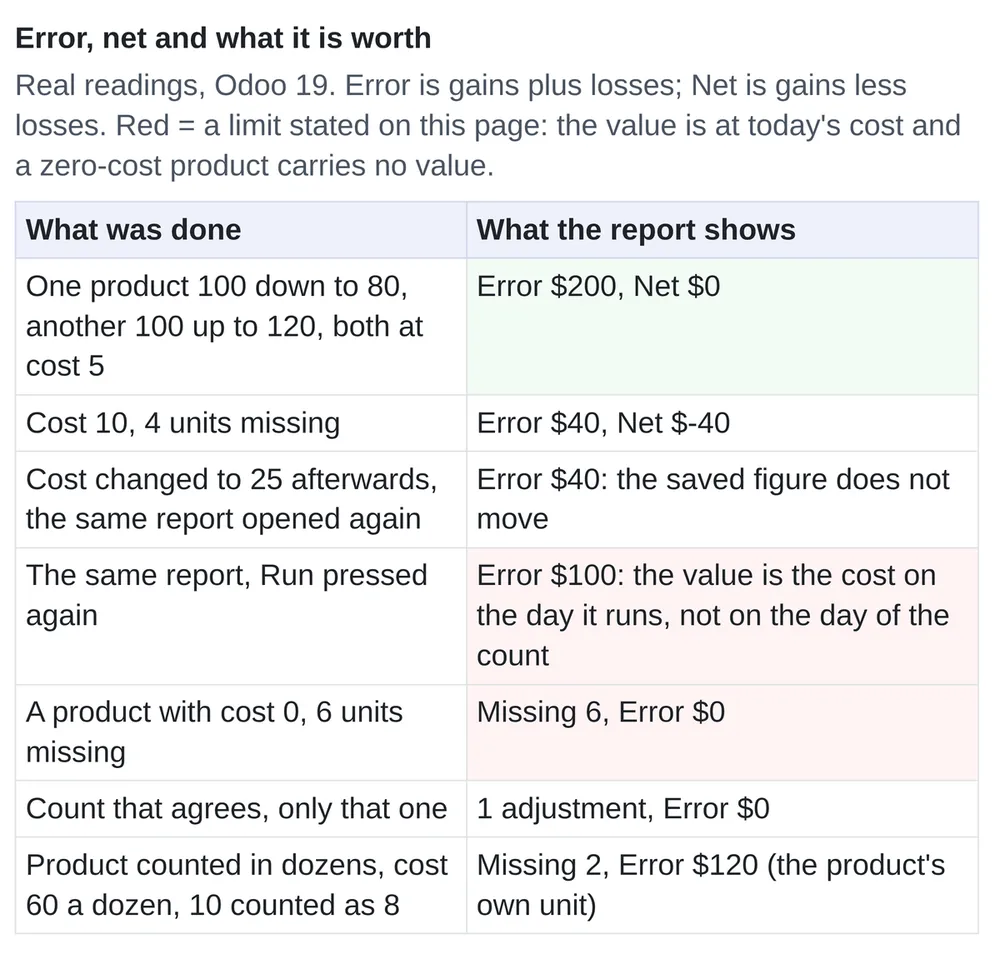
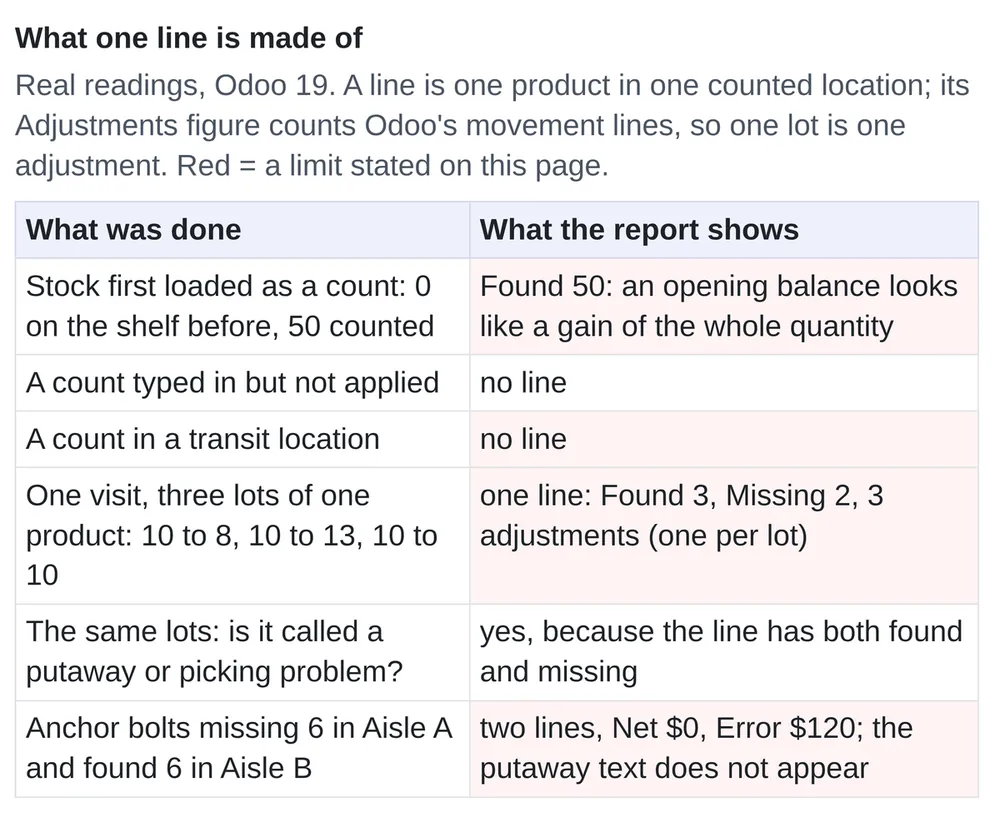
Error is gains plus losses, net is gains less losses; the first tells you how far to trust the records and only the second is what was lost. The value is the quantity times the product's cost, read when Run is pressed as the report's own company and saved on the lines. The first table reads that: cost changed afterwards leaves the saved report alone, pressing Run again re-values it at today's cost, a product at cost 0 shows its quantity but no value, and a product kept in dozens is valued per dozen. The second table reads what one line is made of: stock first loaded by a count is all found, a count never applied and a count in transit are not lines, one visit to three lots is three adjustments, and a product missing in one place and found in another is two lines.
It does not value at the cost on the day of the count, and it does not call out the same product missing in one place and found in another.
Error, net and what it is worth. Evidence table.
What one line is made of. Evidence table.
5 Who may use it, and how fast
Use it when you need to know who sees the figures and what a big warehouse costs.Reads only
Counted stock at cost is sensitive, and a report that needs minutes will not be run.
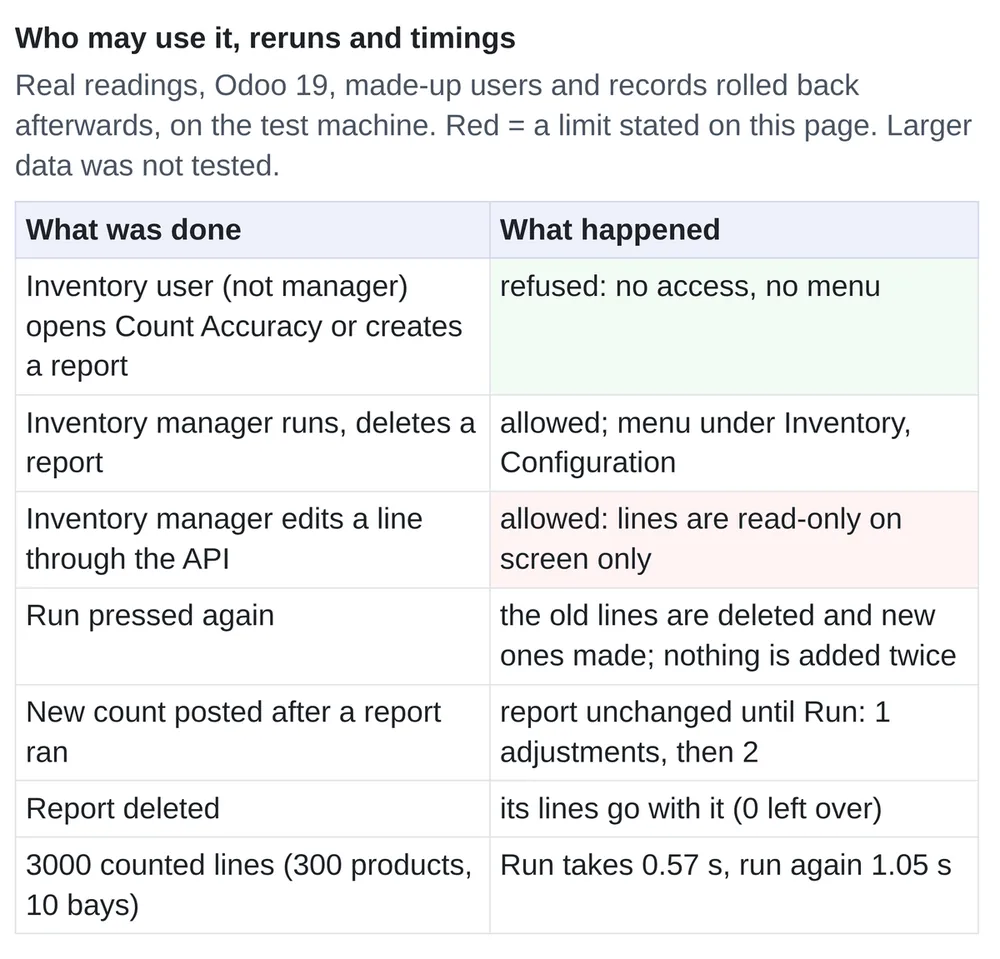
The models, the lines and the menu are for Inventory administrators; an Inventory user is refused reading and creating and does not see the menu. Several companies: a report belongs to one company, reads only that company's locations, and a user sees only the reports of the companies he or she is allowed in. The table is a real reading, including that Run replaces the old lines, that a report does not change until Run is pressed again, and the time to report 3000 counted lines (300 products in 10 bays): 0.57 s on the test machine.
A manager can change a line through the API; the lines are read-only on screen only.
Who may use it, reruns and timings. Evidence table.
What changed in this version
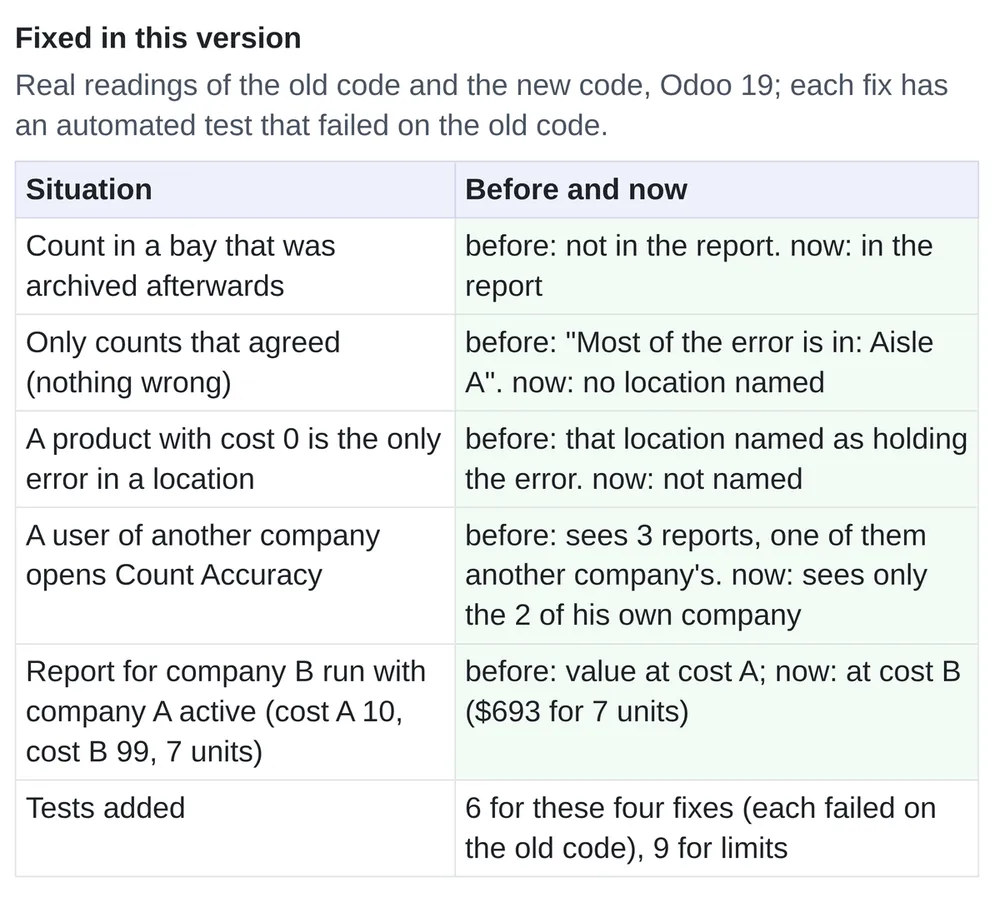
Version 1.0.14 fixes four defects, each with an automated test that failed on the old code: a count in a location that was archived afterwards is no longer dropped from the report; a location with no error (only counts that agreed, or only products at cost 0) is no longer named as holding the error; the cost is read as the report's company, not the company the user had active; and a user of another company no longer sees the reports (with their findings and totals) of every company, and cannot create a report for another company. It adds 15 automated tests (6 for the fixes, 9 pinning the limits above), rewrites the screenshots and the text, and removes the claim that it runs on Enterprise, which was not tested. Nothing else about running a report changed. The demo video of an earlier version is kept as it was and was not re-recorded.
Screenshots
What it does not do
- Each of these was reproduced in a run of the app on Odoo 19; the ones marked fixed were changed in this version.
- Fixed in this version. Evidence table.
Requirements
- Odoo 19.0 or 20.0. The App Store sells each version separately, so buy the one that matches your database.
- Odoo.sh or On-Premise only. Third-party apps cannot be installed on Odoo Online (SaaS) databases. Check your hosting before buying.
- Module
mh_count_accuracy, version 19.0.1.0.14, licensed OPL-1.