Stock Valuation Closing
Inventory valuation against the general ledger, and the stock variation closing entry, which Odoo Community computes but gives no menu to open
Request a live demo · Odoo.sh or On-Premise only, not Odoo Online (SaaS).
Free
App Store price, per Odoo version
19 · 20
Odoo versions, each sold on its own page
Odoo.sh
or On-Premise; not Odoo Online (SaaS)
1.0.1
version of mh_stock_valuation_closing
How it works
It is already in your Odoo. You just cannot open it.
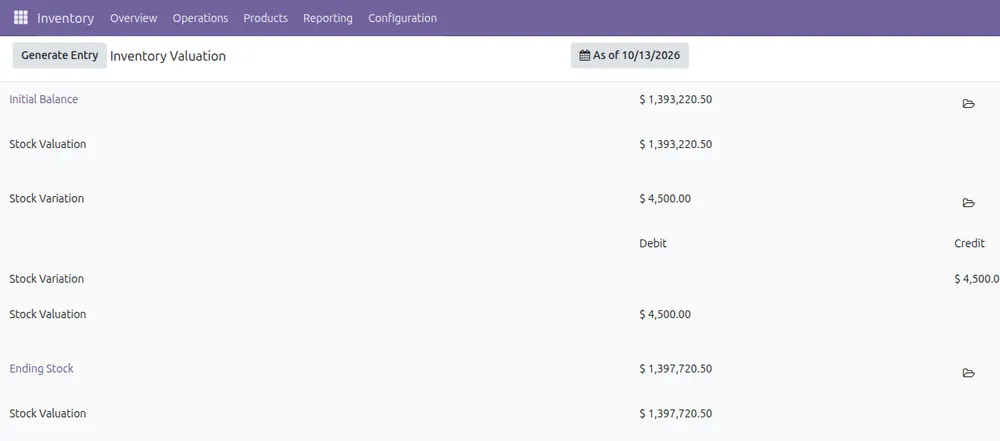
Odoo 19 and 20 ship an Inventory Valuation screen that compares what your stock is worth with what the general ledger says it is worth, shows the gap, and has a button that books the stock variation closing entry to close it. They also ship a daily or monthly job that creates that entry for you. Neither has a menu, and the setting that switches the job on is on no form. This app adds the doors and nothing else.
Two menus, one screen
Inventory > Reporting > Valuation vs Ledger and Accounting > Reporting > Inventory Valuation both open Odoo's own screen: the ledger balance of your stock accounts at the start, the stock variation to book, and the real stock value at the end, for today or any date you pick. On Odoo 20 the screen also lists accruals (bills to receive, invoiced not delivered and the like), and its Generate Entries button posts those entries as well as the closing entry. On Odoo 19 the button is Generate Entry and books the closing entry only.
The closing settings, on a form at last
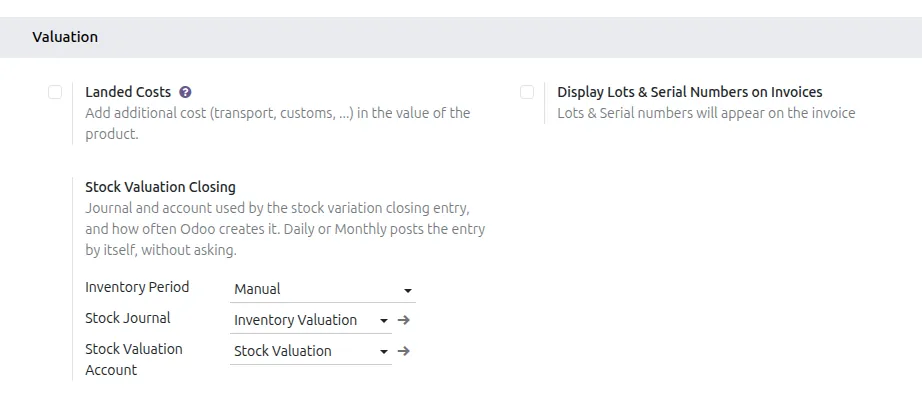
Settings > Inventory > Valuation gets three fields: the closing period (Manual, Daily or Monthly), the Stock Journal and the Stock Valuation Account that the closing entry uses. Choose Daily or Monthly and Odoo's own job creates and posts the entry by itself, so it only makes sense once you trust the figures.
Nothing is recomputed here
The figures, the closing entry and the job are Odoo's own code and behave exactly as Odoo's do. This app has no models, no data and no calculation of its own. It was tested by posting real closing entries in both versions and checking that the ledger balance of the stock account ends up equal to the stock value, and that closing again says there is nothing left to close.
Who sees it
The menus show for users with the Accounting Administrator right. Odoo's screen has to read the ledger and the entry it creates is an accounting entry, so a stock manager without that right would only get an access error. The Inventory menu also needs Inventory Administrator, as everything under Inventory > Reporting does. Invoicing users do not see the menus.
Screenshots

What it does not do
- It does not export to PDF or Excel. Odoo's own screen has no export: the buttons are in its source, switched off. It shows one total per stock account, not a list of products.
- It does not create stock journal entries when a transfer is validated. That is a different job, and Odoo decides it from your product categories.
- It does not set up your accounts. The comparison needs a stock valuation account on your product categories. If there is none, there is nothing to compare.
- It does not change how Odoo values stock. It will not make a missing or wrong ledger balance right; it shows the gap and lets Odoo's entry close it.
Requirements
- Odoo 19.0 or 20.0. The App Store sells each version separately, so buy the one that matches your database.
- Odoo.sh or On-Premise only. Third-party apps cannot be installed on Odoo Online (SaaS) databases. Check your hosting before buying.
- Odoo 19 and 20, Community or Enterprise, with Inventory and Accounting (module stock_account). Third-party apps install on Odoo.sh or On-Premise only - they cannot be installed on Odoo Online (SaaS).
- Module
mh_stock_valuation_closing, version 19.0.1.0.1, licensed OPL-1.