Transfer Creation Rights
Restrict who can create receipts, delivery orders and internal transfers by hand, while orders, reordering rules, returns and backorders keep creating them
Request a live demo · Odoo.sh or On-Premise only, not Odoo Online (SaaS).
Free
App Store price, per Odoo version
19 · 20
Odoo versions, each sold on its own page
Odoo.sh
or On-Premise; not Odoo Online (SaaS)
1.0.1
version of mh_transfer_creation_rights
Anybody with Inventory access can press New on the Transfers list and invent a receipt or a delivery. Odoo has rights for working in Inventory, but none for making a transfer up, so a delivery nobody ordered or a receipt nobody can trace to a purchase is one click away for every warehouse user. This adds three rights to the user form, one each for receipts, delivery orders and internal transfers. Take a right away from a user and that person can no longer create that kind of transfer by hand.
How it works
Three rights on the user form
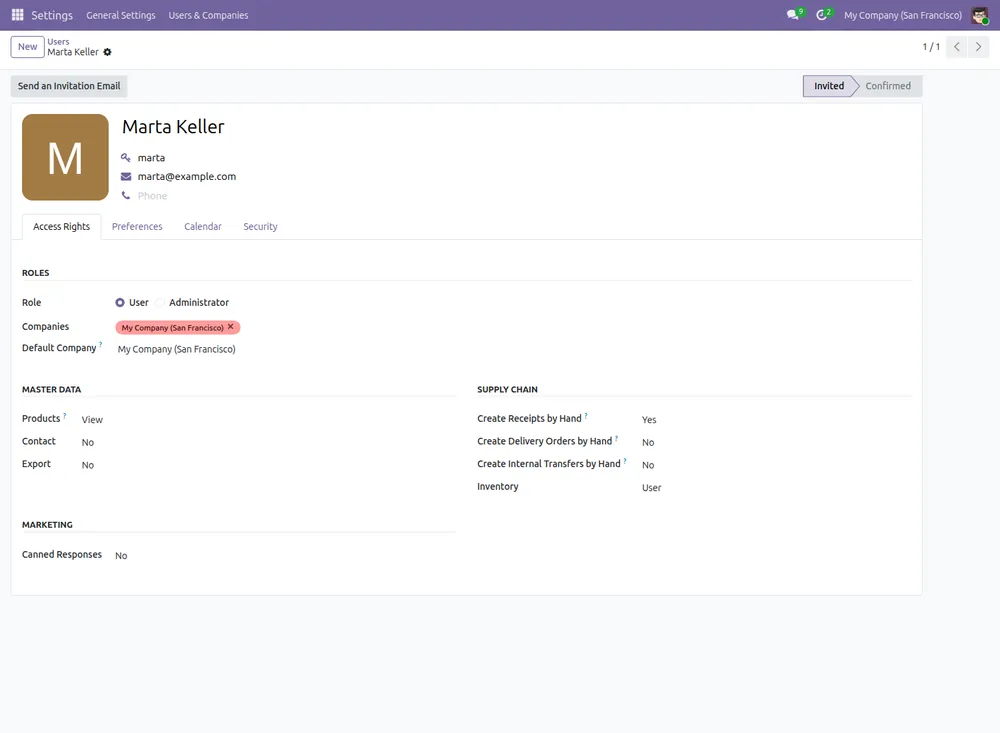
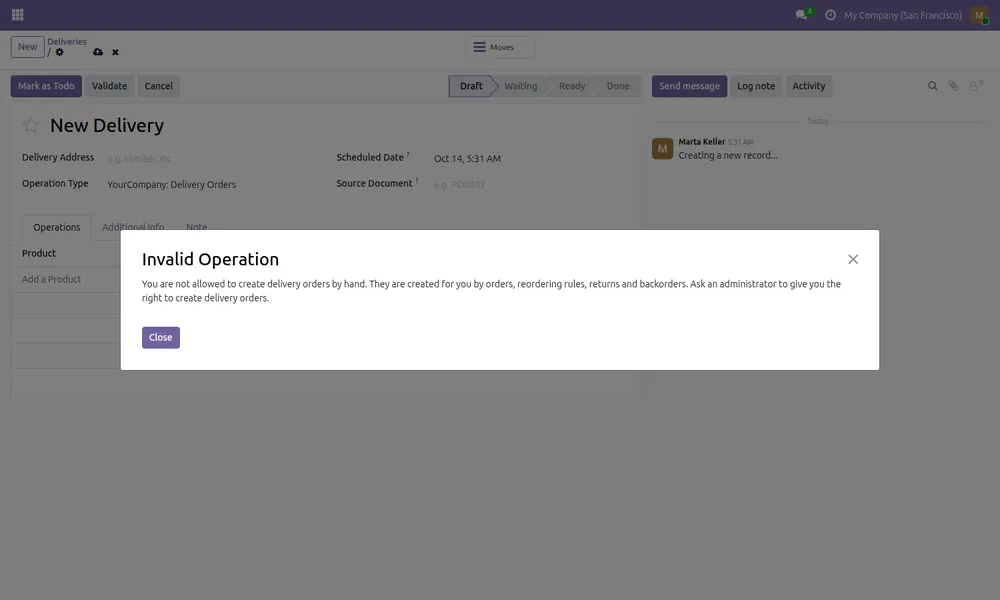
Under Supply Chain on the Access Rights tab of the user form you get three Yes/No lines: Create Receipts by Hand, Create Delivery Orders by Hand and Create Internal Transfers by Hand. Without the matching right, saving a new transfer of that type, duplicating one or importing one is refused with a message that says which right is missing. A right covers its own type only: someone who may create receipts still cannot create a delivery.
What carries on as before
Only a person pressing Save on a transfer is stopped. Transfers that Odoo creates for you are not touched, whatever rights the user has: receipts from confirmed purchase orders, deliveries from confirmed sales orders, transfers made by reordering rules and routes, manufacturing component transfers, dropshipping, returns, backorders and the next step of a multi-step receipt. Each of these is tested with a user who holds none of the three rights.
Installing it changes nothing on day one
When you install it, everybody who can already use Inventory is given all three rights, so nobody is locked out. Restrict a person by taking a right away on their user form. Inventory Administrators always have all three. People you give Inventory access later do not get the rights until you add them.
Screenshots
What it does not do
- It does not hide the New button. A user without the right can open the form and fill it in, and is refused when saving.
- It stops the Odoo web interface, not integrations. Transfers created through the external API, scheduled actions or another app's code are treated as automatic and are not stopped.
- It does not limit what people do with existing transfers. Validating, editing and cancelling are still governed by Odoo's own Inventory rights. It does not restrict by warehouse, and it does not cover manufacturing, repair or dropship operation types.
Requirements
- Odoo 19.0 or 20.0. The App Store sells each version separately, so buy the one that matches your database.
- Odoo.sh or On-Premise only. Third-party apps cannot be installed on Odoo Online (SaaS) databases. Check your hosting before buying.
- Odoo 19 and 20, Community or Enterprise. Requires Inventory (stock). Third-party apps install on Odoo.sh or On-Premise only - they cannot be installed on Odoo Online (SaaS).
- Module
mh_transfer_creation_rights, version 19.0.1.0.1, licensed OPL-1.