Variant Routes
Different routes for product variants: buy one variant, manufacture or dropship another, instead of one route for the whole product
Request a live demo · Odoo.sh or On-Premise only, not Odoo Online (SaaS).
Free
App Store price, per Odoo version
19 · 20
Odoo versions, each sold on its own page
Odoo.sh
or On-Premise; not Odoo Online (SaaS)
1.0.2
version of mh_variant_routes
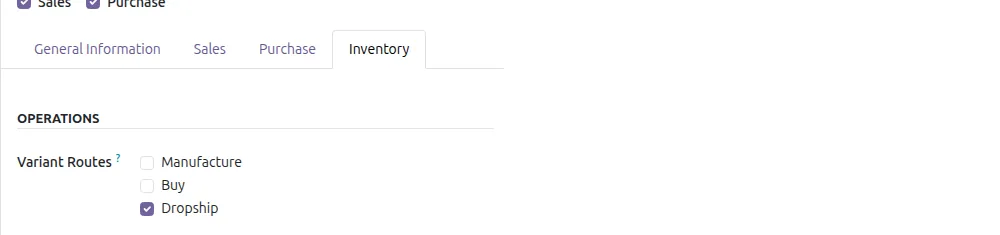
In Odoo, the routes of a product (Dropship, Replenish on Order, and the ones you create) are ticked on the product template. Every variant of the product gets the same routes. If the red shirt is shipped straight from the supplier and the blue one is made or bought for your own stock, Odoo only lets you do that if red and blue are two separate products. This app lets you tick routes on the variant itself.
How it works
Routes on the variant
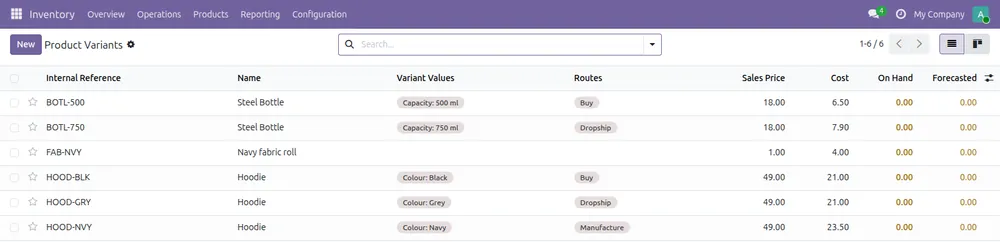
Open a variant (the Variants button on the product, or Inventory > Products > Product Variants) and tick its routes under Variant Routes. Those routes replace the product's routes for that variant only. You can pick from the same routes Odoo offers on the product: the ones marked Applicable on Product.
Nothing changes until you tick one
A variant with no variant routes keeps using the routes of its product, and follows the product when you change them. You can set routes on one variant and leave the rest alone. Untick them and the variant goes back to the product's routes.
Odoo uses it where it matters
Odoo looks up routes on the variant when it searches for a rule. So the variant's routes decide whether a sales order line is drop shipped, which rule a reordering rule replenishes with, and what the Routes report shows for the variant. A route picked on a sales order line still wins over the variant's routes, as it does over the product's.
Seen in the variant list
The Product Variants list gets a Routes column showing the routes each variant uses, and a filter, Has Variant Routes, for the variants that have their own.
Screenshots
What it does not do
- Buy and Manufacture are not offered by default. Odoo leaves them off the product's route list (Applicable on Product is off) and picks them from vendors and bills of materials. To choose them per variant, tick Applicable on Product on those routes in Inventory > Configuration > Routes. A Buy route on a variant still needs a vendor, and a Manufacture route needs a bill of materials for it.
- The Replenish button on the product form pre-selects a route from the product, not from the variant. For a variant with its own routes, choose the route in the wizard. The View Diagram button on the product form shows the product's routes.
- Category routes still apply to the variant, added to the variant's routes, as they are for the product.
- It does not add routes or rules. Dropship, Buy and Manufacture need Odoo's Dropshipping, Purchase and Manufacturing apps installed, as before.
- If Odoo creates a variant again (for example after you change the product's attributes), the new variant starts with no variant routes.
Requirements
- Odoo 19.0 or 20.0. The App Store sells each version separately, so buy the one that matches your database.
- Odoo.sh or On-Premise only. Third-party apps cannot be installed on Odoo Online (SaaS) databases. Check your hosting before buying.
- Odoo 19 and 20, Community or Enterprise. Also requires Inventory (stock). Third-party apps install on Odoo.sh or On-Premise only - they cannot be installed on Odoo Online (SaaS).
- Module
mh_variant_routes, version 19.0.1.0.2, licensed OPL-1.