Warehouse Access Rules
Restrict users to the warehouses they work in, and see how many transfers and stock lines each of them will stop seeing before you switch it on
Request a live demo · Odoo.sh or On-Premise only, not Odoo Online (SaaS).
12 = 12
transfers the count announced for a Riverside-only user, and transfers that user then actually lost (10 = 10 stock lines); made-up data, three warehouses
3
things it narrows: transfers, stock on hand and the warehouse list. Stock moves, Moves History, locations and operation types are not narrowed
26
automated tests of the app on this version, none failing; 14 were added for what this page states (12 before)
< 3 ms
for a restricted user to count and list a page of 80 transfers among 3,000, about the same as an unrestricted user (best of five); larger data not tested
Fixed
in this version: a new, changed or archived restriction, and a new warehouse, did not reach a user who had already opened a screen until the server was restarted
Not
a security boundary on its own: it stops what people see in transfers, stock on hand and the warehouse list, not what they may do, and not other screens that show other warehouses
Restricting somebody to their own site is easy to switch on and hard to predict: hidden records look exactly like there being none, and the complaint arrives from the warehouse floor. Warehouse Access Rules counts first. Pick the user and their warehouses, press Count what they lose, and it tells you how many transfers and stock lines that person will stop seeing, with a button that opens those very transfers. People you have not named keep seeing everything. This page walks through it with screenshots of an Odoo 19 database holding a made-up distributor, three warehouses and four users, each logged in separately, and with tables rendered from real readings of the same run; each picture says which it is.
It narrows three things: transfers, stock on hand and the warehouse list. It is not a complete lock: other screens still show other warehouses, and this page says which.
Install it and a Warehouse Access menu appears under Inventory, Configuration. It needs only the Inventory app (stock).
How it works
What it keeps, what it changes, what it does not
Each line was tested or read in the code.
1 Count before you hide
Use it when you want to know what a restriction will cost a user before you switch it on.Reads only
Hiding records looks exactly like there being none, so nobody can tell a wrong rule from a broken system until it is too late.
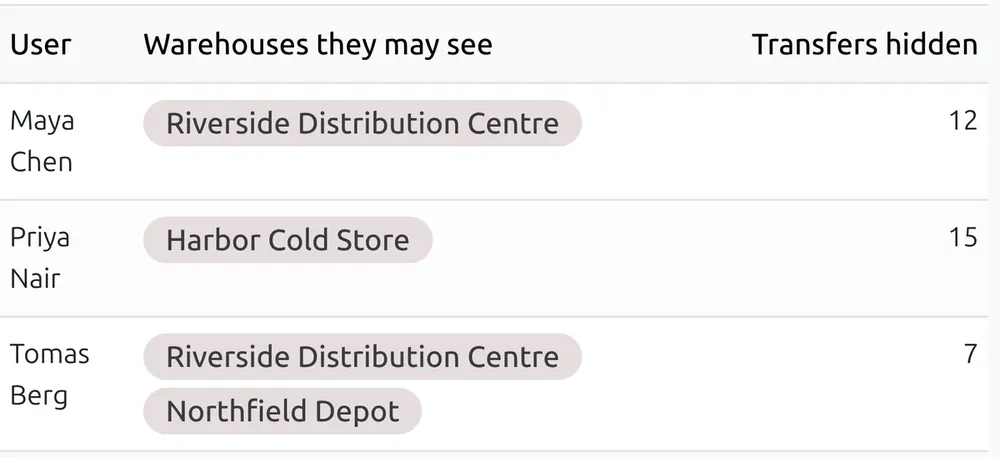
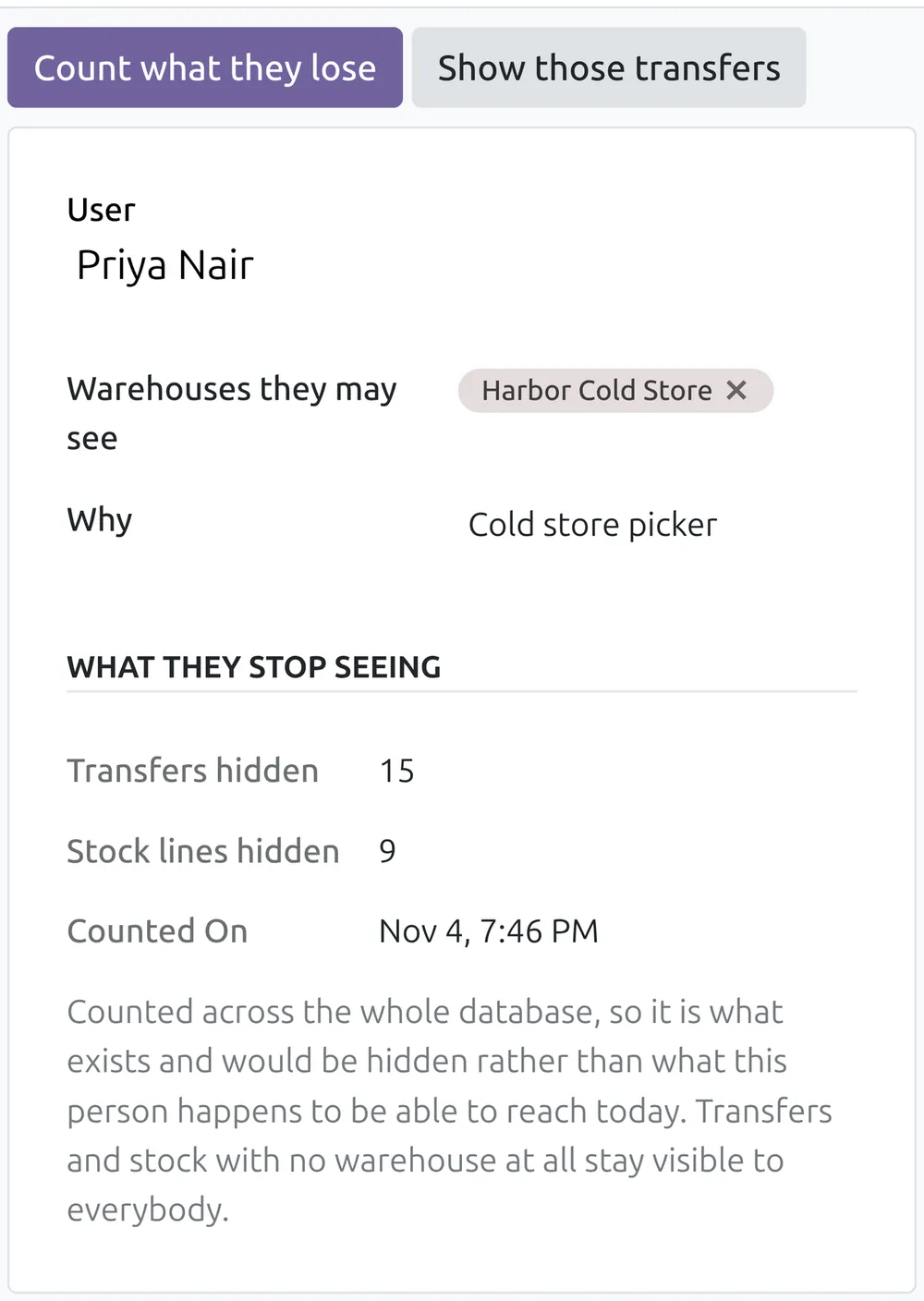
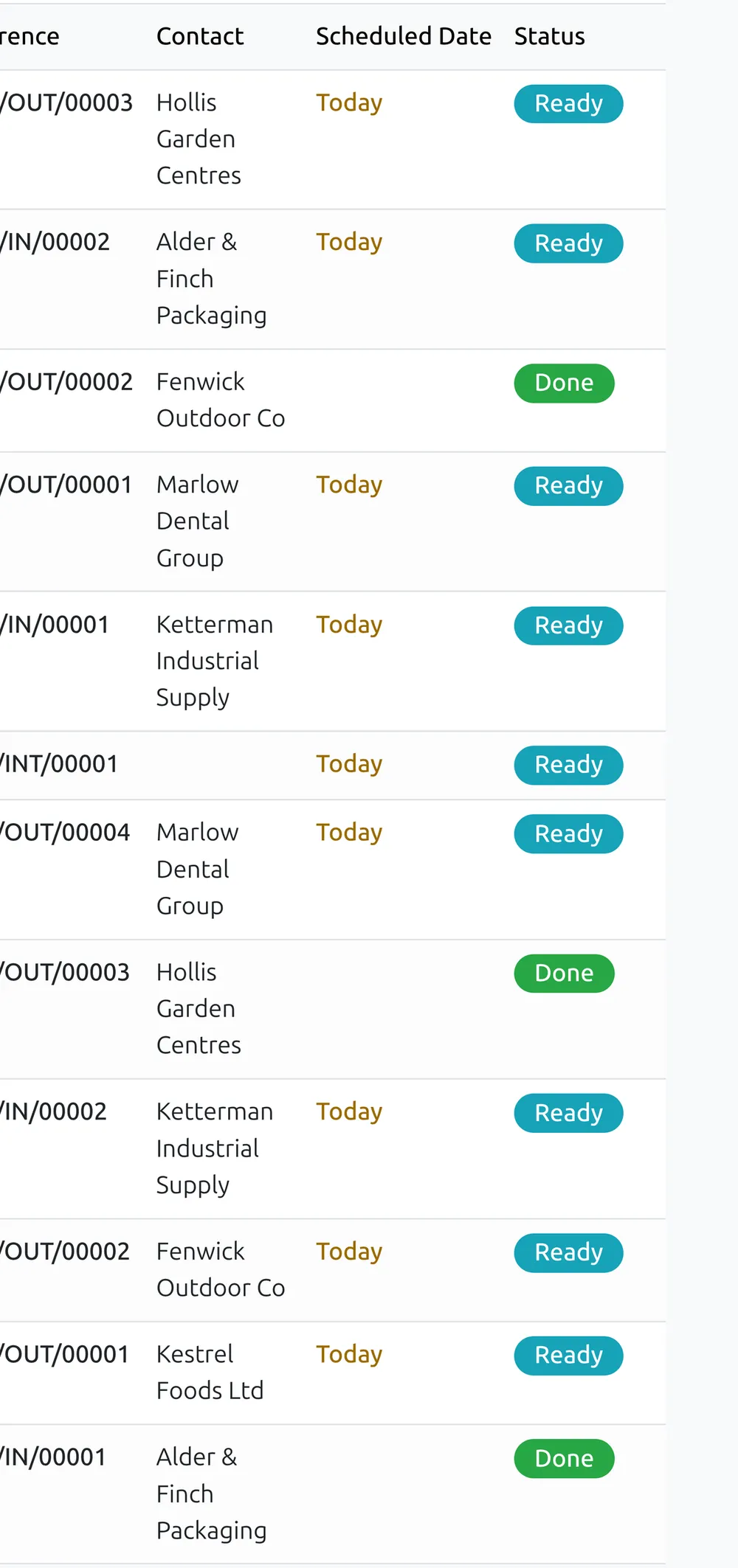
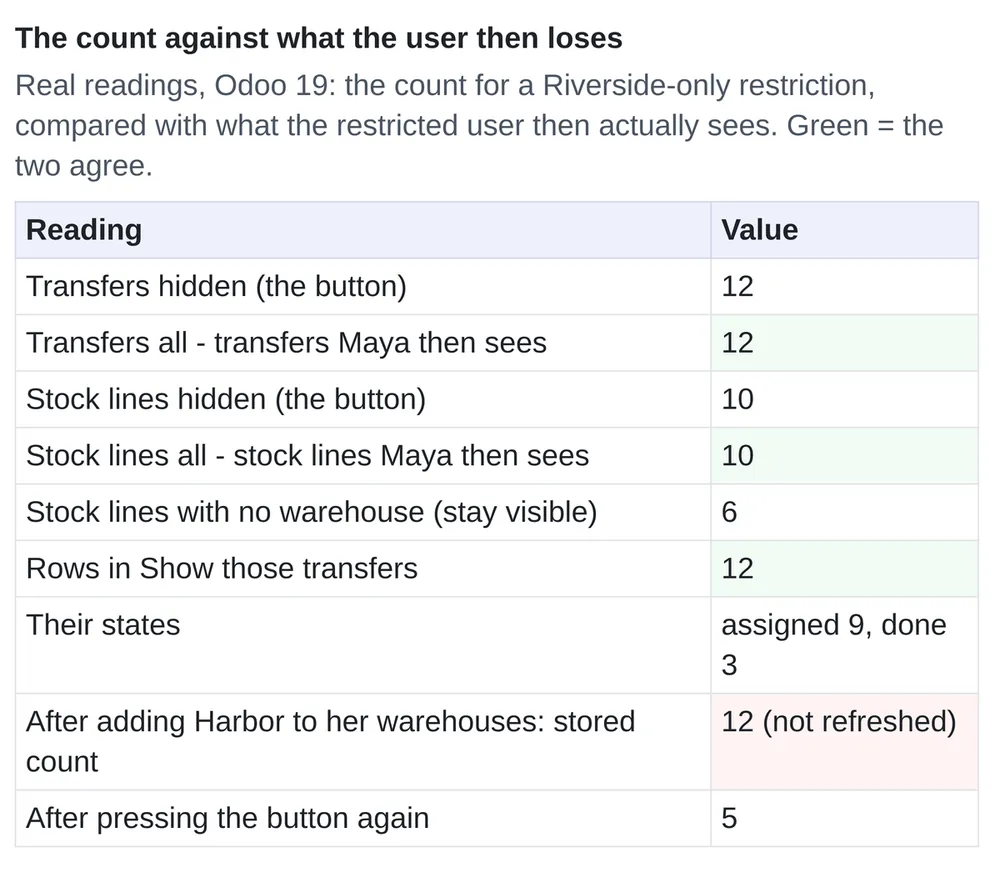
Open Inventory, Configuration, Warehouse Access. The first picture is the list of restrictions: one row per user, the warehouses they may see, and how many transfers they stop seeing (the form also shows stock lines). The second is a restriction opened and counted with a real click on Count what they lose: Priya Nair, restricted to Harbor Cold Store, stops seeing 15 transfers and 9 stock lines. Show those transfers opens the transfers in question (third picture, Maya Chen: 12 transfers, in three states). The figures count the whole database as the superuser, so they are what exists, not what the person can reach today. The table compares the count with what the restricted user then actually lost: 12 and 12, 10 and 10.
The numbers are a snapshot taken when you press the button; they are not refreshed when warehouses or transfers change.
The list of restrictions. Real Odoo screen.
A restriction after a real click on Count what they lose. Real Odoo screen.
Show those transfers, for Maya Chen. Real Odoo screen.
The count against what the user then loses. Evidence table.
2 What a restricted user sees
Use it when a person should only see the site they work in.Changes records
A picker at one site has no use for another site's transfers, and sees them in every list.
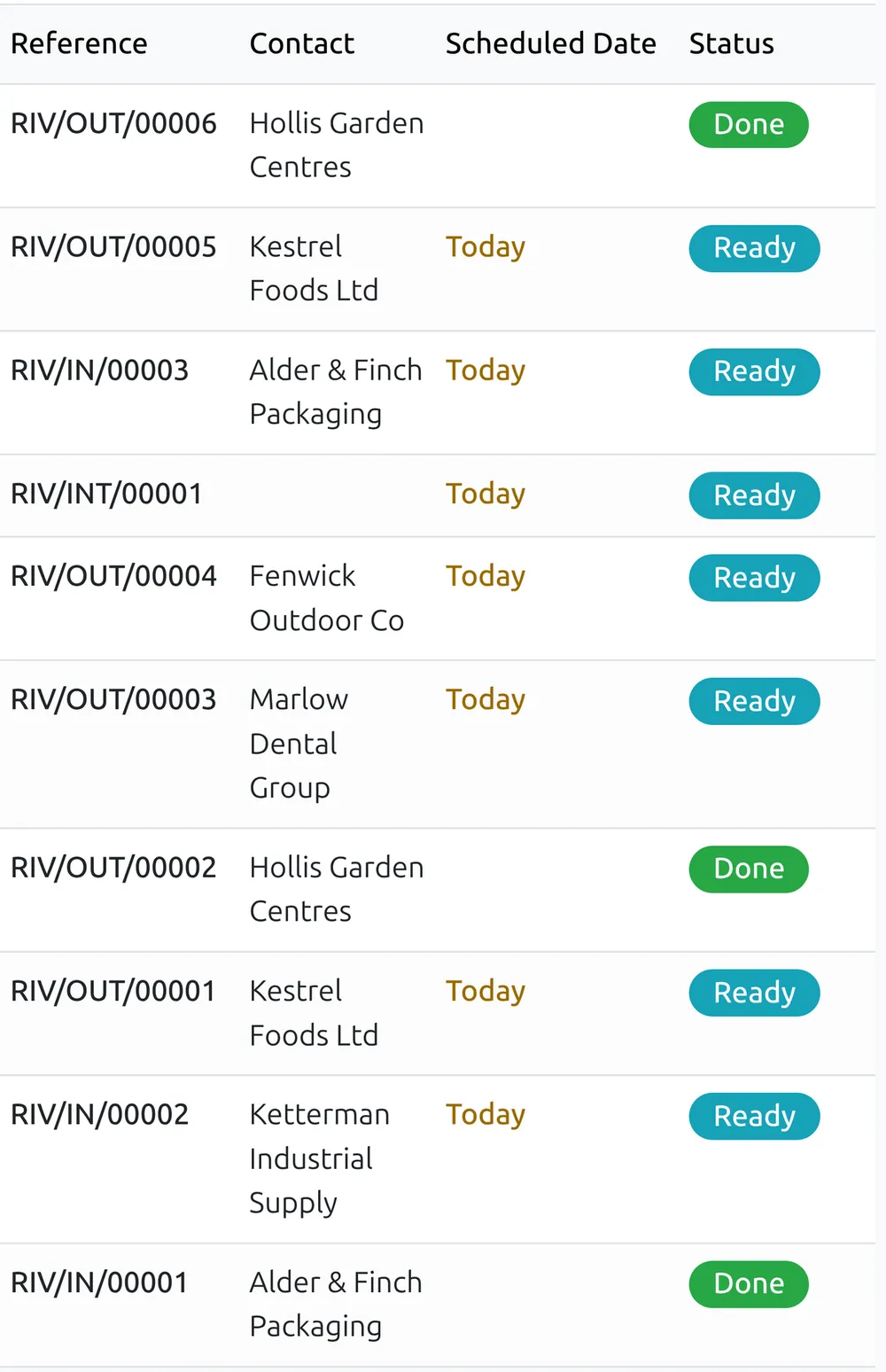
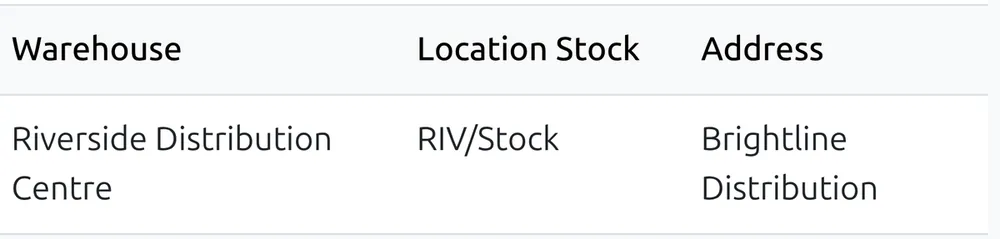
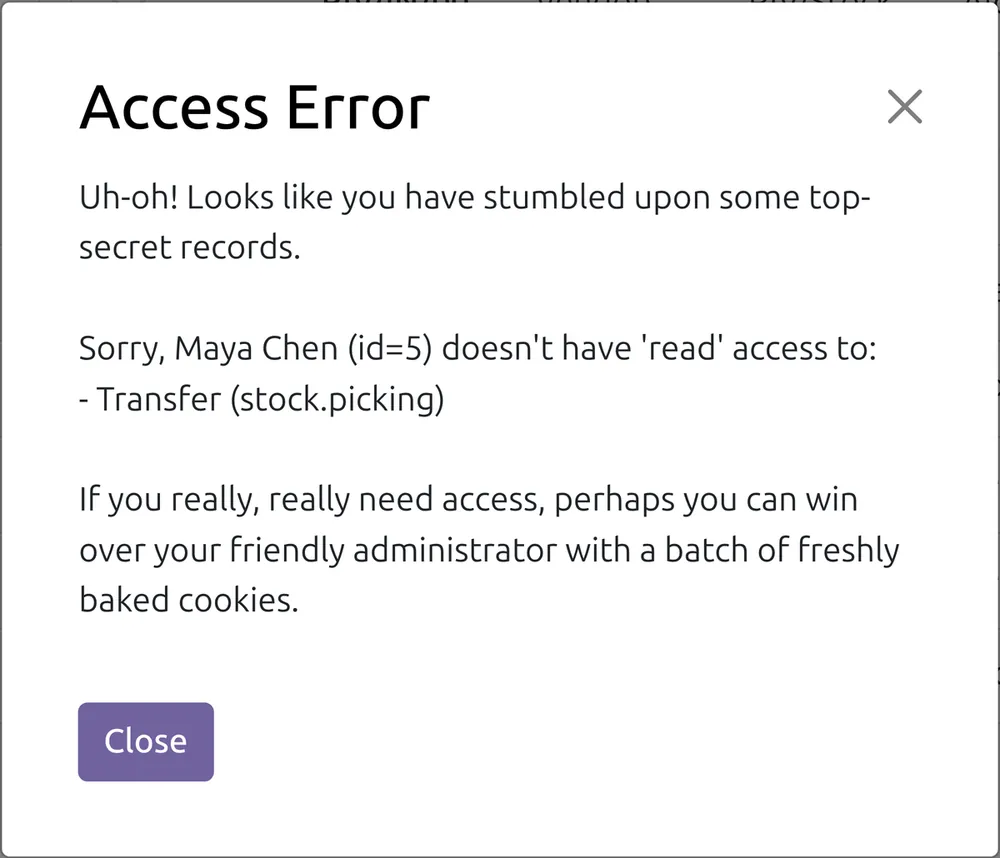
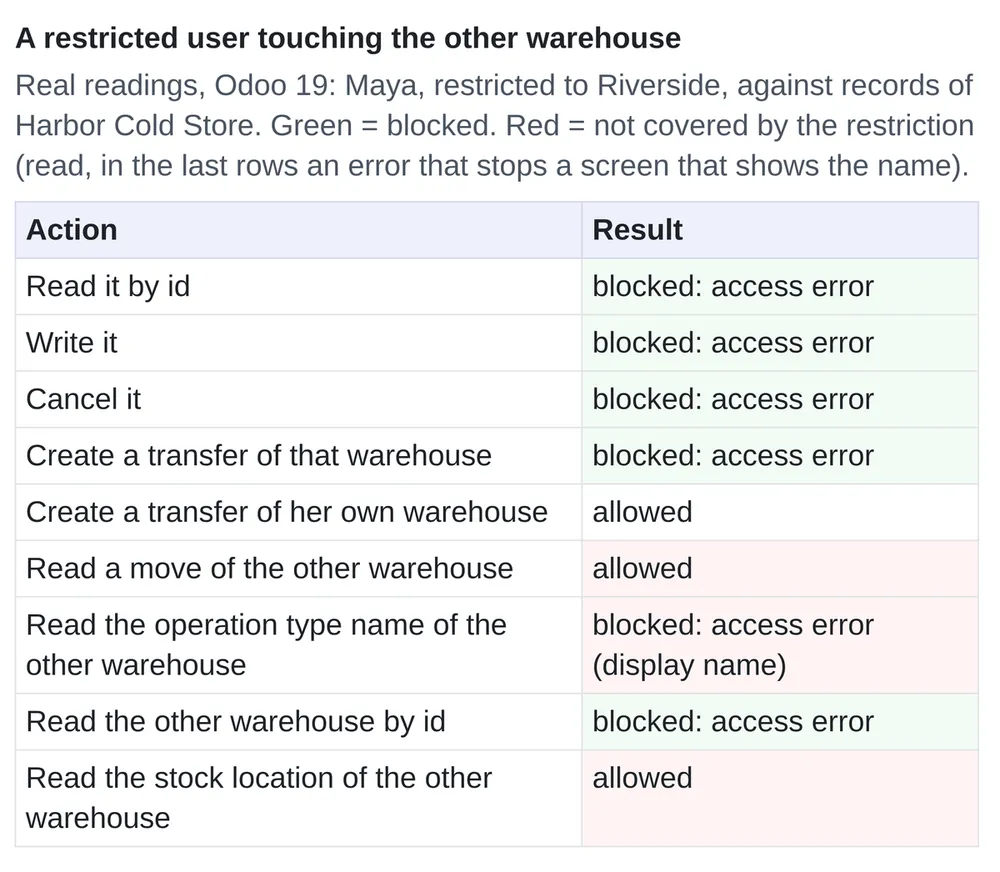
Maya Chen is restricted to Riverside Distribution Centre. Her Transfers list holds the ten Riverside transfers and none of the other twelve (first picture); her warehouse list holds one warehouse (second). Opening a transfer of another warehouse by its address, or trying to cancel, change or create one, is refused with an access error (third picture and table). Odoo's own product on-hand and forecast figures follow the warehouses she can see: 490 on hand for an unrestricted user, 340 for her. Anybody without a restriction is untouched: in the same run the unrestricted users still saw all 22 transfers.
It does not change which operations a user may perform on the transfers they can see.
Maya Chen's transfers. Real Odoo screen.
Her warehouse list. Real Odoo screen.
A transfer of another warehouse opened by its address. Real Odoo screen.
A restricted user touching the other warehouse. Evidence table.
3 What it does not narrow
Use it when you need to know which screens still show other warehouses.Read-only
A restriction that quietly leaves a screen open is worse than none, because you stop checking.
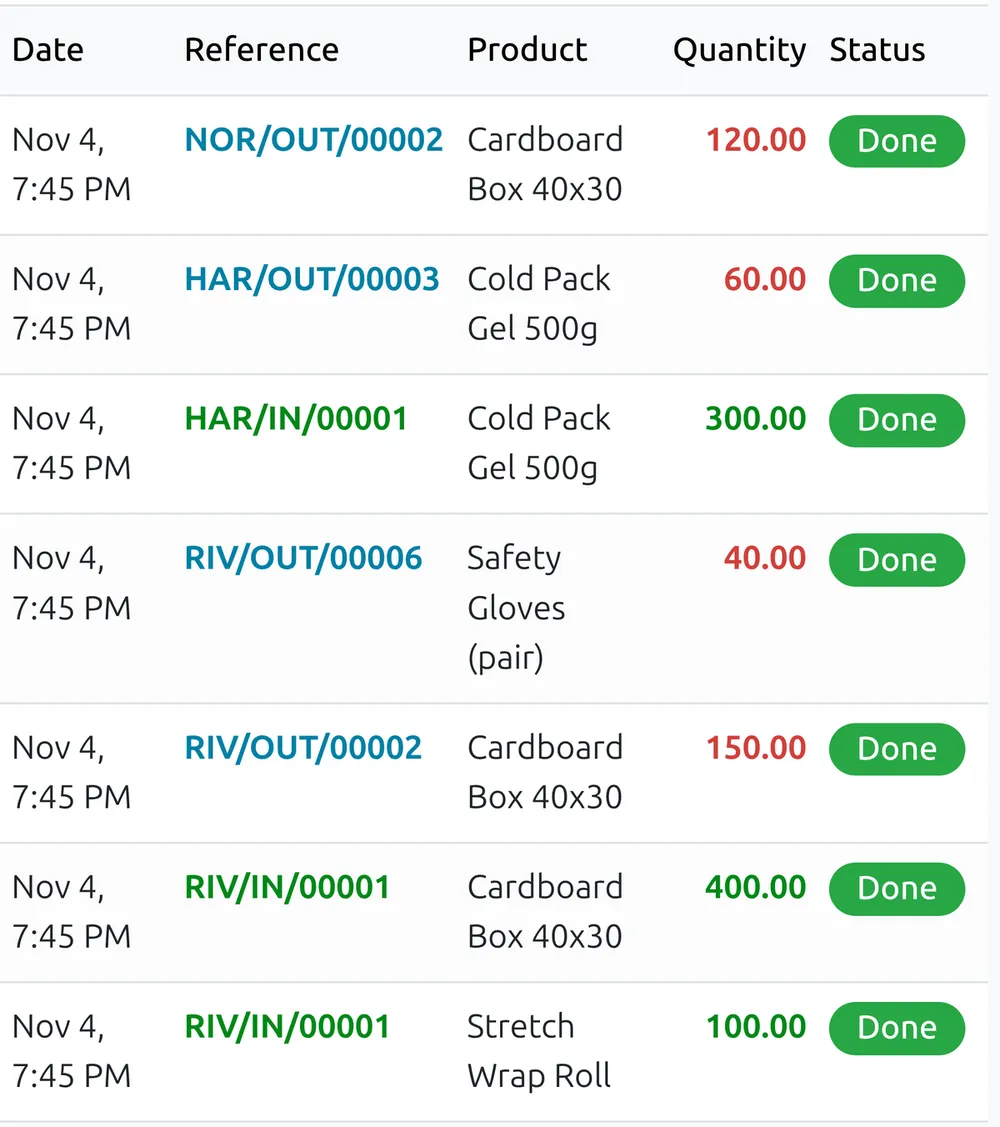
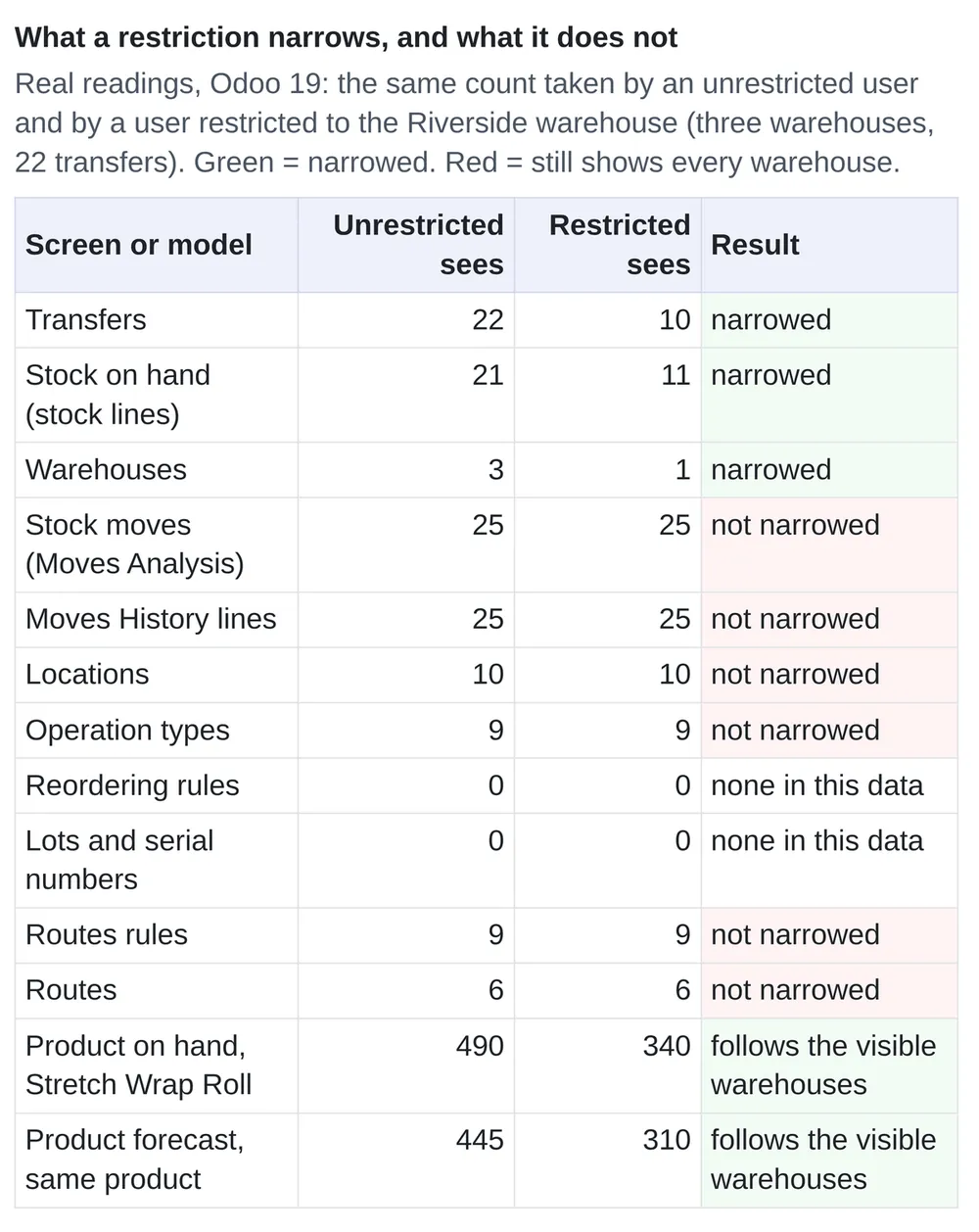
Only transfers, stock on hand and the warehouse list are narrowed. The first picture is Moves History as Maya sees it: the done moves of Northfield and Harbor are in her list, with references, products and quantities. The table counts every stock model for an unrestricted and a restricted user: stock moves, move lines, locations, operation types, reordering rules, lots and routes are not narrowed. Reading the display name of another warehouse's operation type directly is refused for her (an access error).
It does not restrict by location inside a warehouse, and it is not a substitute for access rights.
Moves History as a Riverside-only user sees it. Real Odoo screen.
What a restriction narrows, and what it does not. Evidence table.
4 Who can set it, and what it refuses
Use it when you need to know who can change a restriction and what cannot be saved.Read-only
A restriction that anybody can edit, or that can be saved empty, is no restriction.
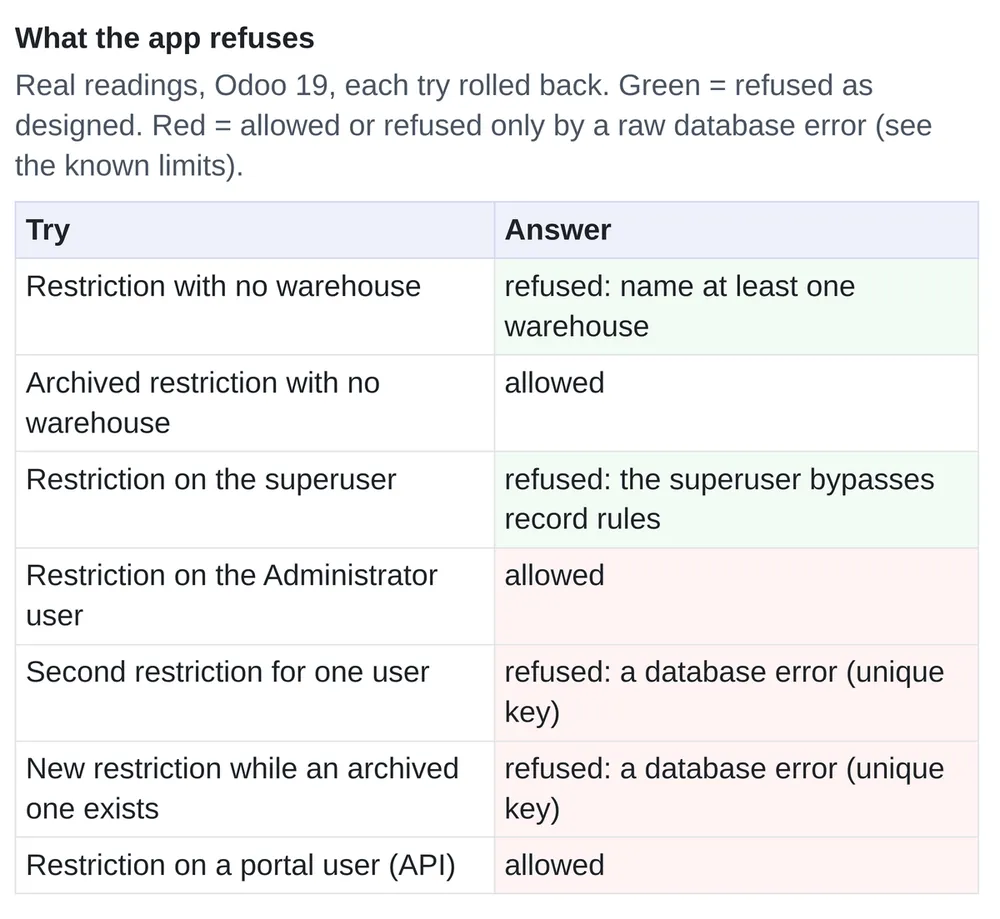
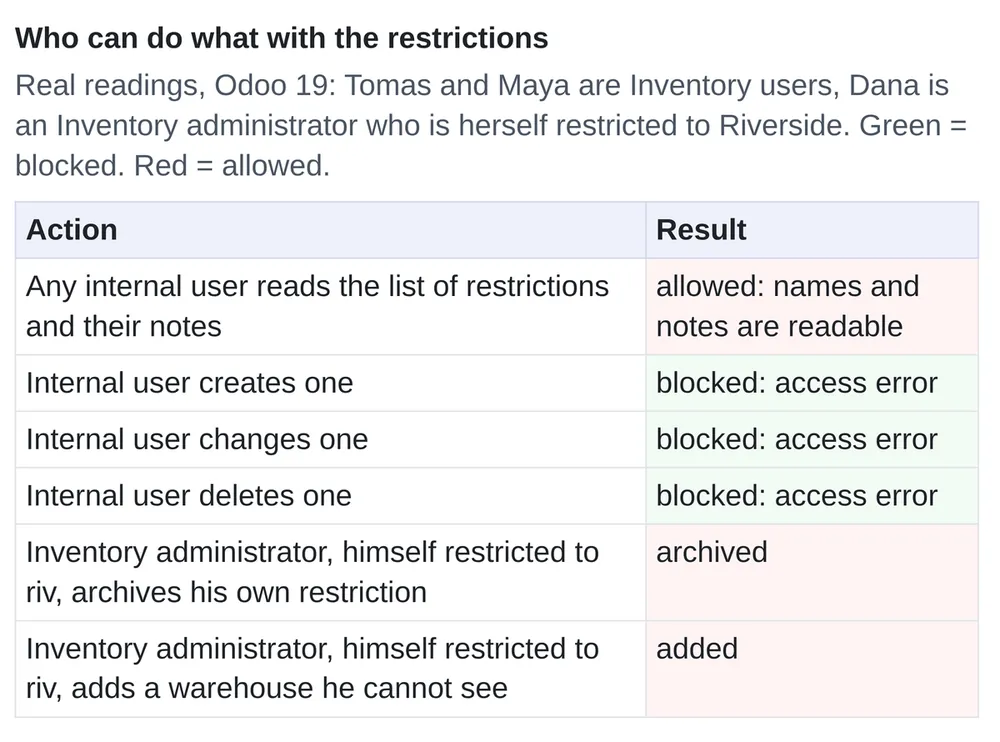
Restrictions are created, changed and deleted by Inventory administrators; the other internal users cannot, but they can read the list, notes included. A restriction with no warehouse is refused (an empty list would hide everything), and so is a restriction on the superuser. A second restriction for the same user is refused by the database, and an archived restriction keeps the slot. An Inventory administrator who is restricted can still archive their own restriction. The two tables are real readings.
A portal user can be given a restriction through the API; the form does not offer one.
What the app refuses. Evidence table.
Who can do what with the restrictions. Evidence table.
5 A change takes effect at once
Use it when you change somebody's warehouses and expect them to notice on their next click.Changes records
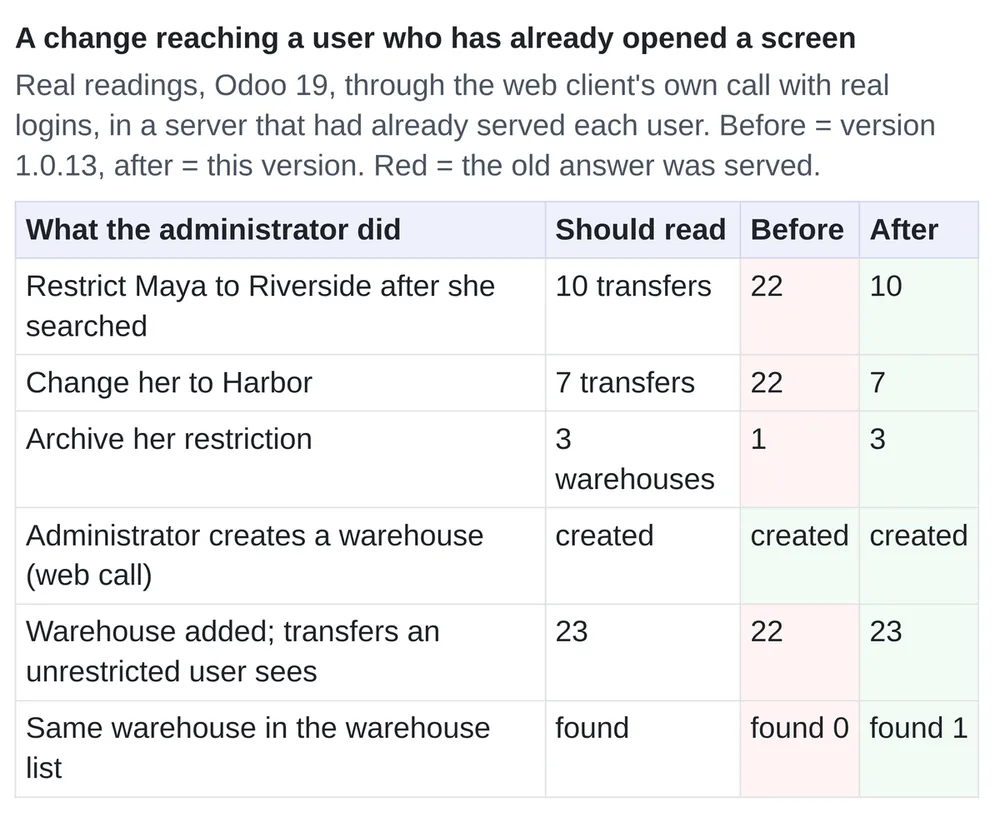
Odoo keeps the evaluated record rules between requests. Until this version, a restriction that was added, changed, archived or deleted did not reach a user who had already opened a screen, and a new warehouse stayed invisible to everybody who had; on Odoo 20 the administrator could not even create a warehouse.
The table is a real reading through the web client's own call with real logins, in a server that had already served each user, before and after this version: Maya had searched, was restricted to Riverside, changed to Harbor and unrestricted again; the old version kept answering 22 transfers each time. A warehouse added later is now found by the administrator and its transfers seen by users nobody restricted.
A restriction takes effect on the next request; it does not end a session or an open screen.
Before and after. Evidence table.
6 Archiving, transfers between warehouses, speed
Use it when your warehouses close, and goods move between them.Read-only
Edge cases are where a visibility rule quietly goes wrong.
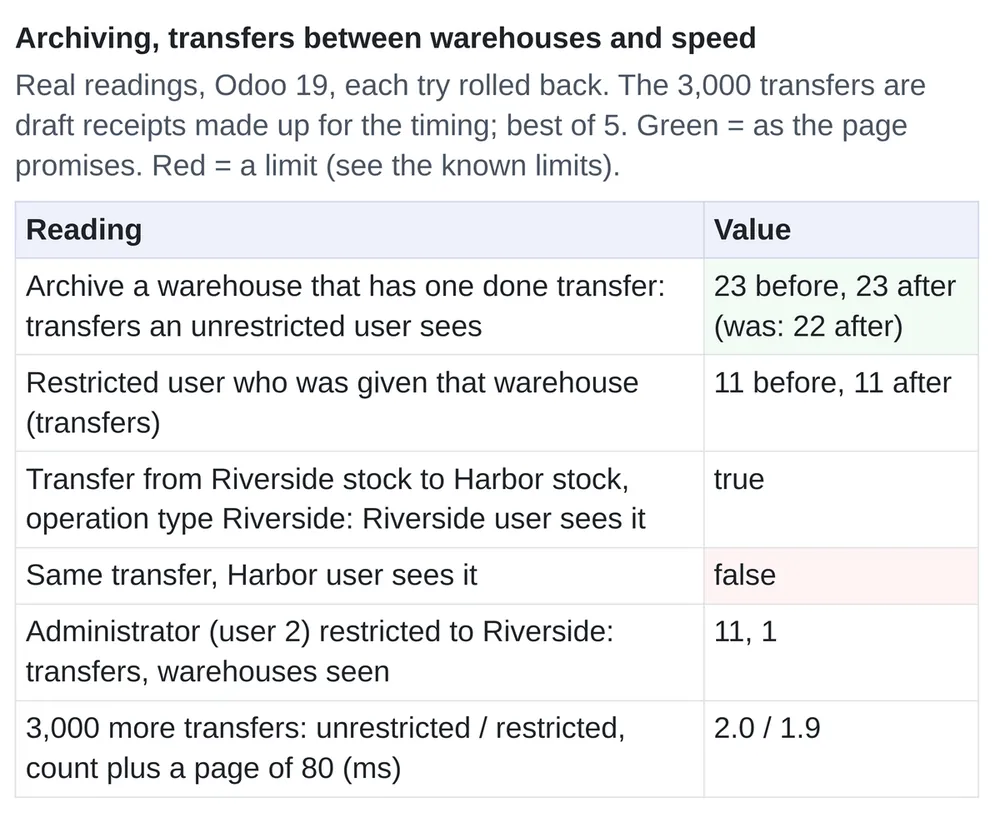
Archiving a warehouse that has history no longer hides its transfers from people nobody restricted (until this version it did), and a user who was given it keeps seeing them. A transfer follows its operation type: a transfer from Riverside stock into Harbor stock is a Riverside transfer, visible to the Riverside user and not to the Harbor user. The restriction applies to the Administrator user too, which can still open the list of restrictions. With 3,000 extra transfers a restricted user's count plus a page of 80 took under 3 ms, about the same as an unrestricted user (best of five).
Archiving, transfers between warehouses and speed. Evidence table.
What changed in this version
Version 1.0.14 fixes two defects. First, Odoo keeps the evaluated record rules between requests, and the app's rules were baked into that cache: a restriction that was added, changed, archived or deleted, and a warehouse that was added, did not reach a user who had already opened a screen until the server was restarted (on Odoo 20 an Inventory administrator could not create a warehouse at all). The cache is now emptied whenever a restriction changes and before a new warehouse is checked. Second, archiving a warehouse hid its transfers from people nobody restricted, against the promise that unnamed people keep seeing everything; archived warehouses now count. 14 automated tests were added, 7 of them fail on the old code and pass now. The screenshots and text were rewritten; the demo video of an earlier version is kept as it was and was not re-recorded.
What it does not do
- Each of these was reproduced in a run of the app on Odoo 19 and is pinned by a test that passes.
Requirements
- Odoo 19.0 or 20.0. The App Store sells each version separately, so buy the one that matches your database.
- Odoo.sh or On-Premise only. Third-party apps cannot be installed on Odoo Online (SaaS) databases. Check your hosting before buying.
- Module
mh_warehouse_access, version 19.0.1.0.14, licensed OPL-1.