Access Change Log
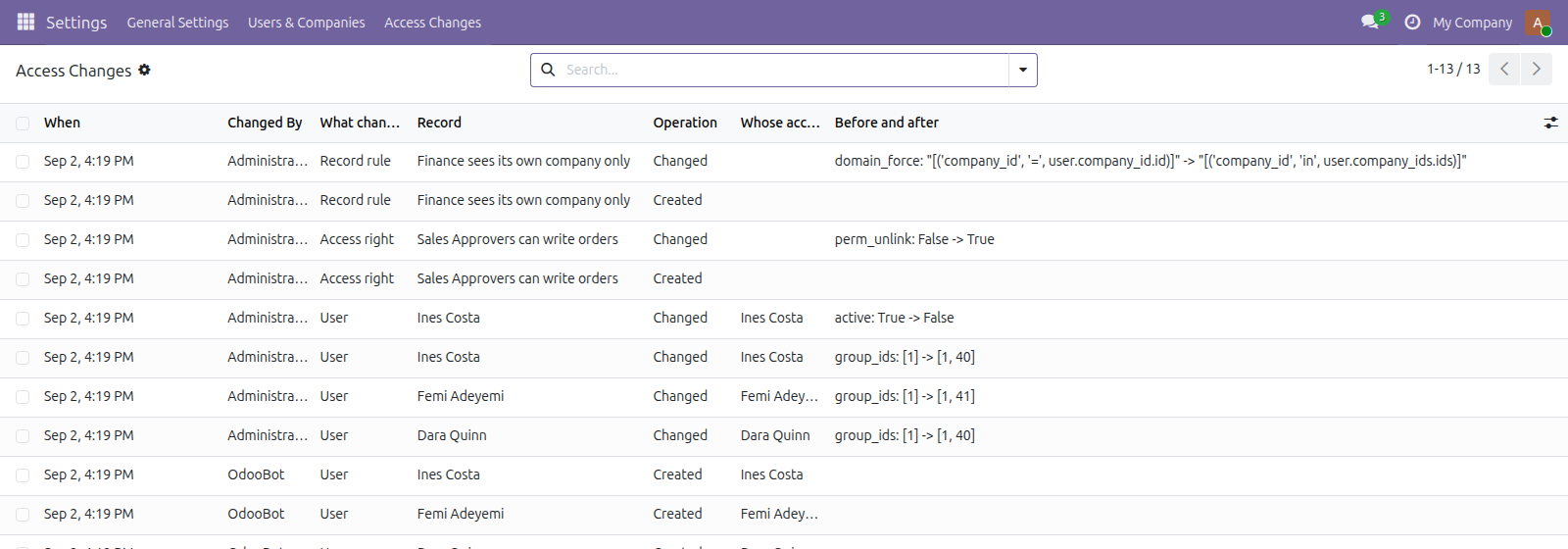
A record of every change to groups, access rights and record rules: who changed whose access, when, and what it was before
The video below shows Access Change Log running on a real Odoo 19 database. Want it driven against your own data, or a question answered first? Ask and we will set up a session.
Odoo keeps no usable record of access changes. The chatter on a user does not track group membership, so by the time somebody asks who granted this access in March, the only honest answer is a guess.
That question has a name in every audit framework worth the paper, and it is always asked after the fact - the one moment it cannot be answered by looking at the current state.
Who did it, to whom, and the old domain next to the new one.
What it does
It keeps what the value was
The group list as it was and as it became, the old domain beside the new one. Knowing something changed is a note; knowing what it was is evidence somebody can act on.
Who did it, and to whom
Every entry names both, because they are rarely the same person and that pair is what an auditor actually asks for. Group by either.
Quiet on purpose
Only fields that are about access - somebody editing their signature is not an access change. Installing a module creates hundreds of groups, rights and rules, and none of those is a decision anybody made, so they are not recorded either. A trail full of noise is one nobody reads.
A save that changed nothing leaves nothing
Values are compared before and after rather than against the instruction sent, so pressing save on an unchanged form does not add an entry. Deletions keep the name of what went, since the id resolves to nothing by the time anybody reads it.
It never gets in the way
Recording sits inside a guard that swallows its own errors. An audit trail that can refuse a legitimate access change is worse than a gap in the trail, so a failure is logged to the server rather than raised at whoever was doing their job. The log is read-only in the interface, administrators included.
Screenshots
Requirements
- Odoo 19.0, Community or Enterprise.
- Odoo.sh or On-Premise only. Third-party apps cannot be installed on Odoo Online (SaaS) databases — check your hosting before buying.
- Odoo 19 Community or Enterprise, no other module needed. It records from the moment it is installed and cannot reconstruct what happened before - it does not pretend to. It logs access configuration, not what people did with the access.
- Module
mh_access_change_log, version 19.0.1.0.12, licensed OPL-1.
Related apps
Move Odoo attachments out of the filestore into a Google Drive folder, using Odoo 19 own cloud storage migration - Drive is the provider Odoo does not ship
Hide or lock any field for the groups you choose, on any model, enforced by the server and not just hidden in the form view
Write a record rule and see how many records it actually leaves a chosen user, counted for real before you save it