Record Rule Preview
Write a record rule and see how many records it actually leaves a chosen user, counted for real before you save it
Request a live demo · Odoo.sh or On-Premise only, not Odoo Online (SaaS).
0
rules left behind by a preview: it is rolled back
7
kinds of mistake refused before they cost you
16
automated tests, none failing
1
ordinary record rule created on Apply, nothing wrapped
base
the only module it depends on
19.0
Odoo version of this build
Record Rule Preview is for whoever writes the domains that decide who sees which records in an Odoo 19 database. You name the model, the domain and a user, press Preview, and read a number: how many records that user can reach with the rule in force. The number is counted through Odoo itself, with every other rule on the model already in the count, and the rule is rolled back before you look at it. Only when the number is what you meant do you press Apply. This page walks through every step with screenshots of an Odoo 19 database seeded with made-up data.
Install it and a Record Rule Preview entry appears under Settings, for administrators only. It depends on Odoo's base module and nothing else. The screenshots were taken in an Odoo 19 Community database with the CRM app installed for the examples: a fictitious office-supply company, three salespeople and sixty customers. The data is synthetic, and every number quoted beside a screenshot is read off that screenshot.
How it works
Why a rule needs a count first
Use it when you write or change record rules and want to know what they leave before the people they catch find out.Saves a draft, no rule yet
A record rule with a domain that is wrong by one operator raises nothing. The users it catches simply stop seeing records, and nobody reports that as a bug, because an empty list looks like an empty list. You find out weeks later, from a salesperson who assumed their pipeline had gone cold.
Global rules are worse. Global record rules are ANDed together, so a rule that is correct on its own can still take everything away once another global rule exists on the same model. Reading two domains and working out the intersection in your head is exactly the step that goes wrong.
It moves the question to before you save. You write the record rule as a draft, name a user it should affect, and the app creates it for real inside a database savepoint, counts the records that user can reach, and rolls the whole thing back. The count is measured, not predicted: it was taken with every other record rule in force, so the intersection is in the number rather than in your head.
Then it refuses the usual mistakes. Apply is blocked until the draft has been previewed, blocked again if you edit it afterwards, and blocked when the rule leaves the sample user with nothing unless you say in writing that you meant it. Applying creates an ordinary ir.rule, so Odoo enforces it exactly as it enforces any other.
1 Write the draft: model, groups, domain and who to count for
Use it when a rule is still an idea and you want it written down, with its reason, before it can hurt anybody.Saves a draft, no rule yet
A record rule is easy to type and hard to judge. In the standard form it takes effect the moment you save it, and the form does not tell you whom it catches. Nobody keeps a record of why it was written either.
Open Settings > Record Rule Preview and press New. The form asks for a Name , the Model , optional Groups , the permissions it covers (Read, Write, Create, Delete, all ticked to start) and a Domain , which starts as [] . The domain is a normal Odoo domain with user , company_id and company_ids available, the same names a record rule uses.
Count for is the user the rule is measured against. It lists internal users only. A Why note is for whoever reads the draft in a year. Leave Groups empty and a Global rule box appears ticked: with no groups the rule applies to every user, and the form says so.
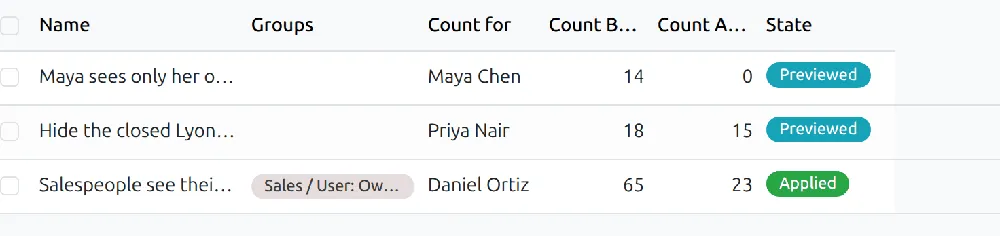
The list shows every draft with its model, groups, user, the two counts and a state badge, and filters for Applied, Not applied yet and Global. It can be grouped by model or by state.
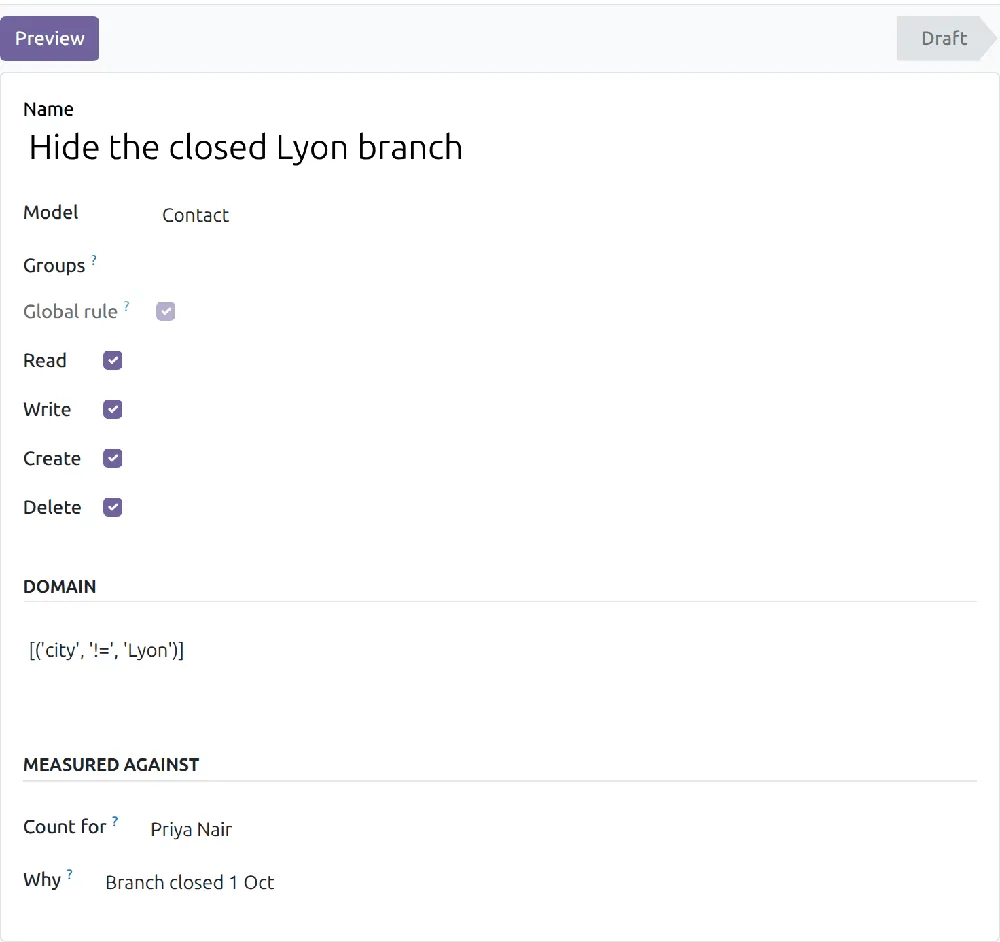
A new draft: model, groups, permissions and domain. With no groups it is marked as a global rule.
The draft list, every row with its two counts and its state.
Northfield Office Supply closed its Lyon branch. The administrator opens a draft called Hide the closed Lyon branch on Contact, leaves Groups empty, writes the domain [('city', '!=', 'Lyon')] , picks Priya Nair in Count for and adds the note Lyon office closed 30 Sep . Nothing is enforced yet: it is a row in the draft list, in the Draft state.
A draft is not a rule. Nothing it contains is enforced until Apply, and the form does not check that the model's records are the ones you meant: that is what Preview is for.
a saved draft with its model, domain, permissions, user and reason, visible in one list.
Only administrators (Settings) can see the menu or the drafts. A draft that names a model that is not loaded in the database is refused when you press Preview.
2 Preview: the number is measured, not predicted
Use it when you need to know how many records a user ends up with, with every other record rule counted in.Measures, then rolls back
The number you want is how many records a user ends up with. You cannot get it by reading the domain, because the user is also covered by every other rule on the model, and those combine in ways the domain alone does not show.
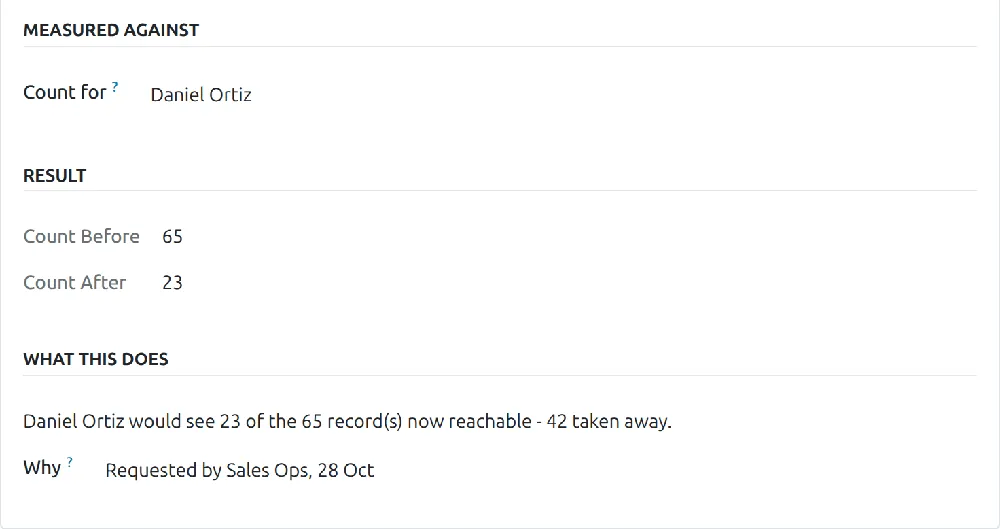
Press Preview . The app first counts what the sample user can read today. It then creates your rule for real inside a database savepoint, counts again as that user through Odoo's own search, deletes the rule and undoes the savepoint. The form fills in Count Before , Count After , and a sentence under What this does , and the draft moves to Previewed.
The sentence is one of four. The same count either way, with a reason. None of the records, with a warning that this is almost always a domain mistake. More records than before, with an explanation. Or fewer, with how many were taken away. Each names the user it measured.
The result of a preview: before, after, and the verdict in words.
Previewing Salespeople see their own customers for Daniel Ortiz reads Count Before 65, Count After 23. The sentence says Daniel Ortiz would see 23 of the 65 record(s) now reachable - 42 taken away . Twenty-three is the number of customers assigned to Daniel in the sample data. The rule was created and removed again: the rules list holds exactly what it held before, and nothing about anyone's access changed.
The count is what the user can read, counted with Odoo's normal search, so archived records are not in it. It measures one user at a time and it does not test write, create or delete.
Count Before, Count After and a plain-words verdict naming the user, with nothing enforced and nothing left behind.
A user who is not in any of the groups you picked is not affected by a group rule, so the count will not change. The verdict then says the domain matches everything or another rule is narrower, which is not the real reason: check the user belongs to the group.
3 Global rules: the other rules are already in the number
Use it when the rule has no groups, so it applies to everyone and has to be judged against the rules already there.Measures, then rolls back
A global rule has no groups, so it applies to every user, and it is ANDed with every other global rule on the model and with whatever group rules the user already has. Whether a new one is harmless depends on what is already there.
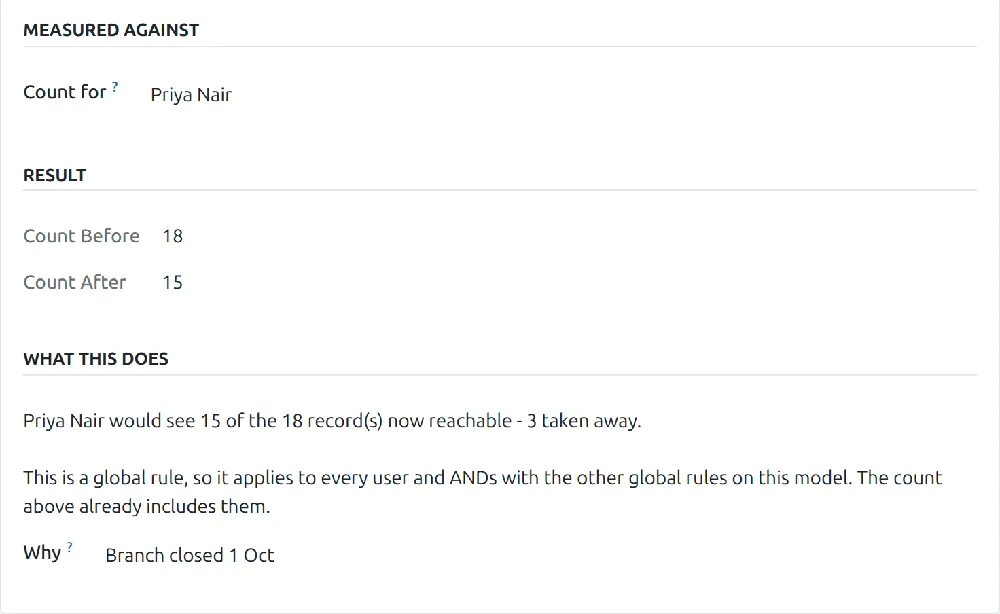
Preview a draft with no groups and the verdict gets a second paragraph: This is a global rule, so it applies to every user and ANDs with the other global rules on this model. The count above already includes them. The form shows the Global rule box ticked. The words matter because of what the count contains: it was taken with every other rule in force, so it is already the intersection.
A global rule previewed: the 18 already has the own-customers rule in it.
The own-customers rule from section 1 is applied. The Lyon branch has closed, and the administrator previews Hide the closed Lyon branch , [('city', '!=', 'Lyon')] , with no groups, for Priya Nair. Count Before is 18 , not 65: Priya is already limited to her own customers by the rule applied earlier. Count After is 15 : three of her eighteen customers are in Lyon. The verdict reads Priya Nair would see 15 of the 18 record(s) now reachable - 3 taken away , and adds the global-rule note.
A global rule applies to everybody, but the count is for one user. Preview it again with a different name in Count for to see another person, particularly the person most likely to be caught.
a count that already includes the rules in force, with the verdict saying the rule applies to every user.
Everyone is affected, not only the user you counted. Preview again for other people before you apply.
4 The zero guard: a rule that leaves nobody anything
Use it when a domain might be wrong in the way that matches nothing, and you want it stopped before it empties a list.Blocks Apply until ticked
A domain that matches nothing is the most common way these go wrong. The form saves, the rule applies, and the user's list is empty. Because an empty list is a valid result, nothing complains.
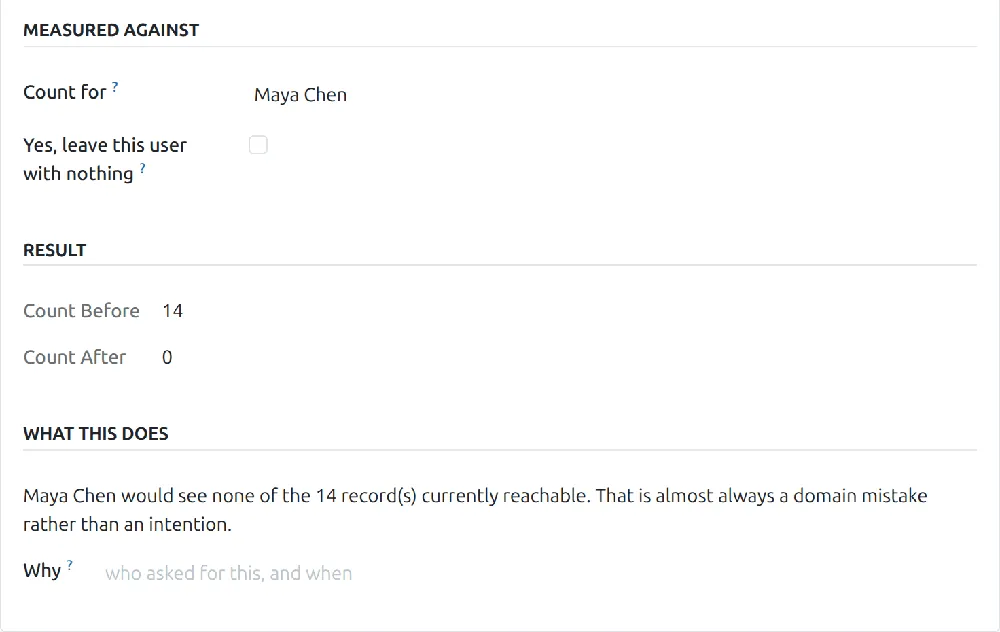
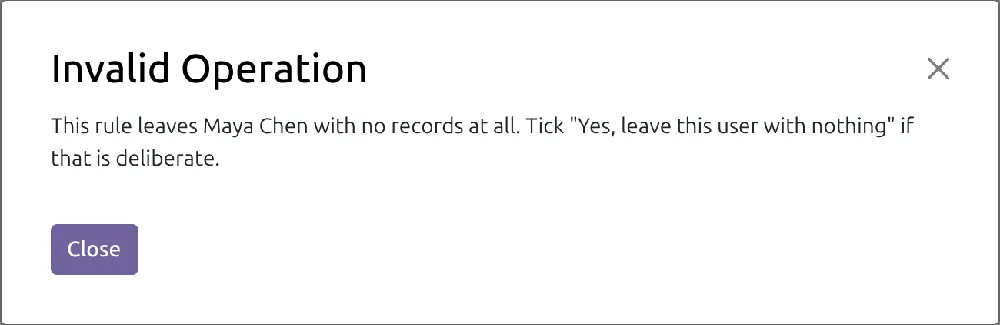
When Count After is zero, the draft shows a box: Yes, leave this user with nothing . It is the only way past. Press Apply without ticking it and Odoo refuses with This rule leaves Maya Chen with no records at all. Tick "Yes, leave this user with nothing" if that is deliberate. The verdict above already said it in other words: that is almost always a domain mistake rather than an intention.
The box stays hidden while the draft is a plain Draft and whenever the count is above zero, so it only appears in the one situation that needs it.
A rule that leaves the user nothing: the verdict and the box that has to be ticked.
Apply without ticking the box is refused.
A draft called Maya sees only her own region carries the domain [('user_id', '=', company_id)] . It looks plausible: it compares the salesperson on a contact with something the user has. But company_id is a company, not a user, and no contact has a salesperson with that id. Previewed for Maya Chen, Count Before is 14 and Count After is 0 . Applying it for real would have emptied her customer list; the preview shows it first and Apply refuses until someone says otherwise.
It only catches zero. A domain that is wrong in a way that leaves the user a few records, or the wrong ones, is not flagged: that is why the verdict names the count and the user, so you can compare it with what you expected.
an empty result you cannot apply by accident: Apply refuses until the draft carries an explicit yes.
The tick is for rules that are meant to hide everything from this user. If that is not what you meant, change the domain and preview again.
5 A stale preview cannot be applied
Use it when more than one person edits drafts, or you change a domain after looking at the numbers.Blocks Apply
A number on the screen is only worth anything while it describes the rule beside it. If somebody edits the domain after previewing and then presses Apply, the form still shows the old counts, and you would be applying one rule on the evidence of another.
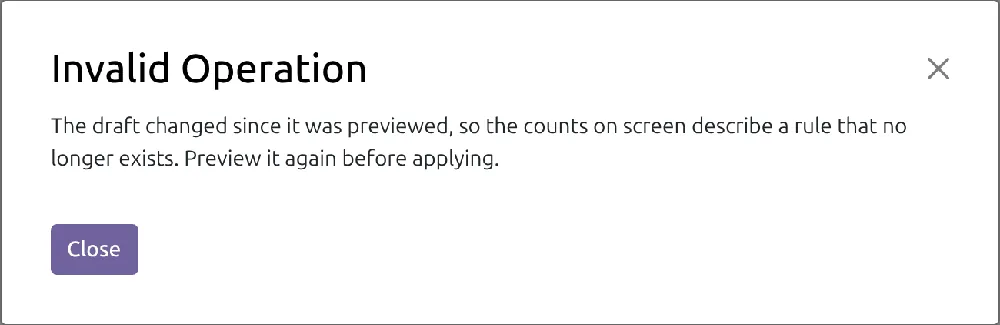
The app records what each preview measured: the model, the domain, the groups, the permissions and the user to count for. Change any of those and Apply is refused with The draft changed since it was previewed, so the counts on screen describe a rule that no longer exists. Preview it again before applying. Changing the name, the note or the tick box does not invalidate it, because none of them changes what was measured.
Two other refusals follow the same idea. Apply is not offered on a draft that has not been previewed, and the action itself refuses if it is called anyway. And an applied draft cannot be applied twice: the message tells you to edit the rule it created, or copy the draft.
Apply after an edit is refused until the draft is previewed again.
The Lyon draft was previewed. Someone changes its domain to compare a different city and presses Apply without previewing again. The dialog above appears. They press Preview, the counts are measured for the new domain, and only then does Apply go through.
The form keeps showing the old counts after an edit until you press Preview again. The refusal comes when you press Apply, not as soon as you type, so read the counts only on a form you have just previewed.
Apply only ever creates the rule that was measured, or tells you to measure again.
Previewing again after every edit is the habit this builds. It costs one click and it is rolled back every time.
6 Mistakes refused at the form: bad domains, empty permissions, the superuser
Use it when the draft itself is wrong, before any count is worth taking.Refused on save
Some mistakes should never reach a preview at all: a domain that is not a domain, a rule that restricts nothing, or a sample user who is exempt from every rule.
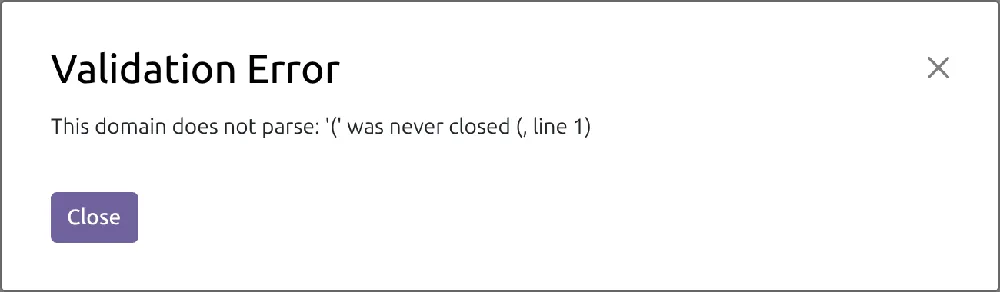
These are checked when you save the draft. A domain that does not parse is refused with This domain does not parse and the reason from the parser. A domain that parses but is not a list, such as a dictionary, is refused with A record rule domain has to be a list . A draft with all four permissions unticked is refused, because a rule that restricts nothing is not saved by Odoo either. And the superuser cannot be the user to count for: it bypasses every record rule, so it would report every rule as harmless.
A domain that parses but names a field the model does not have is saved. It is caught when you press Preview, where Odoo refuses to create the record rule with Invalid domain: Invalid field and the draft stays as it was.
A broken domain is refused at the form, with the parser's own reason.
Editing the Maya draft, someone deletes the closing bracket and saves. The dialog above appears at once and the draft keeps its previous domain. Nothing was previewed, applied or counted, and the mistake did not wait until the rule was running.
The parse check evaluates the expression with the names the record rule uses. It does not check that the fields exist or that the logic is what you meant: the field check comes at Preview, the logic is what the count is for.
four kinds of broken draft stopped on save, each with a message that says what to fix.
An unknown field in a domain is only caught at Preview, not at save.
7 Apply: an ordinary record rule, not a copy
Use it when the count is what you meant and you want the record rule live.Writes one record rule
After the preview you still need the real thing, and you want it to be the real thing: not a copy that lives inside this app and stops working when the app is removed.
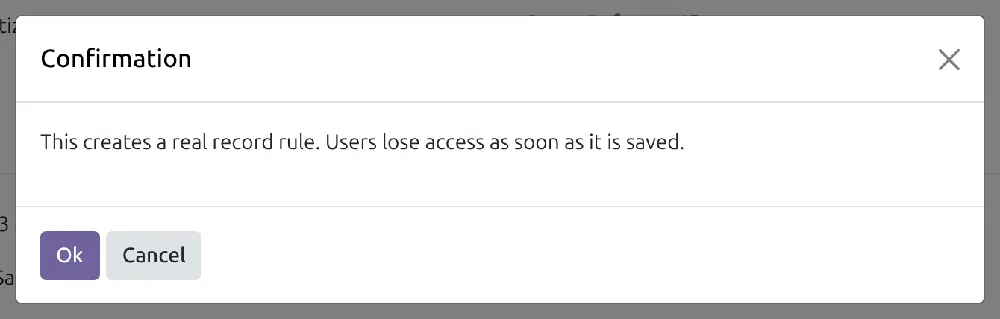
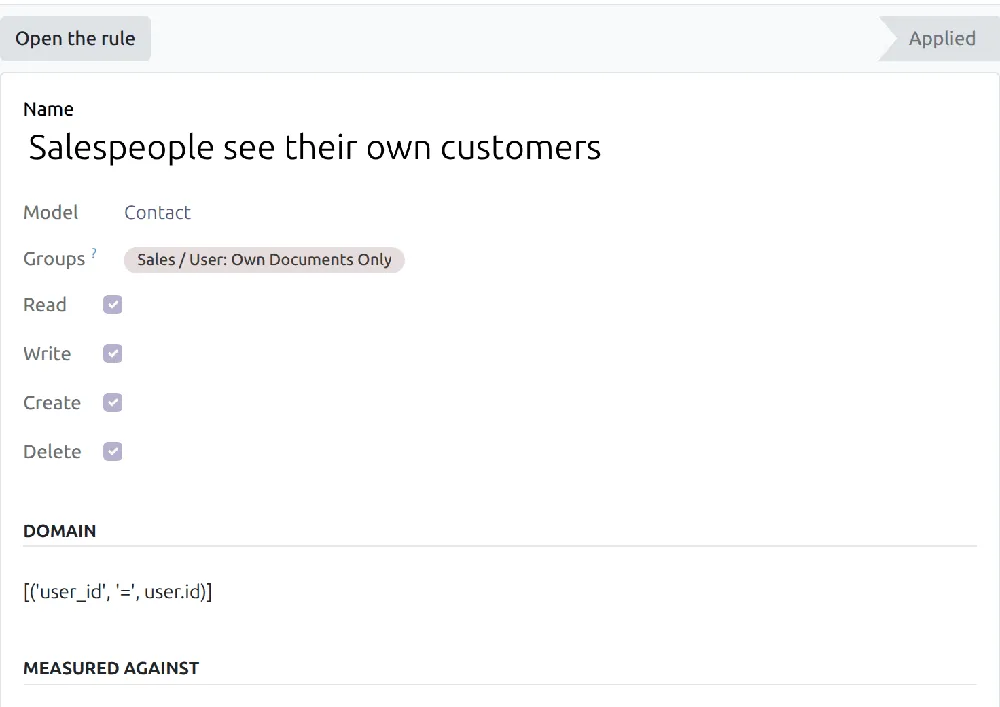
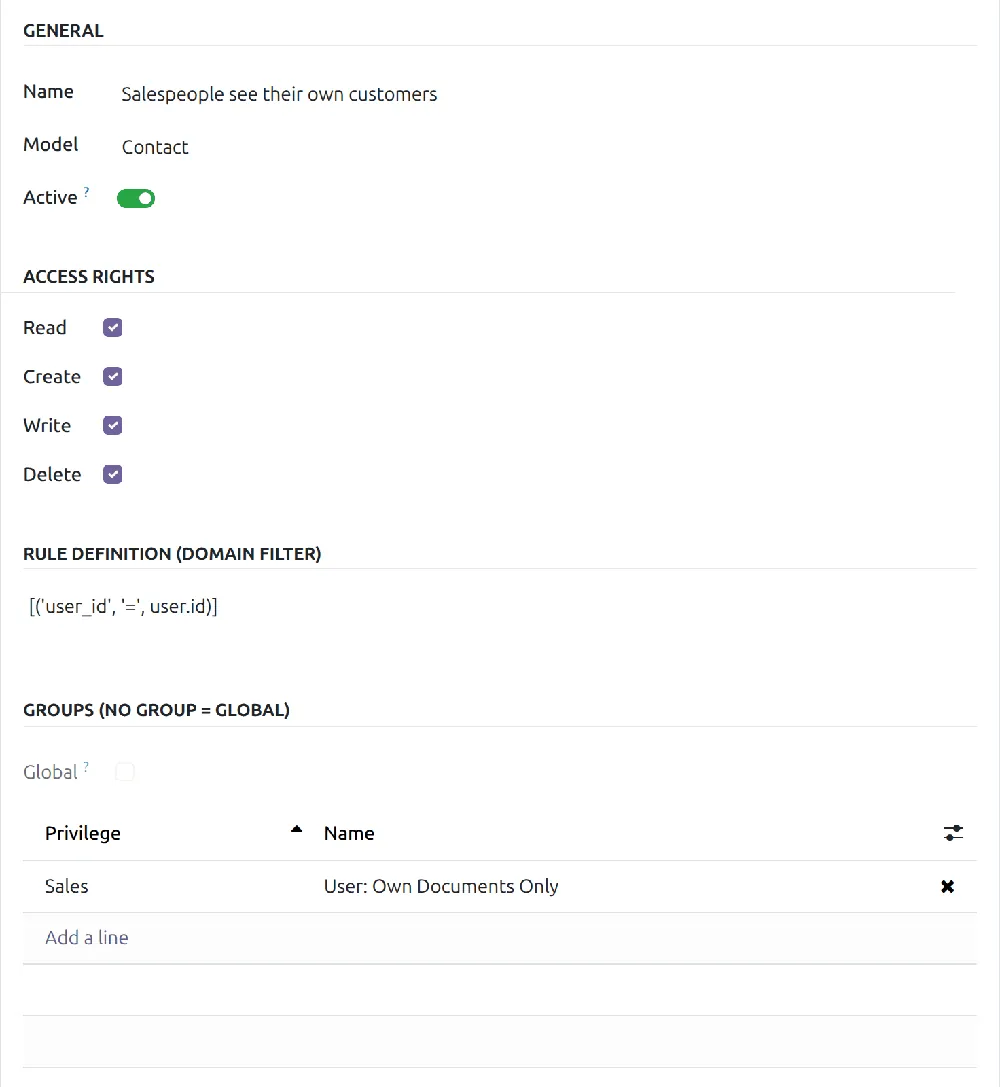
Apply asks for confirmation ( This creates a real record rule. Users lose access as soon as it is saved. ) and creates one ordinary ir.rule record with your name, model, domain, groups and permissions. The draft becomes Applied, its fields lock, and an Open the rule button takes you to the rule. Nothing is wrapped or intercepted, so Odoo enforces it as it enforces any other record rule.
Nothing in the rule points back at the app, so uninstalling the app leaves the rules you made where they are.
Apply asks first.
An applied draft: locked, with a button to the real rule.
What Apply created: an ordinary record rule, no mention of this app.
The own-customers draft was previewed at 65 to 23 for Daniel Ortiz. The administrator presses Apply and confirms. The rule appears in Odoo's own record rules as Salespeople see their own customers , on Contact, for the group Sales / User: Own Documents Only. Then Priya Nair's draft is previewed for the Lyon rule and reads 18 before, which is her own customer count: the rule that was just applied is already doing its job.
Once applied, the rule is yours: edit it in the standard form. The draft does not follow later changes, and if you delete the rule the draft still says Applied while its Open the rule button reports that there is nothing to open.
one ordinary record rule that Odoo enforces like any other, found again from the draft with one click.
The effect is immediate once confirmed. The preview is your chance to be wrong cheaply; Apply is not.
Who it is for
The Odoo administrator who is asked to "make salespeople see only their own" and does not want to find out by phone call what that did. Preview gives the number first, on the account that matters.
The IT lead or consultant who writes record rules for several clients and wants every one kept as a draft with a reason, a user it was measured for and the counts it produced.
Whoever answers the auditor : the draft list shows, for each applied record rule, the name, the model, the reason, who it was measured for and what it removed on the day.
It is not for end users: only administrators can open it. It also pairs with the free Access Snapshot , which shows what one user can already do on one model, before you decide what to change.
What this app does not do
It restricts records, not fields. Which columns a user may read is field access, a different question: Field Access Rules covers it.
The count is the number of records the sample user can read, counted with Odoo's normal search. It does not test whether they can write, create or delete, even when those permissions are ticked, it does not count archived records, and it measures one user per preview.
A group rule is only measured for people who are in the group. If the user you pick is not, the count does not change and the verdict gives the wrong reason (it blames the domain, not the missing membership). Pick a member.
It does not edit or delete existing record rules: it makes new ones. And it does not watch the rules it made: once applied, the draft is a record of what was decided, not a live view of the record rule.
Questions buyers ask
Does previewing change anything in my database?
No. The record rule is created inside a database savepoint, the records are counted, and the rule is removed again. The tests check that the number of record rules is the same after a preview and that what the user sees is unchanged. Only the draft itself is saved.
Is the number a prediction?
No. It is counted, as that user, through Odoo's own search, with the record rule in force. Reproducing what Odoo would do from the domain is the guess this app removes.
Why can't I pick the administrator to count for?
The superuser bypasses every record rule, so counting against it would always say no change and every rule would look harmless. Pick a user the rule is meant to affect.
What if I edit the draft after previewing?
Apply is refused until you preview again, because the count on screen would describe a rule that no longer exists.
Does it work with several companies?
The domain can use company_id and company_ids , as record rules do. Counts are for the one user you pick, with that user's companies.
What happens if I uninstall it?
The record rules you applied stay. They are ordinary record rules with no link back to this app. The drafts go with the app.
Does it need developer mode?
No. The screenshots were taken in a normal session.
Requirements
- Odoo 19.0 or 20.0. The App Store sells each version separately, so buy the one that matches your database.
- Odoo.sh or On-Premise only. Third-party apps cannot be installed on Odoo Online (SaaS) databases. Check your hosting before buying.
- Module
mh_record_rule_preview, version 19.0.1.0.17, licensed OPL-1.