Access Config Migration
The video below shows Access Config Migration running on a real Odoo 19 database. Want it driven against your own data, or a question answered first? Ask and we will set up a session.
Export groups, model access rights and record rules from one database and import them into another, with the exact list of what would be created and changed shown before anything is applied
What it does
Built on staging, rebuilt by hand on production
That is where two databases start to differ, and the difference stays invisible until somebody cannot do their job — or can do somebody else's.
Doing it by hand is slow and it is where the mistakes come from. A database restore takes the data with it, so that is not an option either.
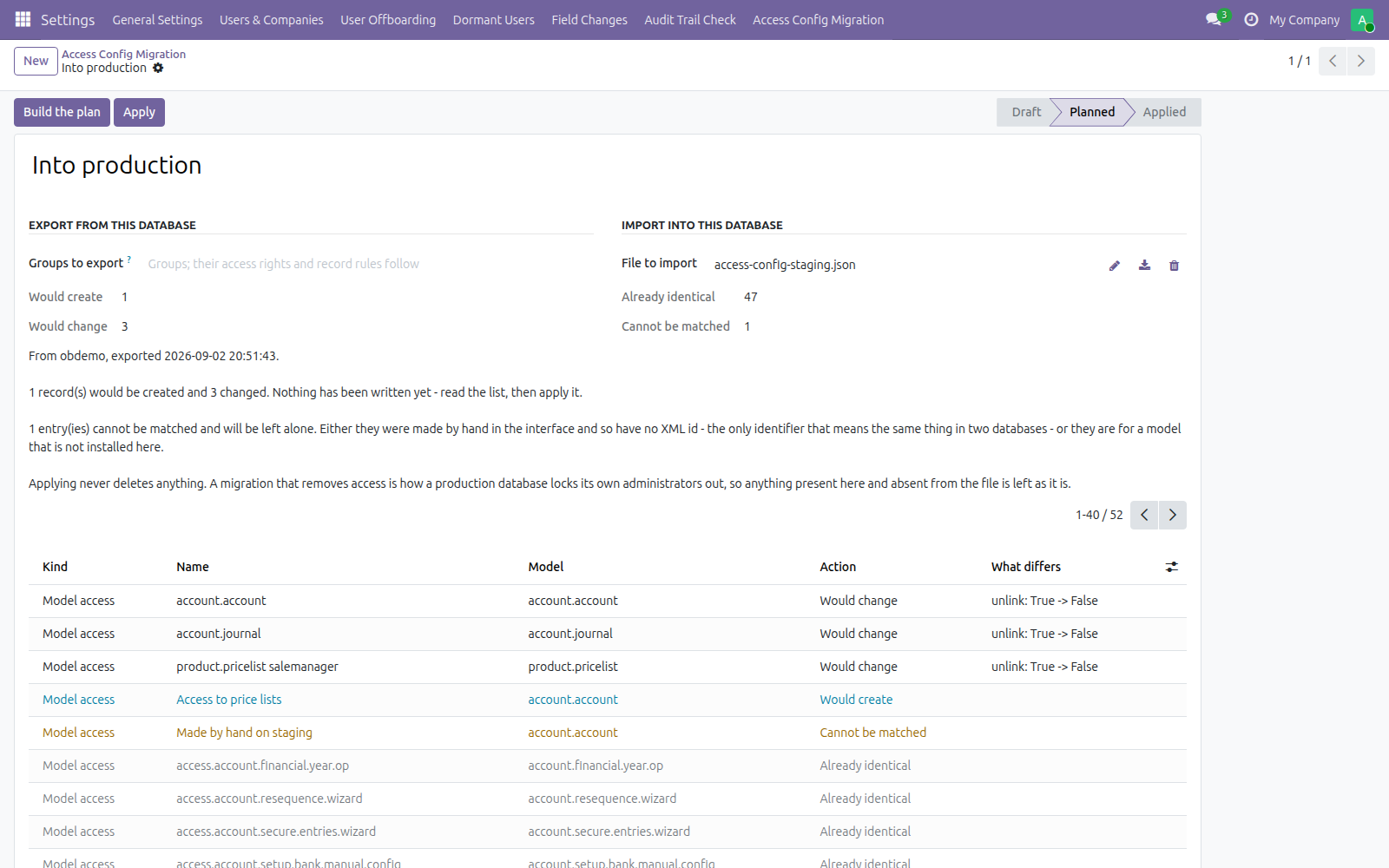
The plan, before anything is written: what would be created, what would change and which permission differs, what already matches, and what cannot be matched at all.
Import stops at the plan
Attach the file and press Build the plan. That is where it stops. Nothing is written until you have read the list and pressed Apply — and the rows that need a decision sort to the top, above the ones that already match.
Matched by XML id, and by nothing else
An XML id is the only identifier that means the same thing in two databases. A name can be edited; a database id is per-database.
A row made by hand in the interface has no XML id, and this reports it as unmatched rather than guessing which local row it meant. That is deliberate: the wrong guess here grants somebody access nobody intended, quietly. Entries for a model that is not installed on the target are skipped the same way, and named.
It never deletes
Anything present on the target and absent from the file is left exactly as it is. A migration that removes access is how a production database locks its own administrators out, and the day you want that, you want to be doing it deliberately and by hand.
What it does not do
Stated up front so nothing about the scope is a surprise after you install it.
Screenshots
Requirements
- Odoo 19.0, Community or Enterprise.
- Odoo.sh or On-Premise only. Third-party apps cannot be installed on Odoo Online (SaaS) databases — check your hosting before buying.
- Odoo 19, Community or Enterprise. No dependencies beyond the base system. Administrator access on both databases.
- Module
mh_access_migration, version 19.0.1.0.11, licensed OPL-1.
Related apps
Move Odoo attachments out of the filestore into a Google Drive folder, using Odoo 19 own cloud storage migration - Drive is the provider Odoo does not ship
Hide or lock any field for the groups you choose, on any model, enforced by the server and not just hidden in the form view
Write a record rule and see how many records it actually leaves a chosen user, counted for real before you save it