API Key Inventory
Every API key in the database in one list, with who owns it, when it expires and when it was last actually used, so the forgotten ones can be revoked
The video below shows API Key Inventory running on a real Odoo 19 database. Want it driven against your own data, or a question answered first? Ask and we will set up a session.
Odoo 19 gives API keys a scope and an expiry date, and that is real progress. What it still does not give you is anywhere to see all of them at once - they live in each user's own preferences - or any way at all to tell a key carrying live traffic from one somebody made for a trial two years ago.
Those two look identical, and the safe-looking action - leave it alone - is the one that keeps the forgotten key valid.
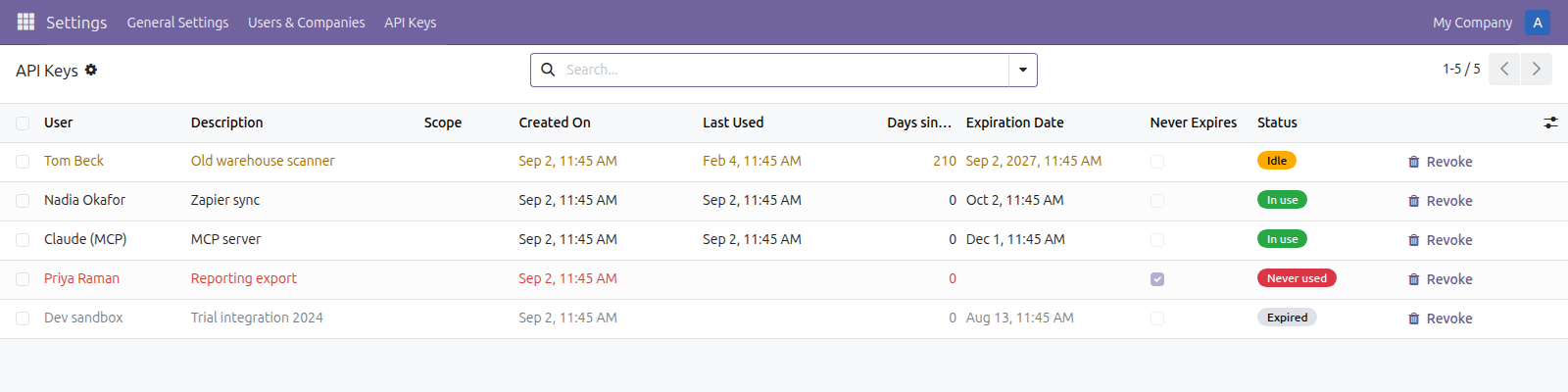
A key nobody has used in seven months, two carrying traffic, one never used at all, and one that lapsed a fortnight ago.
What it does
All of them, worst first
Keys are made from each user's own preferences, so the inventory goes and finds them. Longest-unused sorts to the top, and a key never used at all is ranked by its age rather than treated as brand new.
The four worth finding
Never used - issued and forgotten, or an integration that never shipped. Idle - nothing for thirty days. No expiry - nothing will ever take it out of play on its own. Expired - still listed, no longer a way in. Each is one click in the search panel.
Recording never refuses a key
The stamp is written inside a guard that swallows its own errors. Locking out the integration this app exists to look after would be far worse than a missing timestamp, so a failure there is logged and ignored.
What it does not do
Recorded at the point Odoo verifies the key, so the timestamp reflects real traffic rather than an intention. It is the one fact that separates a key you must not touch from a key you should have removed a year ago.
A key is checked on every call the integration makes. The stamp is written at most once a minute, because a write per call would cost more than the fact is worth - so the count measures how many minutes a key was active in, not how many calls it made.
Screenshots
Requirements
- Odoo 19.0, Community or Enterprise.
- Odoo.sh or On-Premise only. Third-party apps cannot be installed on Odoo Online (SaaS) databases — check your hosting before buying.
- Odoo 19 Community or Enterprise, no other module needed. It does not create keys or change their scope - that is Odoo's own screen and this does not get between you and it. It does not record what each call did; for an agent connected over MCP that is AI Agent Guardrails .
- Module
mh_api_key_inventory, version 19.0.1.0.13, licensed OPL-1.
Related apps
Move Odoo attachments out of the filestore into a Google Drive folder, using Odoo 19 own cloud storage migration - Drive is the provider Odoo does not ship
Hide or lock any field for the groups you choose, on any model, enforced by the server and not just hidden in the form view
Write a record rule and see how many records it actually leaves a chosen user, counted for real before you save it