Barcode and QR on Reports
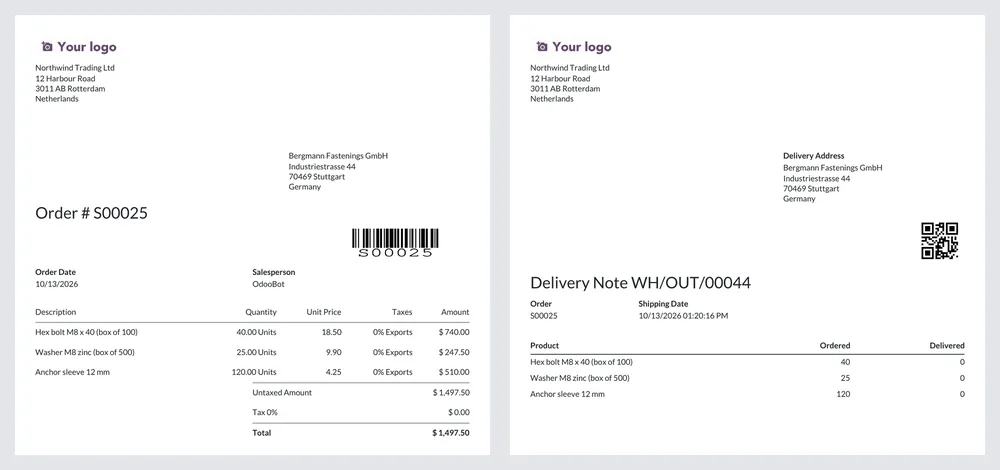
Print the order number as a barcode or QR code on quotations, purchase orders, invoices and delivery slips, ready for a scanner.
Request a live demo · Odoo.sh or On-Premise only, not Odoo Online (SaaS).
Free
App Store price, per Odoo version
19 · 20
Odoo versions, each sold on its own page
Odoo.sh
or On-Premise; not Odoo Online (SaaS)
1.0.2
version of mh_report_barcode_qr
Odoo prints a barcode of the document number on Picking Operations, but not on quotations, purchase orders, invoices or delivery slips. Those carry the number as plain text, so whoever receives the paper has to type it. This app prints the number as a Code 128 barcode or a QR code on those PDFs, so a scanner or a phone camera reads it straight into a search box.
How it works
What it does
For each of four document types you choose None, Barcode (Code 128) or QR code: Quotations and Sales Orders, RFQs and Purchase Orders, Invoices, and Delivery Slips. One more setting puts the code at the start of the document, under the title block where Odoo prints one, or at the end of the document. All five settings are in Settings, General Settings, under Companies.
Every document layout
The code is added to Odoo's document layout, so it appears whichever layout your company uses, and on the PDF Odoo builds when you send a document by email as well as when you print it. Invoices are covered with or without the payment block, and pro-forma invoices follow the Quotations and Sales Orders setting.
Per company
The settings belong to the company. A document is printed with the settings of its own company, even when you print it while working in another one.
Only the apps you have
It does not install Sales, Purchase, Invoicing or Inventory. A document type whose app is not installed is simply never printed, and the setting for it does nothing.
Who it is for
Warehouses and offices that receive your paper and scan the number into their own system, drivers whose delivery slip is checked at a gate, and anyone who files printed orders and wants to find them by scanning.
Screenshots
What it does not do
- It prints the number Odoo already gave the document. It does not change numbering and does not add barcodes to the product lines. A QR code holds the document number only, not a portal link or payment details. A draft invoice numbered "/" gets no code until it is posted. An invoice that was already sent keeps the PDF Odoo stored at that time; printing it again gives a new PDF with the code. Document numbers with non-ASCII characters are printed as text by Odoo's barcode widget, not as a code. Other reports, such as Picking Operations (which has its own barcode) and the return slip, are not changed.
Requirements
- Odoo 19.0 or 20.0. The App Store sells each version separately, so buy the one that matches your database.
- Odoo.sh or On-Premise only. Third-party apps cannot be installed on Odoo Online (SaaS) databases. Check your hosting before buying.
- Odoo 19 and Odoo 20, Community or Enterprise. It depends only on the Odoo base apps; Sales, Purchase, Invoicing and Inventory are optional and each one switches on its own document type when installed. Third-party apps install on Odoo.sh or On-Premise only - they cannot be installed on Odoo Online (SaaS).
- Module
mh_report_barcode_qr, version 19.0.1.0.2, licensed OPL-1.