GDPR Retention Purge
Request a live demo · Odoo.sh or On-Premise only, not Odoo Online (SaaS).
3
screens: rules, legal holds, audit log
1
scheduled run a day, plus a Run Now button
0
log entries any user can create, edit or delete
9
automated tests, none failing
1
dependency: Odoo's own Discuss (mail) module
24
made-up records anonymized in the screenshots
Blank the personal fields you choose on records that match your rule, on a daily schedule, while the record, its history and the legal holds you place stay where they are. Every change is written to a log nobody can edit.
GDPR Article 5(1)(e) asks you to keep personal data no longer than necessary. In an Odoo database that usually means contacts, leads and applicants whose email, phone, address and notes are still sitting there years after the last conversation. Odoo already ships Data Recycle, which finds stale records and archives or deletes the whole record . That is the right tool when the record itself has to go. It is the wrong one when you must keep the contact, the invoice link and the sales history but lose the person. This app does that second job: you write a rule (which model, which records, which fields), it blanks only those fields, skips anything under a legal hold, and logs each record it touched.
Install it once and a GDPR Retention app appears with three entries: Anonymization Rules , Legal Holds and Purge Audit Log . The screenshots on this page were taken in a fresh Odoo 19 database with Contacts and CRM installed and seeded with made-up people and companies (all addresses are example.com or example.org). Every number quoted beside a screenshot is read off that screenshot or off the seed: 12 contacts created before 2020, 14 lost leads, 2 legal holds, 24 log entries.
How it works
Why per-field anonymization
Deleting a customer breaks the paper trail: invoices lose their partner, sales orders lose their contact, reporting loses its history. Archiving hides the record but leaves every personal detail on it. What data-protection practice usually wants for old records is the middle path: keep the record, remove the person . That is what a rule in this app does.
Who is it for?
The person who gets the question "how long do you keep customer data, and can you prove you delete it?" and has to answer for an Odoo database, not a spreadsheet.
It is a tool, not a legal opinion. It does what its rules say. Which fields to clear, and after how long, is a decision for you and your data-protection advisers.
1 Anonymization rules: which records, which fields
Use it when you need to say which old records lose which personal fields.Writes when run
"Remove old personal data" is not an instruction a database can follow. It needs a model (contacts? leads?), a condition (older than what? lost? inactive?) and a list of fields (which ones are personal?). Written down once, as a rule, it can be reviewed and repeated.
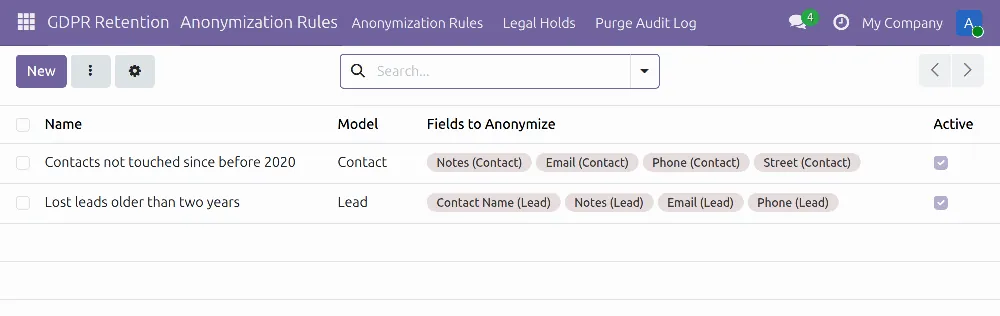
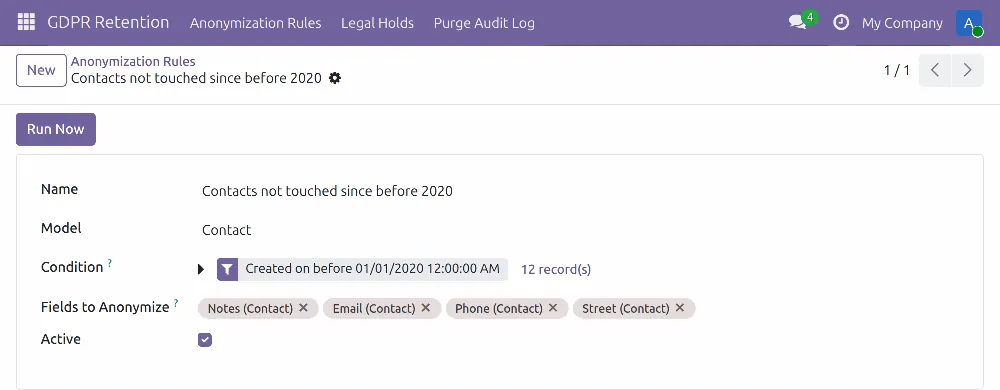
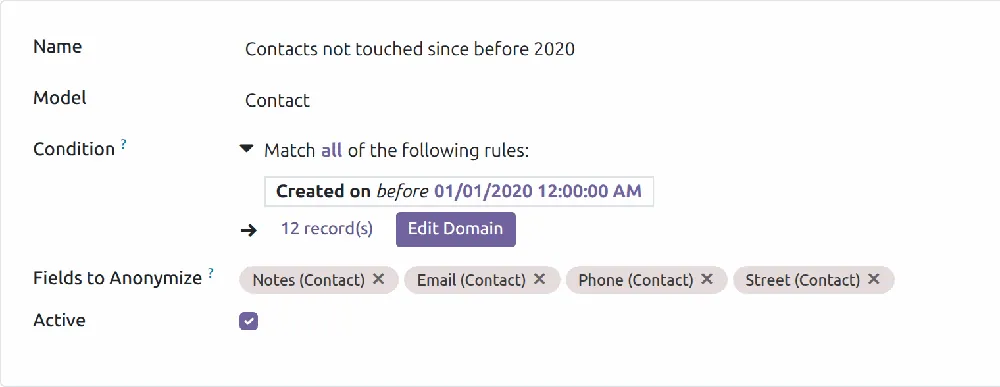
Under GDPR Retention > Anonymization Rules each rule is one line: its name, the model, the fields it clears and an Active tick. Open a rule and the form has four things: a Name , the Model , a Condition and the Fields to Anonymize . The Condition is Odoo's standard domain editor, and beside it the form shows how many records match now . The condition can be unfolded to read or edit it, and the editor has an Include archived switch.
The field picker is deliberately narrow. It offers only fields that are stored, not required, and single-valued: required fields (clearing one would break the record), many-to-many and one-to-many relations, binary files and computed non-stored fields are not offered. The same rule is also enforced on the server, so a rule created by import or by code is refused too.
A Run Now button on the form applies that rule immediately, without waiting for the daily run.
Two rules in the list: the model, the fields each one clears, and the Active tick.
A rule form: the condition shows 12 matching records, and four fields are listed to be cleared.
The condition unfolded: Odoo's own editor, the live match count, and the Include archived switch.
The made-up trading company in the screenshots keeps its customers as Contacts. Its rule is called Contacts not touched since before 2020 : model Contact, condition Created on before 1 January 2020 , fields Notes, Email, Phone and Street. The form says 12 record(s) , so before anything runs the owner already knows how many contacts the rule reaches.
A second rule, Lost leads older than two years , targets the Lead model with three conditions (archived or not, probability 0, created before 28 October 2024) and clears Contact Name, Email, Phone and Notes. It matches 14 leads.
a rule anyone can read in ten seconds: the model, the records it reaches (with a live count) and exactly the fields it will clear.
Test a new rule on a copy of the database first. Run Now blanks the fields straight away and there is no way back except a database backup.
2 What happens to a record
Use it when you want to see exactly what a run leaves behind on a contact.Writes when run
The fear with any clean-up is collateral damage: a run that blanks too much, or that breaks the record other documents point at. The question to ask of an anonymization tool is simple: what is left, and is it still a valid record?
The run searches the model with your condition and, for each record found, writes a blank value into each chosen field. The record itself stays: same id, same name where you did not pick the name, same links from invoices, orders and contacts. Text and notes become empty; numbers become 0; links to other records, dates and ticks are emptied. Nothing else on the record is written.
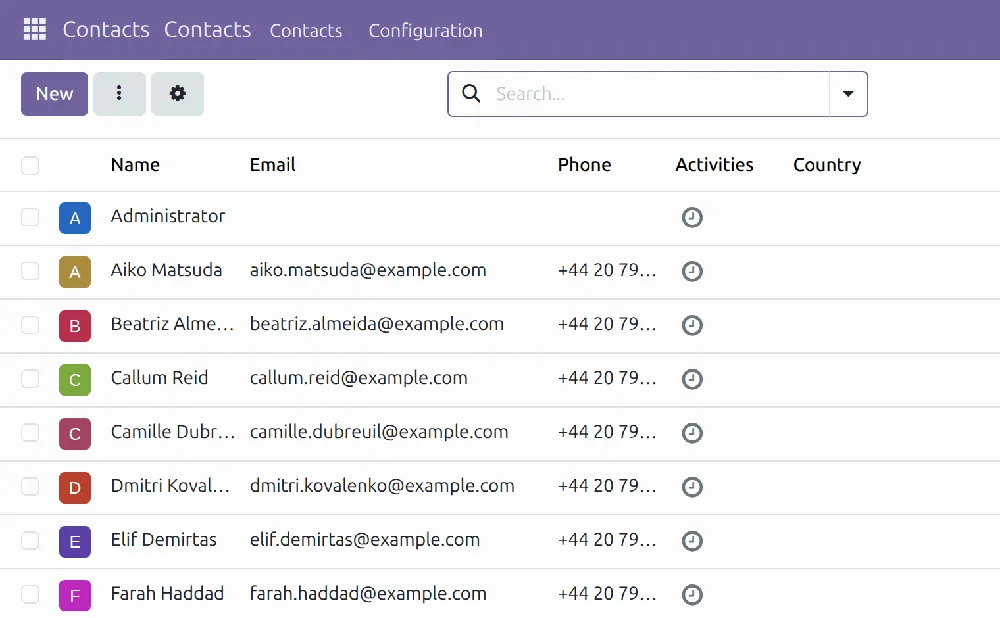
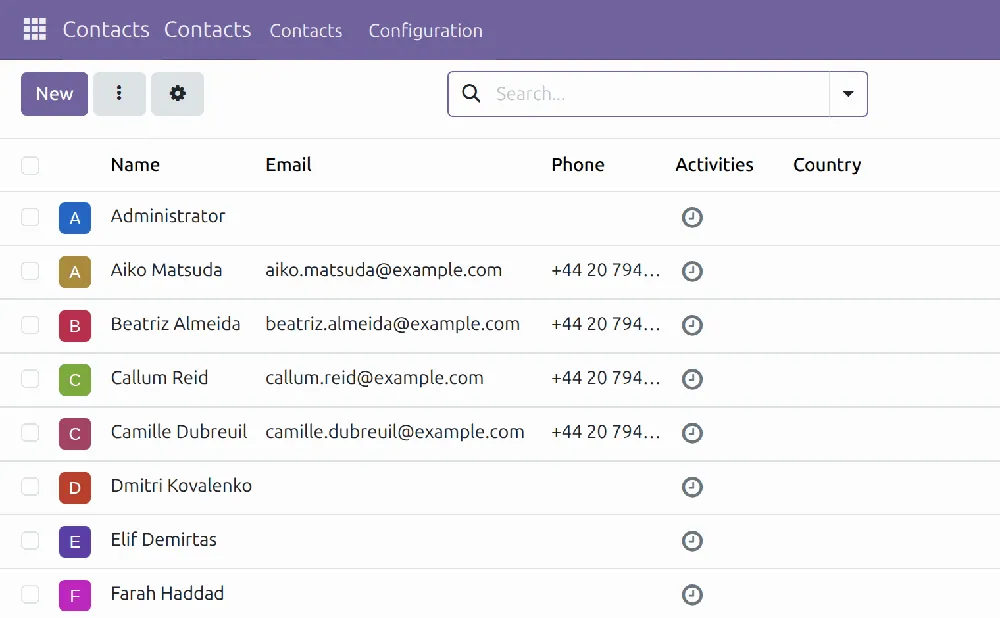
Before the run: the Contacts list shows each person's email and phone.
After the run: the older contacts have no email or phone, the newer ones are unchanged. Camille Dubreuil, under a legal hold, is also unchanged.
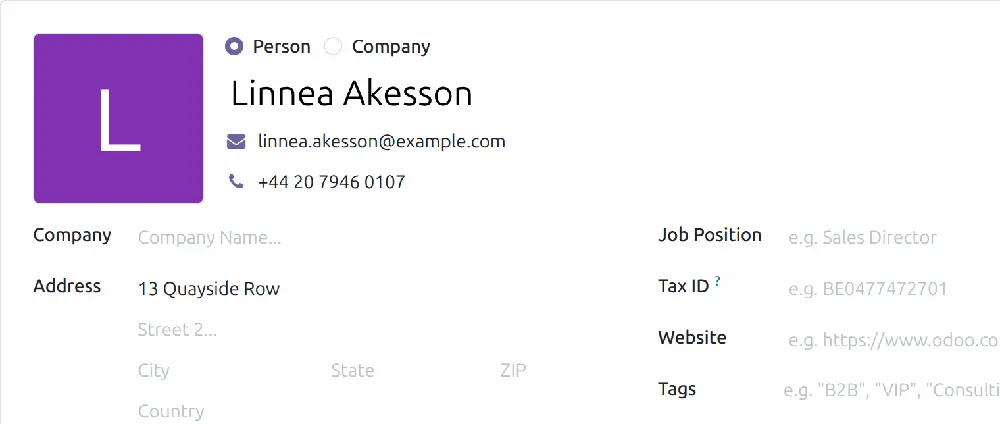
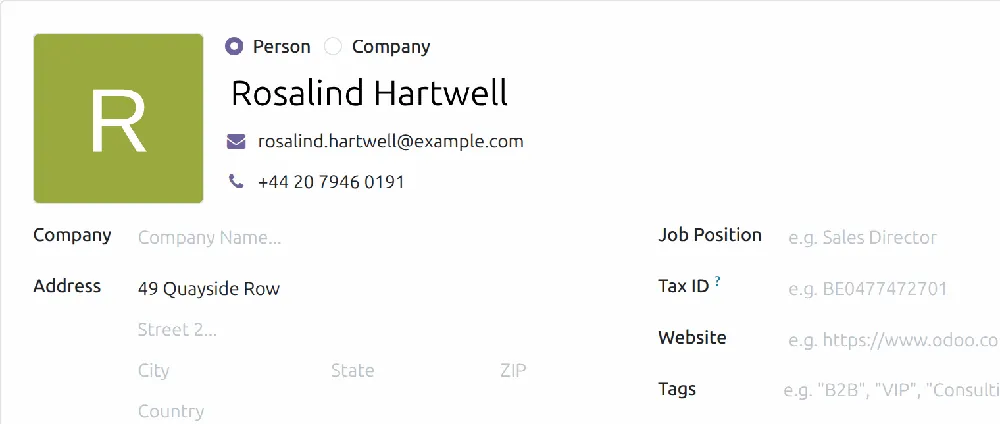
One contact before: name, email, phone and street.
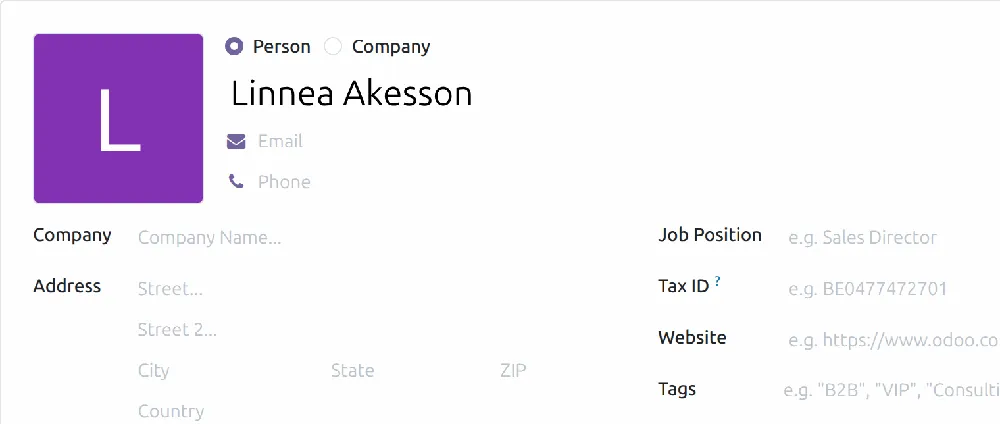
The same contact after: the name and the record remain, email, phone and street are empty.
Linnea Akesson was created in 2017. Before the run her contact shows linnea.akesson@example.com , a phone number and a street address. After the run the form still opens, still carries her name, and the email, phone, street and her notes are empty. In the Contacts list the same happens to Dmitri Kovalenko, Elif Demirtas and Farah Haddad. Aiko Matsuda, Beatriz Almeida and Callum Reid, created in 2026, are untouched, because the condition does not reach them.
The rule matched 12 contacts. Eleven were anonymized and one, Camille Dubreuil, was skipped because of a legal hold (section 3).
the person's details are gone from the record, while the record, its id, its history and every document that points at it are still there.
The record is kept, so anything that identifies the person in another place (a note on a sales order, an attachment, an email in the chatter) is kept too. Decide separately what to do about those.
3 Legal holds: records that must not be touched
Use it when a record is part of a dispute, an investigation or a statutory retention period and must keep its details.Writes when saved
Retention rules are blunt on purpose: everything matching the condition is cleared. Real databases have exceptions: the customer who disputes an invoice, the lead named in an investigation. Deleting the data of a person in a live dispute can be worse than keeping it.
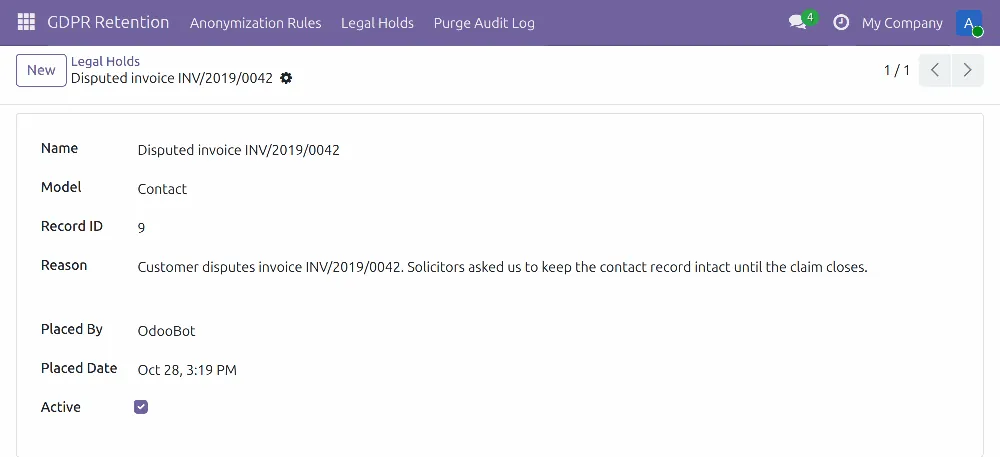
Under GDPR Retention > Legal Holds each hold is a line with a name, a model, a record id, who placed it and when. A hold has a Name , the Model , the Record ID and a required Reason . Placed by and Placed date fill in by themselves.
Before a record is anonymized the run asks one question: is there an active hold for this model and this record id? If yes, the record is skipped: no field is blanked and no log line is written. Archiving a hold (clearing its Active tick) releases it, and the next run treats the record normally.
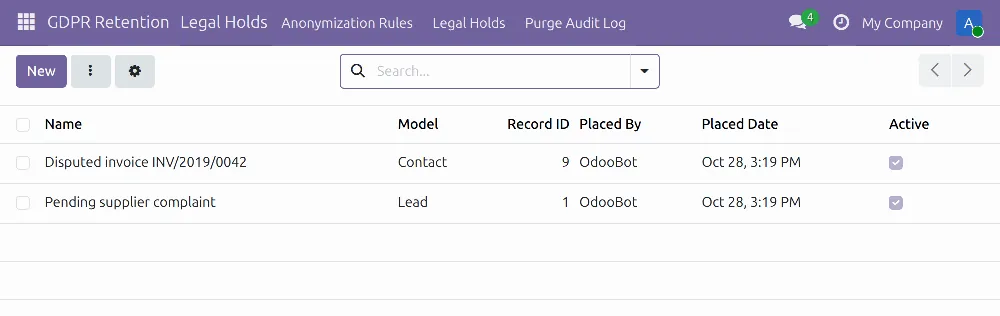
Two active holds: one on a Contact, one on a Lead, with who placed them and when.
A hold form: the model, the record id and the written reason.
Camille Dubreuil disputes invoice INV/2019/0042 and the solicitors have asked the company to keep the contact intact. The owner places a hold on Contact record 9 with that reason. The contact matches the retention rule (created before 2020), yet after the run Camille's email, phone, street and notes are exactly as before, and there is no log line for record 9. In the same way the lost lead with record id 1 is held for a trading-standards enquiry and keeps its details while the other 13 matching leads are cleared.
held records keep every field exactly as it was, on every run, until someone releases the hold, and the reason is written next to the hold.
Place the hold before the rule runs. A record that was already anonymized cannot be restored by placing a hold afterwards.
4 The purge audit log: proof of what was cleared
Use it when someone asks what you deleted, when and under which rule.Read-only
A retention policy nobody can evidence is a policy on paper. When an auditor or a data subject asks "was this record anonymized, and when?", a log that any administrator can edit is a weak answer.
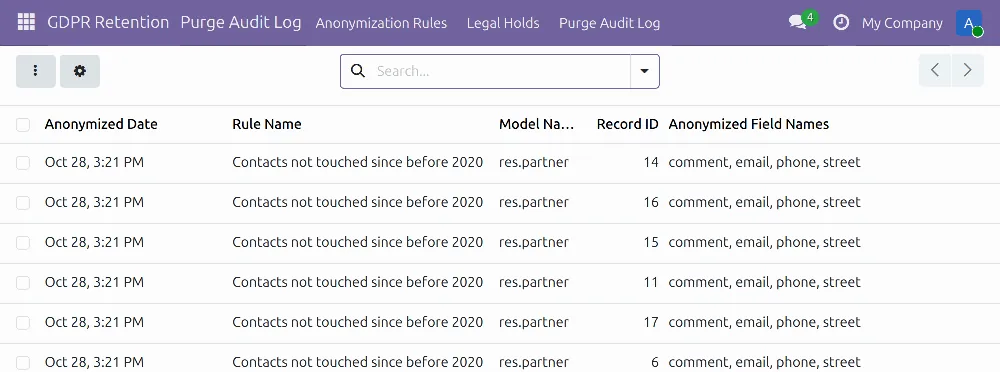
GDPR Retention > Purge Audit Log is a plain list, newest first, with one line per anonymized record: the date and time, the rule name, the technical model (res.partner, crm.lead), the record id and the technical names of the fields that were cleared. The list has no New button and cannot be edited or deleted from.
The line is written by the run itself, in the same step as the blanking. No group has permission to create, change or delete a log entry: the access table gives the GDPR Retention Manager group and the Administrator group read access only. A test checks that a manager who tries to create an entry is refused.
The line stores the rule name , so the entry stays readable if the rule is later deleted, and the model and id of the record, not the person's name or the old values. The log itself holds no personal data.
The audit log: when, which rule, which model and record, which fields. No New button.
After the two rules in this page ran, the log shows 24 lines: 11 for contacts, each reading comment, email, phone, street , and 13 for leads, each reading contact_name, description, email_from, phone . Contact 9 and lead 1, both under hold, have no line. Running a rule a second time adds no duplicate lines.
one line per anonymized record, written by the run and not editable through Odoo, naming the rule, the record and the fields.
The log records that fields were cleared, not what they contained. If you need to prove what was removed, keep your own record of the rule definition at the time.
5 The daily run and Run Now
Use it when you want retention to happen on its own without anyone remembering to run it.Writes when run
Installing the app adds one scheduled action, GDPR Retention: run active anonymization rules , every day. It goes through every active rule in turn. Inactive rules are skipped, and so is a rule whose condition cannot be read. Pressing Run Now on a form does the same for that one rule, immediately.
Three details decide how it behaves over time:
The two example rules are active. A year on, the owner edits the first rule's condition and moves the date to 1 January 2021. At the next daily run the contacts created during 2020 are anonymized and logged too, while the contacts already in the log are left alone. Switching a rule's Active tick off removes it from the run; its earlier log lines stay.
retention that happens on schedule, rule by rule, and that can be repeated safely.
After saving a new rule, press Run Now once and look at the result. A rule that fails would otherwise stop the other rules at the next daily run.
6 Lost leads and archived records
Use it when the records you want to clear are archived, such as lost leads or closed accounts.Writes when run
The records most worth cleaning are often the ones nobody sees: lost leads, closed accounts, archived contacts. In Odoo these are archived, and a normal search skips archived records.
The run uses Odoo's normal search, so archived records are not matched unless the condition asks for them . The condition editor has an Include archived switch; when it is on, the condition contains Active = true or false , as in the second rule in this page. Without it, an old archived contact that matches every other part of the condition is not touched.
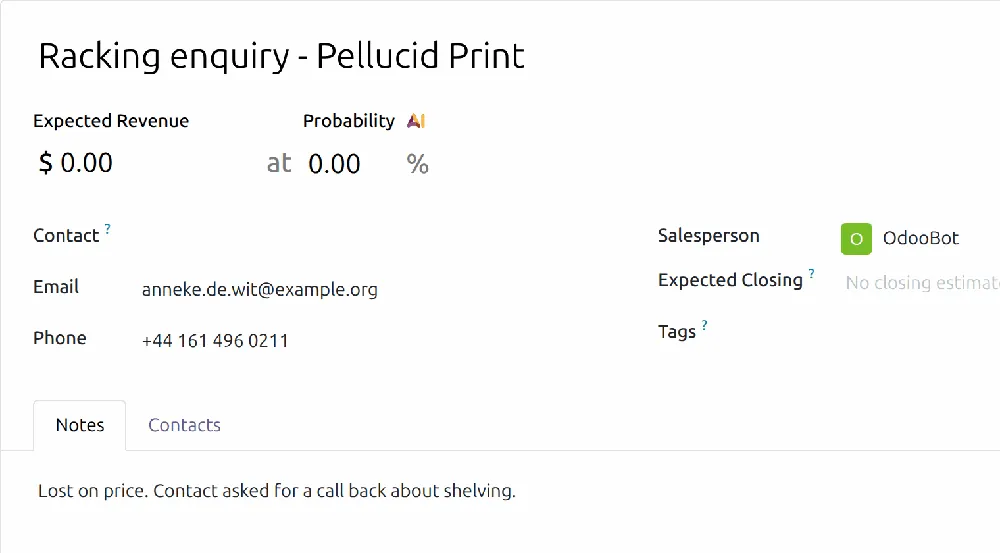
A lost, archived lead before the run: email, phone and a note.
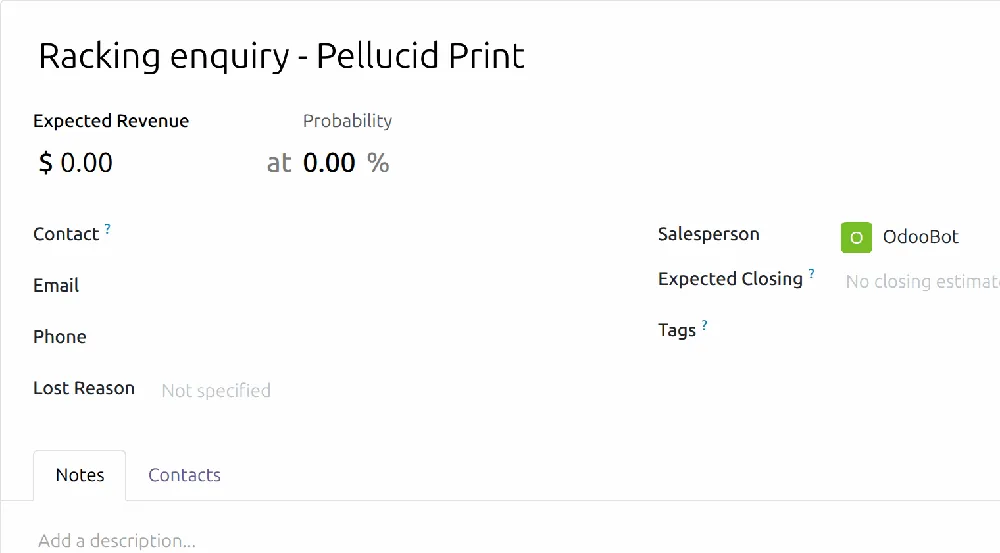
The same lead after the run: email, phone and the note are empty. The title, which is a required field, is kept.
An archived contact created in 2018, after the run: its details are still there, because the contact rule does not include archived records.
All 14 lost leads in the example are archived. The lead rule has Active = true or false in its condition, so it reaches them: 13 are cleared (Contact Name, Email, Phone and Notes) and one is skipped for a hold. The contact rule does not include archived records. Two contacts created in 2018 and 2019 and later archived still show their email and phone after the run, even though they were created before 2020.
lost leads cleared on schedule, and a clear picture of why an archived record is or is not being touched.
If your records are archived, switch Include archived on and read the match count before you run.
Security and data
The app adds one group, GDPR Retention Manager . Members and Settings administrators can open the three screens and manage rules and holds; the audit log is read-only for both. The menu is shown to those two groups only. Because a rule can blank fields on any model, treat membership of the group like an administrator right.
Nothing leaves your database. The app makes no network calls. After about two weeks a user may see one dismissible notification asking for a review on the Odoo Apps page; it is shown to everyone alike, offers nothing in return, can be dismissed for good, and opens the store only if the user clicks the button.
What it does not do
- It blanks the fields a rule names, on the records a rule matches, and logs each record. It does not decide for you what personal data is, and it is not legal advice or a compliance certificate. In more detail:
Questions buyers ask
Does it delete the record?
No. It writes blank values into the fields you picked and keeps the record. For deleting or archiving whole records use Odoo's Data Recycle.
Can I preview what a rule will touch?
The form shows how many records match the condition. It does not list them or show a before and after, so test on a copy first.
Can I undo a run?
No. Cleared values are not stored anywhere. Restore from a backup if you need them back.
Does it run by itself?
Yes. One scheduled action runs every active rule once a day. You can also press Run Now on a rule.
Why was an archived record not cleared?
A normal search skips archived records. Switch Include archived on in the condition.
Can I set a rule as "older than seven years"?
Not as a rolling window. A condition using context_today, relativedelta or datetime is refused when you save. Use a fixed date and move it forward, or a field that holds the age.
What happens to a record under a legal hold?
It is skipped on every run and no log line is written, until the hold is released by unticking Active.
Who can see the audit log?
Members of the GDPR Retention Manager group and Settings administrators, read-only. Nobody has create, edit or delete rights on it.
Does it clear chatter messages or attachments?
No. It writes only the fields you pick.
Is the other Odoo version included?
No. The store sells each Odoo version of an app as a separate product.
Requirements
- Odoo 19.0 or 20.0. The App Store sells each version separately, so buy the one that matches your database.
- Odoo.sh or On-Premise only. Third-party apps cannot be installed on Odoo Online (SaaS) databases. Check your hosting before buying.
- Module
mh_gdpr_retention, version 19.0.1.0.16, licensed OPL-1.