Collected by Salesperson
Request a live demo · Odoo.sh or On-Premise only, not Odoo Online (SaaS).
Free
App Store price, per Odoo version
19 · 20
Odoo versions, each sold on its own page
Odoo.sh
or On-Premise; not Odoo Online (SaaS)
1.0.1
version of mh_collections_by_salesperson
Collections by salesperson: cash received per salesperson per month, customer payments matched to each salesperson's invoices. Partial payments, refunds and company currency. Read only.
Odoo's invoice analysis reports what each salesperson invoiced. It has a Salesperson column and an invoice date, but nothing for what the customers actually paid: an invoice that is half paid counts in full, and there is no payment date to group by. So "how much cash did each salesperson bring in last month" has no screen. This is that screen. Odoo 19 and 20 Community and Enterprise.
How it works
What it does
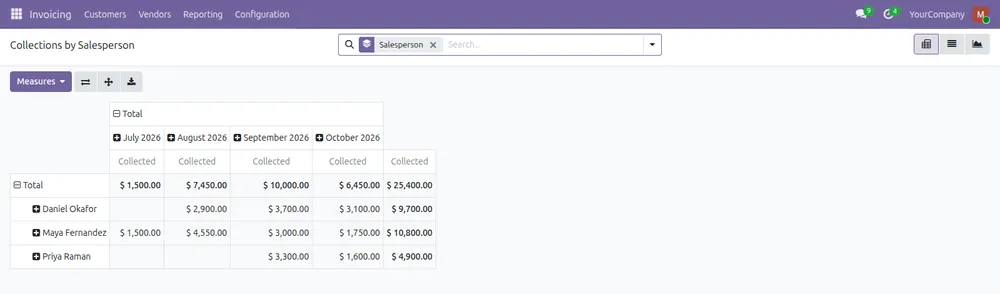
Adds Reporting > Management > Collections by Salesperson, in the Invoicing or Accounting app. One row for each match between a customer payment (or a bank statement line) and a customer invoice: salesperson, customer, invoice, payment entry, payment date, payment journal and the amount collected in company currency.
It opens as a pivot of salespeople by payment month. Switch to the list or the graph, filter by payment date, group by customer, payment journal or company, and click a row to open its invoice.
How each number is worked out
Date. The date of the payment or bank line. Not the invoice date, and not the day somebody matched the two.
Partial payments. Each payment counts for the part it cleared. An invoice paid in three instalments is three rows, each dated on its own payment. The unpaid rest is not counted.
One payment, several invoices. The payment is split between the invoices it was matched to, each part under that invoice's salesperson.
Credit notes. A credit note set against an invoice is not cash and is not counted. Money paid back to a customer against a credit note is a negative row under the credit note's salesperson, so the monthly total is net cash.
Currency. Rows are in company currency: the value the payment was booked at, for the part matched. If the rate moved between the invoice and the payment, the gain or loss Odoo books on its exchange-difference entry is not in the figure, because it is not cash received. When a total spans companies with different currencies, Odoo's pivot and list convert it to the current company's currency, the same way its own invoice analysis does.
Salesperson. The Salesperson on the invoice as it is now. Change it on the invoice and the history follows. Invoices with no salesperson are listed with an empty one; there is a filter for them.
Screenshots
What it does not do
- It does not calculate commission. No rates, no rules, no settlement. It shows the cash; what you pay on it is up to you.
- It does not count a payment that is not matched to an invoice. An advance or the overpaid part of a payment has no invoice, so it has no salesperson and is not listed. Unpaid invoices are not listed either.
- It does not count credit-note set-offs or manual journal entries as cash. Only a payment or a bank statement line matched to a customer invoice, credit note or sales receipt is a row.
- It keeps no history of its own. If a match is undone in Odoo the row disappears, and there is no record of who the salesperson was when the money came in.
- It does not sort by product or sales team, and it prints no PDF. Group by salesperson, month, customer, payment journal or company; export the list or pivot with Odoo's own export.
- It does not convert each row to another currency. Rows are in the company's currency; only totals across companies are converted, by Odoo.
Requirements
- Odoo 19.0 or 20.0. The App Store sells each version separately, so buy the one that matches your database.
- Odoo.sh or On-Premise only. Third-party apps cannot be installed on Odoo Online (SaaS) databases. Check your hosting before buying.
- Odoo 19 or 20, Community or Enterprise, with Invoicing (account). Third-party apps install on Odoo.sh or On-Premise only - they cannot be installed on Odoo Online (SaaS). Billing and read-only accounting users can open it; in a multi-company database each user sees only the companies they are logged in to.
- Module
mh_collections_by_salesperson, version 19.0.1.0.1, licensed OPL-1.