Romania SAF-T Exporter
A SAF-T XML for a period that passes ANAF's published schema and DUKIntegrator on our test data. Not a filing
Request a live demo · Odoo.sh or On-Premise only, not Odoo Online (SaaS).
2 of 2
ANAF checks run on the seeded file (schema file and DUKIntegrator): both pass on our test data
5
VAT rates mapped to ANAF tax codes: 21, 19, 11, 9 and 5 percent, plain domestic VAT only
381
credit notes are written as ANAF invoice type 381 with a minus sign
16
automated tests in this app, none failing
0
things sent to ANAF or anyone else
XML
the one export, attached to the declaration
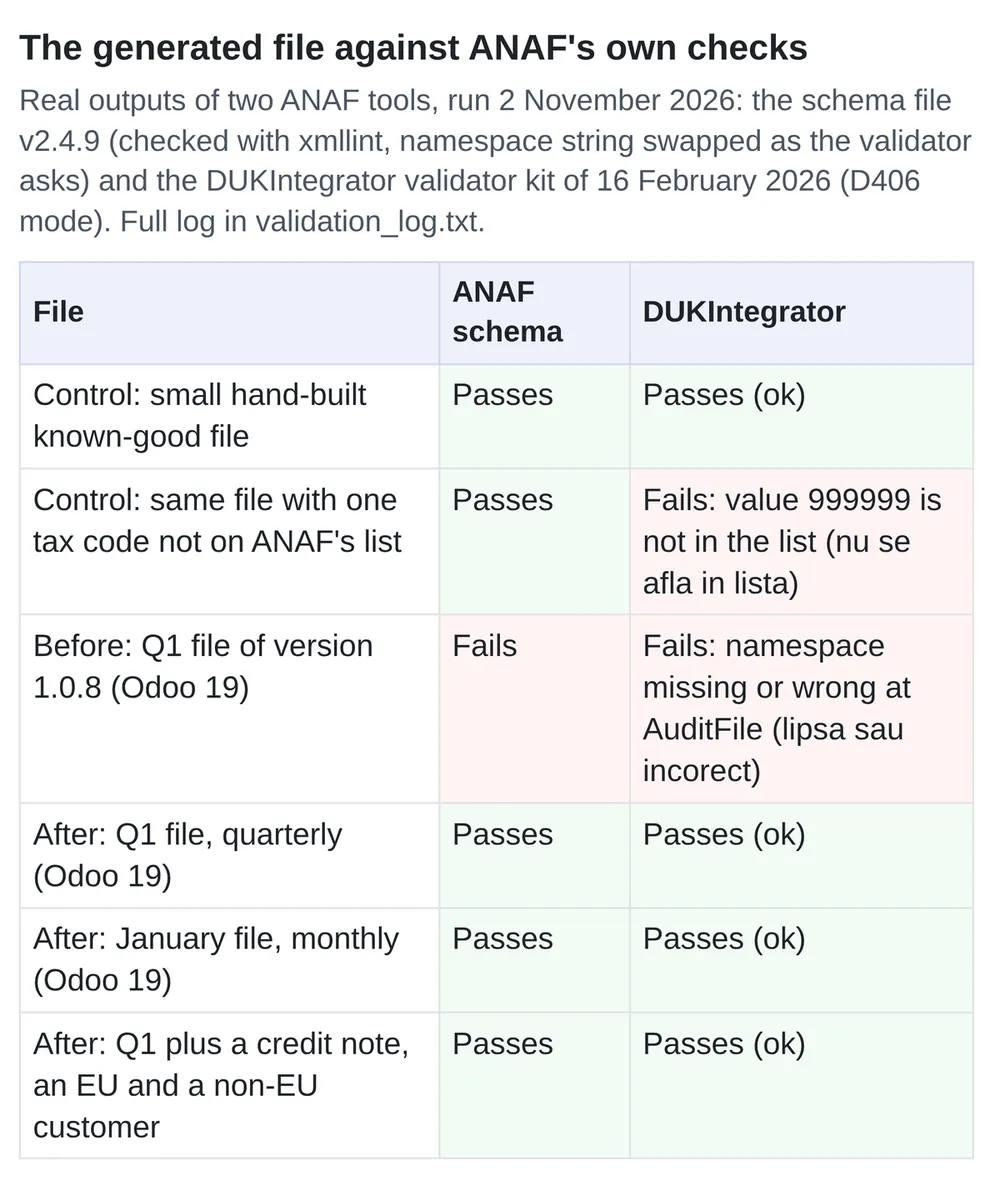
This app collects the posted accounting of a period into one XML file in ANAF's layout. The file from version 19.0.1.0.9 passes ANAF's published schema (version 2.4.9) and ANAF's DUKIntegrator validator on our test data (results below). That is a format check only: this is not a filing, the app sends nothing, and it says nothing about deadlines, obligations or whether your figures are right. Your accountant reviews the file and files through ANAF's own channel. This page shows an Odoo 19 database seeded with a made-up Romanian company.
How it works
What the ANAF checks say
ANAF publishes a schema file and a validator kit on its SAF-T page. Both were downloaded on 2 November 2026 (schema version 2.4.9, validator kit dated 16 February 2026) and run on the files this app generated for the seeded company, next to a known-good control and the file the previous version produced.
Real output of the two ANAF tools. The ANAF schema column uses the schema file with only its namespace string changed from d406t to d406, which is what DUKIntegrator asks for.
The validator accepted the file on made-up data with valid-format CUIs. Your data can still be refused by the app (it stops and lists what is missing) or by ANAF's checks. Run the file through DUKIntegrator yourself before anyone files it.
1 Declarations: one period, one file
Use it when you want one XML file per month or quarter, kept next to the period it covers.Writes when saved
A file for a period is easier to hand over when the period, the status and the file sit on one record.
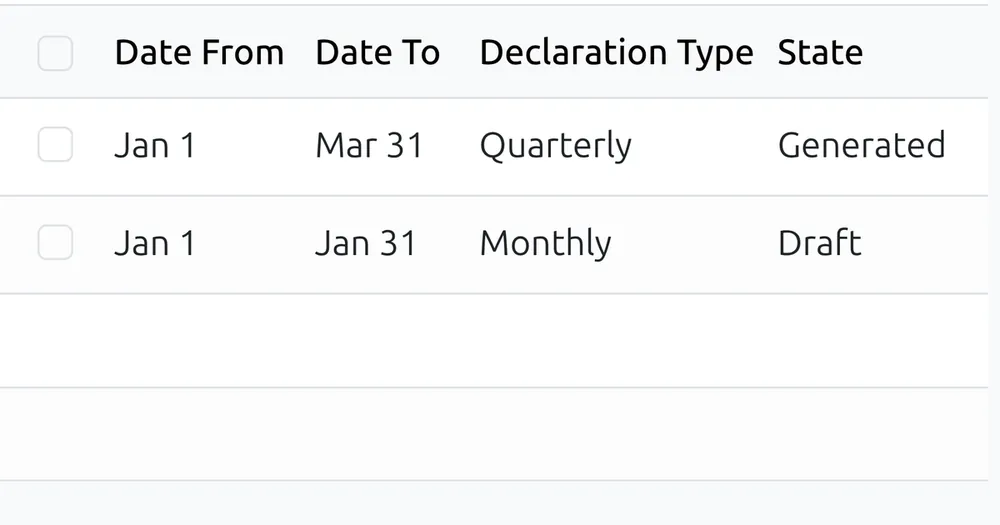
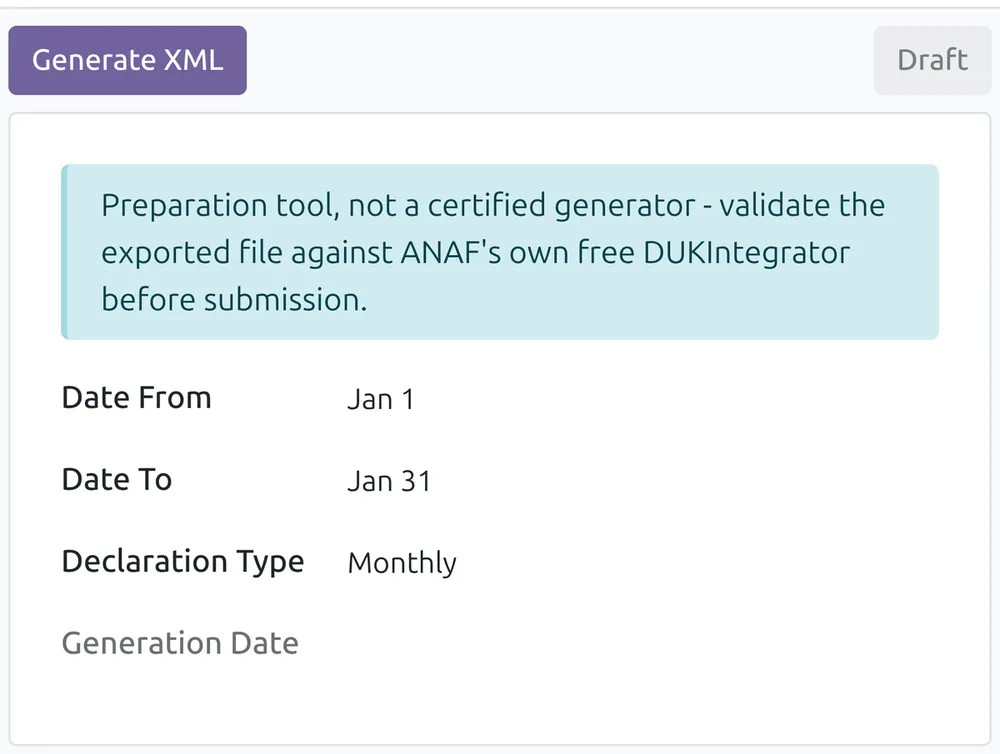
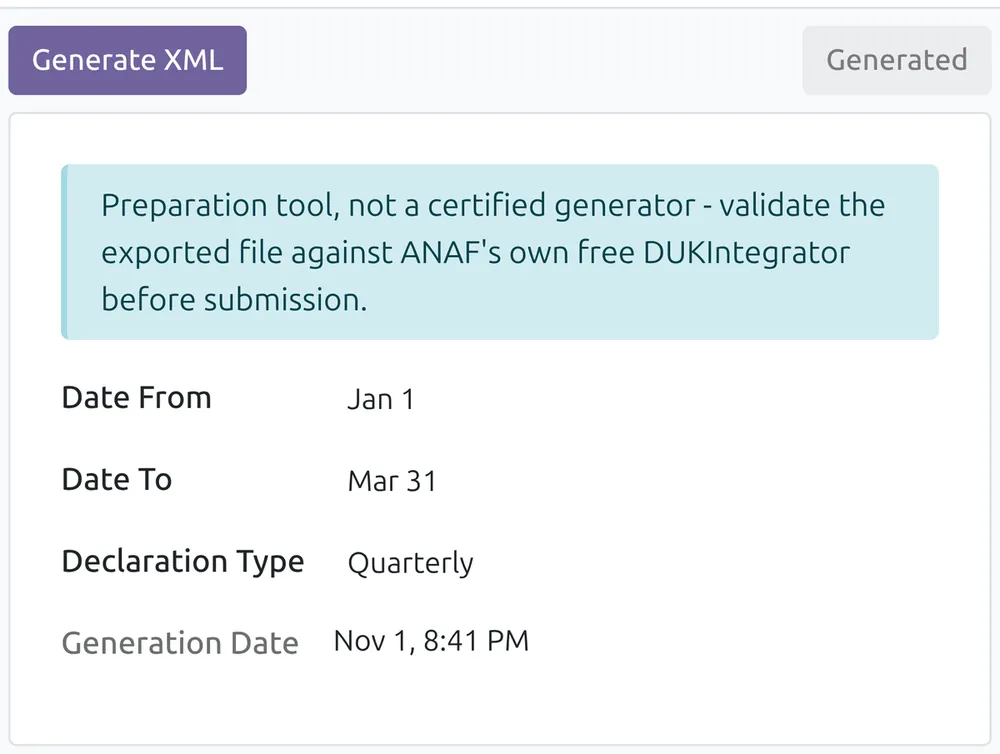
Under SAF-T > Declarations (Accounting users and Accounting Administrators) each record has a start date, an end date, a Monthly or Quarterly label, a status (Draft or Generated) and the generation date. Generate XML builds the file, attaches it to the record, sets the status to Generated and starts the download. The label is written into the file header as L or T. The form carries a notice that this is a preparation tool and that the file should be validated with ANAF's DUKIntegrator.
Two declarations: one generated, one still a draft.
A draft declaration with the notice.
A generated declaration; the status and the generation date are the only trace on the form.
The seeded company, Carpatia Mobila SRL, has a quarterly declaration for 1 January to 31 March 2026 and a monthly one for January 2026. A second declaration with exactly the same dates is refused by a database constraint.
It does not submit anything and does not track whether a declaration was filed.
The period is the two dates, and they are not checked (an end date before the start date gives an empty file). Each press of Generate XML adds another attachment, the form has no list of them, and the status stays Generated if invoices change afterwards.
2 What goes into the file
Use it when you want to see which records land in the file, and what the app refuses to write, before anyone reads it.Reads accounting data only
A file is only useful if you know what it holds and what it leaves out.
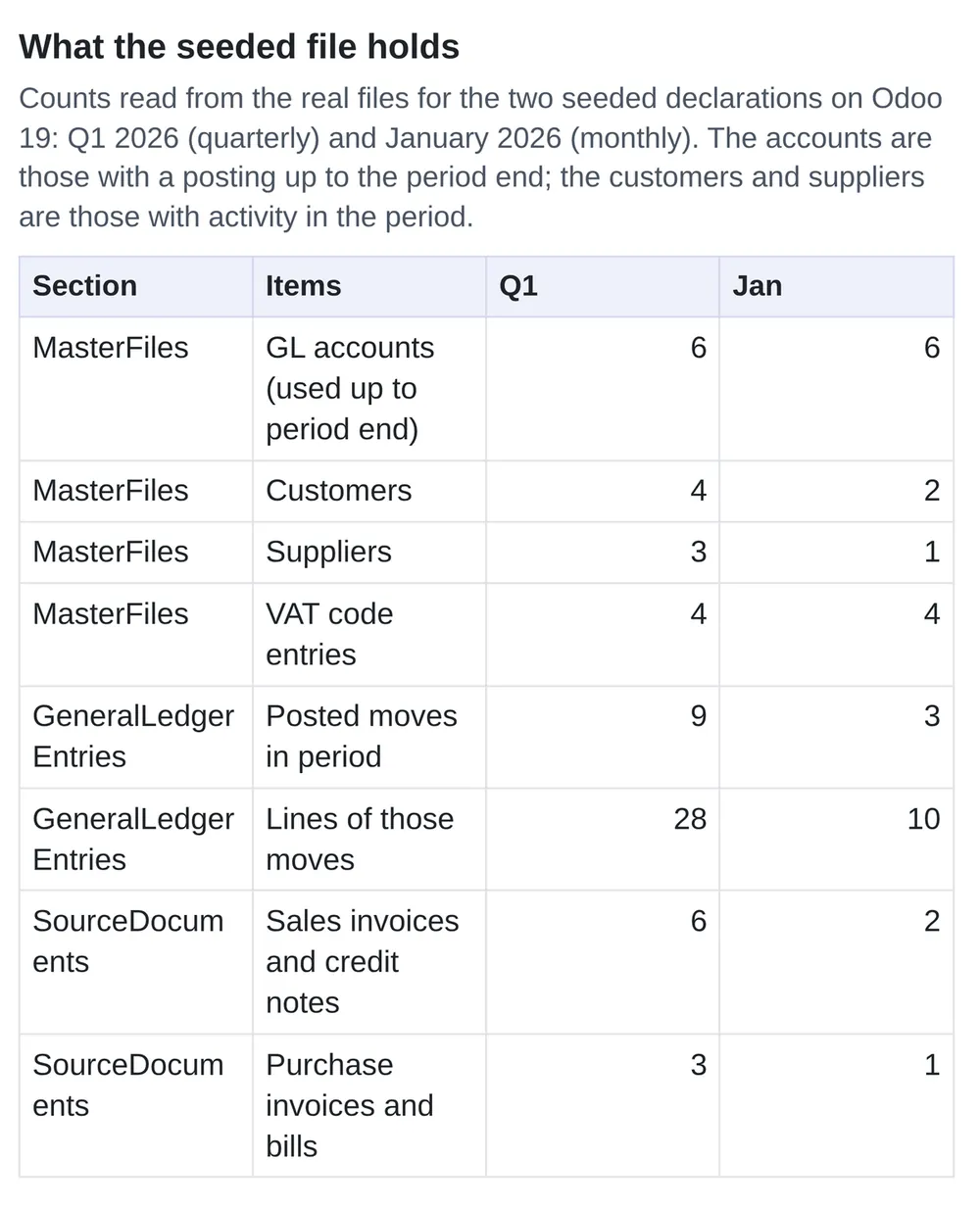
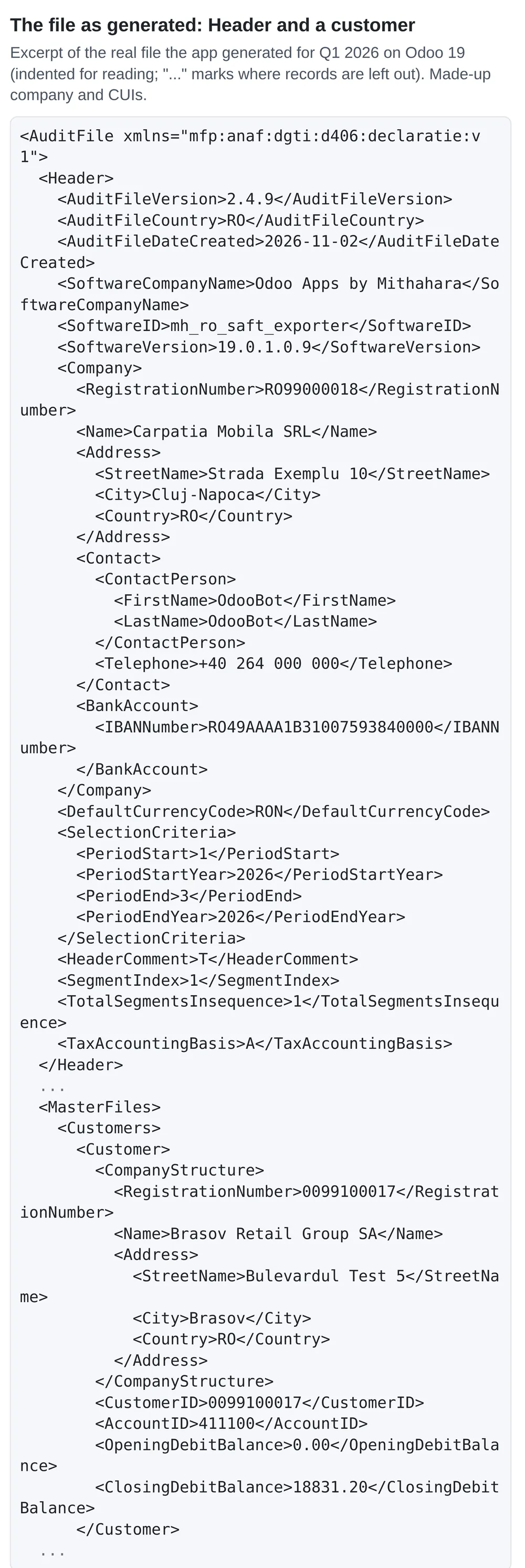
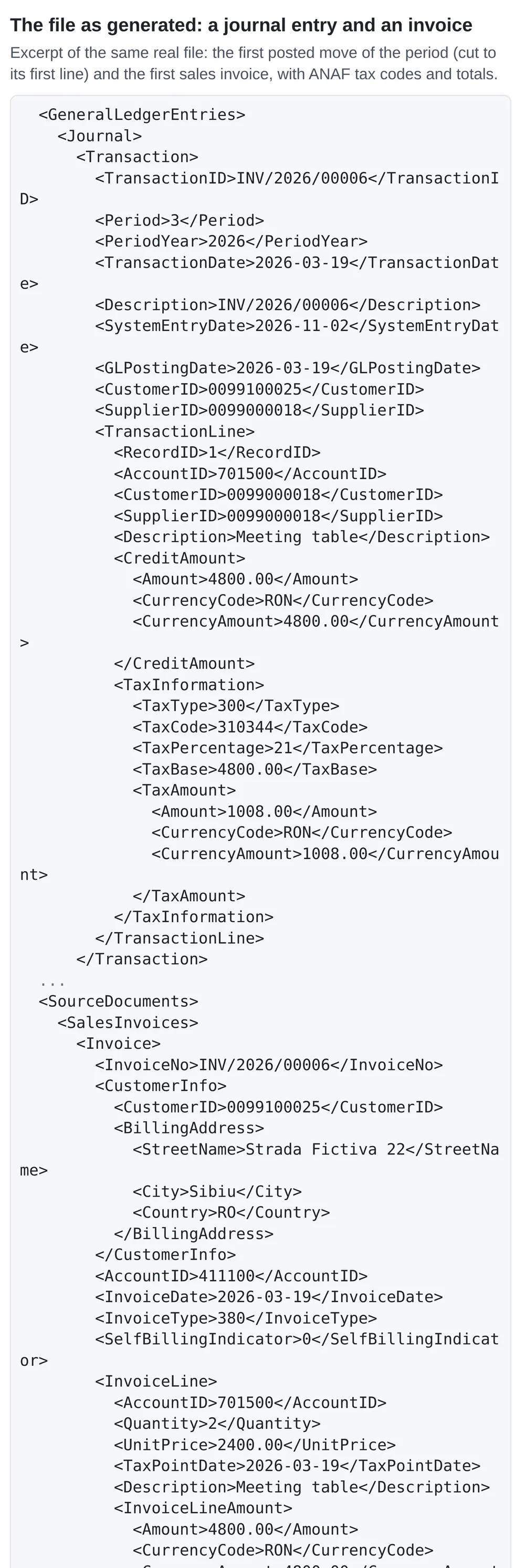
Four sections under the root AuditFile , which carries ANAF's namespace. Header : the company (registration number, name, address, a contact telephone, a bank account), the period as months and years, the software, and the L or T return type. MasterFiles : the accounts that have a posting up to the period end, each with its opening and closing balance; the customers and suppliers that appear in the period, each with a code built by ANAF's rule and a balance; the VAT codes. GeneralLedgerEntries : posted journal entries dated in the period, grouped by journal, with a tax block on every line. SourceDocuments : posted customer invoices and credit notes, and vendor bills and refunds, dated in the period, with lines, tax codes and totals.
Counts read from the real files.
The Header and the first customer, from the real file.
A journal entry and an invoice, from the real file.
The seeded books have seven posted sales invoices, one draft and four posted vendor bills. The Q1 file holds six sales invoices and three bills: the draft, the April invoice and the May bill are absent. A credit note posted against an invoice appears as type 381 with the same amounts as the invoice and a minus sign.
It does not check the data for completeness beyond the points above, balance the entries or convert currencies. Foreign-currency invoices, Odoo.sh, Odoo Enterprise and multi-company databases were not tested.
Not exported: payments, stock movements, assets and products (those sections are empty). Documents are reported in the company currency only. Account types Activ and Pasiv are derived from the Odoo account type, and the app cannot tell Romanian bifunctional accounts. A partner with no VAT number gets an own code of ANAF type 04, suppliers included. The contact person is the user who presses Generate.
Questions buyers ask
Will ANAF accept the file?
The file passes ANAF's published schema and its DUKIntegrator validator on our test data. Nothing was submitted to ANAF, so no acceptance is claimed. Run it through DUKIntegrator yourself first.
Does it file with ANAF?
No. It transmits nothing. Your accountant reviews the figures and files through ANAF's own channel.
What does it read?
Accounts, partners, taxes, posted journal entries and posted invoices. Drafts and cancelled entries are left out.
What if my taxes are not the plain ones?
The app stops and names the document and the tax. It does not guess an ANAF code.
Does Monthly or Quarterly change the file?
Yes, only the return type in the header: L for monthly, T for quarterly. The period is the two dates.
Requirements
- Odoo 19.0 or 20.0. The App Store sells each version separately, so buy the one that matches your database.
- Odoo.sh or On-Premise only. Third-party apps cannot be installed on Odoo Online (SaaS) databases. Check your hosting before buying.
- Module
mh_ro_saft_exporter, version 19.0.1.0.10, licensed OPL-1.