Combined Calendar
Task deadlines, time off, meetings, activities, orders and transfers on one calendar: pick a model and its date fields, and each entry opens its source record
Request a live demo · Odoo.sh or On-Premise only, not Odoo Online (SaaS).
7
standard sources: meetings, tasks, time off, opportunities, orders, transfers, activities
1 hour
between automatic refreshes; opening a calendar refreshes it too
30
automated tests, none failing
5000
newest records shown per source
calendar
the only Odoo module it depends on
Read only
entries never change the record behind them
Odoo's Calendar app lists meetings. Task deadlines live in Project, leave in Time Off, expected closings in CRM, delivery dates in Sales and Inventory. Combined Calendar builds a calendar from sources you choose, with no code, and shows only the entries each person is allowed to read. This page walks through it with screenshots of an Odoo 19 database seeded with made-up data, and says where it stops.
How it works
Why one calendar
The app keeps four things in one place, so "what is on next week" is one screen instead of five apps.
1 Sources: which records go on the calendar
Use it when tasks, leave, deals and deliveries each carry a date you want side by side.Combined Calendar managers only
Every app keeps its own dates. Seeing them together means opening each app and comparing in your head.
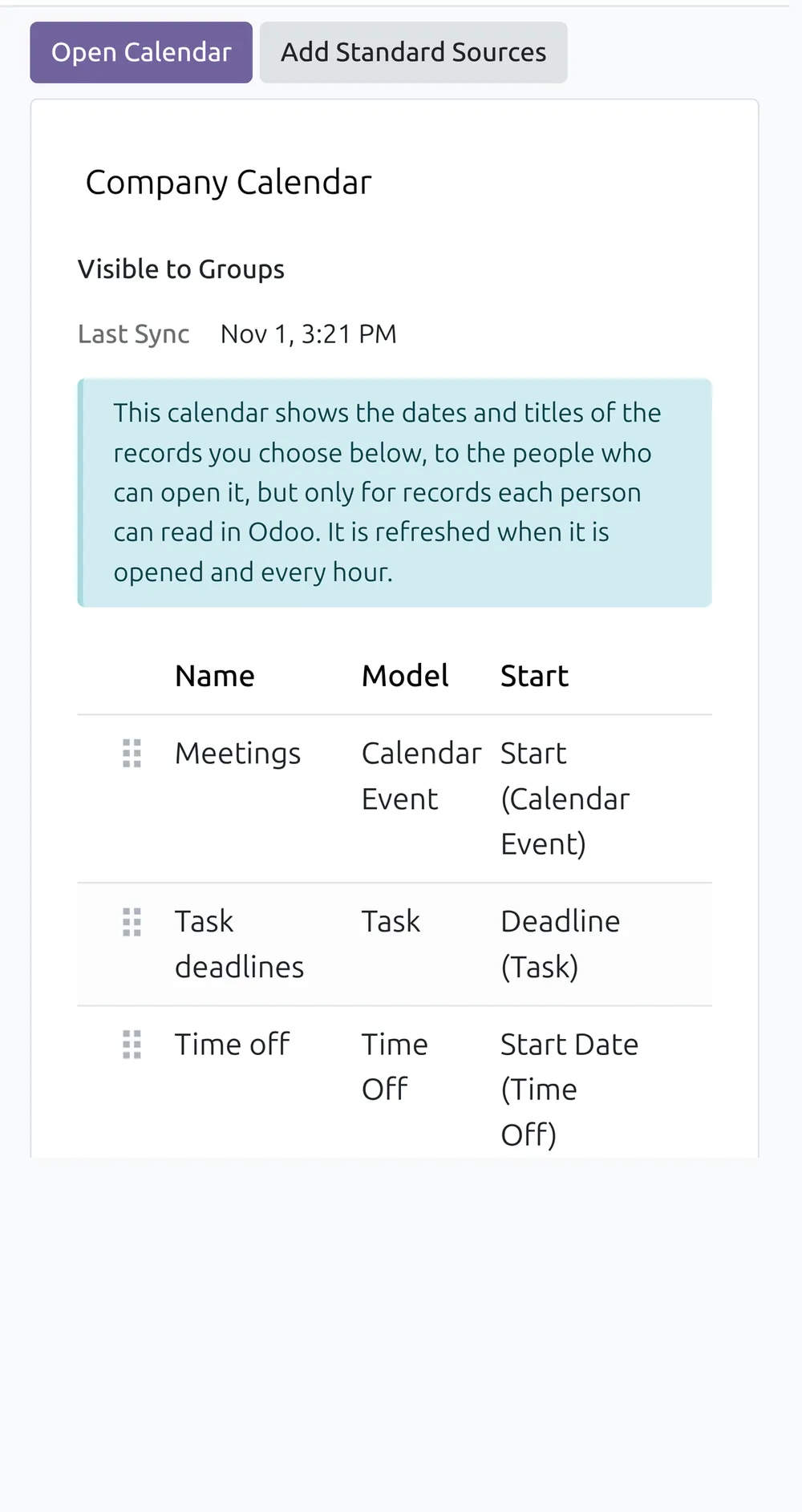
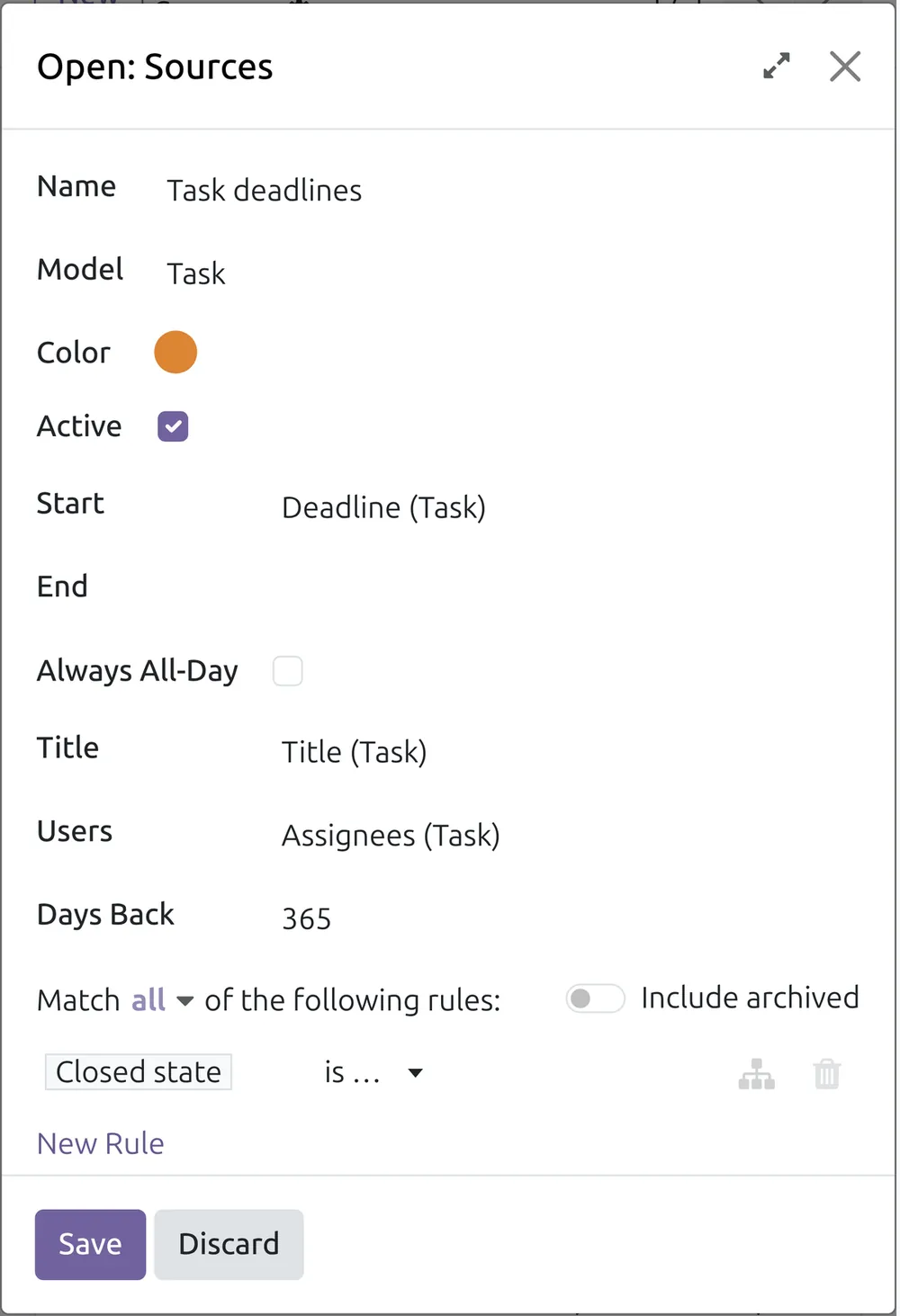
Under Calendar > Combined Calendar Setup a manager opens a calendar and lists its sources. Add Standard Sources adds one source for each of these that is installed: Meetings, Task deadlines, Time off, Opportunity closings, Delivery dates, Transfers and Activities. A source has a model, a filter, a start field, an optional end field, an optional title and users field, an always-all-day switch and a Days Back window (365 days by default).
A calendar and its sources. The info box says what the calendar shows and when it refreshes.
A standard source: Task deadlines uses the task's Deadline and shows tasks that are not closed.
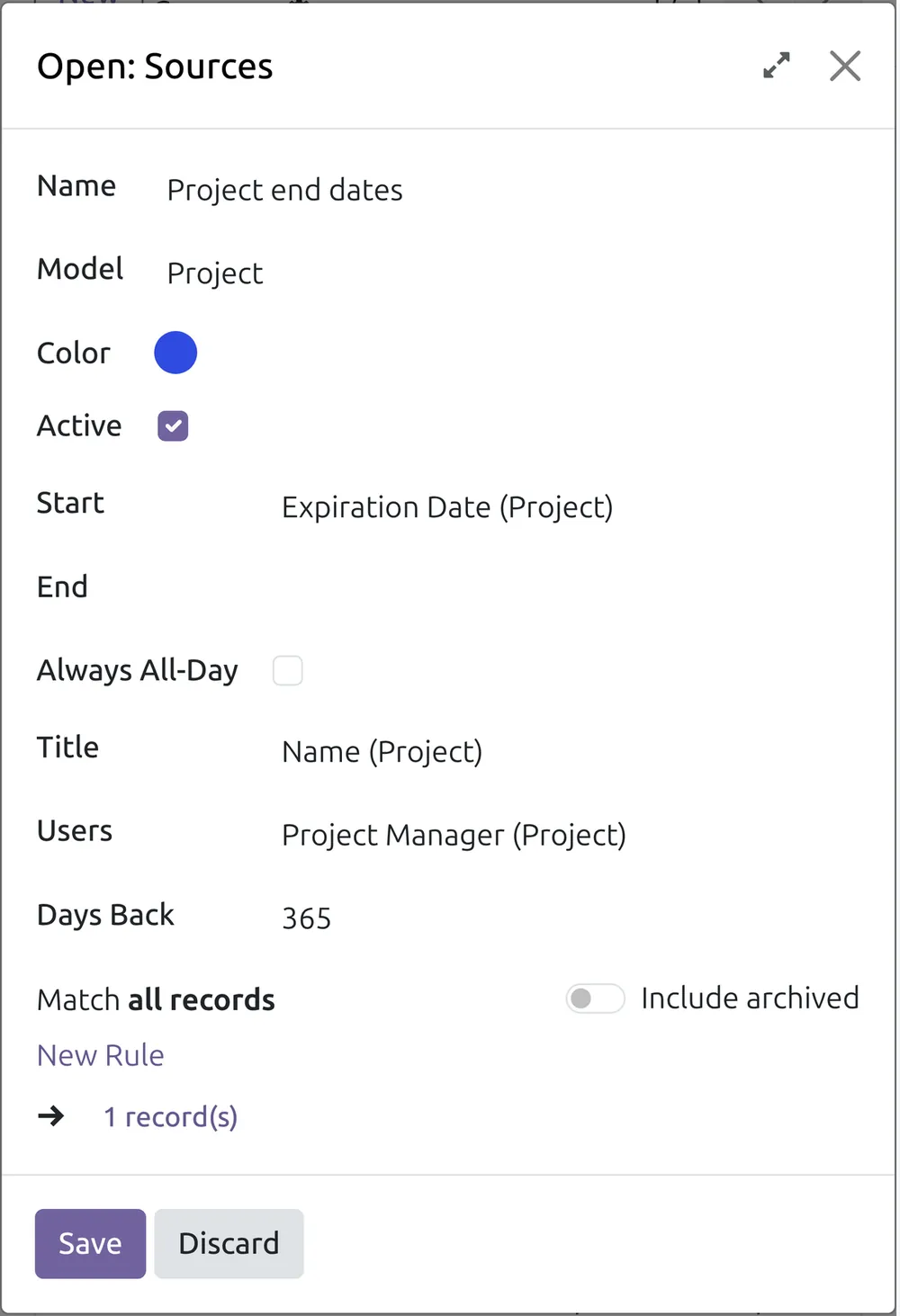
A source added by hand for a model the standard set does not cover.
The seeded Company Calendar has a source of its own on top of the standard ones. Project end dates reads the date on projects (Odoo labels that field Expiration Date), uses the project name as the title and the project manager as the user.
A source needs a stored date or date and time field; computed dates are not offered. Each source shows its newest 5000 records inside its Days Back window.
After you install another app, press Add Standard Sources on the calendar. The default Company Calendar created at install holds standard sources only for apps that were already installed. In the test database it got Meetings and Activities and nothing else.
2 The entries: what the calendar holds
Use it when you want the dates of many apps in one list or on Odoo's calendar grid.Entries are written by the refresh, never by users
A planner wants one answer to "what is due on the 11th", across apps.
Under Calendar > Combined Calendars a card per calendar. Opening one refreshes it and shows Odoo's own calendar view, with a filter per source (each in its own colour) and per user, and a list view of the same entries. A date field gives an all-day entry from 08:00 to 18:00; a date and time field keeps its time and lasts as long as the end field says, or one hour without one.
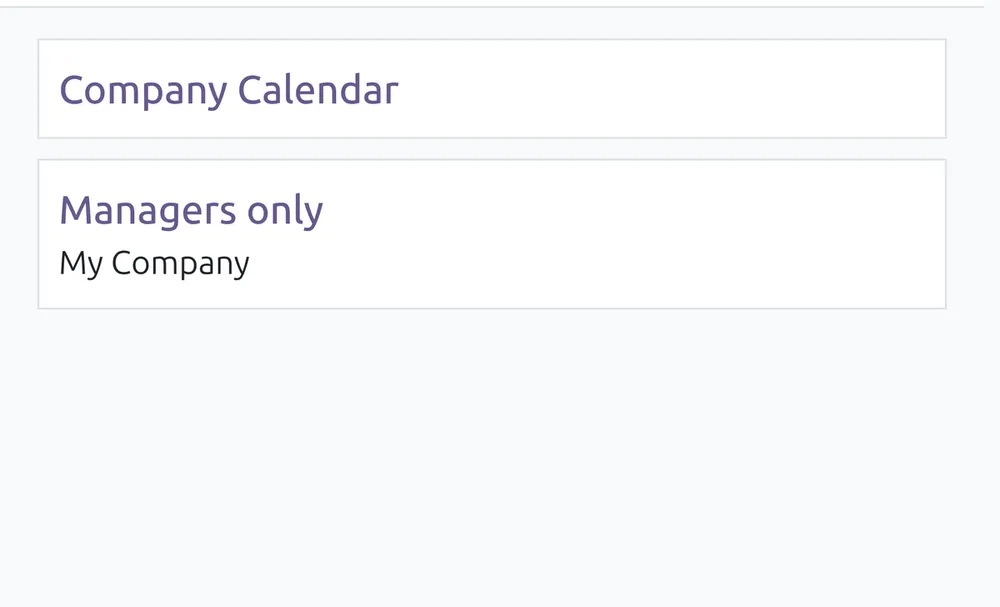
The administrator sees both calendars.
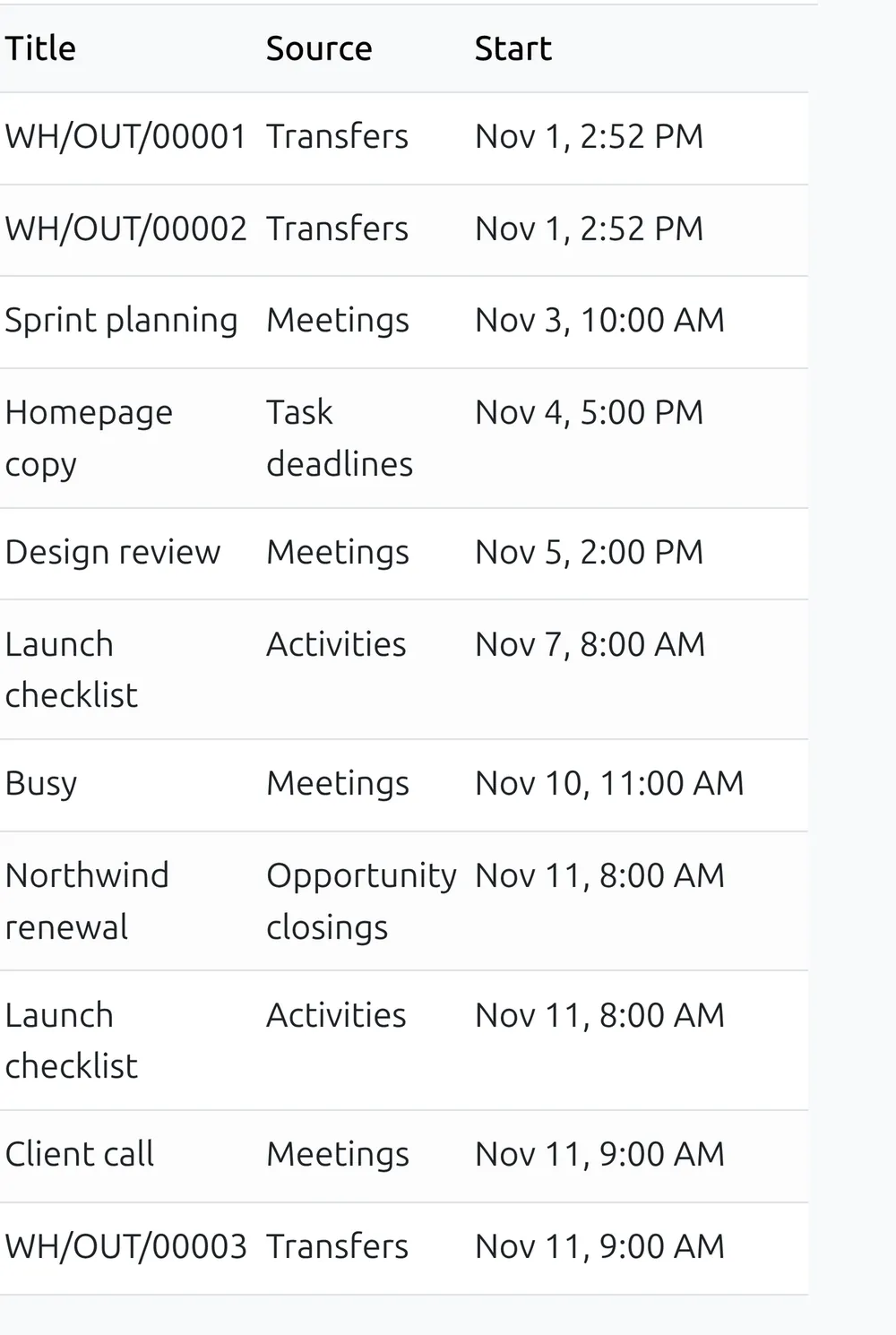
The entries of the Company Calendar in list view, with their sources and start times.
On the 11th of the seeded month the calendar holds an opportunity closing (Northwind renewal), a to-do, a client call, a delivery transfer, a task deadline (Checkout QA) and an order delivery date, from six different sources.
The Activities source shows the name of the record a to-do sits on, not the activity summary. The Transfers source lists every open transfer, including the ones a confirmed sale creates.
The screenshots show the list view and the setup screens, not the month grid. The headless browser used to take them draws Odoo's calendar grid empty, so the grid is not pictured here; the demo video in this listing shows it.
3 Permissions: each person sees only what they can read
Use it when one calendar is shared with a team but opportunities and orders are not for everyone.Follows each user's own access rights
A shared calendar must not leak the titles and dates of records a person cannot open.
The calendar holds titles and dates, so what a person sees is decided at read time. An entry shows only if the person can read its source record, record rules included, and its title is read as that person. A calendar can also be limited to groups and to one company.
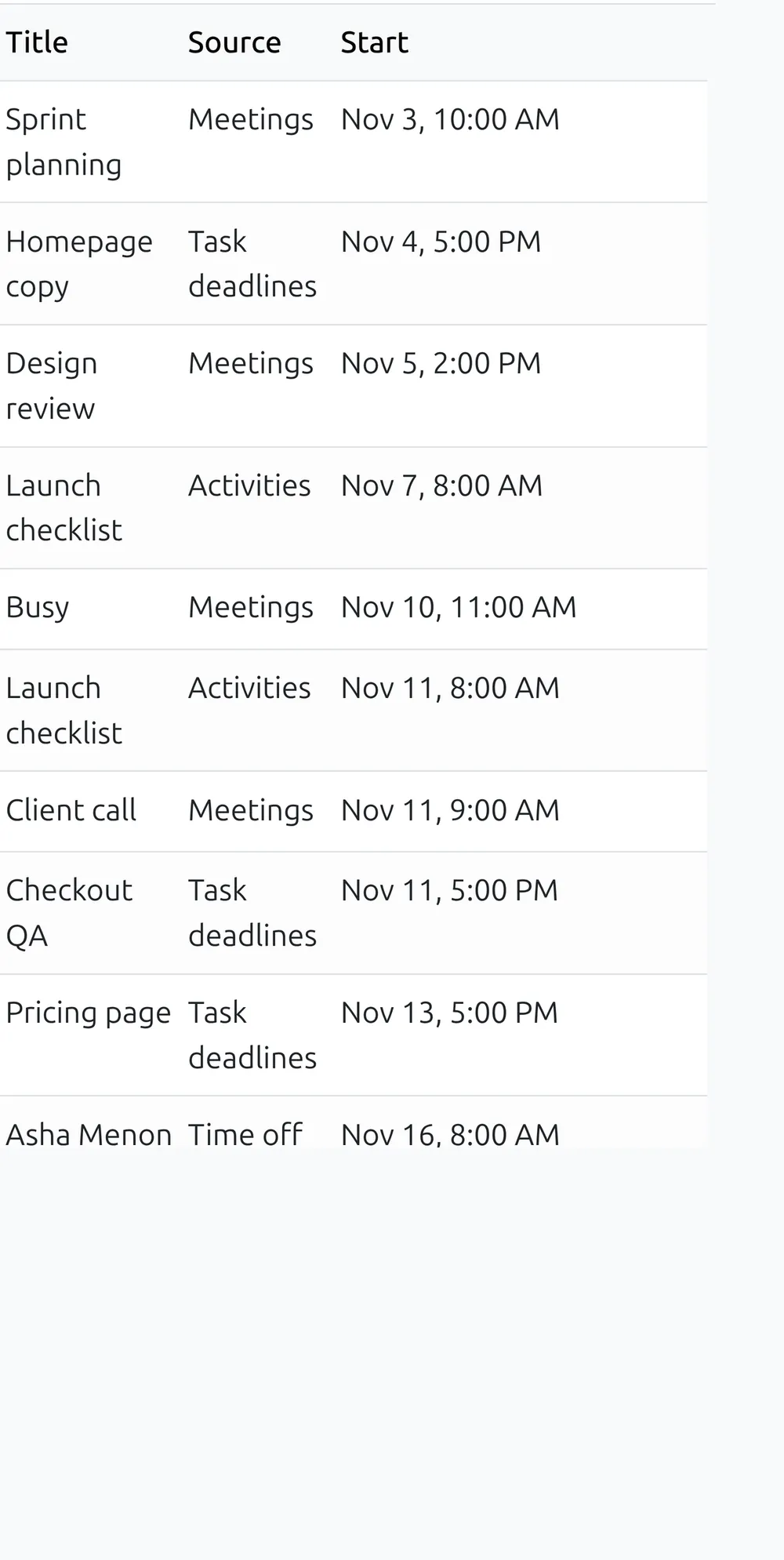
Asha Menon sees one calendar. Managers only is limited to project managers.
The same calendar for a plain internal user: no opportunities, delivery dates or transfers, and a colleague's private meeting reads Busy.
Asha Menon has no sales, CRM or stock access, so none of those sources appear for her. Rohit Kapoor's private meeting on the 10th shows as Busy because she is not an attendee, exactly as in Odoo's own calendar. On Odoo 19 she also sees her own leave.
Multi-company use in a browser was not tested; a company rule on calendars, sources and entries is tested in code.
4 Open the record behind an entry
Use it when you spot a date and need the task, order or leave request itself.Nothing is written back
A date on a combined view is only useful if you can jump to its record.
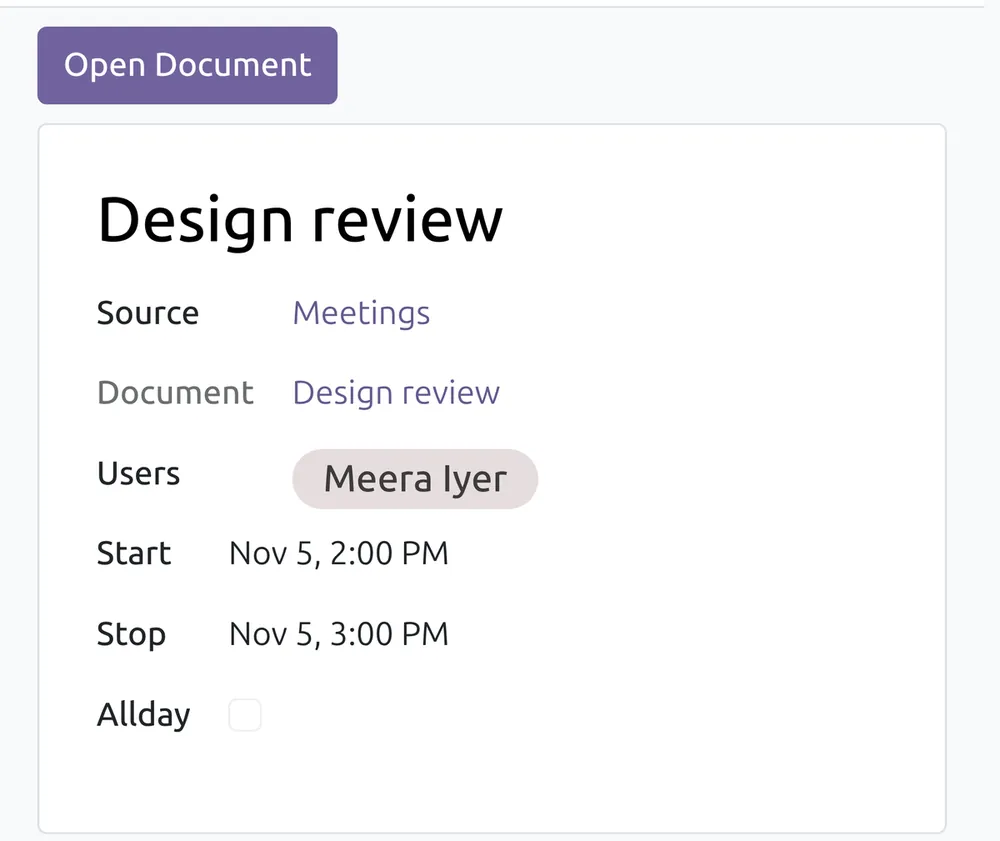
An entry's form shows its source, the document, the people it belongs to and its dates. Open Document opens Odoo's own form of that record. Click an entry on the calendar, then View, then Open Document.
An entry: where it comes from, who it belongs to, and the Open Document button.
Design review is a meeting of Meera Iyer on the 5th. Open Document leads to the meeting itself, where it can be changed.
Entries cannot be edited or dragged; the calendar view has no create, edit or delete. To change a date, open the record.
5 Freshness: not live, refreshed on open and every hour
Use it when you want to know how current the calendar is.Scheduled action every hour
A copy of dates can go stale.
Opening a calendar refreshes it, and a scheduled action refreshes every calendar every hour. Deleted, archived and no-longer-matching records drop out at the next refresh; a source switched off or deleted leaves nothing behind. The calendar form shows when it was last refreshed.
A task deadline was moved two days. The entry kept the old date until the calendar was opened, then showed the new one.
No reminders, emails or invitations, and no Gantt or timeline view. It sends no data to any third party.
The calendar is not live. A change to a record shows up the next time the calendar is opened or at the next hourly refresh.
Questions buyers ask
Can people see records they are not allowed to read?
No. An entry shows only if the person can read its record, and the title is read as that person.
Does it change my records when I drag an entry?
No. The calendar view cannot create, edit or delete, and nothing is written back.
Is it live?
No. It refreshes when a calendar is opened and every hour.
Can I add my own model?
Yes, any model with a stored date or date and time field, using Odoo's domain editor for the filter.
Requirements
- Odoo 19.0 or 20.0. The App Store sells each version separately, so buy the one that matches your database.
- Odoo.sh or On-Premise only. Third-party apps cannot be installed on Odoo Online (SaaS) databases. Check your hosting before buying.
- Module
mh_combined_calendar, version 19.0.1.0.3, licensed OPL-1.