Company Audit
Find the records whose company conflicts with the records they point at, before Odoo refuses the save
Request a live demo · Odoo.sh or On-Premise only, not Odoo Online (SaaS).
11 of 11
mismatch findings were also refused by Odoo's own company check, with 0 findings that Odoo accepts and 0 refused but not shown (made-up database, 729 rows read; before this version 17 of 28 findings were accepted by Odoo)
0 of 367
tables that have a write date changed during a run: the audit only reports and writes its own two tables
24
automated tests ran on this version, none failing; 16 were added and 1 weak test replaced (9 before), and the tests for the two fixes failed on the old code first
0.23 s
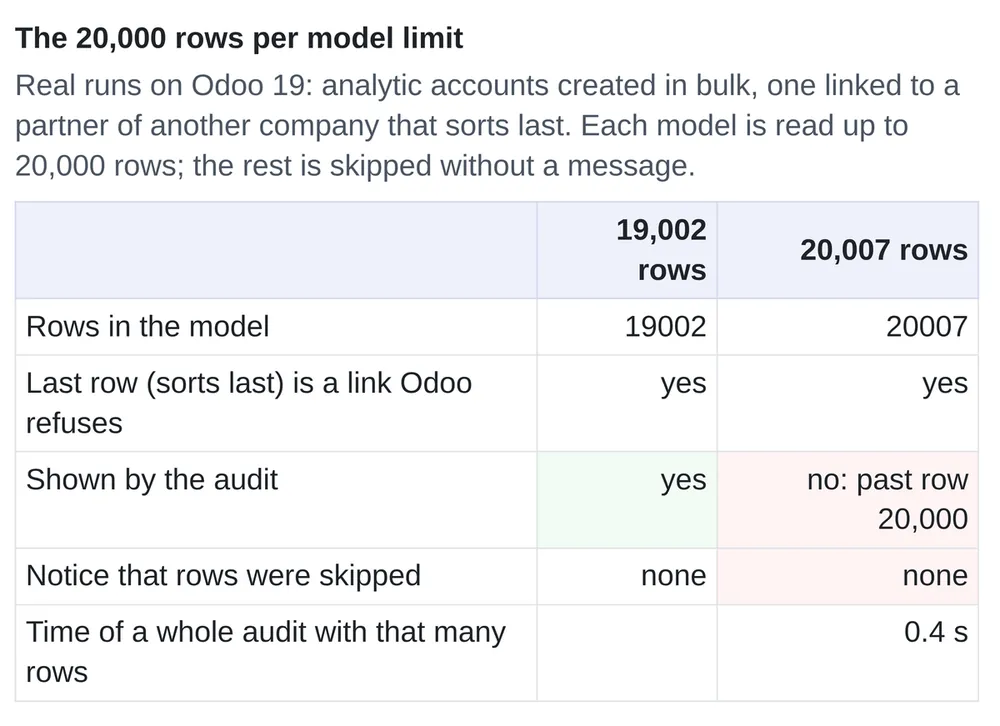
for a whole audit of 94 models on the made-up database; each model is read up to 20,000 rows and the rest is skipped without a message
Fixed
in this version: every audit counted the earlier audits' findings as records without a company, and many findings were links that Odoo itself accepts
Not
a repair tool: it never changes a record, does not run by itself, and its list of records without a company includes what Odoo's own apps ship without one
Odoo checks that a record and the records it links to belong to the same company when it saves the record. It does not look at data that is already in the database, so records that were imported, migrated or written before a check existed stay inconsistent until somebody saves one and gets an error. Company Audit reads the whole database and lists them, lists the records that have no company at all, and lists the users who can switch between companies. This page walks through it with screenshots of an Odoo 19 database holding a made-up food group with three companies, and with tables rendered from real readings of the same run; each picture says which it is.
It reports and never repairs. This page also says where it is not a finding list you can take at face value: records without a company, records past the first 20,000 of a model, archived records.
Install it and a Company Audit menu appears in Settings, for Settings administrators only. It needs only the base module.
How it works
What it keeps, what it changes, what it does not
Each line was tested or read in the code.
1 Run an audit
Use it when you want a list of what is inconsistent across your companies before somebody hits the error.Writes its own tables
There is no screen in Odoo that lists records whose companies conflict; you find one when its save fails.
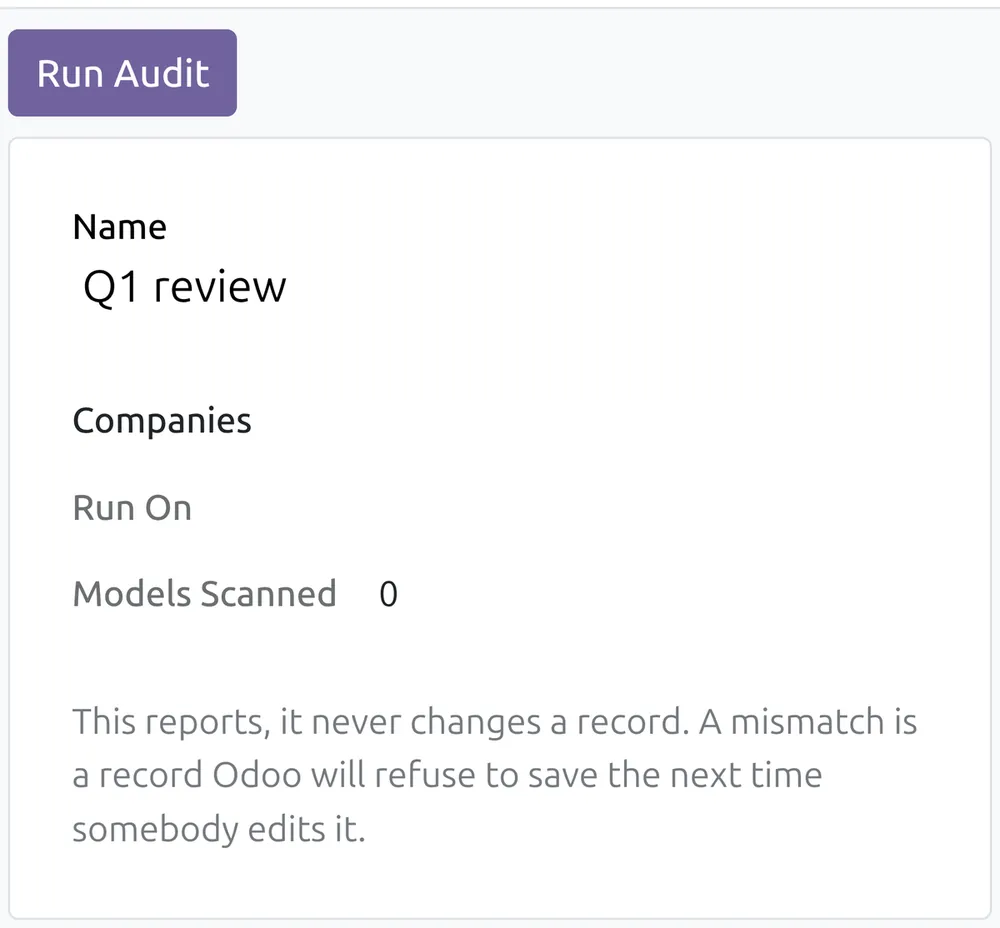
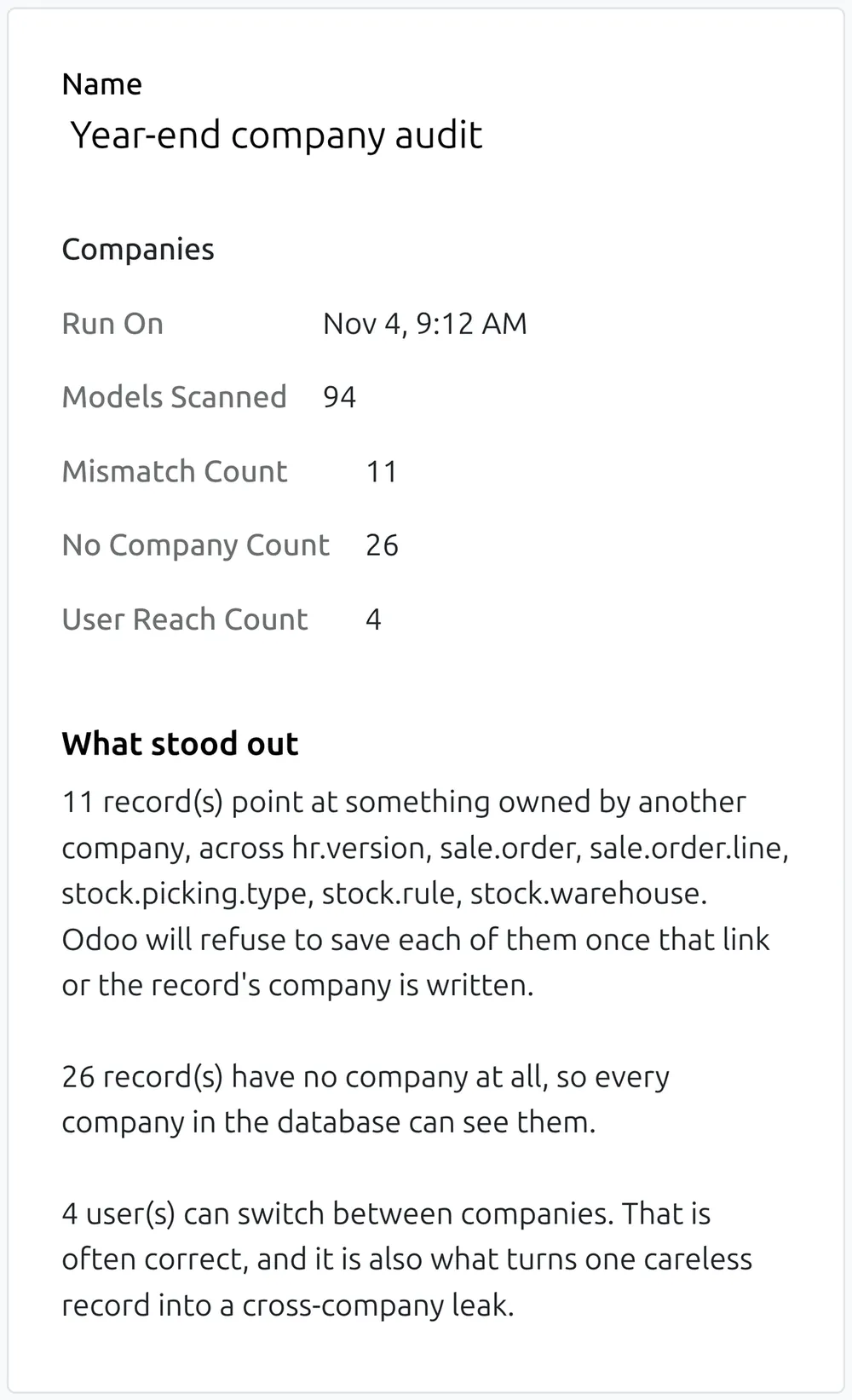
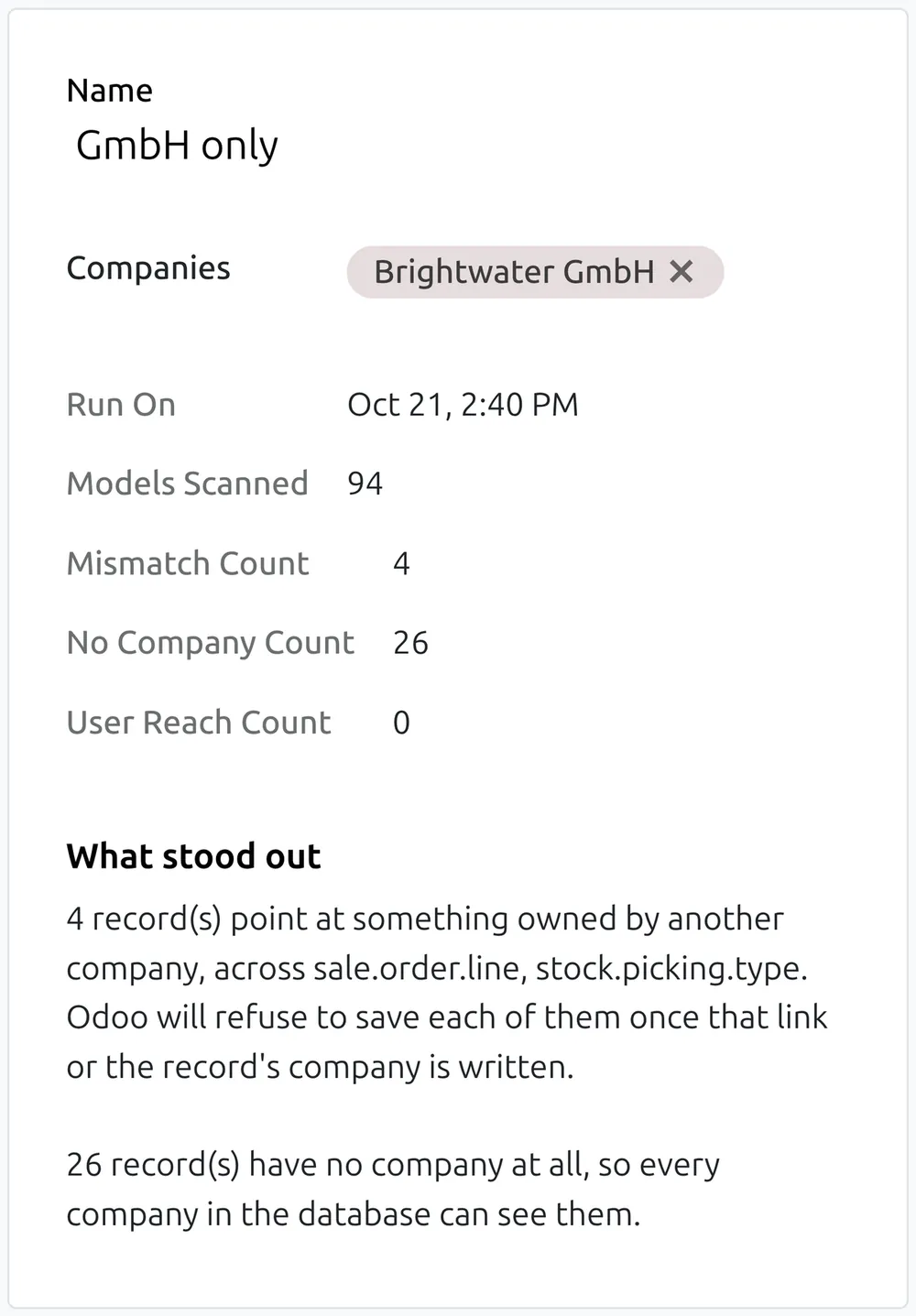
Open Settings, Company Audit, create an audit, give it a name, optionally choose companies (empty means all) and press Run Audit. The first picture is a new audit before it is run. The second is the result for the whole database: how many models were scanned, the three counters and a short text. Running the same audit again replaces its lines; several audits can sit side by side and do not influence each other.
It does not run by itself and does not repair anything.
A new audit before it is run. Real Odoo screen.
The result of a run over the whole database. Real Odoo screen, the run date is stamped for the made-up history.
2 Records that point at another company
Use it when a record of one company uses a customer, product or location owned by another.Read-only
Imported or migrated records can link across companies, and Odoo refuses to save them later.
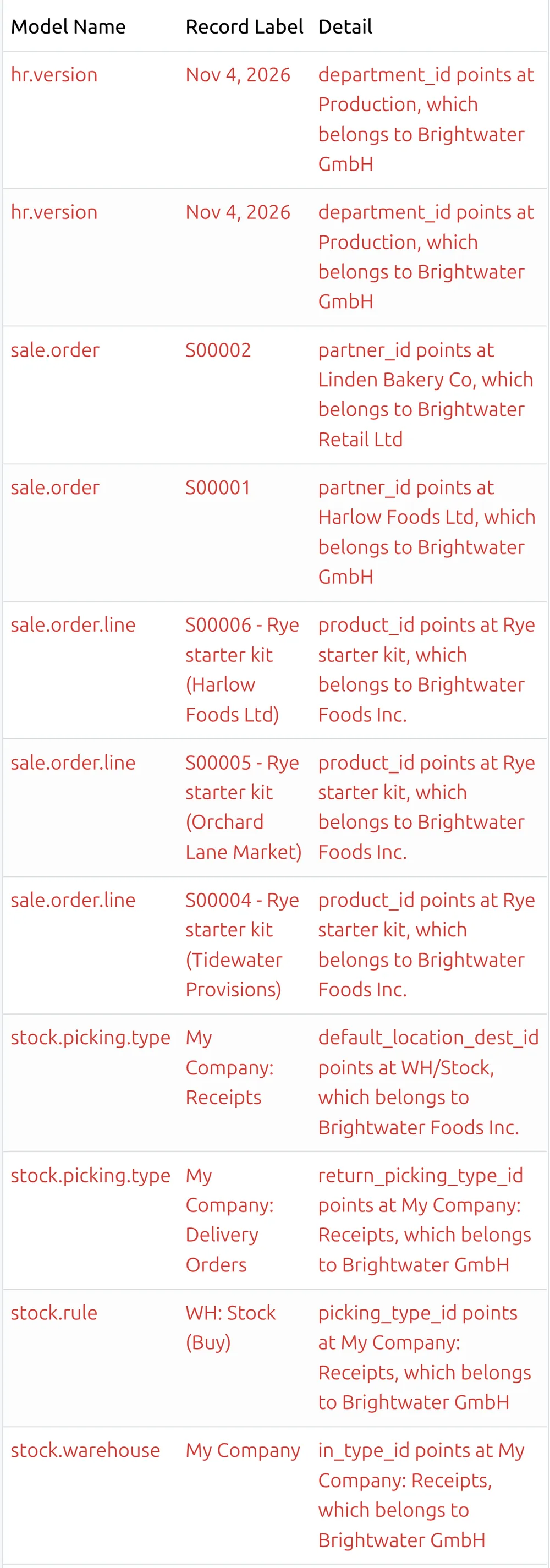
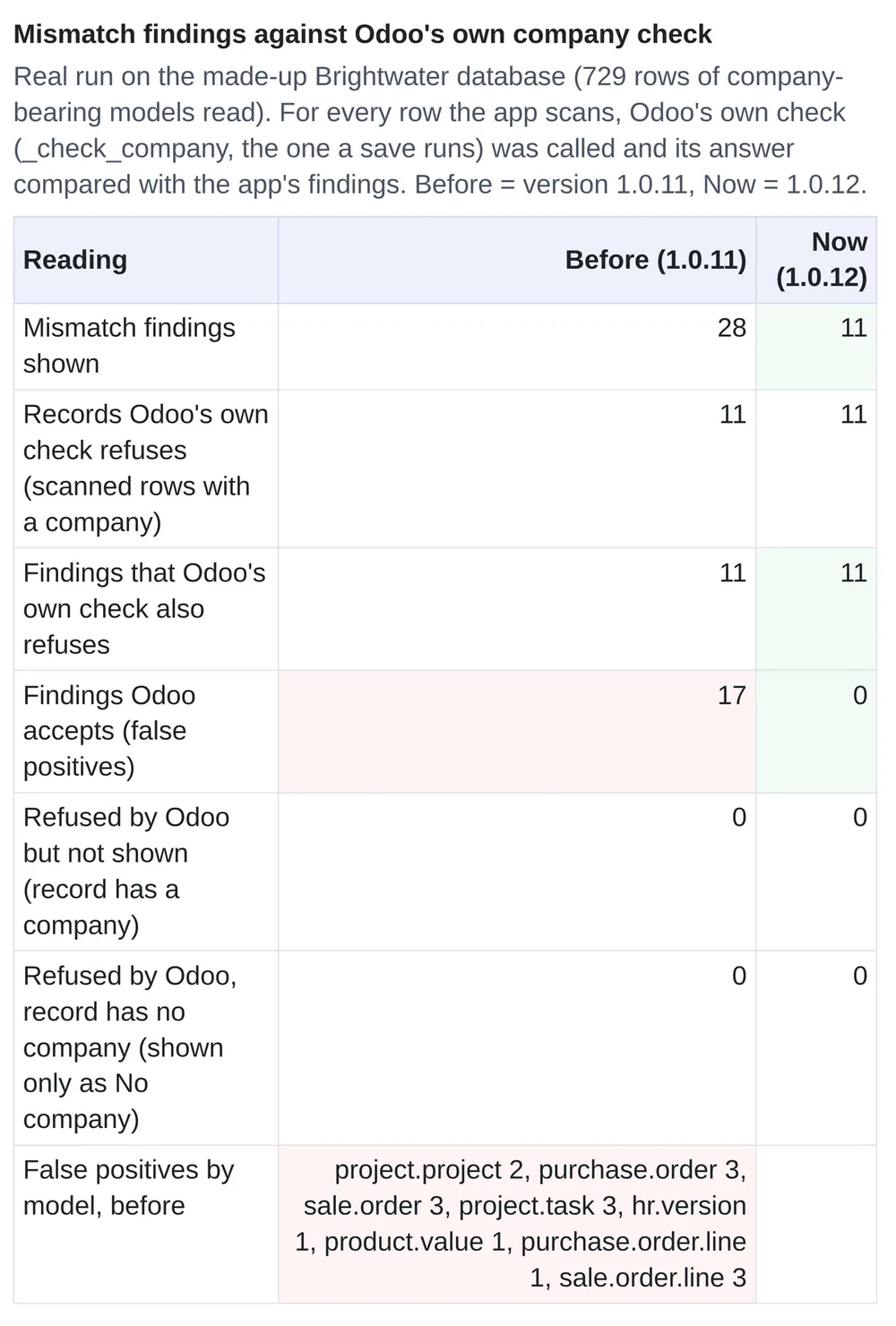
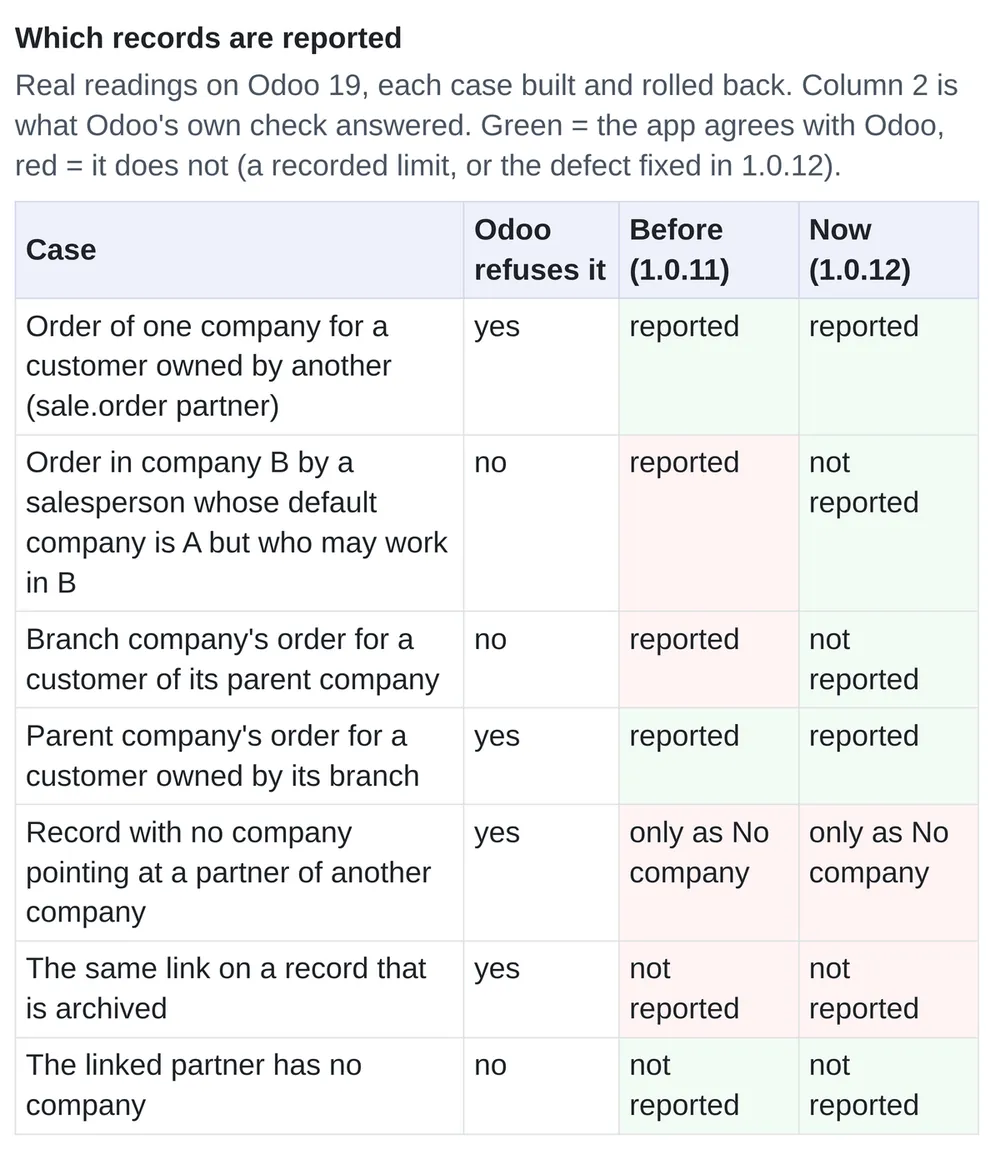
The Findings tab lists, for each record, the first link that Odoo's own company rule would refuse, the record it points at and the company that owns it (the real list below: orders for customers owned by another company, order lines with a product of another company, a department, a receipt type; the picture shows the 11 mismatch lines of the made-up database, hidden rows of other kinds). The audit asks Odoo's own rule: a user is accepted if the record's company is among the companies the user may work in, and a branch company may use a partner of its parent company. Checked against Odoo's own company check on every row, 11 findings were also refused by Odoo, 0 were accepted and 0 were missed; the first table is that comparison and shows what changed in this version. The second table is each case.
A write of another field on a flagged record is accepted by Odoo; it refuses once the link or the company is written. It shows one line per record even when several links are bad.
The mismatch lines of the made-up database. Real Odoo screen; lines of the other two kinds hidden for the picture, only the columns Model, Record and Detail shown.
Findings against Odoo's own check. Evidence table.
Which records are reported. Evidence table.
3 Records with no company
Use it when you want to know which records every company can see.Read-only
A record without a company is visible to every company in the database, which is sometimes meant and sometimes a leftover.
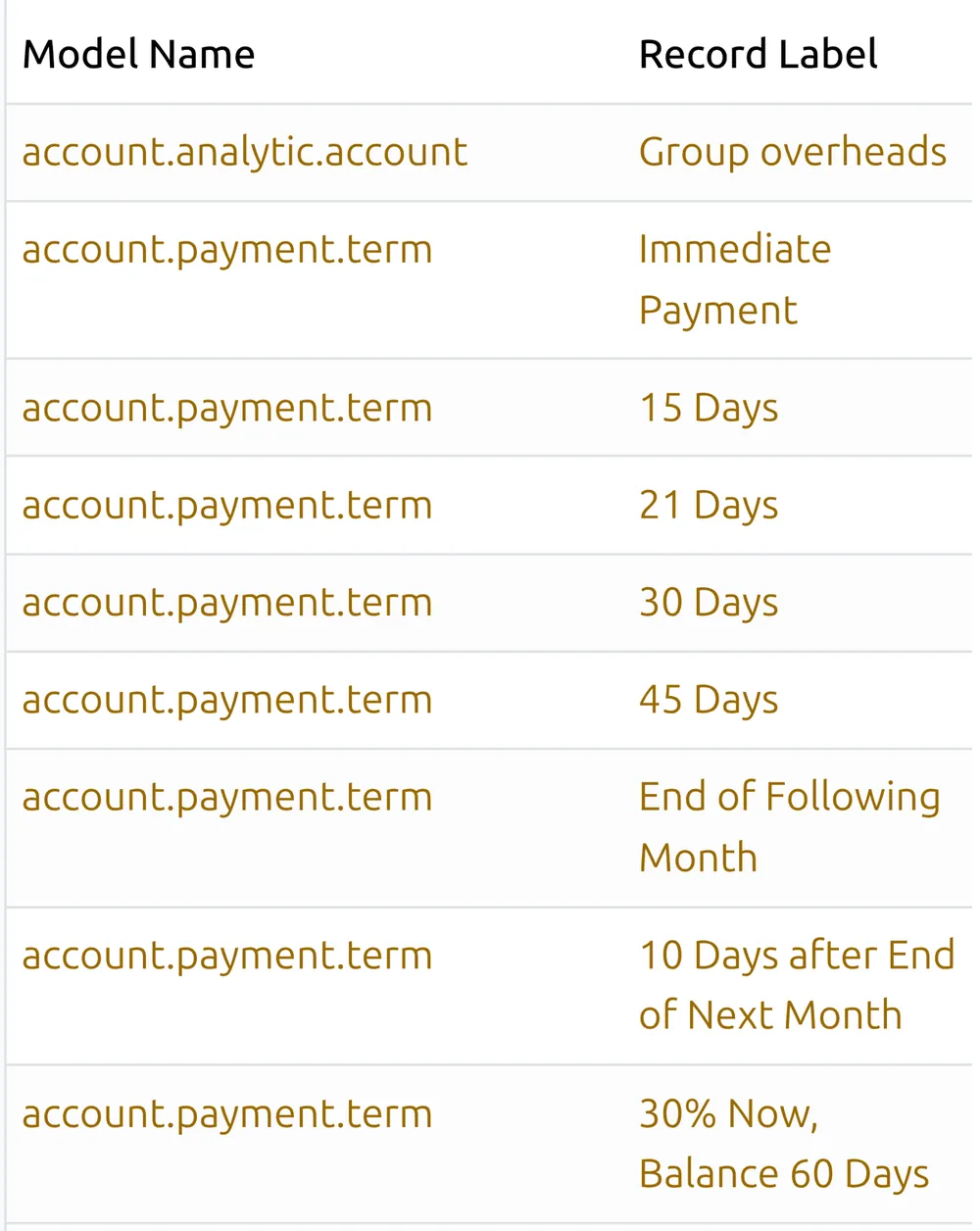
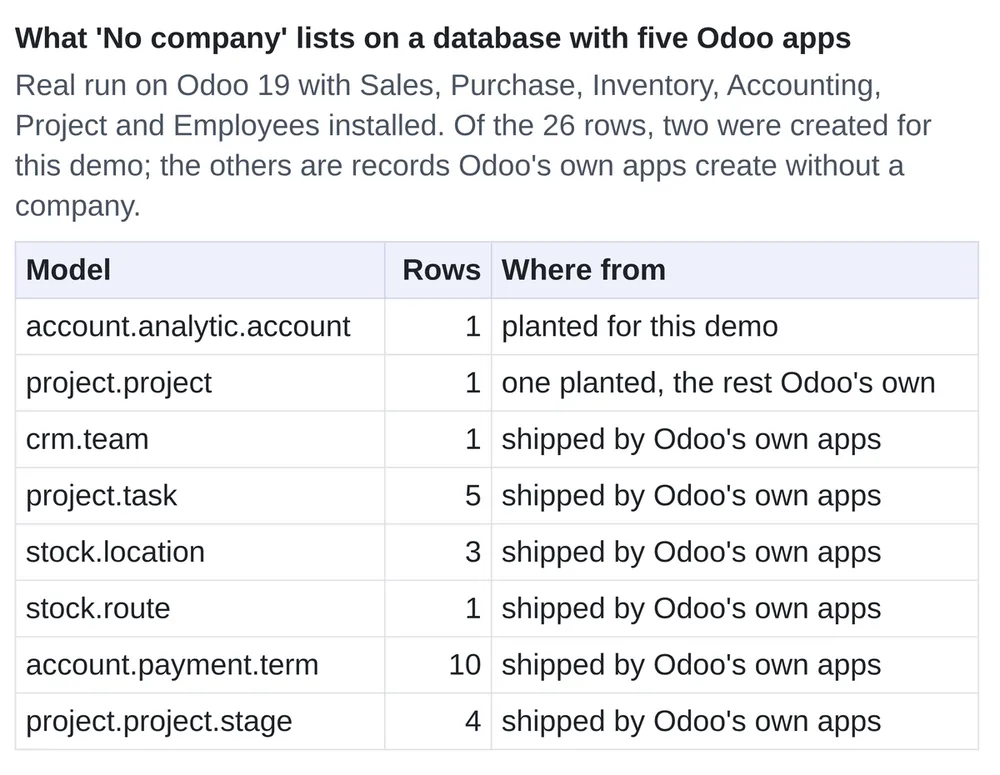
Records with an empty company on models that are not shared by design (partners, users, products, currencies, countries and technical ir.* models are left out) are listed whatever companies you chose. On the made-up database it lists 26 rows; the first picture shows the first nine. Almost all are records Odoo's own apps create without a company (payment terms, project stages, stock locations); two were created for the demo. The table counts them by model.
It cannot tell a meant-to-be-shared record from a leftover; you decide.
The first nine 'No company' lines. Real Odoo screen; the other rows and columns hidden for the picture.
What 'No company' lists on a database with five apps. Evidence table.
4 Users who can switch companies
Use it when you want to review who can work in several companies.Read-only
A user in several companies is often right, and it is also how one careless record becomes visible across companies.
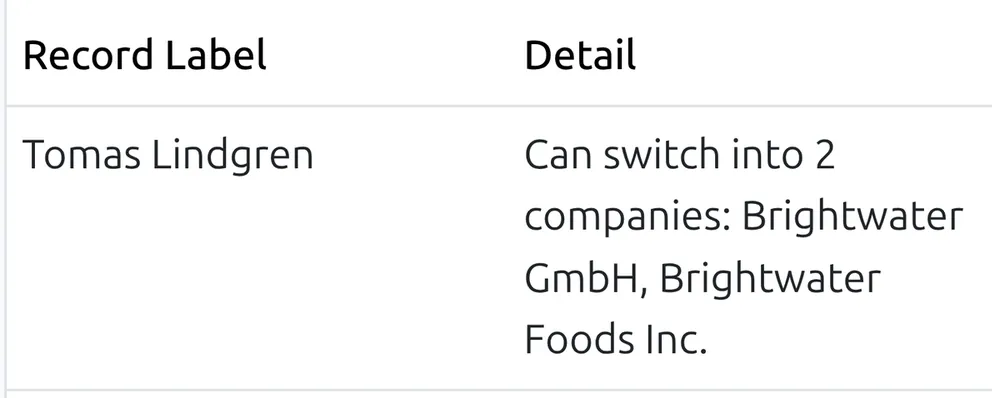
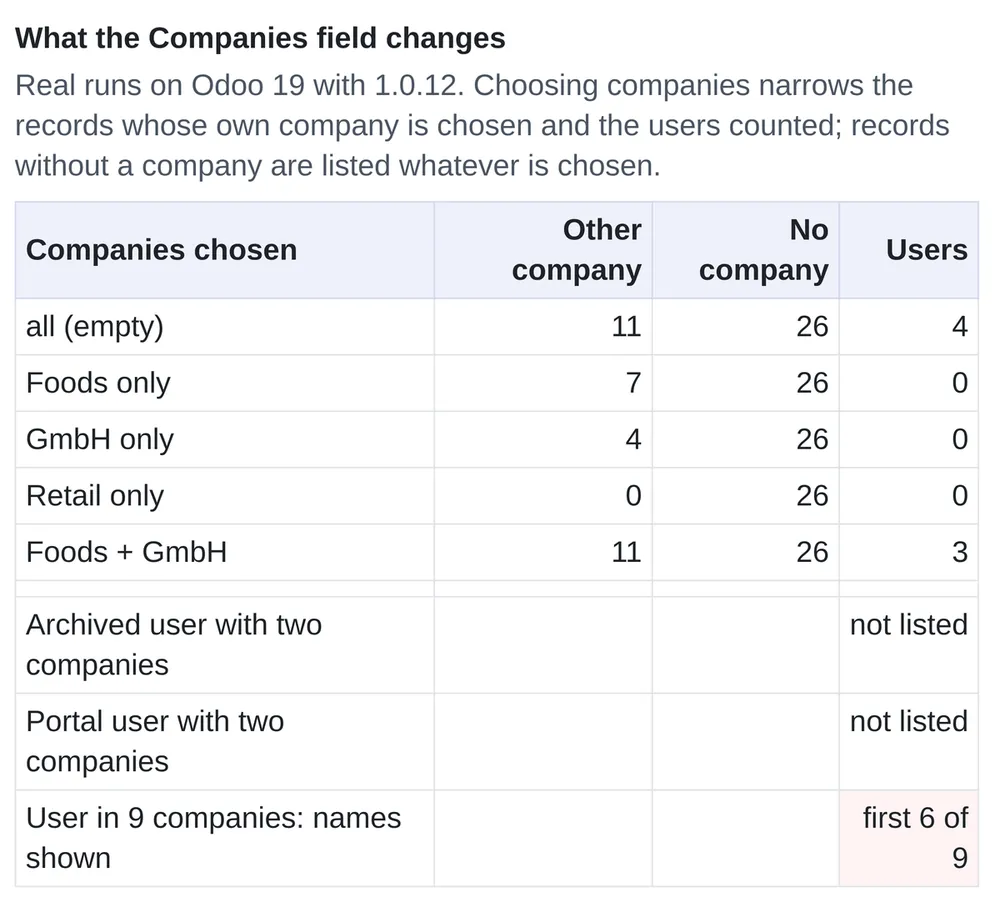
Active internal users who may work in more than one of the chosen companies are listed with the number and the first six company names. Archived users and portal users are not listed; with one company chosen there are none. The picture is the last page of the Findings tab (Odoo shows 40 lines to a page, mismatch lines first, user lines last).
It does not say whether the reach is right for the person.
The user lines. Real Odoo screen, the other rows hidden for the picture.
5 Choose companies and keep the history
Use it when you want to audit one company, or compare today with last month's audit.Read-only
Different people care about different companies, and a one-off check is easy to forget.
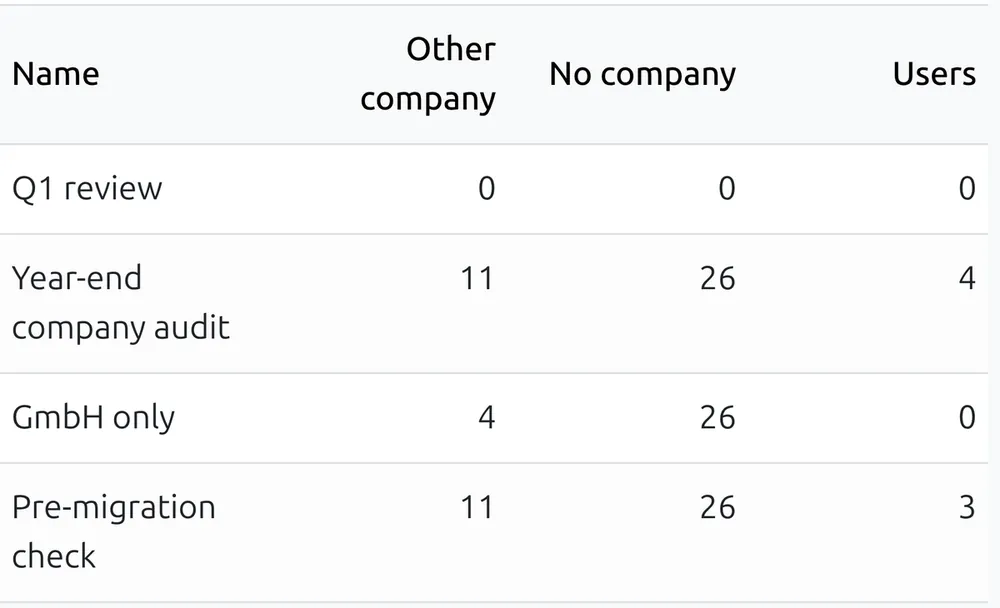
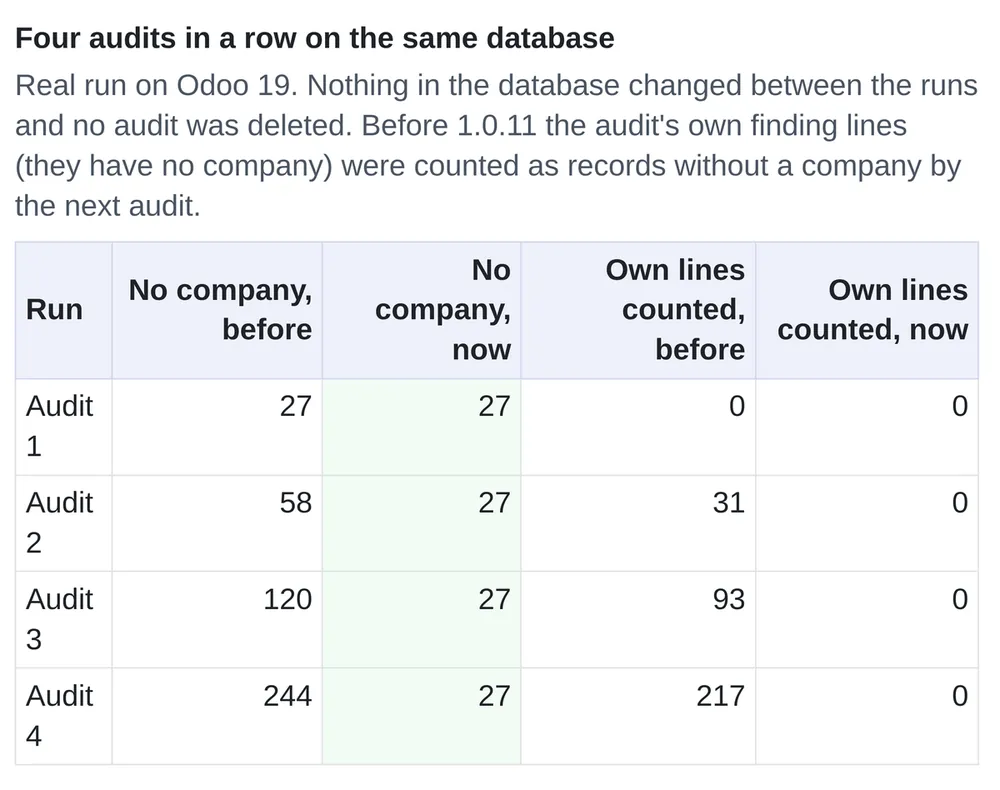
The Companies field narrows the check to records whose own company is chosen (the company of the record they point at does not have to be chosen) and to the users counted against those companies; records without a company are listed whatever is chosen. The audit list shows the counters of every audit kept. The second table runs the audit with five different choices; the third shows that four audits in a row, none deleted, give the same 'No company' number on this version (before they grew every time).
It does not run on a schedule.
The audit list. Real Odoo screen; the column titles are shortened and two columns hidden for the picture.
An audit limited to one company. Real Odoo screen.
What the Companies field changes. Evidence table.
Four audits in a row. Evidence table.
6 Who can run it and what it writes
Use it when you need to know what the audit can see and touch.Read-only
A tool that reads every company's records has to be restricted and must not change them.
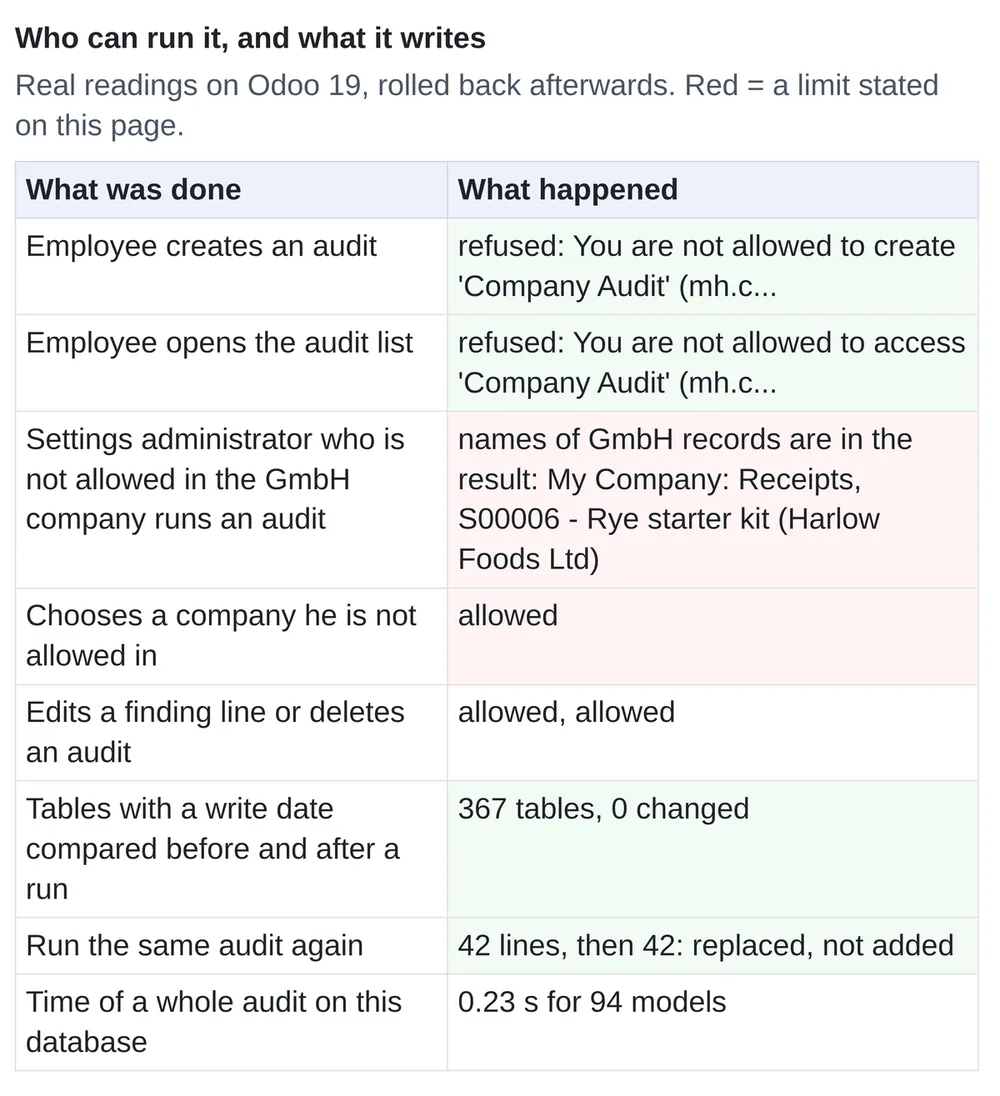
Only Settings administrators can see or run it; an employee gets an access error on both. It reads as superuser, so a Settings administrator who is not allowed in a company still gets the names of that company's records in the findings, and can choose that company. During a run 367 tables with a write date were compared before and after: none changed. The table has these readings and the timing.
Who can run it, and what it writes. Evidence table.
What changed in this version
Version 1.0.12 fixes two defects. First, the audit scanned its own finding lines, which have no company, so each later audit counted the earlier audits' lines as records without a company (27, 58, 120 and 244 on four runs in a row on the made-up database); it no longer scans its own tables. Second, any link to a record of another company counted, on any field; Odoo only enforces fields declared with check_company, accepts a user whose allowed companies include the record's company and a parent company's partner for a branch, so 17 of 28 findings on the made-up database were accepted by Odoo. The audit now asks Odoo's own rule. The wording that Odoo refuses "the next write" is corrected: it refuses when the link or the record's company is written. It also adds 16 automated tests, rewrites the screenshots and the text, and removes the claim of Enterprise support, which was never tested. The demo video of an earlier version is kept as it was and was not re-recorded.
Screenshots
What it does not do
- Each of these was reproduced in a run of the app on Odoo 19 and, where a test is possible, pinned by a test that passes.
- The 20,000 rows per model limit. Evidence table.
Requirements
- Odoo 19.0 or 20.0. The App Store sells each version separately, so buy the one that matches your database.
- Odoo.sh or On-Premise only. Third-party apps cannot be installed on Odoo Online (SaaS) databases. Check your hosting before buying.
- Module
mh_company_audit, version 19.0.1.0.12, licensed OPL-1.