Cookie Consent Enforcer
Register the analytics, marketing or functional scripts of your Odoo website here, and they are added to a page only after the visitor has agreed to that category
Request a live demo · Odoo.sh or On-Premise only, not Odoo Online (SaaS).
0
stand-in tag cookies set before the visitor answered, in the browser run
3
categories: analytics, marketing, functional, and no essential one
11
automated tests in the app, none failing
0
script tags naming a registered tag in the page source: tags travel as data
2
ways to register a script: a URL or an inline snippet, never both
Not
a compliance statement: it shows what is blocked and allowed, nothing about the law
Odoo has a place to paste a script, and the free Cookie Consent Banner records what a visitor agreed to, but nothing connects the two: a pasted script is a plain script tag and runs on every page load. Cookie Consent Enforcer is that connection for the scripts you register in it. Each one is stored with a category, sent to the page as inert data, and injected by a small script only when the consent cookie says that category was accepted. This page walks through it with screenshots of an Odoo 19 database holding a made-up garden-supply shop, and with readings taken from a real browser run: which scripts ran and which cookies were set before and after each answer.
It states what it blocks and what it allows in the runs shown here. It does not say that a website is compliant with the GDPR, the ePrivacy rules or any other law, and it does not decide which of your scripts belong in which category.
Install it and a Consent-Gated Trackers entry appears under Website > Configuration. It needs Odoo's Website app and the free Cookie Consent Banner, which is installed with it.
How it works
What it gates, and what it does not
The gate applies to the scripts registered in this app, and to nothing else on the page. The free banner draws the question and writes the answer into a cookie; this app reads that cookie.
1 The banner the visitor answers
Use it when a visitor opens your website for the first time.Free banner, no change
A visitor should be asked before scripts that follow them around start running.
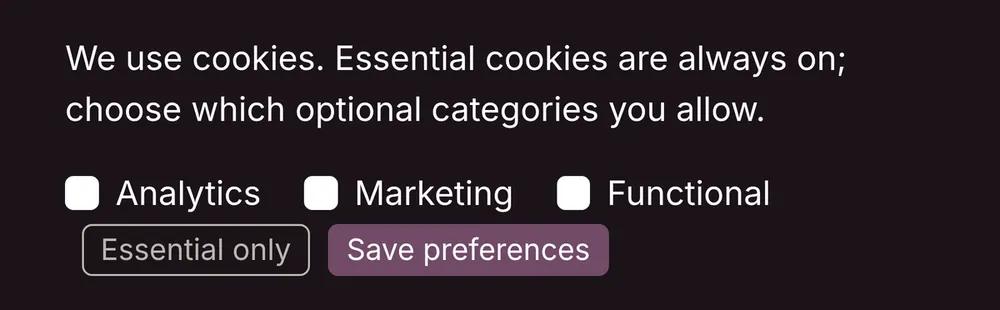
The free Cookie Consent Banner shows a bar at the foot of the page with three boxes, Analytics, Marketing and Functional, and two buttons: Essential only and Save preferences . Essential cookies are not a box, they are always on. Nothing about the banner is changed by this app; it only reads the answer.
The banner asks one question per visit until it is answered, and it comes back when the website's policy version is raised. It has no link that lets a visitor reopen it later.
The bar a first-time visitor sees (a screen-only edit placed it in the page flow for the picture).
2 Register a script by category
Use it when your site loads an analytics tag, a marketing pixel or a chat widget.Settings administrators
A script pasted into the site header cannot be told which kind it is, so it cannot wait for an answer.
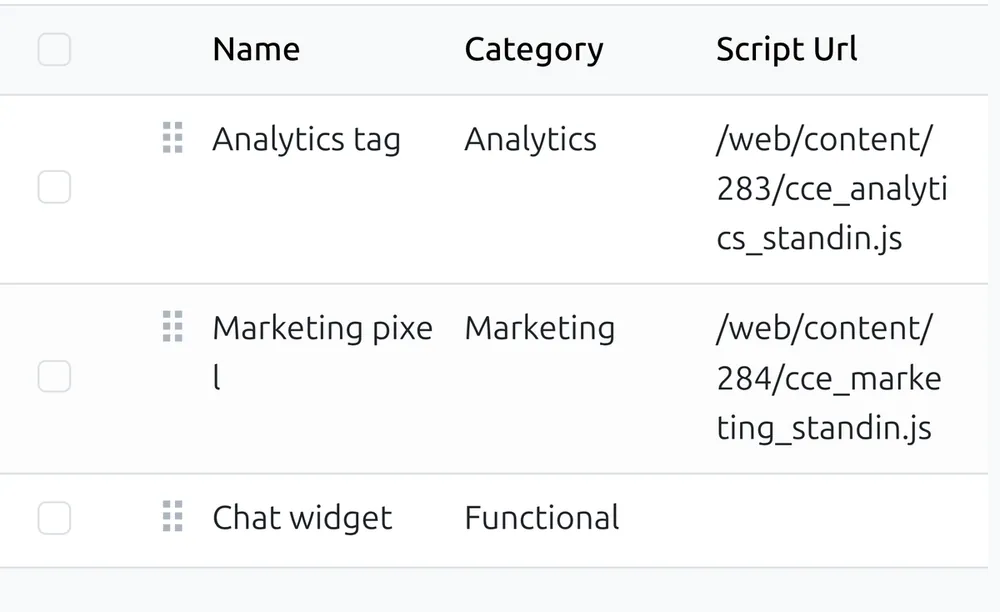
Open Website > Configuration > Consent-Gated Trackers . Each row is one script with a name, a category (Analytics, Marketing or Functional), an optional website, and either a script URL or an inline snippet. A tracker with no website applies to every website. Archived trackers are not sent to the page.
The demo shop has three rows. They are stand-ins: the two URLs point at small files served by the demo Odoo, and the third is a one-line inline snippet.
It does not scan the site for scripts and it does not know what a script does. The category is the one you pick.
The list of registered scripts.
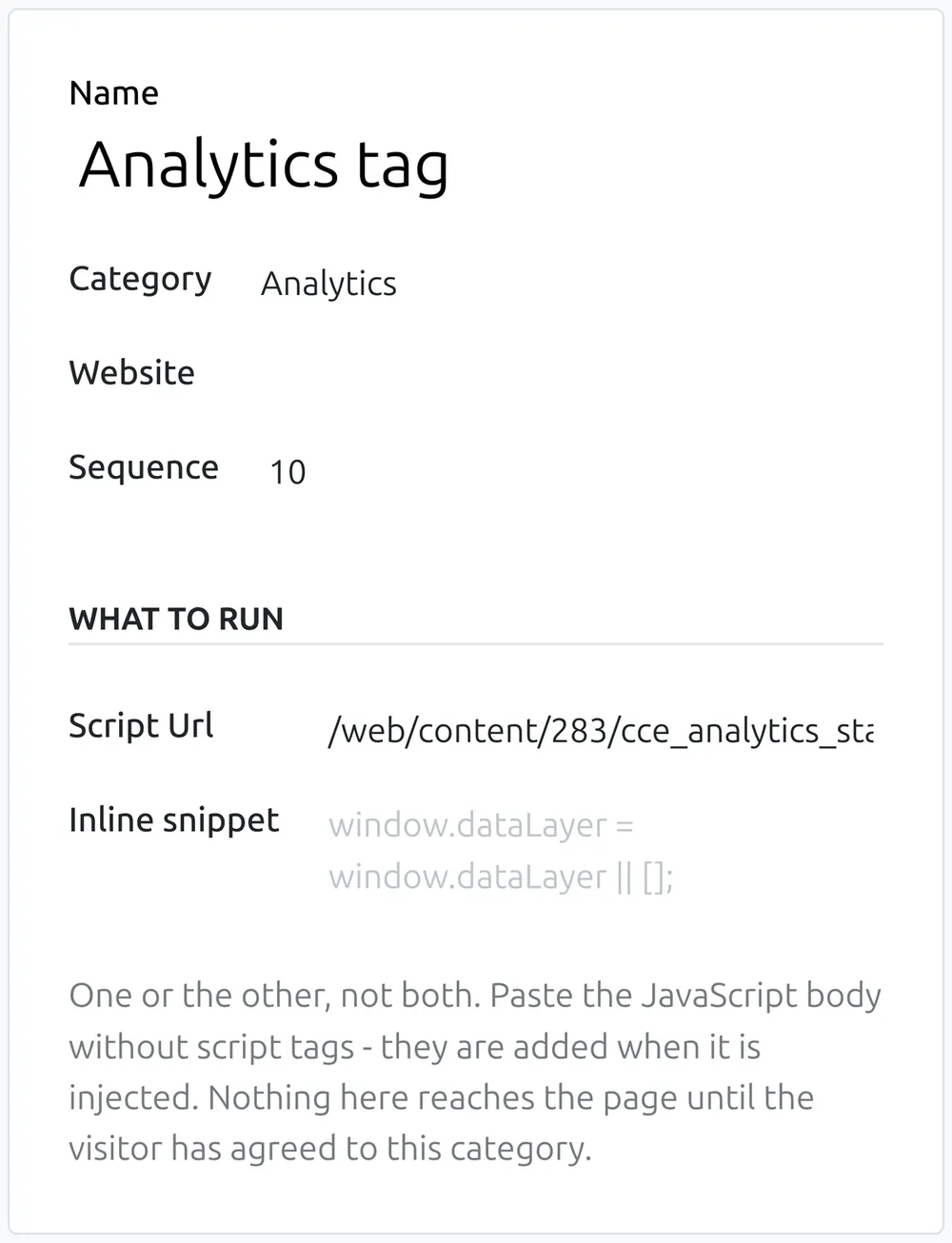
A tracker with a script URL.
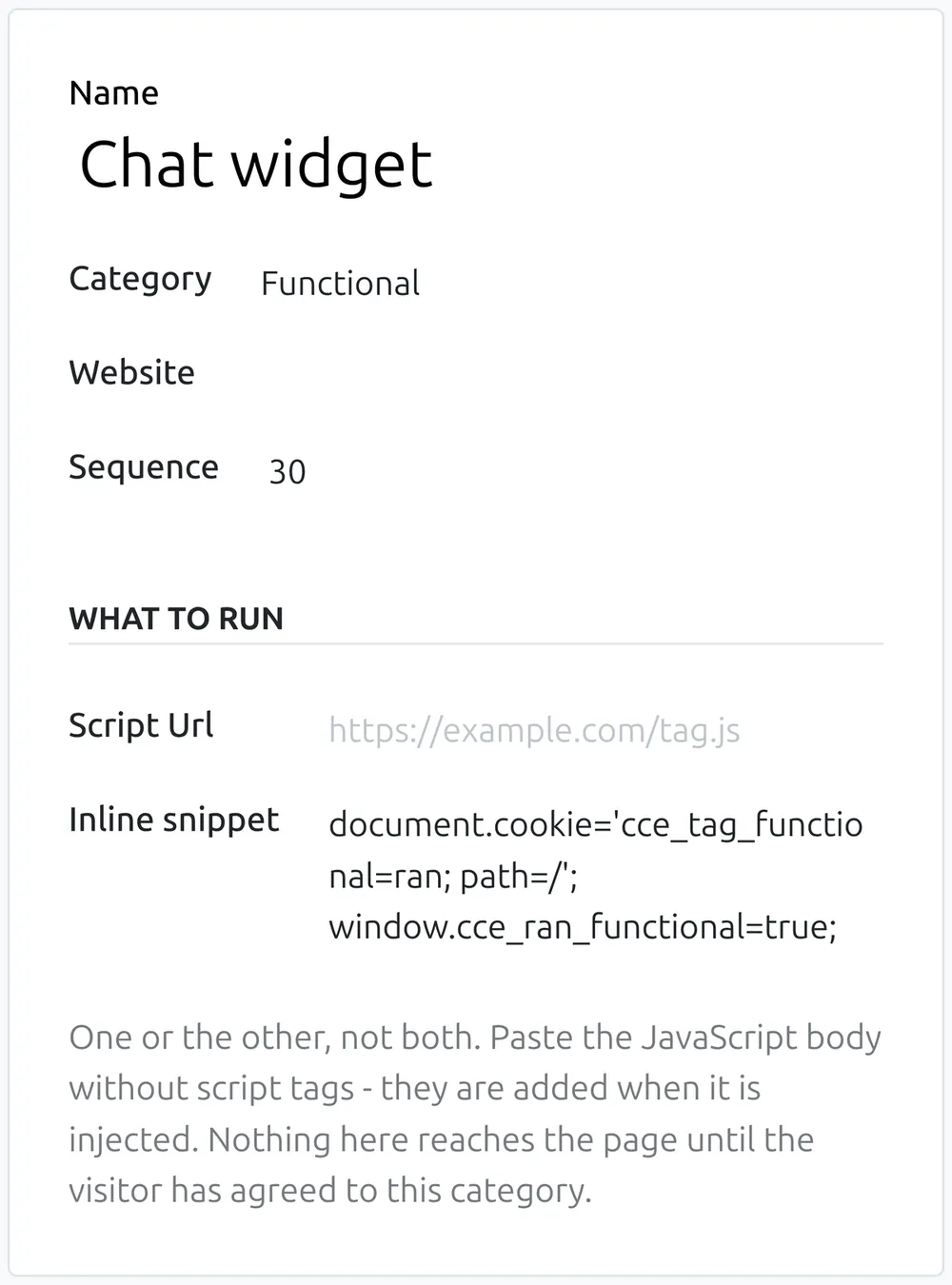
A tracker with an inline snippet: the JavaScript body, with no script tags.
3 Mistakes it refuses
Use it when someone pastes a snippet into the form.Checked when saved
A row that does nothing, or a paste that cannot run, looks like a working setup.
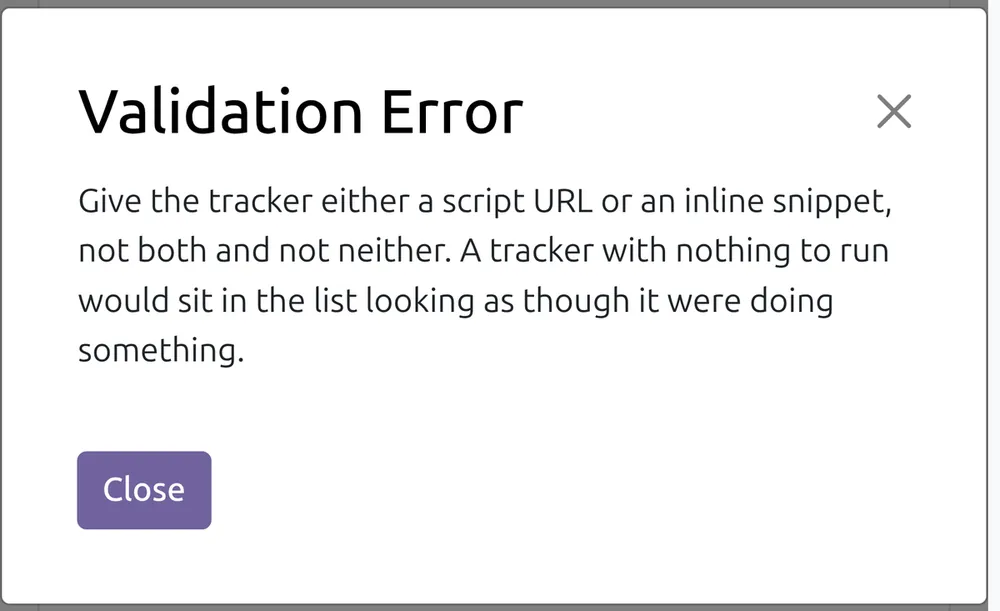
A tracker needs a script URL or an inline snippet, and not both and not neither. Script tags pasted into the inline snippet are refused, because they would end up inside the tag that is created and never run. There is no Essential category to file a marketing script under.
It does not judge what the URL or the snippet contains.
Saving a tracker with both a URL and a snippet.
4 Before the visitor answers
Use it when you want to know what a first page view really does.Browser run
A banner on the screen says nothing about what the page has already done.
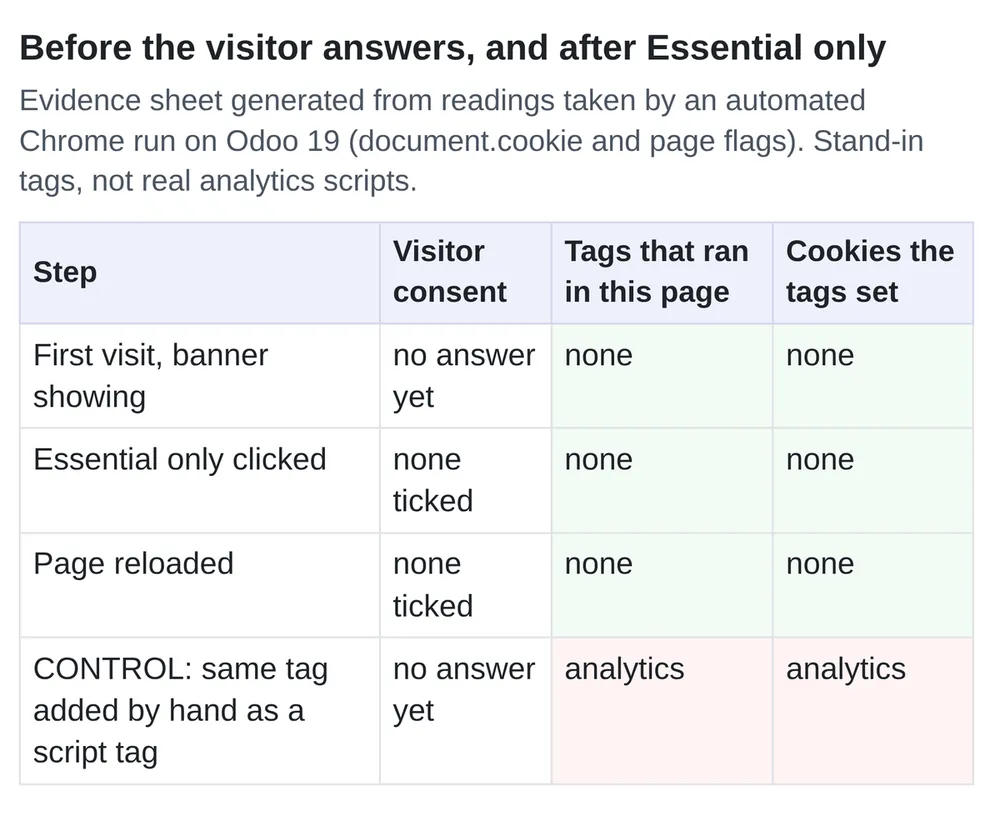
A fresh Chrome profile opened the home page of the demo shop. The banner was showing and nothing had been answered. The reading, taken from the page itself, found no script element for any registered tag, no request for the two script files, and none of the cookies the tags set. Choosing Essential only changed none of that, and neither did reloading the page or opening another page.
The control row matters: the same stand-in file added to that page by hand as a plain script tag did run and did set its cookie, so the reading can see a tag when one runs. The page's own source for an anonymous request holds the tag as data in a hidden element and contains no script tag that names a tag.
It reads one cookie, the one the free banner writes. It does not check that the cookie says what the visitor meant.
Readings from the browser run, rendered as a table. Generated from the automation's readings, not a live view of a site.
5 After the visitor agrees
Use it when a visitor accepts one category and refuses the others.Browser run
Agreeing to analytics should not switch on a marketing pixel, and it should not need a reload.
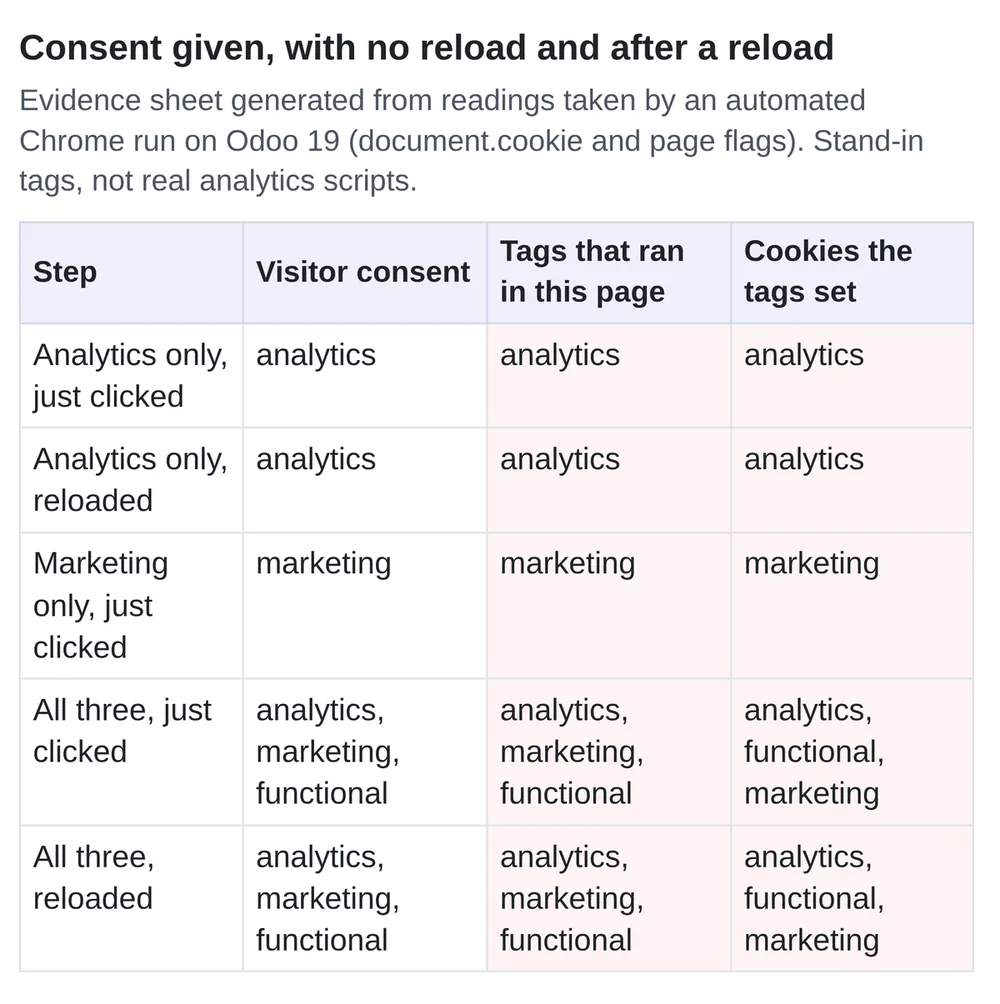
Accepting analytics only ran the analytics tag and nothing else, straight away without a reload and again after a reload. Accepting marketing only ran the marketing tag. Ticking all three ran all three. Pressing Save preferences with nothing ticked ran none. The same readings came out on Odoo 19 and Odoo 20.
It cannot unload a script that has already run, and it gives no way to take consent back after the page has loaded.
Readings after each choice, with and without a reload.
Screenshots
What it does not do
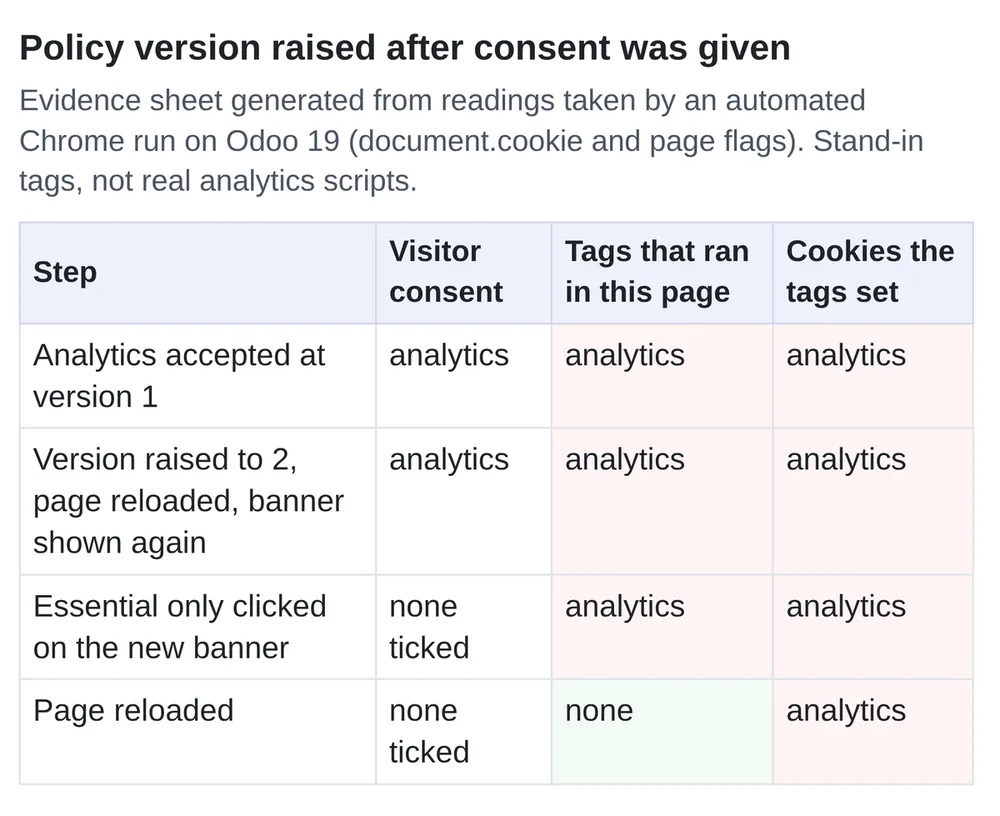
- These were measured in the run behind this page or read from the code. None is fixed in this version.
- The policy-version case: the tag runs again with the old answer, and its cookie is still there after the refusal.
Questions buyers ask
Does it make my website compliant?
No. It loads the scripts registered in it only after the matching category was accepted, and nothing else. It makes no statement about the GDPR, the ePrivacy rules or any other law.
Does it block scripts I pasted somewhere else?
No. Only scripts registered in this app are held back. A script pasted into Website Settings, Custom Code ran before any answer in the test.
Does it work with the real Google Analytics or a Meta pixel?
Not tested. The browser run used stand-in scripts that only set a cookie. How a real vendor tag behaves after it is loaded is outside what was checked.
What happens if I raise the policy version?
The banner comes back, but a tag the visitor had already allowed keeps loading until the visitor answers again and the page is loaded again.
Does it remove cookies?
No. A cookie that a tag set before consent was refused stays in the browser.
Which categories are there?
Analytics, marketing and functional. There is no essential category, so a script cannot be filed as essential.
Requirements
- Odoo 19.0 or 20.0. The App Store sells each version separately, so buy the one that matches your database.
- Odoo.sh or On-Premise only. Third-party apps cannot be installed on Odoo Online (SaaS) databases. Check your hosting before buying.
- Module
mh_cookie_consent_enforcer, version 19.0.1.0.16, licensed OPL-1.