Shop Agent Orders
Let your sales agents log in to the website shop and place the order on behalf of an assigned customer, with that customer's prices, addresses and delivery methods.
Request a live demo · Odoo.sh or On-Premise only, not Odoo Online (SaaS).
$48.91
App Store price, per Odoo version
19 · 20
Odoo versions, each sold on its own page
Odoo.sh
or On-Premise; not Odoo Online (SaaS)
1.0.1
version of mh_shop_agent_orders
Your salespeople or resellers take orders by phone or on a visit, then key them into the backend, or they ask the customer to order alone on the website. Odoo's website shop cannot do it for them: it always puts a logged-in user's cart on that user's own account, so an agent who opens the shop can only buy for himself, at his own prices.
Shop Agent Orders lets an agent pick one of his customers and shop as that customer: the customer's pricelist, the customer's addresses, the customer's delivery methods. The order belongs to the customer, the agent is recorded on it, and no online payment is taken.
How it works
Who is an agent, and which customers
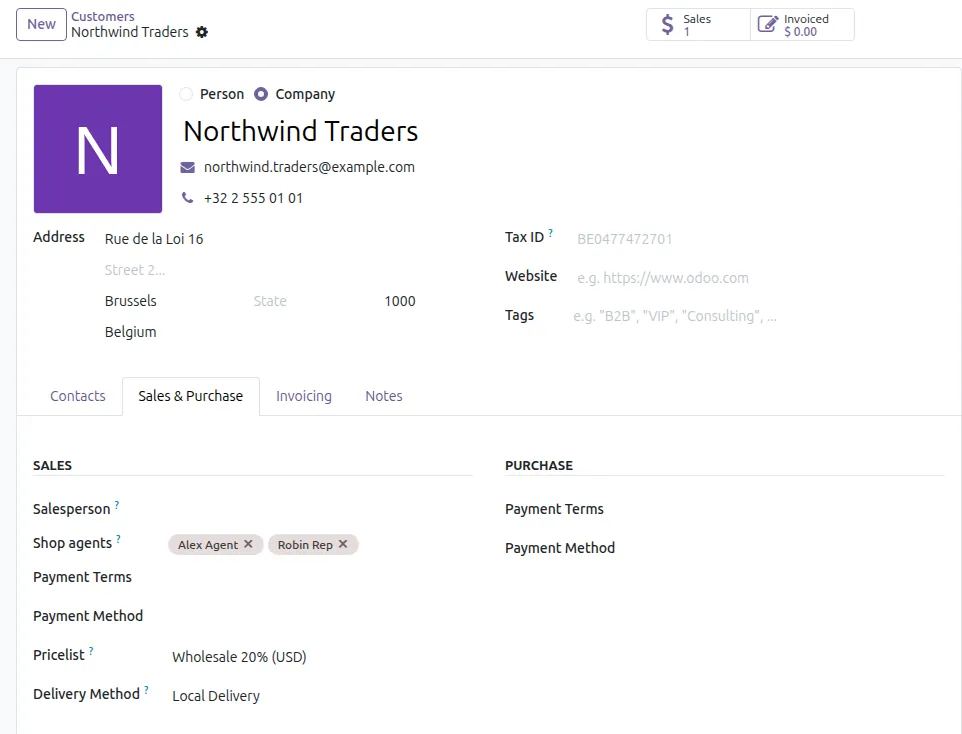
Members of the new group Shop agent are agents. An agent can be an internal user or a portal user. On the customer's form, in the Sales & Purchase tab, a sales manager lists the Shop agents of that customer. A customer can be ordered for only by the agents listed on it, and a customer can have several agents. An agent with no customer assigned has nothing to pick. A customer is a company, or a person without a parent company: a contact under a company is not offered, so assign the company. Archived customers and the agent's own contact are never offered either. The list of agents on a customer is visible and editable only to Sales Administrators and Settings administrators, not to agents or to the customer.
Shopping as the customer
The agent opens "Order for a customer" and sees his own customers (name and city) with a search box. After he picks one, a bar at the bottom of every shop page says "Ordering for" the customer, with a button to exit. The shop then prices everything with that customer's pricelist and fiscal position, delivery methods are the ones available for the customer's delivery address, and checkout shows only that customer's addresses. The agent can add a new address for the order and choose among the customer's existing ones. Pricelist switching and promo codes are switched off while he orders for a customer, so the agent's own pricelist can never leak into the customer's order.
A separate cart per customer
The cart for a customer is a separate draft order for that customer, that agent and that website. It is never merged with the agent's own cart, with another customer's cart, or with another agent's cart for the same customer. Exiting returns the agent to his own cart; picking the customer again finds the same cart. When the customer logs in to the shop himself he never lands on the agent's cart, and Odoo's abandoned cart reminder emails are not sent for carts an agent is building.
No online payment: a quotation or a confirmed order
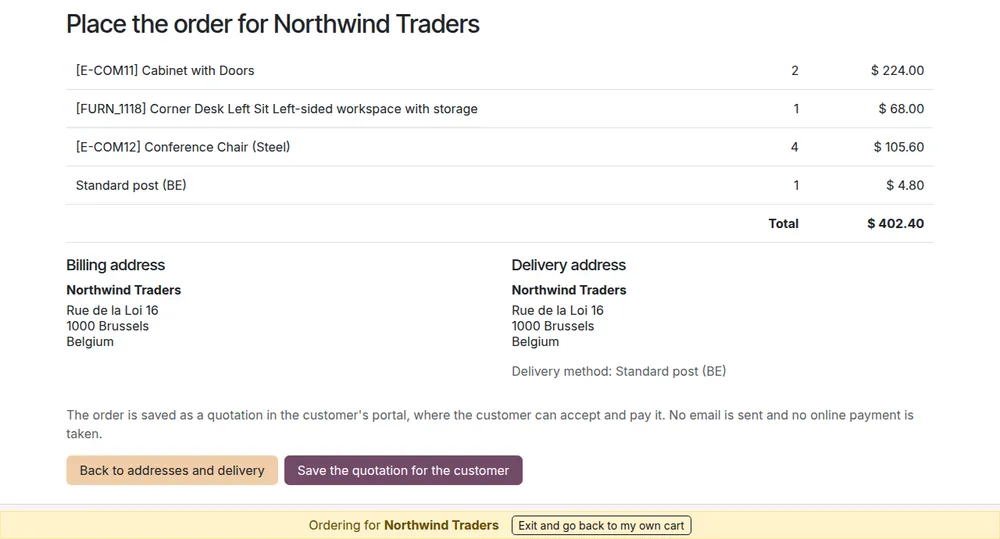
The last step for an agent is a page "Place the order for" the customer: the lines at the customer's prices, the totals, the billing and delivery addresses, the delivery method, and one button. There is no payment form. The shop's payment route refuses an order built by an agent, in the mode or after leaving it, and its payment-validate route never confirms one. A setting decides what the button does: Website > Configuration > Settings, under eCommerce, "Shop Agent Orders" (also on the website form). "Send as a quotation" is the default: the order is saved as a quotation the customer can accept and pay in the portal, and no email is sent. "Confirm the order" confirms it, and Odoo's standard order confirmation email goes to the customer. After placing, the agent is back on his own cart.
Whose order is it
The order belongs to the customer: the customer is the partner on the order and finds it in his portal like any other. The agent is recorded in the field "Placed by shop agent" on the order (with a filter in the Sales orders list), and an internal agent is also the order's salesperson. A portal user cannot be a salesperson, so for a portal agent only the field is set. The agent does not get access to the customer's order in the portal: his portal lists his own purchases only. An internal agent finds the orders he placed in the Sales app, under the access his own sales group gives him.
Tested against attempts to break it
The access rules are covered by automated tests on Odoo 19 and 20 that post other customers' ids straight to the shop's address, cart, checkout and payment routes as a portal agent, that run two agents on one customer, and that end the mode when the assignment, the customer or the agent's group changes during the session. Three browser tours drive the real shop: an agent orders for a customer, exits back to his own cart, and tries to reach a customer who is not his.
Who it is for
Distributors, wholesalers and B2B sellers on an Odoo website shop whose field reps, resellers or telephone sales staff order for existing customers, and who want the customer's own prices and delivery methods applied without keying the order into the backend.
Screenshots
What it does not do
- It takes no payment, deposit or card on behalf of the customer, and it does not log the agent in as the customer. An agent cannot edit the customer's existing contact or addresses; he can add a new address for the order and choose among the existing ones, and a customer whose address is incomplete needs a new complete address before the agent can place the order. Pricelist promo codes, pricelist switching, the cart's "Quick reorder" list, the express payment buttons and the portal's "Reorder" are off while ordering for a customer. It does not create customers, import assignments or compute commission: assignments are set on the customer form, one customer at a time. In quotation mode no email is sent, and the agent gets no portal screen listing the orders he placed; internal agents find them in the Sales app. Internal agents see the same products as in the shop, including products that are not published. It was tested with Odoo's eCommerce and Sales only: coupon and loyalty programs, subscriptions, B2B portal add-ons and other eCommerce add-ons were not tested with it, and their promo codes are not blocked by this app. The "ordering for" mode lives in the agent's browser session and ends when he logs out.
Requirements
- Odoo 19.0 or 20.0. The App Store sells each version separately, so buy the one that matches your database.
- Odoo.sh or On-Premise only. Third-party apps cannot be installed on Odoo Online (SaaS) databases. Check your hosting before buying.
- Odoo 19 or 20, Community or Enterprise. Also requires eCommerce (website_sale) and Sales (sale). Third-party apps install on Odoo.sh or On-Premise only - they cannot be installed on Odoo Online (SaaS).
- Module
mh_shop_agent_orders, version 19.0.1.0.1, licensed OPL-1.