Dead Stock Check
Count the products that have not moved in months, and what they are costing you to hold
The video below shows Dead Stock Check running on a real Odoo 19 database. Want it driven against your own data, or a question answered first? Ask and we will set up a session.
Quantity on hand tells you nothing about whether stock is a problem. The same 500 units are healthy in a fast-moving line and dead capital in a slow one. What separates them is the date something last actually left the building.
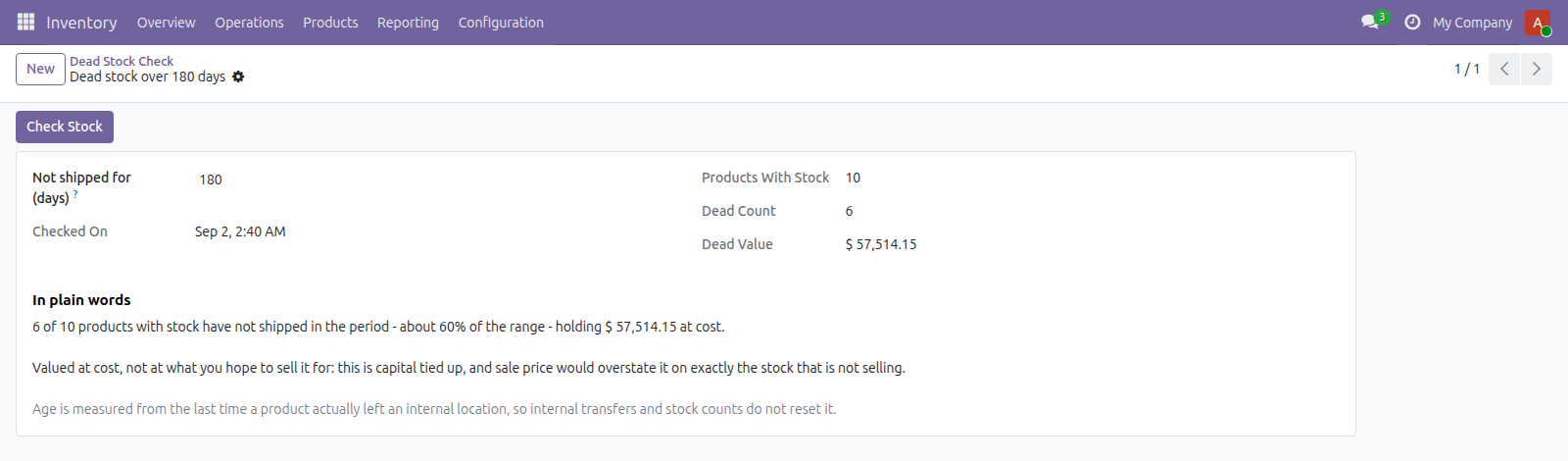
Set a period, press the button, get one number: how many products with stock on hand have not shipped in that long, and what they hold at cost.
One check, one verdict, stating what the figure is and what it is not.
Internal transfers do not count as shipping
Only moves that actually left an internal location reset the clock. Counting every stock move would make a pallet shuffled between bays look busy, and that is exactly how dead stock hides.
Valued at cost
This is capital tied up, so it is worth what you paid. Sale price would overstate it on precisely the stock that is not selling.
It says when the answer is nothing
An empty company says so rather than reporting a clean zero that looks like good news. A company where everything has shipped says that too.
Requirements, and where it stops
Odoo 19 Community or Enterprise with Inventory. Free, and deliberately one figure per company - it does not name the products or break the total down.
Screenshots
Requirements
- Odoo 19.0, Community or Enterprise.
- Odoo.sh or On-Premise only. Third-party apps cannot be installed on Odoo Online (SaaS) databases — check your hosting before buying.
- Module
mh_dead_stock_check, version 19.0.1.0.18, licensed OPL-1.
Related apps
Inventory valuation for any period: opening stock, received, issued and closing value, per product.
Record the plots of land behind every lot of coffee, cocoa, soya, rubber, palm, cattle or wood, and check a shipment has the geolocation data an EU deforestation due diligence statement needs before it leaves
Age your inventory into buckets by how long it has sat unsold, with the capital tied up in each, per warehouse and category