Inventory Aging Report
Age your inventory into buckets by how long it has sat unsold, with the capital tied up in each, per warehouse and category
The video below shows Inventory Aging Report running on a real Odoo 19 database. Want it driven against your own data, or a question answered first? Ask and we will set up a session.
Quantity on hand tells you nothing about whether stock is a problem. The same 500 units are healthy in a fast-moving line and dead capital in a slow one. What separates them is the date something last actually left the building - and that is not on the quant.
The free Dead Stock Check gives you the headline number. This is the report that says which products, in which warehouse, and how much money.
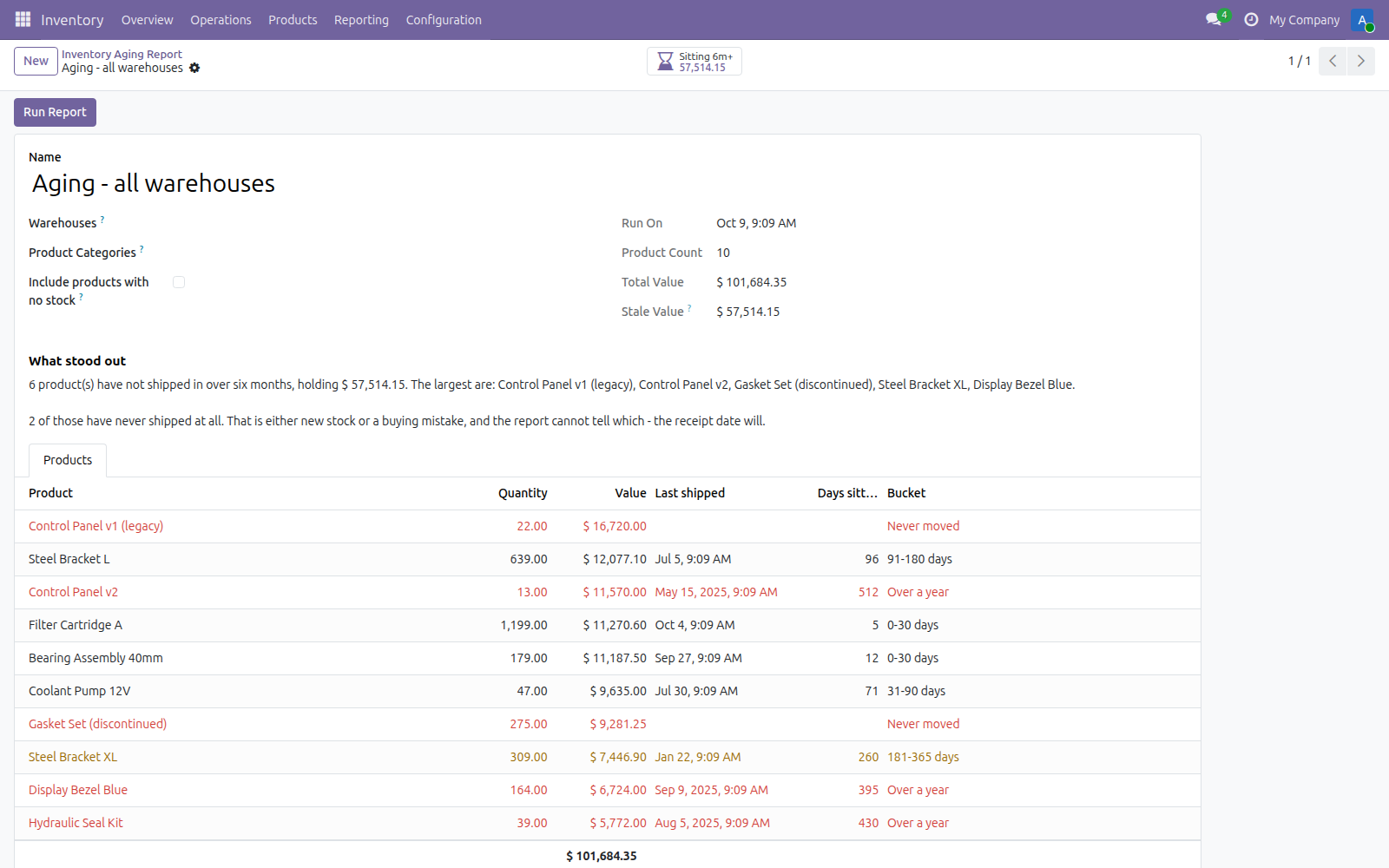
Every product with stock on hand, aged by its last outgoing move, with the capital held in each line.
What it does
Six buckets, chosen to match how stock is written down
0-30, 31-90, 91-180, 181-365 days, over a year, and never moved. A quarter, a half year, a year - the intervals accountants already use, not even slices that line up with nothing.
Internal transfers do not reset the clock
Only moves that actually left an internal location count as shipping. Counting every stock move would make a pallet shuffled between bays look busy, and that is precisely how dead stock hides.
Valued at cost, not at hope
Each line carries quantity times standard cost. Sale price would overstate the exposure on exactly the stock that is not selling, which is the one place you cannot afford an optimistic number.
Narrow it to a warehouse or a category
Leave both empty for the whole company, or run one report per site and one per range. Categories match down the tree, so a parent category covers everything under it.
It names the worst offenders
Findings say how many products have not shipped in six months, what they hold, and which five are the largest by value - with one button to open just those lines. A report you have to read twice to act on is a report nobody reads.
Screenshots
Requirements
- Odoo 19.0, Community or Enterprise.
- Odoo.sh or On-Premise only. Third-party apps cannot be installed on Odoo Online (SaaS) databases — check your hosting before buying.
- Odoo 19 Community or Enterprise with Inventory. Installs the free Dead Stock Check , which gives the headline figure. It reads existing moves and quants and writes nothing back to your inventory, and it does not tell you what to do with the stock - discount, return or write off remains a judgement call.
- Module
mh_stock_aging_report, version 19.0.1.0.17, licensed OPL-1.
Related apps
Inventory valuation for any period: opening stock, received, issued and closing value, per product.
Record the plots of land behind every lot of coffee, cocoa, soya, rubber, palm, cattle or wood, and check a shipment has the geolocation data an EU deforestation due diligence statement needs before it leaves
Check every reordering rule against what the product has actually consumed: which minimums will stock out over the lead time, and which maximums are hoarding cash