Delivery by Customer
Show a delivery method at the website checkout and on sales orders only to the customers or customer tags you choose
Request a live demo · Odoo.sh or On-Premise only, not Odoo Online (SaaS).
2 lists
on each delivery method: Allowed Customers and Allowed Customer Tags; both empty means everyone, as in standard Odoo
35
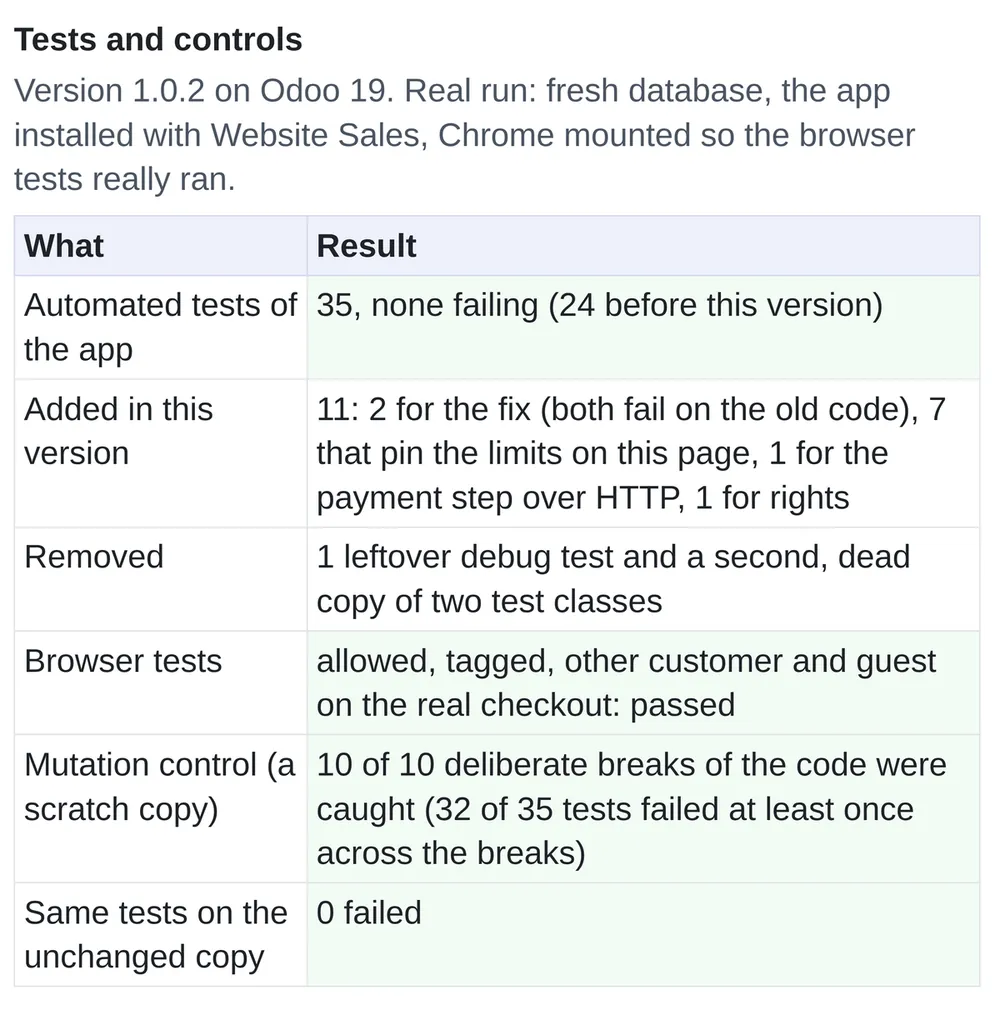
automated tests in the app, none failing, including browser tests on the real checkout; 11 were added in this version
10 of 10
deliberate breaks of the code were caught by the tests (each one made at least one test fail; the real code: 0 failed)
1
defect found and fixed in this version (a listed customer the user cannot see, or an archived one, made a restriction look empty), disclosed below
0
settings or menus added: one page on the delivery method form
Not
a block-list, a rule per product or country, or a payment-method rule (see the known limits)
Odoo decides which delivery methods a customer may pick from the delivery address, the product tags, the weight and the volume. It never asks who the customer is. So the trade courier you agreed for your wholesale accounts, or the free pickup meant for your staff, is offered to every shopper who reaches the checkout. Delivery by Customer adds a Customers page to each delivery method, with two lists: Allowed Customers and Allowed Customer Tags. A method with both lists empty behaves as in standard Odoo. A method with anything listed is offered only to those customers, to customers carrying a listed tag, and to the contacts of such a customer. This page walks through it with screenshots of an Odoo 19 database holding a made-up hardware shop, and with tables rendered from real readings of the same run; each picture says which it is.
The page also says where the app stops: it is an allow-list (there is no block-list), the rule reads the customer of the order and not the delivery address, deleting the only listed customer makes the method open to everyone again, and writing the delivery method field directly (an import, code) is not checked.
Install it and a Customers page appears on the delivery method form. It needs only the Website Sales app (website_sale) and adds no menu, setting or data.
How it works
What it keeps, what it changes, what it does not
Each line was tested or read in the code or on the running shop.
1 Say who may use each delivery method
Use it when you have a method that is not for everyone.Writes when saved
Odoo has no field for who a delivery method is for. A method set for your wholesale accounts looks the same to every shopper.
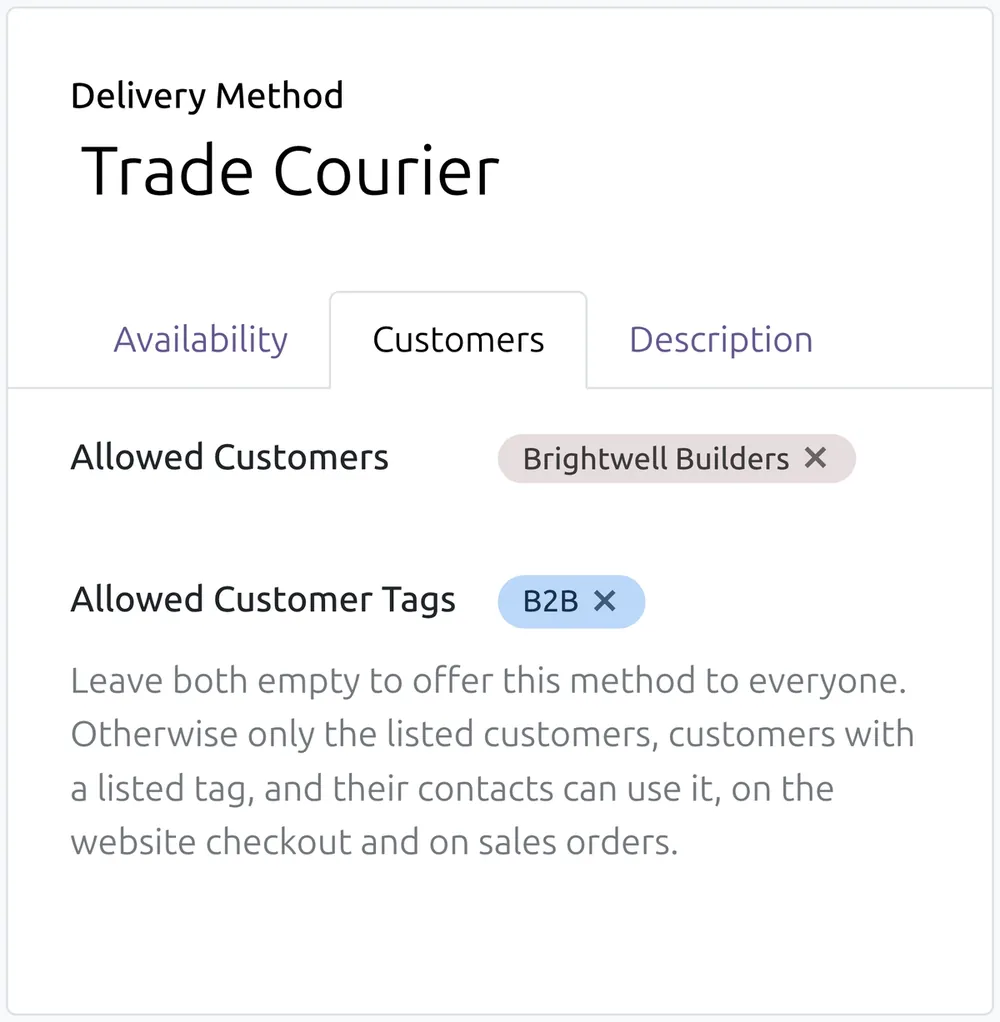
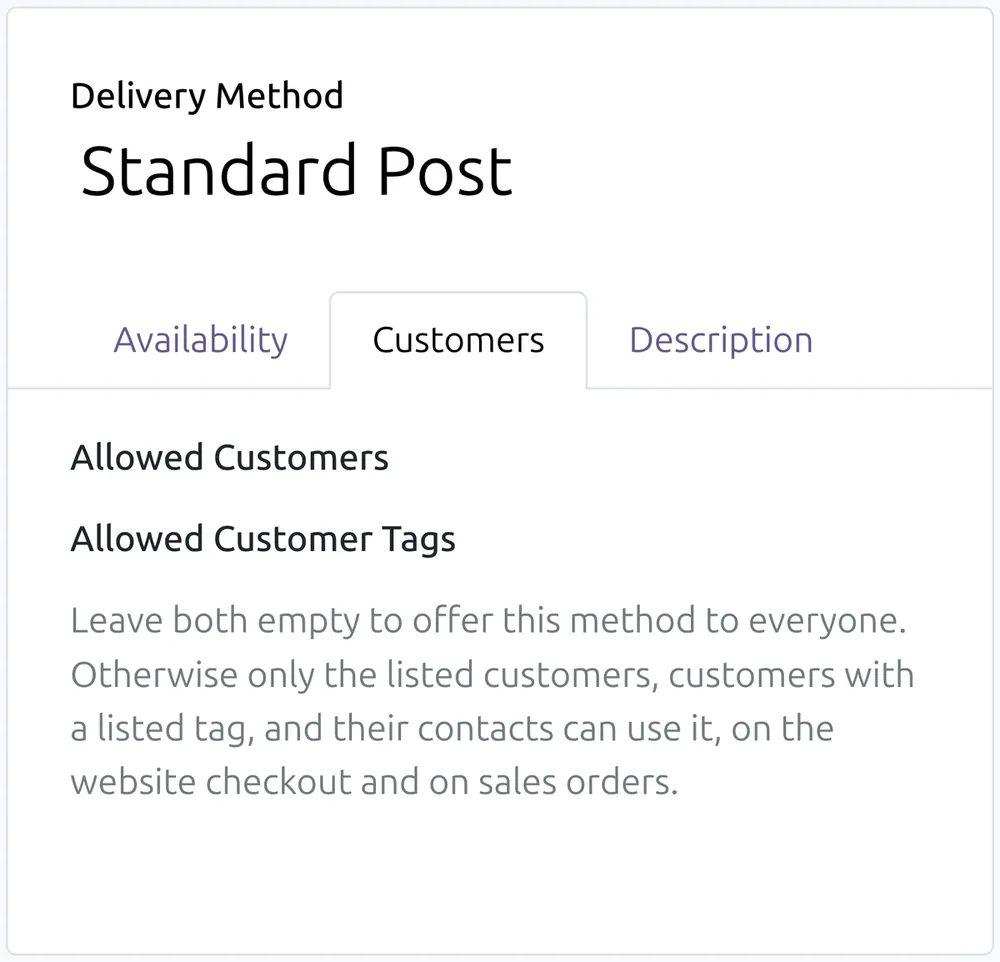
Open Website, Configuration, eCommerce, Delivery Methods (or Sales, Configuration, Sales Orders, Delivery Methods) (the app adds no menu of its own), open a method and click the Customers page, next to Availability. Allowed Customers takes customers or companies, Allowed Customer Tags takes customer tags. The first picture is Trade Courier: Brightwell Builders and the tag B2B are listed. The second is Standard Post with nothing listed, which is offered to everyone. Pictures are real Odoo 19 screens, cropped to the title and the page.
Both lists are allow-lists. There is no list of customers to exclude.
Trade Courier, restricted: one customer and one tag. Real Odoo screen.
Standard Post, both lists empty: offered to everyone. Real Odoo screen.
2 What each customer sees at the checkout
Use it when you want to know what a shopper is offered.Read-only for customers
A restricted method must not appear to customers who are not on its list, and must appear to the ones who are.
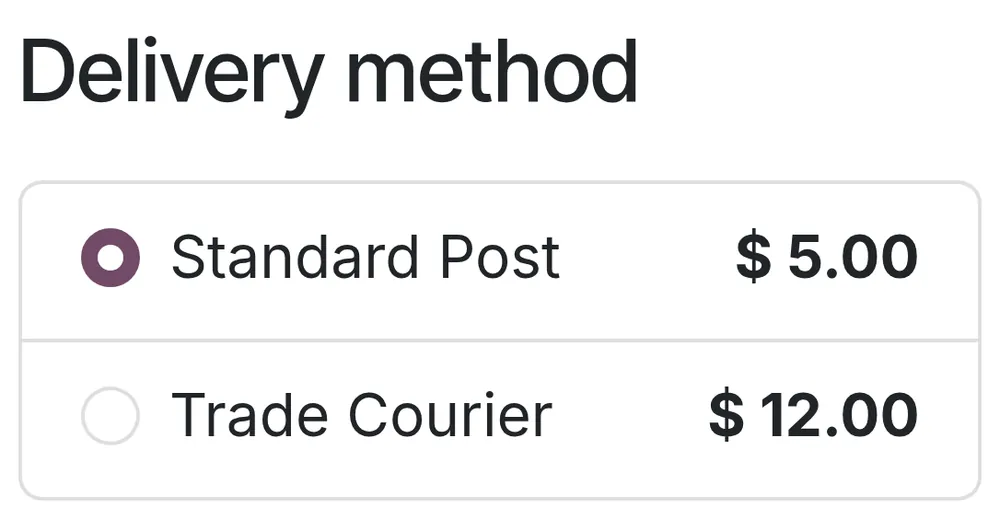
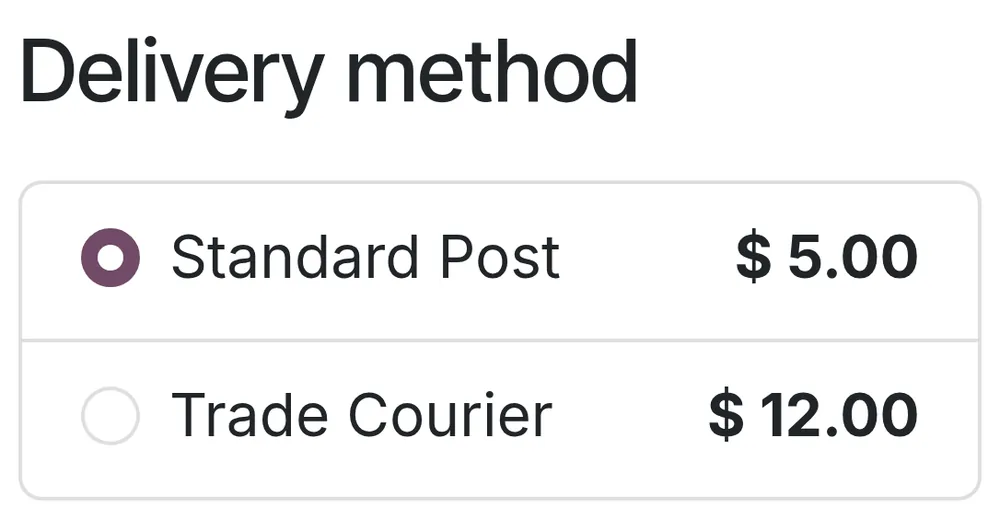
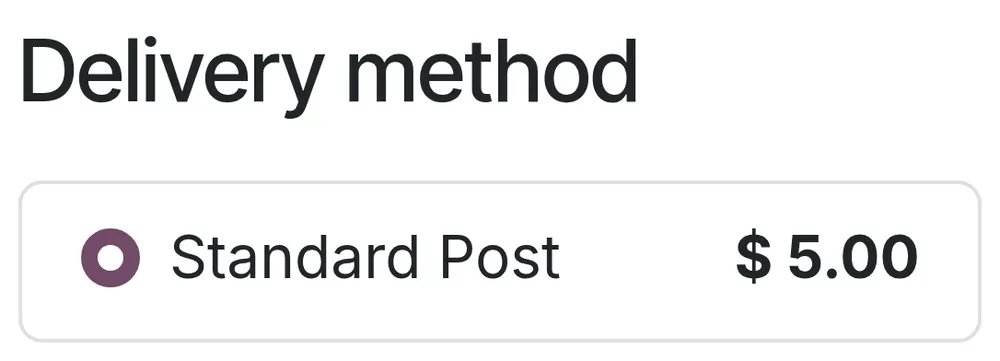
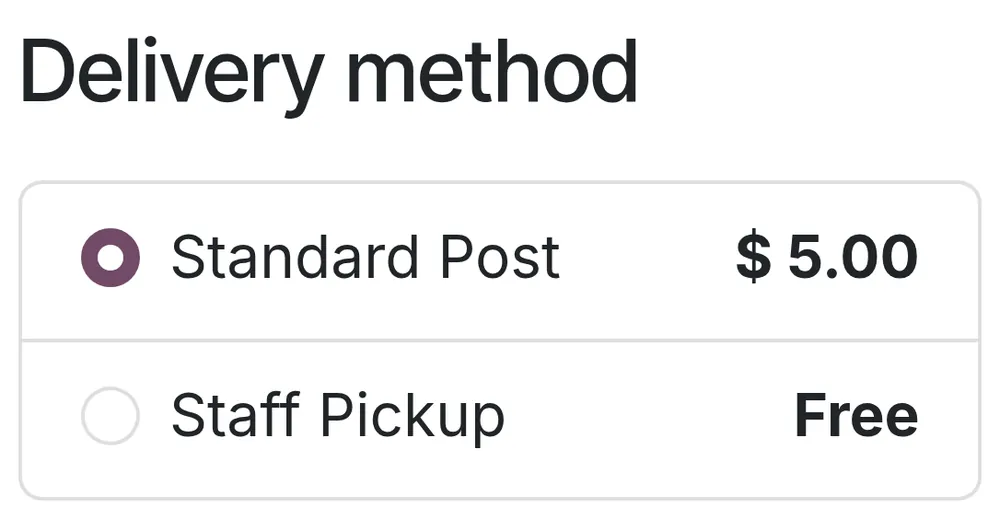
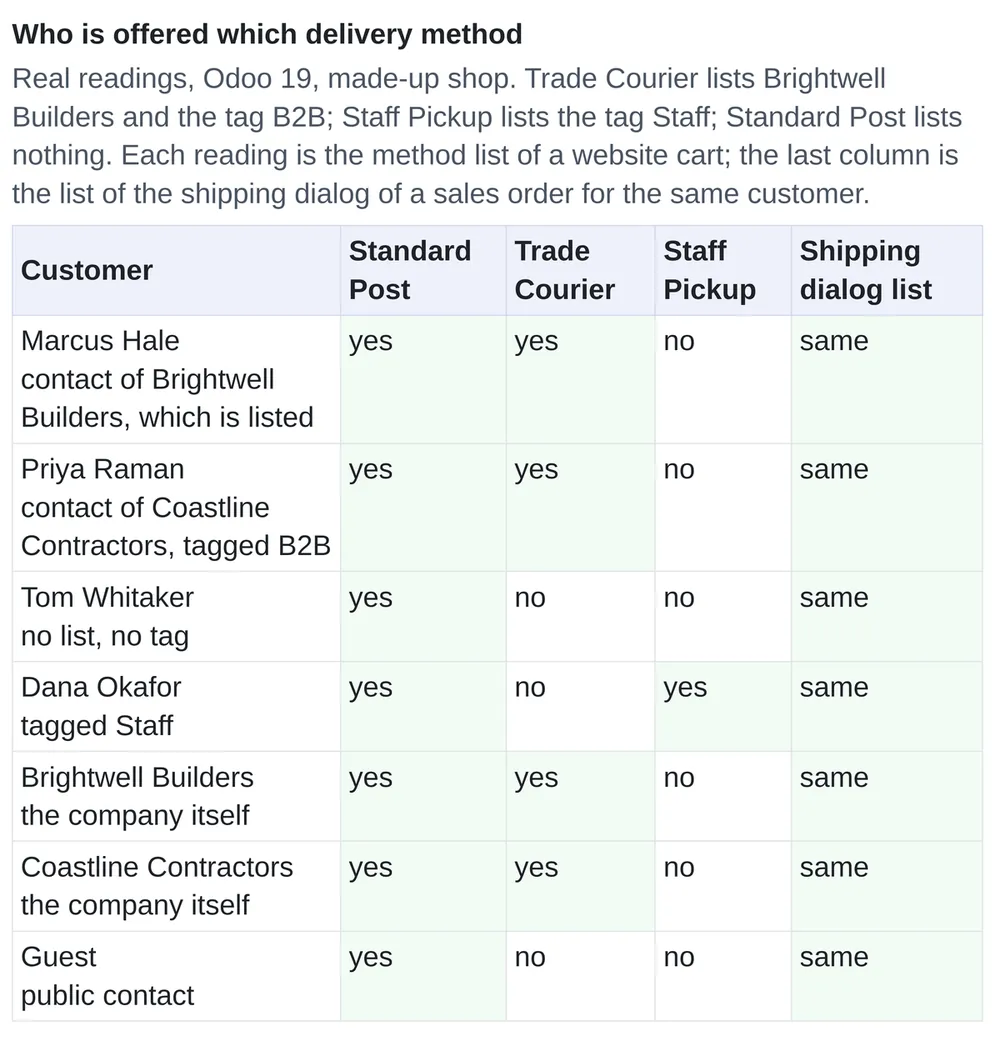
Five shoppers with the same cart of four fence panels, each in their own browser session. Marcus Hale works for Brightwell Builders, which is listed: he gets Standard Post and Trade Courier. Priya Raman works for Coastline Contractors, which carries the tag B2B: the same two. Tom Whitaker has neither: Standard Post only. Dana Okafor carries the Staff tag, so she gets Standard Post and Staff Pickup, which only the Staff tag may use. A guest who has not signed in sees Standard Post only. Pictures are real Odoo 19 screens as each shopper, cropped to the Delivery method block of the checkout page; the page says so because the rest of the checkout is cut away.
It does not change the price of any method, and it adds nothing to the checkout page itself: the list is only shorter.
Marcus Hale (contact of the listed company Brightwell Builders): Standard Post and Trade Courier. Real Odoo screen.
Priya Raman (contact of Coastline Contractors, tagged B2B): the same two. Real Odoo screen.
Tom Whitaker (not listed, no tag): Standard Post only. Real Odoo screen.
Dana Okafor (tag Staff): Standard Post and Staff Pickup. Real Odoo screen.
A guest after filling in the address form: Standard Post only. Real Odoo screen.
Who is offered which method, website and shipping dialog. Evidence table.

3 Shipping on a sales order
Use it when your team adds the shipping line to quotations.Writes when confirmed
A salesperson should not be able to give a customer a method that customer is not entitled to.
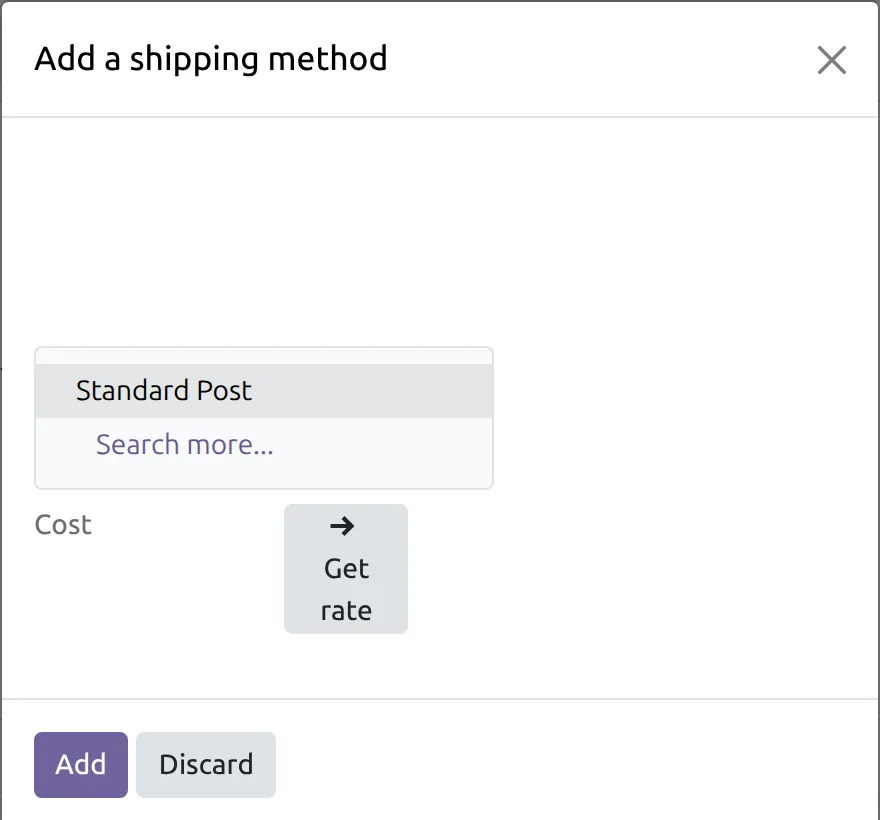
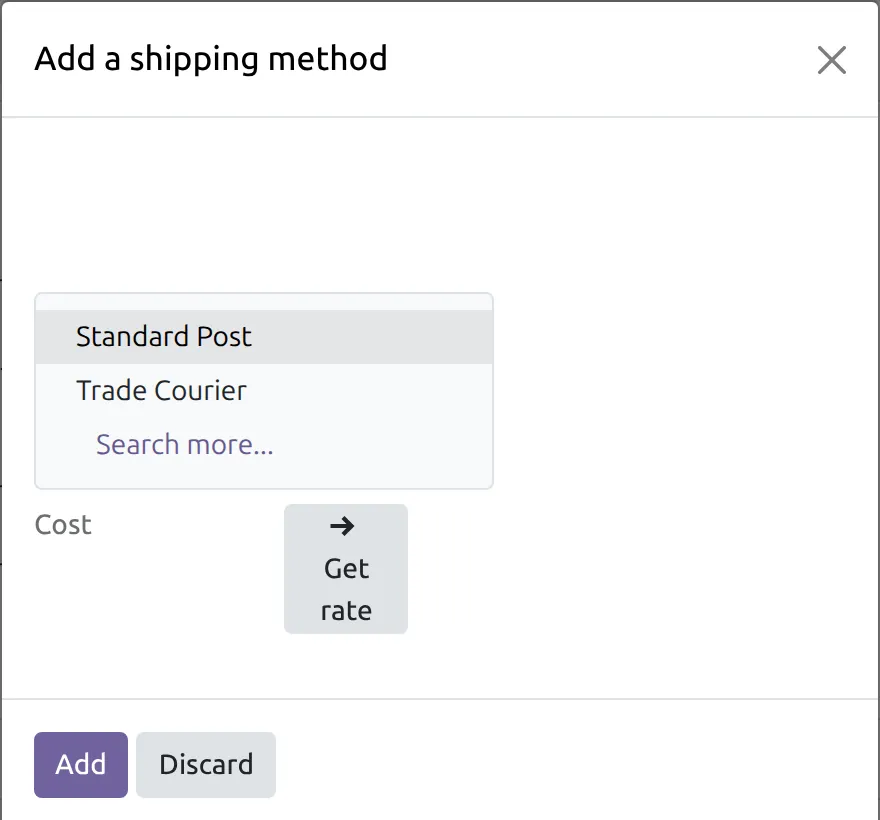
On a quotation, the ('Add shipping', 'Shipping Method') button opens a dialog whose 19 list holds only the methods the order's customer may use. For Tom Whitaker the list is Standard Post; for Marcus Hale it is Standard Post and Trade Courier. If a restricted method is forced onto an order of a customer who is not allowed (the call the dialog's button makes), the app refuses it with the message "The delivery method Trade Courier is not available to Tom Whitaker." Refreshing the price of the method already on the order still works. Pictures are real Odoo 19 screens; the list was dropped down over the dialog and the page is cropped to the dialog.
Methods already on an order are not re-checked when the customer on the order is changed afterwards.
Tom Whitaker's quotation: Standard Post only. Real Odoo screen.
Marcus Hale's quotation: Standard Post and Trade Courier. Real Odoo screen.
4 The checkout cannot be tricked
Use it when you want to know whether a hidden method can still be picked.Read-only
A shopper's browser can send any delivery method number. The list on the page is not enough.
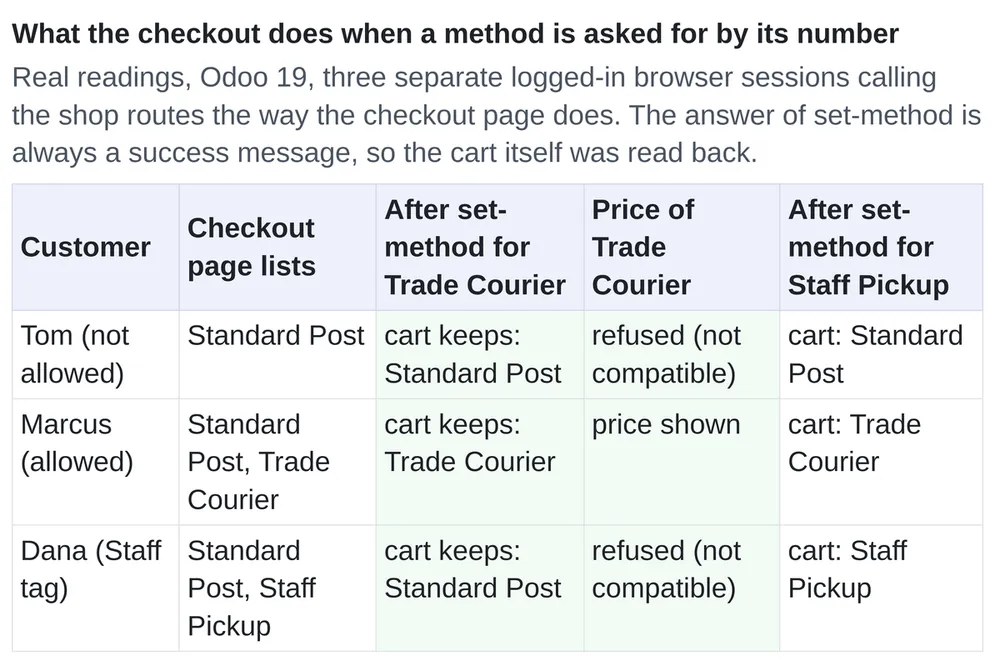
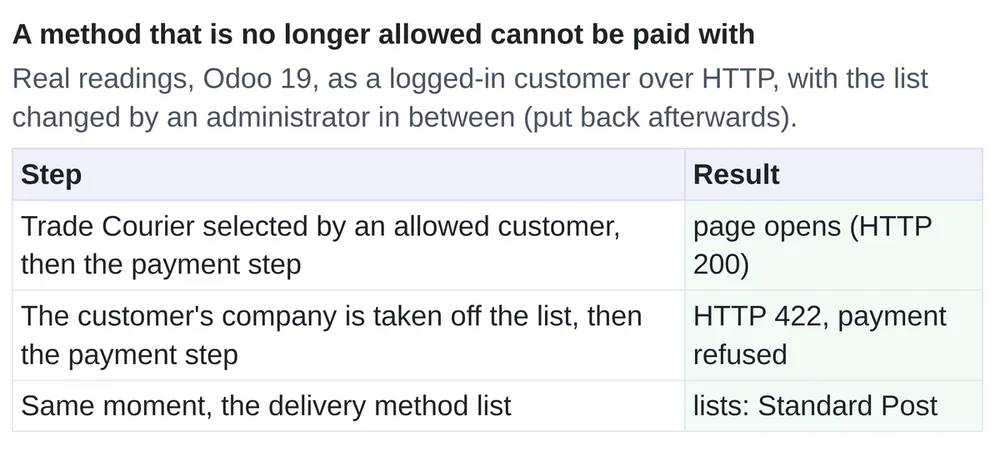
The table shows three logged-in sessions calling the shop's routes the way the checkout page does. Asking for Trade Courier as Tom or Dana is answered with a success message but the cart keeps its Standard Post (that is Odoo's route: the answer is always a success message, so the table reads the cart back). The price of Trade Courier is refused for them with Odoo's "not compatible with your address" message. For Marcus the same calls work. A second table covers the payment step: a method chosen earlier that the customer may no longer use is refused when the shopper goes to pay (the payment page answers HTTP 422).
Odoo's own checks (address, product tags, weight, volume) still run first; the app adds the customer check to them.
What the checkout routes do. Evidence table.
The payment step after the list changes. Evidence table.
5 The rule in detail
Use it when you want to know exactly who counts as allowed.Read-only
An allow-list has edge cases: companies and their contacts, people listed one by one, tags and their parents, archived and deleted customers.
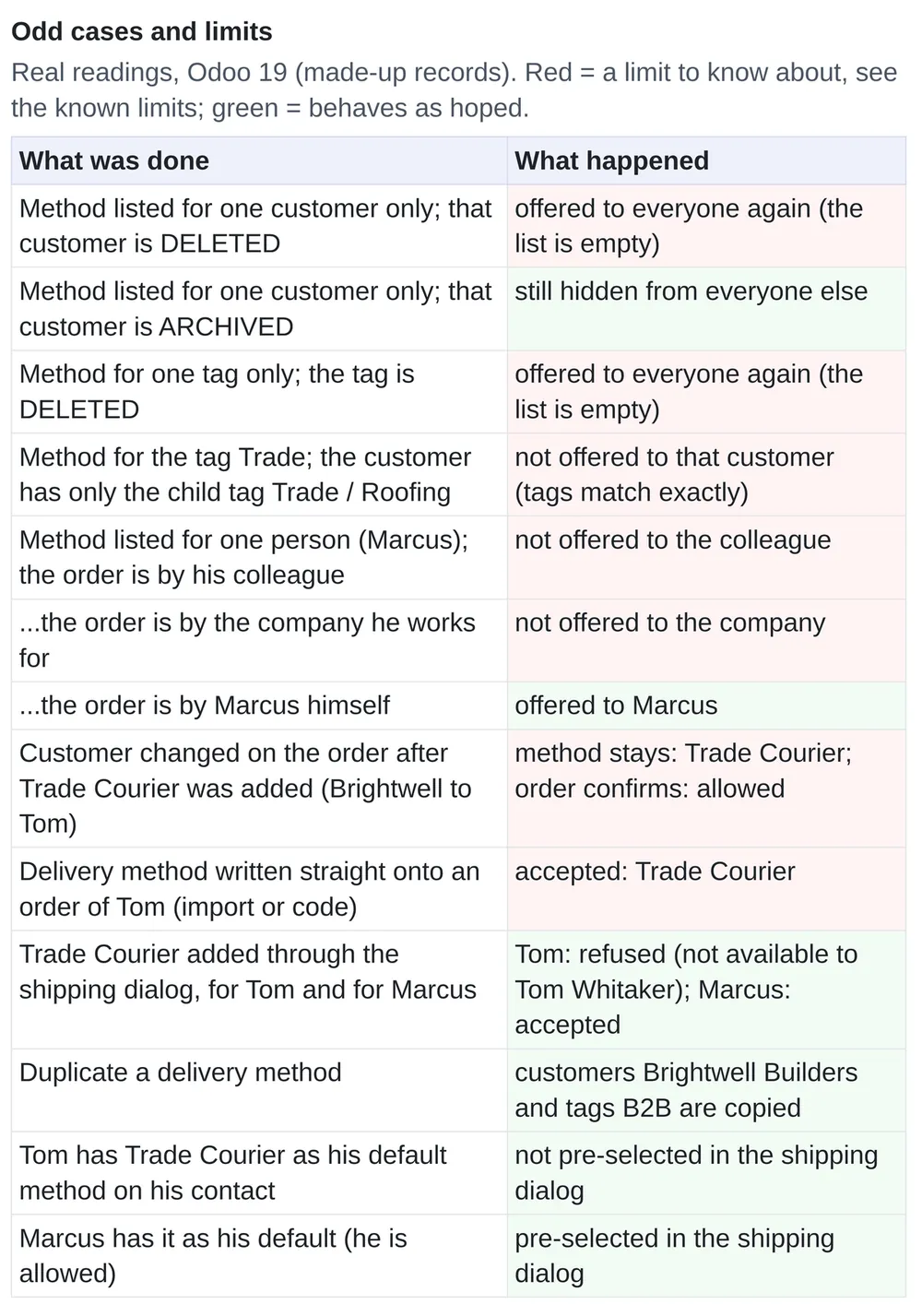
A customer is allowed when they, or the company they belong to, are listed, or carry a listed tag themselves or through the company. Listing a company therefore covers all its contacts; listing one person covers that person only (a colleague is not covered, the company itself is not covered). Tags match exactly: a customer with the child tag Trade / Roofing is not covered by a method listing the parent tag Trade. The second table below lists the odd cases with what actually happened, including the two that matter most: deleting the only listed customer or tag leaves an empty list, and an empty list means everyone.
A deleted customer or tag is gone from the list; the method is open again if nothing else is listed. Archive a customer instead of deleting.
Odd cases and limits. Evidence table.
6 Who can change it
Use it when you want to know who edits the lists.Read-only
The lists decide who may use a method, so who may change them matters.
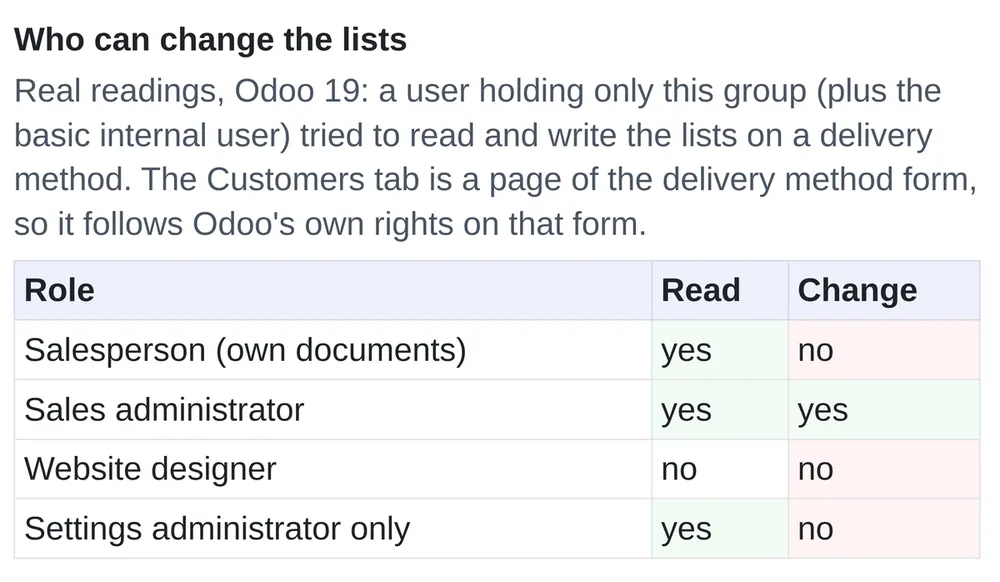
The lists are on the delivery method form, so they follow Odoo's own rights on it: a Sales administrator can change them, a salesperson can read the form but not change it, a Website designer cannot read delivery methods at all. The app adds no group and no access rule. Customers see only the method names at the checkout.
Who can change the lists. Evidence table.
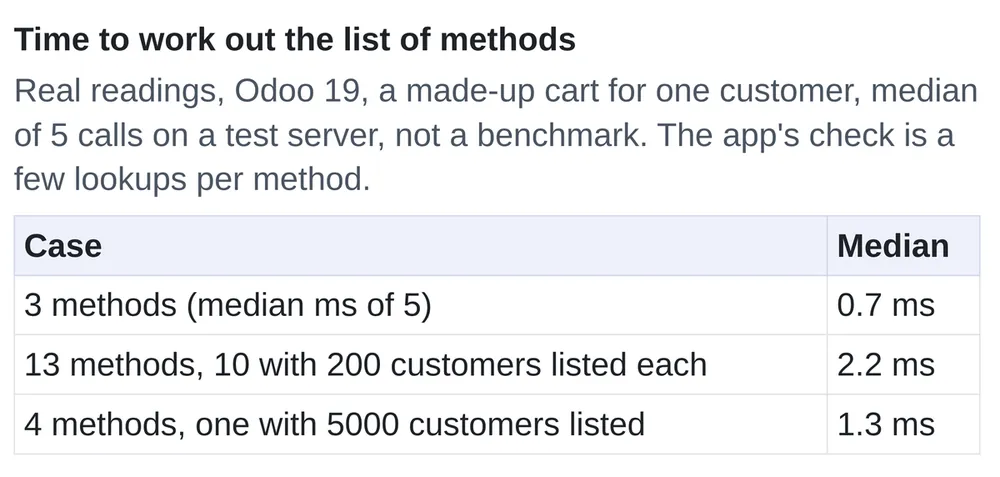
Time to work out the list. Evidence table.
7 One defect fixed in this version
Use it when you want to know what changed in behaviour.Read-only
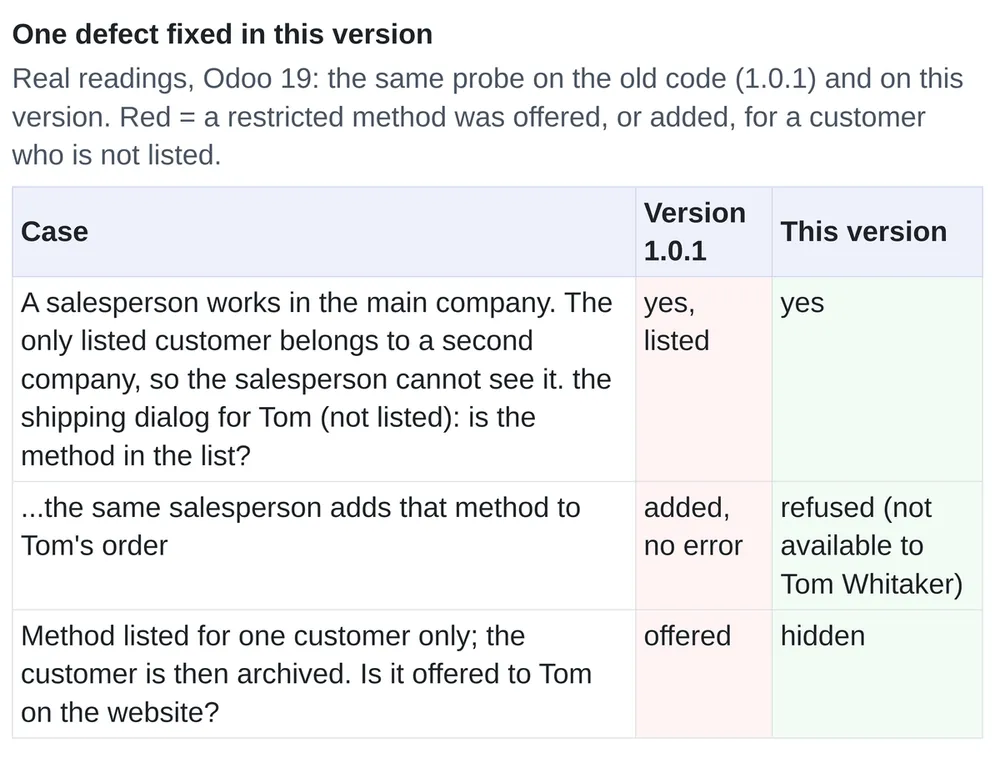
One defect was found while checking this page against the code, and fixed in both versions.
The app read the two lists as the user who asked. Odoo hides from a user the records its rules do not let them see, and the default read also leaves out archived records. A listed customer that belongs to another company (a salesperson working in the main company cannot see it), or an archived listed customer, therefore dropped out of the list. When it was the only one listed, the list looked empty, and an empty list means everyone: the method was offered to customers who are not allowed, and a salesperson could add it to their order. Now the lists are read with full rights and with archived customers included. The effect on a shop: a method listed for one customer who is later archived becomes a method nobody can use (it used to become public). Two tests fail on the old code, both through the real routes (the shipping dialog calls as a salesperson, and the checkout's method list), and pass now.
The defect, before and after. Evidence table.
What changed in this version
Version 19.1.0.2 fixes one defect (see section 7) and adds 11 automated tests (24 before, 35 now), 2 for the fix, 7 that pin the limits above, 1 for the payment step over HTTP and 1 for rights. It removes a leftover debug test and a second, dead copy of two test classes from the test file, replaces the screenshots and the page text with checked ones, rewrites the manifest summary and adds the new limits to the manifest description, and takes no feature out. The demo video of an earlier version is kept as it was and was not re-recorded.
Screenshots
What it does not do
- Each of these was reproduced on a running Odoo 19 shop and is pinned by a test that passes; none is changed in this version. The odd-cases table above shows the readings, the one below the tests and controls.
- Tests and controls. Evidence table.
Requirements
- Odoo 19.0 or 20.0. The App Store sells each version separately, so buy the one that matches your database.
- Odoo.sh or On-Premise only. Third-party apps cannot be installed on Odoo Online (SaaS) databases. Check your hosting before buying.
- Module
mh_delivery_per_customer, version 19.0.1.0.2, licensed OPL-1.