Email Bcc Rules
A Bcc field in the Odoo composer, and standing rules that blind-copy an address on messages about a chosen record type
Request a live demo · Odoo.sh or On-Premise only, not Odoo Online (SaaS).
1
message carries the Bcc when a mail goes to several people
0
Bcc lines or blind addresses in the headers of the captured messages
27
automated tests, none failing
3
ways that reach the recipient: the composer, a template and standing rules
1
copy of the template Bcc delivered per message, address only in the SMTP envelope
the only Odoo module it depends on
Odoo can send a blind copy, but nothing in its screens lets you ask for one. Email Bcc Rules adds a Bcc field to the Send-message composer and to outgoing mail records, and standing rules that add an address (an archive or compliance mailbox, say) to messages about a chosen kind of record. This page shows it with screenshots of an Odoo 19 database seeded with made-up data, sending through a small SMTP server that records what Odoo hands it, and it says where it stops. One limit matters for compliance use: a Bcc typed in the composer replaces matching standing rules.
How it works
Why a Bcc field
Archiving a copy of customer email, or copying a compliance mailbox, should not depend on someone remembering to Cc it where everybody can see.
1 The composer: type a Bcc
Use it when somebody sends a customer an email and an address should get a copy that the customer does not see.Adds a Bcc field to Send message
Odoo's composer has To and Subject. A blind copy means leaving the composer and asking the sender to Cc someone visibly.
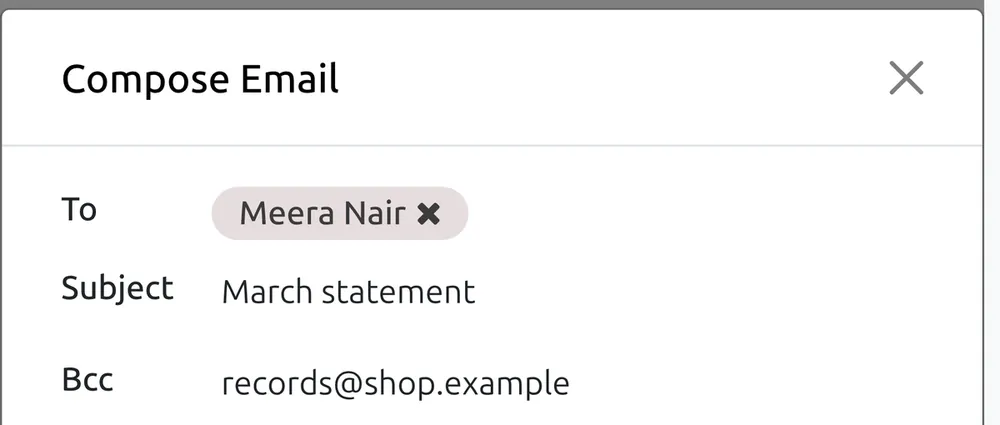
Open a record, choose Send message and Open Full Composer . Below the subject there is a Bcc box. Addresses are comma separated and may carry a display name.
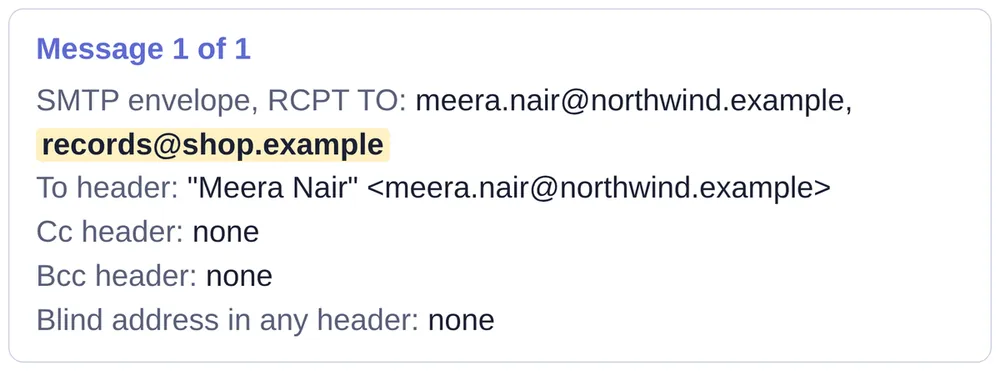
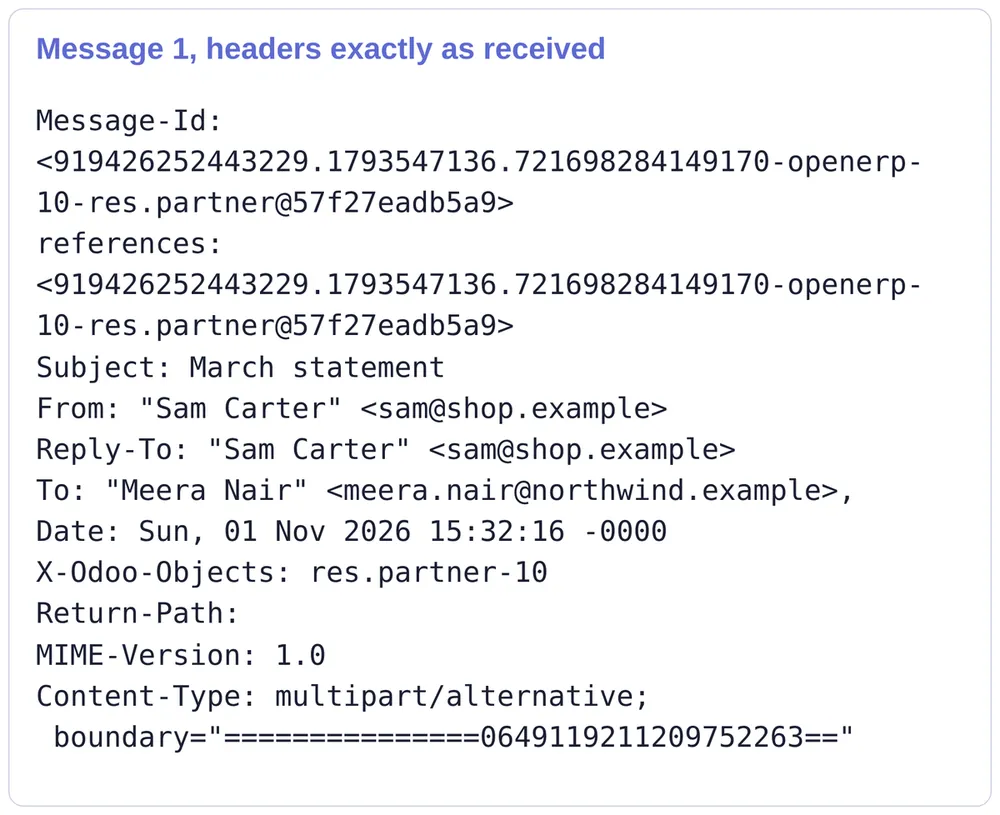
The message was sent through a local SMTP server that records what Odoo gives it. The envelope lists two recipients: Meera Nair and the Bcc address. The headers list only Meera Nair; there is no Bcc line and the Bcc address appears in no header.
Sam Carter types a Bcc in the full composer.
The envelope has the Bcc address; the headers do not.
The headers exactly as the SMTP server received them.
Sam Carter sends Meera Nair the March statement and types records@shop.example as the Bcc. Meera gets the mail. The records mailbox gets a copy. Nothing in what Meera receives names the records address.
A message with only a Bcc and no To sends nothing at all: Odoo drops a message with no visible recipient. The Bcc is not recorded on the chatter message, so the record does not show afterwards who was blind-copied.
This was observed against a local SMTP server, not a real mail provider. It shows what Odoo sends; it does not show how a provider or a mail client treats the Bcc.
2 One copy, not one per recipient
Use it when a message goes to several people and the archive should get one copy.Bcc rides on exactly one message
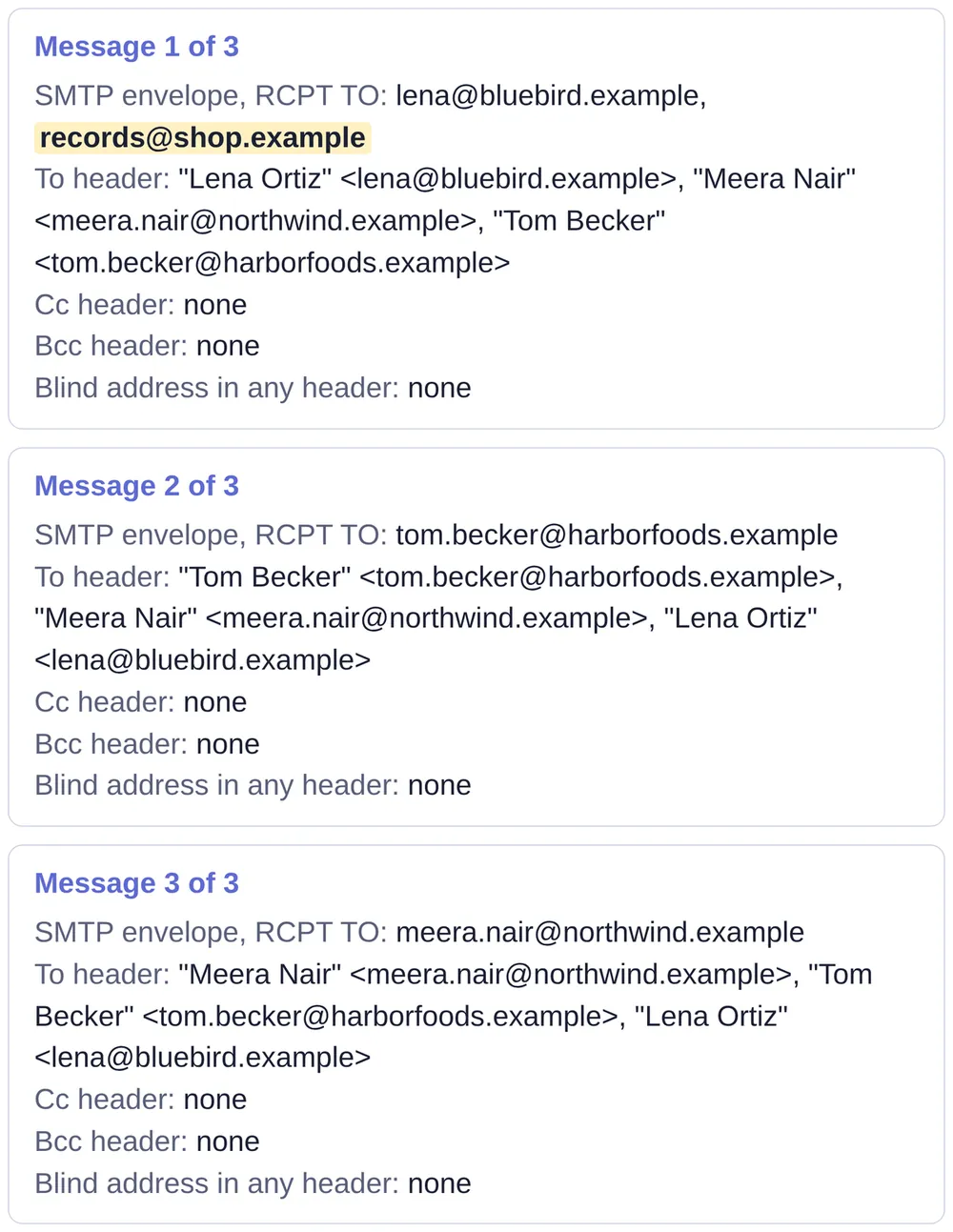
Odoo turns a message to several people into one outgoing email per person. A Bcc copied onto each would deliver the archive address one copy per person.
The Bcc is attached to a single one of those emails.
Three recipients, three messages, one Bcc.
An April price list went to Meera Nair, Tom Becker and Lena Ortiz. Three messages left Odoo and one of them also went to records@shop.example. In a second run with six recipients, one of six carried it.
The mass-mail composer writes one message per selected record, so with three records you get three copies of the Bcc, one per record. Within one record it is still one.
3 Standing rules: blind-copy an address automatically
Use it when an archive or compliance address should be copied without anybody remembering to type it.Adds a Bcc to matching messages
A copy that depends on a person typing an address gets forgotten.
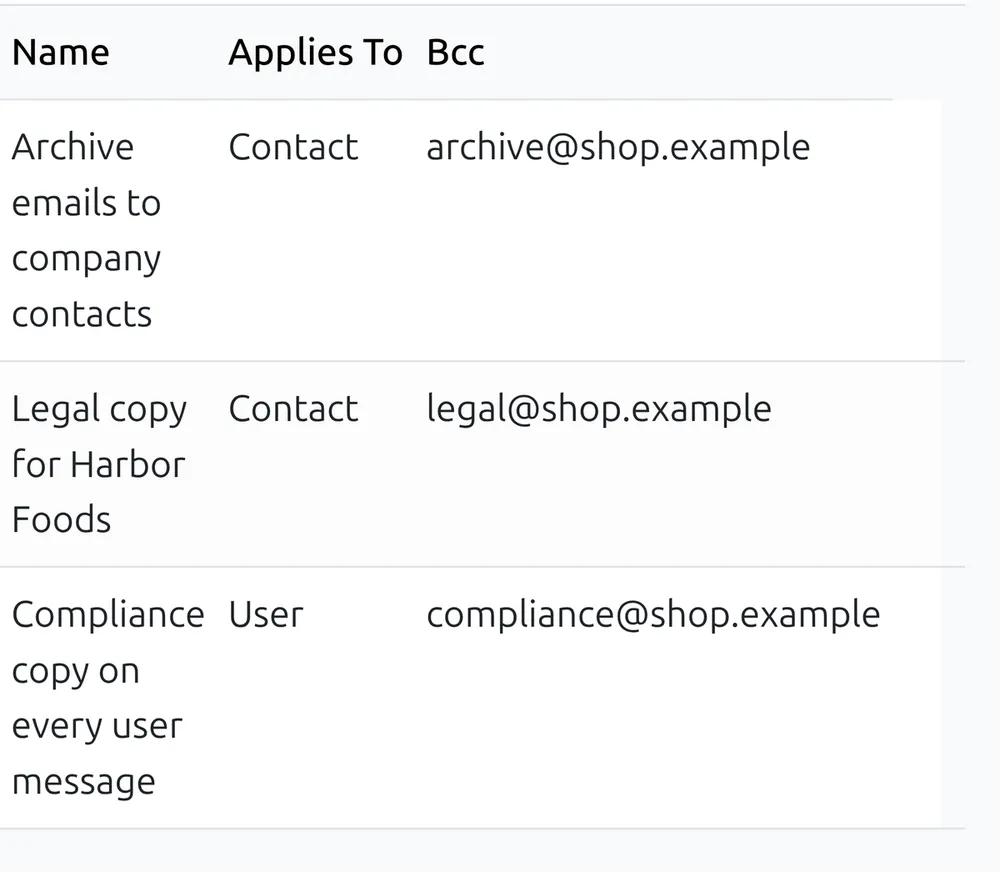
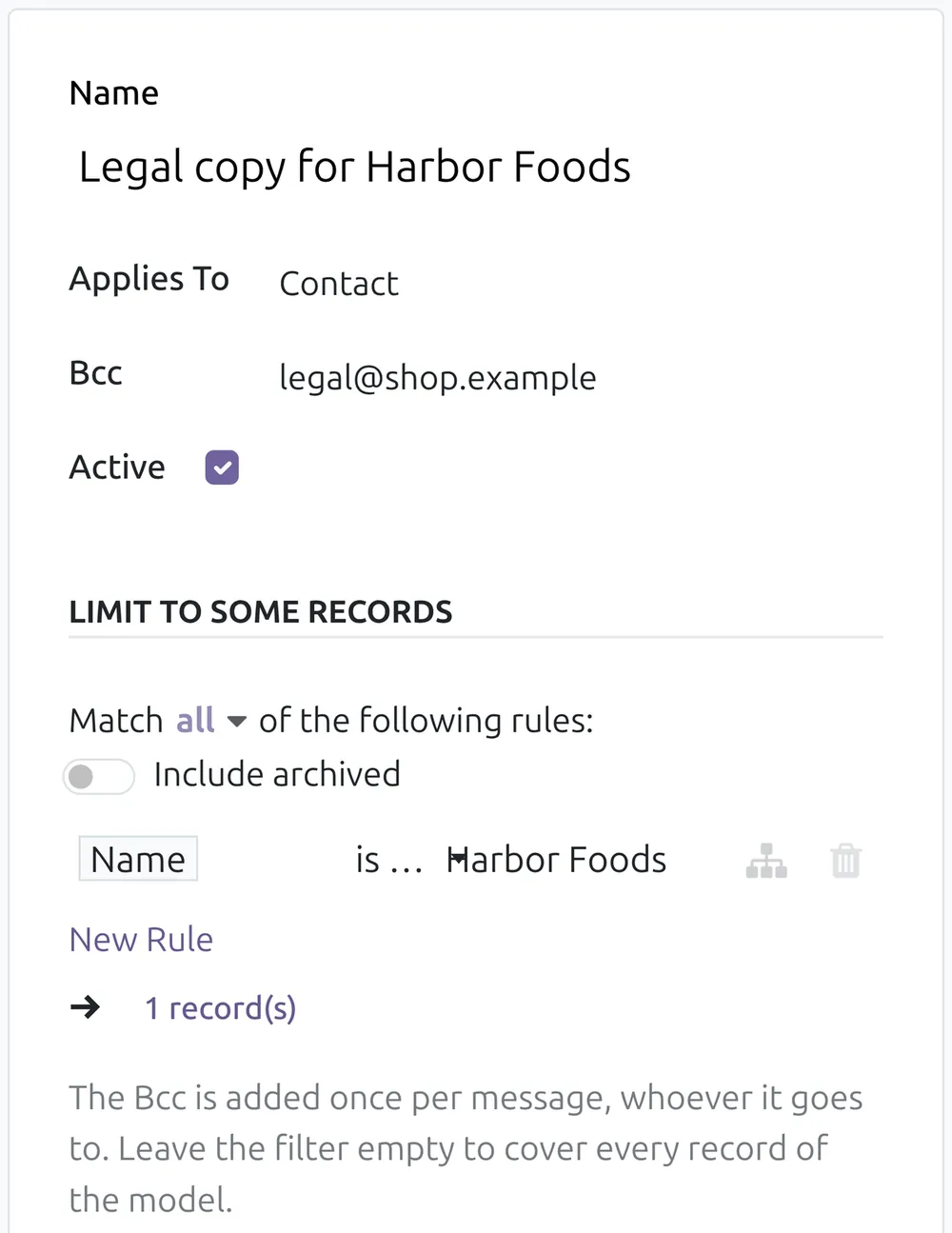
Rules live under Settings > Technical > Email > Standing Bcc Rules , a menu Odoo shows in developer mode. A rule names the record type it applies to, one or more Bcc addresses, an optional filter and an optional company. Archived rules do nothing.
Three rules.
One rule, limited to records matching a filter.
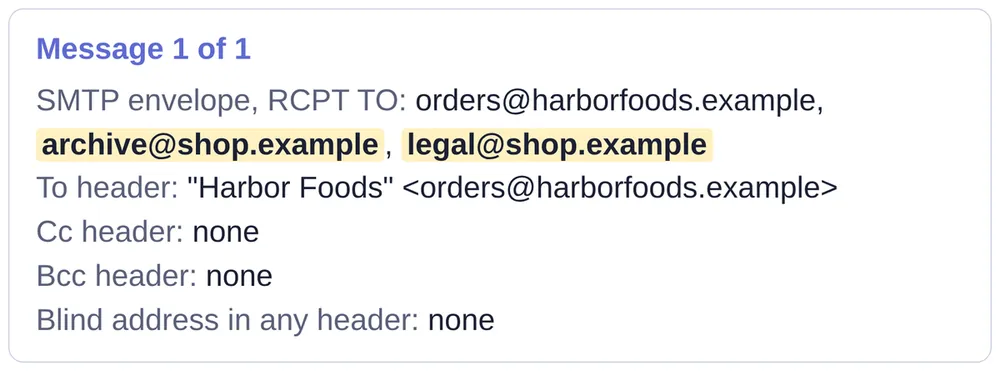
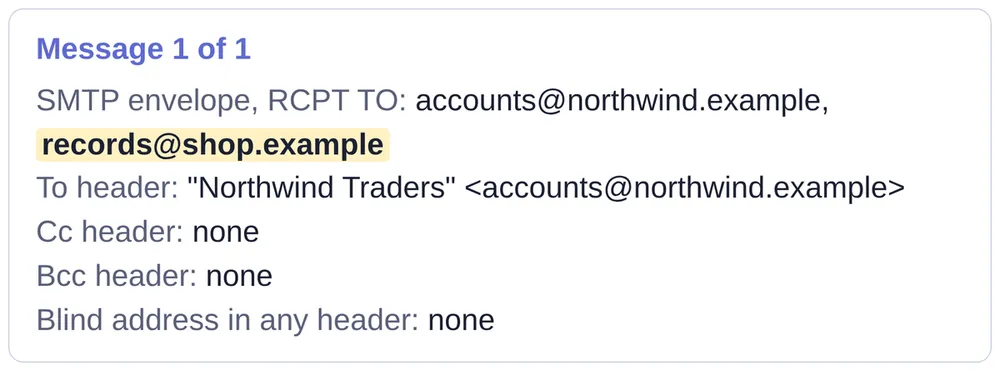
Two rules, one message, both addresses in the envelope only.
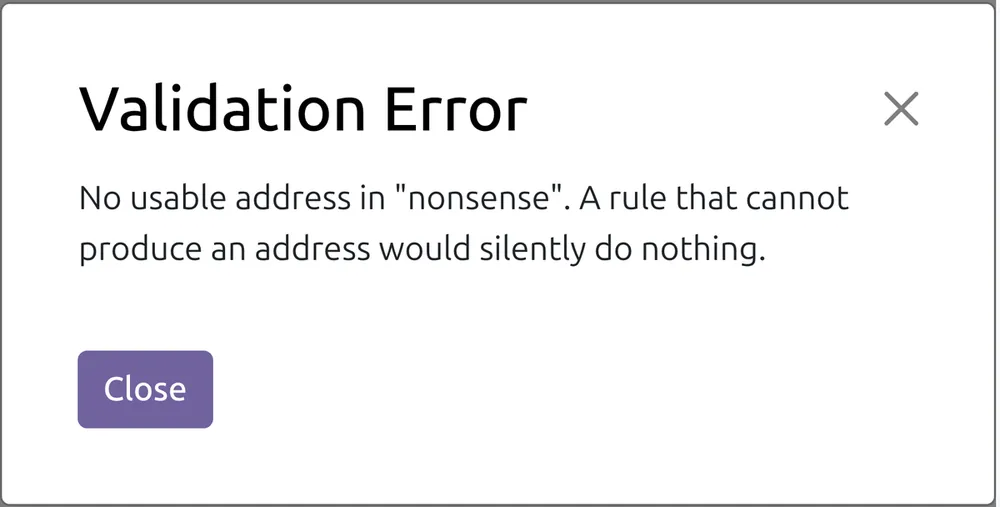
The save is refused.
A typed Bcc was used and the matching rule's address was not added.
A message to Harbor Foods matched two rules, so the one outgoing message also went to archive@shop.example and legal@shop.example. A message to Meera Nair matched neither, because the first rule is limited to contacts with no parent company.
A rule with no usable address, or a filter that cannot be read, is refused when you save it, not discovered at send time.
Rules apply to any message that notifies someone by email on a matching record, including a chatter post by another user. A log note sends no email, so nothing is added. Several active companies were not tested.
A Bcc typed in the composer replaces the matching rules for that message instead of adding to them. Anyone who can open the composer can therefore bypass an archive rule on a message. This was measured and not fixed.
4 Templates and the mail record
Use it when you want an automated or templated email to blind-copy an address, or want to see the Bcc on a mail record.Template Bcc is delivered
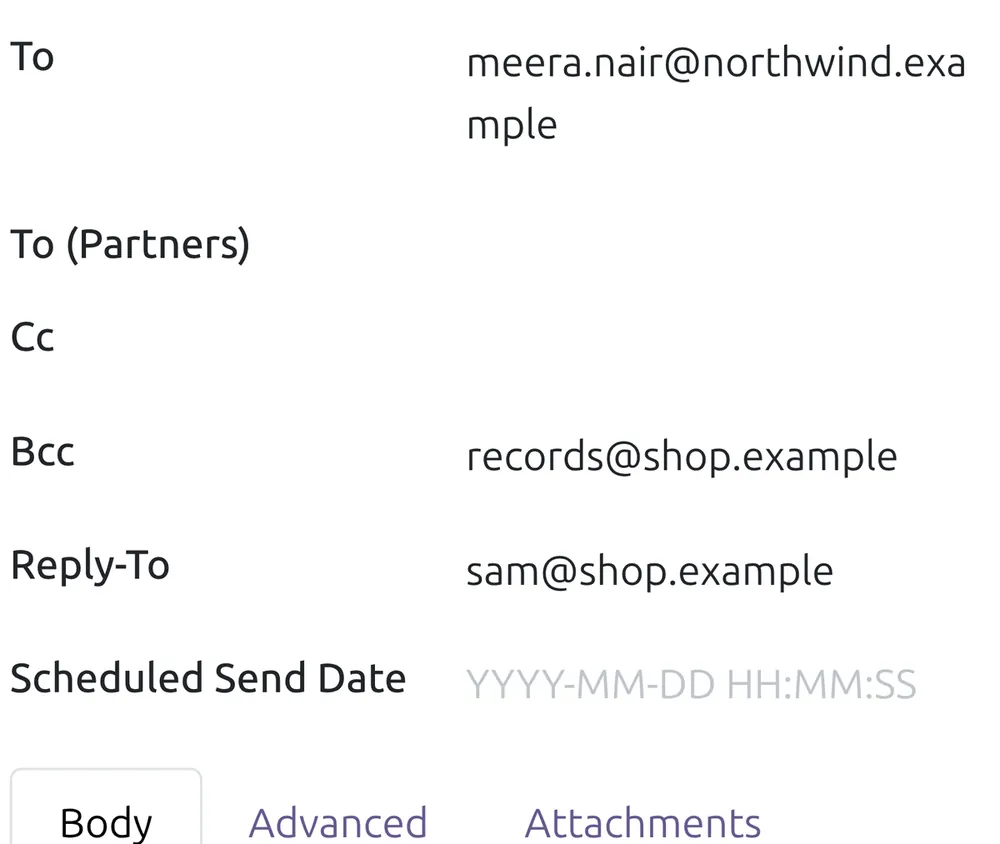
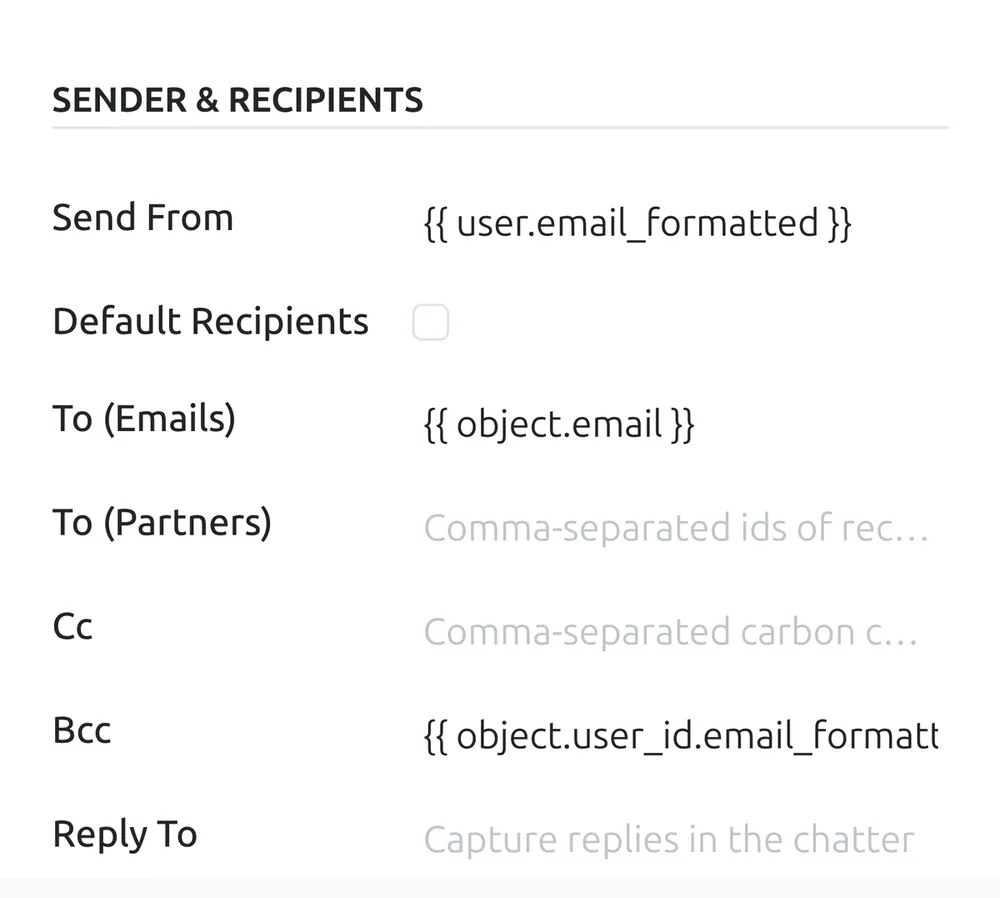
The Bcc shows on the mail record under Cc (Settings > Technical > Email > Emails, developer mode). Odoo deletes a sent mail unless it is set to keep it; this one was kept for the screenshot. The same field exists on mail templates, in the Settings tab of the template form, in developer mode, and the form shows it only when Default Recipients is off.
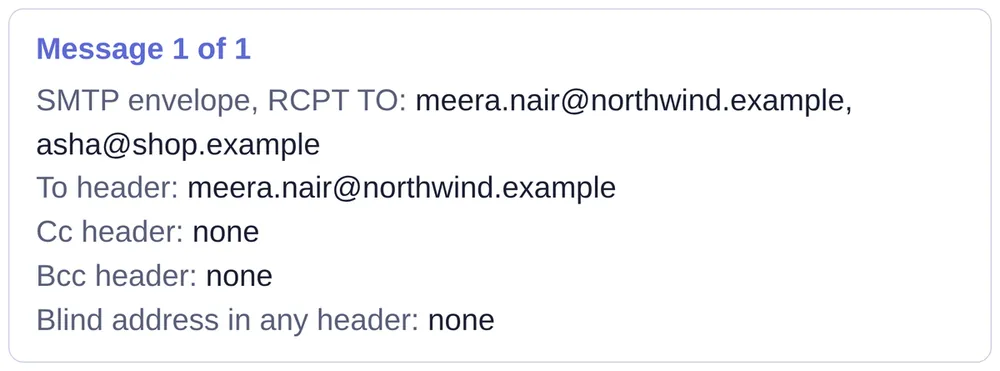
A Bcc stored on a template, placeholders included, is added to the outgoing mail when the template is sent: from the Send-message composer with the template selected (the composer shows the rendered Bcc, and you can edit it), in mass-mail mode (rendered for each record), and from code that sends the template ( send_mail ). Automated actions use that same method but were not run here. In the test below the template Bcc rendered to the salesperson, Asha Menon, and the message to the customer also went to her address, in the SMTP envelope and in no header. A Bcc passed from code when sending still overrides the template one. A template with no Bcc adds nothing.
A Bcc typed in the composer replaces the template Bcc, the same way it replaces standing rules. In the multi-record comment (chatter) composer the template Bcc is carried as written, so a placeholder there is not rendered per record; this was not tested. It does not thread replies from a blind-copied address onto the record; a Bcc that replies is replying to a message the record does not know it received.
A kept mail record with its Bcc.
The Bcc field on a template, with a placeholder.
Sent from the template: the envelope holds the customer and the Bcc address; no header names it.
Questions buyers ask
Can I put a Bcc on an email template?
Yes. It is added when the template is sent, and in the composer when the template is selected. Checked with a local SMTP server on Odoo 19 and 20; a real mail provider was not tested.
Can somebody bypass a standing rule?
Yes. A Bcc typed in the composer replaces the matching rules for that message. The rule does not stop a user from typing a different Bcc.
Does the Bcc show anywhere afterwards?
Not on the chatter message. It sits on the outgoing mail record, which Odoo deletes after sending unless it is set to keep it.
Is the blind copy really invisible?
In a local SMTP capture the address was in the envelope and in no header. How a real mail provider or mail client treats it was not tested.
Requirements
- Odoo 19.0 or 20.0. The App Store sells each version separately, so buy the one that matches your database.
- Odoo.sh or On-Premise only. Third-party apps cannot be installed on Odoo Online (SaaS) databases. Check your hosting before buying.
- Module
mh_email_cc_bcc, version 19.0.1.0.10, licensed OPL-1.