Field Help Text Editor
Edit a custom field's help/tooltip text from Ctrl+K, without hunting through Settings > Technical > Fields
The video below shows Field Help Text Editor running on a real Odoo 19 database. Want it driven against your own data, or a question answered first? Ask and we will set up a session.
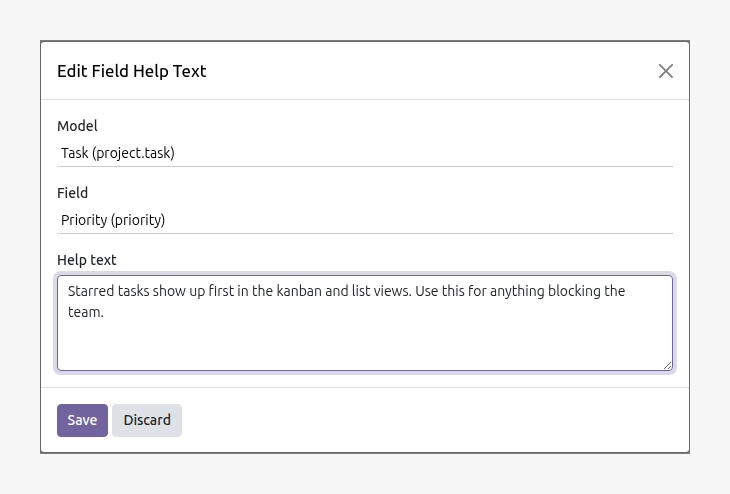
Odoo already stores per-field help text and already shows it read-only in the Developer Mode tooltip. Editing it means leaving whatever you're doing, opening Settings > Technical > Database Structure > Fields, and searching for the exact model and field. This app adds one command palette entry instead - "Edit Field Help Text" (Ctrl+K) - pick a model, pick a field, edit its help text, save. No new model, writes directly to the native field.
What it does
No new model, no new permissions
Writes straight to the field Odoo already uses for help text (ir.model.fields.help). Whatever could edit it via Settings before still can; this just skips the navigation. On a custom field the new tooltip shows immediately. On a standard, code-defined field Odoo keeps serving the help from its own definition, so the edit is stored but not shown - exactly as it behaves when edited via Settings.
Search-as-you-type on both pickers
Type part of a model or field's name or technical name to filter - no scrolling through every model or every field on a large model.
Screenshots
Requirements
- Odoo 19.0, Community or Enterprise.
- Odoo.sh or On-Premise only. Third-party apps cannot be installed on Odoo Online (SaaS) databases — check your hosting before buying.
- Module
mh_field_help_editor, version 19.0.1.0.9, licensed OPL-1.
Related apps
Per-field anonymization, a legal hold override, and an append-only purge log - not a Data Recycle clone
Real WCAG violations, found in your rendered pages - not another overlay widget
The Article 33 72-hour clock starts the moment you log the incident