Field Reach
Field access report: who can see this field. Pick a model and a field, list every user who can read it and every user who can write it, with the reason
Request a live demo · Odoo.sh or On-Premise only, not Odoo Online (SaaS).
Free
App Store price, per Odoo version
19 · 20
Odoo versions, each sold on its own page
Odoo.sh
or On-Premise; not Odoo Online (SaaS)
1.0.1
version of mh_field_reach
Odoo lets a field carry a list of groups, and a user outside them neither reads nor writes the field, whether in a form, a list, an export or over the API. Those groups live in Python only, so no screen can tell you which people they let in. Field Reach does: Settings, Field Reach, choose a model, choose a field, press Check.
How it works
What it does
You get one row per active internal user showing whether they can read the field, whether they can write it, and why: no restriction, field restricted to a group the user is or is not in, model not readable or writable, or blocked or allowed by the model's own override. Filter to the users who can read it or the ones who can write it, search a user, and export the list like any Odoo list.
Administrators only
The menu is for the Settings group, and running the check is refused for anyone else. Nothing is changed in your database apart from the temporary rows that make up the list, which Odoo clears itself.
Screenshots
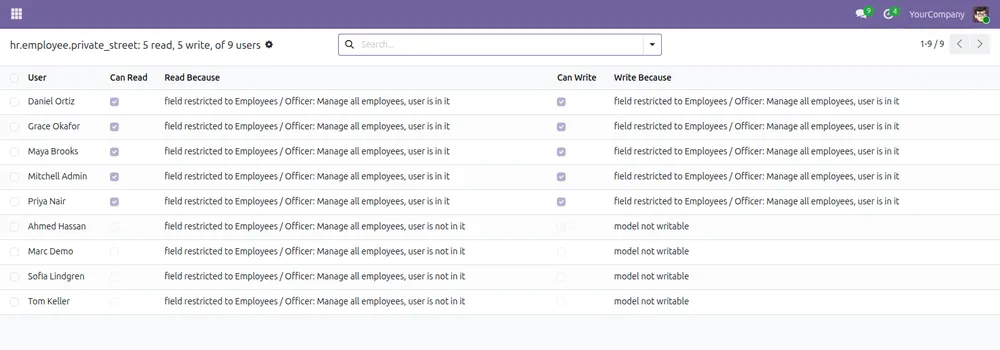
What it does not do
- The verdict is the answer of Odoo's own field-access call, run as each user. A user in a group that implies the required group counts, and a model that overrides the call (employees, users, tasks) is judged by its override. When the override and not the field's groups made the difference, the row says so.
- It does not change any field, group or user, and does not judge whether a reader should have access. It does not read record rules, so "can read the field" does not mean "can see this particular record". The superuser, who reads everything by design, is not listed, and portal and public users are left out. Users of every company are listed. It does not say whether a field is read-only in a form because of its definition (computed fields, readonly flags), only whether Odoo's access check would let the user write it. It keeps no history: it reads groups and access as they are the moment you press Check.
Requirements
- Odoo 19.0 or 20.0. The App Store sells each version separately, so buy the one that matches your database.
- Odoo.sh or On-Premise only. Third-party apps cannot be installed on Odoo Online (SaaS) databases. Check your hosting before buying.
- Odoo 19 or 20, Community or Enterprise. No other module is needed. Third-party apps install on Odoo.sh or On-Premise only - they cannot be installed on Odoo Online.
- Module
mh_field_reach, version 19.0.1.0.1, licensed OPL-1.