Google Ads Conversions
Request a live demo · Odoo.sh or On-Premise only, not Odoo Online (SaaS).
$38.92
App Store price, per Odoo version
19 · 20
Odoo versions, each sold on its own page
Odoo.sh
or On-Premise; not Odoo Online (SaaS)
1.0.1
version of mh_google_ads_conversions
Google Ads conversion tracking for the Odoo shop: purchases with order value and lead form submissions, sent only after cookie consent
Smart Bidding can only optimise for sales if Google Ads is told which clicks became orders and what they were worth. Paste your Google Ads conversion ID and conversion labels into Website settings and your shop reports every completed order to Google Ads with its value, currency and order reference, and, if you set a lead label, every submitted website form as a lead conversion. No Google Analytics app is needed, and this app requests nothing from Google until the visitor accepts marketing cookies.
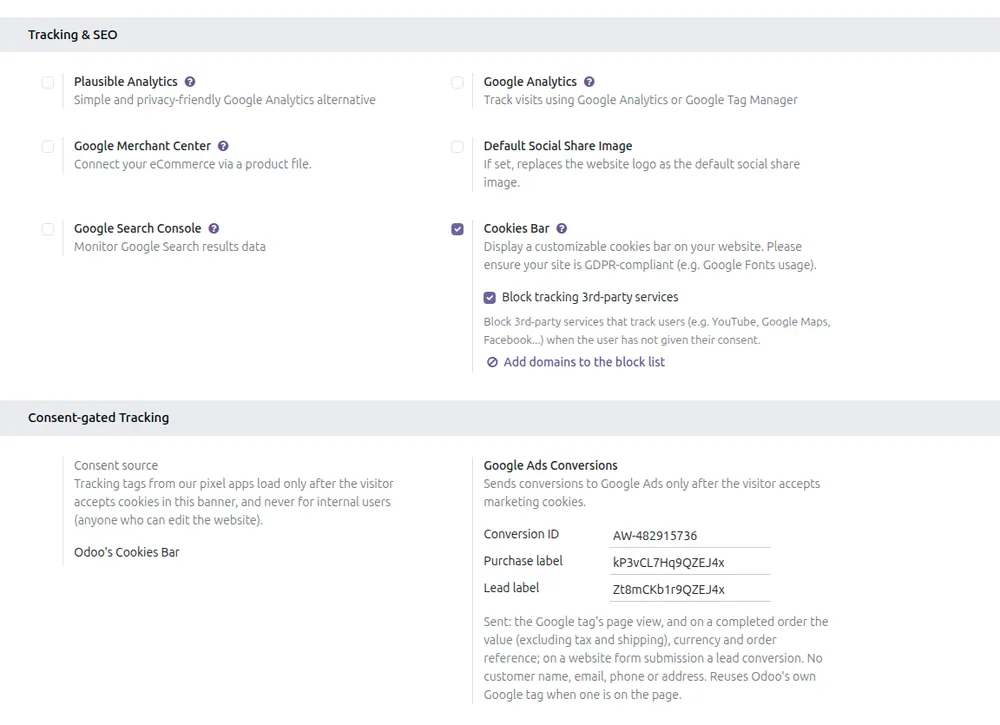
Sends conversions to Google Ads only after the visitor accepts marketing cookies.
How it works
What is sent to Google
The Google tag's page view for your conversion ID on each page, which Google Ads also uses for its remarketing audiences. On a completed order, a purchase conversion with the order value excluding tax and shipping, the currency, and the order reference (such as S00042) as transaction_id. On a website form submission, a lead conversion whose transaction_id is the form's record type and number (such as mail.mail-12), with no value. Names, emails, phone numbers and addresses are never sent, and there are no enhanced conversions. The tag runs in the visitor's browser, so Google also receives what any tag receives from a browser, such as the page address and the visitor's IP address. A short version of this is shown next to the settings.
Purchase and lead conversions
The purchase conversion fires on the order confirmation page, once per order in each browser: a reload is not counted again, and the transaction_id lets Google drop a repeat. The lead conversion fires when the server accepts an Odoo website form (Contact Us, or any form built in the website editor), whatever the form does next, including Odoo's default redirect to a thank-you page. If the redirect leaves before Google confirms the hit, the next page sends it once more under the same transaction_id, so Google still counts it once. A form the server refuses is not counted.
Works next to Odoo's Google tag
If Odoo's own Google Analytics setting already loads Google's gtag.js on the page (a G- measurement ID), the app reuses it and adds your conversion ID to the same dataLayer, so gtag.js is not loaded twice. Your conversion ID sits in its own gtag group, so the shop events Odoo sends to Google Analytics (add to cart, purchase, virtual page views) never reach Google Ads: Google Ads receives only the page view and the conversions this app sends. With a GTM- container on Odoo 20, which loads Google Tag Manager rather than gtag.js, the app loads gtag.js once itself on the same dataLayer.
Consent and Consent Mode v2
Built on our free Website Tracking Base, which is installed with it. The tag waits for marketing consent from Odoo's Cookies Bar ("Allow all") or from our free Cookie Consent Banner (the Marketing box). Analytics consent alone does not load it. With neither banner switched on it never loads. It never loads for internal users, so your own visits and the website editor are not tracked. When it loads it sets the Consent Mode v2 signals ad_storage, ad_user_data and ad_personalization to granted, and back to denied if the visitor withdraws marketing consent on the page.
Settings, per website
In Website settings: the conversion ID (AW-...), the purchase conversion label and an optional lead conversion label. Each website keeps its own. A pasted tag snippet or a wrong ID is refused with a message saying what to paste instead.
Who it is for
Odoo shops and lead-generation sites that advertise on Google Ads and want purchase conversions with order value, and form leads, reported to Google Ads without a Google Analytics 4 app, without adding code to the website by hand, and without loading anything before consent.
Screenshots
What it does not do
- No enhanced conversions: it sends no email, phone or address, hashed or not. It is a browser tag, not the Google Ads API: it cannot report orders from visitors who decline cookies or block the tag, it does not upload offline conversions, and it does not connect to your Google Ads account, create conversion actions or manage campaigns. You create the purchase and lead conversion actions in Google Ads and copy the ID and labels. It sends no add-to-cart, checkout or dynamic remarketing item events: only the page view, purchase and lead, and Odoo's own Google Analytics events are kept off your conversion ID. The value always excludes tax and shipping. Only orders that reach the eCommerce confirmation page are reported, not orders confirmed in the backend, at the Point of Sale or from a portal quotation. Leads come only from Odoo website forms, not from newsletter sign-ups, live chat or third-party forms. One conversion ID per website. If you also use Odoo's own Google Analytics setting, Odoo itself loads Google's tag (gtag.js, or Tag Manager for a GTM- key on Odoo 20) before consent, with the consent signals denied; that is Odoo's behaviour and this app does not change it. Tested with a G- key on Odoo 19 and 20 and a GTM- key on Odoo 20. It is a technical control, not legal advice: what your policy says remains yours to decide.
Requirements
- Odoo 19.0 or 20.0. The App Store sells each version separately, so buy the one that matches your database.
- Odoo.sh or On-Premise only. Third-party apps cannot be installed on Odoo Online (SaaS) databases. Check your hosting before buying.
- Odoo 19 and 20, Community or Enterprise, with the Website and eCommerce apps. Also requires Website Tracking Base (free), installed automatically. Third-party apps install on Odoo.sh or On-Premise only - they cannot be installed on Odoo Online (SaaS).
- Module
mh_google_ads_conversions, version 19.0.1.0.1, licensed OPL-1.