Hide Unavailable Variants
Sizes and colours nobody can buy disappear from the product page instead of staying greyed out
Request a live demo · Odoo.sh or On-Premise only, not Odoo Online (SaaS).
12 of 12
random products gave the same list of values to remove as a separate brute force over the real variants
Off
until you switch it on, for the website or for a product: nothing changes in your shop on install
30
automated tests in the app, none failing, with four browser tours; 6 were added for the limits stated on this page
500
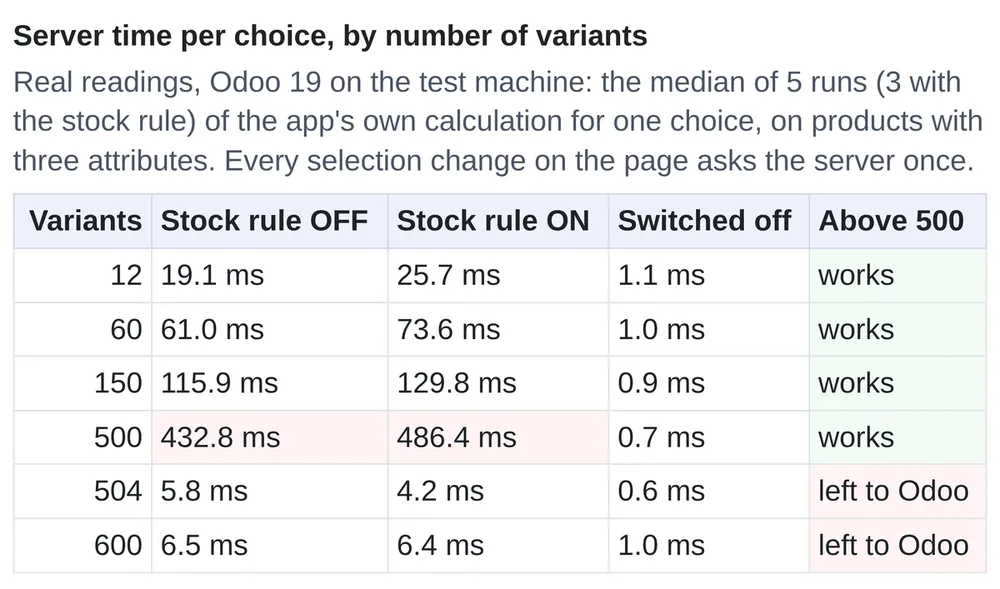
variants is the most a product may have for the app to work; above that it leaves the page to Odoo. On Odoo 19 one choice costs the server 433 ms at 500 variants
0.3 s
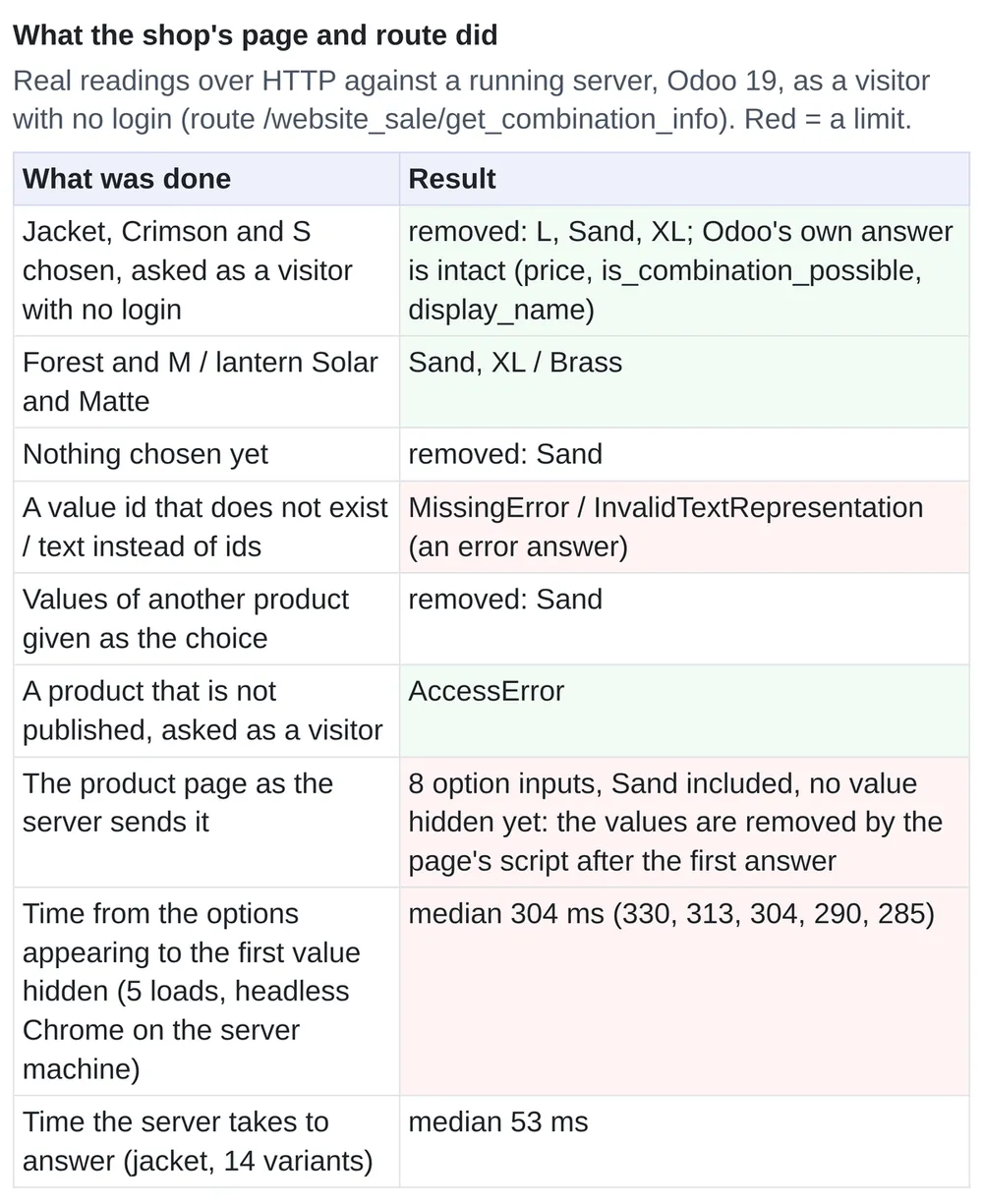
is how long the full list of values stays on screen after the page loads, before the app removes the unavailable ones (median of 5 loads)
Free stock
is what the sold-out rule reads: one left in an open cart still counts as in stock
On a product with several attributes, Odoo lets the shopper pick a colour and then shows the sizes that do not exist in that colour greyed out, still on the page. A size that exists but is sold out is not marked at all. Hide Unavailable Variants removes those values from the shop's product page: a value goes when no variant a shopper can buy has it together with the values chosen above it. You switch it on for a whole website or for single products, and you can count sold-out variants as unavailable. This page walks through it with screenshots of an Odoo 19 database holding a made-up shop (Alder Creek Outfitters), and with tables rendered from real readings of the same run; each picture says which it is.
This app changes what the shopper is offered, not what you sell. A shopper who has chosen Crimson never sees that size L does not exist in Crimson: the size is simply not there. It reads free stock only, and the options are on screen for about 0.3 s before the app removes them.
Install it and you get two switches in Website, Configuration, Settings (eCommerce) and a choice on the Sales tab of each product. It needs only the Odoo eCommerce (website_sale) app; the sold-out rule also needs eCommerce Inventory (website_sale_stock).
How it works
What it keeps, what it changes, what it does not
Each line was tested or read in the code.
1 What the shopper sees
Use it when shoppers pick a colour and then find sizes that are greyed out or do not exist.Changes the page
Odoo keeps values that cannot be bought on the page, greyed out, and shows sold-out ones as if they were fine.
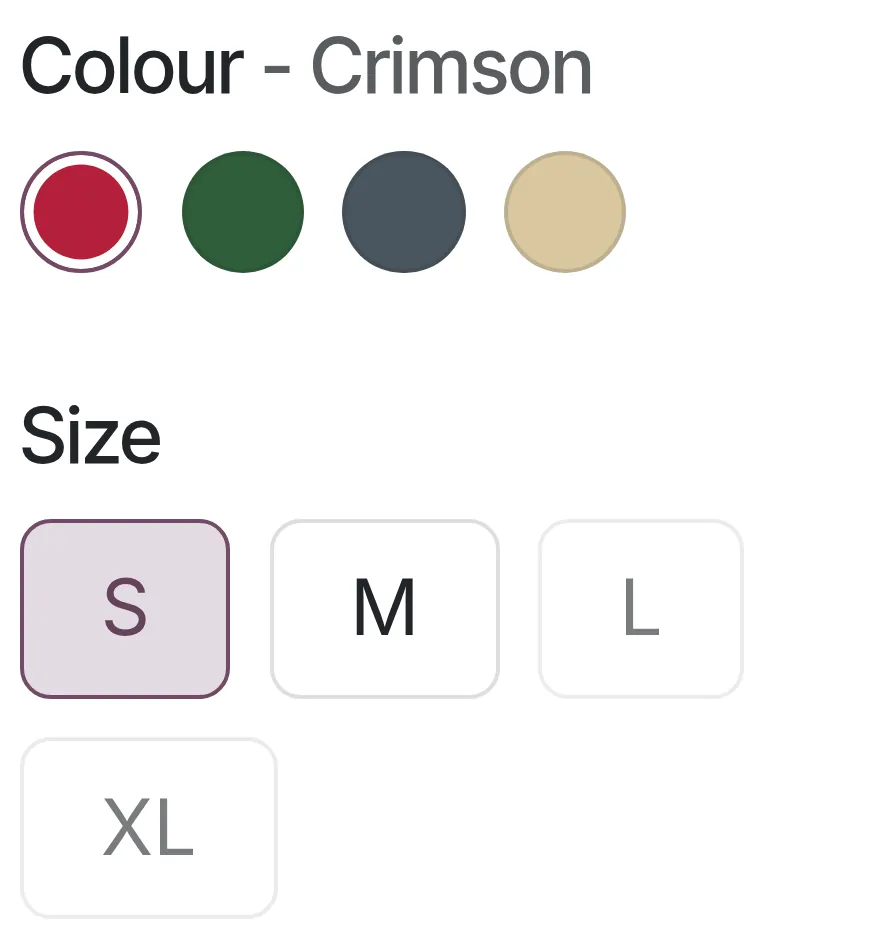
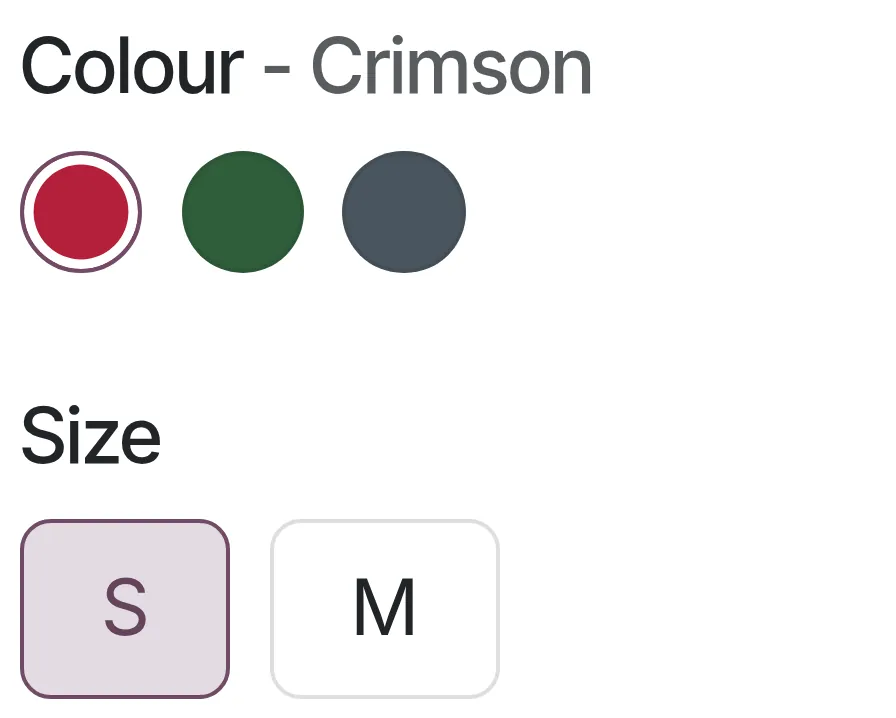
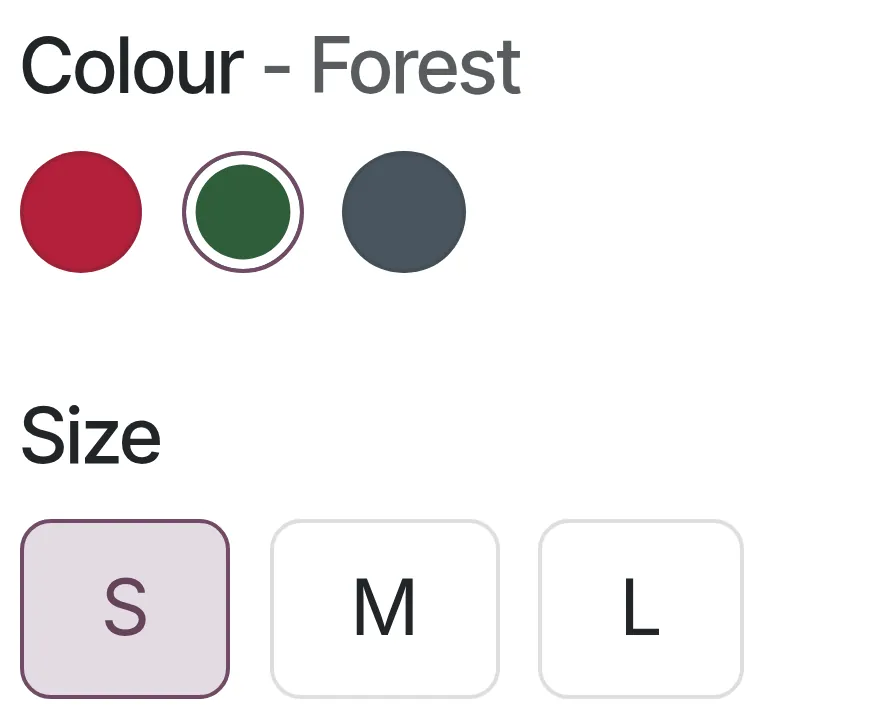
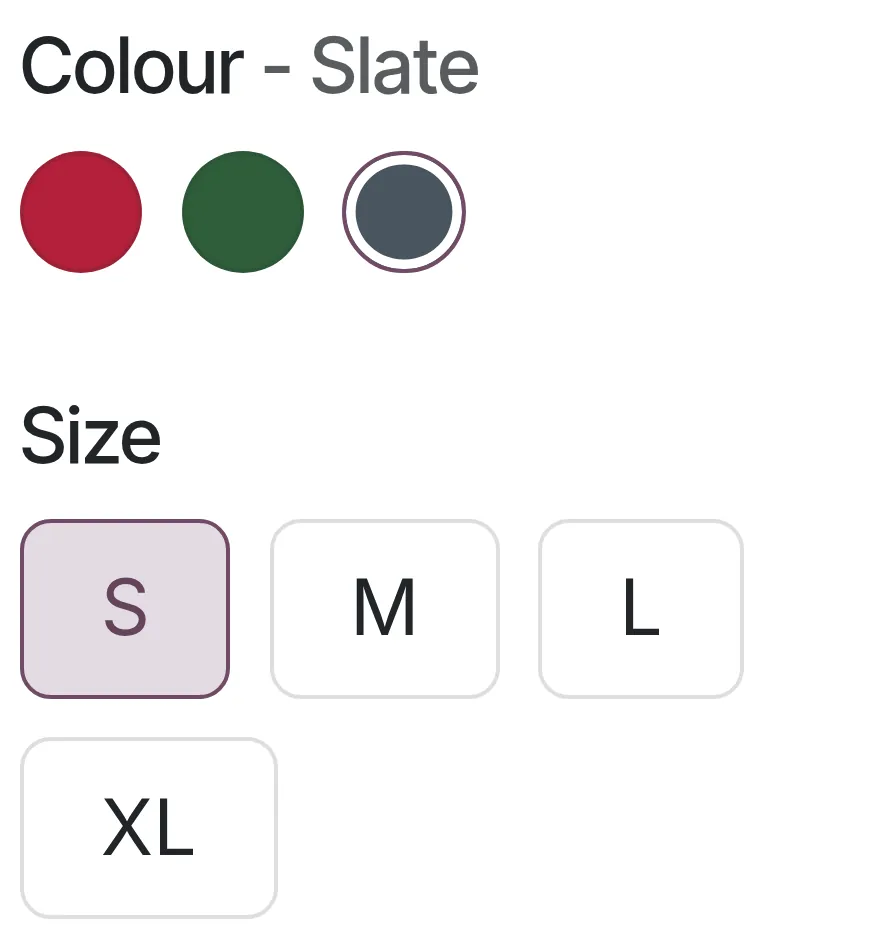
The pictures are the colour and size part of one product page, Ridgeline Rain Jacket, with Crimson chosen. Crimson is not made in L and XL, every Sand jacket and the Forest XL are sold out, the rest have stock. First Odoo's default (the product set to show values greyed out): four colours, and L and XL greyed. Then with the app on: Sand, L and XL are gone. Then Forest and Slate chosen: the sizes that exist in that colour come back, and Sand stays gone because nothing in Sand can be bought.
It does not strike values out: the values that stay keep Odoo's own grey-out. The pictures are the colour and size part only, cropped; the rest of the page is Odoo's.
Odoo's default: Sand is offered although sold out; L and XL are greyed but still on the page. Real Odoo screen (Odoo 19, visitor view).
With the app on: Sand, L and XL are gone. Real Odoo screen.
Forest chosen: L is back, XL is gone because it is sold out. Real Odoo screen.
Slate chosen: all four sizes are back, Sand stays gone. Real Odoo screen.
2 The value you picked stays
Use it when a shopper lands on, or moves to, a combination that cannot be bought.Read-only
A page that removes the value a shopper is looking at would be unusable.
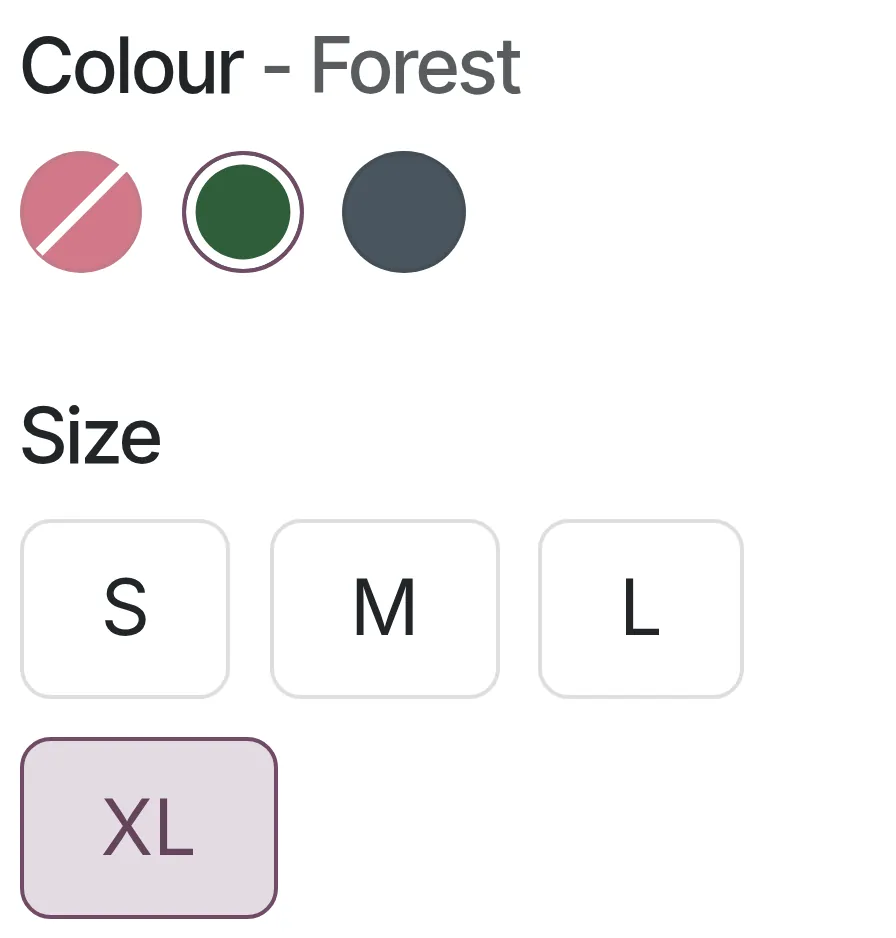
The value that is selected is never removed, even when that combination cannot be bought. Here Slate, then XL, then Forest were clicked: Forest XL is sold out, so XL stays because it is selected and Odoo greys the Crimson swatch, which has no XL. The other sizes stay too. A value that conflicts only with a choice made below it stays visible and greyed, so the shopper can always move on and is never trapped.
It does not pick an in-stock variant as the default selection; the default is Odoo's.
Forest and XL chosen (XL is sold out in Forest): XL stays, Crimson is greyed by Odoo. Real Odoo screen.
3 Which variants count as buyable
Use it when you want to know exactly which values go for each choice.Read-only
A rule you cannot predict is a rule you cannot trust.
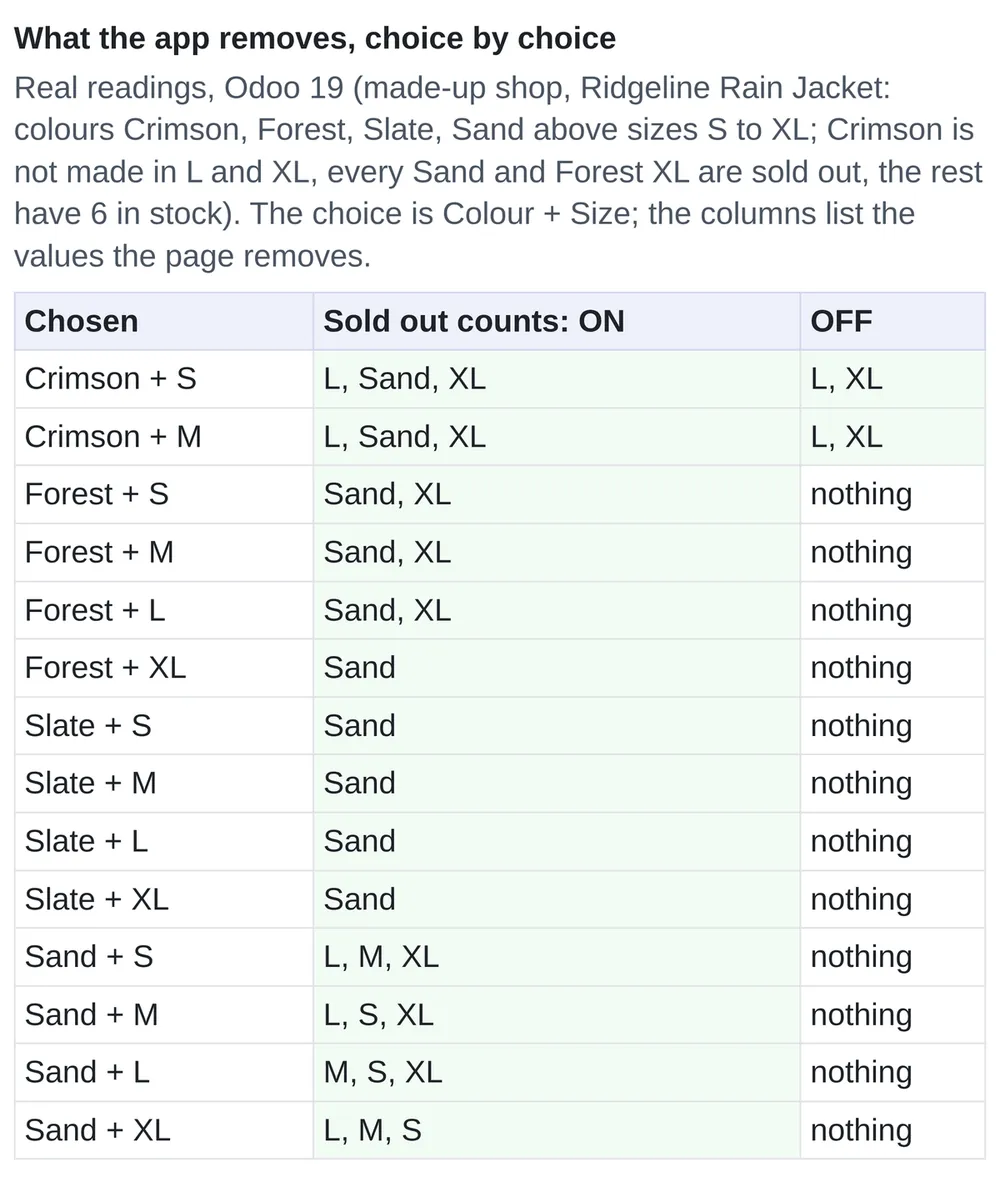
The table is every buyable choice of colour and size on the jacket and the values the page removes for it, with the sold-out rule on and off. Variants that were never created, archived variants, combinations blocked by an attribute exclusion and a value taken off the product count as not buyable (a test for each). With the rule off, only Crimson L and XL go. With it on, Sand and Forest XL go too.
Hiding follows the page order: a value is only removed for choices made above it.
What was removed for each choice. Evidence table from real readings.
4 Sold out counts too
Use it when you do not want shoppers to choose sizes that are sold out.Reads free stock
A sold-out variant looks like any other until the shopper has chosen it.
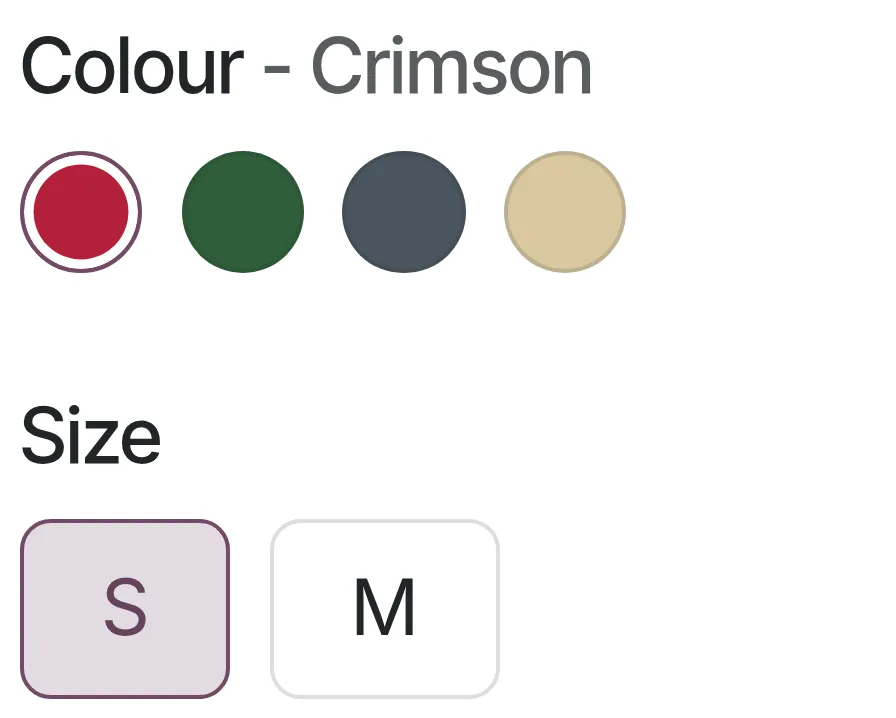
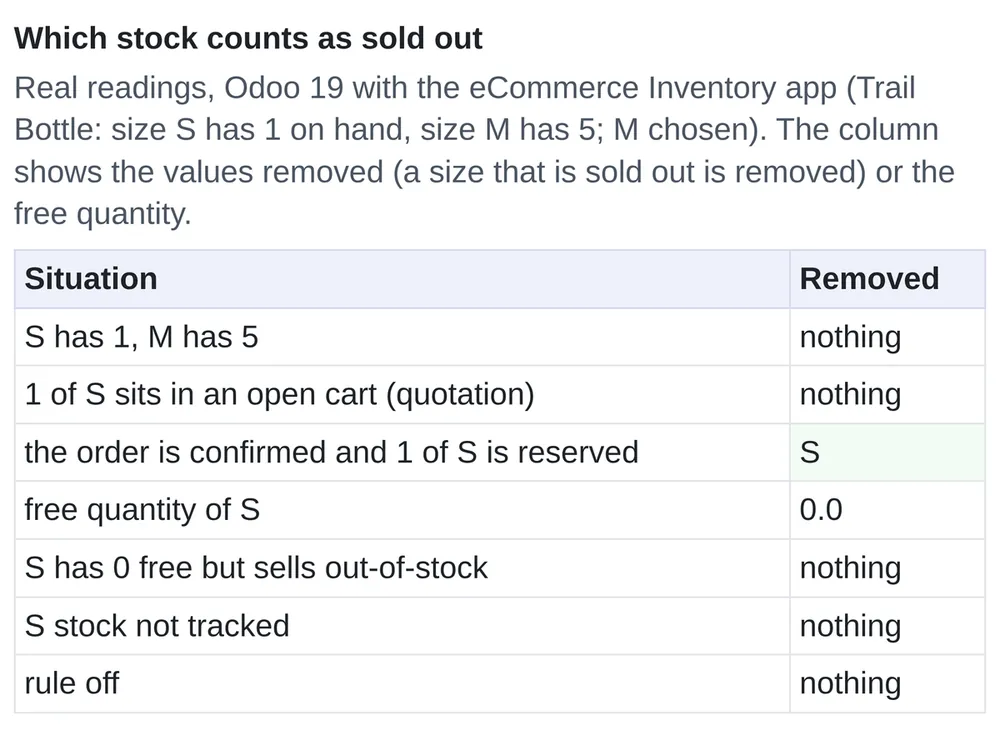
With "Sold out counts as unavailable" on, a storable variant with free quantity of 0 or less in the website's warehouse, and no permission to sell out of stock, is treated like one that does not exist. Products that allow out-of-stock orders, and products whose stock is not tracked, are never treated as sold out. Without the eCommerce Inventory app only variants that do not exist are removed. The picture is the same page with the rule off: Sand is back, L and XL (not made) are still gone. The table shows which stock counts: one left in an open quotation still counts as in stock; once the order is confirmed and the unit reserved, it does not.
It reads free stock only: what is in a shopper's cart or an open quotation is not subtracted.
The sold-out rule off: Sand is offered again. Real Odoo screen.
Which stock counts. Evidence table.
5 Dropdowns, radio buttons, pills and swatches
Use it when your attributes are shown as dropdowns, radio buttons, pills, colour swatches or image swatches.Changes the page
Each display type is its own piece of page, and a hiding rule that works on one can miss another.
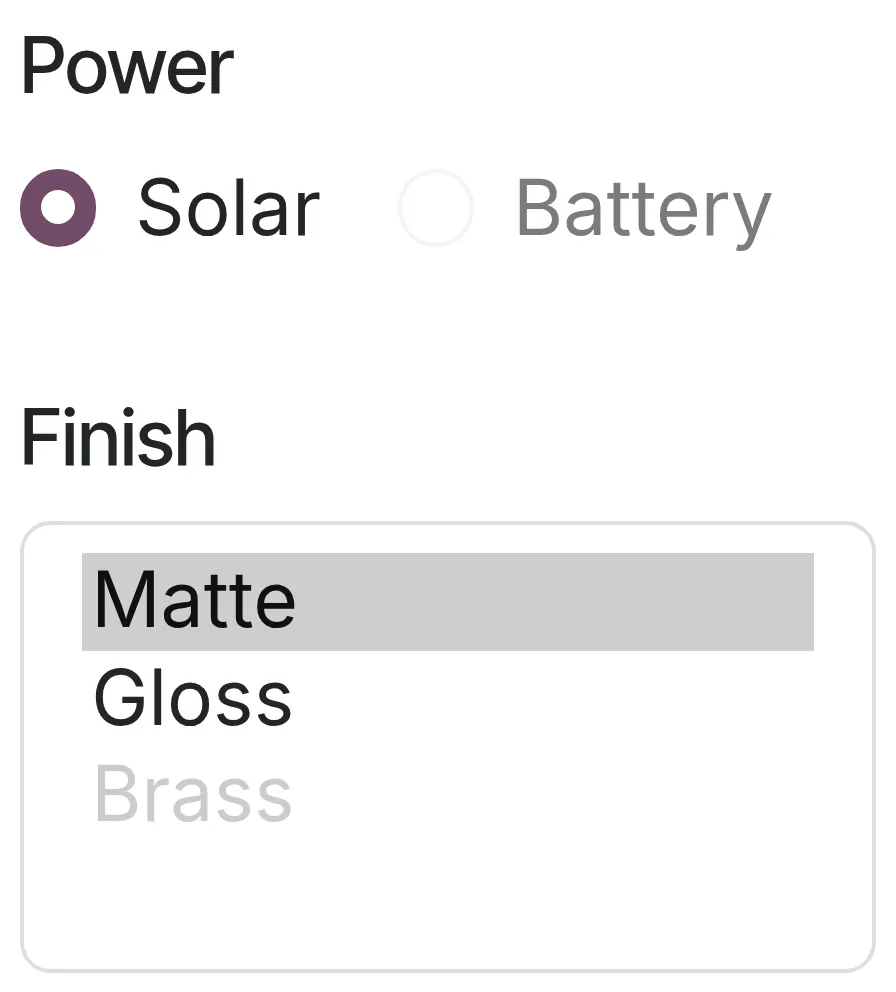
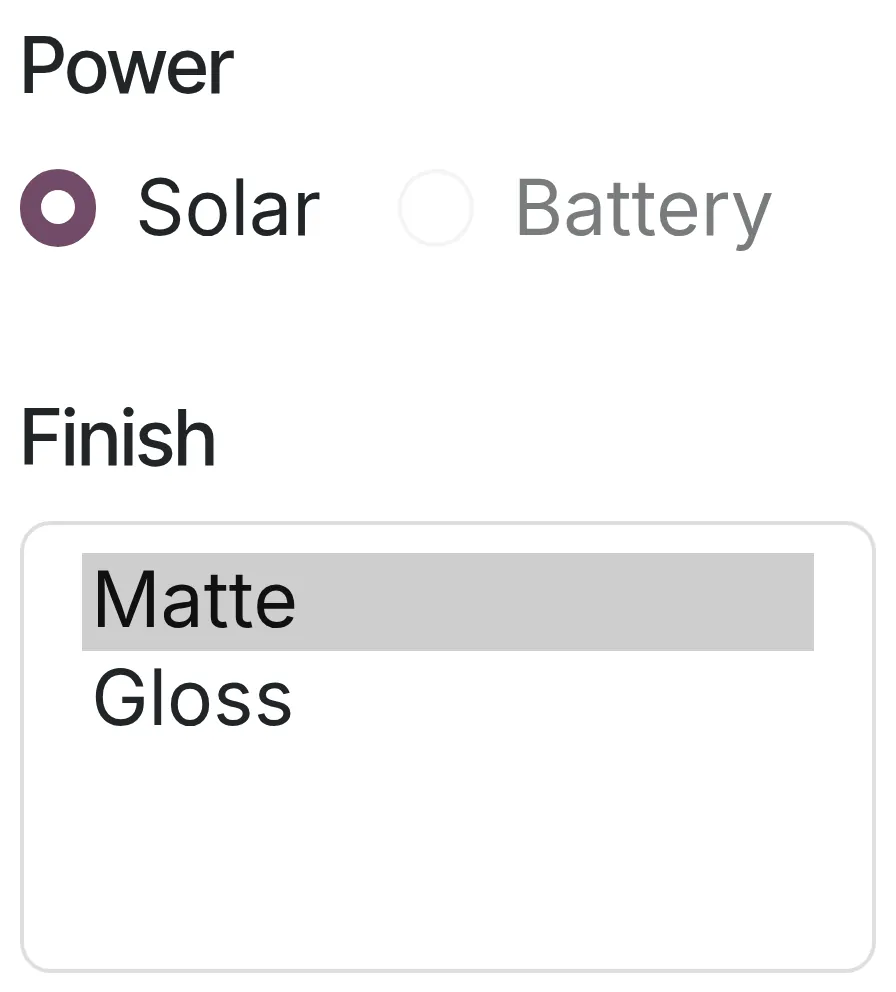
The app handles dropdowns (the option is hidden and disabled), radio buttons, pills, colour swatches and image swatches. Browser tours add the product to the cart and check the variant that arrives: a lantern with a dropdown and radio buttons (with the optional-product window), a jacket with swatches and pills, a lamp with image swatches and a never-create attribute. The pictures are the Basecamp Lantern with Solar and the Matte finish chosen, shown first as Odoo does and then with the app on. The dropdown is drawn open as a list (its size set to 4) because a real dropdown cannot be captured: the options in it are the real ones.
Battery stays visible, greyed by Odoo, because it conflicts only with the finish chosen below it.
Odoo's default: Brass, which Solar does not come in, is greyed in the list. Real Odoo screen, dropdown drawn open.
With the app on: Brass is gone from the list. Real Odoo screen, dropdown drawn open.
6 Switch it on: website or product
Use it when you want it on for the whole shop, or only for the products with a matrix.Writes the switch
Hiding values on every product at once is not always what you want.
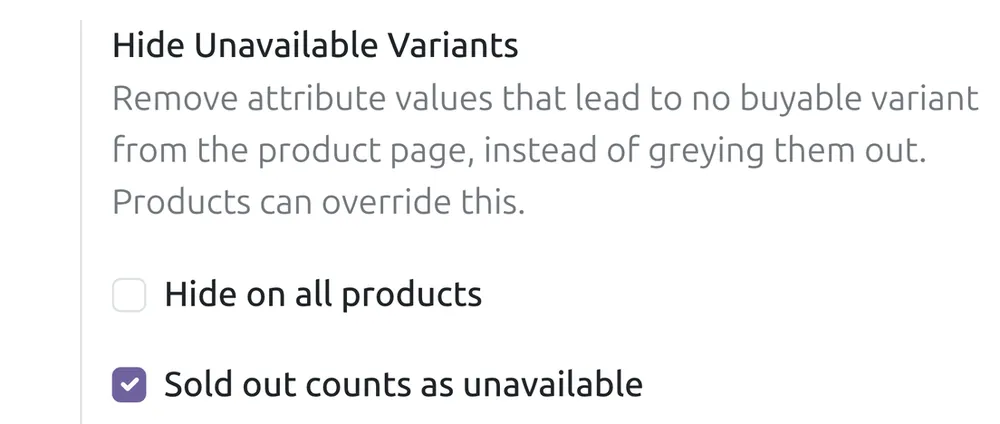
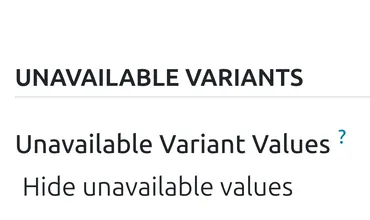
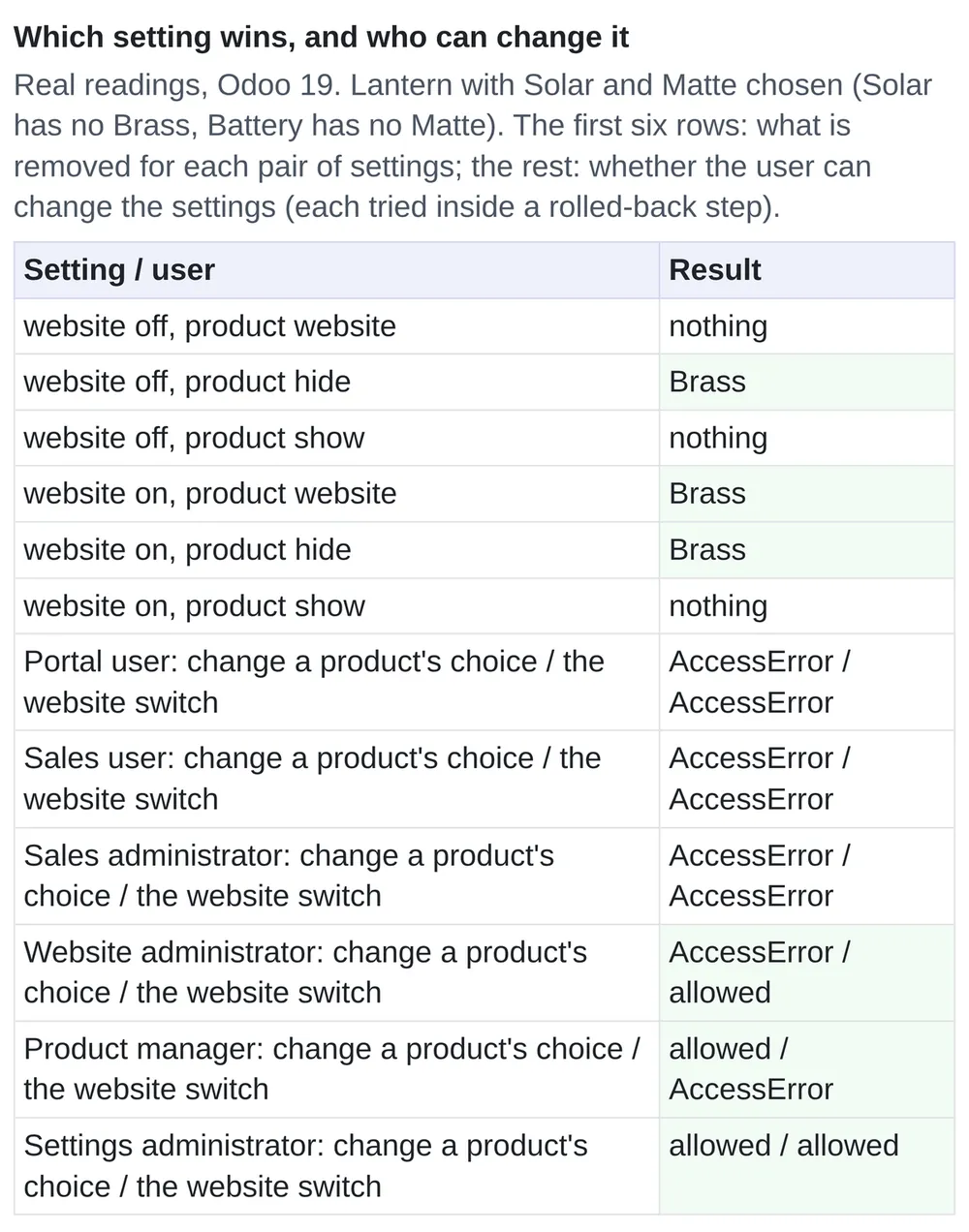
Website, Configuration, Settings, eCommerce has "Hide on all products" and "Sold out counts as unavailable"; each website has its own. The Sales tab of the product form has a choice per product: follow the website, hide, or show greyed out (Odoo's default). The product's choice wins over the website's in both directions, and everything is off until you switch it on. The pictures are the settings block (with one product set to hide and the website switch off) and the product's group. The table shows what each pair of settings did and who may change them: a Settings administrator both; a Product manager the product's choice; a Website administrator the website switch; a Sales user and a Sales administrator neither.
There is no switch per attribute.
The website switches. Real Odoo screen, the block cropped out of the settings page.
The product's choice on the Sales tab. Real Odoo screen.
Which setting wins, and who can change it. Evidence table.
7 Order of the attributes and what is left alone
Use it when you want to know how the attribute order and the kinds of attribute change the result.Read-only
The same data gives a different page if the attribute order changes.
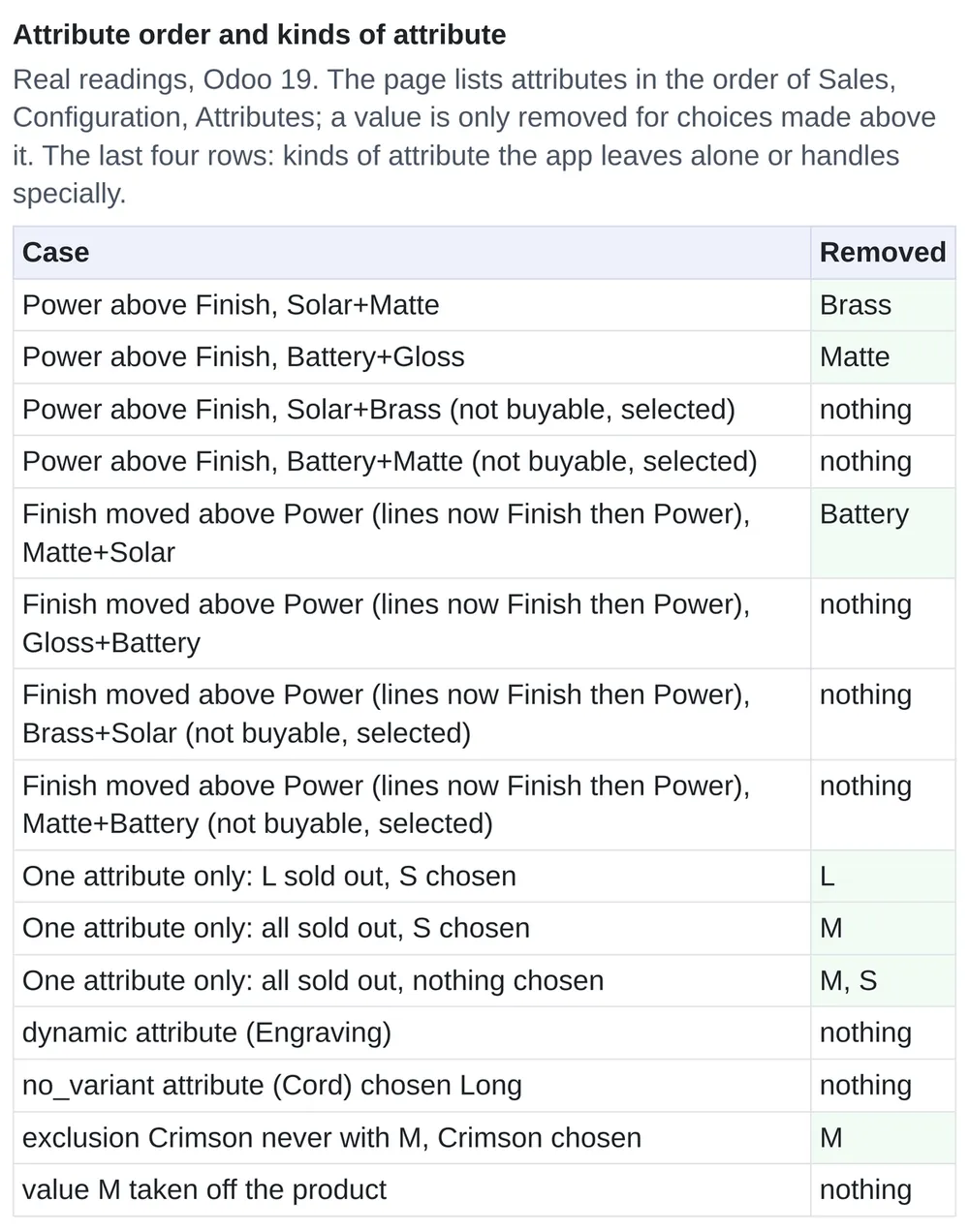
Attributes are read in the order the page lists them: the sequence of the attribute lines on the product, then the order of the attributes. Moving Finish above Power changed the value removed for Matte and Solar from Brass to Battery. A value is only removed for choices made above it, so a value that conflicts only with a choice below stays. Products with a dynamic-variant attribute are left to Odoo (their variants may not exist yet), and an attribute set to never create variants is neither hidden nor a constraint. An attribute exclusion counts. The table is real readings of these cases, plus a product with one attribute only.
When every variant of a product is sold out and nothing is chosen, every value is removed; with one value chosen only that one stays.
Attribute order and kinds of attribute. Evidence table.
8 Speed and the 500-variant limit
Use it when you sell products with big size and colour matrices.Read-only
The app looks at every variant on every click, so a very large matrix costs time.
One calculation per change of selection. The first table is the server time for products with three attributes from 12 to 600 variants on Odoo 19; at more than 500 active variants the app does nothing and Odoo's normal grey-out stays. The second table is real readings over HTTP as a visitor with no login: what the route answers, that Odoo's own answer is intact, that an unpublished product still answers with Odoo's access error, that the options are in the page the server sends and are removed by the page's script, and how long that takes.
Odoo 19 measured 433 ms per choice at 500 variants; Odoo 20 measured 52 ms. Treat a product near the limit as slow on 19.
Server time per choice. Evidence table (Odoo 19, test machine).
What the shop's page and route did. Evidence table.
9 Checked against a brute force
Use it when you want to know the logic is right before you rely on it.Read-only
A hiding rule is only as good as its logic over the real variants.
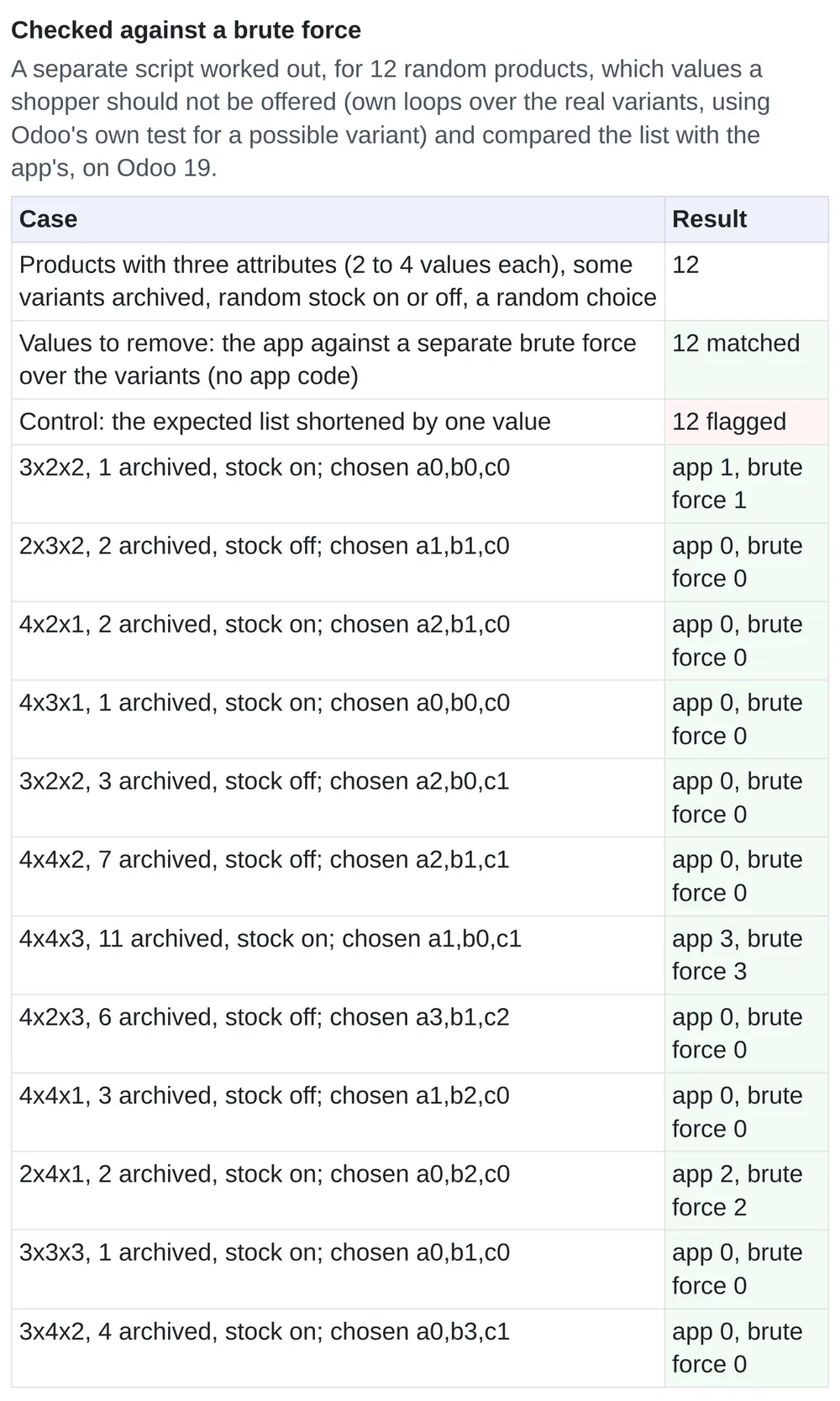
A separate script made 12 random products (three attributes of 2 to 4 values, some variants archived, random stock, the stock rule on or off, a random choice) and worked out the values to remove with its own loops over the real variants and Odoo's own test for a possible variant, no module code. All 12 matched the app. As a control the same check with the expected list shortened by one value flagged all 12.
What was checked. Evidence table (Odoo 19).
What changed in this version
Version 19.0.1.0.2 changes no behaviour of the app. It adds 6 automated tests that pin the limits above, replaces the screenshots, the icon and the banner, and rewords the description: the earlier text said "Community or Enterprise", which this version does not claim, and it now lists the limits tested. The demo video and the YouTube card are those of an earlier version and were not re-recorded or checked against the new text.
What it does not do
- Each of these was reproduced in a run of the app on Odoo 19; none is fixed in this version. The ones that can be pinned are pinned by a test that passes.
Requirements
- Odoo 19.0 or 20.0. The App Store sells each version separately, so buy the one that matches your database.
- Odoo.sh or On-Premise only. Third-party apps cannot be installed on Odoo Online (SaaS) databases. Check your hosting before buying.
- Module
mh_website_hide_variants, version 19.0.1.0.3, licensed OPL-1.