Invoice Salesperson Check
Invoice salesperson check: posted customer invoices credited to OdooBot, a user with no sales role, or not the order's or the customer's salesperson. Read only.
Request a live demo · Odoo.sh or On-Premise only, not Odoo Online (SaaS).
Free
App Store price, per Odoo version
19 · 20
Odoo versions, each sold on its own page
Odoo.sh
or On-Premise; not Odoo Online (SaaS)
1.0.1
version of mh_invoice_salesperson_check
Commission, sales targets and "My Invoices" all follow the Salesperson on the customer invoice. Odoo fills that field by itself when an invoice is made by hand: the customer's salesperson, else whoever is logged in, else the user who created it (OdooBot, for an invoice made by an automated action). It is also editable after posting. Nothing then compares it with the sales order or the customer, so a bookkeeper or OdooBot can end up credited with an invoice and nobody sees it. This is the screen that does. Odoo 19 and 20 Community and Enterprise.
How it works
What it does
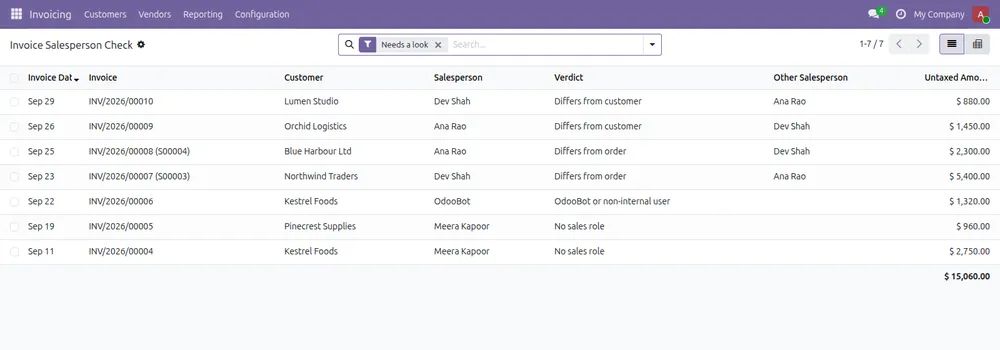
Adds Accounting > Customers > Invoice Salesperson Check. One row for each posted customer invoice or credit note: invoice date, invoice, customer, salesperson, a verdict, the other salesperson it disagrees with, and the untaxed amount in company currency. It opens on the rows that need a look, grouped by verdict; switch to the pivot for the untaxed amount at stake per verdict, filter by invoice date, document type, salesperson or customer, and click a row to open the invoice.
It reads the invoices as they are and stores nothing, so setting the salesperson right on the invoice removes the row.
The verdicts
Each row gets the first verdict that applies, in this order.
No salesperson. The invoice has none.
OdooBot or non-internal user. The salesperson is OdooBot, or a portal or public user.
No sales role. An internal user who holds none of the Sales access groups (Own Documents Only, All Documents, Administrator). A Sales Administrator counts as having the role, because it is implied. This is a guess from access groups: a salesperson who is not set up in the Sales app looks the same as a bookkeeper.
Differs from order. The invoice was made from a sales order and the order has a different salesperson. The other salesperson column shows the order's. An order with no salesperson is not a difference. A credit note made from an invoice keeps its order, so it is compared with the order too.
Differs from customer. The invoice was not made from an order and the customer (or the customer's company) has a different salesperson set. An order's salesperson may legitimately differ from the customer's, so this check is skipped for invoices that have an order.
OK. None of the above.
Screenshots
What it does not do
- It does not change anything. It does not reassign a salesperson, and it does not decide which of two salespeople is right. A difference is a prompt to look, not proof of a mistake.
- It does not calculate commission or targets. It only shows whose name is on the invoice and how much untaxed value sits behind each verdict.
- It keeps no history. It reads the salesperson as it is now. It does not show who changed it or when, and once it is corrected the row says OK.
- It only reads posted customer invoices and credit notes. Drafts, cancelled invoices, vendor bills and sales receipts are not listed.
- It does not read Sales Teams. "No sales role" looks at access groups only. If an invoice covers orders of two salespeople and none matches, the lowest user id is shown as the other salesperson.
Requirements
- Odoo 19.0 or 20.0. The App Store sells each version separately, so buy the one that matches your database.
- Odoo.sh or On-Premise only. Third-party apps cannot be installed on Odoo Online (SaaS) databases. Check your hosting before buying.
- Odoo 19 or 20, Community or Enterprise, with Sales (it compares with the order). Third-party apps install on Odoo.sh or On-Premise only - they cannot be installed on Odoo Online (SaaS). Billing and read-only accounting users can open it; in a multi-company database each user sees only the companies they are logged in to.
- Module
mh_invoice_salesperson_check, version 19.0.1.0.1, licensed OPL-1.