Lapsed Customers
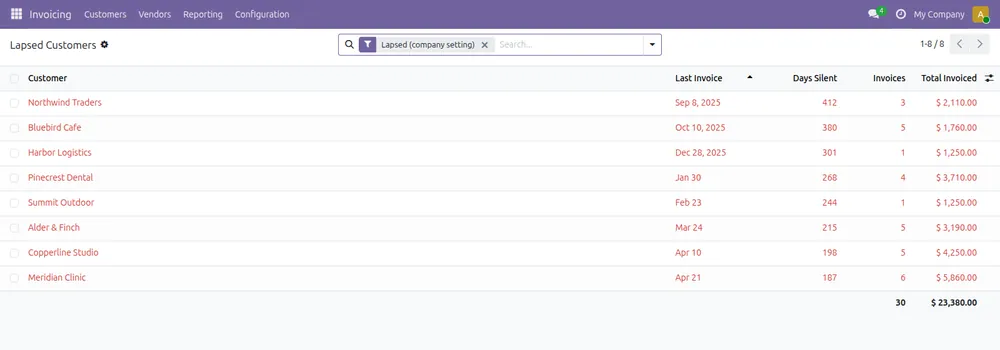
Lapsed customers report: last invoice date and days since the last invoice for every customer, filter customers silent for N days
Request a live demo · Odoo.sh or On-Premise only, not Odoo Online (SaaS).
Free
App Store price, per Odoo version
19 · 20
Odoo versions, each sold on its own page
Odoo.sh
or On-Premise; not Odoo Online (SaaS)
1.0.1
version of mh_lapsed_customers
How it works
What it does
Odoo does not keep a "last invoice date" on the customer. To find the customers who stopped buying you have to open invoices, group by customer and read dates by eye, because a grouped list cannot show a latest date. This adds one list under Invoicing > Reporting > Partner Reports > Lapsed Customers.
One line per customer
Each customer with at least one posted customer invoice gets a line: the date of the last invoice, how many days ago that was, how many invoices and the total invoiced in your company currency. The oldest silence is on top. Contacts and delivery addresses roll up to their company, so a buyer's invoices count towards the company they work for.
Silent for more than N days
The list opens on the "Lapsed (company setting)" filter. The number of days is set per company, 180 by default, on the company form (Settings > Companies). Ready-made filters for 90 and 365 days are included, and any other number works with a custom filter on Days Silent. The days are worked out when you open the list, so the report is never out of date. Export works like any Odoo list.
Several companies
Each company is reported separately and judged against its own threshold. Users only see the companies they are allowed into.
Screenshots
What it does not do
- It does not score, tag or segment customers, and it does not build mailing lists. It only lists them.
- It counts posted customer invoices only. Credit notes, draft and cancelled invoices, vendor bills and receipts are ignored, so a customer whose invoices were all credited still appears with their original total. A customer who only buys at the Point of Sale without an invoice, or who only has a sales order, does not appear.
- It does not change anything: no fields are added to the customer form and nothing is stored.
Requirements
- Odoo 19.0 or 20.0. The App Store sells each version separately, so buy the one that matches your database.
- Odoo.sh or On-Premise only. Third-party apps cannot be installed on Odoo Online (SaaS) databases. Check your hosting before buying.
- Odoo 19 and 20, Community or Enterprise. Needs only Invoicing (account). Users need the Billing or Read-only accounting right. Third-party apps install on Odoo.sh or On-Premise only - they cannot be installed on Odoo Online (SaaS).
- Module
mh_lapsed_customers, version 19.0.1.0.1, licensed OPL-1.