Matomo Analytics
Matomo analytics on the Odoo website, with eCommerce tracking of product views, cart updates and orders. Loads only after cookie consent
Request a live demo · Odoo.sh or On-Premise only, not Odoo Online (SaaS).
Free
App Store price, per Odoo version
19 · 20
Odoo versions, each sold on its own page
Odoo.sh
or On-Premise; not Odoo Online (SaaS)
1.0.2
version of mh_matomo_analytics
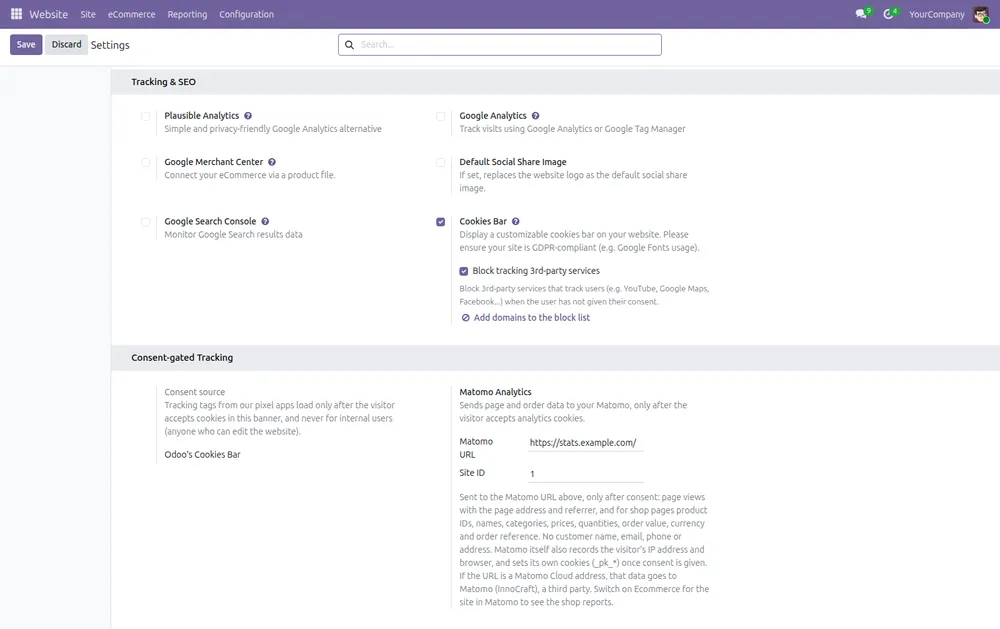
Enter your Matomo URL and site ID in Website settings and your Odoo website reports to Matomo: page views, and for the shop the product views, cart updates and orders with their value. Nothing is requested from Matomo, and no Matomo cookie is set, until the visitor accepts analytics cookies.
How it works
What is sent to your Matomo
Page views with the page address and referrer. For shop events, the product ID, name, eCommerce category, price and quantity, the cart or order value, and the order reference on completed orders. Names, emails, phone numbers and addresses are never sent. Matomo itself also records what any tracker records from a browser, such as the visitor's IP address and browser, and sets its own cookies (_pk_*) once consent is given. If your Matomo URL is a Matomo Cloud address, that data goes to Matomo (InnoCraft), a third party; with your own server it stays with you. A short version of this is shown next to the setting in Website settings.
Shop tracking
A product page reports a product view (setEcommerceView). Each add to cart sends the whole cart, every line with its quantity, because Matomo replaces the cart on every update. The first checkout page sends the cart again. The order confirmation page sends the order (trackEcommerceOrder) with the order reference, total, subtotal, tax and shipping, once per order in each browser. The product ID sent is Odoo's product variant ID. Switch on Ecommerce for the site in Matomo to see the reports.
Consent and exclusions
Built on our free Website Tracking Base, which is installed with it. The Matomo script waits for analytics consent from Odoo's Cookies Bar ("Allow all") or from our free Cookie Consent Banner (the Analytics box). Marketing consent alone does not load it. With neither banner switched on it never loads. It never loads for internal users, so your own visits and the website editor are not tracked.
Who it is for
Odoo websites and shops that want Matomo, self-hosted or Matomo Cloud, for privacy-friendly analytics, without pasting tracking code into the website by hand or loading anything before consent.
Screenshots
What it does not do
- It has no cookieless mode: without analytics consent it does nothing, so a visitor who declines is not counted at all. It does not use Matomo's server-side tracking API, so it cannot report orders from visitors who decline cookies or use a blocker. Quantity changes and removals made on the cart page are not sent when they happen (the cart is sent again when checkout starts), and it does not report refunds, site search, goals, custom dimensions or Matomo Tag Manager. It does not install Matomo, create the site in it, or show Matomo reports inside Odoo. The Matomo URL must be https. One Matomo site per website. It is a technical control, not legal advice: what your cookie policy says remains yours to decide.
Requirements
- Odoo 19.0 or 20.0. The App Store sells each version separately, so buy the one that matches your database.
- Odoo.sh or On-Premise only. Third-party apps cannot be installed on Odoo Online (SaaS) databases. Check your hosting before buying.
- Odoo 19 and 20, Community or Enterprise, with the Website and eCommerce apps. Also requires Website Tracking Base (free), installed automatically. A Matomo you run yourself or a Matomo Cloud account. Third-party apps install on Odoo.sh or On-Premise only - they cannot be installed on Odoo Online (SaaS).
- Module
mh_matomo_analytics, version 19.0.1.0.2, licensed OPL-1.