Menu Visibility
Hide menus from the roles that do not need them, many menus and many groups at once, with a preview of what one person would be left seeing and a one-click way to put it all back
The video below shows Menu Visibility running on a real Odoo 19 database. Want it driven against your own data, or a question answered first? Ask and we will set up a session.
What it does
Change many menus and groups at once
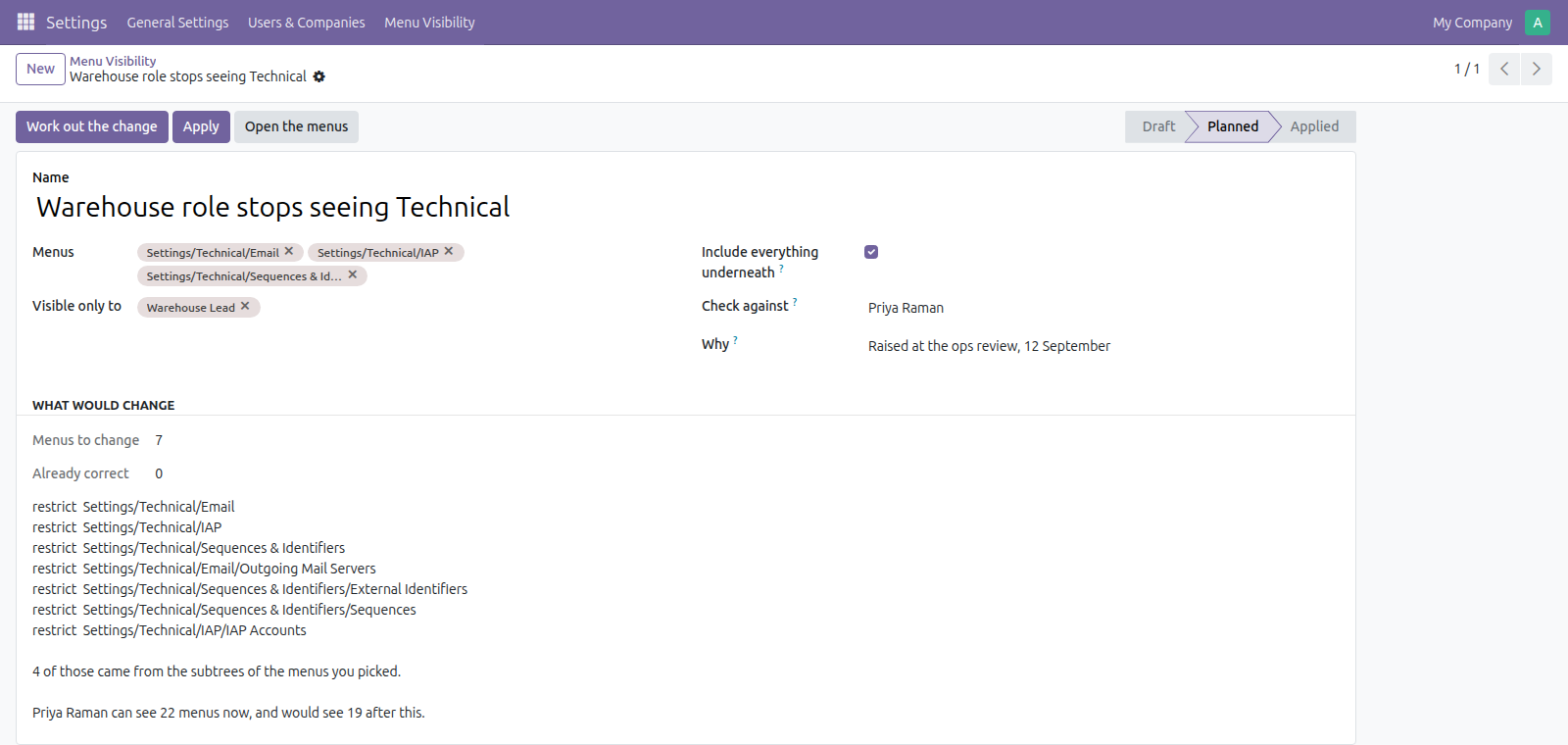
Choose many menus and many user roles in a single operation and include each menu's subtree when needed so you can hide whole branches together.
Preview impact on a real user
See how many menus a specific user can see now and how many they would see after the change, so you can judge the impact before you apply it.
Plan shows what will actually change
Produce a plan that lists the exact menu entries the operation would touch and gives counts of items it would change versus items already correct.
Apply, open or revert with one click
Apply the planned restrictions, open the affected menus after applying, or revert the change to restore previous access with a single action.
Keep a record of what changed and why
Each change keeps the plan it was applied from, a note saying who asked and when, and whether it is still in force, so the decision can be read back a year later.
What it does not do
It hides menus, it does not secure them. A hidden menu's action can still be reached by anyone who knows the URL, and the records behind it stay readable unless model access rights and record rules say otherwise. Those are the real controls, and there are separate apps here for both. Use this to take clutter away from a role, not to keep a determined user out.
A folder goes when its last visible entry does. Odoo only counts a menu visible if it, or something under it, carries an action the person may open. Restrict the last such entry and the folders above it disappear too. The plan measures that for a named user rather than guessing at it.
It does not hide buttons, tabs or fields. Fields are their own job and Field Access Rules does that one server-side. Buttons and tabs are not covered here at all.
Screenshots
Requirements
- Odoo 19.0, Community or Enterprise.
- Odoo.sh or On-Premise only. Third-party apps cannot be installed on Odoo Online (SaaS) databases — check your hosting before buying.
- Module
mh_menu_visibility, version 19.0.1.0.6, licensed OPL-1.
Related apps
Move Odoo attachments out of the filestore into a Google Drive folder, using Odoo 19 own cloud storage migration - Drive is the provider Odoo does not ship
Hide or lock any field for the groups you choose, on any model, enforced by the server and not just hidden in the form view
Write a record rule and see how many records it actually leaves a chosen user, counted for real before you save it