Models Without Access
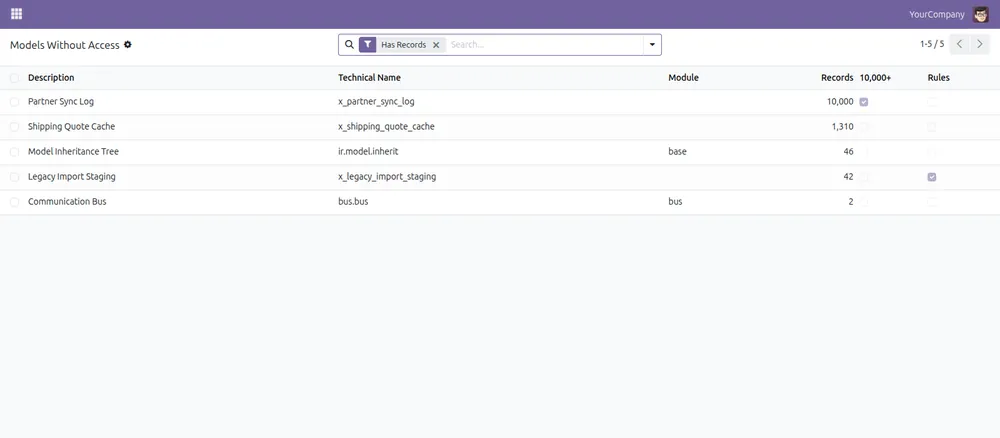
Models without access rights - every model no group can open, with its module, how many records it holds and whether it has record rules
Request a live demo · Odoo.sh or On-Premise only, not Odoo Online (SaaS).
Free
App Store price, per Odoo version
19 · 20
Odoo versions, each sold on its own page
Odoo.sh
or On-Premise; not Odoo Online (SaaS)
1.0.1
version of mh_models_without_access
A model with no access line is closed to everyone except the superuser, and Odoo says nothing about it. The only trace is a line in the server log when a module loads. This puts that list on a screen: Settings, Models Without Access.
How it works
What it does
One row per concrete model that no active access line opens to anyone. Each row shows the model, the module that created it, how many records it holds (archived ones included, counted up to 10,000) and whether it has a record rule. The list is built the moment an administrator opens the menu and reads the access lines as they are right then.
Start with the models that hold records
The Has Records filter is on by default, because a missing access line on an empty table hurts nobody. Switch to Empty to see the rest, filter to models with or without record rules, group by module, or search by name or technical name.
What no access means
On Odoo 19 a model is listed when it has no active access line granting read, write, create or delete. A line with no group is open to every user, so a model whose only line has no group is not listed. On Odoo 20, which keeps access in ir.access, a model is listed when it has no active line with a group: a line without a group only restricts, so a model with only that line is listed. Lines you archived are ignored on both, as Odoo ignores them. Abstract and transient models are left out.
Expect a long list
Most of what appears is internal plumbing that is closed on purpose, and a model reached only by code running as the superuser needs no line. The list tells you what is closed. It does not tell you what should be open.
Administrators only
The menu is for the Settings group, and building the list is refused for anyone else even if they can reach the model by another route. Nothing is changed in your database apart from the temporary rows that make up the list, which Odoo clears itself.
Screenshots
What it does not do
- It does not grant access to anything and does not judge whether a closed model is a mistake. It does not read record rules beyond saying whether one exists. It counts records up to 10,000 and says so when it stops there. It does not follow inherited models: a model that delegates to a parent also needs access to that parent, and this reads each model on its own. It keeps no history.
Requirements
- Odoo 19.0 or 20.0. The App Store sells each version separately, so buy the one that matches your database.
- Odoo.sh or On-Premise only. Third-party apps cannot be installed on Odoo Online (SaaS) databases. Check your hosting before buying.
- Odoo 19 or 20, Community or Enterprise. No other module is needed. Third-party apps install on Odoo.sh or On-Premise only - they cannot be installed on Odoo Online.
- Module
mh_models_without_access, version 19.0.1.0.1, licensed OPL-1.