Near-Threshold Orders
Purchase orders split below the approval limit - vendors whose orders each stay under the approval threshold but add up to more than it
Request a live demo · Odoo.sh or On-Premise only, not Odoo Online (SaaS).
Free
App Store price, per Odoo version
19 · 20
Odoo versions, each sold on its own page
Odoo.sh
or On-Premise; not Odoo Online (SaaS)
1.0.1
version of mh_near_threshold_orders
Odoo asks a manager to confirm a purchase order only when that one order reaches the approval amount. It never adds up what a vendor was bought from across several orders, so five orders of 1,900 against a 5,000 threshold pass without anyone looking, although together they come to 9,500. This report finds those vendors.
How it works
What it does
One button, Find Orders, under Purchase > Reporting > Near-Threshold Orders. For each vendor it takes the confirmed orders that are each under the approval threshold, adds up those confirmed within the window (7 days by default, you can change it) and lists every vendor where the sum reaches the threshold: how many orders, what they add up to, first and last confirmation. One click opens the orders themselves.
Where the threshold comes from
The company's own purchase approval amount, the one under Settings > Purchase > Purchase Order Approval. If two-step approval is switched off, type the amount you care about on the report. Order totals include taxes and are converted to the company currency at the order date, the way Odoo's own check does it. An order at or over the threshold is left out: it already needed a manager.
Reads only
Nothing is blocked, delayed, flagged or changed, and the native threshold is not touched. The list is built when you press the button and is not kept. Orders are read with your own access rights, so each company shows only its own orders.
Screenshots
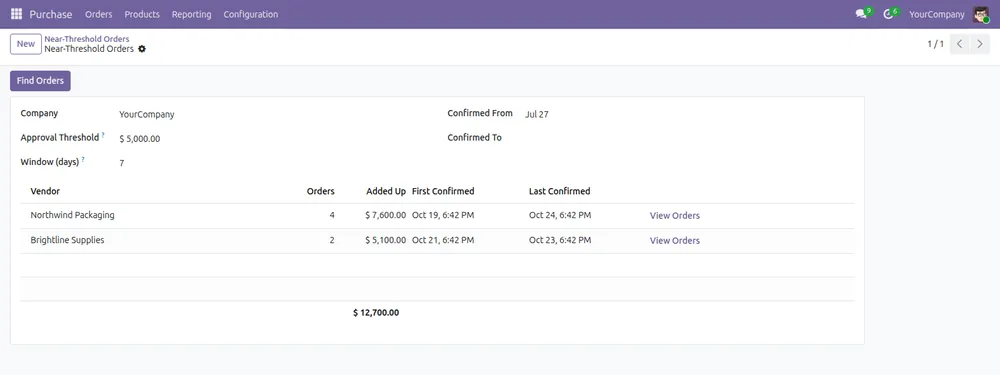
What it does not do
- It does not block or delay any order, add an approval limit or change Odoo's threshold. It does not say anyone split an order on purpose: weekly standing orders can add up innocently, so the report says added up, not split. It reads one company at a time and only confirmed orders, not drafts or cancelled ones. A window starts at each order, so overlapping windows of the same vendor can appear as separate rows, and a window already contained in a larger one is not repeated. It has no tiers, approvers or approval log: it only shows where a single threshold was never put to the test.
Requirements
- Odoo 19.0 or 20.0. The App Store sells each version separately, so buy the one that matches your database.
- Odoo.sh or On-Premise only. Third-party apps cannot be installed on Odoo Online (SaaS) databases. Check your hosting before buying.
- Odoo 19 or 20, Community or Enterprise, with Purchase. Opening the report needs the Purchase Manager right. Third-party apps install on Odoo.sh or On-Premise only - they cannot be installed on Odoo Online.
- Module
mh_near_threshold_orders, version 19.0.1.0.1, licensed OPL-1.