POS Cash Drawer Alert
Cash drawer limit alert in POS: warn the cashier when the cash in the drawer goes over a limit during the session, without blocking a sale
Request a live demo · Odoo.sh or On-Premise only, not Odoo Online (SaaS).
Free
App Store price, per Odoo version
19 · 20
Odoo versions, each sold on its own page
Odoo.sh
or On-Premise; not Odoo Online (SaaS)
1.0.1
version of mh_pos_cash_alert
Cash piles up in the drawer during a busy day. Odoo only compares the drawer with what it expects when the session is closed, so nobody is told at 3 pm that the till holds far more cash than it should. The one related setting Odoo has, Authorized Difference, limits the gap at closing, not the cash held during the session.
How it works
What it does
You set a limit per Point of Sale. When a payment, a refund or a cash in/out takes the cash in the drawer over that limit, the cashier sees a warning on the till with the amount in the drawer and the limit. It never blocks a sale.
What counts as cash in the drawer
Opening cash of the session, plus the cash payments of paid orders, minus cash refunds, plus Cash In and minus Cash Out, for the current session of that Point of Sale. Change given back is netted off: a 30 sale paid with a 100 note adds 30, not 100. Orders still in draft, card and other non-cash payments, cancelled orders and other sessions are not counted. It is the figure Odoo shows as the theoretical closing balance, live instead of at closing.
Two tills
Odoo does not let two Points of Sale share one cash payment method, so each till has its own cash method, its own session and its own limit, and counts only its own drawer. Two devices on the same till (same session) share one drawer: an order sold on another device counts once it has synced to the server and this till checks again (after its next payment or cash in/out). On Odoo 20, Odoo allows one cash payment method per Point of Sale; on Odoo 19 a Point of Sale with several cash methods counts all of them as one drawer.
Who it is for
Shops and restaurants that take a lot of cash and want the till emptied before the drawer holds more than the owner is comfortable with.
Screenshots
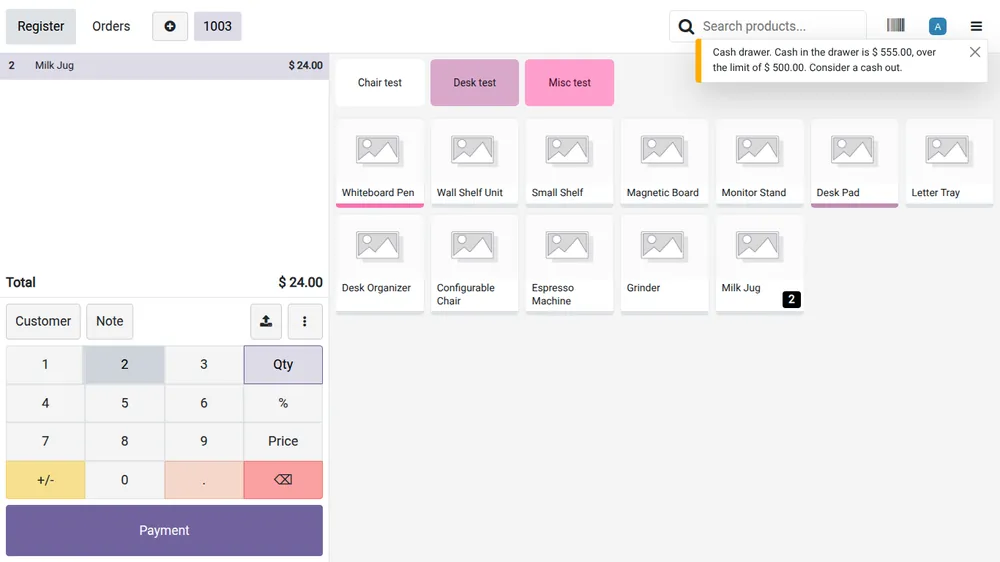
Requirements
- Odoo 19.0 or 20.0. The App Store sells each version separately, so buy the one that matches your database.
- Odoo.sh or On-Premise only. Third-party apps cannot be installed on Odoo Online (SaaS) databases. Check your hosting before buying.
- Odoo 19 and 20, Community or Enterprise. Depends only on Point of Sale (point_of_sale). Third-party apps install on Odoo.sh or On-Premise only - they cannot be installed on Odoo Online (SaaS).
- Module
mh_pos_cash_alert, version 19.0.1.0.1, licensed OPL-1.