POS Commission
Put a salesperson on every Point of Sale order line, pay commission by salesperson, product or category, and settle it as one draft vendor bill per person
Request a live demo · Odoo.sh or On-Premise only, not Odoo Online (SaaS).
1
draft vendor bill per salesperson for each Settle run, addressed to the employee's work contact
44
tests in the run, none failing, including a browser test of the till
3,000
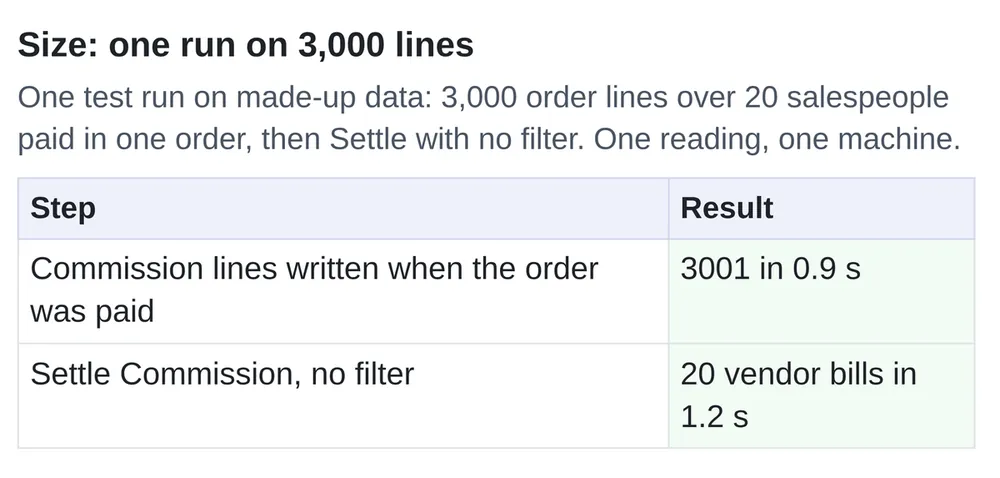
commission lines written in about a second and settled into 20 bills in about a second (one run, made-up data)
0
network calls, scheduled actions, or changes to prices, taxes and payments
0
commission lines that can be billed twice: a cancelled commission bill cannot be set back to draft, so Settle makes a new one (section 7)
Not
checked: Enterprise, Odoo.sh, other currencies, the Employee login screen, offline, uninstall (see Before you install)
Odoo's Point of Sale records who ran the register, not who sold each item. In a shop where one cashier rings up what three people sold, commission is worked out in a spreadsheet at month end. With this app each line carries its salesperson, a rule gives the rate, the commission is written when the order is paid, a refund takes it back, and a Settle run turns a period into vendor bills. This page walks through it with screenshots of a real cashier session on an Odoo 19 database holding a made-up garden centre, with readings taken from the database afterwards, and with the limits found when it was tested.
It writes amounts that end up on vendor bills, so this page also says what it changes, what it keeps, and what it does not check.
Install it and the Point of Sale menu gains a Commission entry with Commission Lines, Settle Commission, Settlements and Commission Rules. It needs Odoo's own Point of Sale, Point of Sale Employees (pos_hr) and Accounting (account).
How it works
1 Set the rates
Use it when you pay a different rate per person, product or category.Nothing written yet
A single shop-wide percentage is rarely what people are paid, and a spreadsheet of rates is checked by hand.
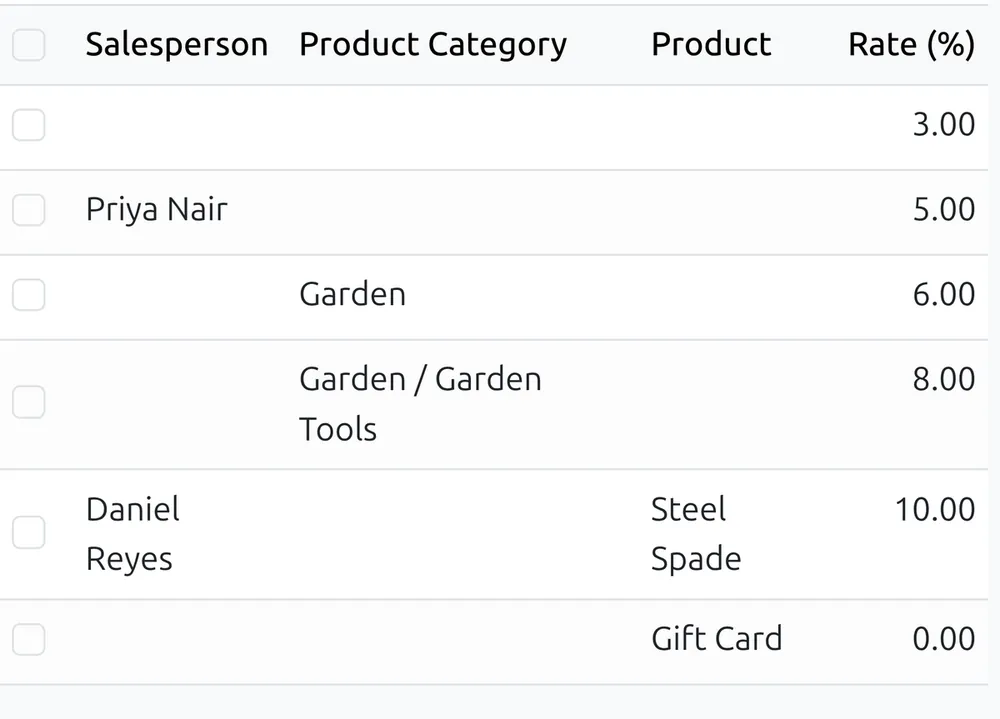
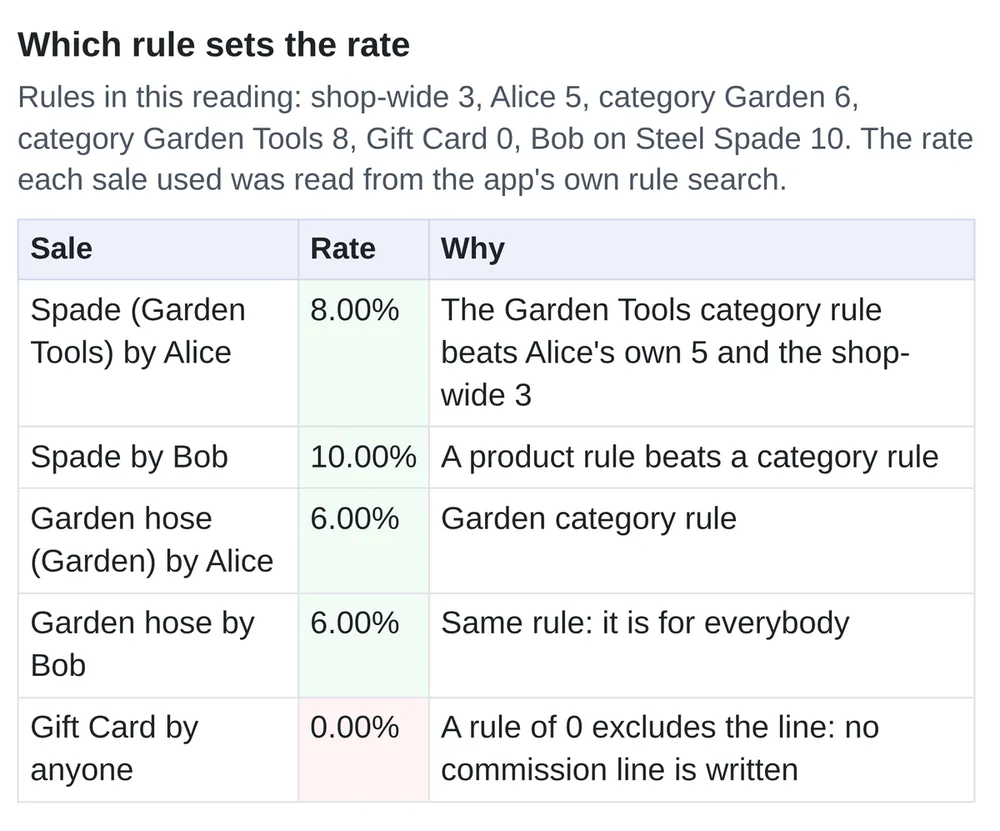
Open Point of Sale > Commission > Commission Rules. Each rule has an optional salesperson, an optional product category (sub-categories included) or an optional product, and a rate between 0 and 100. A blank salesperson means everybody; a blank category and product mean any. A rule names a product or a category, not both. The most specific rule wins: a product rule beats a category rule, a sub-category beats its parent, and a rule for the salesperson beats one for everybody. A rate of 0 excludes the matching lines. Archived rules are ignored. Rules belong to a company.
A rule is for a single product variant, not for a whole product template. A rule with a bigger salesperson match never beats a more specific product or category rule.
Six rules of the garden centre. A blank cell reads as everybody or any.
Which rule won for five sales, read from the app's own rule search. Generated from the test's readings, not a live screen.
2 A salesperson on every line at the till
Use it when one cashier rings up what several people sold.Writes on payment
Odoo records the cashier of the order, not the person who sold each item.
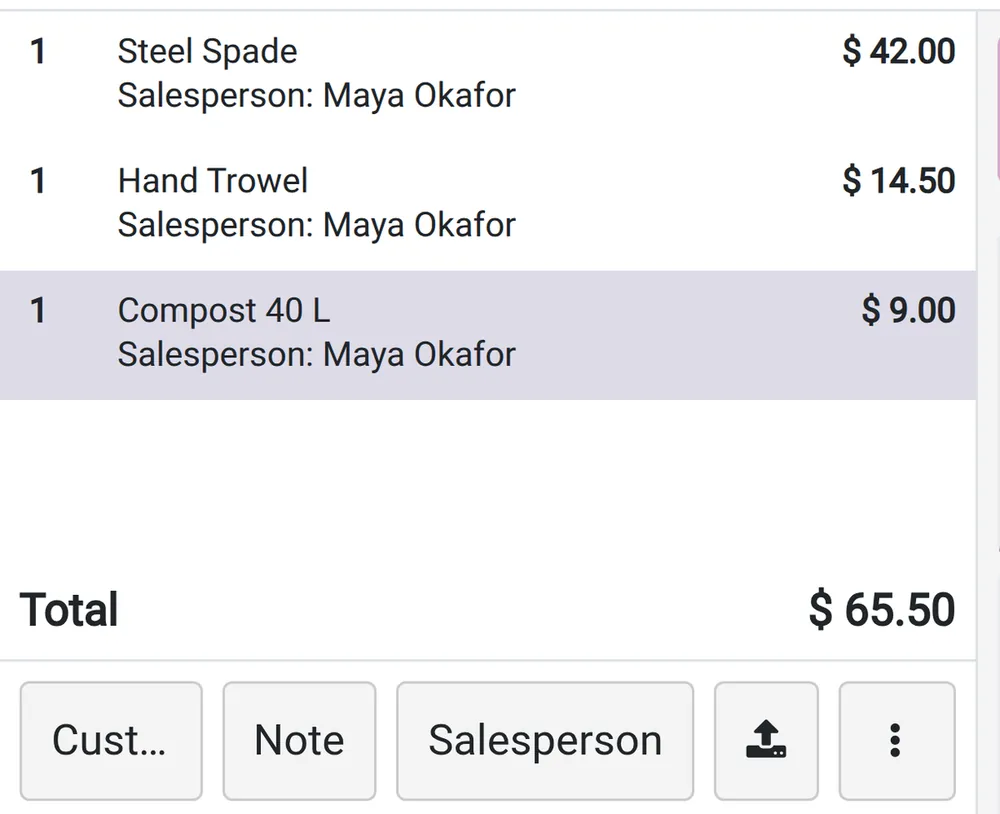
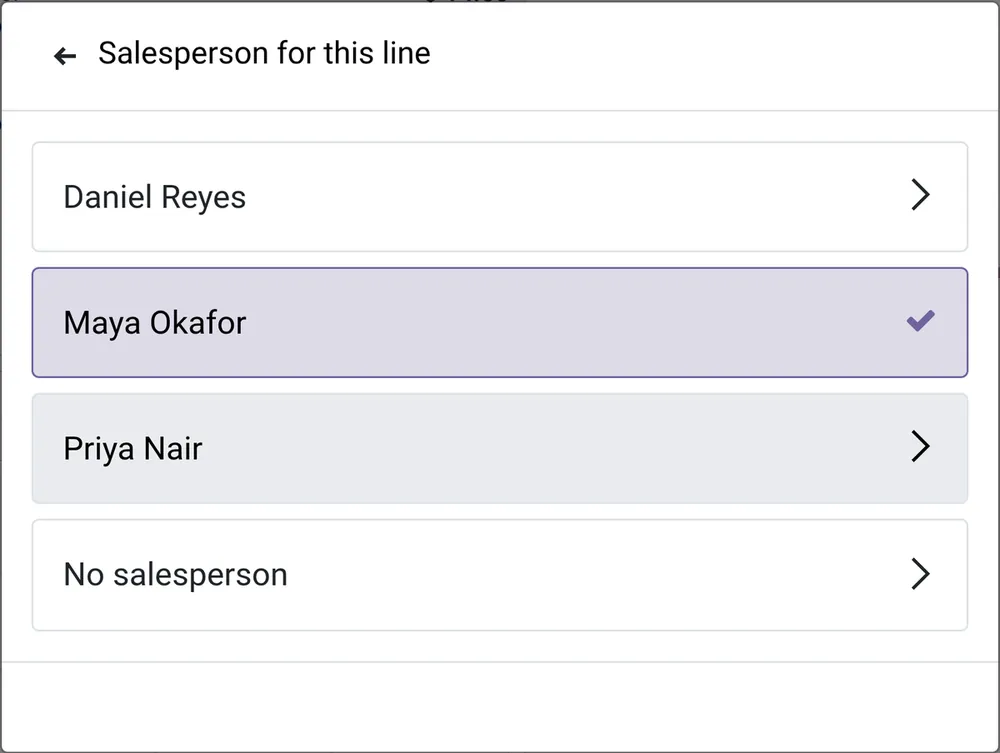
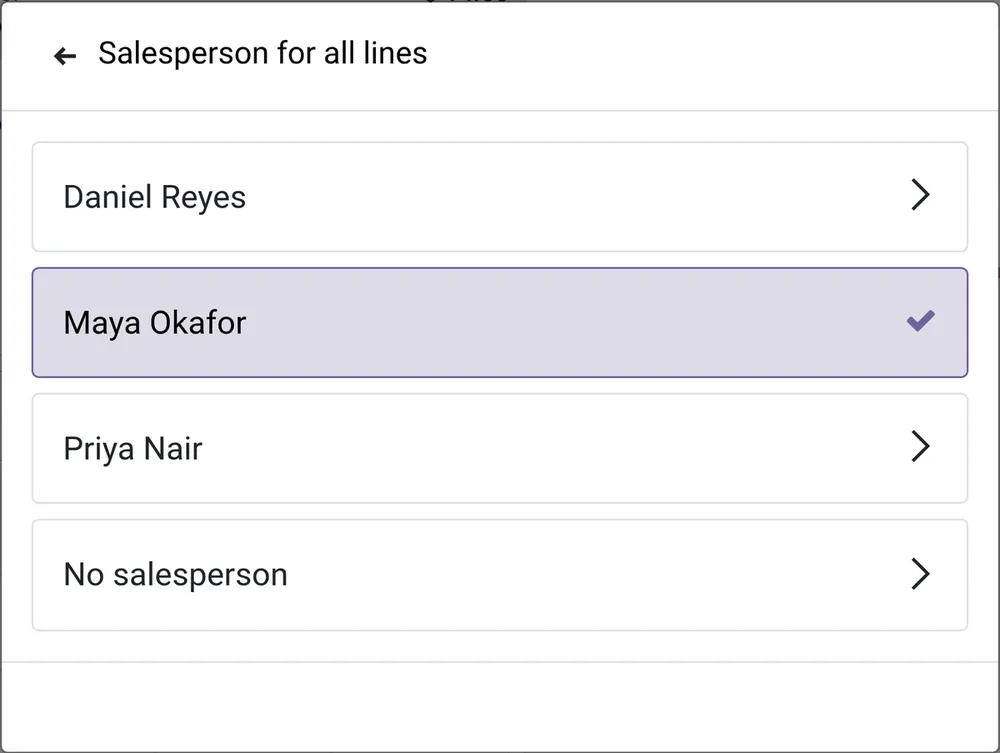
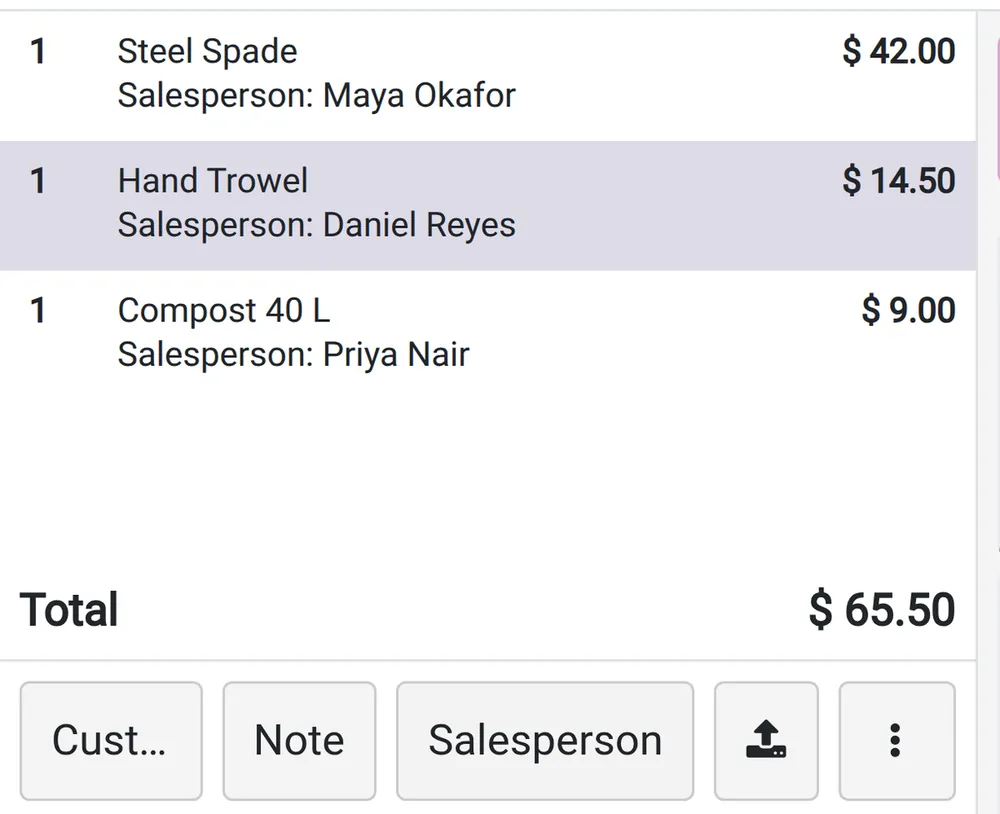
New lines default to the cashier. The Salesperson button sets the salesperson of the selected line; Salesperson for all lines (in the ⋮ menu) sets every line. The popup lists the employees the till has loaded and No salesperson , and ticks the current one. The salesperson shows under each line and on the printed receipt (the browser test checks it; no receipt screenshot is shown here). In the real session the order went out with three salespeople: Maya Okafor on the spade, Daniel Reyes on the trowel, Priya Nair on the compost.
On Odoo 19 the till offers every employee of the company unless the Point of Sale limits them under its employee access settings; on Odoo 20 it offers the employees assigned to the Point of Sale. Tested without the Employee login screen.
Three lines added by Maya Okafor: each defaults to the cashier.
The popup for one line.
The same popup from Salesperson for all lines.
After picking: three lines, three salespeople.
3 What is earned when the order is paid
Use it when the commission must be written once, at the rate in force that day.Writes on payment
A commission worked out at month end uses today's rates for yesterday's sales.
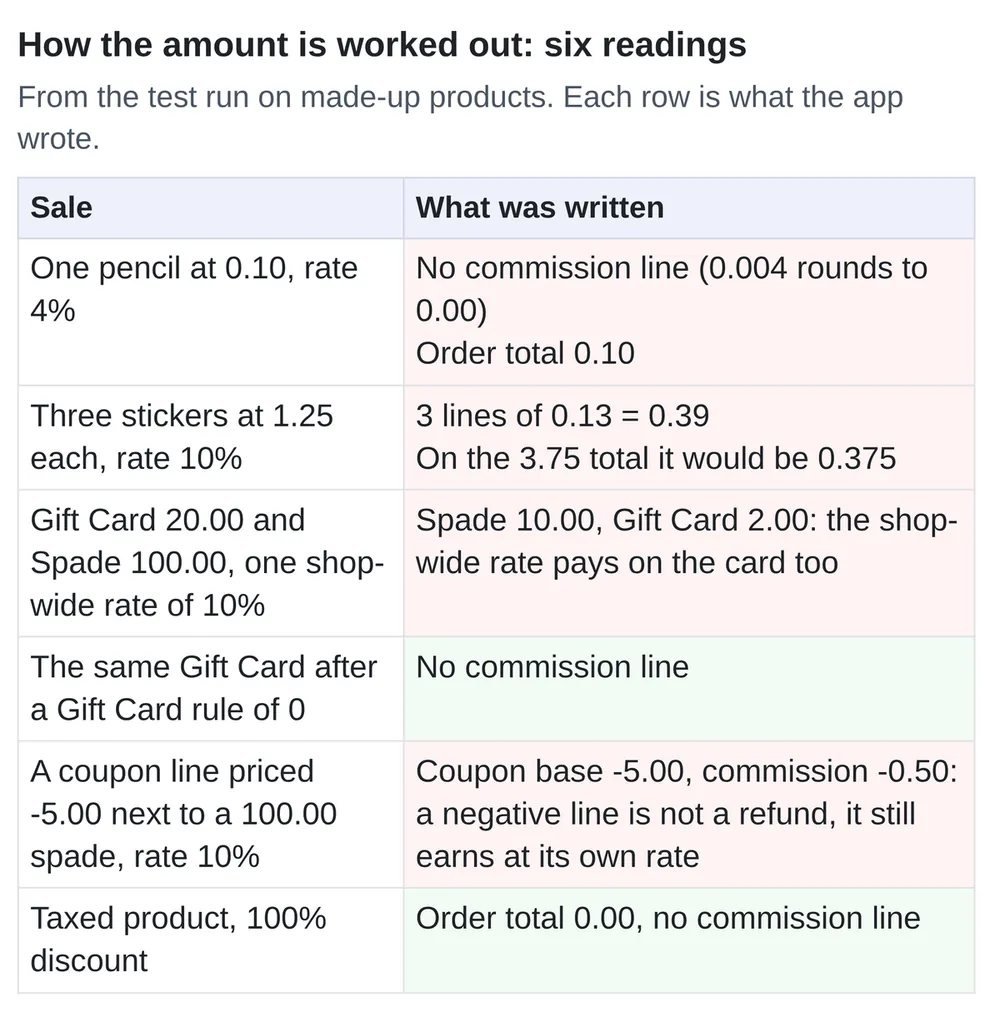
When an order is paid, every line with a salesperson and a matching rule earns a commission line: the untaxed amount after discount, converted to the company currency, times the rate, rounded to the currency. The rate and the rule are stored on the line, so changing a rule later does not rewrite what was earned. Paying again, or running the step twice, does not double a line (the database refuses a second line for one order line). A line with no rule, a rate of 0, a commission that rounds to nothing, or no salesperson earns nothing and writes no line. Lines nobody assigned go to the cashier's employee.
Rounding is per line, so small lines can add up differently from the order total, and a line under half a cent of commission is lost. The order total and the tax are not read; only each line's untaxed amount.
Six readings from the test run, rendered as a table. Generated from the test's readings on made-up records, not a live screen.
4 Refunds take it back
Use it when a returned item must not stay paid.Writes on payment
A refund that leaves the commission in place pays for a sale that did not stand.
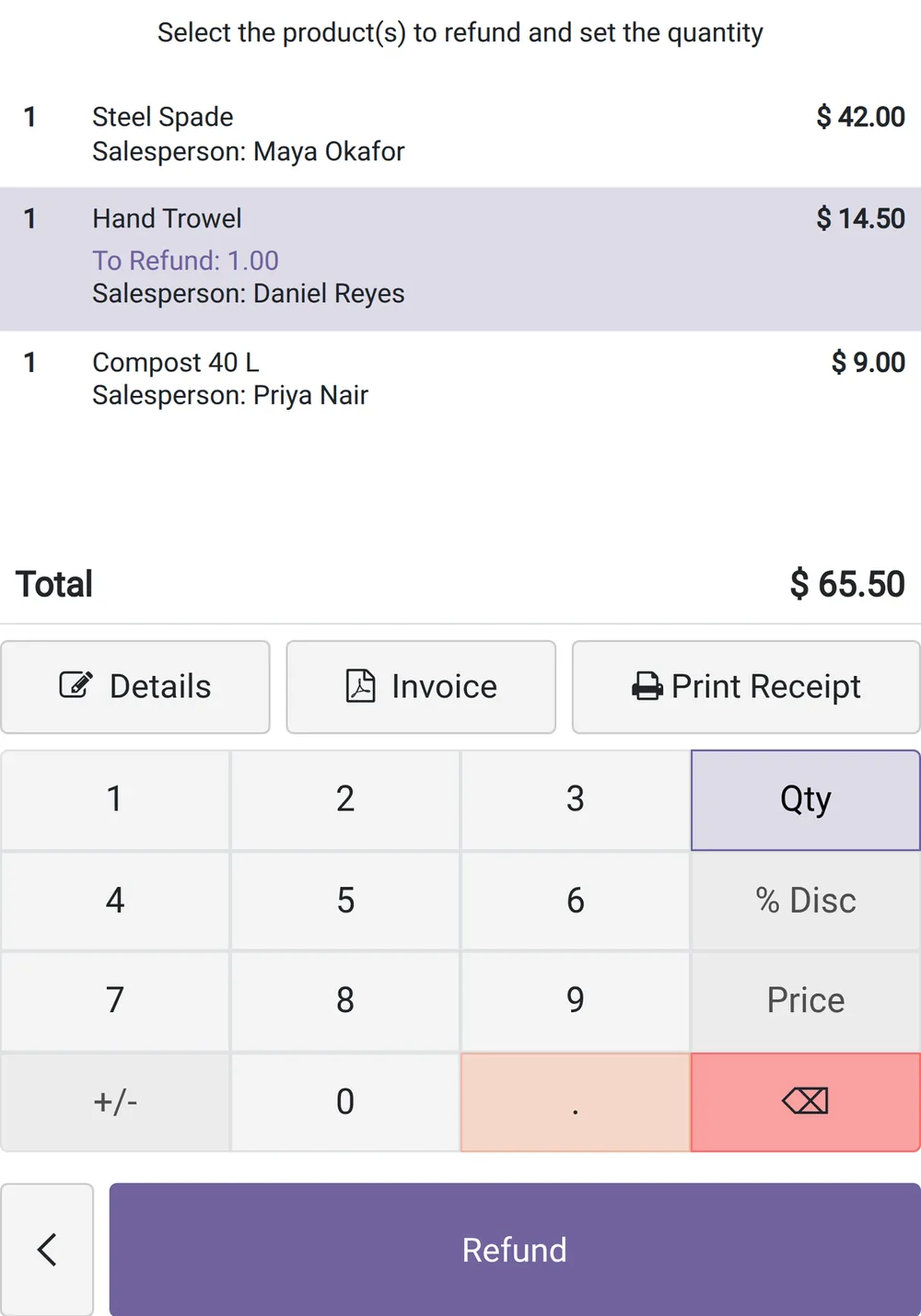
A refund adds a negative commission line for the person who sold the refunded line, at the rate the sale paid, pro rata for a partial refund. On the till a refund line takes the salesperson of the line it refunds. In the real session one Hand Trowel of the first order was refunded from the till's order list: the refund screen still shows Daniel Reyes on the line, and a line of -1.16 for Daniel Reyes appeared next to the +1.16 the sale had earned. A refund of a line that earned nothing earns nothing. A refund made from the order form in the back office (Return Products) was also tested and claws back the same way.
A sale made before the app was installed has no commission to take back. A negative line that is not a refund of a sold line (a discount product, for example) earns a negative commission at its own rate.
The till's refund screen with one Hand Trowel selected.
Commission Lines after the session: the refund is red, settled lines are grey. Columns hidden to fit; the real list also shows order, point of sale, category, base, rate and settlement.
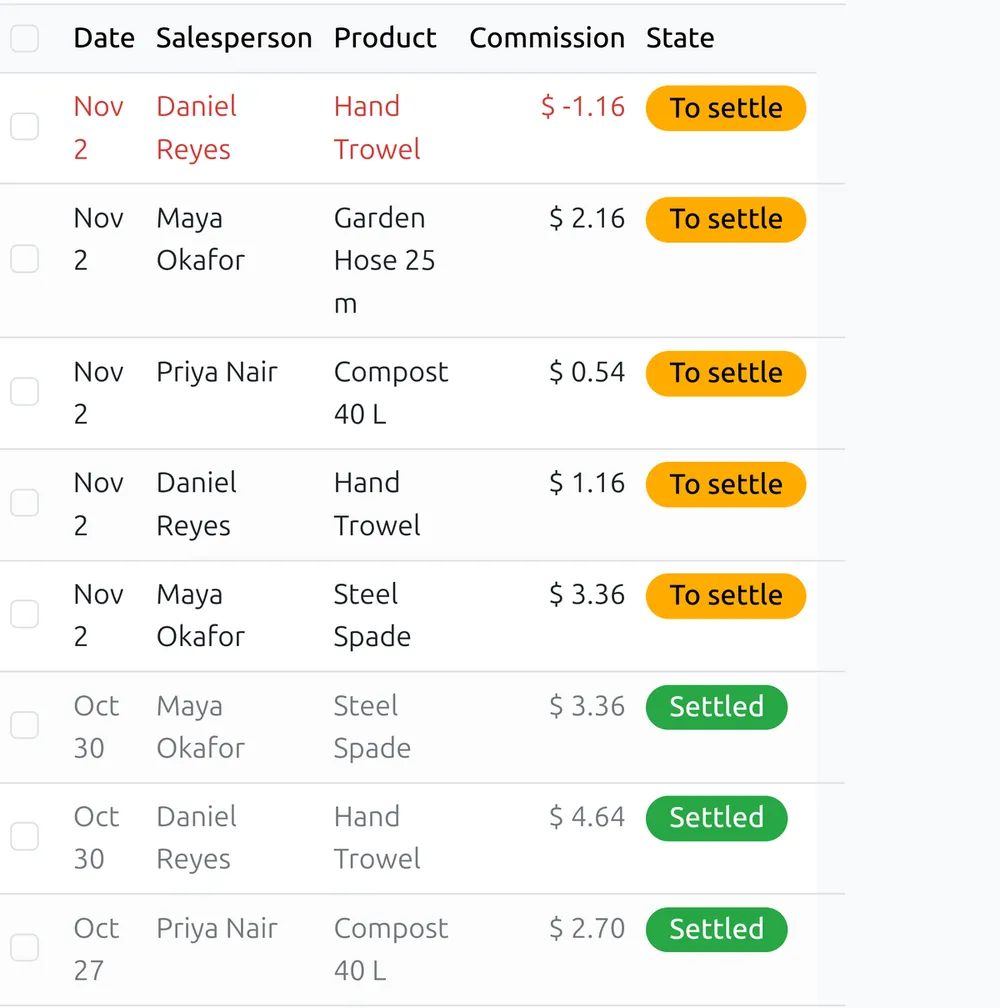
5 Settle: one draft vendor bill per person
Use it when payday: each person is paid once, for the lines not paid before.Writes bills
Paying commission from a list invites paying a line twice or forgetting one.
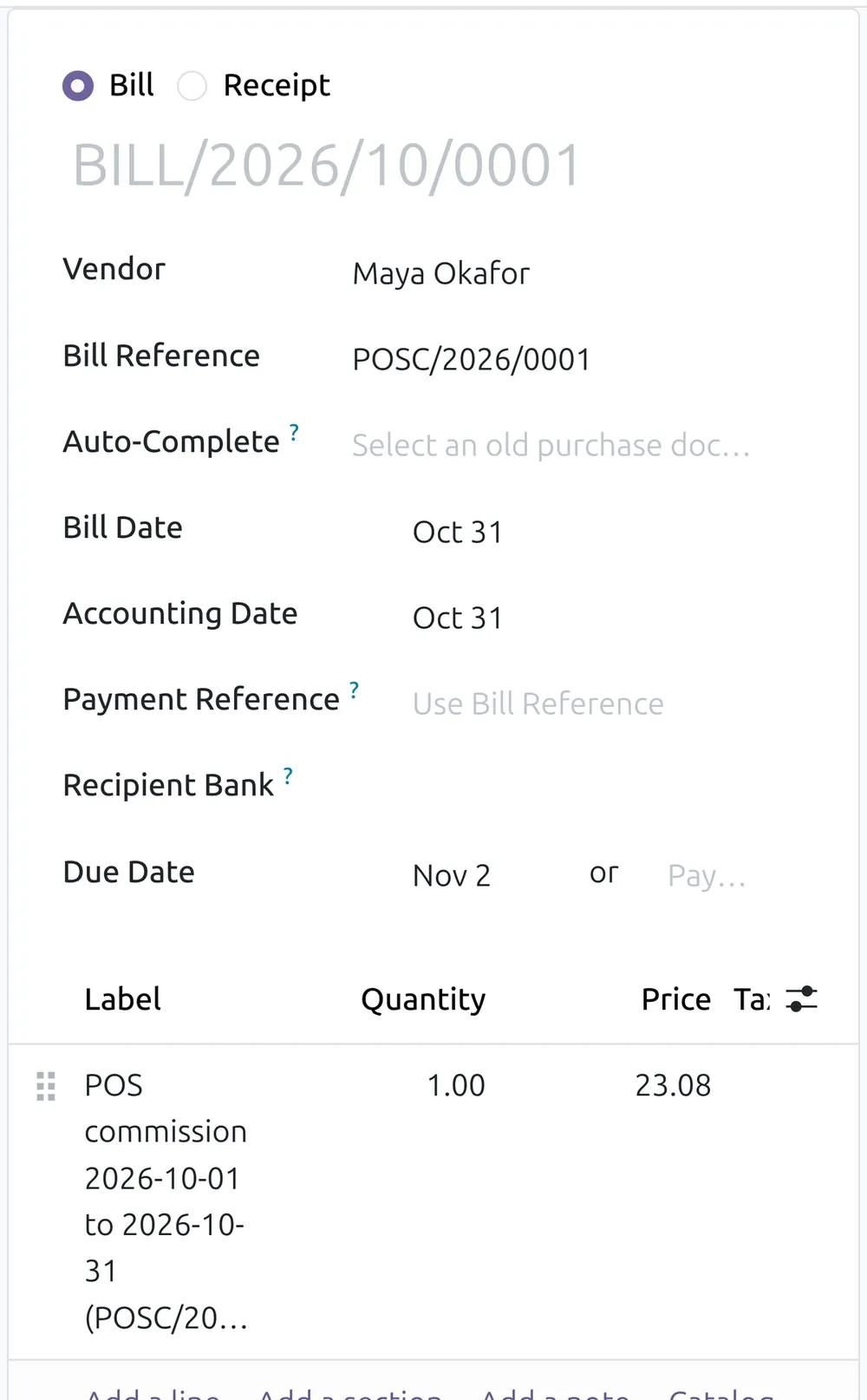
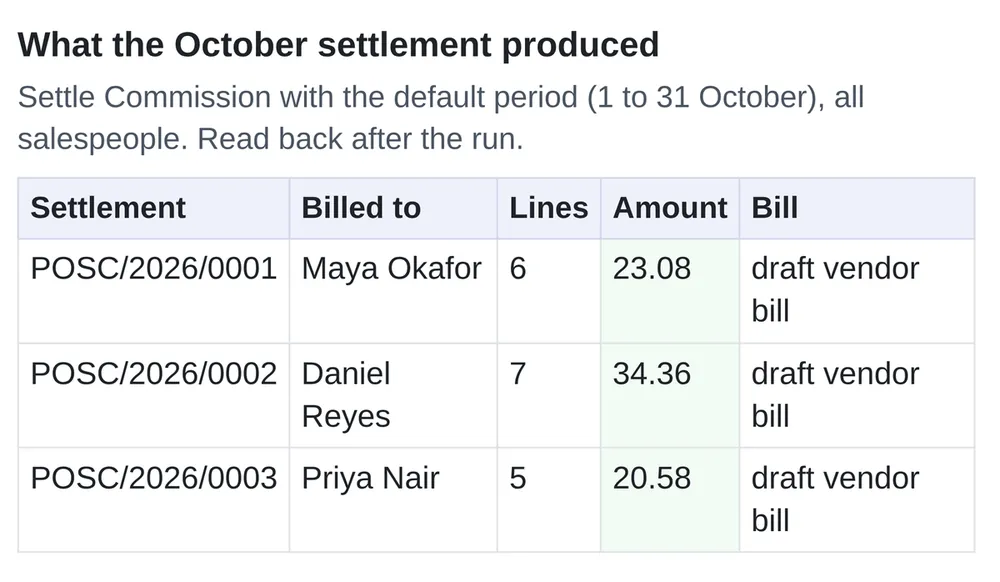
Point of Sale > Commission > Settle Commission needs the Accounting Billing access right. Choose a period (it opens on last month), optionally some salespeople, or select lines in the Commission Lines list and use Settle Selected Lines (then the period is ignored). Each salesperson with commission to settle gets one settlement and one draft vendor bill addressed to their work contact, with a single line of the POS Commission service product, no tax, dated at the end of the period. Settled lines are locked and cannot be settled twice or deleted. If refunds outweigh a person's sales, that person waits for the next period with the lines carried over. If a salesperson has no work contact the whole run stops and says who. The expense account is the one Odoo picks for the POS Commission product (600000 Expenses on the test chart); set one on the product.
The bill is a draft: posting it, paying it and the accounting that follows are Odoo's. Cancelling or deleting the bill puts its lines back to To settle; the settlement keeps its amount as a record.
The dialog on its defaults for 2 November: last month.
The three settlements the run created (columns hidden to fit).
One settlement: salesperson, contact, period, amount and its bill.
The draft vendor bill (top of the form).
What the run produced, read back from the database.
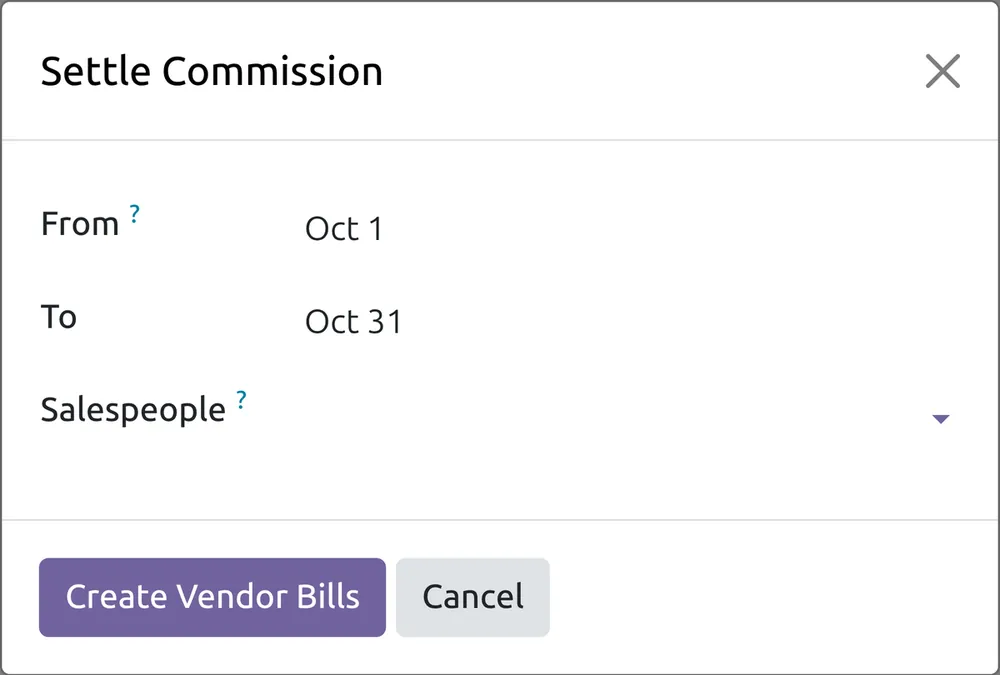
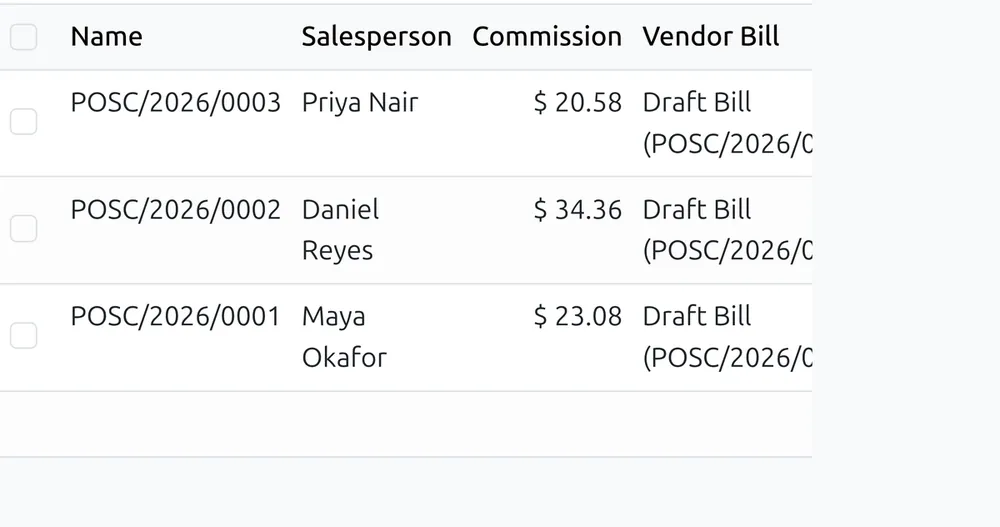
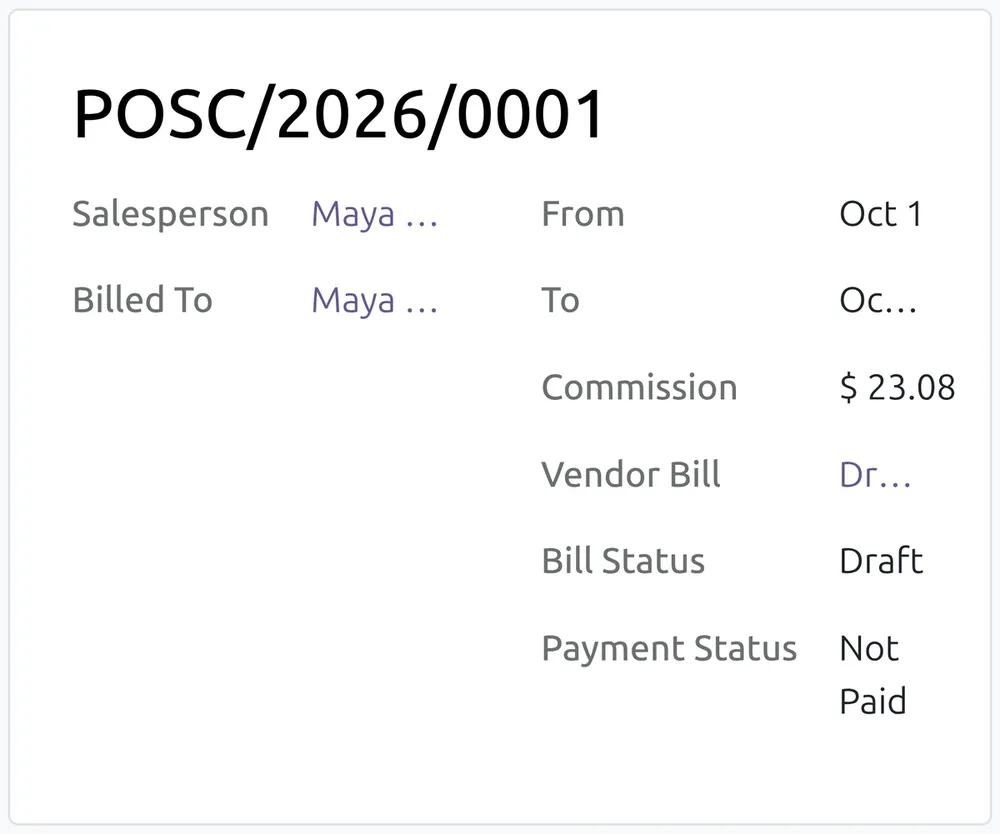
6 Reports
Use it when you want to see commission and sales by person.Nothing written
Odoo's Orders Analysis groups by cashier, which hides who sold.
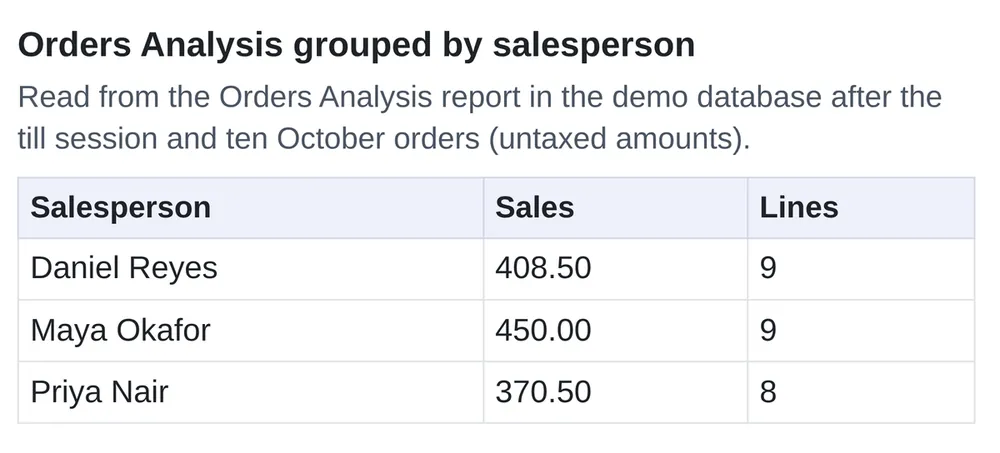
Orders Analysis gains a Salesperson column, filter and group-by, and the order form shows a Salesperson column on its lines. Commission Lines have list and pivot views by salesperson, point of sale, product, category, month and status, with Odoo's standard export. Today's reading from the demo database:
Orders Analysis follows the salesperson on the order line, which can be edited after payment; the commission lines do not follow it (section 8).
Orders Analysis grouped by salesperson, read from the report. Generated from the database reading, not a live screen. The pivot and graph views were too wide to shoot at a readable size.
7 Settlement limits
Use it when you need to know what the settlement does not guard.Writes bills
A payment record that can be edited outside the app can drift from the commission it was made for.
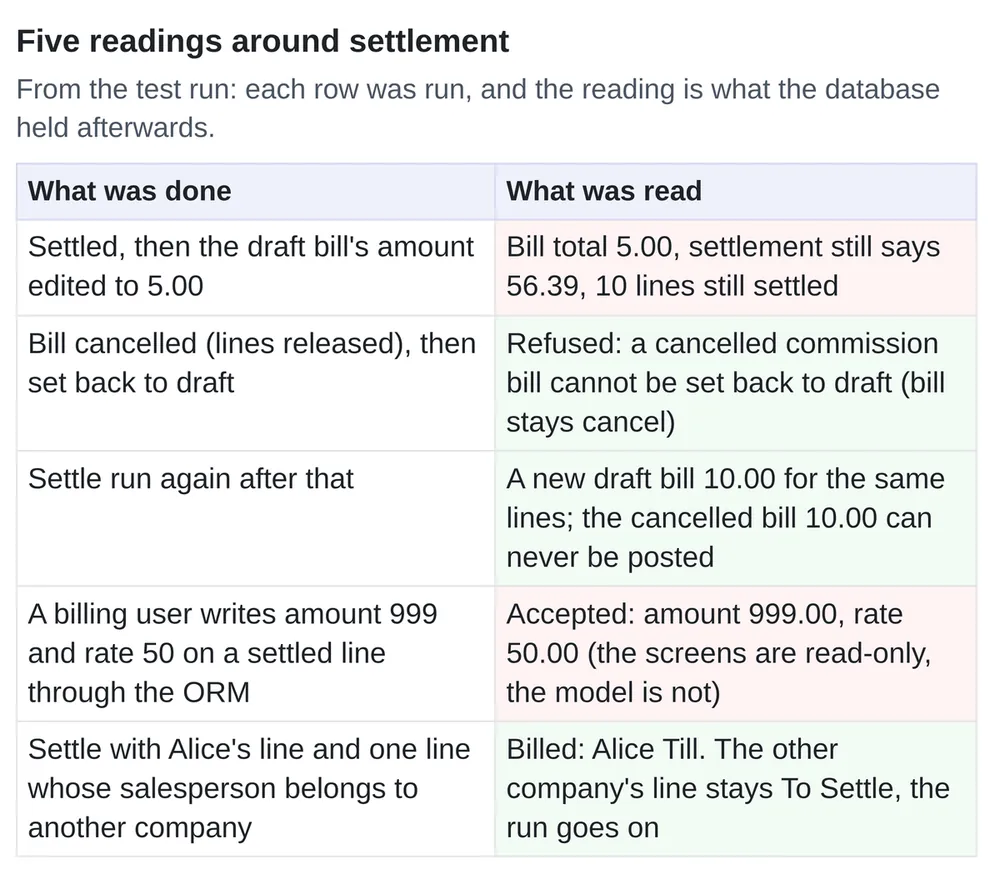
Four things were run and read back (the table at the top of this page repeats them). Two are guarded since version 1.0.3. A cancelled commission bill cannot be set back to draft, so it cannot be posted and paid while its lines are back at To settle; run Settle Commission again and it makes a new bill for them. A commission line whose salesperson belongs to another company is skipped by Settle and stays at To settle, and the run settles everyone else; a run where that is the only line says there is nothing to settle. Two remain: a draft bill's amount can be edited and the settlement keeps its old amount, and a billing user can write the amount and rate of a settled line through the ORM, although the screens are read-only. The till does not offer an employee of another company, but the server accepts any employee id sent with a line, and an employee moved to another company after earning has the same effect. Each is pinned by a test.
8 After the sale
Use it when something changes after the order was paid.Writes on payment
Edits and clocks are where payment records and reports part.
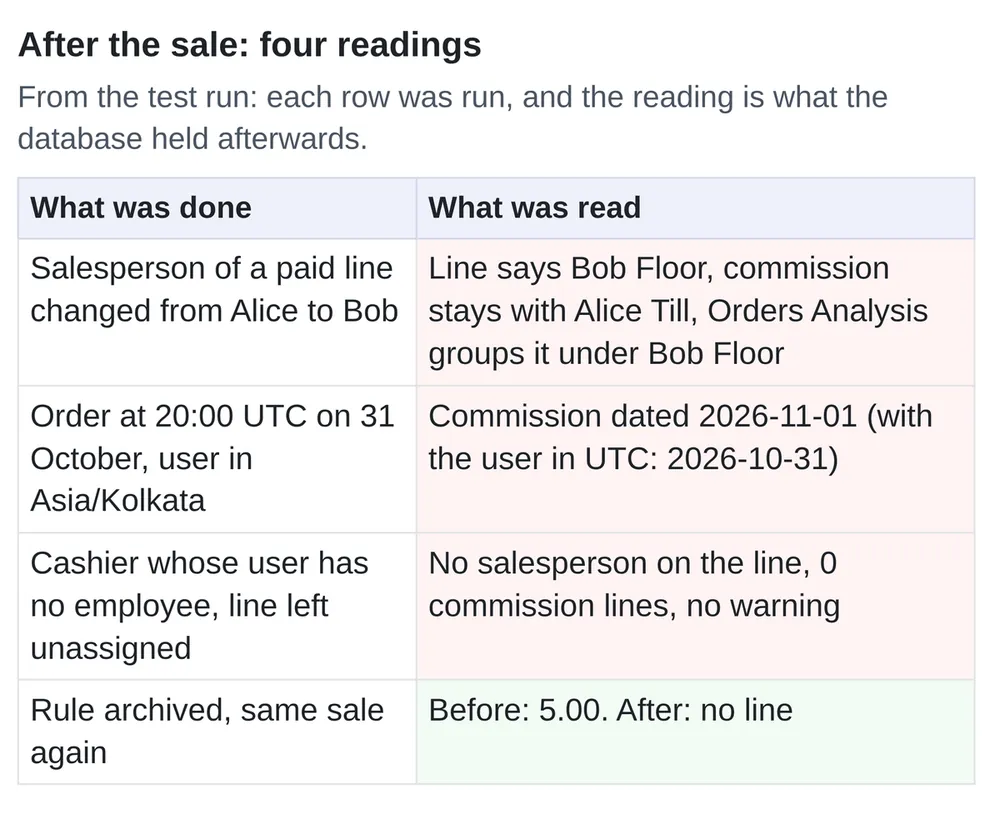
Changing the salesperson of a paid line leaves the commission with whoever earned it, while Orders Analysis moves the sale to the new name. The commission date is the order date in the user's time zone: an order at 20:00 UTC on 31 October read 1 November for a user in Asia/Kolkata and 31 October for a user in UTC, which decides which settlement period it falls in. A cashier whose user has no employee, with a line left unassigned, earns nothing and no warning appears. An archived rule is ignored.
Four readings from the test run, rendered as a table. Generated from the test's readings on made-up records, not a live screen.
Size
One run on made-up data: 3,000 order lines over 20 salespeople paid in one order, then Settle with no filter, on one machine. It is a single reading, not a promise.
The run, rendered as a table.
Screenshots
What it does not do
- This is the part to read before buying. Each line was tested on a throwaway Odoo 19 Community database.
- Five readings from the test run, rendered as a table. Generated from the test's readings on made-up records, not a live screen.
- These were measured in the test run or read from the code. Each is pinned by a test; the two settlement guards below are new in 1.0.3.
Questions buyers ask
Does it change prices, taxes or payments?
No. Commission is worked out from each line's untaxed amount after discount, and the order itself is created by Odoo.
Which rule wins when several match?
The most specific: a product rule beats a category rule, a sub-category beats its parent, and a rule for the salesperson beats one for everybody. A rate of 0 excludes the line.
What if I change a rate later?
Lines already earned keep the rate they were paid at. The rate and the rule are stored on the line.
What happens on a refund?
A negative commission line for the salesperson who sold the line, at the rate the sale paid, pro rata for a partial refund.
How is commission paid?
Settle Commission creates one draft vendor bill per salesperson, addressed to the employee's work contact. Posting and paying it is Odoo's accounting.
Can a line be settled twice?
Not through Settle: settled lines are locked. A cancelled commission bill cannot be set back to draft, so its lines are billed once on the new bill the next run makes.
Does it work on Odoo Online or Enterprise?
Not on Odoo Online (SaaS): third-party apps cannot be installed there. Enterprise and Odoo.sh were not tested.
Does it support margin, targets or tiers?
No. It pays a percentage of the untaxed line amount.
Requirements
- Odoo 19.0 or 20.0. The App Store sells each version separately, so buy the one that matches your database.
- Odoo.sh or On-Premise only. Third-party apps cannot be installed on Odoo Online (SaaS) databases. Check your hosting before buying.
- Module
mh_pos_commission, version 19.0.1.0.4, licensed OPL-1.