Sales Commission
Commission for salespeople and external agents, earned on the invoice or on the payment, and paid out on one vendor bill per person per period.
The video below shows Sales Commission running on a real Odoo 19 database. Want it driven against your own data, or a question answered first? Ask and we will set up a session.
Commission worked out on a confirmed sales order is commission on money that has not been invoiced, let alone collected, and a spreadsheet of who earned what is out of date the day a credit note arrives.
This app computes commission from the invoice itself — per invoice line, per salesperson and agent, on the untaxed amount — follows that invoice through payment, credit notes, reset to draft and cancellation, and turns each period into one draft vendor bill per person.
What it does
Rules by product, category and sales team
Each plan has a default rate and rules by product, product category (sub-categories included) and sales team. The most specific rule wins: a product beats a category, a sub-category beats its parent, a sales team narrows either one, and equally specific rules are decided by their order in the list.
Due on the invoice, or on the payment
Each plan picks its trigger. On an “Invoice posted” plan, commission is due on the invoice date. On an “Invoice paid” plan it waits until the invoice is In Payment or Paid, and is dated on the payment. An invoice that a credit note cleared counts as settled, so both sides net to zero.
Salespeople and external agents
Salespeople earn on invoices where they are the Salesperson. Agents are contacts: set them on the customer, change them on a sales order, and the invoice carries them. Each salesperson and each agent sits on one active plan per company, so their rate never depends on which plan was found first.
Credit notes and resets are counted once
A credit note against an invoice claws back from the same people at the rate that invoice paid them, even if the plan has changed since. Reset, re-post or recompute an invoice and its unsettled commission is rebuilt, never duplicated. Commission already on a vendor bill is never rewritten: if its invoice is reset or cancelled, a clawback line is deducted from the next settlement.
One vendor bill per person per period
Settle Commissions takes a period and, if you like, some recipients, and creates one draft vendor bill per person with your commission product and its expense account. Where clawbacks outweigh new commission it creates a vendor refund instead. Cancel or delete the bill and its lines are due again.
Statement, report, and who sees what
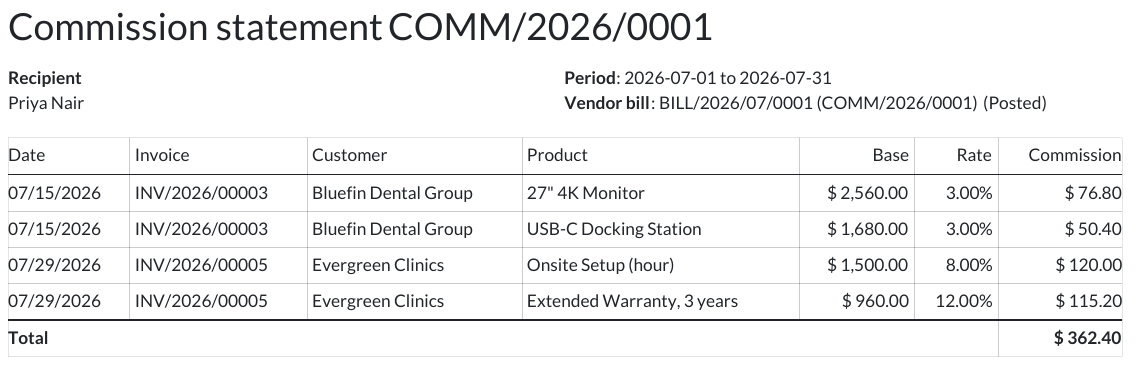
Each settlement prints as a PDF statement of every invoice line behind it and exports to Excel. The Commission Report shows every line by recipient and month as a list, pivot or graph. Salespeople see only their own commission; Sales Administrators set the plans and Invoicing users settle them. Plans, lines and settlements each belong to one company.
Screenshots
Requirements
- Odoo 19.0, Community or Enterprise.
- Odoo.sh or On-Premise only. Third-party apps cannot be installed on Odoo Online (SaaS) databases — check your hosting before buying.
- Odoo 19 Community or Enterprise; installs Odoo’s own Sales app (sale). Third-party apps install on Odoo.sh or On-Premise only — they cannot be installed on Odoo Online (SaaS).
- It does not pay commission on margin or on sales orders, and has no targets, volume tiers or manager overrides. It does not run payroll: a salesperson is paid through a vendor bill to their own contact, in your company currency. Invoices posted before you install it earn nothing until you select them and run Recompute Commission. An invoice that groups several sales orders takes its salesperson and agents from the first order, as Odoo does for the salesperson. A vendor credit note against a commission bill does not release its lines — cancel the bill instead.
- Module
mh_sale_commission, version 19.0.1.0.1, licensed OPL-1.
Related apps
Point of Sale sales by cashier, by session and by product, with a profit and loss that never counts a missing cost as margin.
Split one order into several deliveries, confirm many quotations at once, duplicate lines in place, and add custom fields to quotations without code.
See whose turn it is to reply on a Lead or Sales Order, without opening the thread