POS Orderline Location
Choose the stock location of each Point of Sale order line, see the available quantity per location, and get one delivery per location
Request a live demo · Odoo.sh or On-Premise only, not Odoo Online (SaaS).
3
deliveries from one cashier order: one per source location, read back from the database
28
automated tests in the app, none failing, including a browser test of the till
0
prices, taxes, discounts or payments read or written by the app; it only picks locations
0
network calls and scheduled actions
-1
what a location holds after selling 2 from 1: nothing is reserved and nothing blocks the sale
Not
checked: Enterprise, Odoo.sh, several companies, restaurant mode, combos, kits (see Before you install)
Odoo's Point of Sale takes every sale from one source location, the one set on the operation type. A shop with a back room and a shop floor, or a second store that sells from its own shelves, has to correct the stock by hand after every sale that came from the other location. With this app the cashier picks the location on the order line and the delivery follows. This page walks through it with screenshots of a real cashier session on an Odoo 19 database holding a made-up provisions shop, with readings taken from the database afterwards, and with the limits found when it was tested.
It changes where stock leaves from, so this page also says what it changes, what it keeps, and what it does not check.
Install it and the Point of Sale configuration gains a Line Locations tab. It needs Odoo's own Point of Sale and Inventory apps (point_of_sale and stock).
How it works
1 Set up the list
Use it when one Point of Sale sells from more than one stock location.Nothing written yet
Odoo's Point of Sale has one source location per register, so a sale from the other shelf is wrong until somebody fixes the stock.
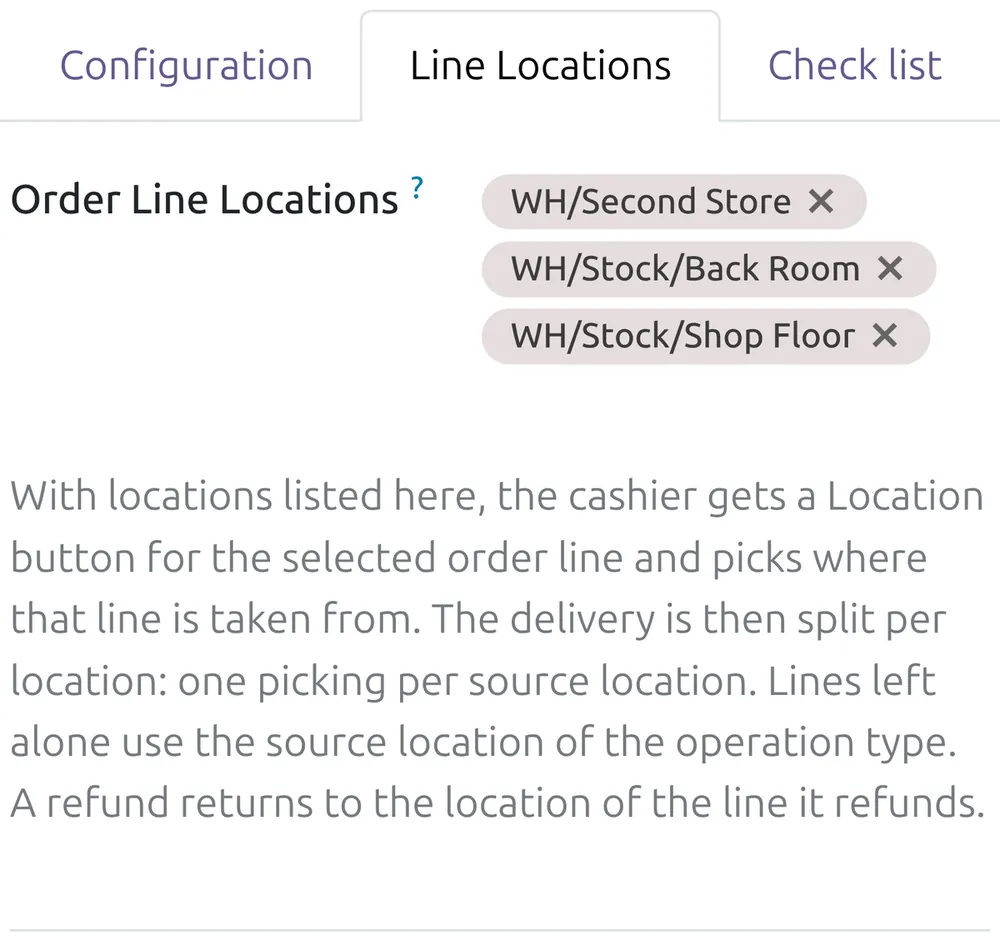
Open the Point of Sale configuration and the Line Locations tab. List the internal locations the cashier may choose from; they must belong to the company of the Point of Sale. Leave the list empty and that register behaves as Odoo does. A location of another warehouse is accepted, and the delivery then uses the register's own operation type.
A location with no company cannot be listed. Nothing here reserves or counts stock.
The Line Locations tab with three locations.
2 Choose the location on the line
Use it when the cashier knows which shelf the item comes from.Nothing written yet
A single source location hides where the stock really sits, so the cashier cannot say.
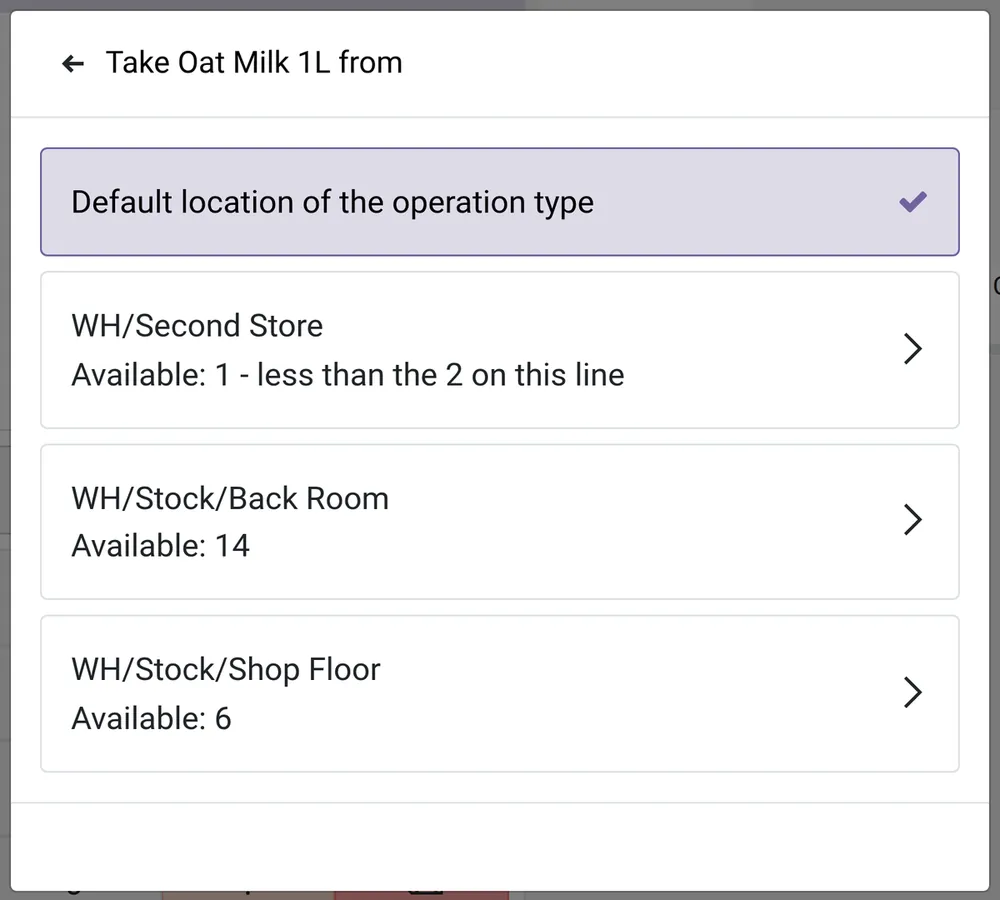
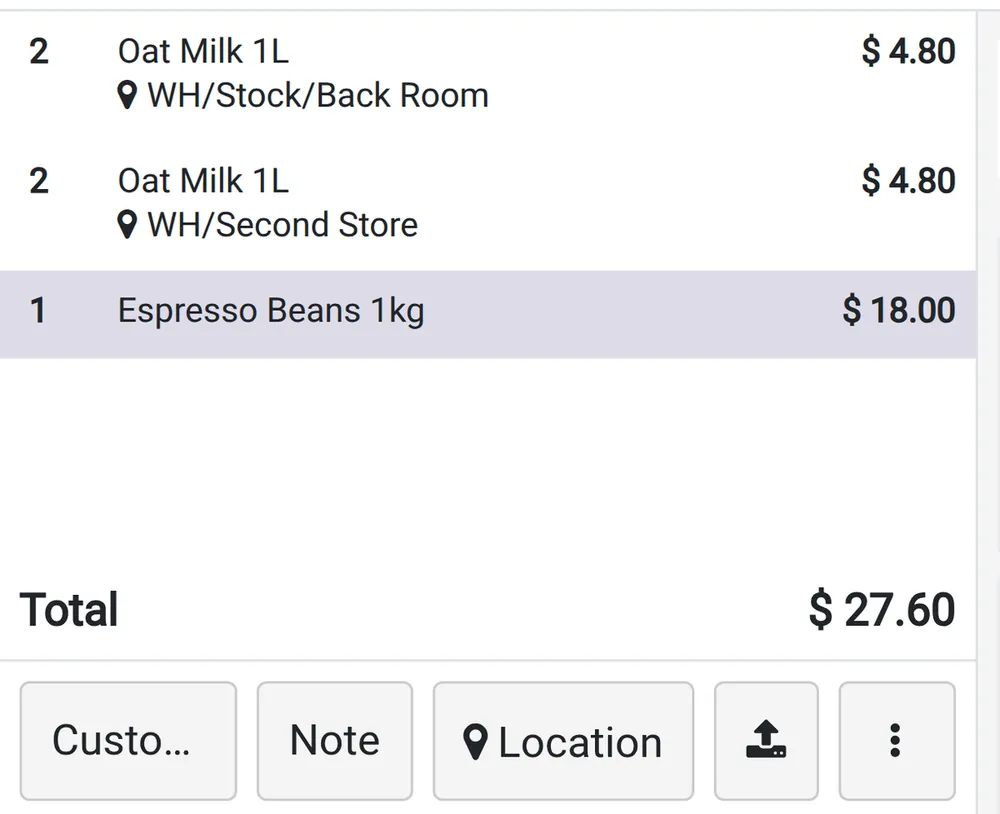
With a list set, the till shows a Location button next to Customer and Note. It is disabled until a line is selected. The popup lists the default location of the operation type and each allowed location, with the quantity available there: on hand minus reserved, sub-locations included. The chosen location is shown under the line and on the button. Two lines of one product from different locations stay two lines.
The quantity is read when the popup opens, from the server. It is not refreshed later.
The popup for a line of Oat Milk 1L: 1 at Second Store, 14 at Back Room, 6 at Shop Floor.
The cart: two lines of one product stay two lines; the third has no location.
3 A short location warns, and never blocks
Use it when you want to see when a location is short.Warns only
A cashier who picks a location with 1 left for a line of 2 should hear about it, and Odoo's own till does not block sales on stock either.
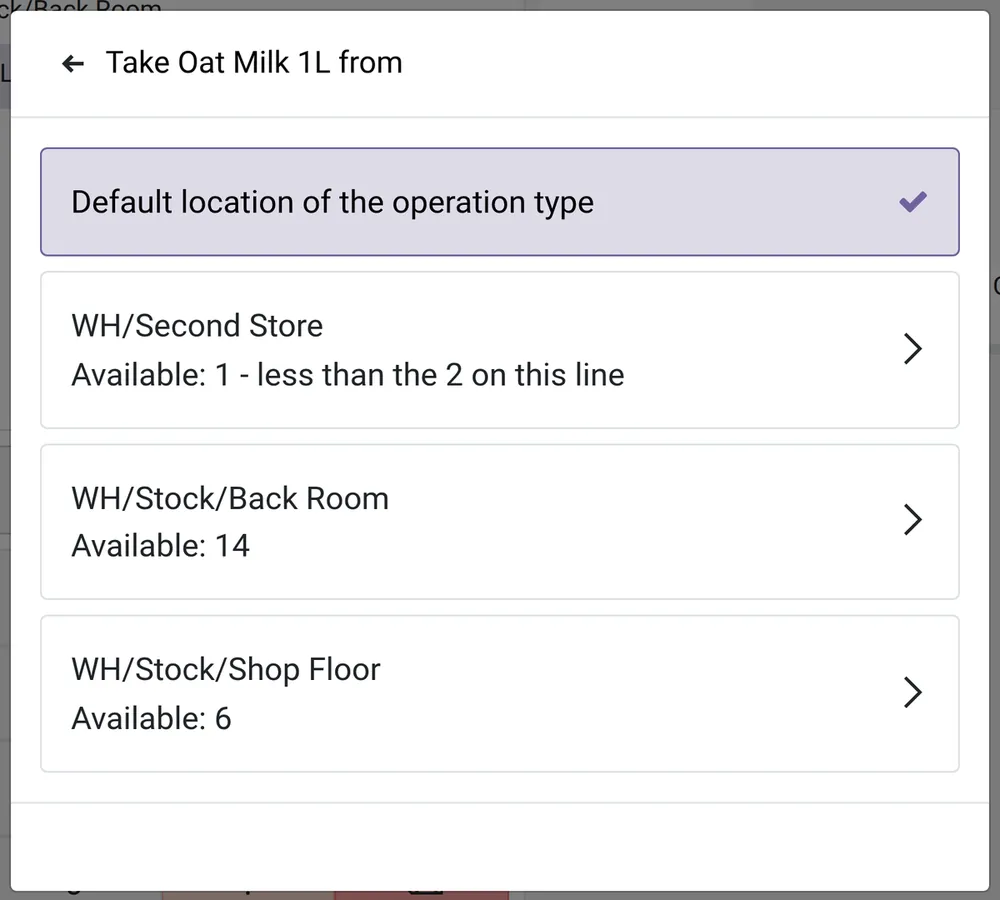
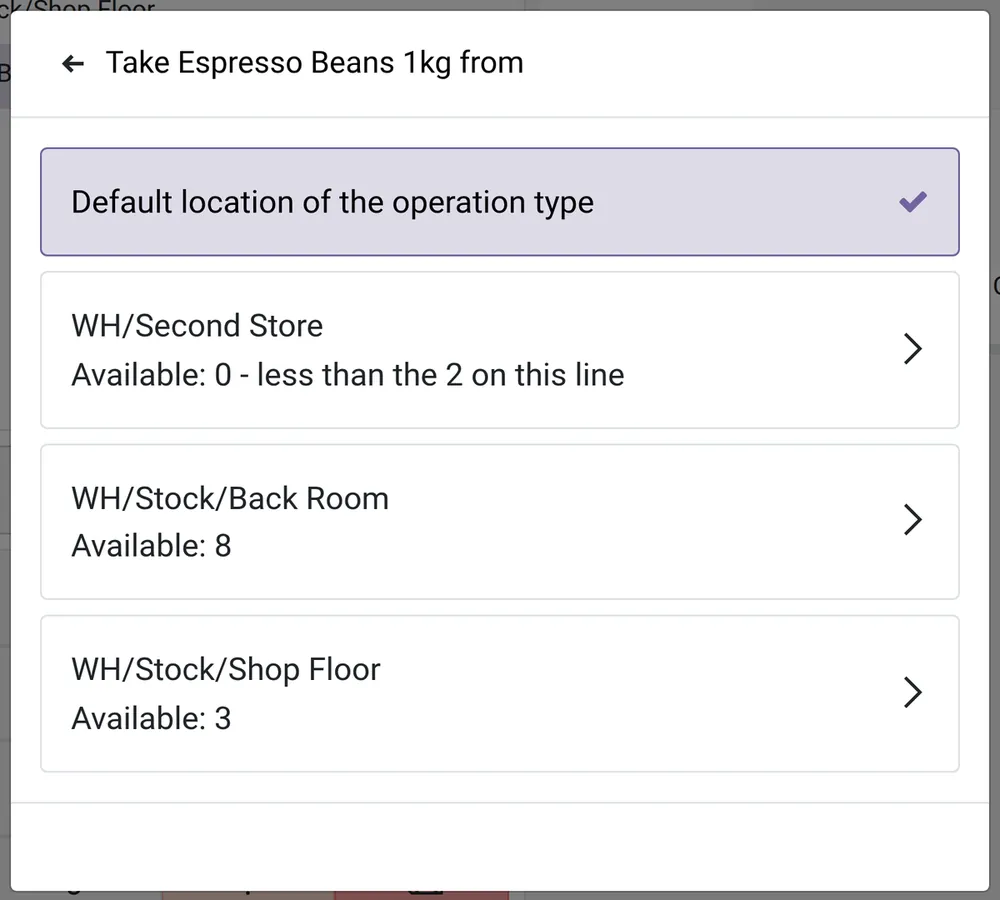
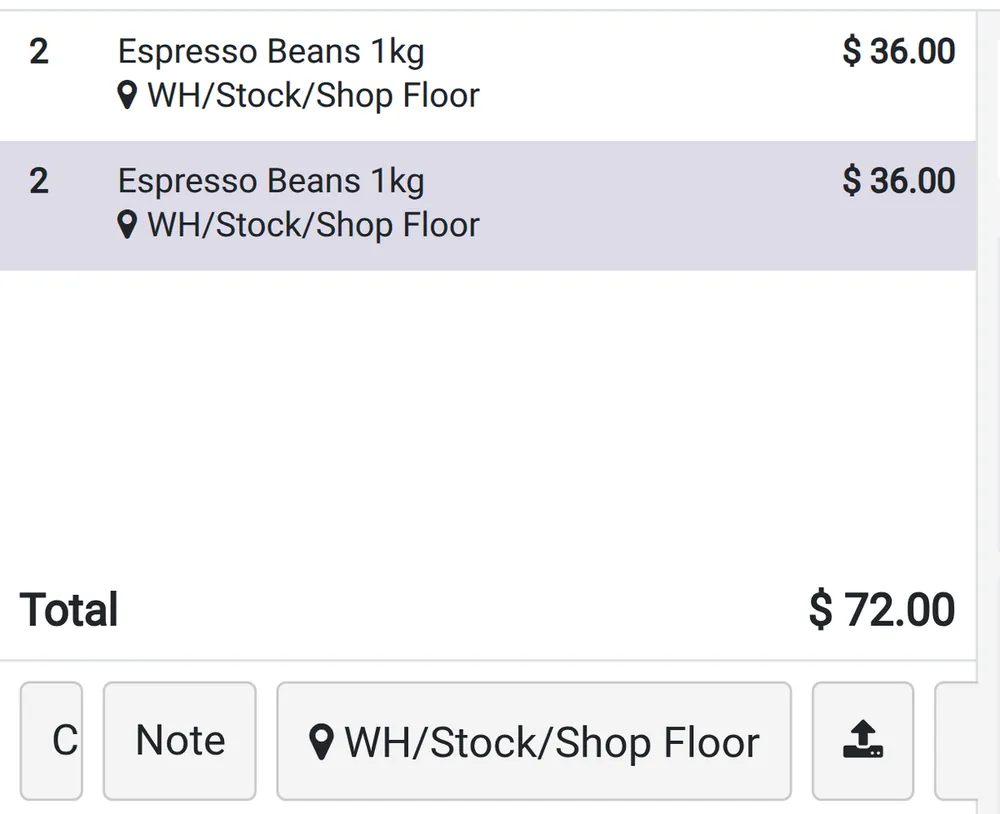
When a line asks for more than a location has, the popup adds less than the 2 on this line to that location. Choosing it is still allowed, as in Odoo's own Point of Sale. The check is per line. Two lines of 2 Espresso Beans from Shop Floor, which holds 3, get no warning on the second line (it says Available: 3), and the order leaves Shop Floor at -1.
It does not add up the lines of the cart, does not reserve, and does not refuse.
A line of 2 Oat Milk: Second Store has 1 and the popup says so.
The second line of 2 Espresso Beans: Shop Floor shows 3 and no warning, though the cart now asks for 4.
The cart that goes with it: 2 + 2 from a location holding 3.
4 One delivery per location
Use it when the stock must leave the right shelf.Writes on payment
If one picking takes everything from one place, somebody has to move the stock afterwards.
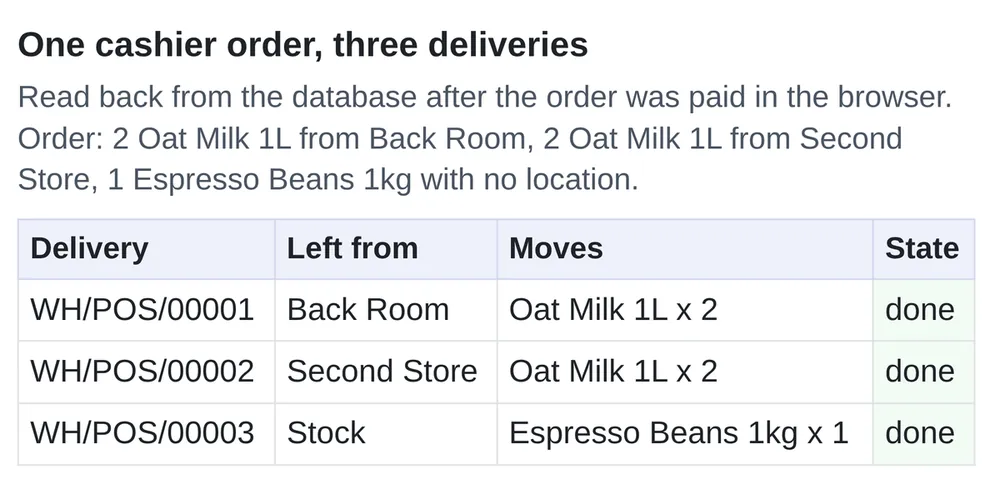
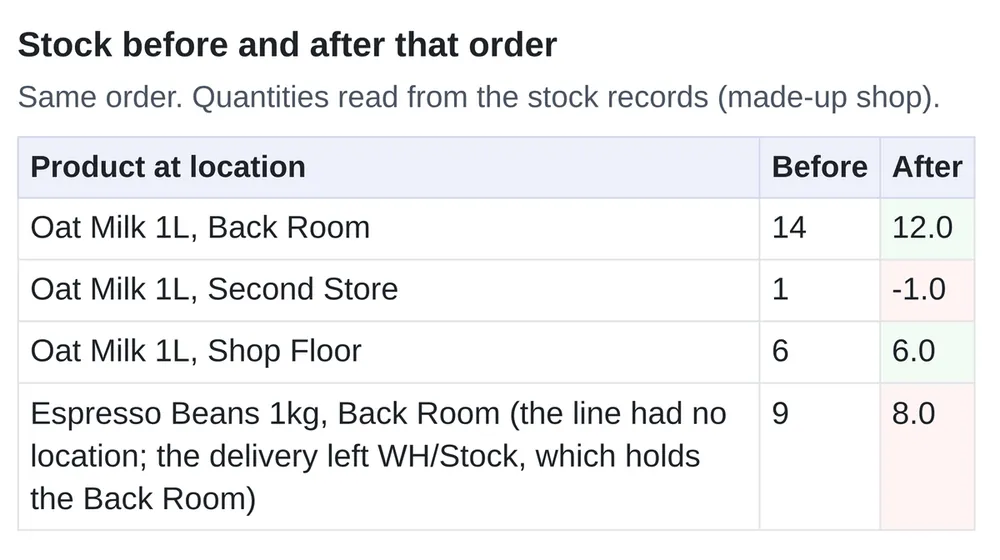
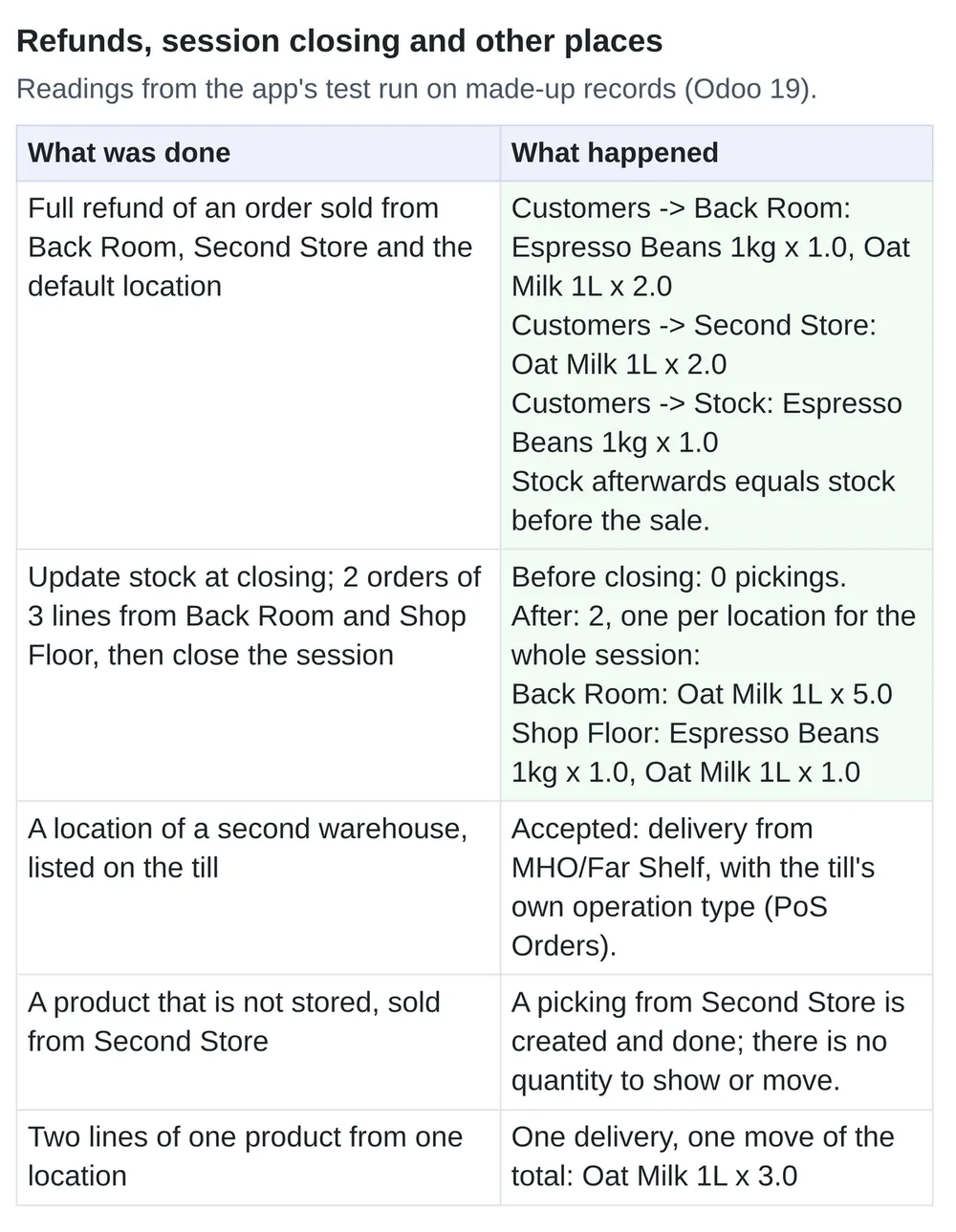
When the order is paid (or at session closing, if your company updates stock at closing), Odoo's delivery is created once per source location, each with the moves of its lines, done as usual. In the real session the order of 2 Oat Milk from Back Room, 2 Oat Milk from Second Store and 1 Espresso Beans with no location produced three done deliveries, one from each place. At closing the lines of all the orders of the session are grouped: two orders gave two deliveries for the session, not one per order. A line with no location leaves the source location of the operation type, including that location's sub-locations : the Espresso Beans line left WH/Stock and the stock came out of the Back Room, which sits under it.
Ship-later orders ignore the line location and follow Odoo's own routing. Lot-tracked products are taken from the chosen location and its sub-locations.
The deliveries of that order, read back from the database after the real session.
Stock before and after. Generated from the database readings, not a live screen.
5 Refunds, closing and other places
Use it when returns and end-of-day stock must go back to where they came from.Writes on payment
A refund that goes to the default location puts the stock on the wrong shelf.
A refund line takes the location of the line it refunds, and its return comes back into that location, one return picking per location, even if the location was taken off the list since the sale. In the test a full refund returned each line to its location and the stock matched what it was before the sale. A sold line and a returned line in one order give two pickings, out and in. A product that is not stored gets a done picking from the location with nothing to move; two lines of one product from one location become one move of the total.
The till's own refund screen was not exercised; refunds were run on the server side.
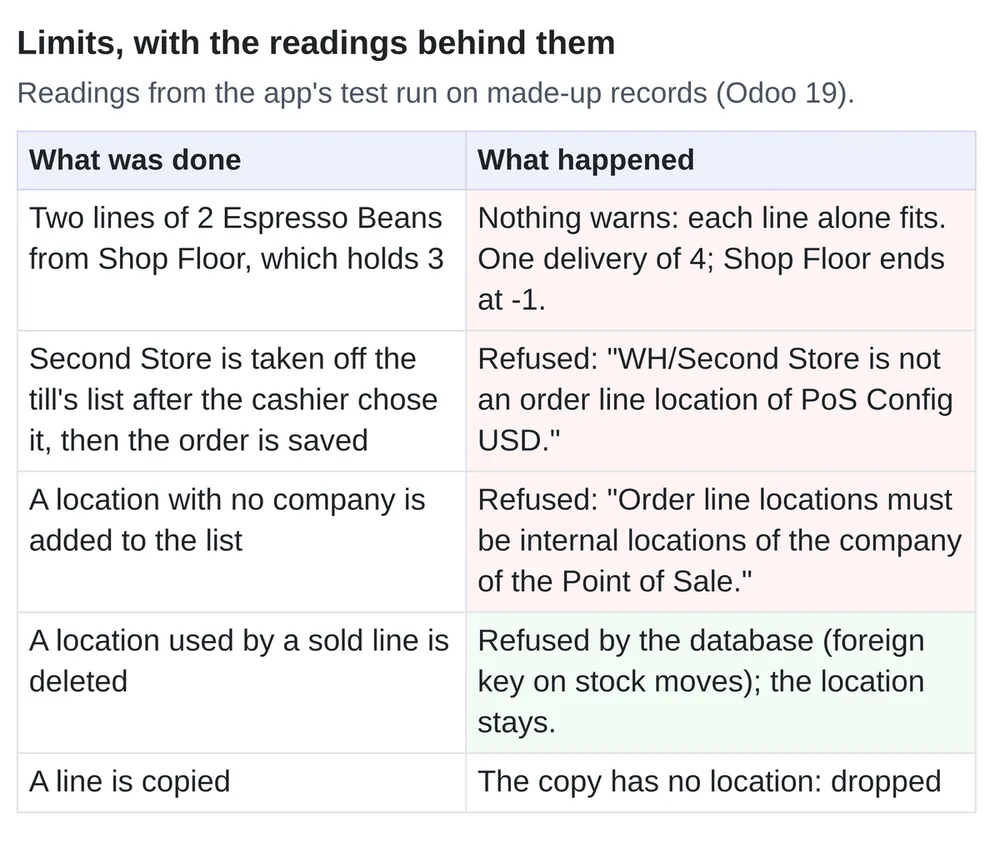
Five readings from the test run, rendered as a table. Generated from the test's readings on made-up records, not a live screen.
6 Offline and the receipt
Use it when the connection drops at the till.Nothing written yet
A popup that needs the server would stop the cashier choosing a location when the line is down.
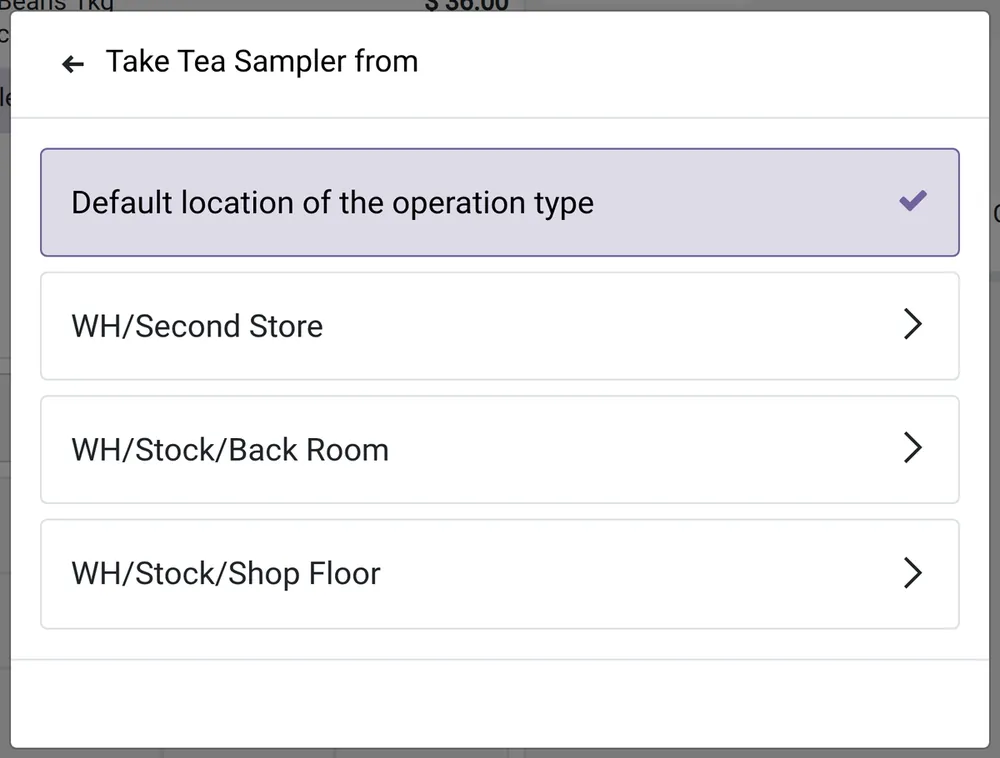
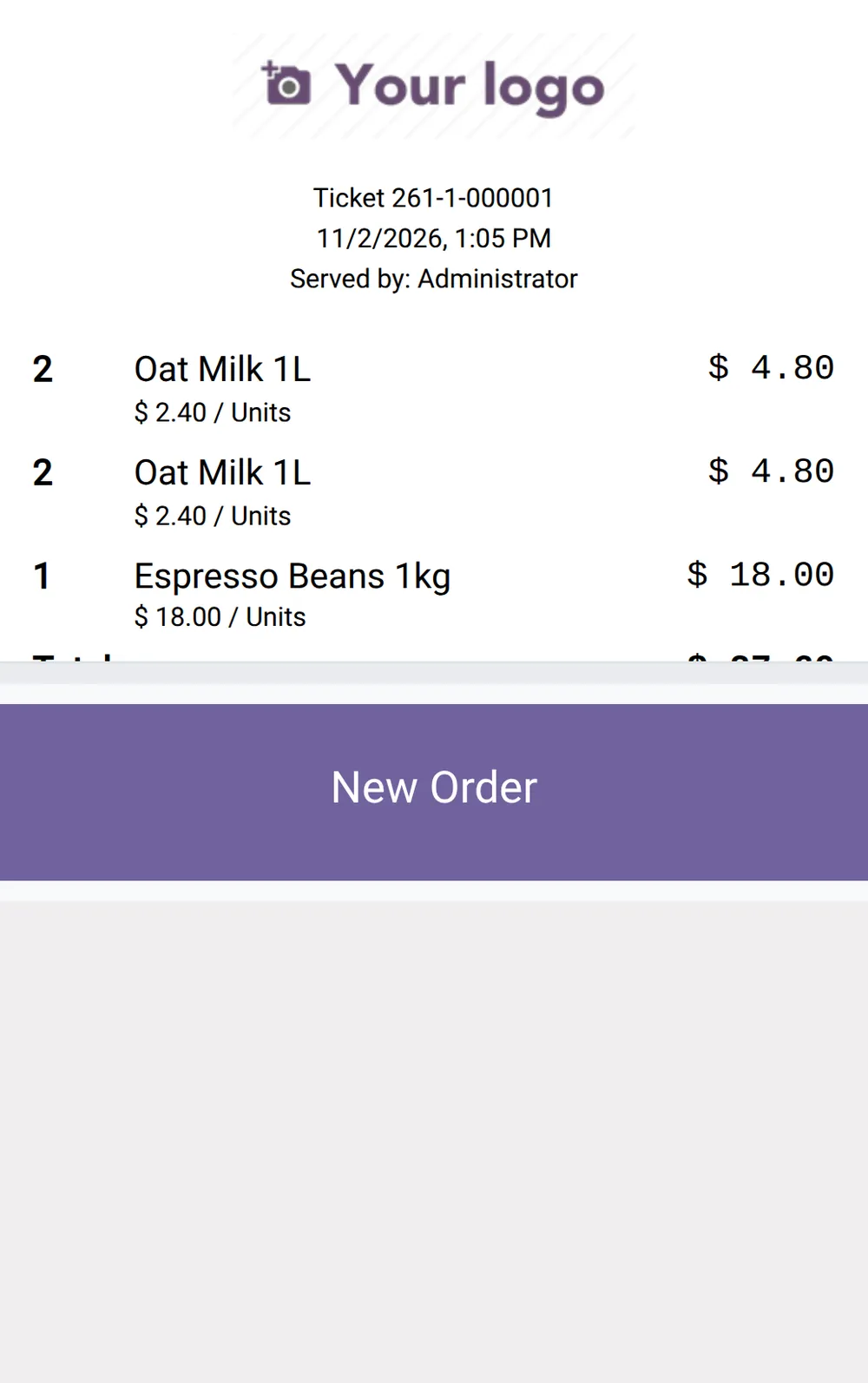
With the network cut after the till has loaded, the Location popup still opens and lists the allowed locations. It shows no quantity, because the quantity comes from the server. The location is shown under the line in the cart and is not printed on the customer receipt: the receipt text read after payment has no location.
Without quantities there is no short-stock warning.
The popup with the network cut: locations, no quantities.
The receipt after payment: no location text.
7 When the list changes during a sale
Use it when a manager edits the list while a till is open.Refuses the order
A location that was fine when chosen is not on the list when the order is saved.
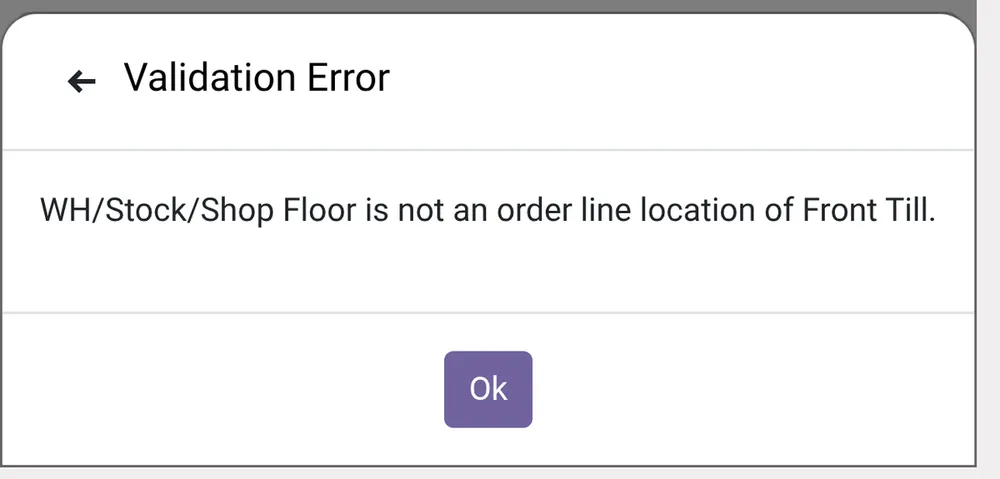
The server accepts a line location only if the Point of Sale lists it (a refund line may keep the location of the line it refunds). If the location is taken off the list after the cashier chose it, the order is refused with WH/Stock/Shop Floor is not an order line location of Front Till. In Odoo 19 the dialog appeared on the payment screen; once the location was listed again, pressing Validate again saved the order. Change the list when no till has a sale open.
This is recorded, not fixed in this version.
The refusal, as the cashier saw it.
Screenshots
What it does not do
- This is the part to read before buying. Each line was tested on a throwaway Odoo 19 Community database.
- Five readings from the test run, rendered as a table. Generated from the test's readings on made-up records, not a live screen.
- These were measured in the test run or read from the code. None is fixed in this version; each is pinned by a test.
Questions buyers ask
Does it reserve stock or stop a sale from a short location?
No. The popup says when a location holds less than the line asks for, and the cashier can still choose it. The location then goes negative.
Is the quantity checked against the whole cart?
No. It is checked per line. Two lines of 2 from a location holding 3 raise no warning and leave it at -1.
What happens to a line with no location?
It is delivered as Odoo does it, from the source location of the operation type, including that location's sub-locations.
Where do refunds go?
A refund line takes the location of the line it refunds, and its return comes back into that location, even if the location left the list.
What if the list is edited during a sale?
If the location a cashier chose is no longer on the list when the order is saved, the server refuses the order. Edit the list when no sale is open.
Does it work offline?
The popup opens and lists the locations without quantities.
Does it change prices or payments?
No. It reads and writes no prices, taxes, discounts or payments.
Does it work in restaurant mode or with combos and kits?
Not verified. Those were not tested.
Requirements
- Odoo 19.0 or 20.0. The App Store sells each version separately, so buy the one that matches your database.
- Odoo.sh or On-Premise only. Third-party apps cannot be installed on Odoo Online (SaaS) databases. Check your hosting before buying.
- Module
mh_pos_orderline_location, version 19.0.1.0.3, licensed OPL-1.