POS Discount Reasons
Predefined discount reasons in POS: apply a discount from a list of reasons and track which cashier gave which discount, and why
Request a live demo · Odoo.sh or On-Premise only, not Odoo Online (SaaS).
Free
App Store price, per Odoo version
19 · 20
Odoo versions, each sold on its own page
Odoo.sh
or On-Premise; not Odoo Online (SaaS)
1.0.2
version of mh_pos_discount_reasons
How it works
A discount with no reason is a leak you cannot trace
A cashier gives 20% off and Odoo records the 20%. It does not record why, so at the end of the month nobody can tell a damaged item from a favour to a friend. This app adds the missing field: a list of reasons you control, picked on the till, stored on the order line and reported next to the cashier who gave the discount.
Reasons you define
Keep the list under Point of Sale > Configuration > Discount Reasons: a name, an optional discount percentage, and the Points of Sale that offer it. Leave the Points of Sale empty and the reason is offered everywhere in the company. A reason at 0% records why without changing the discount the cashier typed.
A Discount Reason button on the till
The Actions menu of the Point of Sale screen gets a Discount Reason button. The cashier picks a reason, and its percentage is set on the selected line. When the order has more than one line, the cashier chooses between the selected line and all lines. The reason is shown under the line in the cart, and taking the discount off the line takes the reason off with it.
Make the reason compulsory
Switch on Require a Discount Reason in the Point of Sale settings, next to Line Discounts. A cashier who typed a discount by hand is then asked "Why was this discount given?" before the order is paid, and cannot pay without picking a reason. A refund line takes the reason of the line it refunds, so refunded discounts net off under the same reason.
Reported by reason and by cashier
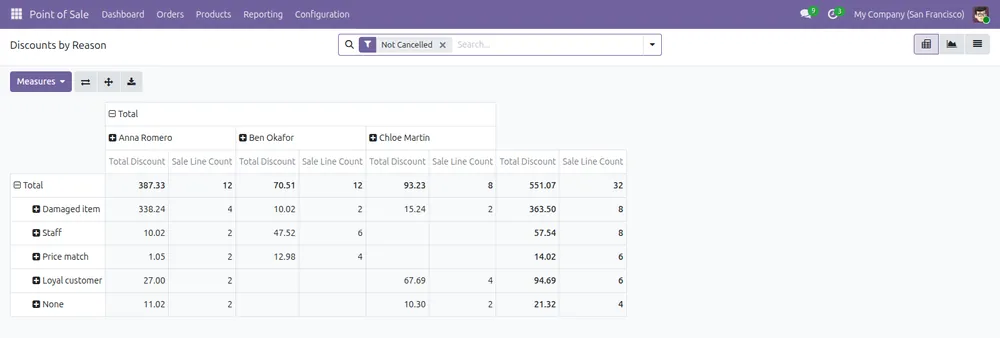
Point of Sale > Reporting > Discounts by Reason is Odoo's own Orders Analysis, filtered to discounted lines: the discount amount and the number of lines for each reason, side by side for each cashier, with a graph and a list. Discounts given without a reason get a row of their own. Discount Reason and Cashier are also added to Orders Analysis itself, to filter and group by. With employee login, the cashier is the employee who rang the order up.
Who it is for
Shops and restaurants where cashiers give discounts and the owner wants to know why: damaged stock, staff pricing, price matching, loyal customers.
Screenshots
What it does not do
- It does not print the reason on the receipt. It is stored on the order line and shown in the cart and in the report.
- It covers line discounts only. The global discount button of Odoo's Point of Sale, loyalty rewards and pricelist prices are not given reasons.
- It does not limit or approve discounts. It records why; it does not decide how much a cashier may give or ask a manager to agree.
- It does not change orders already sold. Lines sold before you install it appear in the report with no reason.
- It follows Odoo's own discount rights. An employee whose Point of Sale role may not give discounts does not see the button. If a Point of Sale has no reason set up, the compulsory check does not apply there.
Requirements
- Odoo 19.0 or 20.0. The App Store sells each version separately, so buy the one that matches your database.
- Odoo.sh or On-Premise only. Third-party apps cannot be installed on Odoo Online (SaaS) databases. Check your hosting before buying.
- Odoo 19 and 20, Community or Enterprise. Needs Point of Sale. Works with or without POS employee login. Third-party apps install on Odoo.sh or On-Premise only - they cannot be installed on Odoo Online (SaaS).
- Module
mh_pos_discount_reasons, version 19.0.1.0.2, licensed OPL-1.